
چۈشەندۈرۈش
Add a widget you can use to add your Google Reader items to your sidebars.
Easy to use, just define your Google Account, in the settings Google Reader Page.
This plugin use the WP-ZFF Zend Framework Full (version 1.10.5-1), please install it !
(here is the plugin site : http://passavanti.name/wp-zff-zend-framework-full). And here is the wordpress plugin page : https://wordpress.org/extend/plugins/wp-zff-zend-framework-full/
ئېكران كەسمىسى
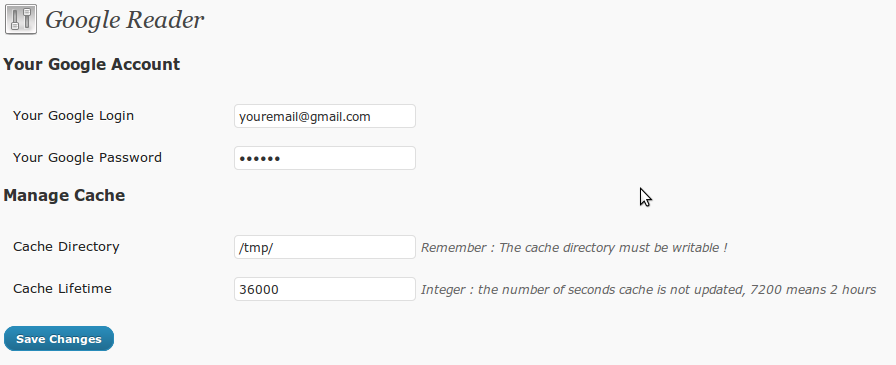
This screenshot represents the plugin admin page (in settings menu) 
This is the screenshot of the widget configuration


ئورنىتىش
- First install and active this plugin : WP-ZFF Zend Framework Full (version 1.10.5-1)
- Then, Download google-reader zip archive
- Extract the
google-readerdirectory - Upload the directory to the
/wp-content/plugins/directory - Activate the plugin through the ›Plugins‹ menu in WordPress
FAQ
- core files are missing
-
Simply upgrade to version 1.1
باھالاشلار
بۇ قىستۇرمىغا تېخى باھا يېزىلمىدى.
تۆھپىكار ۋە ئىجادكار
«Google Reader» كودى ئوچۇق يۇمشاق دېتال. تۆۋەندىكى كىشىلەر بۇ قىستۇرمىغا تۆھپە قوشقان.
تۆھپىكار
«Google Reader» نى تىلىڭىزغا تەرجىمە قىلىڭ
ئىجادىيەتكە قىزىقامسىز؟
كودقا كۆز يۈگۈرتۈپ، SVN خەزىنە تەكشۈرۈپ ياكى RSSئارقىلىق ئىجادىيەت خاتىرىسىگە مۇشتەرى بولغىلى بولىدۇ.
ئۆزگىرىش خاتىرىسى
1.0
- First version of the plugin
- It’s broken
1.1
- Readme.txt modified (for screenshosts and new version)
- Missing Core File correction
- Adding dependency check for ZF plugin
