
Convenient ISO management program
UltraISO is a multimedia program for handling ISO CD/DVD image files. It lets you easily create, burn, edit, and convert these files, even maintaining their bootable information for custom discs. What's great is that it's super lightweight, so it won't hog your computer's resources or cause any annoying slowdowns.
Top Recommended Alternative

UltraISO can directly edit image files on your system and extract content from discs. It can also process a huge variety of file formats, converting them to the standard ISO format in just moments. While it has a complex interface, its features make it a solid choice for managing disc images.
Easy-to-use burning tool
UltraISO, in its essence, is a comprehensive tool for creating and managing DVD/CD images, letting you directly edit files, extract content, and build ISOs from your PC. It's especially good at handling many file formats, like BIN and NRG, and can quickly convert them to standard ISOs in seconds. This broad compatibility makes it super flexible for all your disc image needs.
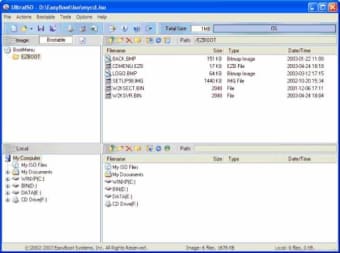
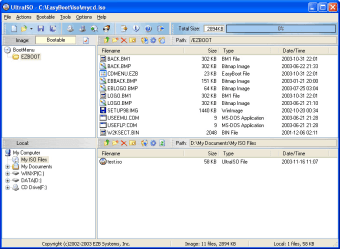
While its double-window interface might seem a bit busy at first compared to other tools, most folks get the hang of it pretty quickly. Plus, it comes with handy extras like optimizing file structures to save space and letting you extract audio from CDs. These thoughtful additions boost its overall usefulness for people who wish to transfer files from their computer to a physical medium like a CD.
There’s no denying that the program is powerful, but its interface can feel a bit complicated initially, especially for new users. The trial version also comes with some limitations, and the overall design might not be as intuitive as other programs. This means there's a bit of a learning curve, but once you get the hang of it, the program's strengths often outweigh these initial hurdles.
An essential addition to your PC software arsenal
Despite its initial learning curve and a somewhat busy interface, UltraISO stands out as a powerful and efficient tool for managing ISO files. Its wide range of features, support for numerous formats, and fast processing make it incredibly versatile. Once you get comfortable with it, UltraISO becomes an indispensable program for creating, editing, and burning disc images, offering reliable performance and great utility for your PC.