
تفصیل
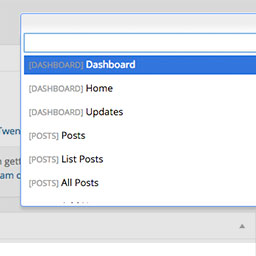
Dashy gives you a search field to get to admin pages quicker. More keyboard shortcuts right inside of WordPress. Get to pages, post, plugins, custom post types, faster. You can even search and get a to single post with the keyboard. To activate, use Control+Space.
To get to a specific page, type "list” and choose "List Pages”. From there you will be showing all of your pages that you can edit. Start searching the page name, and hit enter to go directly to editing that page. This supports posts, pages, and custom post types.
اسکرین شاٹس

View of Dashy when activated. 
Search for menu items to get to them quickly. 
Go directly to pages, posts, and CPTs from the "List ___” option.


انسٹالیشن
- Upload ‘dashy’ to the
/wp-content/plugins/directory - Activate the plugin through the ‘Plugins’ menu in WordPress
- Press Control+Shift+D to activate.
جائزے
There are no reviews for this plugin.
شراکت دار اور ڈیویلپرز

“Dashy” کا اپنی زبان میں ترجمہ کریں۔
ڈویلپمینٹ میں دلچسپی ہے؟
کوڈ براؤز کریں، ایس این وی ریپوزیٹری کو چیک کریں یا ڈویلپمینٹ لاگ کو سبسکرائب کریں بذریعہ آر ایس ایس۔
