Convert from one video format to another

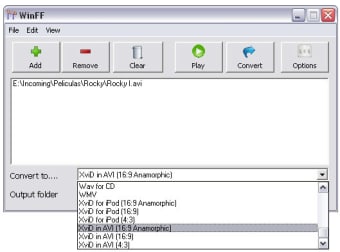
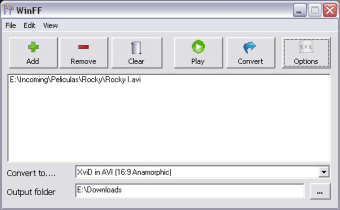
WinFF is the Windows version of one of the most popular video converters on Linux. It enables you to covert video files into several different video formats including Xvid and WMV.

Top Recommended Alternative

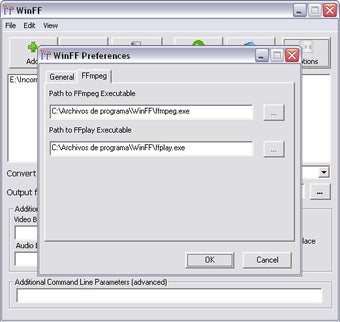
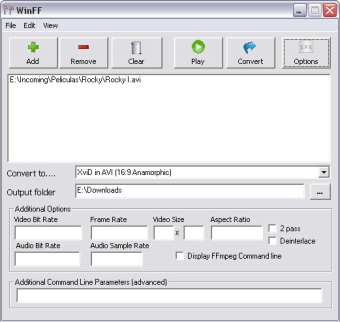
WinFF has a basic GUI with a multitude of options and functionalities that will help you select the videos you need, previsualize them and define the format of the conversion. In addition, there are other specialised options such as the ability to change the ratio of the conversion, the resolution or the quality of the audio track.

Although WinFF is a fairly stable converter, it does struggle with long names especially those with unusual characters. To avoid problem, I advise you simply all of the names of the files that you want to convert. Otherwise, you might find that the program simply rejects the files for no apparent reason.

This is a convenient and quick file converter that still needs a few bugs ironing out before it would be my number one choice.


  • Pros

    • Fast and efficient
    • Easy to use
  • Cons

    • Struggles with long names and irregular characters
Image
 0/5

App specs

  • License

    Free

  • Version

    1.5.5
  • Latest update

  • Platform

    Windows

  • OS

    Windows 10

  • Language

    English

  • Downloads

    102.4K

    Last month's downloads

    • 152
  • Size

    20.97 MB

  • Developer

Program available in other languages


Icon of program: WinFF

WinFF for PC

  • Free
  • 3.8
    215
  • 102.4K
  • V1.5.5

User reviews about WinFF

3.8

3 reviews

Add review

Main reviews for you

  • Image

    Anonymous user

    It is simple and best app for video converter. It is simple for use and installation is not too hard. I use this app in Ubuntu Linux.

  • Image

    Anonymous user

    Installs Malware. Installed AoA Audio Extractor and it installed malware called Monetizer. Was caught by Malwarebytes.


  • Image

    Anonymous user

    New Version 0.32. A lot more stable than 0.31 Pros: handles internation filenames betterwin 95/98/me compatibilitysome smaller bug fixes Cons: still some problems with eastern asian characters

More

You may also like

Alternatives to WinFF

Explore Apps

Latest articles

Laws concerning the use of this software vary from country to country. We do not encourage or condone the use of this program if it is in violation of these laws.
Softonic

Is WinFF safe?

100/100

Score result: Clean

This file passed a comprehensive security scan using VirusTotal technology. It is safe to download.

  • Virus free
  • Spyware free
  • Malware free
  • Verified by Security Partners

    VirusTotal logo

Scan Info

Last scan
Monday, January 1, 2024
Scan provider
VirusTotal · Full report

File Integrity

File
WinFF-1.5.5-Setup.exe
SHA256
09f17eeded4cb54ad8b85ba6c0bbb2ce681a15f27212c2c4bbc8fbd65768b43a
SHA1
9634be80cddf561c5fbb416ef8ee844c75d8ed62

Softonic security commitment

WinFF has been thoroughly scanned by our advanced security systems and verified by industry-leading partners. This file comes from the official developer and has passed all our security checks, showing no signs of viruses, malware, or spyware. For more information, visit our Security and Trust Center