

Description
Poptics is a lightweight and powerful popup builder for WordPress that helps you create high-converting popups, exit-intent popups, email optins, and WooCommerce popups without writing code. It is made for site owners who want simple tools to grow leads, subscribers and sales without slowing down their website.
With Poptics, you can build any type of popup, including email popup, lightbox popup, form popup or multi-step forms, subscription popup, newsletter popup, conversion popup or marketing popup using an easy drag-and-drop editor. Every popup is responsive, fast and designed to convert visitors into customers.
Poptics also includes smart triggers like exit intent, time delay, scroll depth, click triggers and page-level targeting. These help you show the right popup at the right time, whether it’s a lead generation popup, a WooCommerce popup or a simple banner message.
For eCommerce store owners, Poptics offers eCommerce popups for upsell, cross-sell, cart recovery and product promotions. It also works as an AI popup builder, helping you generate messages and ideas that match your goals. This makes it easier for beginners and busy site owners to launch campaigns quickly.
With built-in analytics, A/B testing, audience targeting, scheduling, Poptics comes with a suite of industry-based pre-designed popup templates that specifically grab the attention of all types of audiences and convert them into loyal customers.
Want to create responsive popups that convert instantly? Check this 👇
Live Demo | Quick Guide | Support | Documentation | Buy Pro
Need help setting up your Popup campaign? 👉Let Us Know.
🚀 Key Features
- Popup Builder for WordPress – Create popups, email optins, exit popups, WooCommerce popups, alerts, surveys and more using a simple drag-and-drop builder.
- Unlimited Popups – Build as many popup campaigns as you want with no limits.
- AI Support – Use AI prompts to help generate popup text, ideas and variations.
- Smart Triggers – Show popups based on exit intent, scroll depth, time delay, click trigger or page-level targeting.
- WooCommerce Popups – Display upsell, cross-sell, discount or cart recovery popups to increase conversions.
- Pre-Designed Templates – Start fast with templates for email popups, newsletter popups, subscription popups, lead generation popups and promotional designs.
- Customizable Styles – Adjust colors, fonts, spacing and layout to match your brand.
- Mobile Responsive – Every popup looks good on desktop, tablet and mobile.
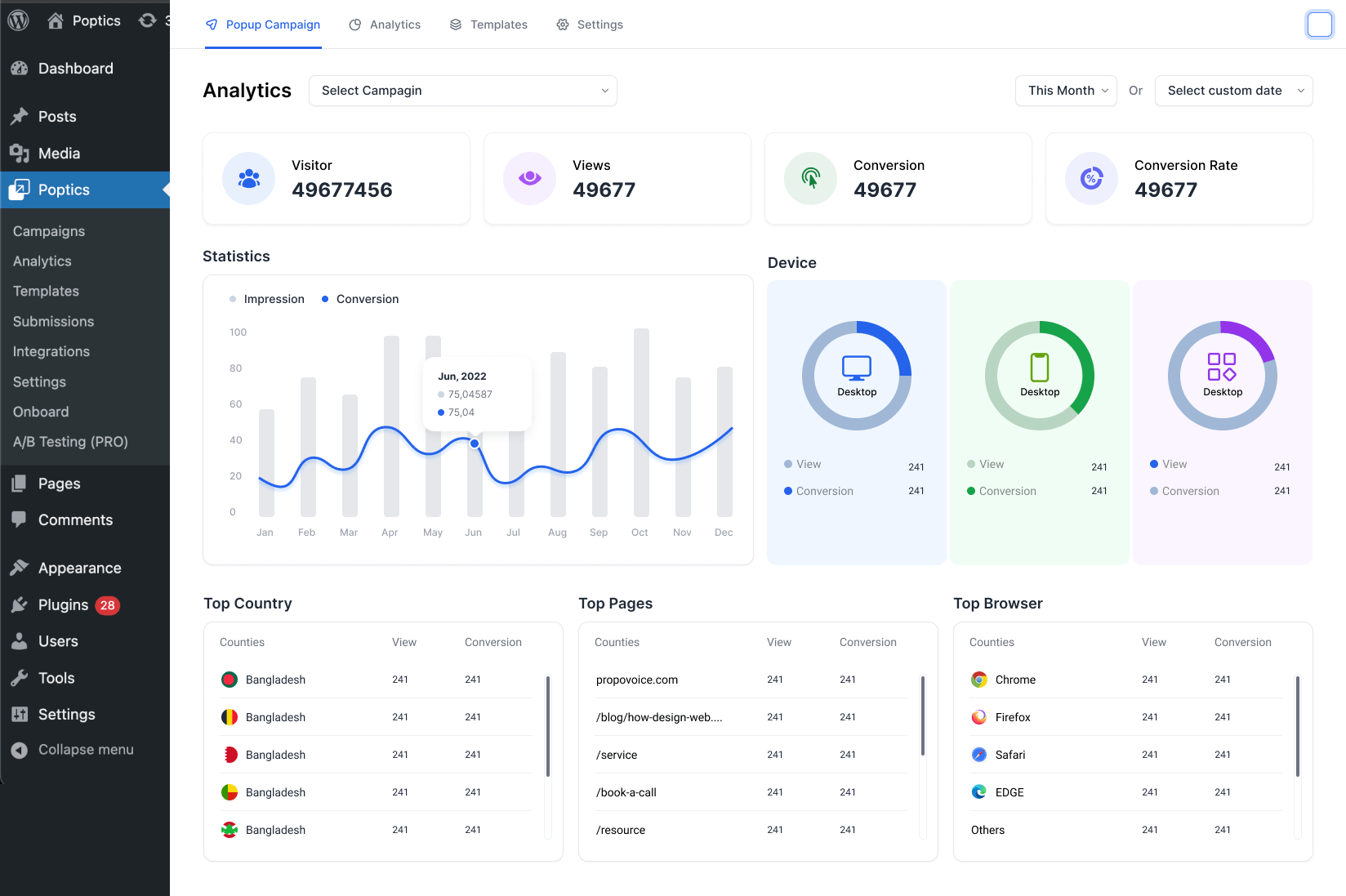
- Conversion Analytics – Track views, clicks, conversion rates and device performance.
- Email Marketing Integrations – Connect Mailchimp, FluentCRM, Zapier, Pabbly, ActiveCampaign and more.
- A/B Testing (Pro) – Test different popup designs, headlines and offers to improve results.
- Lightweight & Fast – Built to load quickly and work smoothly with modern WordPress setups.
What Poptics Can Do 🎯
Poptics helps you create popups that support real goals like collecting leads, growing subscribers, recovering carts and promoting offers. You can build email popups, subscription popups, lightbox popups, form popups and exit popups that match your site’s style and show at the right moment.
Here’s how Poptics supports your website:
✅ Grow Leads and Subscribers – Create clean and simple email optin popups, newsletter popups and multi-step forms that help grow your subscriber list without interrupting the browsing experience. View all submissions inside your dashboard and sync them with your preferred email tools.
✅ Reduce Cart Abandonment – Use targeted exit intent popups and WooCommerce popups to remind shoppers about the items in their cart, offer discounts or highlight related products.
✅ Increase Conversions – Run conversion popups during promotions, sales events or product launches. Use timers, call-to-action templates and audience targeting to show the right message to the right visitor.
✅ Promote Offers and Announcements – Show special deals, banners, updates or flash sale promotions with sticky bars, fullscreen popups or slide-ins.
✅ Collect Feedback – Display simple survey popups or feedback forms to understand user behavior and make better decisions.
✅ Use Smart Targeting for Better Results – Control who sees your popup based on device, page, referrer, login status, or user behavior. This ensures that every popup stays relevant and helpful.
✅ Automate Responses – Use auto-responder emails to follow up with users right after they sign up through a popup.
✅ Improve Results with A/B Testing (Pro) – Test different messages, designs or offers to find the version that converts best.
Find your Desire Popup Campaign from Poptics 🔎 :
Check out all the pop ups options here and find out which one you would like to use:
️ Lightbox Popups: Create eye-catching lightbox popups to highlight offers, email optins or announcements while keeping the rest of the screen dimmed.
️ Multi-Steps Popups(pro): Build multi-step popup forms that make longer inputs easier. Useful for surveys, signup flows or segmented lead forms.
️ Sidebar Popups: Show sidebar popups for updates or promotions while letting visitors continue reading the page.
️ Slide-in Popups: Use slide-in popups to share deals or messages with smooth animation that doesn’t interrupt browsing.
️ Fullscreen Popups: Display fullscreen popups to capture full attention for major promotions, lead generation offers or welcome screens.
️ Countdown Timers: Add urgency using countdown timer popups for limited-time discounts or seasonal campaigns.
️ Sticky Bar Popups: Show messages at the top or bottom of the screen with sticky bar popups for ongoing offers or newsletter signup.
️ Phone Call Campaign Popups: Let users call your business directly through a phone call popup, useful for service-based sites.
️ Floating Bar: Use a floating bar popup that stays visible while users scroll, great for continuous promo visibility.
Discover How Poptics Popup Boosts Businesses 🔰
📩 Comprehensive Lead Generation
Poptics helps you engage visitors with different lead generation popups, email popups and multi-step forms. You can collect emails, grow subscribers and promote offers without interrupting the user experience.
- Unlimited Free Popups: Design unlimited, customizable popups for lead generation.
- Advance Popup Campaigns: Personalize various popup types with custom colors and layouts.
- Lead Generation: Easily manage lead collection by viewing submissions and organizing data.
⏰ Timely Popup Engagement Triggers
Show popups at the right moment using behavior-based triggers such as exit intent, click triggers, time delay and scroll depth. These triggers help increase conversions and reduce bounce.
- Targeted Popup Triggers: Show the right campaign at the right time.
- Page Level Targeting: Customizable content based on page interactions.
- Abandonment Cart Reminder: Recover lost sales by reminding users of their left items.
- Smart Exit-Intent Technology(Pro): Track user exit behavior and show a final offer.
- Strategic Time-Based Popups: Trigger popups after set time intervals.
- Engaging Click-Triggered Popups: Show content when users click specific buttons or links.
- Auto Responder Email: Automates responses, ensuring timely replies.
🖥️ Flexible Display Control Options
Customize your popups with flexible display controls for user interactions, improving engagement through detailed settings for ideal presentation and functionality.
- Strategic Popup Placement: Select where popups appear on specific pages or posts.
- Dynamic Popup Visibility: Control when and where popups appear.
- Customizable Popup Frequency: Adjust how often popups display based on user interaction.
- Flexible Campaign Scheduling: Automate timing to ensure the best moments for promotions.
- Precise Audience and Targeting: Customize popup visibility for returning visitors on specific devices to optimize lead generation with targeted messages.
- Versatile Embeds: Integrate forms, videos, or popup content directly into your site.
🎨 Stunning Popup Design Made Easy
Design clean and responsive popups using the drag-and-drop popup builder. Customize every part of the popup without coding with flexible popup design tools.
- Drag ‘n’ Drop Builder: Create popups with the Gutenberg builder; no coding is needed.
- Stylish Pre-designed Templates: Choose from template library for quick popup setups.
- Customizable Design Options: Modify options like colors, fonts, images, and layouts.
- Responsive Mobile Design: Ensure popups look great on all devices.
- Fully Translation Ready: Allowing customization of popups in any language.
📊 Actionable Analytics for Conversions
Track how your popups perform with built-in analytics. Understand what works and improve your marketing strategies, monitor campaign performance, and easily increase conversions.
- Comprehensive Conversion Analytics: Monitor key metrics and insights on submission and conversion rates to improve campaigns and boost engagement.
- In-depth Advanced Analytics: Analyze device usage, date ranges, and page performance to improve campaigns and make informed decisions.
- Smart A/B Testing(Pro): Can optimize popup performance and data-driven insights from the past.
Effortless Powerful Integrations 🧩
Poptics allows you to connect your account with the most popular platforms to collect all your captured leads in one place and experience new levels of website conversion performance.
➕ FluentCRM – Sync leads from popups, automate emails and segment contacts.
➕ Mailchimp – Automatically sync and nurture leads from popups.
➕ Pabbly – Automate workflows, manage subscriptions, and improve conversions.
➕ Zapier – Connect popups to over 5,000 apps to sync leads for better marketing.
➕ OpenAI – Generate campaign categories, text, images, and complete campaigns using OpenAI.
➕ Active Campaign – Automatically transfer leads from popups for segmentation.
➕ Easy Digital Downloads(Pro)- Streamline digital product sales and management.
➕ WooCommerce (Pro)- Showcasing the latest products, top-selling products, and upsell/cross-sell products to enhance the shopping experience and increase revenue.
Upcoming Features and System Update 🌀
Our goal at Poptics is to provide innovative solutions that meet the evolving needs of our users. We are continuously developing new popup features that will keep your popups relevant, impactful, and highly effective. We’ve got some exciting additions on our roadmap for you:
- Multi-language Support: To make popups accessible to global audiences.
- Spam Protection: To keep your lead forms and subscription popups clean and secure.
- Google Analytics Integration: Providing deeper insights into engagement and conversions.
- LMS Integrations: For users in the e-learning industry, we’re adding (LMS).
- Gamification Popups: Soon, we will add spin-to-win wheels, scratch cards, and more.
📚 Support and Documentation
- Simply visit our Documentation
- For any questions, ask them away on Poptics Forum.
- Help us improve, input your valuable suggestions Poptics Roadmap.
So, why wait? Be a WordPress Sales Broker with Poptics Popup Maker 🚀
💁 Did you like Poptics Popup Builder Plugin?
🙌 Join our All-Time Active Facebook Group
🎥 Learn actionable tutorials on YouTube Channel
🤝 Give us your useful rating on WordPress.org
🔥 Now, What’s Next for You?
If you’re impressed with Poptics Popup Maker Plugin, please check out our other awesome WordPress plugins:
📅 Eventin: All-in-one event management plugin for WordPress.
🍽️ WPCafe: Smart Restaurant Management System Plugin For WordPress.
🍽️ Booktics: Appointment Booking Calendar Plugin for Service Businesses.
🗓️ WP Timetics: AI-powered Booking System for daily meetings & appointments. Suitable for all types of niches and provides the ultimate booking solution.
If you’re curious, pay a visit to 👉 Aethonic to learn more about our advanced solutions in WordPress and lots of marketing tips & tricks! to grow your business. 🎉
License
This plugin is licensed under the GPLv2 or later. See the license file for more details.
Screenshots
screenshot-1 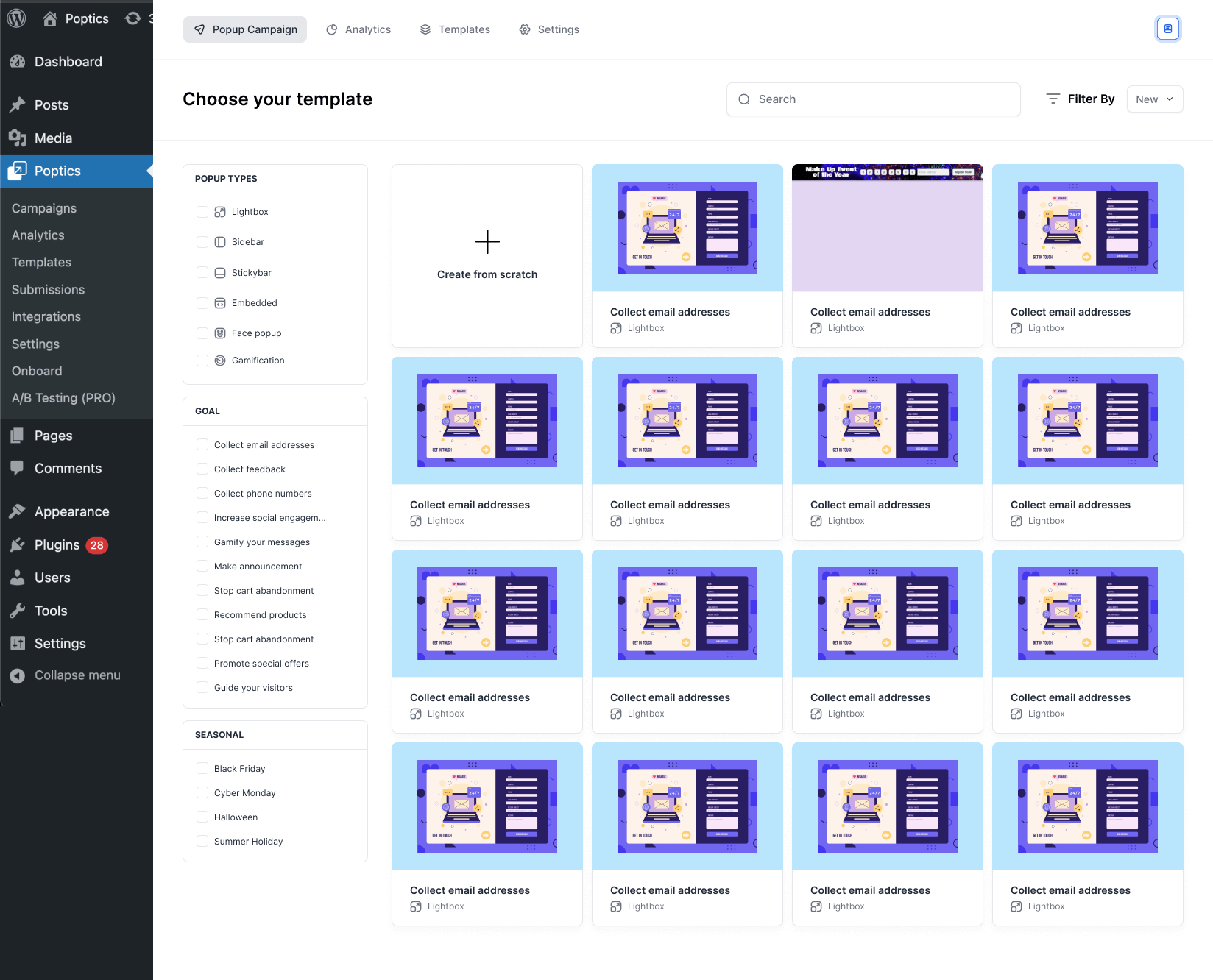
screenshot-2 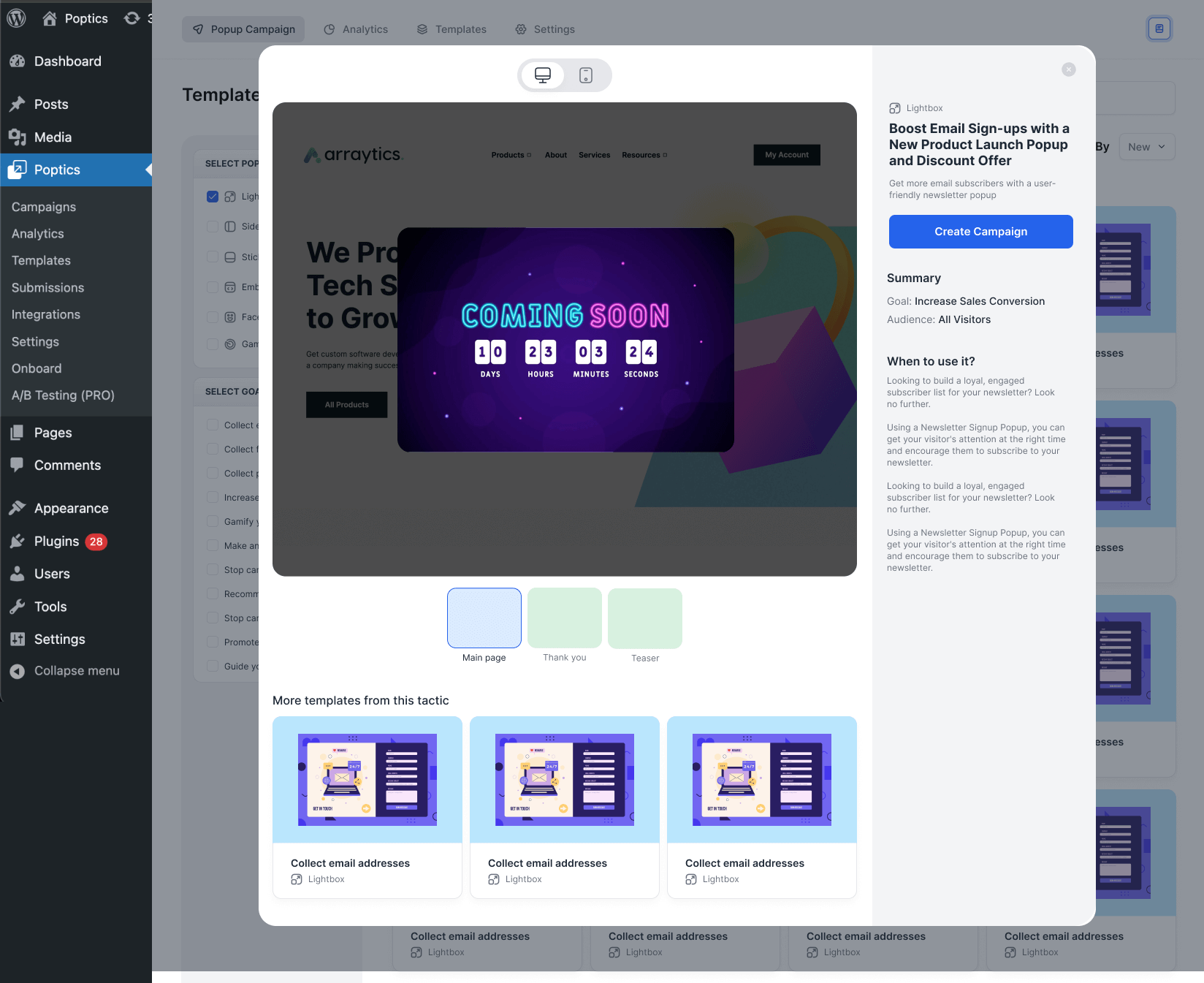
screenshot-3 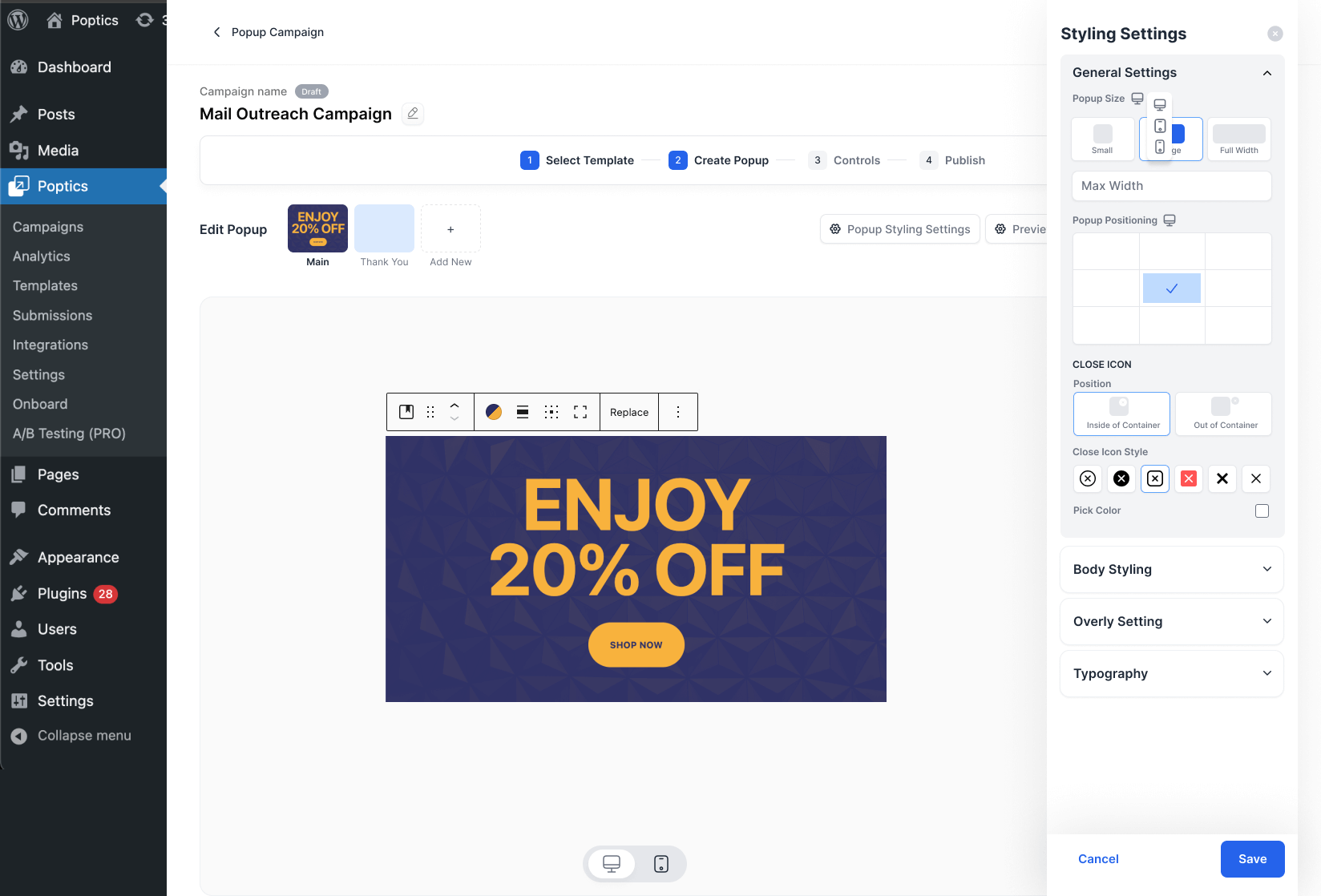


Blocks
This plugin provides 12 blocks.
- Poptics Form
- Style settings
- Poptics Button
- Poptics Heading
- Poptics Countdown
- Poptics Cover
- Poptics Image
- Poptics Image Box
- Poptics Woo-Commerce Products
- Poptics Container
- Poptics Icon
- Poptics Funnel Button
Installation
Minimum Requirements
- WordPress version 5.2 or higher (tested up to 6.7)
- PHP version 7.3 or higher
Automatic Installation
Installing Poptics automatically is simple because WordPress handles everything.
- Log in to your WordPress dashboard.
- Go to “Plugins” on the left menu and click “Add New”.
- In the search bar, type “Poptics.”
- Click “Install Now” next to the Poptics plugin.
- After the installation, click “Activate” to enable the plugin.
Manual Installation
You can also install Poptics manually by downloading the plugin and uploading it to your website.
- Download and unzip the Poptics plugin.
- Use an FTP client or CPanel to upload the plugin folder to wp-content/plugins/ in your WordPress directory.
- Go to Plugins in your WordPress dashboard and activate the plugin from the list.
Upgrading
Poptics updates automatically, but if you’ve customized the plugin, make a backup before updating. Sometimes, updating can cause permalink issues.
To fix permalink issues:
- Go to “Settings > Permalinks” in WordPress.
- Click “Save Changes” to refresh the settings.
FAQ
-
📌 Is Poptics beginner-friendly?
-
Yes. Poptics is designed for beginners and non-coders. With the drag-and-drop popup builder and ready-to-use templates, you can create professional popups without any coding skills.
-
📌 Does Poptics work with WooCommerce?
-
Absolutely. You can create WooCommerce popups for upsells, cross-sells, product promotions, and abandoned cart recovery campaigns.
-
📌 Can I create exit-intent popups?
-
Yes. Exit-intent popups are built-in and can help recover abandoning visitors before they leave your site.
-
📌 Is it mobile responsive?
-
Yes. All Poptics popups are fully responsive and optimized for mobile, tablet, and desktop devices.
-
📌 Can I integrate Poptics with my email marketing tool?
-
Yes. Poptics integrates with Mailchimp, FluentCRM, Zapier, Pabbly, and ActiveCampaign.
-
📌 Does Poptics have analytics?
-
Yes. The built-in analytics dashboard lets you track views, clicks, conversions, and run A/B tests (Pro) to improve campaign performance.
-
📌 Can I run A/B testing on my popups?
-
Yes. With Poptics Pro, you can create multiple variations of a popup and test which design, headline, or offer performs best using built-in A/B testing tools.
-
📌 Is Poptics a good Popup Maker alternative?
-
Yes. Poptics offers similar features to Popup Maker but with a modern interface, faster performance, and a library of optimized templates.
Reviews


Contributors & Developers
“Poptics – Popup Builder, Email Opt-ins, Exit-Intent & WooCommerce Popups Sales” is open source software. The following people have contributed to this plugin.
Contributors
Interested in development?
Browse the code, check out the SVN repository, or subscribe to the development log by RSS.
Changelog
1.0.20
Fix: CSS overriding issue
1.0.19
Tweak: Admin UX Improved
1.0.18
Tweak: Navbar design updated for better UI enhancement
Tweak: Help button design updated for better visibility
Tweak: Campaign List page table updated for minimal UI
Tweak: Analytics page Design updated for clear visibility
1.0.17
Fix: Popup Box Height Issue
1.0.16
Fix: Fixed conflict issue with wp timetics
1.0.15
Tweak: Added 404 Not Found page
Tweak: Included browser cache clear instructions on error
Fix: Resolved template structure issue
1.0.14
Tweak: Improved visibility of text on the dashboard graph
Fix: Updated CSS to fix styling issues caused by third-party packages
Fix: Addressed post status conflict between WordPress and Poptics campaign status
Fix: Ensured compatibility of Gutenberg block editor with the WordPress 6.8 update
Fix: Resolved class name validation issue
Fix: Fixed global post status conflict issue
Fix: Resolved issue where the form submit success screen was not displaying in face-popup
1.0.13
Fix: Resolved system crash during build caused by adding third-party packages via Composer
Fix: Adjusted CSS to resolve styling issues introduced by third-party packages
1.0.12
Tweak: Improved spacing in the top navigation bar
Tweak: Updated table styling for better readability
Tweak: Refined the layout and right-side navigation of the campaign editor page
Tweak: Enhanced navigation within the control settings section
Tweak: Redesigned the “Pro” feature tag for a cleaner look
Tweak: Polished the appearance of the AI button
Tweak: Made campaign creation from templates faster by skipping the campaign name input
1.0.11
Tweak: Optimized unnecessary script loading on the frontend
1.0.10
Tweak: Added gradient color input settings for the popup body background in the Style Settings block
Tweak: Added input field text color settings in the Input block
Tweak: Displayed submission date in the submission details modal
Tweak: Added an analytics option to the submission list dropdown menu
Fix: Fixed an issue where changing the device would reset the design when creating a campaign from scratch
1.0.9
Fix: Resolved an issue where the campaign list was not updating after creating a new campaign
1.0.8
New: Added a block editor layer panel for easier navigation of nested blocks
Tweak: Redesigned the block editor layout for a better user experience
Tweak: Improved settings fields for Poptics custom blocks
Tweak: Optimized the campaign list API call to reduce load time
Tweak: Display thumbnail images in the campaign list table
Fix: Fixed bugs in Poptics custom block settings
Fix: Resolved an issue with template loading
1.0.7
Tweak: Optimized the Template API call for faster performance
Tweak: Removed some invalid CSS properties from custom blocks
Tweak: Added a toast notification when the Web Script URL is copied
Tweak: Added an option to toggle the title on or off in the heading block
Fix: Resolved issues with the Poptics heading block
Fix: Fixed the campaign list fetching issue when no pagination limit is provided
Fix: Fixed the issue where the custom URL in page targeting was not working
1.0.6
Tweak: Added support for keyboard shortcuts to enhance the block editor workflow
Tweak: Block settings for campaign auto-response emails are now displayed in a convenient drawer
Tweak: Made Gutenberg block areas visible when hovered for better usability
Tweak: Enhanced container block functionality by displaying the inserter button on hover
Fix: Introduced scrolling for overflowing popups to ensure better navigation
Fix: Resolved popup overflow issues on small devices for improved responsiveness
Fix: Resolved an issue where Pro functionalities were enabled even when Pro was not active, but the Pro license had been previously activated
Fix: Resolved an error occurring when settings were accessed without any data configured
1.0.5
New: Submission entries export and import feature
New: Introduced custom Poptics Image block
Tweak: Replaced the webhook collapse title with the webhook name
Tweak: Moved the device change button from the editor to the top-right button panel
Tweak: Improved the Image Box block with new image settings
Fix: Resolved the analytics info calculation mismatch issue
1.0.4
New: Introduced the Poptics Icon block
Tweak: Introduced a menu system in the popup style settings block
Tweak: Updated popup close icon settings
Tweak: Added z-index settings for the popup body and overlay
Tweak: Added a toggle button to show or hide the block editor’s right sidebar
Tweak: Displayed price currency in the WooCommerce products block
Tweak: Provided settings to modify type and goal options
Tweak: Added a border color settings field and removed the box shadow color option (replaced by border color)
1.0.3
New: Added the Poptics Container block
Fix: Resolved an issue with the sticky bar not loading correctly
Fix: Fixed an issue with SVG icon uploads
Fix: Addressed an issue where the popup was incorrectly displayed on custom pages with specific query parameters in the URL
Tweak: Added support for the inline form layout
Tweak: Introduced additional input field settings
1.0.2
Fix: URL validation added and data sending process to FluentCRM updated
Fix: Template preview issue fixed
Fix: Fixing design issue while sending email from single campaign auto response
Fix: Fix countdown block issues
Fix: Fix control page select box overflow issue
Tweak: Countdown block advanced settings added
Tweak: Update block editor settings (box shadow, video control, font-weight etc)
Tweak: Enhanced background image settings
Tweak: Make settings for button icon font color
Tweak: Add external classes in custom blocks
Tweak: Change global settings data storage field
1.0.1
New: All the custom post made dynamic in campaign page target control section
New: Tags and categories are also available in campaign page target control section
New: Custom Poptics Image Box block created
New: Provide animation settings for popup body
New: Advanced settings for Poptics Button block implemented
New: Custom Input Blocks made editable with advance menu
New: Provide a status toggle button in campaign list table
New: Poptics wooCommerce block created to insert products in popups
Fix: Template design broken issue fixed
Fix: Form submission and validation off in edit mode
Fix: Countdown selected value not showing issue
Tweak: Move the device switch button from center to left
Tweak: Submission filter loading added
Tweak: Setup webhook for poptics onboarding
1.0.0
- Initial release of Poptics.
