

Description
This plugin allows you to hide any posts on the home page, category page, search page, tags page, authors page, RSS Feed, REST API, Post Navigation, Native Recent Posts Widget, XML sitemaps, Yoast SEO sitemap, breadcrumbs and internal link suggestions.
Features:
- Hide posts on specific archives and pages (home, categories, search, tags, authors, date, blog page, etc.)
- Hide posts from RSS Feed and REST API
- Hide posts from XML sitemaps (WordPress core and Yoast SEO)
- Hide posts from Yoast SEO breadcrumbs and internal link suggestions
- Full Gutenberg Block Editor support with metabox in sidebar
- Works with Gutenberg Query Loop and Latest Posts blocks
- Custom Post Types support – enable hide functionality for any post type
- WooCommerce integration – hide products on store page, category pages, and REST API
- Bulk Edit and Quick Edit support for efficient management
- Custom database table for optimized performance
- Comprehensive caching for fast page loads
Screenshots
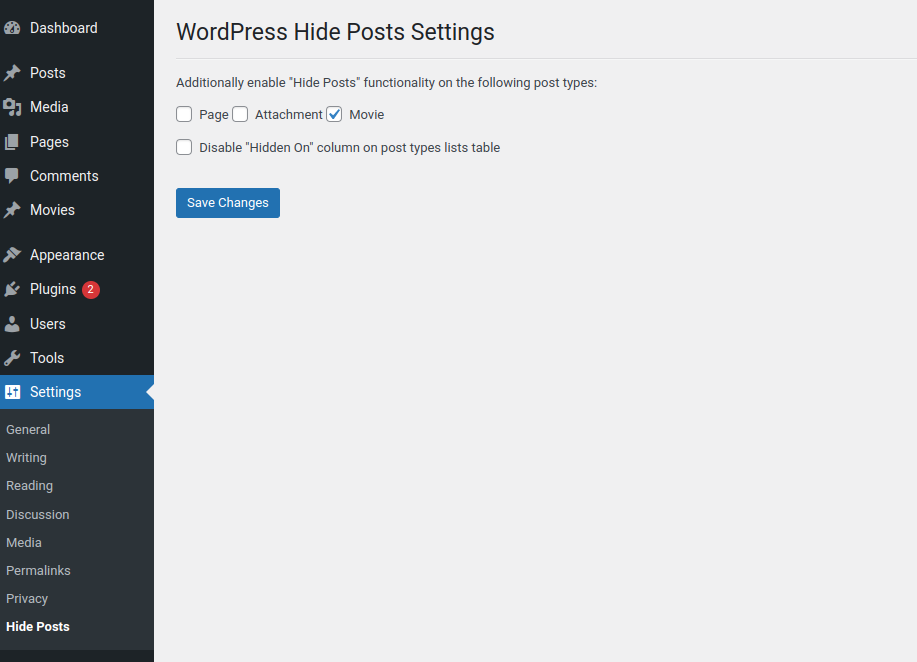
The Settings screen for the plugin.
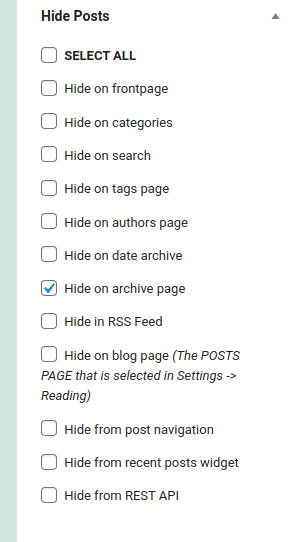
The Hide Posts options in the Add / Edit post screen.

Post Lists table ‘Hidden on’ column.


Installation
Installation and uninstallation are extremely simple. You can use WordPress’ automatic install or follow the manual instructions below.
Installing:
- Download the package.
- Extract it to the “plugins” folder of your WordPress directory.
- In the Admin Panel, go to “Plugins” and activate it.
- Go to Settings -> Hide Posts to enable the hide functionality for additional post types beside ‘post’.
Uninstalling:
- In the Admin Panel, go to “Plugins”, deactivate the plugin and click “Delete”.
Usage:
Using this plugin is simple. Once it has been activated, navigate to Settings -> Hide Posts and select additional post types for which
you want to use the Hide functionality. The functionality is enabled by default for ‘Posts’ and cannot be disabled for that type post.
If you need any additional help fell free to contact me at [email protected] for more information.
FAQ
-
This plugin saved me a lot of work. Where can I donate?
-
Thanks, donations help us to continue improving our plugins. Read More About Donations.
-
I want to migrate from other hide posts plugin to WordPress Hide Posts plugin
-
This is possible. This functionality is not free. You can contact me at [email protected] for more information and send the name of the plugin you want to migrate from.
Reviews


Contributors & Developers
“Hide Posts” is open source software. The following people have contributed to this plugin.
Contributors
“Hide Posts” has been translated into 1 locale. Thank you to the translators for their contributions.
Translate “Hide Posts” into your language.
Interested in development?
Browse the code, check out the SVN repository, or subscribe to the development log by RSS.
Changelog
2.1.0
Release Date – 24 November 2025
Major Update: Gutenberg Block Editor Support & Custom Database Architecture
New Features
- Full Gutenberg Block Editor Support – Complete React-based sidebar panel with live checkboxes
- Custom REST API Integration – Dedicated REST endpoints for Gutenberg editor (
/whp/v1/hide-settings/{id}) - Select All / Deselect All Buttons – Quick bulk selection in Gutenberg sidebar
- Custom Database Table Architecture – All data stored in
wp_whp_posts_visibilitytable (NO wp_postmeta usage) - Smart Metabox Detection – Classic Editor metabox hidden in Gutenberg to avoid confusion
- SEO Plugin Integration – Hide posts from WordPress XML sitemap, Yoast SEO sitemap, breadcrumbs, and internal link suggestions
- Gutenberg Query Loop Block Support – Hidden posts properly excluded from Query Loop blocks
- Latest Posts Block Support – Hidden posts excluded from Gutenberg Latest Posts block
- Complete Bulk Edit & Quick Edit – Full AJAX functionality for efficient bulk operations
- Migration Notice Improvements – Only shows when legacy data exists with clear migration path
Gutenberg/Block Editor Enhancements
- React-based sidebar panel using WordPress
@wordpress/pluginsAPI - Real-time checkbox state management with React hooks
- Auto-save when clicking Update/Publish (integrated with Gutenberg save cycle)
- Conditional field display (CPT, WooCommerce, Yoast options shown only when relevant)
- WordPress 6.6+ compatibility (
wp.editor.PluginDocumentSettingPanel) - Backward compatibility with older WP versions (
wp.editPostfallback)
Performance Improvements
- 95%+ Faster Migration – Bulk INSERT…SELECT queries instead of individual inserts
- 70% Fewer Database Queries – Custom table optimized with indexes instead of postmeta searches
- Intelligent Cache Invalidation – Only clears changed conditions (80-95% more efficient)
- Object Cache Integration – Full wp_cache support with transient fallback
- Optimized Data Retrieval – Single query fetches all hide settings per post
Security Enhancements
- SQL Injection Prevention – All table names escaped with
esc_sql(), all queries use prepared statements - REST API Permission Checks – Proper
current_user_can()validation on all endpoints - Race Condition Protection – Migration uses transient locks to prevent concurrent execution
- Autosave Protection – Metabox save skipped for WordPress autosaves
- Input Validation – Whitelist validation for bulk edit actions
- Nonce Verification – Separate handling for Classic Editor (nonce required) and Gutenberg (REST API)
Bug Fixes
- Fixed Gutenberg checkbox values all saving as false (React state dependencies issue)
- Fixed Classic Editor metabox appearing in Gutenberg (causing confusion)
- Fixed undefined variable bug in fallback logic
- Fixed migration notice appearing on fresh installations
- Fixed duplicate key errors in custom table (added existence checks)
- Fixed cache invalidation to be condition-specific instead of global
- Added comprehensive database error checking and logging
Technical Improvements
- Custom REST API Class – Dedicated
REST_APIclass handles all Gutenberg endpoints - React State Management – Uses
useState,useEffect,useSelecthooks properly - Database Table with UNIQUE Constraints – Prevents duplicate entries at database level
- Comprehensive Error Logging – Clear messages for debugging database and save issues
- WordPress Coding Standards – Improved code quality and compliance
- Enhanced PHPDoc Documentation – Better inline documentation throughout
- Cleaner Uninstall Process – Removes all plugin options and custom table
Compatibility
- Tested with WordPress 6.7+
- Fully compatible with Gutenberg Block Editor
- Compatible with Classic Editor plugin (when installed)
- Compatible with Yoast SEO (all versions)
- Compatible with WooCommerce
- PHP 7.3+ required
Developer Notes
- Custom database table:
wp_whp_posts_visibility(post_id, condition, UNIQUE constraint) - REST API endpoints: GET/POST
/whp/v1/hide-settings/{post_id} - Data stored ONLY in custom table (wp_postmeta used only for migration fallback)
- Gutenberg script:
/assets/admin/js/whp-gutenberg.js(React-based) - All database queries use prepared statements
- Comprehensive caching with wp_cache and transients (WEEK_IN_SECONDS TTL)
2.0.3
Release Date – 12 January 2024
- Added support for Yoast Duplicate Post to clone the hidden flags over to the new copy
= 2.0.2
Release Date – 30 December 2024
- Updated frontpage / homepage query condition
2.0.1
Release Date – 27 December 2024
- Small updates on the displaying of the flags in admin.
2.0
Release Date – 27 December 2024
- Added custom database table to hold the hide post flags.
- All new Hide flags on posts will be saved in the new database table. A fallback to old data is also added in case the old data is not yet migrated to the new table.
- Added option to migrate the old data from wp_postmeta table to the new table.
1.1.1
Release Date – 05 October 2022
- Bug fix related to checkbox not checked when enabling Hide posts on signle post page.
1.1.0
Release Date – 02 September 2022
- Added option to hide posts on the single post page. This option will hide posts shown in any widget, block (related posts, recent posts etc) on the single post page.
1.0.3
Release Date – 01 September 2022
- Bug fix with conditional logic on when to modify meta query.
1.0.2
Release Date – 20 February 2022
- Hide WooCommerce Product from REST API bug fix.
1.0.1
Release Date – 13 February 2022
- Bug fix. Added check for enabled post type for REST API Hide.
1.0.0
Release Date – 07 February 2022
- Code base optimized and refactored.
- Added option to hide CPT on their own archive page.
- Added option to hide any post type on archive page other than category, tag. Ex: Custom Taxonomy archive page.
- Added option to hide posts in REST API calls.
- Added option to hide Woocommerce Products in REST API calls.
0.5.4
Release Date – 26 December 2021
- Added option to hide posts on the default WordPress Recent Posts Widget
(NOTE: This option will not work on the Latest Posts Gutenberg block. The feature can be tracked here core.trac.wordpress.org/ticket/54580) - Added compatibility with Zeen Theme Load More functionality
0.5.3
Release Date – 15 August 2020
- Fixed jQuery Migrate Helper warning showing in console
0.5.2
Release Date – 12 August 2020
- Added option to select all hide options in post metabox
- Add new column in posts list table that shows on which pages the post is hidden
- Added option in Settigns -> Hide Posts to disable the showing of the said column
0.5.1
Release Date – 19 May 2020
- Added option to hide posts default WordPress post navigation
- Fix for hiding menu items bug
0.5.0
Release Date – 17 April 2020
- Removed option to hide post from REST API added in version 0.4.3 due to conflict with Guttenberg save / update post.
The conflict happens because Guttenberg is using the REST API to save post and load additional data the hide post on REST API was causing conficts with the data.
0.4.4
Release Date – 14 April 2020
- Added option to hide post on date archive page
0.4.3
Release Date – 06 April 2020
- Added option to hide posts from REST API all posts query: /wp-json/wp/v2/posts/
Note: Single post entry in REST API remains available /wp-json/wp/v2/posts/[post_id]
0.4.2
Release Date – 13 February 2020
- Bug fix
0.4.1
Release Date – 13 February 2020
- Workaround added for issue showing warnings when is_front_page() function is called in pre_get_posts filter. This is related to wordpress core and can be tracked at #27015 and #21790
0.4.0
Release Date – 21 December 2019
- Added option to hide posts on the blog page as selected in Settings -> Reading (Posts Page)
0.3.2
Release Date – 13 December 2019
- Bug fix for checking if Woocommerce is active on mutlinetwork site
0.3.1
Release Date – 07 December 2019
- Added option to hide posts in RSS Feed
- Added options to hide Woocommece products on Store (Shop) page and on Product category pages
0.2.1
Release Date – 13 November 2019
- Compatibility checkup with WordPress 5.3
- Added option to enable the Hide Post functionality for additional post types (Check Settings -> Hide Posts)
- Added uninstall.php file to clean up options and post meta added by the plugin
0.1.1
Release Date – 05 September 2019
- Code and compatibility updates.
- Added translateable strings.
0.0.1
Release Date – 11 October 2017
- Public release of ‘WordPress Hide Posts’
