dennisroliff

Forum Replies Created
-
Forum: Fixing WordPress
In reply to: getting my site out of subdirectoryHello @fierevere ,
I got it knocked by following the instructions on this page https://askwpgirl.com/move-wordpress-subdirectory-root/
Now I just have to work on the slow home page loading speed. Something doesn’t seem right.
Thanks again.
Regards,
Dennis
Forum: Fixing WordPress
In reply to: getting my site out of subdirectoryHello @fierevere ,
I backed up and deleted the two .htaccess files within the drp-wordpress-site directory, then dragged all the WordPress files out of that directory and into the public_html directory. Then I changed the site location to dennisroliff.com and as soon as I saved that I got a 404 page not found error. Now I can’t log in to my back end. hmmmmmmm. The website seems to work, with a few broken image paths, which are easily fixable. But again, can’t log in to my backend because it defaults to https://dennisroliff.com/drp-wordpress-site/wp-login.php
Not sure which file I need to change. Or, could it be something in the SQL database?
Thanks.
Dennis
- This reply was modified 5 months, 4 weeks ago by dennisroliff.
- This reply was modified 5 months, 4 weeks ago by dennisroliff.
Forum: Fixing WordPress
In reply to: getting my site out of subdirectoryHello @fierevere ,
Here is the code that exists in the .htaccess file that currently resides in the public_html directory…
#<IfModule mod_headers.c>
#    Header set Access-Control-Allow-Origin "*"
#</IfModule>
# Removed the prior lines per ticket 746681


RewriteCond %{HTTPS} off
RewriteCond %{REQUEST_URI} !^/[0-9]+\..+\.cpaneldcv$
RewriteCond %{REQUEST_URI} !^/\.well-known/acme-challenge/.+$
RewriteCond %{REQUEST_URI} !^/\.well-known/pki-validation/[A-F0-9]{32}\.txt(?:\ Comodo\ DCV)?$
RewriteRule ^(.*)$ https://%{HTTP_HOST}%{REQUEST_URI} [L,R=301]
<IfModule LiteSpeed>
CacheLookup public on
</IfModule>

# BEGIN WordPress
# The directives (lines) between "BEGIN WordPress" and "END WordPress" are
# dynamically generated, and should only be modified via WordPress filters.
# Any changes to the directives between these markers will be overwritten.

<IfModule mod_rewrite.c>
RewriteEngine On
RewriteRule .* - [E=HTTP_AUTHORIZATION:%{HTTP:Authorization}]
RewriteBase /
RewriteRule ^index\.php$ - [L]
RewriteCond %{REQUEST_FILENAME} !-f
RewriteCond %{REQUEST_FILENAME} !-d
RewriteRule . /index.php [L]
</IfModule>

# END WordPress

# php -- BEGIN cPanel-generated handler, do not edit
# Set the “alt-php83” package as the default “PHP” programming language.
<IfModule mime_module>
  AddHandler application/x-httpd-alt-php83 .php .php8 .phtml
</IfModule>
# php -- END cPanel-generated handler, do not edit
I see there are directives between # BEGIN WordPress and # END WordPress. Are these the correct directives to have my site accessed from the public_html directory?
Here is the code contained in the .htaccess file within the drp-wordpress-site directory…
# BEGIN LSCACHE
## LITESPEED WP CACHE PLUGIN - Do not edit the contents of this block! ##
<IfModule LiteSpeed>
RewriteEngine on
CacheLookup on
RewriteRule .* - [E=Cache-Control:no-autoflush]
RewriteRule litespeed/debug/.*\.log$ - [F,L]
RewriteRule \.litespeed_conf\.dat - [F,L]

### marker ASYNC start ###
RewriteCond %{REQUEST_URI} /wp-admin/admin-ajax\.php
RewriteCond %{QUERY_STRING} action=async_litespeed
RewriteRule .* - [E=noabort:1]
### marker ASYNC end ###

### marker CACHE RESOURCE start ###
RewriteRule drp-wordpress-site/wp-content/.*/[^/]*(responsive|css|js|dynamic|loader|fonts)\.php - [E=cache-control:max-age=3600]
### marker CACHE RESOURCE end ###

### marker DROPQS start ###
CacheKeyModify -qs:fbclid
CacheKeyModify -qs:gclid
CacheKeyModify -qs:utm*
CacheKeyModify -qs:_ga
### marker DROPQS end ###

</IfModule>
## LITESPEED WP CACHE PLUGIN - Do not edit the contents of this block! ##
# END LSCACHE
# BEGIN NON_LSCACHE
## LITESPEED WP CACHE PLUGIN - Do not edit the contents of this block! ##
### marker BROWSER CACHE start ###
<IfModule mod_expires.c>
ExpiresActive on
ExpiresByType application/pdf A2592000
ExpiresByType image/x-icon A2592000
ExpiresByType image/vnd.microsoft.icon A2592000
ExpiresByType image/svg+xml A2592000

ExpiresByType image/jpg A2592000
ExpiresByType image/jpeg A2592000
ExpiresByType image/png A2592000
ExpiresByType image/gif A2592000
ExpiresByType image/webp A2592000
ExpiresByType image/avif A2592000

ExpiresByType video/ogg A2592000
ExpiresByType audio/ogg A2592000
ExpiresByType video/mp4 A2592000
ExpiresByType video/webm A2592000

ExpiresByType text/css A2592000
ExpiresByType text/javascript A2592000
ExpiresByType application/javascript A2592000
ExpiresByType application/x-javascript A2592000

ExpiresByType application/x-font-ttf A2592000
ExpiresByType application/x-font-woff A2592000
ExpiresByType application/font-woff A2592000
ExpiresByType application/font-woff2 A2592000
ExpiresByType application/vnd.ms-fontobject A2592000
ExpiresByType font/ttf A2592000
ExpiresByType font/otf A2592000
ExpiresByType font/woff A2592000
ExpiresByType font/woff2 A2592000

</IfModule>
### marker BROWSER CACHE end ###

## LITESPEED WP CACHE PLUGIN - Do not edit the contents of this block! ##
# END NON_LSCACHE
<IfModule LiteSpeed>
###LSCACHE START PLUGIN - Do not edit the contents of this block!###
RewriteEngine on
CacheLookup public on

###LSCACHE START RESOURCE###
RewriteRule wp-content/.*/[^/]*(loader|fonts|\.css|\.js)\.php - [E=cache-control:max-age=3600]
###LSCACHE END RESOURCE###
###LSCACHE START FAVICON###
RewriteRule favicon\.ico$ - [E=cache-control:max-age=86400]
###LSCACHE END FAVICON###
###LSCACHE END PLUGIN - Do not edit the contents of this block!###
</IfModule>

# BEGIN WordPress
<IfModule mod_rewrite.c>
RewriteEngine On
RewriteBase /drp-wordpress-site/
RewriteRule ^index\.php$ - [L]
RewriteCond %{REQUEST_FILENAME} !-f
RewriteCond %{REQUEST_FILENAME} !-d
RewriteRule . /drp-wordpress-site/index.php [L]
</IfModule>

# END WordPress
In other words are these the correct directives (which are already there in the .htaccess file in the public_html directory) …
# BEGIN WordPress
# The directives (lines) between "BEGIN WordPress" and "END WordPress" are
# dynamically generated, and should only be modified via WordPress filters.
# Any changes to the directives between these markers will be overwritten.

<IfModule mod_rewrite.c>
RewriteEngine On
RewriteRule .* - [E=HTTP_AUTHORIZATION:%{HTTP:Authorization}]
RewriteBase /
RewriteRule ^index\.php$ - [L]
RewriteCond %{REQUEST_FILENAME} !-f
RewriteCond %{REQUEST_FILENAME} !-d
RewriteRule . /index.php [L]
</IfModule>

# END WordPress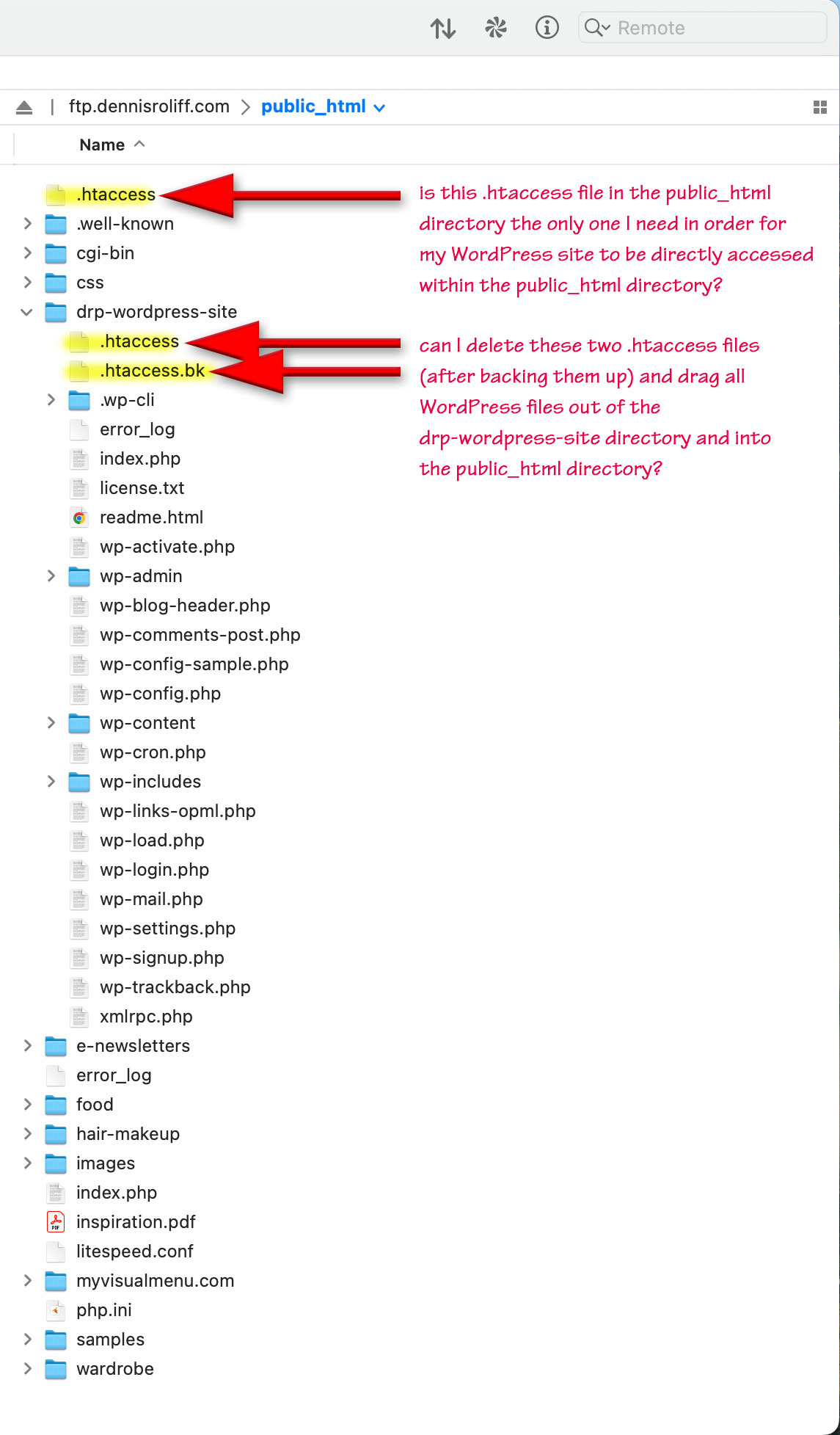
Thanks and regards,
Dennis
- This reply was modified 5 months, 4 weeks ago by dennisroliff.
- This reply was modified 5 months, 4 weeks ago by dennisroliff.
Forum: Fixing WordPress
In reply to: getting my site out of subdirectoryHello @fierevere ,
Thanks for the input. As I was thinking about it last night, I remembered there is a general setting for this in the backend of my site. You were correct. I’ll get to that later today to see if it makes any difference in load time.

Regards,
Dennis
Forum: Fixing WordPress
In reply to: post max size is smaller than upload max file sizeHello @macmanx ,
I’ve got it knocked. Talked to my service provider and they indicated that their servers don’t generate php.ini files. In order to make tweaks to PHP functions, as you mentioned, the root level .htaccess file was key.
 Forum: Fixing WordPress
In reply to: post max size is smaller than upload max file sizehello @macmanx,
thanks for the input. i spent several hours and a lot of google searching trying to figure out how to locate my php.ini file. apparently it’s supposed to be in the root directory… wasn’t there and none of the ‘how to locate your php.ini file’ hacks worked.
here is my current main .htaccess file:
#<IfModule mod_headers.c>
#    Header set Access-Control-Allow-Origin "*"
#</IfModule>
# Removed the prior lines per MDD Hosting ticket 746681


RewriteCond %{HTTPS} off
RewriteCond %{REQUEST_URI} !^/[0-9]+\..+\.cpaneldcv$
RewriteCond %{REQUEST_URI} !^/\.well-known/acme-challenge/.+$
RewriteCond %{REQUEST_URI} !^/\.well-known/pki-validation/[A-F0-9]{32}\.txt(?:\ Comodo\ DCV)?$
RewriteRule ^(.*)$ https://%{HTTP_HOST}%{REQUEST_URI} [L,R=301]
<IfModule LiteSpeed>
CacheLookup public on
</IfModule>

# BEGIN WordPress
# The directives (lines) between "BEGIN WordPress" and "END WordPress" are
# dynamically generated, and should only be modified via WordPress filters.
# Any changes to the directives between these markers will be overwritten.

<IfModule mod_rewrite.c>
RewriteEngine On
RewriteRule .* - [E=HTTP_AUTHORIZATION:%{HTTP:Authorization}]
RewriteBase /
RewriteRule ^index\.php$ - [L]
RewriteCond %{REQUEST_FILENAME} !-f
RewriteCond %{REQUEST_FILENAME} !-d
RewriteRule . /index.php [L]
</IfModule>

# END WordPress

# php -- BEGIN cPanel-generated handler, do not edit
# Set the “alt-php83” package as the default “PHP” programming language.

<IfModule mime_module>
  AddHandler application/x-httpd-alt-php83 .php .php8 .phtml
</IfModule>

# php -- END cPanel-generated handler, do not edit
Forum: Fixing WordPress
In reply to: website loading extremely slowlyHi @tfanelli ,
Thanks for your generous and expert feedback. After going to my CPanel under ‘Softwares’ I realized I was using the wrong Software (PHP Selector) to change the PHP version of my domain ( see image ). I took the advice of the ‘information popup’ and utilized ‘MultiPHP Manager’ to update the PHP version on my domain to 8.3.
I was indeed running W3 Cache plugin but it must not have been configured correctly. I reverted to LiteSpeed Cache (which is also configurable – I’ll have to look into that to see what I can tweak for better persormance) and seem to be getting faster initial load speeds ( less than a second ).
Also, here is what my current .htaccess file looks like
#<IfModule mod_headers.c>
#    Header set Access-Control-Allow-Origin "*"
#</IfModule>
# Removed the prior lines per MDD Hosting ticket 746681


RewriteCond %{HTTPS} off
RewriteCond %{REQUEST_URI} !^/[0-9]+\..+\.cpaneldcv$
RewriteCond %{REQUEST_URI} !^/\.well-known/acme-challenge/.+$
RewriteCond %{REQUEST_URI} !^/\.well-known/pki-validation/[A-F0-9]{32}\.txt(?:\ Comodo\ DCV)?$
RewriteRule ^(.*)$ https://%{HTTP_HOST}%{REQUEST_URI} [L,R=301]
<IfModule LiteSpeed>
CacheLookup public on
</IfModule>

# BEGIN WordPress
# The directives (lines) between "BEGIN WordPress" and "END WordPress" are
# dynamically generated, and should only be modified via WordPress filters.
# Any changes to the directives between these markers will be overwritten.

<IfModule mod_rewrite.c>
RewriteEngine On
RewriteRule .* - [E=HTTP_AUTHORIZATION:%{HTTP:Authorization}]
RewriteBase /
RewriteRule ^index\.php$ - [L]
RewriteCond %{REQUEST_FILENAME} !-f
RewriteCond %{REQUEST_FILENAME} !-d
RewriteRule . /index.php [L]
</IfModule>

# END WordPress

# php -- BEGIN cPanel-generated handler, do not edit
# Set the “alt-php83” package as the default “PHP” programming language.

<IfModule mime_module>
  AddHandler application/x-httpd-alt-php83 .php .php8 .phtml
</IfModule>

# php -- END cPanel-generated handler, do not edit
As you can see, I removed 3 lines as suggested by my web hosting company tech support. There is a block of LiteSpeed code, a block of WordPress code and a block of code for the PHP version. If you see anything that might be amiss, let me know if you can. Thanks.
Dennis
here is an illustrative composite jpeg I put together:

or to see an enlargeable version of this jpeg go here
- This reply was modified 1 year, 7 months ago by dennisroliff.
Forum: Everything else WordPress
In reply to: permalink questionHi Steven,
Thanks for the input. I did the search and replace with Mac’s textedit app. It worked great!
Forum: Fixing WordPress
In reply to: a tricky website transformation processHi @sterndata ,
Thanks for the input. I don’t believe that xyz.com is a wordpress site.
However, I won’t be using anything from the xyz.com database. I am utilizing xyz.com for information for the xyzblog.com site which I am developing to utilize as the client’s new site and eventually pointing xyz.com to the server space containing xyzblog.comThe actual websites are xyz.com = jpalenhouse.com and xyzblog.com = jpalenhouseblog.com
Dennis
Forum: Fixing WordPress
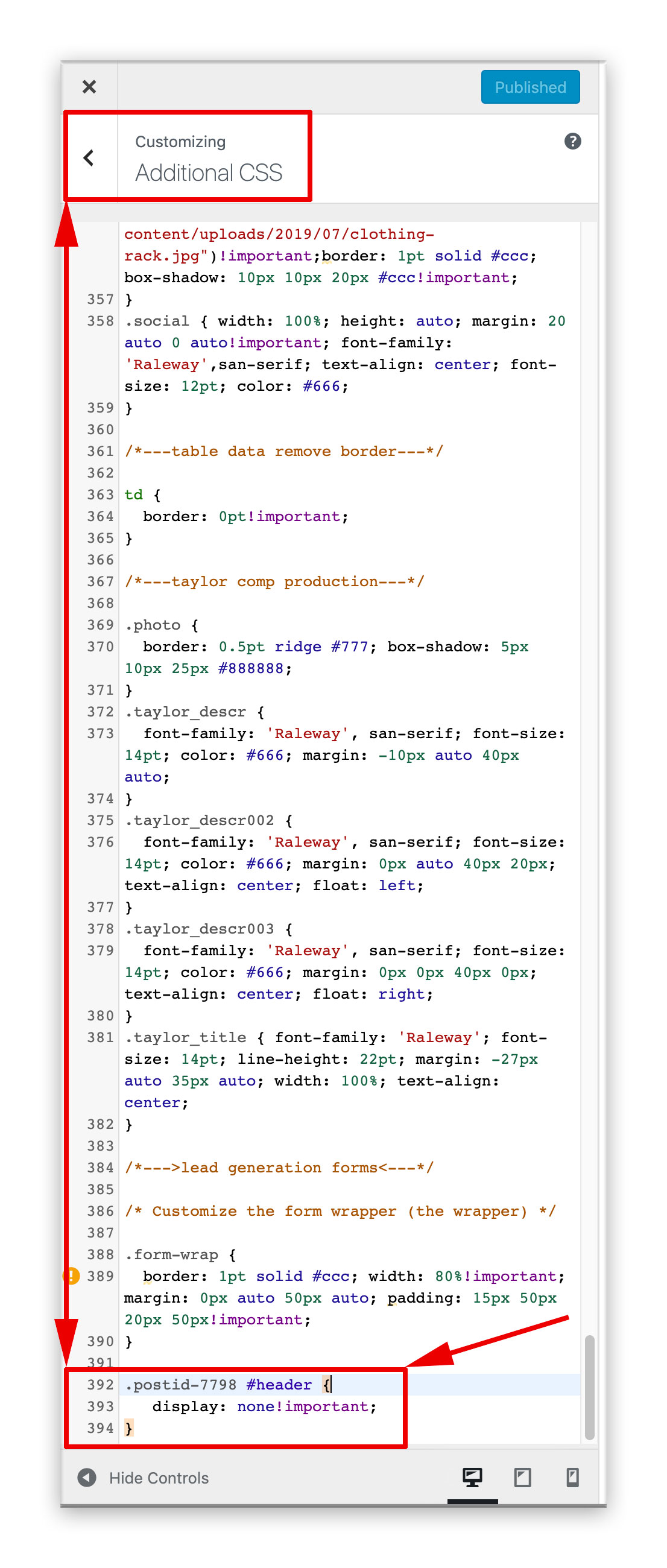
In reply to: removing post header on single postThat was IT!!! Thanks so much for your patient analysis.
Now I can continue with this and the 13 other potential revenue source projects I have going on.
So relieved. Let me know if there is a way I can give you props through this forum as I’m able to do on codingforums.com
Dennis
Forum: Fixing WordPress
In reply to: removing post header on single postI see what you are saying. I just noticed that too. Let me try to
remedy this. Man, if this fixes it, that would be great.I’ll let you know.
Thanks.
Dennis
Forum: Fixing WordPress
In reply to: removing post header on single postForum: Fixing WordPress
In reply to: removing post header on single postHi @crouchingbruin ,
Thanks for your input.
I’ve tried that, even with !important; and it does not seem to work in any
of the three browsers I use, the latest versions of… Chrome, Safari, Firefox.Dennis
Oops,
It’s my fault for not reading the very bottom section of the pricing plan.
The initial payment is in ‘subscription’ format and the subscription can be cancelled at any time, but the purchaser will lose access to upgrades and support upon cancellation, is that correct? Or does a certain amount of support time come with the initial payment? This business model on the subscription plan is not uncommon and for those who just assume that it’s a one time payment and pay with credit card, may just forget about it and not even notice that they are automatically being charged an additional fee annually. Which is good for imagely’s bottom line. What I plan on doing is purchasing the NexGEN Plus and then cancelling the subscription right away so as not to forget that it’s an annual subscription. I see now that the higher price structure ( which I was surprised about at first ) includes the ability to install and activate on multiple sites. That is well worth the extra money in my opinion.Forum: Plugins
In reply to: [Contact Form 7] contact form 7 ~ email destinationHi Neil,
Thanks.
Dennis