

Most teams use functional testing to confirm that features work as expected. I validate inputs, outputs, and defined flows, then move on once the requirement is met. As a result, the test suite looks complete.
However, this approach breaks down once features are exercised together. Tests still pass because functions behave correctly in isolation, while behavior across workflows, state transitions, and dependencies is never validated as a whole.
Therefore, functional testing becomes effective when it is designed to verify system behavior across interactions, not isolated outcomes. By testing shared state, execution order, and end-to-end flows, failures surface earlier and releases align more closely with real production behavior.
Overview
Types of Functional Testing
Functional testing covers multiple levels and approaches throughout the software development lifecycle.
- Unit Testing: The most granular level of testing, where individual components, such as functions or methods are tested independently, usually by developers.
- Integration Testing: Focuses on verifying that multiple components or modules work together correctly, ensuring proper data flow and interactions.
- System Testing: Tests the fully integrated system to confirm it meets all functional requirements, typically in an environment that closely resembles production.
- User Acceptance Testing (UAT): Performed by end-users or clients to validate that the software fulfills real-world requirements and is ready for deployment.
- Regression Testing: Re-executes previously successful tests to ensure new changes, bug fixes, or enhancements have not broken existing functionality.
- Smoke Testing: A preliminary check of a new build to confirm that the core functionalities are operational before conducting deeper testing.
- Sanity Testing: A focused, quick check to ensure recent fixes or minor changes work as intended without introducing major issues elsewhere.
Functional Testing Process
A structured functional testing process generally follows these steps:
- Understand Requirements: Review functional specifications, user stories, and business rules to define expected system behavior.
- Create a Test Plan: Define the objectives, scope, schedule, resources, and testing approach.
- Design Test Cases: Prepare detailed, step-by-step test cases that cover valid and invalid scenarios, including inputs and expected outcomes.
- Prepare Test Data: Generate realistic datasets that reflect normal usage and edge cases.
- Execute Test Cases: Run the tests, either manually or via automation, and record the outcomes.
- Compare and Report: Evaluate actual results against expected behavior. Log any discrepancies in a defect tracking system for the development team.
- Regression Testing and Retesting: Once bugs are fixed, retest the affected functions and run regression tests to ensure no new issues are introduced.
Functional vs Non-Functional Testing
Functional and non-functional testing differ primarily in what they evaluate:
| Aspect | Functional Testing | Non-Functional Testing |
|---|---|---|
| Purpose | Validates specific actions or features against requirements. | Measures attributes like performance, security, and usability. |
| Focus | Examines what the system does (behavior). | Examines how the system performs (speed, reliability, scalability). |
| Testing Basis | Functional specifications, user stories, business rules. | Performance benchmarks, security policies, user expectations. |
| Examples | Login, search, form submission, payment processing. | Load testing, stress testing, security audits, scalability checks. |
In this article, I will break down how functional testing works, what it should cover, and how to apply it effectively across real application flows.
What is Functional Testing?
Functional testing is a type of software testing that verifies the functionality of a software system or application by checking that ensuring that the system behaves according to the specified functional requirements and meets the intended business needs.
The goal of functional testing is to validate the system’s features, capabilities, and interactions with different components. It involves testing the software’s input and output, data manipulation, user interactions, and the system’s response to various scenarios and conditions.

Purpose of Functional Testing
Functional testing ensures that software features work as intended and meet specified requirements. It helps identify defects early, validates workflows, and ensures that changes do not break existing functionality.
The key purposes include:
- Verify feature behavior in isolation and in context: Testing individual components ensures they perform as intended, while testing them in combination reveals hidden issues caused by interactions or dependencies.
- Validate end-to-end workflows: Ensures sequences of actions, data flows, and user interactions operate seamlessly, preventing failures in real-world usage scenarios.
- Confirm adherence to business rules and specifications: Checks that all functional requirements are met accurately, reducing misalignment between development and stakeholder expectations.
- Detects regressions and unintended side effects: Identifies defects introduced by new code, enhancements, or bug fixes before they affect users.
- Improve system reliability and user confidence: By uncovering hidden failures and validating behavior comprehensively, functional testing ensures the application behaves predictably in production.
Benefits of Functional Testing
Here are the main benefits of functional testing:
- Identify Bugs Early: Helps identify bugs and errors quite early in the development process.
- Requirement Validation: Helps ensure that the application fulfills user requirements and specifications as expected,
- Better User Experience and Quality: By ensuring seamless functionality, functional tests help improve user experience and software quality and reliability.
- Regulatory Compliance: Ensures that the software complies with industry standards, regulations, and legalities.
- Cross Platform Compatibility: Verifies that the application can function seamlessly across different platforms, environments and user conditions.
What to Test in Functional Testing?
Functional testing focuses on verifying that all aspects of an application work according to requirements. It goes beyond checking individual features to ensure that workflows, data handling, and user interactions function correctly under expected conditions.
Key areas to test include:
- Core features and functionality: Validate that each primary feature, such as login, search, form submissions, or payment processing, works as intended.
- User workflows and scenarios: Test end-to-end sequences, ensuring that steps from start to finish execute correctly and handle expected variations.
- Data validation and processing: Ensure input handling, data storage, and output generation adhere to specifications, including edge cases and invalid inputs.
- Business rules and logic: Verify that rules, conditions, and calculations embedded in the system produce correct results.
- Integration points: Check interactions between modules, APIs, databases, and external systems to confirm smooth communication and data flow.
- Error handling and messages: Test how the system responds to invalid inputs, failed processes, or exceptions, ensuring proper error messages and recovery.
- State management and dependencies: Validate that features correctly handle changes in state, dependencies, or prior actions that influence subsequent behavior.
Types of Functional Testing in 2026
Here are the main types of functional testing:
1. Unit Testing: This is performed by developers who write scripts that test if individual components/units of an application match the requirements. This usually involves writing tests that call the methods in each unit and validate them when they return values that match the requirements.
In unit testing, code coverage is mandatory. Ensure that test cases exist to cover the following:
- Line coverage
- Code path coverage
- Method coverage
2. Smoke Testing: This is done after the release of each build to ensure that software stability is intact and not facing any anomalies.
3. Sanity Testing: Usually done after smoke testing, this is run to verify that every major functionality of an application is working perfectly, both by itself and in combination with other elements.
Read More: Sanity Testing vs Smoke Testing
4. Regression Testing: This test ensures that changes to the codebase (new code, debugging strategies, etc.) do not disrupt the already existing functions or trigger some instability.
5. Integration Testing: If a system requires multiple functional modules to work effectively, integration testing is done to ensure that individual modules work as expected when operating in combination with each other. It validates that the end-to-end outcome of the system meets these necessary standards.
6. Beta/ Usability Testing: In this stage, actual customers test the product in a production environment. This stage is necessary to gauge how comfortable a customer is with the interface. Their feedback is taken for implementing further improvements to the code.
7. White box Testing: In White box testing, the tester validates the internal functioning of a software system.
8. Grey-box Testing: Grey-box testing Integrates aspects of both black-box and white-box testing, where the internal functions of the applications are partially tested. The functionality and security are tested here by utilizing the system’s architecture.
9.Exploratory Testing: In exploratory testing, testers explore the software to detect issues and evaluate user experience without depending on predefined test cases.
10.Blackbox Testing: In Black box testing, the software system’s functionality is validated without examining its internal functions. Testers assess the inputs, outputs, and user interactions to ensure the systems fulfill requirements.
11.Component Testing: Component testing is performed right after unit testing. In this approach, test objects are tested independently as a component without combining with other components.
12.Database Testing: Database testing verifies the accuracy and reliability of data within a database by making sure that database aspects like schema, CRUD (Create, Read, Update, Delete) etc. function as expected under different conditions.
13. Recovery Testing: Recovery testing validates the application’s ability to recover from various types of failures.
14. Static Testing: Static testing is a type of functional testing approach that includes the assessment of the software’s code, design, or documentation without actually executing the program.
Functional Testing Example
To understand the functional tests with the help of an example, here’s a test scenario to different kinds of functional testing techniques.
Test Scenario:
An online HRMS portal on which the user logs in with their user account and password. The login page has two text fields for username and password. It also has two buttons – Login and Cancel.
When successful, the login page directs the user to the HRMS home page. The cancel button cancels the login.
Specifications:
- The user id field requires a minimum of 6 characters, a maximum of 10 characters, numbers(0-9), letters(a-z, A-z), special characters (only underscore, period, hyphen allowed). It cannot be left blank. User id must begin with a number/character. It cannot include special characters.
- The password field requires a minimum of 6 characters, a maximum of 8 characters, numbers (0-9), letters (a-z, A-Z), all special characters. It cannot be blank.
Functional Testing Techniques
Here are the main types of functional testing techniques that are commonly used:
Key Functional testing Techniques
- End-user based/System Tests
- Equivalence Tests
- Boundary Value Tests
- Decision-based Tests
- Ad-hoc Tests
1. End-user based/System Tests
Test the system to gauge if all components are working perfectly in combination.
In the example, this would entail testing the customer journey – HRMS application loading, entering accurate credentials, directing to the home page, performing tasks, logging out of the system. This test ensures that this workflow proceeds and completes without any errors.
2. Equivalence Tests
Test data is segregated into partitions called equivalence data cases. In this test, data in each partition must respond in the same way. Consequently, you only need to test one condition across all partitions. If the condition does not work in one partition, it won’t work in any of the others.
In the example, since the user id field can accommodate a maximum of 10 characters, it should behave the same way anytime data > 10 is entered.
3. Boundary Value Tests
These tests are used to check how the system behaves when data limits are implemented.
In the example, since the user id requires a minimum of 6 characters, this test will be used to check how the system responds when less than 6 characters are entered.
4. Decision-based Tests
These tests are initiated to check for possible system outcomes when a particular condition is met.
In the example, the following decision-based tests can be undertaken:
- If incorrect credentials are entered, the system should inform the user and reload the login page.
- If correct credentials are entered, the system should take the user to the home page UI.
- If correct credentials are entered but the user wants to cancel login, the system should not direct to the home page UI.
Instead, it should reload the login page.
5. Ad-hoc Tests
These tests uncover discrepancies that might not have been identified in any of the other tests. Ad-hoc tests are targeted toward breaking the system and checking its response.
In the example, an ad-hoc test could be conducted to check the following:
While a user is still logged in, the administrator deletes their account – that too while the user is performing tasks. The test would check if the application responded gracefully in such a scenario.
How to Create a Functional Test Plan in 2026
Functional test planning helps define what to test, how to test it, and when to test it. A clear plan aligns the QA team with business goals and sets the foundation for effective test execution.
A good functional test plan should include:
- Scope of testing: Outline the features or user flows to be tested based on requirements.
- Test objectives: Define what the testing is expected to validate.
- Test environment: List the devices, browsers, and configurations to be used.
- Test data: Prepare relevant input values, user profiles, or edge cases needed for test coverage.
- Roles and responsibilities: Assign who writes, executes, and reviews test cases.
- Schedule and timelines: Establish when test activities will start, finish, and how often they repeat.
- Exit criteria: Define conditions under which testing can be considered complete.
Learn More: Test Plan vs Test Case: Core Differences
Process of Functional Testing
Functional testing follows a structured process to validate if the application behaves as expected. It is typically driven by user requirements and use cases.
The standard process includes:
- Review requirements: Understand functional specifications and user expectations for each feature.
- Write test cases: Create test scenarios that cover all use cases, edge cases, and acceptance criteria.
- Set up the test environment: Prepare devices, browsers, and supporting systems needed to execute the tests.
- Execute tests: Run the test cases manually or through automation tools to verify expected outcomes.
- Log defects: Record any deviations from expected behavior with detailed steps and screenshots.
- Re-test and regression: After fixes, re-run failed test cases and check for side effects across other areas.
- Sign-off: Once all critical issues are resolved and criteria are met, conclude the testing cycle.
Functional Testing vs Non-functional Testing: Differences
Functional testing focuses on the application’s operational aspects, ensuring its functions behave as intended as per specified requirements. On the other hand, non-functional testing validates non-functional aspects like the application’s performance, scalability, and reliability.
| Aspect | Functional Testing | Non-Functional Testing |
|---|---|---|
| Function | Validates software functionalities and behavior. | Validates system attributes like performance, stability etc. |
| Objective | Checks if the software meets specific requirements. | Checks if the software performs seamlessly under various conditions. |
| Techniques | Equivalence Tests, Boundary Value Tests, etc. | Performance testing, Load testing, stress testing, etc. |
| Example | Testing form submission | Testing performance under different network conditions |
| Tools Used | BrowserStack, Selenium | Jmeter |
Read More to find out the Differences Between Functional and Non-functional Testing
Why Automate Functional Tests in 2026?
Automation can certainly reduce time and effort in executing functional tests. Human error can also be lowered, preventing bugs from slipping past the test phase.
However, increased automation means that QAs need to develop test cases for each test. Naturally, formulating the right test case is pivotal, along with identifying the right automation tool for the purpose.
What to Look for in the Right Functional Testing Automation Tool
Choosing the right functional testing tool depends on how well it fits your team’s workflows, tech stack, and test coverage needs. Here are key factors to consider:
- Ease of use: The tool should be simple enough for all QA team members to adopt without steep learning curves.
- Cross-platform compatibility: It should support test creation and execution across different operating systems, browsers, and devices.
- Flexible scripting: The tool should support multiple programming languages or offer script conversion to suit team preferences.
- Custom reporting: Built-in reporting and logging features should help track failures and performance metrics efficiently.
- Reusable test cases: The tool must allow easy maintenance and reuse of test cases even if the application UI changes.
- CI/CD integration: It should integrate with CI/CD pipelines to run automated tests during every build cycle.
- Scalability: The tool must handle parallel testing or high-volume test runs as your product scales.
Top Functional Testing Tools and Frameworks in 2026
Here are some of the most reliable tools and frameworks used for functional testing in 2025:
- BrowserStack Automate: Cloud-based platform for running automated functional tests across 3,500+ real browsers and devices.
- BrowserStack App Automate: Enables automated functional testing of mobile apps on real iOS and Android devices.
- Selenium: Widely used open-source tool for automating browser-based apps across different browsers and platforms.
- Cypress: Fast, developer-friendly testing framework for modern web apps. Works directly in the browser.
- Playwright: Framework from Microsoft for reliable, cross-browser end-to-end testing of web applications.
- Puppeteer: Node.js library for automating Chrome and Chromium. Suitable for headless testing and quick functional checks.
- Appium: Open-source framework for automating native, hybrid, and mobile web apps on iOS and Android.
How to Perform Functional Testing with BrowserStack?
Consider scenario of adding an item to the shopping cart in bstackdemo.com using Browserstack Live.
1. Sign in to Browserstack and visit Live.
2. Choose the desired device and browser from the list of available devices on the Live Dashboard.
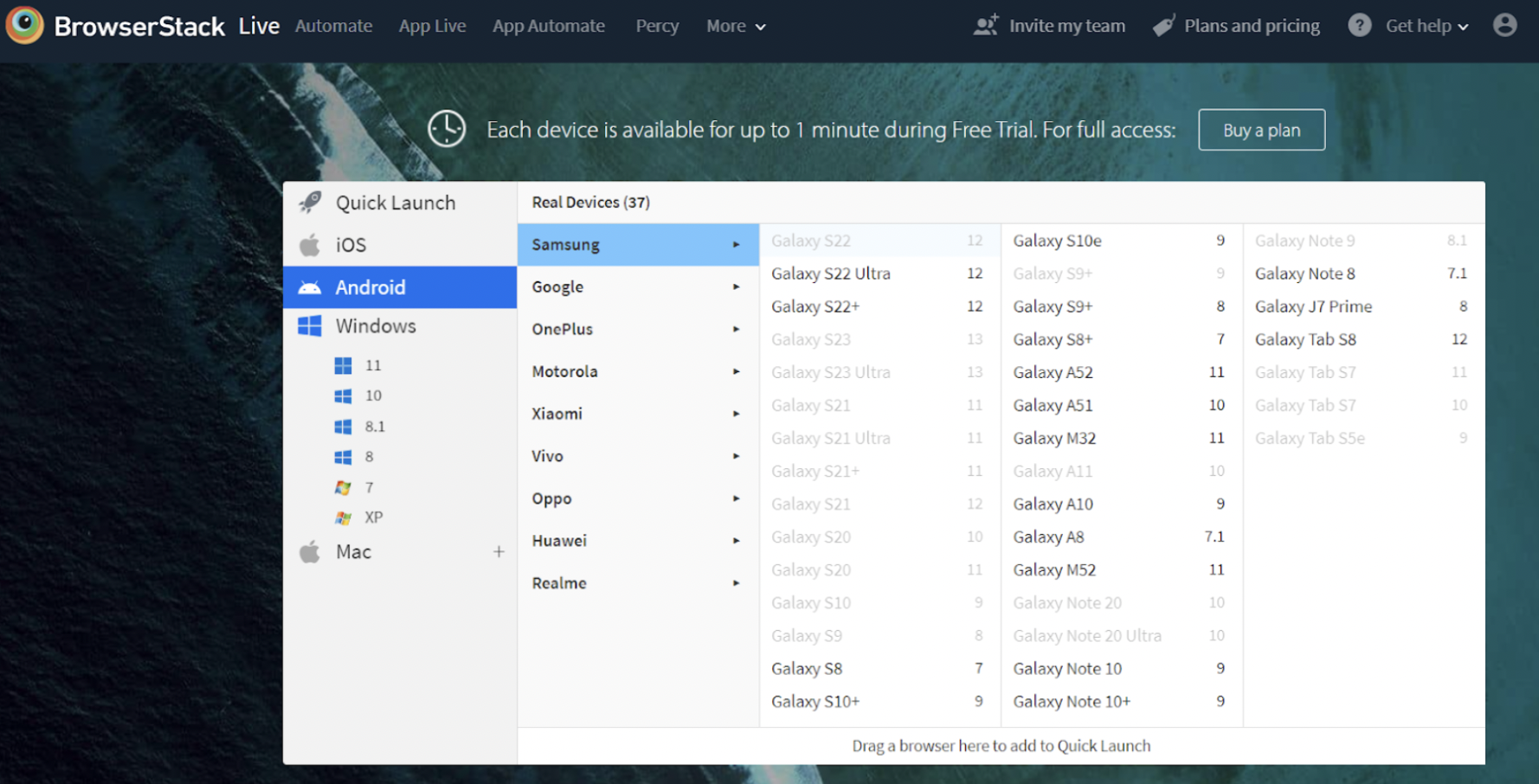
3. Select the Device and Browser you wish to test and input the Application URL (in this example, bstackdemo.com) on the selected browser.
Now execute the Add to Cart Test Case using the below test steps.
Step 1 – Login to Bstackdemo
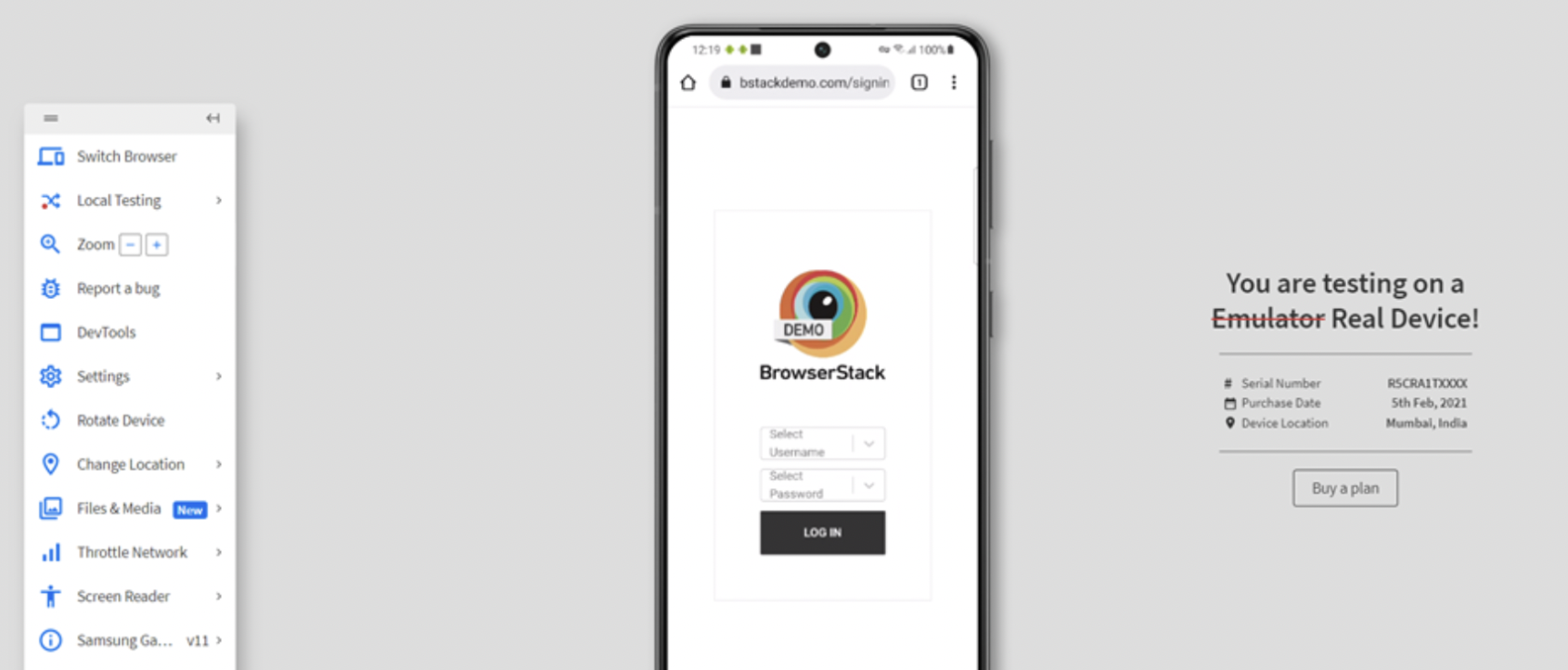
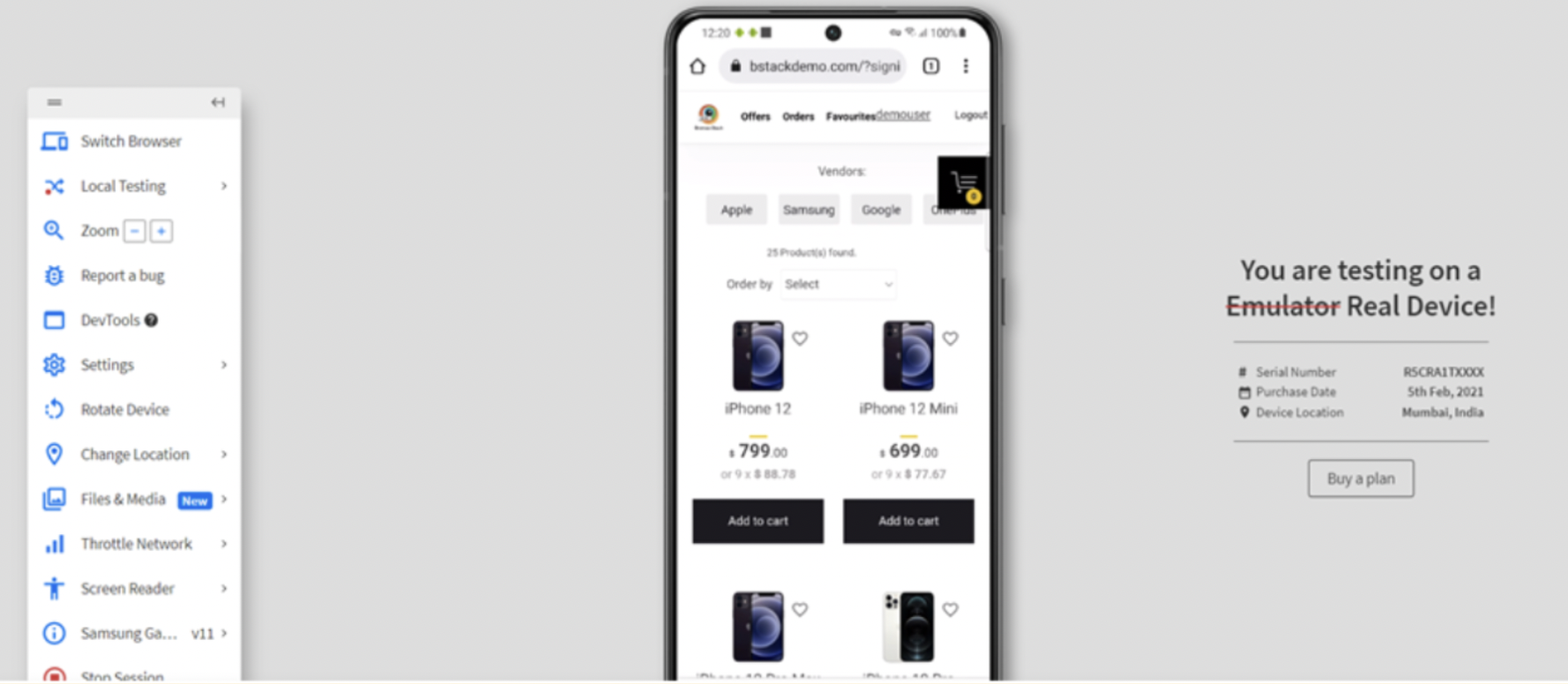
Step 2 – Select the item and Click Add to Cart button
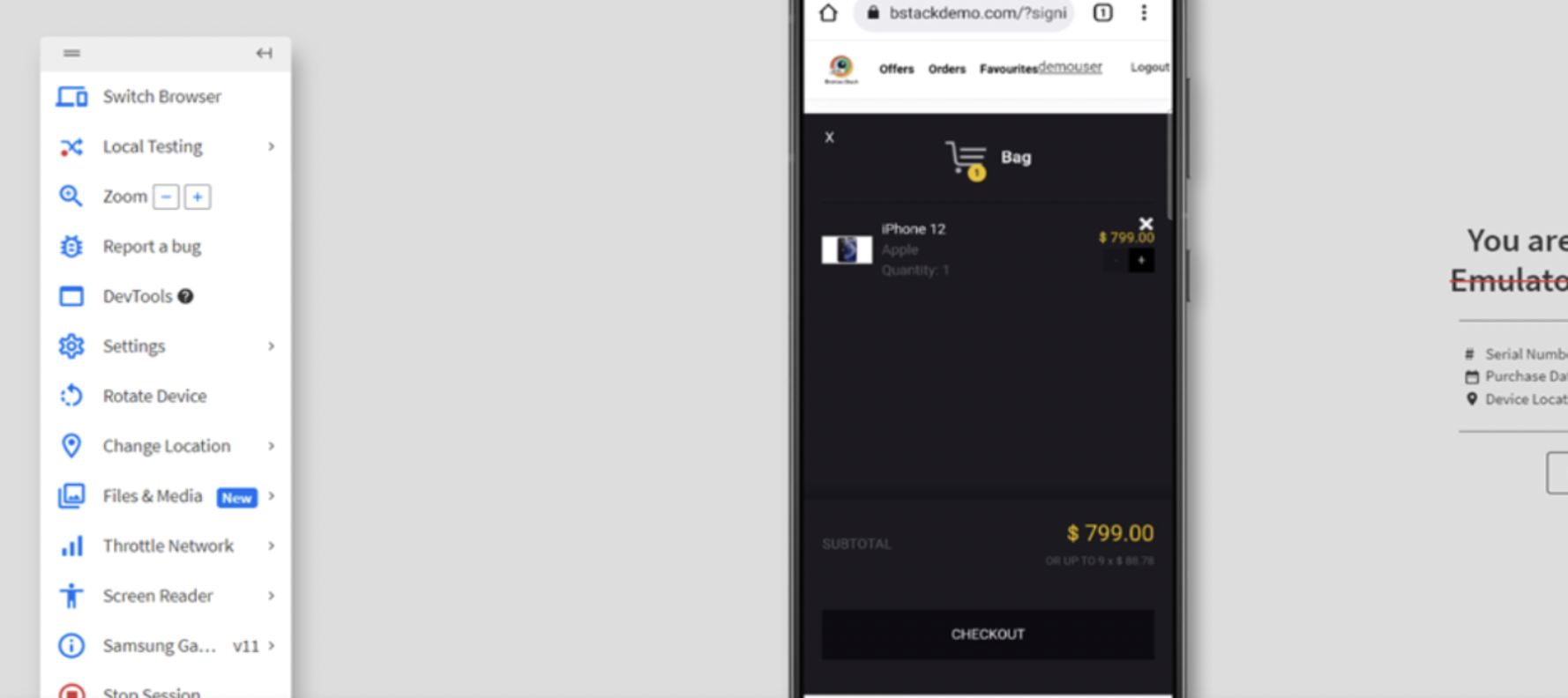
Step 3 – Item is added to Cart and Click on Checkout
Step 4 – Enter the mandatory Details and Click on Submit
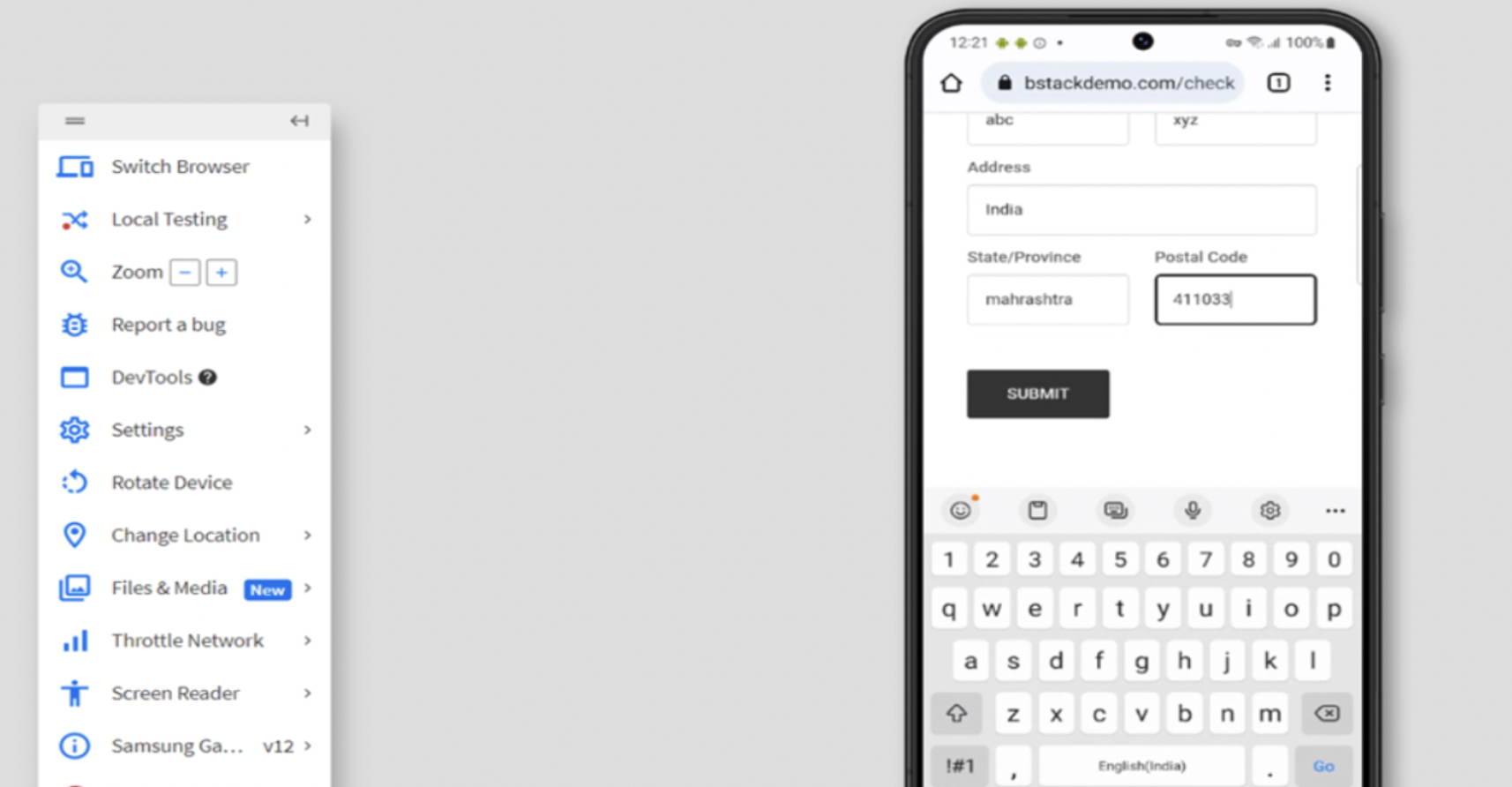
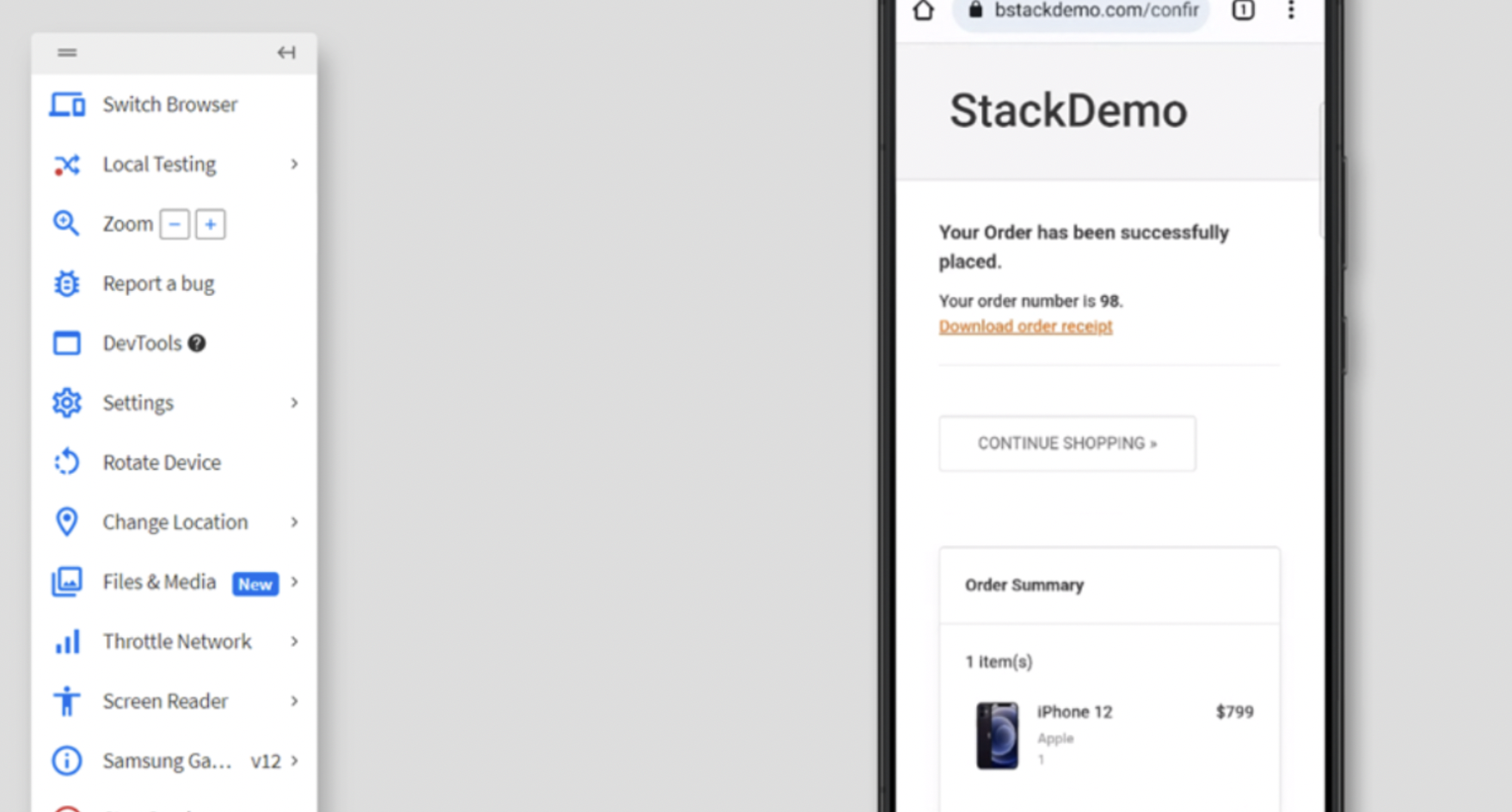
Step 5 – Verify Item has been shipped successfully and download order receipt has been generated
Limitations of Functional Testing
Functional testing also comes with a few limitations like:
- The entire focus is on functionality and overlooks other major issues like security vulnerabilities and therefore, has limited coverage.
- This approach cannot detect issues like resource usage, response times or system behavior under stress.
- It relies on complete test cases. If the test cases are not created properly or is incomplete, defects can be missed.
- Functional tests don’t address issues related to long-term use (like memory use). The focus lies on current functionality.
Best Practices for Functional Testing
Follow these best practices to ensure reliable and efficient functional testing:
- Define clear test objectives: Establish what each test is intended to verify before designing test cases.
- Test from the user’s perspective: Validate the system’s behavior based on actual user workflows and scenarios.
- Prioritize test coverage: Focus on critical features and edge cases to catch high-impact issues early.
- Maintain reusable test cases: Structure test cases to be modular and reusable across different scenarios.
- Keep test data consistent: Use realistic and stable data to ensure accurate, repeatable test results.
- Automate where possible: Automate repetitive functional tests to save time and reduce human error.
- Review and update test cases regularly: Align your test suite with product updates and UI changes.
- Use real devices for validation: Validate functionality across actual browsers and devices, not just emulators.
What Industry Experts Recommend for Functional Testing
Functional testing is often reduced to executing test cases or validating expected results. Experienced testing practitioners consistently emphasize a different approach. The following best practices are drawn from how well-known testing experts describe the purpose and effective use of functional testing in real-world teams.
- Alan Page, a former Microsoft software tester and co-author of How We Test Software at Microsoft, says functional testing should focus on exposing product risks and behaviors that help teams make release decisions, not just on increasing test coverage.
- James Marcus Bach, a leading authority on exploratory testing, states that functional testing is most effective when testers actively investigate and question product behavior instead of relying only on predefined test cases.
- Michael Bolton, an international testing consultant and educator, emphasizes that functional testing requires human judgment to evaluate whether system behavior truly works for users, beyond what automated checks can confirm.
- Cem Kaner, a professor and researcher in software testing, recommends designing functional tests around boundaries, inputs, and realistic usage scenarios to uncover defects that simple happy-path tests miss.
- Rex Black, a test strategy and management expert, advises that functional testing should be prioritized based on business and user risk rather than attempting equal coverage across all features.
- Angie Jones, a quality engineering leader and frequent conference speaker, highlights that functional testing delivers the most value when it validates real end-to-end user workflows instead of isolated actions.
Conclusion
Functional testing ensures software works correctly across features, workflows, and user interactions. It catches defects early, prevents regressions, and confirms that applications behave reliably in real-world scenarios.
Running functional tests on real browsers and devices reveals issues that isolated testing often misses, such as browser-specific behavior, rendering problems, or device-specific workflows. Platforms like BrowserStack let teams replicate these conditions easily, helping ensure that applications function consistently for every user, in every environment.