cal command in Linux with Examples
Last Updated :
11 Jul, 2025
The 'cal' command in Linux is a versatile tool that displays calendars directly in the terminal. If a user wants a quick view of the calendar in the Linux terminal, 'cal' is the command for you. Here’s a look at the usage and features of 'cal' command in Linux.
What is the 'cal' command?
cal command is a calendar command in Linux which is used to see the calendar of a specific month or a whole year. By default, entering cal in the terminal shows the calendar of the current month, with today's date highlighted. This provides a quick overview of the month at hand.
Syntax:
cal [ [ month ] year]
The rectangular bracket means it is optional, so if used without an option, it will display a calendar of the current month and year.
Displaying Different Time Frames
'cal': Shows current month calendar on the terminal with the current date highlighted.
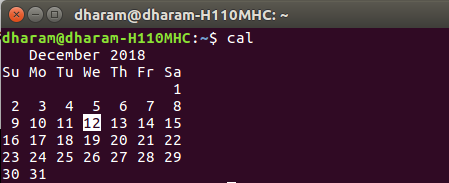
'cal -y': Shows the calendar of the complete current year with the current date highlighted.

'cal [month] [year]': Shows calendar of selected month and year. For example, 'cal 08 2000' displays the calendar for August 2000.

'cal [year]': Shows the whole calendar of the year. For example, 'cal 2018' displays the calendar for the year 2018.
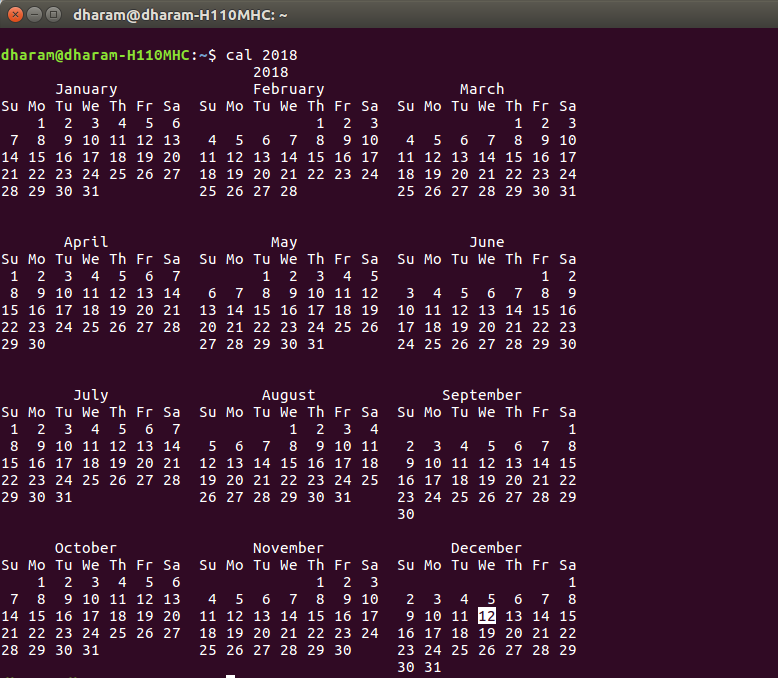
'cal [year]| more': When year is not be visible in the same screen use 'more' with 'cal' use spacebar to scroll down.

'cal -3': Shows calendar of previous, current and next month

'cal -j': Shows the calendar of the current month in the Julian calendar format not in the default Gregorian calendar format. In Julian calendar format, the date does not reset to 1 after every month's end i.e. after 31st Jan, Feb will start as 32nd Feb, not as 1st Feb. But in the Gregorian calendar format, the date is reset to 1 after every month's end i.e after 31st Jan, Feb will start as of 1st Feb.

Conclusion
In conclusion, mastering the 'cal' command in Linux provides users with a powerful tool for calendar management directly from the command line. The 'cal' command is invaluable for system administrators, developers, and anyone who needs quick access to a calendar without leaving the terminal environment. It integrates seamlessly into scripts and commands for automated tasks and scheduling.
Explore
Getting Started with Linux
Installation with Linux
Linux Commands
Linux File System
Linux Kernel
Linux Networking Tools
Linux Process
Linux Firewall
Shell Scripting & Bash Scripting
Linux Administrator System