Label Encoding is a data preprocessing technique in Machine Learning used to convert categorical values into numerical labels. Since most ML algorithms work only with numeric data, categorical features must be encoded before model training. In Label Encoding, each unique category is assigned an integer between 0 and the number of classes.
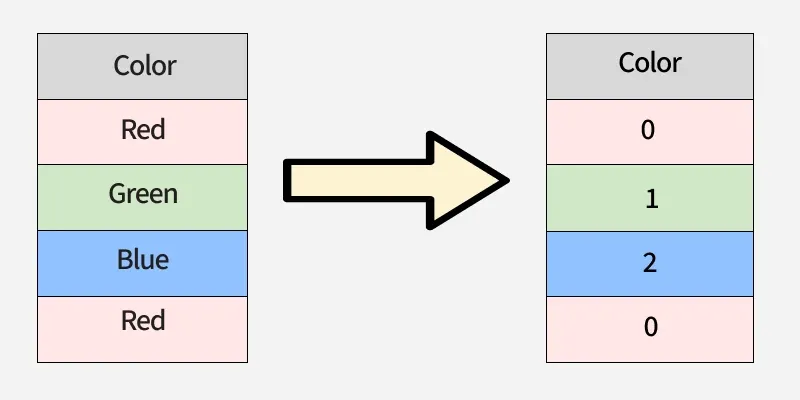 Label Encoding
The labels are assigned in alphabetical order not based on their position in the dataset which is why encoded values may appear non-sequential when viewed top-down in a DataFrame.
Why It Is Important
Label Encoding is important because many ML algorithms cannot process string values directly making numerical conversion essential for model training.
- Helps algorithms like SVM, Logistic Regression and KNN work with categorical data.
- More memory efficient compared to One Hot Encoding.
- Suitable when categorical features have a natural order or limited unique classes.
- Ensures consistent and compact representation of categories.
Understanding Label Encoding
Categorical data is broadly divided into two types:
- Nominal Data: Categories without inherent order like colors: red, blue, green.
- Ordinal Data: Categories with a natural order like satisfaction levels: low, medium, high.
Label encoding works best for ordinal data, where the assigned numbers reflect the order. But when you apply it to nominal data, the numbers accidentally create a fake ranking (e.g., Red = 0, Blue = 1, Green = 2).
Linear regression treats these numbers as if “Green > Blue > Red” and assumes equal gaps between them. This adds artificial relationships that don't exist and can mislead the model, producing wrong coefficients and predictions. Thus, the choice of encoding must align with the data type and the algorithm used.
When to Use Label Encoding
Label Encoding is suitable when converting categorical values into integers will not introduce misleading numeric relationships. It is most useful in the following situations:
- The feature is ordinal and has a natural order.
- The model being used is insensitive to integer ranking such as tree-based algorithms.
- The column contains many unique categories making One-Hot Encoding inefficient.
- Memory efficiency is required and additional dummy columns should be avoided.
- You need a consistent mapping of categories for training, validation and deployment.
LabelEncoder in Scikit-Learn
LabelEncoder is a utility in sklearn.preprocessing used to convert target labels (y) into numerical values ranging from 0 to n classes. It is mainly designed for encoding target variables, not input features making it different from OneHotEncoder or OrdinalEncoder.
It stores all unique classes in sorted order and assigns each class an index, which is then used for transformation and inverse transformation.
Key Attribute
classes_: An array containing all unique class labels discovered during fitting.
1. Encoding Numeric Labels
- LabelEncoder() creates an encoder that converts categories into numeric labels.
- fit() learns unique sorted classes and stores them in classes_.
- transform() maps labels to integers based on order.
- inverse_transform() converts encoded values back to original labels.
Python
from sklearn.preprocessing import LabelEncoder

le = LabelEncoder()
le.fit([1, 2, 2, 6])

le.classes_
le.transform([1, 1, 2, 6])
le.inverse_transform([0, 0, 1, 2])
Output:
array([1, 1, 2, 6])
2. Encoding String Labels
LabelEncoder can also encode non numeric labels (strings) as long as they are hashable.
Python
le = LabelEncoder()
le.fit(["paris", "paris", "tokyo", "amsterdam"])
list(le.classes_)
le.transform(["tokyo", "tokyo", "paris"])
list(le.inverse_transform([2, 2, 1]))
Output:
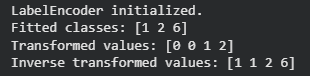 Encoding String Labels
Methods in LabelEncoder
- fit(y): Learns all unique class labels from the target data.
- fit_transform(y): Combines fit() and transform() to learn labels and returns encoded values.
- transform(y): Converts original categorical labels into integer-encoded values.
- inverse_transform(y): Converts encoded integers back to the original labels.
- get_params(deep=True): Returns encoder parameters as a dictionary.
- set_params(params): Updates the parameters of the encoder (supports nested estimators).
- get_metadata_routing(): Returns metadata routing details used internally by estimators.
- set_output(transform=None): Configures output format "default", "pandas", or "polars".
Implementing Label Encoding
1. Using scikit-learn’s LabelEncoder
- LabelEncoder is used to convert categorical text data into numeric values.
- Each unique category is mapped to an integer from 0 to n-classes.
- Useful when encoding single categorical columns or target labels.
- Stores mapping inside .classes_ so we can retrieve original labels later.
Python
from sklearn.preprocessing import LabelEncoder
import pandas as pd

data = pd.DataFrame({
    'Fruit': ['Apple', 'Banana', 'Orange', 'Apple', 'Orange', 'Banana'],
    'Price': [1.2, 0.5, 0.8, 1.3, 0.9, 0.6]
})
le = LabelEncoder()
data['Fruit_Encoded'] = le.fit_transform(data['Fruit'])
print(data)
print("Category Mapping:", le.classes_)
Output:
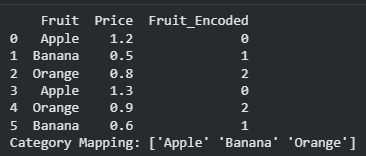 Using scikit-learn’s LabelEncoder
2. Using Pandas Categorical Codes
- Pandas offers a built-in approach to label encoding without external libraries.
- Converts category values into integer codes using astype('category').cat.codes.
- Faster for quick preprocessing inside Pandas workflows.
- Mapping can be extracted using .cat.categories.
Python
data['Fruit_Encoded_Pandas'] = data['Fruit'].astype('category').cat.codes
print(data)
print("Category Mapping:", dict(enumerate(data['Fruit'].astype('category').cat.categories)))
Output:
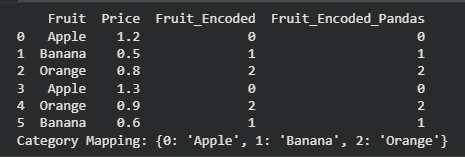 Using Pandas Categorical
3. Encoding Ordinal Data Manually
- Used when categories have a natural order.
- Manual dictionary mapping prevents incorrect ordering assumptions.
- Useful for models that rely on ranking information.
- Encoded using map() function in Pandas.
Python
data = pd.DataFrame({
    'Satisfaction': ['Low', 'High', 'Medium', 'Low', 'High'],
    'Score': [3, 8, 5, 2, 9]
})
satisfaction_order = {'Low': 0, 'Medium': 1, 'High': 2}
data['Satisfaction_Encoded'] = data['Satisfaction'].map(satisfaction_order)
print(data)
Output:
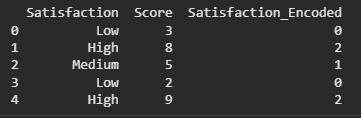 Encoding Ordinal Data Manually
4. Handling Unseen Categories in Test Data
- Real datasets may contain new categories not seen during training.
- Applying LabelEncoder directly may cause an error on unseen labels.
- check existence in .classes_ and assign default (-1).
- Ensures model stability during deployment.
Python
train = pd.DataFrame({'City': ['Delhi', 'Mumbai', 'Chennai', 'Delhi']})
test = pd.DataFrame({'City': ['Mumbai', 'Kolkata']})
le = LabelEncoder()
train['City_Encoded'] = le.fit_transform(train['City'])
test['City_Encoded'] = test['City'].apply(lambda x: le.transform([x])[0] if x in le.classes_ else -1)
print(train)
print(test)
Output:
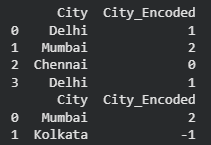 Handling Unseen Categories in Test Data
You can download full code from here.
Difference Between Label Encoding and One-Hot Encoding
Here we compare Label encoding with one hot encoding:
Features | Label Encoding | One-Hot Encoding |
|---|
Definition | Converts categorical labels into numeric integers. | Converts categorical labels into binary vectors. |
|---|
Memory Usage | Low, compact | High, increases feature dimensions |
|---|
Model Compatibility | Tree-based models | Linear and distance-based models |
|---|
Use Case | Suitable for ordinal data where order matters. | Suitable for nominal data with no intrinsic order. |
|---|
Output | Single column with integer values. | Multiple columns with 0/1 values. |
|---|
Advantages
- Simple and fast: Converts categorical values to numerical form efficiently.
- Memory efficient: Does not create additional columns like One-Hot Encoding making it suitable for large datasets.
- Works well for ordinal features: Preserves natural ordering among categories .
- Suitable for tree-based models: Algorithms such as Decision Trees, Random Forest, XGBoost and LightGBM do not misinterpret encoded integers as magnitude.
- Easy deployment: Provides a consistent mapping that can be reused for model prediction or inference.
Limitations
- Implied Ordering Issue: Encoded values may incorrectly suggest order in nominal categories.
- Poor Performance in Some Models: Linear Regression, Logistic Regression, KNN, and SVM may treat encoded integers as meaningful distances, causing inaccurate predictions.
- Unseen Category Problem: Fails when test data contains new categories not present during training, leading to errors or incorrect mapping.
- Not Suitable for High Cardinality: With too many unique categories, numerical labels may not capture relationships effectively.
Explore
Machine Learning Basics
Python for Machine Learning
Feature Engineering
Supervised Learning
Unsupervised Learning
Model Evaluation and Tuning
Advanced Techniques
Machine Learning Practice