Adding CSS in Django Templates
Last Updated :
12 Dec, 2025
Cascading Style Sheets (CSS) control the visual design and layout of HTML pages. Although external CSS files are commonly used, some situations require adding CSS directly inside an HTML template.
- Allows quick styling changes without creating a separate CSS file.
- Useful for small components or page-specific styles.
- Helps test or prototype designs faster.
- Provides flexibility when external files are not needed or practical.
Techniques for Adding CSS Directly in HTML Templates
1. Inline Styles with the style Attribute
Apply styles directly to HTML elements using the style attribute.
HTML
<!DOCTYPE html>
<html>
    <head>
        <title>Page Title</title>
    </head>
<body>
    <h2>Welcome To GFG</h2>
        <p style="color: red; font-size: 16px;">This is a paragraph with inline styles.</p>
</body>
</html>
2. Embedded CSS:
Embed CSS rules within <style> tags in the <head> section of the HTML document. This method allows for more extensive styling while keeping it contained within the HTML file.
HTML
<!DOCTYPE html>
<html>
<head>
    <style>
        p {
            color: blue;
            font-size: 14px;
        }
    </style>
</head>
<body>
<h2>Welcome To GFG</h2>
<p>Default code has been loaded into the Editor.</p>
</body>
</html>
3. <style> Block within HTML Body:
Similar to embedded CSS, place <style> blocks within the body of the HTML document to define styles for specific sections.
HTML
<!DOCTYPE html>
<html>
<head>
<title>Page Title</title>
</head>
  <body>
    <div>
        <h1>Heading</h1>
        <style>
            h1 {
                color: green;
                font-size: 24px;
            }
        </style>
    </div>
</body>
</html>
Bootstrap is a popular CSS framework that helps create responsive, visually appealing websites. Integrating Bootstrap into your Django project can improve the design and streamline the development process.
Understanding the Base HTML Template
Before integrating Bootstrap, let's examine the base HTML template provided. This template serves as the foundation for all other HTML pages in the Django project. It includes the necessary metadata and defines blocks for extending content.
HTML
<!DOCTYPE html>
<html lang="en">
<head>
    <meta charset="utf-8">
    <meta name="viewport" content="width=device-width, initial-scale=1">
    <title>Bootstrap demo</title>
    <link href="https://cdn.jsdelivr.net/npm/[email protected]/dist/css/bootstrap.min.css" rel="stylesheet">
</head>
<body>
  <style>
    p { color: aqua;
    }
  </style>
    {% block start %}
    {% endblock %}
  <script>
    alert('Hello Django!')
  </script>
    <script src="https://cdn.jsdelivr.net/npm/[email protected]/dist/js/bootstrap.bundle.min-js"></script>
</body>
</html>
In this base template:
- The meta tags define the character set and viewport for responsive design.
- The Bootstrap CSS file is linked from a CDN (Content Delivery Network).
- The {% block start %} and {% endblock %} tags define a block where other templates can inject their content.
- The Bootstrap JavaScript file is included at the end of the body tag for optimal loading performance.
- <script> tag includes JavaScript code directly within the HTML document. In this case, an alert message saying "Hello Django!" will be displayed when the page loads.
 snapshot of pop up
Integrating Bootstrap into Django Templates
To use Bootstrap’s styles and components in Django templates:
- Create a base template (e.g.,
base.html) that includes the Bootstrap CSS and JavaScript. - Extend the base template in other templates and add specific content within the defined blocks.
HTML
{% extends 'base.html' %}

{% block start %}
    <nav class="navbar navbar-expand-lg navbar-dark bg-dark">
        <div class="container-fluid">
            <a class="navbar-brand" href="#">Django Bootstrap Demo</a>
            <button class="navbar-toggler" type="button" data-bs-toggle="collapse" data-bs-target="#navbarNav" aria-controls="navbarNav" aria-expanded="false" aria-label="Toggle navigation">
                <span class="navbar-toggler-icon"></span>
            </button>
            <div class="collapse navbar-collapse" id="navbarNav">
                <ul class="navbar-nav">
                    <li class="nav-item">
                        <a class="nav-link active" aria-current="page" href="#">Home</a>
                    </li>
                    <li class="nav-item">
                        <a class="nav-link" href="#">About</a>
                    </li>
                    <li class="nav-item">
                        <a class="nav-link" href="#">Contact</a>
                    </li>
                </ul>
            </div>
        </div>
    </nav>

    <div class="container mt-5">
        <h1>Welcome to our Django Bootstrap Demo!</h1>
        <p>Django is a powerful web framework for building web applications, and Bootstrap is a popular CSS framework for designing responsive and mobile-first websites.</p>
    </div>
{% endblock %}
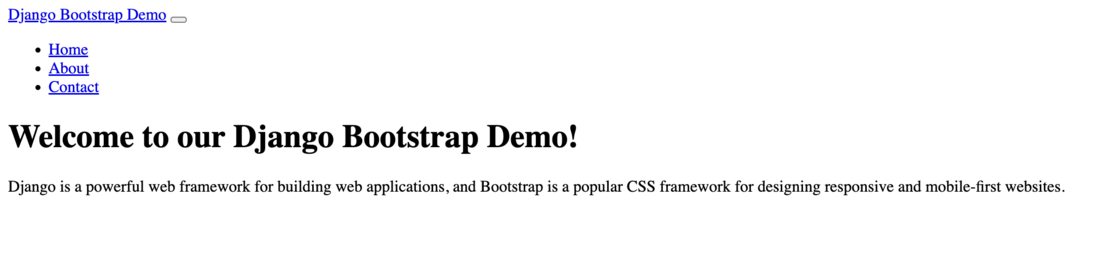 Snapshot of Django Template example
Explore
Python Fundamentals
Python Data Structures
Advanced Python
Data Science with Python
Web Development with Python
Python Practice