<?xml version="1.0" encoding="utf-8" standalone="yes" ?>
<feed xmlns="http://www.w3.org/2005/Atom">
  <title>125px</title>
  <link href="https://125px.com/" rel="self"/>
  <link href="https://125px.com/"/>
  <updated>2010-08-18T13:53:10+00:00</updated>
  <id>https://125px.com/</id>
  <generator>Hugo -- gohugo.io</generator>
  <entry>
    <title type="html"><![CDATA[Qudelix-5k]]></title>
    <link rel="alternate" href="https://125px.com/articles/audio/headphones/qudelix-5k/"/>
    <id>https://125px.com/articles/audio/headphones/qudelix-5k/</id>
    <author>
      <name>Tim Gray</name>
    </author>
    <published>2025-07-19T17:13:03-04:00</published>
    <updated>2025-07-19T17:13:03-04:00</updated>
    <content type="html"><![CDATA[<p>This is a short review of the Qudelix-5K headphone amp/bluetooth DAC.<sup id="fnref:1"><a href="#fn:1" class="footnote-ref" role="doc-noteref">1</a></sup></p>
<p>I recently wrote in a profile that listenig to music is a hobby, and it really is.  I like to think have decent ears, mostly from doing live sound in college.  I also have spent more money than I care to admit on headphones and headphone amps.  I&rsquo;m here to say you don&rsquo;t have to break the bank to get an amazing sounding headphone setup.<sup id="fnref:2"><a href="#fn:2" class="footnote-ref" role="doc-noteref">2</a></sup></p>
<p>First things first.  Spend your money in the right order.  Speakers/headphones first, amps second, DACs third.  20 years ago, there was decent differentiation between an expensive DAC and your phone/PC crap.  Nowadays, cheap DACs are really good.  For example, if you need something for your desktop, the Topping D10s is really quite good.</p>
<p>If you want a nice set of headphones for home, get the <a href="https://drop.com/buy/massdrop-sennheiser-hd6xx">Sennheiser HD 6XX</a>.  They are are $199, sound great, and are very comfortable.  These aren&rsquo;t headphones you are going to wear on the train or working out; they are for home listening. The law of diminishing returns is <em>very</em> true once you go beyond these headphones—save your money and don&rsquo;t be me.  If you want something for commuting/working out, go get a pair of bluetooth Sony/Bose/Beats/whatever for ~$200 and be happy.</p>
<p>You are probably listening to some streaming service from your phone.  Your phone may or may not have a 1/8&quot; headphone jack.  This is where the Qudelix-5K comes in.  It&rsquo;s a tiny bluetooth unit with a jack and a battery.  You plug your headphones into it, connect it to your phone, and listen to music.  Why is it so great?</p>
<p>Well first, it&rsquo;s small and has a battery.  Which means a) convenient and b) can drive most headphones.  If you don&rsquo;t know what &lsquo;drive most headphones&rsquo; means, don&rsquo;t worry.  There&rsquo;s a lot of stuff to say about impedances, sensitivities, and frequency responses, but there&rsquo;s no real need to go there.   I&rsquo;ve not had any issues driving my low and high impedance headphones with this little unit.  That&rsquo;s not to say that there aren&rsquo;t configurations that might have problems, but you are going to have to spend a lot of money to have issues.  Weird, right?  Buy the HD 6XX and you won&rsquo;t have to worry.  You might not have the same experience if you get some little 1/8&quot; dongle to plug into your phone.</p>
<p>You can run the unit by connecting to bluetooth or by plugging in with USB.  USB has lossless audio; bluetooth uses one of several bluetooth codecs.</p>
<p>The second great thing about the 5K is the EQ.  There&rsquo;s a 10 band parametric EQ where you can tweak your headphone&rsquo;s frequency response.  Don&rsquo;t be a &lsquo;purist&rsquo;—take advantage of this.  Every headphone has some inadequacies so you should tweak them to be more &lsquo;flat&rsquo;.  You can look up curves in the Qudelix-5K app or program in your own.<sup id="fnref:3"><a href="#fn:3" class="footnote-ref" role="doc-noteref">3</a></sup>  In addition, you can set an additional 10 band &lsquo;house curve&rsquo; (and save different presets), so if you want to boost the bass or tame the treble, you can do that <em>independently</em> of the headphone adjustments.</p>
<p>This thing is a steal.  Does it sound as good as much more expensive units?  Maybe, maybe not.  I can&rsquo;t tell and you probably won&rsquo;t be able to either. Will you get 2-10x the performance by spending 2-10x the money?  No.  This is one of the best audio purchases I&rsquo;ve made in years and I highly recommend it.</p>
<div class="footnotes" role="doc-endnotes">
<hr>
<ol>
<li id="fn:1">
<p>I&rsquo;m not writing this to get the extended warranty. This thing is serious bang for the buck.&#160;<a href="#fnref:1" class="footnote-backref" role="doc-backlink">&#x21a9;&#xfe0e;</a></p>
</li>
<li id="fn:2">
<p>If you are happy with whatever &lsquo;cheap&rsquo; setup you have, enjoy it.  Don&rsquo;t chase the dragon.&#160;<a href="#fnref:2" class="footnote-backref" role="doc-backlink">&#x21a9;&#xfe0e;</a></p>
</li>
<li id="fn:3">
<p>Search for &lsquo;oratory1990&rsquo; or look up &lsquo;audiosciencereview [headphone]&rsquo; for reviews of your headphones.  Then enter in EQ from the results.&#160;<a href="#fnref:3" class="footnote-backref" role="doc-backlink">&#x21a9;&#xfe0e;</a></p>
</li>
</ol>
</div>
    
        ]]></content>
  </entry>
  <entry>
    <title type="html"><![CDATA[Small camera bags]]></title>
    <link rel="alternate" href="https://125px.com/articles/photography/misc/small-camera-bags/"/>
    <id>https://125px.com/articles/photography/misc/small-camera-bags/</id>
    <author>
      <name>Tim Gray</name>
    </author>
    <published>2025-07-17T21:58:59-04:00</published>
    <updated>2025-07-17T21:58:59-04:00</updated>
    <content type="html"><![CDATA[<p>I&rsquo;ve been shooting a Leica M for many years now.  I appreciate a small setup, and that includes my camera bag.  For a long time, my go to bag was the <a href="https://www.the-digital-picture.com/Reviews/Lowepro-SlipLock-Pouch-50-AW-Review.aspx">Lowepro Sliplock 50 AW</a> (<a href="https://web.archive.org/web/20231202070102/https://www.the-digital-picture.com/Reviews/Lowepro-SlipLock-Pouch-50-AW-Review.aspx">archive.org</a>).  Back in 2009, I tried to buy a second one but they had been discontinued.<sup id="fnref:1"><a href="#fn:1" class="footnote-ref" role="doc-noteref">1</a></sup>  At some point in the intervening 15 years, the plastic clip on mine broke and I had to retire it.  I&rsquo;ve been searching for a similar sized bag since then.</p>
<p>In a quest for a really small but useful bag like that old Lowepro (1 camera + 2 lenses), I&rsquo;ve tried several.  One thing I have been specifically looking for is a small enough bag to fit in my backpack while traveling, for plane stowage reasons.  I like to travel with all carry-ons, so my clothes and stuff are in a shoulder bag, and my &lsquo;personal&rsquo; item is a backpack, which needs to hold all the other crap + my camera bag.  Once I get to the destination, the camera bag comes out and can be used with or without the backpack.</p>
<p>I think for the next trip we take, I&rsquo;ll probably go with a small bag appropriate for a camera with 1-2 lenses, and then a few other lenses in a cube or individual pouches in my backpack.</p>
<p>This post is for anyone looking at these bags for a similar camera setup.    There is info out there, but it wasn&rsquo;t enough to prevent me from buying several bags I&rsquo;m probably not going to use very much.  Learn from my mistakes.</p>
<h2 id="bags">Bags</h2>
<h3 id="think-tank-retrospective-5">Think Tank Retrospective 5</h3>
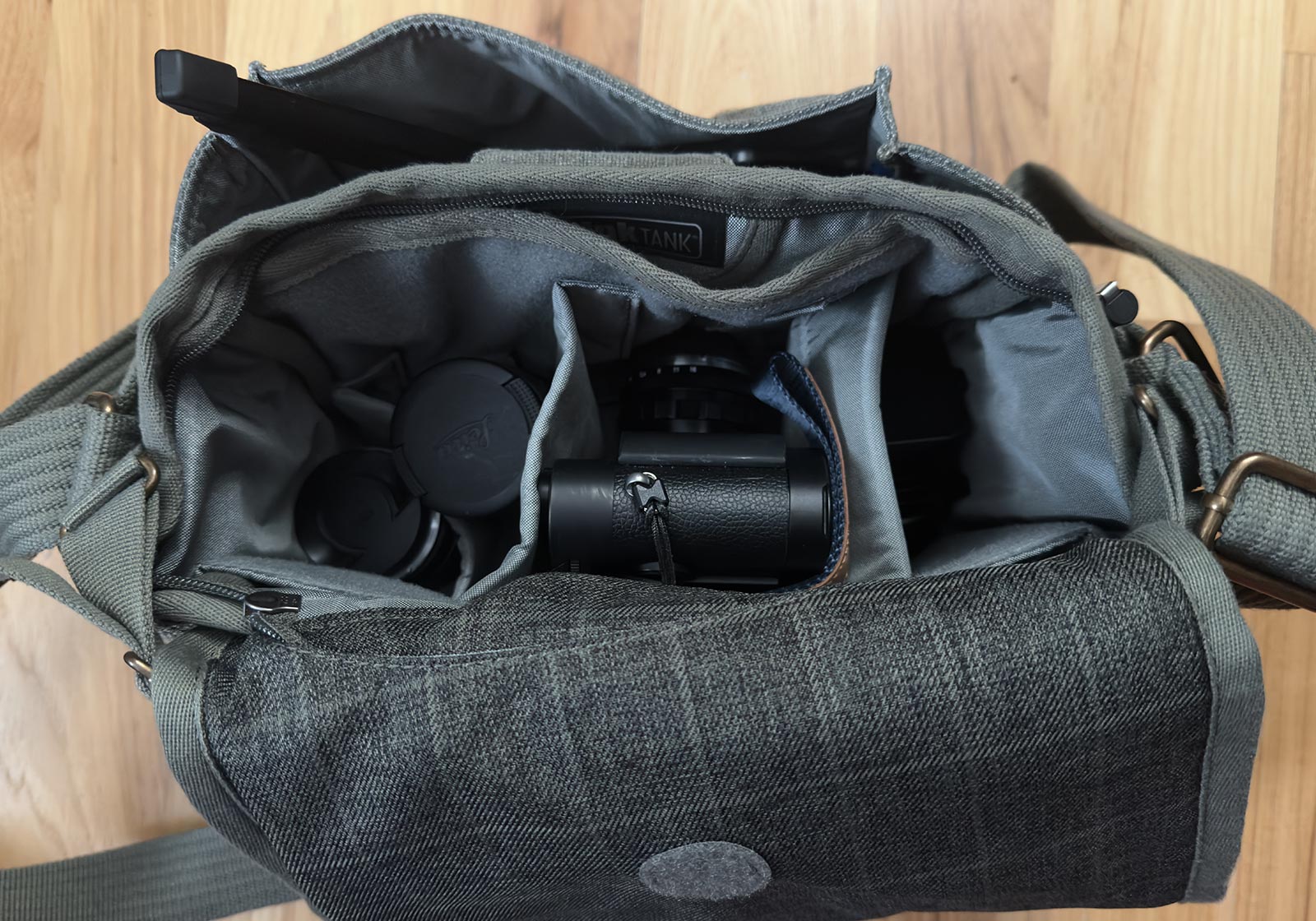
<p>I&rsquo;ve been really happy with Think Tank Retrospective bags.  I have two 5&rsquo;s, the original version and the v2.0.  The v2.0 is fantastic for M rangefinders, easily holding 1 or 2 cameras, several lenses, batteries, film, and a travel tripod. Definitely the default storage for stuff at home and often goes with me on car trips.</p>
<p>It is a bit bigger and doesn&rsquo;t really fit in a backpack well.  It can be a bit more than I&rsquo;d like to carry on those all-day on-your-feet outings I often have on vacation.</p>


<figure><img class="u-photo" src="https://125px.com/articles/photography/misc/small-camera-bags/retro-5.jpg"alt="Retrospective 5 bag with camera and 3 lenses"width="1600" height="1120" /><figcaption><p>Retrospective 5 bag with camera, 3 lenses, and mini tripod.</p></figcaption></figure>

<h3 id="think-tank-retrospective-4">Think Tank Retrospective 4</h3>
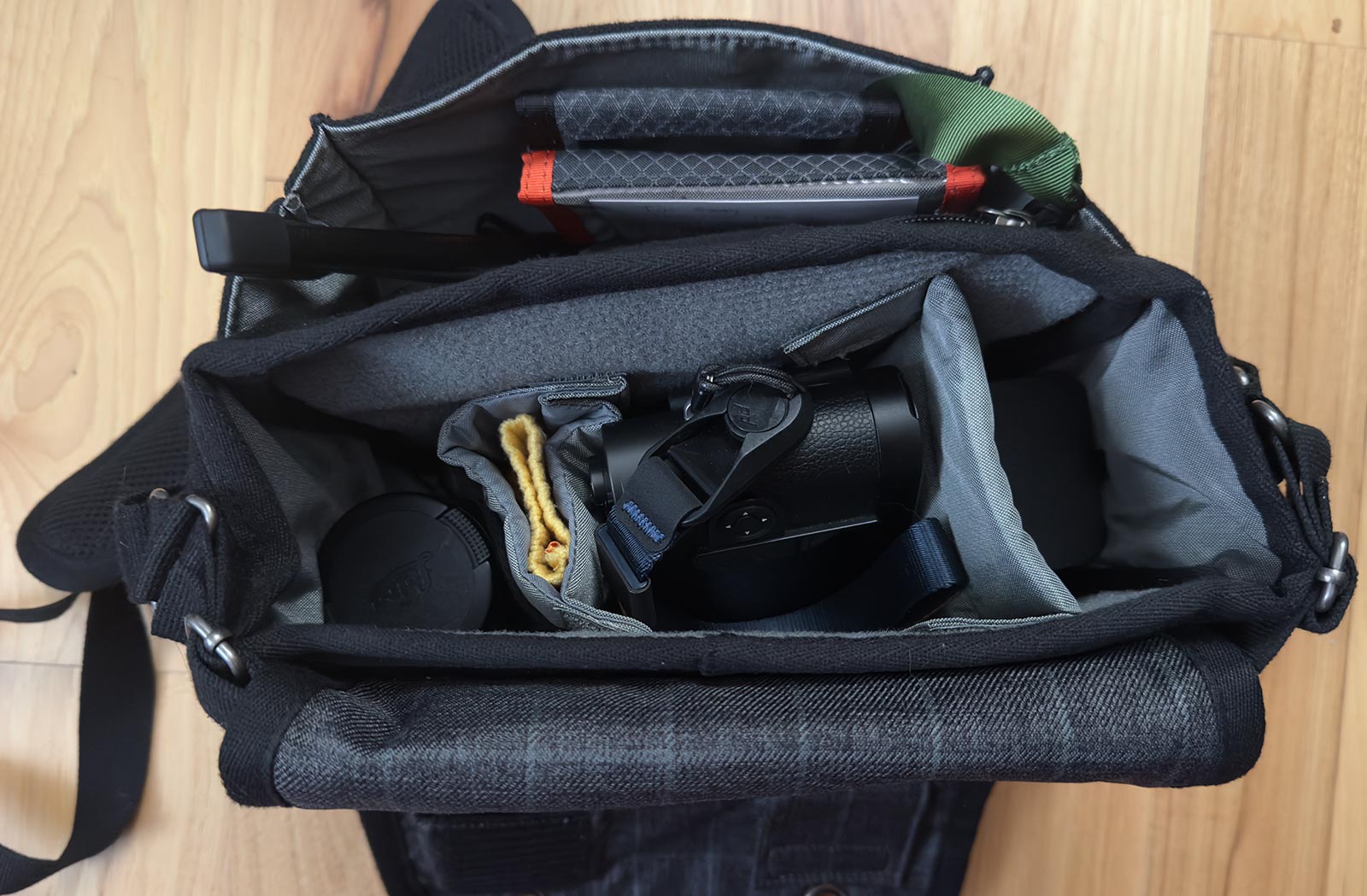
<p>The Retrospective 4 is also great.  A bit smaller in a noticeable way, and a great bag for 1 camera with a few lenses.  It has fewer pockets for accessories, and unfortunately loses the expandable water bottle pouch on the side.  The strap is also a step down.  You could probably make it fit into a backpack if needed.</p>


<figure><img class="u-photo" src="https://125px.com/articles/photography/misc/small-camera-bags/retro-4.jpg"alt="Retrospective 4 bag with camera and 2 lenses"width="1600" height="1049" /><figcaption><p>Retrospective 4 bag with camera, 2 lenses, and mini tripod.</p></figcaption></figure>

<h3 id="wandrd-rogue-sling-3l">Wandrd Rogue Sling 3L</h3>
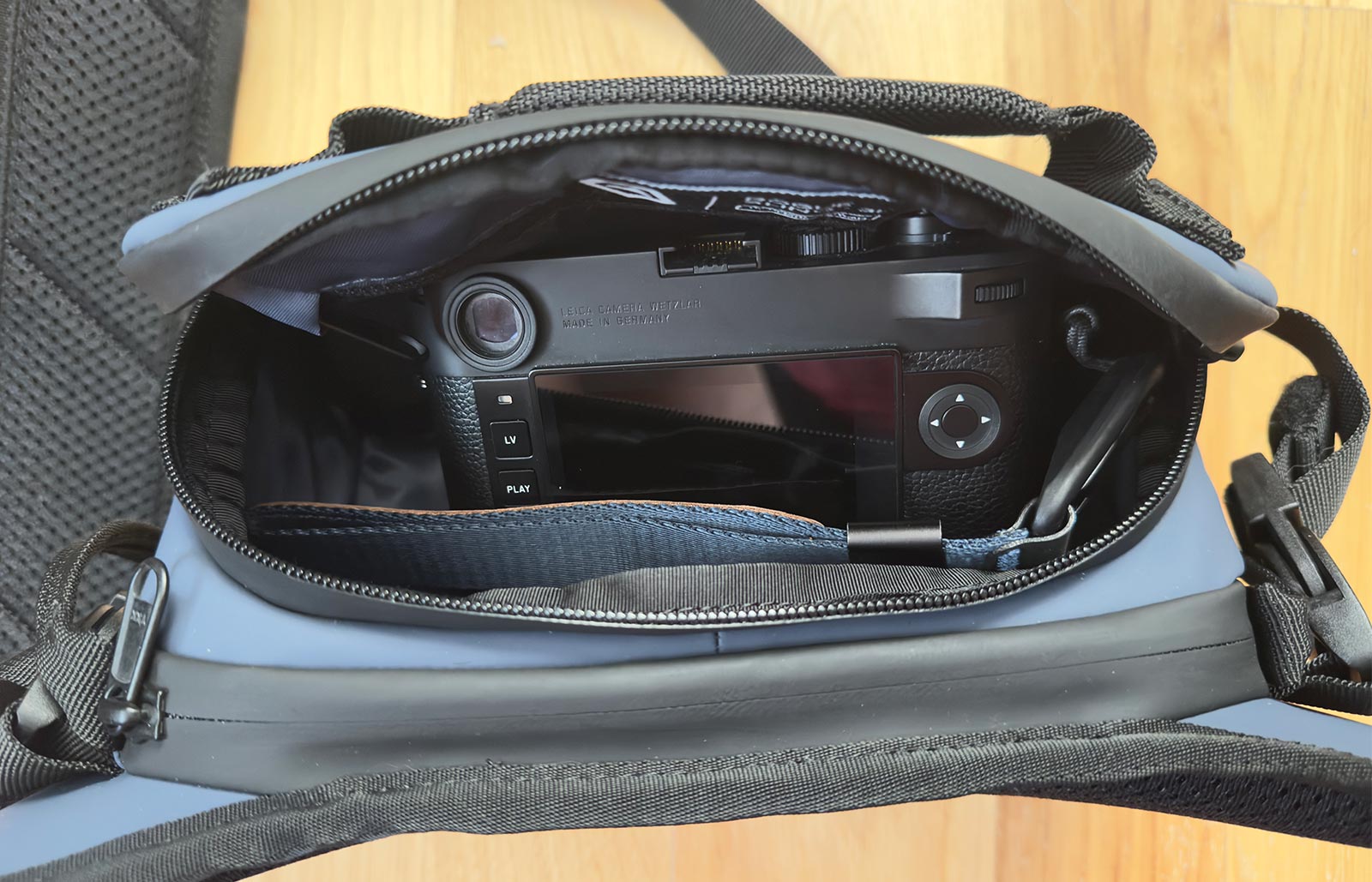
<p>Nice little bag but too small for an M camera in my opinion.  The camera fits, but you have to kind of force the zipper closed because a camera with lens is just a little too deep for the interior space.  It would comfortably fit the camera and lens if the lens was dismounted.  The bag is a lot bigger externally than it needs to be for its internal volume as well.  Maybe the 6L bag is the sweet spot, but I suspect it&rsquo;s not going to meet the &lsquo;fits in my backpack&rsquo; criteria.</p>


<figure><img class="u-photo" src="https://125px.com/articles/photography/misc/small-camera-bags/wandrd.jpg"alt="Wandrd Rogue 3L"width="1600" height="1029" /><figcaption><p>Wandrd Rogue 3L with camera barely fitting.</p></figcaption></figure>

<h3 id="clever-supply-sidekick-pro">Clever Supply Sidekick Pro</h3>
<p>I thought this little bag would work, but alas, it didn&rsquo;t.  My camera has a grip on it and the slightly thicker base plate prevents it from fitting in the padded insert.  Even without it, the camera is too tall for the bag to zip up.  It fits without the padded insert, but now your camera is just rattling around with no protection.</p>
<p>It&rsquo;s a nice little bag and a lot of the promo material on the website features Leica M&rsquo;s, but it didn&rsquo;t work out for me.</p>
<h3 id="wotancraft-pilot-35l">Wotancraft Pilot 3.5L</h3>
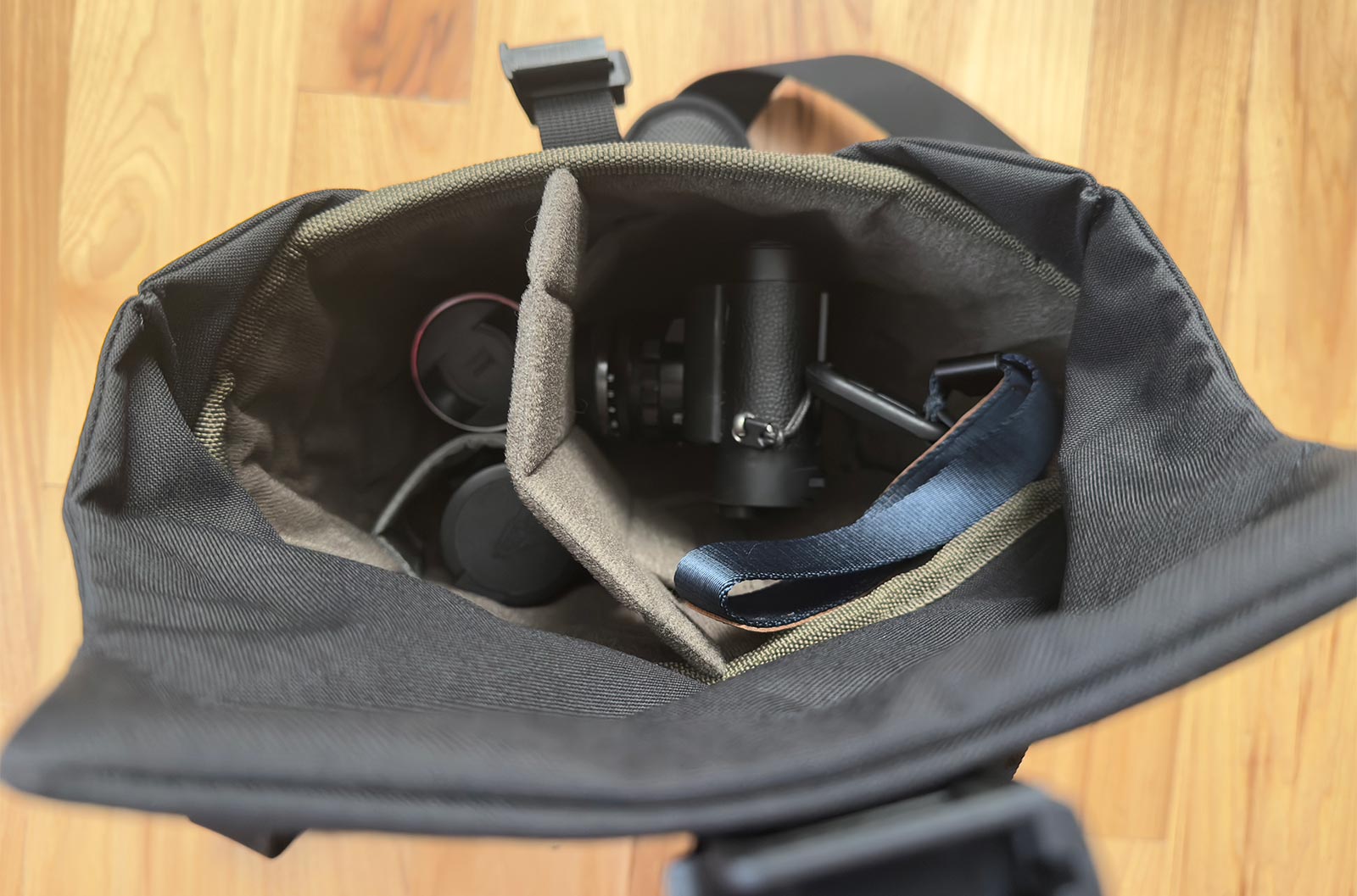
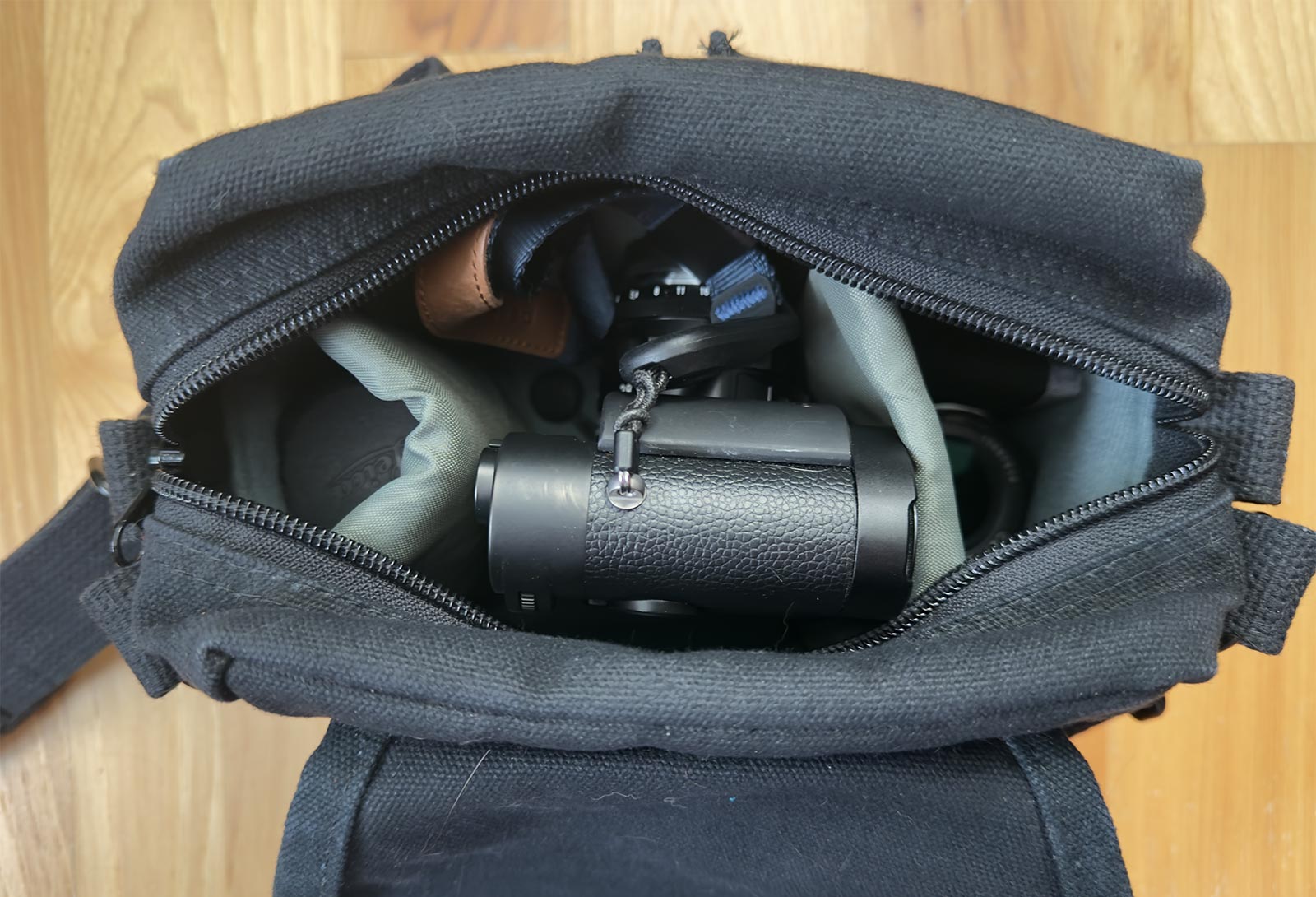
<p>This bag gets good reviews and is pretty nice.  The strap is good and easily adjustable and the front closure has a quick release mechanism which is very cool.  Easily holds a camera and and two extra lenses.  What&rsquo;s the problem then?  In my opinion, it&rsquo;s a weird shape for a Leica M; it&rsquo;s just too deep in way that makes it hard to use the internal space.  A nice bag if I&rsquo;m not worried about keeping it as compact as possible (e.g. a car trip) where I would appreciate having not to cram things in Tetris-style to maximize efficiency.  It would be pretty amazing I think if it was 2&quot; shorter.</p>
<p>I&rsquo;ve bought both small small and medium velcro accessories for the interior, and they kind of get in the way for a bag of this size.</p>


<figure><img class="u-photo" src="https://125px.com/articles/photography/misc/small-camera-bags/wotan-35-1.jpg"alt="Wotancraft Pilot 3.5L"width="1600" height="1057" /><figcaption><p>Wotancraft Pilot 3.5L with camera and 2 extra lenses.</p></figcaption></figure>


<figure><img class="u-photo" src="https://125px.com/articles/photography/misc/small-camera-bags/wotan-35-2.jpg"alt="Wotancraft Pilot 3.5L"width="1600" height="1200" /><figcaption><p>Wotancraft Pilot 3.5L with camera and 2 extra lenses with the divider folded down.</p></figcaption></figure>

<h3 id="wotancraft-pilot-2l">Wotancraft Pilot 2L</h3>
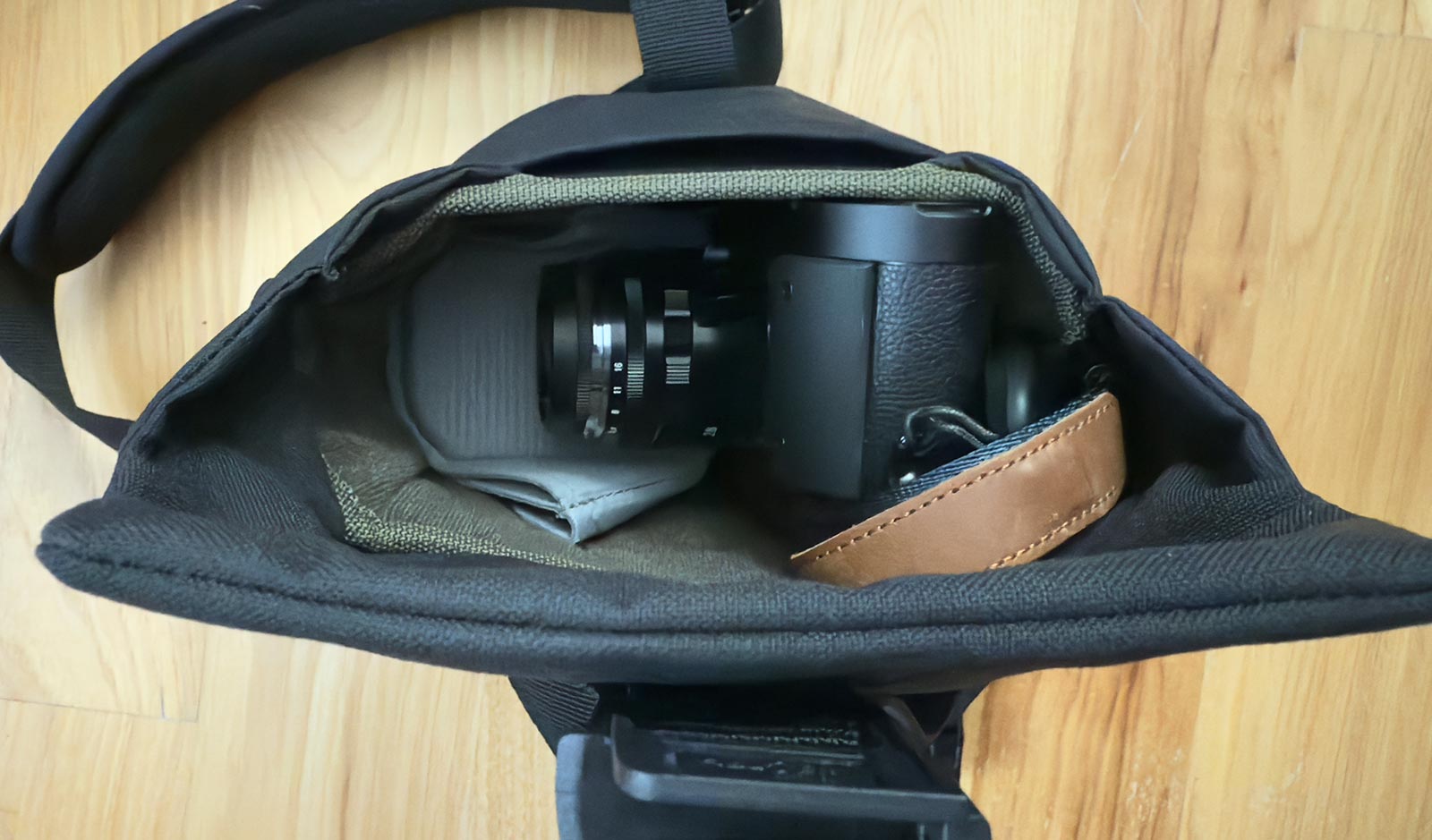
<p><strong>This</strong> is the bag that I&rsquo;ve been looking for.  Fits one camera with a lens mounted and one other lens.  No bigger than it needs to be.  Forget about the small-sized internal accessories; they interfere too much.  The external clip-on pouches are need if you want to carry a bit extra, i.e. another lens or a small notepad.</p>
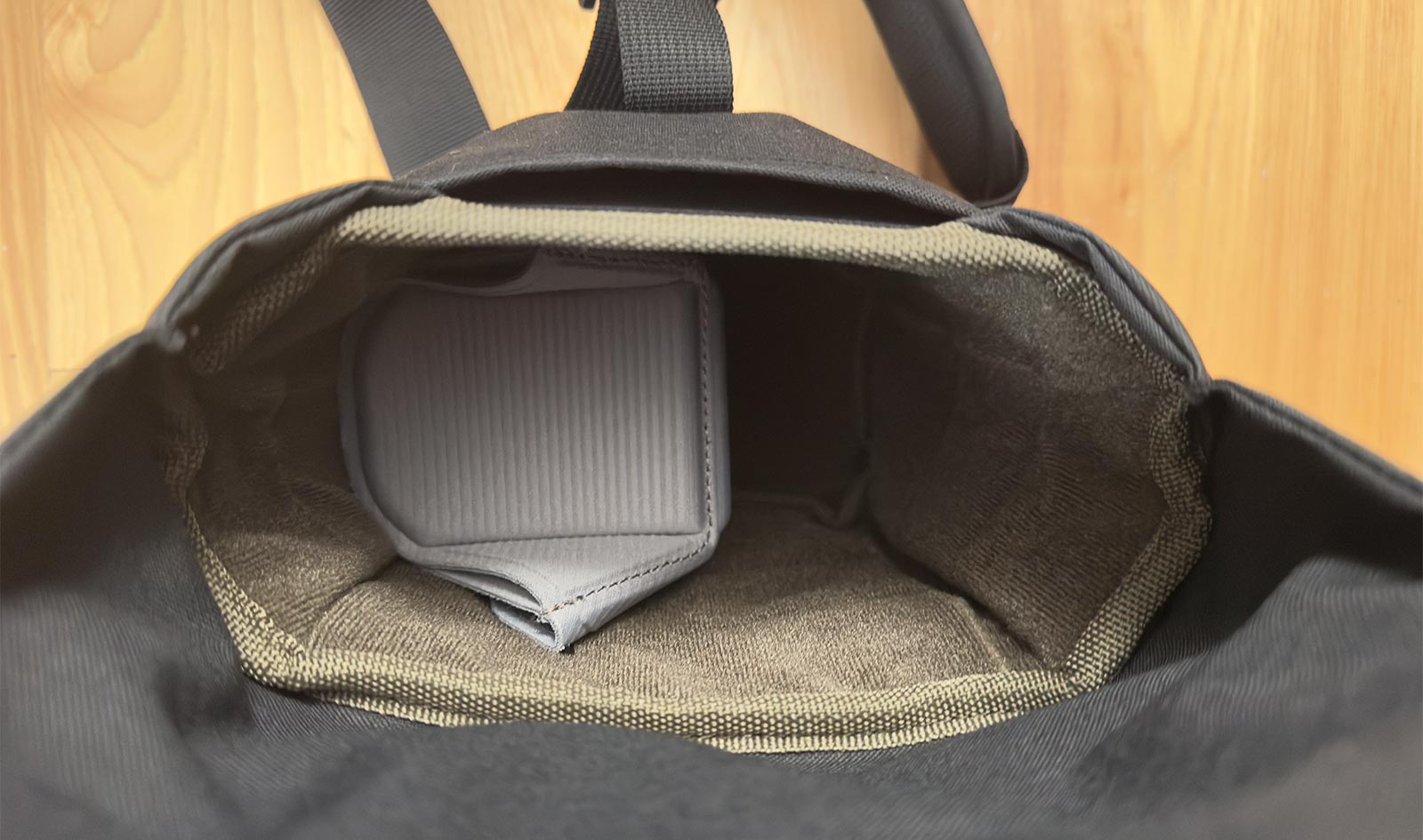
<p>The Peak Design FlexFold divider for their Everyday Sling 3L bag is perfect for this bag (and probably the 3.5L Wotancraft as well).  It lets divide the bag perfectly for a camera with lens mounted plus another lens, with the 2nd lens hidden down under the folded down divider.</p>
<p>A camera with a 90 Summicron mounted fits fine.  A camera with a 75 Summilux mounted also fits, but it&rsquo;s a wee bit tight.</p>


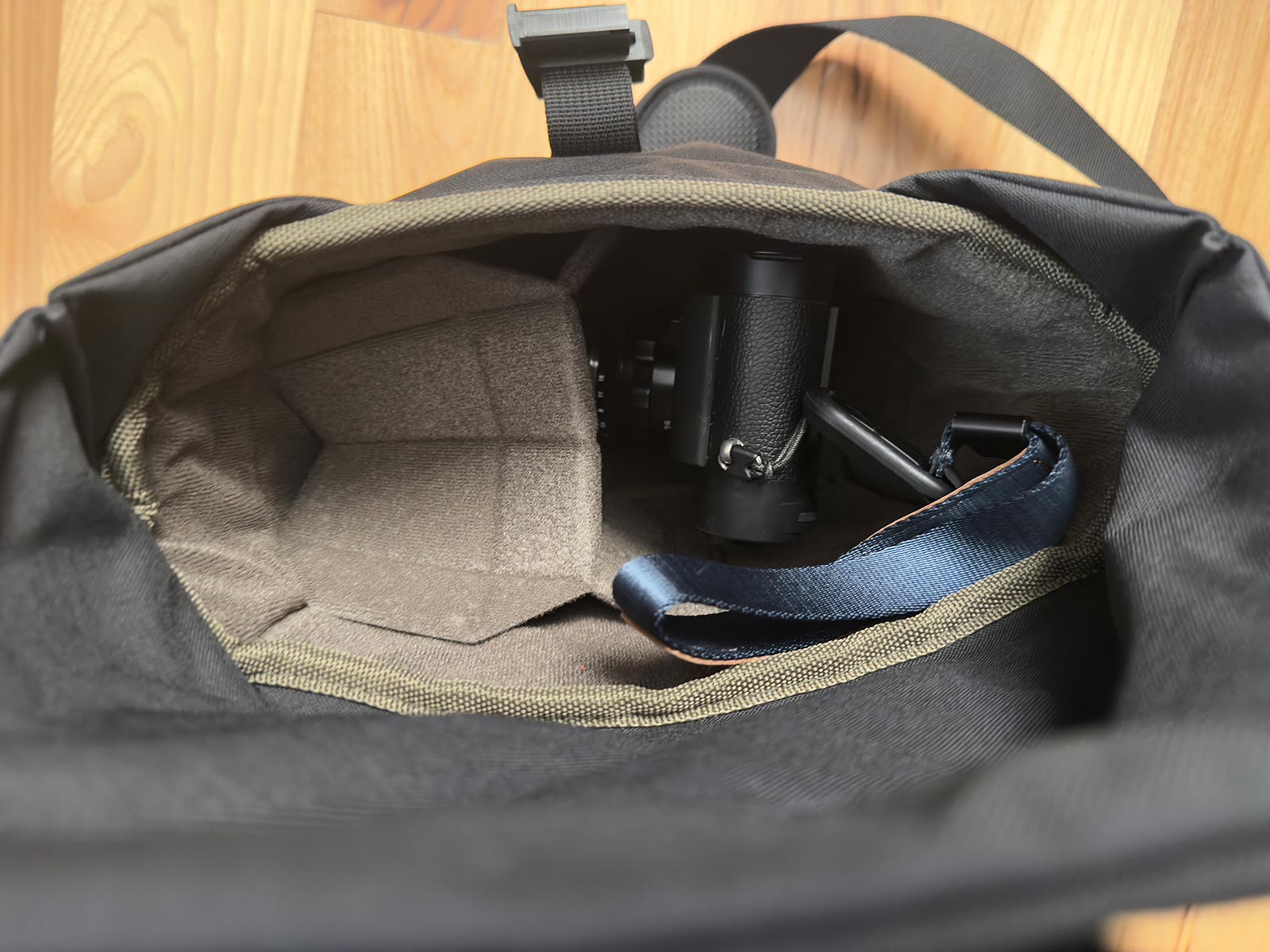
<figure><img class="u-photo" src="https://125px.com/articles/photography/misc/small-camera-bags/wotan-2-1.jpg"alt="Wotancraft Pilot 2L"width="1600" height="939" /><figcaption><p>Wotancraft Pilot 2L with camera and extra lens.  The Peak Design divider is folded down, hiding a lens.</p></figcaption></figure>


<figure><img class="u-photo" src="https://125px.com/articles/photography/misc/small-camera-bags/wotan-2-2.jpg"alt="Wotancraft Pilot 2L"width="1600" height="945" /><figcaption><p>Wotancraft Pilot 2L with camera removed.  The Peak Design divider is folded down, hiding a lens.</p></figcaption></figure>


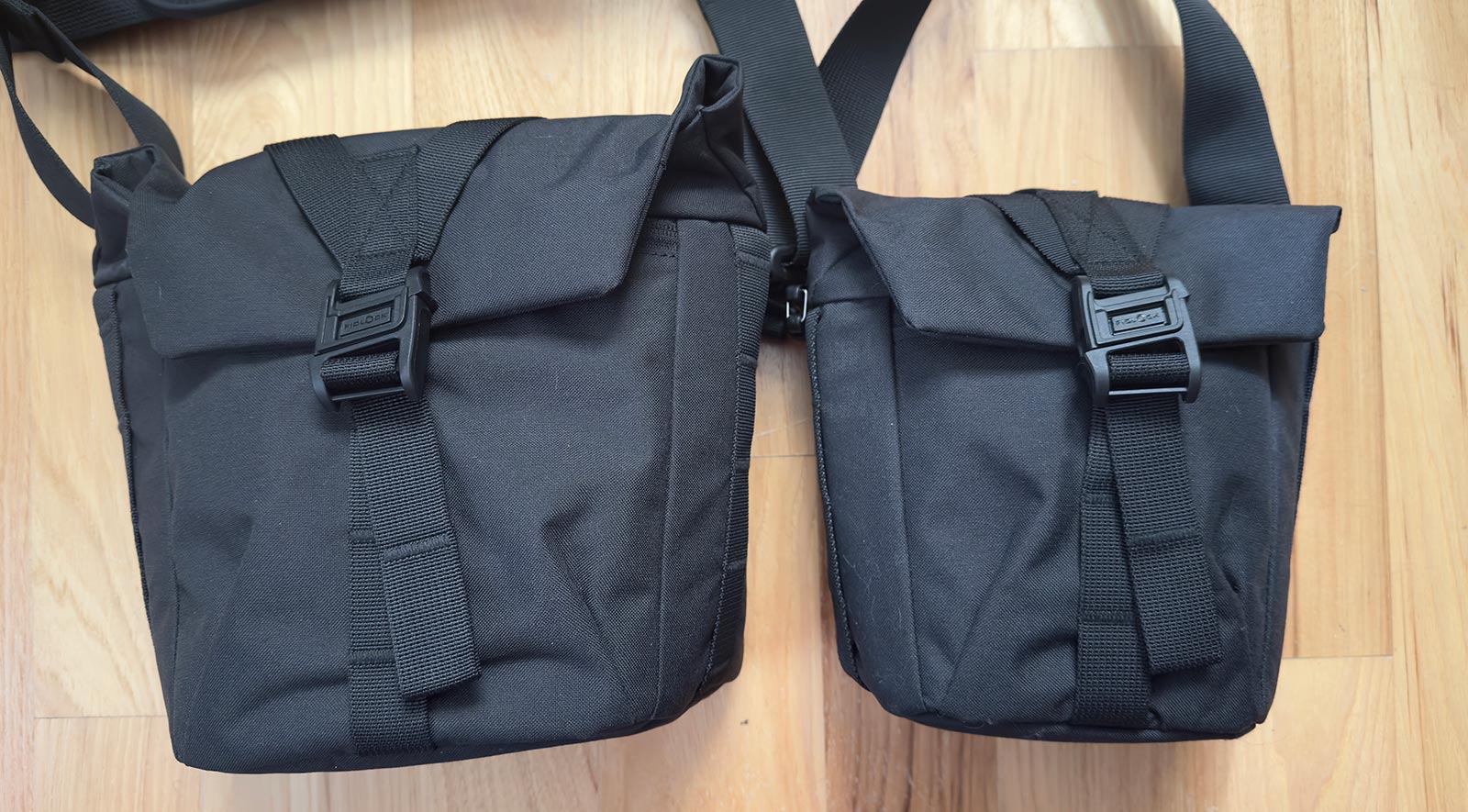
<figure><img class="u-photo" src="https://125px.com/articles/photography/misc/small-camera-bags/wotan-comp.jpg"alt="Comparison of the 2L and 3.5L Wotancraft bags."width="1600" height="885" /><figcaption><p>Comparison of the 3.5L and 2L Wotancraft bags.</p></figcaption></figure>

<h3 id="domke-f-5xa">Domke F-5XA</h3>
<p>This little bag is pretty darn close to the Lowepro as well.  It&rsquo;s got a great strap, though it doesn&rsquo;t have the quick adjusting nature the Wotancraft does.  Easily stores one camera with lens, another lens, and even a bit more.  The &lsquo;bit more&rsquo; can be another lens (as shown in the photo) but it gets a bit tight.  It&rsquo;s the perfect spot for an external finder, batteries, or something similar.  Between the 2L Wotancraft and the little Domke, I&rsquo;d say the Domke wins out on being more space efficient.  It&rsquo;s essentially the same size externally, but it can carry a bit more.</p>


<figure><img class="u-photo" src="https://125px.com/articles/photography/misc/small-camera-bags/domke.jpg"alt="Domke F-5XA"width="1600" height="1090" /><figcaption><p>Domke F-5XA with camera and two extra lenses.</p></figcaption></figure>

<h3 id="domke-f-5xb">Domke F-5XB</h3>
<p>I don&rsquo;t have this bag but I am tempted.  I think it&rsquo;s going to be a bit wider than what I want, but I&rsquo;ll probably end up with it at some point.  A lot of Leica shooters seem to like it.</p>
<h2 id="thoughts">Thoughts</h2>
<p>While the Think Tank bags are excellent and highly recommended, for my specific purpose of a small bag that can easily fit in my backpack and carry just a camera and 1-2 lenses, I&rsquo;m using the Domke F-5XA and the Wotancraft 2L.</p>
<p>The Wotancraft 2L wins out on the quicker adjusting strap, a nicer closure mechanism (the Domke has some pretty loud velcro), and the strapping for mounting external accessories.  It also feels a bit lighter and will probably be a bit more comfortable since you can adjust the strap so easily to reposition the load.  The Domke holds a bit more and seems a bit more space efficient.</p>
<p>Both are good bags and I&rsquo;m not sure which one I&rsquo;m going to like more in the long run.  I took the Domke on my last vacation and it was pretty good.</p>
<div class="footnotes" role="doc-endnotes">
<hr>
<ol>
<li id="fn:1">
<p>I found an email to Lowepro asking for a similar bag in my email while searching for the name of this bag for this blog post.&#160;<a href="#fnref:1" class="footnote-backref" role="doc-backlink">&#x21a9;&#xfe0e;</a></p>
</li>
</ol>
</div>
    
        ]]></content>
  </entry>
  <entry>
    <title type="html"><![CDATA[Poot]]></title>
    <link rel="alternate" href="https://125px.com/photos/2023/09/poot/"/>
    <id>https://125px.com/photos/2023/09/poot/</id>
    <author>
      <name>Tim Gray</name>
    </author>
    <published>2023-09-05T22:00:56-04:00</published>
    <updated>2023-09-05T22:00:56-04:00</updated>
    <content type="html"><![CDATA[

<figure><a href="https://www.flickr.com/photos/tgray1/53167941858"  title="Poot"><img class="u-photo" src="https://125px.com/photos/2023/09/poot/LTG04872_b.jpg"alt="Poot"srcset="https://125px.com/photos/2023/09/poot/LTG04872_k.jpg 2x" 
            width="1024" height="677" /></a></figure>

<p>Sleeping Poot.</p>

    
        ]]></content>
  </entry>
  <entry>
    <title type="html"><![CDATA[Keyboards]]></title>
    <link rel="alternate" href="https://125px.com/2023/09/keyboards/"/>
    <id>https://125px.com/2023/09/keyboards/</id>
    <author>
      <name>Tim Gray</name>
    </author>
    <published>2023-09-02T16:47:56-04:00</published>
    <updated>2023-09-02T16:47:56-04:00</updated>
    <content type="html"><![CDATA[<p>I have used Apple keyboards forever, going back to whatever came with the used Power Macintosh 7600 I started college with.<sup id="fnref:1"><a href="#fn:1" class="footnote-ref" role="doc-noteref">1</a></sup>  I generally used whatever came with the computer I had.  A dual processor G4, some titanium PowerBooks, etc.  I&rsquo;ve been using the Apple Magic Keyboards (with the number pads) at home since they came out.  I tried other keyboards here and there, but generally really like the Apple Magic Keyboards: low profile, good key action, and they look decent.  I think I&rsquo;ve had 2 or 3 of them, starting with the USB plug-in one, and ending on a black Bluetooth one.  I also have one at work.</p>
<p>There were a few dark years where I had to use Windows machines at work.  The first one had some crappy keyboard.  When I changed jobs, I got a Logitech solar powered keyboard.  Decent keyboard, kind of similar to the Apple Magic Keyboard in a lot of respects. That keyboard prompted me to try out a nicer Logitech for home.  After it and the warranty replacement both broke in the same manner<sup id="fnref:2"><a href="#fn:2" class="footnote-ref" role="doc-noteref">2</a></sup>, I had them send me a the Mac version of the solar keyboard.  I didn&rsquo;t like it as much as the Apple keyboard, so I ordered the black Apple keyboard when I got my now ex-Mac Mini.</p>
<p>While I like the Apple keyboard, I kind of wanted one that I could a) program and b) didn&rsquo;t have a number pad.  I don&rsquo;t use a number pad at home much and wanted to reclaim some desk space.  I <em>really</em> wanted to get a HHKB, but couldn&rsquo;t stomach losing the arrow keys while not being truly programmable.  I&rsquo;m perfectly happy with Vim keybindings for arrows, but the HHKB has some goofy layout that I could tell was just not going to work for me.</p>
<p>About 6 months ago, I decided to try a Keychron S1, a low profile mechanical keyboard.  I figured since I was so used to flat keyboards, a low profile keyboard was the way to go.  Nice keyboard, well built and programmable.  I just couldn&rsquo;t type on the thing.  Not sure if it was the profile or the switches, but it was super touchy and I was constantly hitting neighboring keys by accident.</p>
<p>Unfortunately, several days after I got (and before I came to the realization that I couldn&rsquo;t type on the damn thing), I also ordered a Mode Designs Envoy.  The thinking at the time was the Keychron was good, I could maybe take it to work, and I was going to get something more customizable for home.  Once I decided the Keychron had to go, I started to regret ordering the Envoy, but water under the bridge and all.</p>
<p>The Envoy came in about a month ago. I built and am happy to say it is GREAT.  Looks super nice, is well built, the keycaps are great, and I even like the switches.<sup id="fnref:3"><a href="#fn:3" class="footnote-ref" role="doc-noteref">3</a></sup>  All the misgivings I had with the Keychron (it really is a nice keyboard) aren&rsquo;t present in this keyboard. I highly recommend it if you want a 65% keyboard.  I&rsquo;m tempted to also order a Tofu60 or Tofu65, but I know I have no use for a second keyboard like that.</p>
<div class="footnotes" role="doc-endnotes">
<hr>
<ol>
<li id="fn:1">
<p>AppleDesign Keyboard?  I don&rsquo;t think it was the Apple Extende Keyboard II, but it could have been.&#160;<a href="#fnref:1" class="footnote-backref" role="doc-backlink">&#x21a9;&#xfe0e;</a></p>
</li>
<li id="fn:2">
<p>I think they pulled that model off the market.  The switch mechanisms would break where the keycap attached, so your key would get off center and wobble around after the first attachment point broke.&#160;<a href="#fnref:2" class="footnote-backref" role="doc-backlink">&#x21a9;&#xfe0e;</a></p>
</li>
<li id="fn:3">
<p>I went with quiet tactile switches.  At some point I&rsquo;ll try a different type.&#160;<a href="#fnref:3" class="footnote-backref" role="doc-backlink">&#x21a9;&#xfe0e;</a></p>
</li>
</ol>
</div>

    
        ]]></content>
  </entry>
  <entry>
    <title type="html"><![CDATA[HiDPI Monitors]]></title>
    <link rel="alternate" href="https://125px.com/2023/08/monitors/"/>
    <id>https://125px.com/2023/08/monitors/</id>
    <author>
      <name>Tim Gray</name>
    </author>
    <published>2023-08-19T15:54:38-04:00</published>
    <updated>2023-08-19T15:54:38-04:00</updated>
    <content type="html"><![CDATA[<p>I recently upgraded my computer and decided it was time to upgrade my monitors as well.  I have been using an old 24&quot; NEC PA241W SpectraView<sup id="fnref:1"><a href="#fn:1" class="footnote-ref" role="doc-noteref">1</a></sup> as my main high quality monitor and 2560x1440 (WQHD) HP Z25n for the other monitor.</p>
<p>The NEC had some hours on it.  The backshell of the calibrator fell off a while ago, but I could still use until around 2020, when the NEC software stopped supporting the old sensor.  I figured I&rsquo;d eventually get a new NEC when I was ready.</p>
<p>About a year ago, I started to look into a replacement, and it turns out NEC left the color calibrated monitor market.  The NEC was a great monitor: KVM, hardware calibration, uniformity compensation, AdobeRGB gamut, and a 10-bit panel.  Current options seemed to be limited to Dell (1 monitor), BenQ, or Eizo to get most or all of these features.  Of course, there is that Apple Studio Display, which looks amazing, particularly with the 5K resolution, but none of the niceties I was used to in terms of color reproduction.</p>
<p>My struggle with picking a new monitor was I that I got really used to the screen real estate of the HP 25&quot; monitor.  It was good resolution at 2560x1440, the macOS interface was a &lsquo;good&rsquo; size, and the monitor wasn&rsquo;t too big.<sup id="fnref:2"><a href="#fn:2" class="footnote-ref" role="doc-noteref">2</a></sup>   Unfortunately, most of the monitors out there are either 24&quot; 1080p, 27&quot; WQHD, or 27&quot; 4K monitors.  1080p was right out.  WQHD is decent, but I was hoping to get a &lsquo;retina&rsquo; display, but that meant running a 4K monitor at 1080p.  So I didn&rsquo;t know what to do.</p>
<p>Well, it turns out I didn&rsquo;t know how the whole retina/HiDPI thing works on macOS.  This is probably news to no one since I am way behind the curve on display technology.  macOS is smart about the scaling of the interface with HiDPI screens: images are rendered with detail corresponding to the native resolution, but the interface is scaled in size as if the display resolution was lower.  What I didn&rsquo;t realize is that you can choose intermediate resolutions other than just 2x (e.g. 1920x1080 for a 3840x2160 display).  One of the options was 2560x1440!  I was used to that resolution on a 25&quot; monitor and it&rsquo;s only a little bit bigger on a 27&quot; monitor.  Everything is much cleaner and sharper looking too, particularly fonts.  I&rsquo;m seeing details in text that were really obscured in the typical 12-14 pt fonts I use for text editors and terminals.  This intermediate resolution might be slightly harder on your graphics cards than a straight 2x scaling, but I&rsquo;m not noticing any specific issues.</p>
<p>I ended up with an Eizo CS2470.  Highly recommended for anyone doing photography and wanting the extra stuff that a monitor like this provides.  There also seems to be a lot of $400-600 27&quot; 4K monitors that calibrate very well if you want to spend a bit less and don&rsquo;t mind giving up AdobeRGB and hardware calibration.  27&quot; 4K monitors seem like a good match for macOS; maybe not perfect 2x scaling like the Apple Studio Display, but you have a bunch of options for cheaper, many with more capabilities than the Apple monitor provides.  Running them at an effective resolution of 2560x1440 is perfect for me (just like the Apple display).</p>
<h3 id="wqhd-side-note">WQHD side note</h3>
<p>During my monitor research, I saw a lot of discussion about how 2560x1440 looks like crap on macOS.  Turns out Apple removed subpixel rendering of text at some point in the last few years and a lot of people miss it.  I never actually liked it.  In fact, it wasn&rsquo;t that long ago that I was using bitmapped fonts in terminal and in my text editors.<sup id="fnref:3"><a href="#fn:3" class="footnote-ref" role="doc-noteref">3</a></sup></p>
<h3 id="betterdisplay">BetterDisplay</h3>
<p>A lot of people mentioned an app called <a href="https://github.com/waydabber/BetterDisplay#readme">BetterDisplay</a> while I was reading up on the problems with macOS and WQHD displays.  You can fake the HiDPI display rendering with it and get smoother font rendering on a LoDPI screen.  Seems like overkill to me, but the program has a <em>ton</em> of features for managing your screens and is very cool.</p>
<div class="footnotes" role="doc-endnotes">
<hr>
<ol>
<li id="fn:1">
<p>Purchased approximately 13 years ago.&#160;<a href="#fnref:1" class="footnote-backref" role="doc-backlink">&#x21a9;&#xfe0e;</a></p>
</li>
<li id="fn:2">
<p>I&rsquo;m also spoiled by the 38&quot; ultra-wide at work. I looked for ultra-wides, but they seem to have some uniformity issues which could be annoying for photo stuff.&#160;<a href="#fnref:2" class="footnote-backref" role="doc-backlink">&#x21a9;&#xfe0e;</a></p>
</li>
<li id="fn:3">
<p>RIP <a href="https://tobiasjung.name/profont/">ProFont</a>.&#160;<a href="#fnref:3" class="footnote-backref" role="doc-backlink">&#x21a9;&#xfe0e;</a></p>
</li>
</ol>
</div>

    
        ]]></content>
  </entry>
  <entry>
    <title type="html"><![CDATA[Internet presence]]></title>
    <link rel="alternate" href="https://125px.com/2022/12/internet-presence/"/>
    <id>https://125px.com/2022/12/internet-presence/</id>
    <author>
      <name>Tim Gray</name>
    </author>
    <published>2022-12-19T16:17:34-05:00</published>
    <updated>2022-12-19T16:17:34-05:00</updated>
    <content type="html"><![CDATA[<p>Been a long time since I&rsquo;ve posted.  What can I say, work has been very, very busy.</p>
<p>About four years ago, I outfitted this site to interact with <a href="https://micro.blog">micro.blog</a>.  It took some work, but ultimately never found a community there.  While I really admired the concept of hosting everything yourself and owning all your data, it ended up not be an engaging for me.  Nothing wrong with it, just didn&rsquo;t keep my interest.  My posts are archived on <a href="/micro/">this site</a> and at <a href="https://micro.blog/tgray">micro.blog/tgray</a>.</p>
<p>The whole twitter thing has generated lots of discussion.  While I still have an account, I am no longer active there. I&rsquo;m only keeping tabs on some artists who I follow who are not posting elsewhere.  Hopefully they move.  I don&rsquo;t plan on deactivating the account as I&rsquo;d rather prevent someone from scooping up my admittedly worthless name.</p>
<p>The twitter stuff got me thinking that, while I was never a prolific poster, I barely posted at all over the last 4&ndash;5 years.  Unless you are big and have a following, what was the point other than publicly tweeting friends, whom I mostly communicate now through a private Discord server.  Social media has mostly become about consumption, and not discussion or sharing.  That is unfortunate.</p>
<p>Mastodon has problems, sure, but it feels more like the older internet.  I hope they sort out the problems.  For now I am enjoying not being part of yet some other company&rsquo;s money making scheme.  You can find me <a href="https://mstdn.social/@ezwal">here</a>.</p>

    
        ]]></content>
  </entry>
  <entry>
    <title type="html"><![CDATA[Back to BBEdit]]></title>
    <link rel="alternate" href="https://125px.com/2021/09/back-to-bbedit/"/>
    <id>https://125px.com/2021/09/back-to-bbedit/</id>
    <author>
      <name>Tim Gray</name>
    </author>
    <published>2021-09-06T10:24:33-04:00</published>
    <updated>2021-09-06T10:24:33-04:00</updated>
    <content type="html"><![CDATA[<p>I&rsquo;ve used <a href="(http://www.barebones.com/products/bbedit/index.html)" title="BBEdit by Bare Bones">BBEdit</a> for years.  I think I started with version 4 sometime in college.  I&rsquo;m sure I used &lsquo;borrowed&rsquo; copies until I started grad school, when I purchased my own copy circa 2001.  I learned Python in it, wrote both my undergraduate thesis and my graduate dissertation, both in LaTeX, which I also learned with BBEdit.  Once OS X killed Eudora, I moved to Bare Bone&rsquo;s Mailsmith email client, which shares a lot of DNA with BBEdit.  I eventually moved on from Mailsmith due to the rise of IMAP (and really, iPhones), and I settled on mutt.  This sounds like a digression, but I wrote some scripts to use BBEdit as my editor for mutt.  I lived in BBEdit.</p>
<p>Around 2011,<sup id="fnref:1"><a href="#fn:1" class="footnote-ref" role="doc-noteref">1</a></sup> with me doing lots of Python scripting/analysis (and using mutt for email) I started to take a closer look at Vim.  My sloppy coding had me going to the arrow keys all the time for corrections, and it was bothering my wrist.  I bit the bullet, learned Vim and all of its weirdness, and switched over.  I was also using one laptop for both personal and work stuff, so I had plenty of time to tinker.  After leaving that job, I got stuck on Windows computers for about 8 years at work, so I just soldiered on with Vim.</p>
<p>I still bought every version of BBEdit that came out, as it was useful to have around for certain things, as well as to support a good Mac software developer.</p>
<h2 id="bbedit-14">BBEdit 14</h2>
<p>Fastforward to this year, and I&rsquo;m <em>finally</em> back on a Mac at work.  Even better, BBEdit is approved for install on our computers.  Which leads me to the release of BBEdit 14.</p>
<p>I bought v14 like I always do and started to play around with it.  The Notes feature is cool.  And not surprisingly, BBEdit has advanced a lot since I&rsquo;ve used it daily.  While I was well accustomed to the scripting and filtering features, the <em>Open File by Name</em> and <em>Go-&gt;Commands</em> features bring some of the fuzzy file finder-ness and keyboard centric navigation I&rsquo;m used to from Vim.  The new LSP integration is also very cool.  And wow, has the <em>Preview in BBEdit</em> function gained functionality.</p>
<p>I&rsquo;m doing less coding and website stuff, both personally and professionally, and more &lsquo;knowledge management&rsquo;.  I still prefer to mostly work in plain text (Markdown to be specific) and am allergic to using our prescribed note taking tool, OneNote.  OneNote isn&rsquo;t bad, but I can&rsquo;t have my stuff locked up into some cloud only format.  I have some cobbled together thing with <a href="https://vimwiki.github.io/">Vimwiki</a> which works okay, but BBEdit&rsquo;s Projects seem to be better suited for me for project-oriented work.  One BBEdit project per&hellip; project, and I can easily cross link things if I choose.  The attachment script for dropped images&ndash;super cool.  Now I can drag an image into a Markdown file, and get Markdown formatted image code.  Very nice.</p>
<p>BBEdit still lacks in some departments.  I really wish the user configurable syntax coloring and code folding were more capable, and as strange as vimscript is, AppleScript is no walk in the park.  That being said, I&rsquo;ve grown a bit tired of some aspects of Vim.  It is an incredibly capable and extensible editor, and the modal nature of it is really great for modifying and navigating text without a mouse.  But the mouse support obviously takes a back seat.  At the same time, I don&rsquo;t live in a text editor as much as I used to, and the care and feeding of a custom Vim setup takes effort.  As a result, some of my Vim setup is a little creaky and needs attention that I can&rsquo;t give it.  The Vim community is great with lots of amazing integrations available, but they become abandonware too frequently.  For example, I&rsquo;ve used no less than 4 fuzzy file finder implementations in Vim in the last 8 years, yet BBEdit&rsquo;s is pretty good and professionally maintained.</p>
<p>I do wish the BBEdit community was a little more vibrant.  Even if it had the equivalent of just one <a href="https://github.com/tpope" title="Vim plugin artist">tpope</a>, I would be much happier.  Is there someone I can pay to write a BBEdit version of <a href="https://github.com/tpope/vim-speeddating" title="speeddating plugin for Vim">speeddating.vim</a>?</p>
<div class="footnotes" role="doc-endnotes">
<hr>
<ol>
<li id="fn:1">
<p>Around BBEdit v10.&#160;<a href="#fnref:1" class="footnote-backref" role="doc-backlink">&#x21a9;&#xfe0e;</a></p>
</li>
</ol>
</div>

    
        ]]></content>
  </entry>
  <entry>
    <title type="html"><![CDATA[Color film scan processing]]></title>
    <link rel="alternate" href="https://125px.com/articles/photography/digital/color-film-scan-processing/"/>
    <id>https://125px.com/articles/photography/digital/color-film-scan-processing/</id>
    <author>
      <name>Tim Gray</name>
    </author>
    <published>2021-03-07T08:17:42-05:00</published>
    <updated>2021-03-07T08:17:42-05:00</updated>
    <content type="html"><![CDATA[<p><em>This post is a big update to topics discussed in <a href="/articles/photography/digital/invertingraw/">Inverting raw scans</a> and <a href="/articles/photography/digital/colorneg/">Thoughts on color negative scanning</a>.  For B&amp;W, see the companion article <a href="/articles/photography/digital/b-w-film-scan-processing/">B&amp;W film scan processing</a>.</em></p>
<p>I no longer scan with my Nikon Coolscan V.  I now use a Sony A7rII on a copy stand to make &lsquo;camera&rsquo; scans.</p>
<p>For processing the resulting photos, I use Adobe Camera Raw (ACR) and Photoshop (PS).  My PS actions are available <a href="/articles/photography/digital/color-film-scan-processing/coloractions.zip">here</a>.<sup id="fnref:1"><a href="#fn:1" class="footnote-ref" role="doc-noteref">1</a></sup></p>
<p><strong>Disclaimer</strong>: Color is hard to get right.  I have had good results using the following process with <em>my</em> camera (Sony A7rII), Adobe&rsquo;s &lsquo;standard&rsquo; profile for that camera, <em>my</em> light pad<sup id="fnref:2"><a href="#fn:2" class="footnote-ref" role="doc-noteref">2</a></sup>, and Kodak film.  Your results may vary.  A low CRI light source could deliver sub par results, as could other cameras.  Maybe I just lucked out that my camera is well profiled and delivers good color.</p>
<h2 id="step-1---acr">Step 1 - ACR</h2>


<figure><img class="u-photo" src="https://125px.com/articles/photography/digital/color-film-scan-processing/RAW.png"alt="Starting image in ACR"width="784" height="663" /><figcaption><p>Starting image in ACR with no adjustments.</p></figcaption></figure>

<p>Bring your image into ACR.  White balance on the film base.  <strong>This step is crucial and is 99% of the solution to the dreaded &lsquo;removing the orange mask&rsquo; problem.</strong>  A RAW developer is needed here.  It can be done without, but many photo tools do not operate in linear color space.  RAW developers are one common tool that does; we use that to our advantage.  This step can be done with something like dcraw, but I use PS and ACR, and prefer to work with a GUI.</p>


<figure><img class="u-photo" src="https://125px.com/articles/photography/digital/color-film-scan-processing/ACR.png"alt="image in ACR"width="782" height="663" /><figcaption><p>White balanced on the selection at the top between the sprocket holes.</p></figcaption></figure>

<p>I do enable optics corrections in ACR: distortion and vignetting.  I found this gives better scans, particularly getting rid of the orange vignette one might get on a processed image.  For reference, I can see a difference when shooting with the Sony FE 90mm f/2.8 Macro lens at f/5.6 or f/8.</p>
<p>You can invert the image in ACR as well using the curves tool.  From my experimentation, it unfortunately does make a difference.  I find colors to be more realistic and less &rsquo;electric&rsquo; if done in PS.  I saw similar behavior when converting images with dcraw and various settings.  I say this is unfortunate because it would be appealing to invert in ACR and generate previews based on that so one didn&rsquo;t have to look at a bunch of orange images in a browser.  You can still do this as an extra step and just undo it for actual conversion.</p>
<p>Lastly, make sure the &lsquo;Adobe Color&rsquo; profile is selected.  While I can&rsquo;t speak for cameras other than the Sony A7rII, &lsquo;Adobe Color&rsquo; gives <em>much</em> more accurate colors in the final conversion.  I was struggling mightily with a few images where I could not get a yellow correct, when I finally realized for that I had somehow left the profile to &lsquo;Camera Standard&rsquo;, which presumably is some punched-up Sony thing.</p>


<figure><img class="u-photo" src="https://125px.com/articles/photography/digital/color-film-scan-processing/profile.png"alt="Adobe Monochrome profile"width="256" height="31" /></figure>

<h2 id="step-2---ps---1st-pass">Step 2 - PS - 1st pass</h2>
<p>Now it&rsquo;s time for actions.  Run the &lsquo;Color neg process&rsquo; action to start.</p>


<figure><img class="u-photo" src="https://125px.com/articles/photography/digital/color-film-scan-processing/actions.png"alt="List of Photoshop actions"width="230" height="220" /></figure>

<p>A levels dialog will pop up immediately for some user input, associated with the &lsquo;Levels - basic contrast&rsquo; layer which will be explained below.  I usually set the highlight slider to slightly above clipping:  move the slider while holding down the Option key on macOS until clipping occurs, and then back off a bit.  A similar thing can be done with shadows, though depending on how much I inadvertently underexposed, I might need to leave the shadows pretty light.  Then set the midtone slider until things look about right.  All of these adjustments can be changed later.</p>


<figure><img class="u-photo" src="https://125px.com/articles/photography/digital/color-film-scan-processing/levels-contrast-0.png"alt="Initial contrast adjustment"width="1040" height="880" /><figcaption><p>Initial contrast adjustment dialog.</p></figcaption></figure>


<figure><img class="u-photo" src="https://125px.com/articles/photography/digital/color-film-scan-processing/levels-contrast-1.png"alt="Looking for highlight clipping with contrast adjustment"width="796" height="539" /><figcaption><p>Looking for where the highlihgts clip while adjusting contrast.</p></figcaption></figure>


<figure><img class="u-photo" src="https://125px.com/articles/photography/digital/color-film-scan-processing/levels-contrast-2.png"alt="Final basic contrast adjustment"width="1040" height="880" /><figcaption><p>Final contrast adjustment dialog.</p></figcaption></figure>

<p>There are a bunch of layers that the &lsquo;Color neg process&rsquo; action makes:</p>


<figure><img class="u-photo" src="https://125px.com/articles/photography/digital/color-film-scan-processing/layers.png"alt="Layers created by the Basic contrast adjust action"width="268" height="284" /></figure>

<ol>
<li>
<p>&lsquo;Invert&rsquo;: Inverts the image.</p>
</li>
<li>
<p>&lsquo;Auto curves&rsquo;: Sets the endpoints of the curves using &lsquo;Find dark/light colors&rsquo; with 0.01% clipping on the darks and 0% clipping on the highlights.  I usually have a layer mask on this layer to block out included film borders.  This layer sometimes needs adjustment depending on the color content of the image.</p>
</li>
<li>
<p>&lsquo;Levels - basic contrast&rsquo;:  Discussed above.  Basic black/white clipping, with a contrast adjustment.  Does what it says - the first order contrast adjustment.</p>
</li>
<li>
<p>&lsquo;Curves - white balance&rsquo;:  By default, does nothing.  <strong>IF</strong> after adjustments on lower layers (&lsquo;Auto curves&rsquo; in particular), the image needs a white balance adjustment (shot in the wrong color temperature light, etc.), go to this layer, click on the gray point eyedropper, and go click around your image on neutral tones.  Curves can also be adjust by hand.  Be wary of anything that produces big changes in the curves, as it might be an indication that the endpoints set on the &lsquo;Auto curves&rsquo; layer are wrong.


<figure><img class="u-photo" src="https://125px.com/articles/photography/digital/color-film-scan-processing/whitebalance.png"alt="White balance gray point eyedropper"width="266" height="294" /><figcaption><p>White balancing - the gray point eyedropper is highlighted in orange.</p></figcaption></figure>
</p>
</li>
<li>
<p>&lsquo;Curves - contrast tweak&rsquo;: Slight S-shaped curve to adjust contrast.  This layer can be faded out: you can hit the number keys (1 through 0) to adjust the layer opacity from 10% to 100%, varying the overall contrast.  Note, this layer is set to &lsquo;Luminosity&rsquo; blending.  If you want, change the blend mode to &lsquo;Normal&rsquo; and this layer will also affect color saturation.  As this layer is mostly a highlights targeted adjustment, I prefer &lsquo;Luminosity&rsquo;.</p>
</li>
<li>
<p>&lsquo;Color Balance&rsquo;: By default, this layer is disabled.  Enable it to apply a bit of &lsquo;warming&rsquo; to the image.  Adjust sliders to taste, or opacity with the number keys, but I&rsquo;ve found +15 red/cyan and -15 yellow/blue works pretty well for most images.</p>
</li>
</ol>
<p><strong>NOTE</strong>:  If you are working with images with no borders, you might want to remove the mask making steps completely (the &lsquo;Play action &ldquo;90% mask&hellip;&rdquo;&rsquo; in the &lsquo;Color neg process&rsquo; action).  If you are working on images with large borders, non-35mm formats, or anything where this mask is the wrong shape, run &lsquo;Color neg process - borders&rsquo; with appropriate modifications.  &lsquo;Color neg process - borders&rsquo; should properly recognize landscape and portrait orientation and provide a large enough border mask for most purposes.</p>
<p>Next up is the &lsquo;Dust Bust&rsquo; action.  This makes a &lsquo;Dust Bust&rsquo; layer right above the background layer and activates the healing brush.  Change the size of the brush with the &lsquo;{&rsquo; and &lsquo;}&rsquo; keys, zoom into 100% (Command-Option-0 on macOS), and brush out your dust.  Sometimes you might want to go over a spot twice if the healing brush result is a little funky looking.  I&rsquo;ve also found that long light scratches are sometimes best spotted out in segments rather than with one long brush stroke (I seem to have more of these on commercially processed C-41 than home processed B&amp;W).  When you are done, go back to full view (Command-0).</p>


<figure><img class="u-photo" src="https://125px.com/articles/photography/digital/color-film-scan-processing/layers-dust.png"alt="Dust Bust layer"width="239" height="323" /></figure>

<p>You want to do the dust spotting before any fancy layers with luminosity masks or anything.  The reason is the luminosity mask will contain the dust if its not spotted out, and when you then spot it out afterwards, the tonal values will be different for the dust than the surrounding areas.</p>
<h2 id="step-3---ps---2nd-pass">Step 3 - PS - 2nd pass</h2>
<p>Now you have a basic image.  This is the equivalent of a test print in my mind.  I&rsquo;m not a master printer (nor a master photographer), so most of the time for my snapshots, I&rsquo;m done.</p>
<p>The basic curves adjustment performed in &lsquo;Auto curves&rsquo; doesn&rsquo;t always catch everything.  I have had issues with Ektar, images with a natural strong color cast, images with <em>really</em> bright highlights, etc.  One trick I use is the &lsquo;Highlight check&rsquo; action.  What this does is add a temporary curves layer above the &lsquo;Curves - contrast tweak&rsquo; layer, cranks up the gamma, and then puts you back on the &lsquo;Auto curves&rsquo; layer.  It highlights the highlights.  If your highlights have the right natural color, then no real adjustments are needed.  If they are off (too blue, too red, etc.) then go to the appropriate color channel on the &lsquo;Auto curves&rsquo; layer and move the white point slider for that channel to neutralize the color cast.  Depending on the image, you might need to adjust all three channels white points.  You might also need to adjust the midtone slider on the &lsquo;highlight check&rsquo; layer to appropriately accent the range that needs to be adjusted.  When you are done, run the &lsquo;Highlight check - remove&rsquo; action to delete the &lsquo;highlight check&rsquo; layer, or do it manually.  I have had a few images where this actually did not make the image better, so undo is your friend here.</p>


<figure><img class="u-photo" src="https://125px.com/articles/photography/digital/color-film-scan-processing/highlight-check.png"alt="Checking the highlights"width="780" height="660" /><figcaption><p>Example of good highlight color balance of the extreme highlights.</p></figcaption></figure>


<figure><img class="u-photo" src="https://125px.com/articles/photography/digital/color-film-scan-processing/highlight-bad.png"alt="Red tinted highlights"width="780" height="662" /><figcaption><p>Example of red tint in the extreme highlights.  Curtains in upper left are white and illuminated by sunlight.</p></figcaption></figure>


<figure><img class="u-photo" src="https://125px.com/articles/photography/digital/color-film-scan-processing/highlight-correct.png"alt="Corrected highlights"width="778" height="656" /><figcaption><p>Example of corrected highlight color balance.  Red channel white point was moved from 220 to 228</p></figcaption></figure>

<p>Beyond color correction tweaks, sometimes the contrast isn&rsquo;t quite what you like.  Some extra tweaks with an additional curves layer can be performed.  Admittingly, after years of using only curves with various complex blending modes and masks (still useful), I&rsquo;ve come around to PS&rsquo;s &lsquo;dumb&rsquo; adjustment layers, like Brightness/Contrast, Exposure, and Color Balance.  To that end, the &lsquo;Brightness Boost&rsquo; action does just that by adding a Brightness/Contrast layer to the top of the stack with a brightness boost.  Adjust to taste.</p>


<figure><a href="https://www.flickr.com/photos/tgray1/51013231792"  title="Final processed image"><img class="u-photo" src="https://125px.com/articles/photography/digital/color-film-scan-processing/final.jpg"alt="Final processed image"width="800" height="678" /></a><figcaption><p>Final processed image.</p></figcaption></figure>

<p>There&rsquo;s a lot more to color correcting images in PS that is far outside of the scope of this post.  LAB color mode adjustments, luminosity layers, etc.  A few quick links:</p>
<ul>
<li><a href="https://www.alexburkephoto.com/blog/2013/06/02/scanning-and-editing-color-negative-film/">Alex Burke</a>: A nice tutorial about negative scanning and post processing.
The section about luminosity masks is very informative.</li>
<li><a href="https://design.tutsplus.com/tutorials/how-to-create-and-use-luminosity-masks-in-adobe-photoshop--cms-23549">Luminosity Masks</a>: Detailed tutorial on sophisticated adjustments using
luminosity masks.</li>
<li><em>Photoshop LAB Color</em> by Dan Margulis.  Years ago I read this book and it was
a great way to learn an interesting approach to image correction and to learn a bunch of tricks.  Seems like it is out of print and very expensive now.  I have the 1st edition which is much cheaper used.</li>
</ul>
<p>That&rsquo;s basically it!  I do have some helper actions to do things like save out a full sized jpg file for sharing online and as a &lsquo;print&rsquo;.  Another useful action is the one that downsizes the image (50% in my case) and saves as a TIFF file with all layers included.  If I ever want to re-edit the image, I can open up the RAW file from ACR and the TIFF file, and copy over all of the adjustment layers.  If I do this, I would have to recreate the dust spotting layer as it the wrong size (probably some way to upscale and use that too).  I do this as once I am done with an image, I usually don&rsquo;t need the full size work file&ndash;the jpeg is enough.  And I don&rsquo;t particularly want the GIANT files that a full-sized TIFF file would be (300+ MB).  Of course, if I was working on my masterpiece, I&rsquo;d probably save the full PS file, but let&rsquo;s be honest about the quality of my pictures.</p>
<p>Good luck and let me know if you run into any issues.</p>
<div class="footnotes" role="doc-endnotes">
<hr>
<ol>
<li id="fn:1">
<p>These are not the actual actions I use, but &lsquo;cleaned up&rsquo; versions.  I do not use PS or make actions for a living, so often they are a bit disorganized.  If these actions are useful, great!  If not, I can attempt to help you out but can&rsquo;t promise anything.&#160;<a href="#fnref:1" class="footnote-backref" role="doc-backlink">&#x21a9;&#xfe0e;</a></p>
</li>
<li id="fn:2">
<p>Kaiser Slimlite Plano 5000K, CRI 95.&#160;<a href="#fnref:2" class="footnote-backref" role="doc-backlink">&#x21a9;&#xfe0e;</a></p>
</li>
</ol>
</div>

    
        ]]></content>
  </entry>
  <entry>
    <title type="html"><![CDATA[B&amp;W film scan processing]]></title>
    <link rel="alternate" href="https://125px.com/articles/photography/digital/b-w-film-scan-processing/"/>
    <id>https://125px.com/articles/photography/digital/b-w-film-scan-processing/</id>
    <author>
      <name>Tim Gray</name>
    </author>
    <published>2021-03-06T13:48:15-05:00</published>
    <updated>2021-03-06T13:48:15-05:00</updated>
    <content type="html"><![CDATA[<p><em>This post is somewhat of an update to <a href="/articles/photography/digital/vuescan/">Scanning B&amp;W negatives with Vuescan</a>. For color negatives, see the companion article <a href="/articles/photography/digital/color-film-scan-processing/">Color film scan processing</a>.</em></p>
<p>I no longer scan with my Nikon Coolscan V.  I now use a Sony A7rII on a copy stand to make &lsquo;camera&rsquo; scans.</p>
<p>For processing the resulting photos, I use Adobe Camera Raw (ACR) and Photoshop (PS).  My PS actions are available <a href="/articles/photography/digital/b-w-film-scan-processing/BWactions.zip">here</a>.<sup id="fnref:1"><a href="#fn:1" class="footnote-ref" role="doc-noteref">1</a></sup></p>
<h2 id="step-1---acr">Step 1 - ACR</h2>
<p>Bring your image into ACR.  White balance on the film base.  While this is probably not necessary for B&amp;W film, it doesn&rsquo;t hurt.</p>


<figure><img class="u-photo" src="https://125px.com/articles/photography/digital/b-w-film-scan-processing/ACR.png"alt="image in ACR"width="961" height="645" /><figcaption><p>White balanced on the selection on the right of the image.</p></figcaption></figure>

<p>I do enable optics corrections in ACR: distortion and vignetting.  I found this gives better scans, particularly for <a href="/articles/photography/digital/color-film-scan-processing">color negatives</a>.</p>
<p>You can invert the image in ACR as well using the curves tool.  From my experimentation, it makes no difference if you do it in ACR or PS.  I do it in ACR as I can then export a downsized version of every image with no other corrections as jpegs for use in Photo Mechanic or other photo browsers.</p>


<figure><img class="u-photo" src="https://125px.com/articles/photography/digital/b-w-film-scan-processing/ACR-curves.png"alt="Inverting with curves"width="260" height="330" /><figcaption><p>Inverting with curves.</p></figcaption></figure>

<p>Lastly, make sure the &lsquo;Adobe Monochrome&rsquo; profile is selected.  This will make your image a true grayscale image, which makes file sizes easier and guarantees no adjustments will give the image a tint.</p>


<figure><img class="u-photo" src="https://125px.com/articles/photography/digital/b-w-film-scan-processing/create-profile.png"alt="Create a custom camera profile"width="537" height="734" /></figure>


<figure><img class="u-photo" src="https://125px.com/articles/photography/digital/b-w-film-scan-processing/profile.png"alt="Adobe Monochrome profile"width="254" height="37" /></figure>

<p>I personally make a Camera Profile in ACR with the &lsquo;Adobe Monochrome&rsquo; profile selected and the curves inversion saved so I can just set this new Camera Profile for all my images.  To access the profile creation dialog, Option-click on the three dots icon at the right side of the ACR interface (or search for &lsquo;<a href="https://duckduckgo.com/?q=adobe+camera+raw+create+a+custom+profile">adobe camera raw create a custom profile</a>&rsquo;).</p>


<figure><img class="u-photo" src="https://125px.com/articles/photography/digital/b-w-film-scan-processing/ACR-with-profile.png"alt="Settings with custom profile"width="260" height="475" /><figcaption><p>With the custom profile selected, the curves tool is no longer inverted.</p></figcaption></figure>

<h2 id="step-2---ps---1st-pass">Step 2 - PS - 1st pass</h2>
<p>Now it&rsquo;s time for actions.  Run the &lsquo;Invert&rsquo; action if inversion wasn&rsquo;t performed in ACR.  Then run the &lsquo;Basic contrast adjust&rsquo; action.</p>


<figure><img class="u-photo" src="https://125px.com/articles/photography/digital/b-w-film-scan-processing/actions.png"alt="List of Photoshop actions"width="230" height="233" /></figure>

<p>Before I explain what this action does, I should say that PS work on grayscale images is very flexible - there are many ways to do the same thing.  Sometimes I do adjustments that could be done in one step in multiple steps because it is easier to conceptualize what I am doing.  That being said, you can do 90% of needed adjustments in a single curves layer if you felt like it.</p>
<p>There are three layers that the &lsquo;Basic contrast adjust&rsquo; action makes:</p>


<figure><img class="u-photo" src="https://125px.com/articles/photography/digital/b-w-film-scan-processing/layers.png"alt="Layers created by the Basic contrast adjust action"width="244" height="132" /></figure>

<ol>
<li>&lsquo;Levels - Basic contrast&rsquo;: This levels adjustment is just a midpoint change to get the image contrast better for the following steps.  I don&rsquo;t think there is anything magic here, it just makes the following step easier.  Nominally, I am changing the gamma of the image to 1.45.  Is this the right value because CI value of negatives are in the 0.5&ndash;0.7 range and 1.45 is the reciprocal?  I don&rsquo;t know.</li>
<li>&lsquo;Curves - contrast tweak&rsquo;: This is an S-shaped curve to boost midtone contrast and provide some compression in the highlights and shadows.  I like it.  If you don&rsquo;t, disable it.  Better yet, when this layer is selected, you can hit the number keys (1 through 0) to adjust the layer opacity from 10% to 100%, varying the overall contrast.  Some images require more detailed adjustments, but for the type of images I take and want, this really works most of the time.</li>
<li>&lsquo;Levels - total range&rsquo;: This layer auto sets the total range of the image to the darkest and lightest pixels.  Adjust the sliders on the levels panel to taste.  I often move the midpoint a little bit, or sometimes the black point slider.</li>
</ol>
<p>The &lsquo;Levels - total range&rsquo; layer contains a layer mask (the thumbnail with the red X through it in the layer palette) that is set up for landscape images with film borders.  You don&rsquo;t want the film border affecting your levels calculation.  The action creates the mask, runs the calculation and then disables the mask.  If you want to rerun an auto calculation, Shift-click the X&rsquo;d-out mask to re-enable it, run Auto (Option-clicking Auto brings up the options dialog window), then Shift-click the mask to disable it again.</p>
<p><strong>NOTE</strong>:  If you are working with images with no borders, you might want to remove the mask making steps completely (the &lsquo;Play action &ldquo;90% mask&hellip;&rdquo;&rsquo; in the &lsquo;Basic contrast adjust&rsquo; action).  If you are working on images with large borders, non-35mm formats, or anything where this mask is the wrong shape, run &lsquo;Basic contrast adjust - borders&rsquo; with appropriate modifications.  &lsquo;Basic contrast adjust - borders&rsquo; should properly recognize landscape and portrait orientation and provide a large enough border mask for most purposes.</p>
<p>It should be noted that with some images, particularly very overexposed or underexposed images, sometimes I go to the &lsquo;Levels - Basic contrast&rsquo; layer and adjust the midpoint slider from the 1.45 value; it looks more natural that way.</p>
<p>Next up is the &lsquo;Dust Bust&rsquo; action.  This makes a &lsquo;Dust Bust&rsquo; layer right above the background layer and activates the healing brush.  Change the size of the brush with the &lsquo;{&rsquo; and &lsquo;}&rsquo; keys, zoom into 100% (Command-Option-0 on macOS), and brush out your dust.  Sometimes you might want to go over a spot twice if the healing brush result is a little funky looking.  When you are done, go back to full view (Command-0).</p>


<figure><img class="u-photo" src="https://125px.com/articles/photography/digital/b-w-film-scan-processing/layers-dust.png"alt="Dust Bust layer"width="244" height="164" /></figure>

<p>You want to do the dust spotting before any fancy layers with luminosity masks or anything.  The reason is the luminosity mask will contain the dust if its not spotted out, and when you then spot it out afterwards, the tonal values will be different for the dust than the surrounding areas.</p>
<h2 id="step-3---ps---2nd-pass">Step 3 - PS - 2nd pass</h2>
<p>Now you have a basic image.  This is the equivalent of a test print in my mind.  I&rsquo;m not a master printer (nor a master photographer), so most of the time for my snapshots, I&rsquo;m done.</p>
<p>If your image needs more attention, I use a few more generic actions.  &lsquo;Exposure hi/lo&rsquo; and &lsquo;Luminosity layers&rsquo; do similar things in different manners.  Both create a highlight and shadow layer, with a luminosity mask for the highlight layer, and an inverse luminosity mask for the shadow layer.  The &lsquo;Exposure hi/lo&rsquo; action creates Exposure layers.  I find it is useful to go in and adjust the &lsquo;Gamma Correction&rsquo; of those two Exposure layers to address highlights or shadows in a global fashion.  The &lsquo;Luminosity layers&rsquo; creates two curves layers (highlights and shadows) with appropriate curves to boost the highlights or shadows respectively.  You can use the same number key trick on all of these layers to adjust the amount up or down (1&ndash;0 keys to set the amount to 10&ndash;100%).</p>
<p>And who could leave out dodging and burning?  The &lsquo;Dodge/Burn&rsquo; action creates a layer on the very top where you can use the Dodge and Burn tools to&hellip; dodge and burn the image (Shift-O to toggle between Dodge, Burn, and Sponge tools).  There are other good ways to accomplish similar things, like painting on a layer mask of an Exposure adjustment layer set to +/- 0.5&ndash;2 stops. Really at this point, you can get pretty targeted with your adjustments and it gets &lsquo;personal&rsquo;.  This is just a starting point.</p>


<figure><a href="https://www.flickr.com/photos/tgray1/51010070037"  title="Final image"><img class="u-photo" src="https://125px.com/articles/photography/digital/b-w-film-scan-processing/final.jpg"alt="Final image"width="800" height="535" /></a></figure>

<p>That&rsquo;s basically it!  I do have some helper actions to do things like save out a full sized jpg file for sharing online and as a &lsquo;print&rsquo;.  Another useful action is the one that downsizes the image (50% in my case) and saves as a TIFF file with all layers included.  If I ever want to re-edit the image, I can open up the RAW file from ACR and the TIFF file, and copy over all of the adjustment layers.  If I do this, I would have to recreate the dust spotting layer as it the wrong size (probably some way to upscale and use that too).  I do this as once I am done with an image, I usually don&rsquo;t need the full size work file&ndash;the jpeg is enough.  And I don&rsquo;t particularly want the GIANT files that a full-sized TIFF file would be (130+ MB).  And it&rsquo;s even worse with color images!  Of course, if I was working on my masterpiece, I&rsquo;d probably save the full PS file, but let&rsquo;s be honest about the quality of my pictures.</p>
<p>Good luck and let me know if you run into any issues.</p>
<div class="footnotes" role="doc-endnotes">
<hr>
<ol>
<li id="fn:1">
<p>These are not the actual actions I use, but &lsquo;cleaned up&rsquo; versions.  I do not use PS or make actions for a living, so often they are a bit disorganized.  If these actions are useful, great!  If not, I can attempt to help you out but can&rsquo;t promise anything.&#160;<a href="#fnref:1" class="footnote-backref" role="doc-backlink">&#x21a9;&#xfe0e;</a></p>
</li>
</ol>
</div>

    
        ]]></content>
  </entry>
  <entry>
    <title type="html"><![CDATA[Leica Summicron-M 90mm (pre-ASPH)]]></title>
    <link rel="alternate" href="https://125px.com/articles/photography/cameras/leica-summicron-m-90mm-e55/"/>
    <id>https://125px.com/articles/photography/cameras/leica-summicron-m-90mm-e55/</id>
    <author>
      <name>Tim Gray</name>
    </author>
    <published>2021-02-07T09:07:04-05:00</published>
    <updated>2021-02-07T09:07:04-05:00</updated>
    <content type="html"><![CDATA[<p>This will be a shortish review of the Leica M 90mm Summicron, the pre-ASPH version, sometimes referred to as version III or the E55, model number 11136.</p>


<figure><a href="https://www.flickr.com/photos/tgray1/50431678742"  title="orchids"><img class="u-photo" src="https://125px.com/articles/photography/cameras/leica-summicron-m-90mm-e55/flower.jpg"alt="orchids"width="800" height="529" /></a></figure>

<p>90mm is a classic portrait length, though it can be challenging to frame on a rangefinder (small frame lines) and focus at large aperture (rangefinder accuracy).  It&rsquo;s still a useful focal length to have around.</p>
<p>This is big and heavy for an M lens.  Focus throw is long and heavy, much like the <a href="/articles/photography/cameras/75sum/">75mm Summilux</a>.  This makes it easy to precisely adjust focus, but slow.  I prefer a lighter focus feel and with this lens I find it useful to pre-focus to speed the process up.  There might be some minimal focus shift with the lens, but I often shoot it wide open or stopped down to f/5.6, where it has been mostly fine.</p>


<figure><a href="https://www.flickr.com/photos/tgray1/49520851052"  title="Neutron the cat in a peach box."><img class="u-photo" src="https://125px.com/articles/photography/cameras/leica-summicron-m-90mm-e55/cat-peaches.jpg"alt="Neutron the cat in a peach box."width="800" height="534" /></a></figure>

<p>Much has been said about the 90mm APO-Summicron, how sharp it is, how it gets soft at short range, etc.  This is not that lens.  Wide open, it is lower contrast and softer.  Stopped down, the contrast gets better and it sharpens up.  Again, this is not unlike the <a href="/articles/photography/cameras/75sum/">75mm Summilux</a>.  It&rsquo;s not quite as much of a character lens as the 75mm,<sup id="fnref:1"><a href="#fn:1" class="footnote-ref" role="doc-noteref">1</a></sup> but it is not &lsquo;modern&rsquo; and overly sterile.</p>
<p>That being said, it&rsquo;s &lsquo;sharp enough&rsquo;.  Pictures wide open are really pleasant, even on 40+ MP cameras.  It is certainly not as sharp as my sharpest lenses, but it&rsquo;s good enough.  At times I&rsquo;m tempted to get an APO-Summicron (used, if the price was right).  Then I&rsquo;m reminded I don&rsquo;t shoot 90mm much and the pictures this lens makes are very nice.</p>


<figure><a href="https://www.flickr.com/photos/tgray1/16380224348"  title="Todd the monster listening to headphones."><img class="u-photo" src="https://125px.com/articles/photography/cameras/leica-summicron-m-90mm-e55/todd.jpg"alt="Todd the monster listening to headphones."width="799" height="532" /></a><figcaption><p>Shot on T-Max 400.</p></figcaption></figure>

<p>It does flare if you get a lot of light coming in near the axis of the lens; low angle shots into the sun with the sun reflecting off a hardwood floor.  This is a challenging situation for sure, but it is something to be aware of since flare is not reflected in the RF viewfinder.</p>
<p>It works very well on my M10 Monochrom, film Ms, and the Sony A7rII as well.  While I&rsquo;ve had issues with other M lenses on the Sony,<sup id="fnref:2"><a href="#fn:2" class="footnote-ref" role="doc-noteref">2</a></sup> 90mm has always been fine in my experience, and this lens is no exception.</p>
<p>This is a bit cliché, but this lens has a real &lsquo;classic&rsquo; look to it.  And as fast, quasi-modern Leica lenses go, it&rsquo;s also very affordable.  It doesn&rsquo;t have all of the caché that the 75 Summilux has, and it&rsquo;s a bit less versatile (a stop slower, longer minimum focus distance), but in many respects, it is similar in signature and in my opinion, is a good value.</p>
<p>Obviously, if you want a sharper or lighter lens, there are other options, like the 90 APO-Summicron, the <a href="/articles/photography/cameras/90mem/">90 Macro-Elmar M</a>, or the Zeiss Tele-Tessar 85/4.  Hopefully Voigtlander releases a high performing 90mm lens; they&rsquo;ve really been on a roll in the past few years.</p>
<p>Here is a <a href="https://www.flickr.com/photos/tgray1/tags/leicasummicron90mmf20iii">link to photos</a> from the lens that I&rsquo;ve posted to flickr.</p>


<figure><a href="https://www.flickr.com/photos/tgray1/48941282141"  title="Gravel piles with birds on them."><img class="u-photo" src="https://125px.com/articles/photography/cameras/leica-summicron-m-90mm-e55/birds-on-gravel.jpg"alt="Gravel piles with birds on them."width="800" height="534" /></a><figcaption><p>Shot on a Sony A7rII.</p></figcaption></figure>


<figure><a href="https://www.flickr.com/photos/tgray1/41611189224"  title="Box of tea from China with cat smelling it."><img class="u-photo" src="https://125px.com/articles/photography/cameras/leica-summicron-m-90mm-e55/teabox.jpg"alt="Box of tea from China with cat smelling it."width="800" height="534" /></a></figure>

<div class="footnotes" role="doc-endnotes">
<hr>
<ol>
<li id="fn:1">
<p>I seem to recall wilder, swirly bokeh with the 75mm Summilux wide open.&#160;<a href="#fnref:1" class="footnote-backref" role="doc-backlink">&#x21a9;&#xfe0e;</a></p>
</li>
<li id="fn:2">
<p>You often read, &ldquo;Any M lens longer than 35mm works fine,&rdquo; which is just not true in my experience.  Some newer designs wider than 35mm are good from what I&rsquo;ve seen (Leica WATE, 28mm Summilux, etc.), and from personal experience, I can say the 50 Summilux ASPH (not good at all in the corners) and the Zeiss 50mm C Sonnar (some squirrely astigmatism or something in the corners) are less than ideal.  If you have specific M lenses that work great on the Sony, great, but for the &lsquo;best&rsquo; Sony manual focus experience, just get some FE mount Voigtlander and Zeiss lenses; it really is much better.&#160;<a href="#fnref:2" class="footnote-backref" role="doc-backlink">&#x21a9;&#xfe0e;</a></p>
</li>
</ol>
</div>
    
        ]]></content>
  </entry>
  <entry>
    <title type="html"><![CDATA[RRS Micro Ball(head)]]></title>
    <link rel="alternate" href="https://125px.com/articles/photography/misc/rrs-micro-ball-head/"/>
    <id>https://125px.com/articles/photography/misc/rrs-micro-ball-head/</id>
    <author>
      <name>Tim Gray</name>
    </author>
    <published>2020-12-30T10:54:13-05:00</published>
    <updated>2020-12-30T10:54:13-05:00</updated>
    <content type="html"><![CDATA[<p>My only &lsquo;real&rsquo; tripod is the little <a href="https://www.bhphotovideo.com/c/product/30592-REG/Leica_14100_Table_Tripod.html">Leica tabletop tripod</a>.  Not cheap, but consistently gets great reviews as one of the better table top tripods.  The design has barely changed for decades, so one can pick it up relatively cheap used.  I bought mine ten years ago, and as I also needed a small ballhead to level the camera, I also bought a little Novoflex ballhead.  Leica makes one as well, but it&rsquo;s also pricey<sup id="fnref:1"><a href="#fn:1" class="footnote-ref" role="doc-noteref">1</a></sup> and a bit larger.  It&rsquo;s supposed to be a great unit, but for reasons I have forgotten, I didn&rsquo;t buy it.</p>


<figure><img class="u-photo" src="https://125px.com/articles/photography/misc/rrs-micro-ball-head/bc-18.png"alt="Really Right Stuff BC-18 Micro Ballhead"width="800" height="800" /></figure>

<p>Long story short, the little Novoflex ballhead gave up the ghost earlier in the year, so I had to get a replacement.  After a bit of research, I got the <a href="https://www.reallyrightstuff.com/bc-18">Really Right Stuff BC-18 Micro Ball</a>.  Really Right Stuff (RRS) also makes a small panning ballhead, the BPC-16, but <a href="https://shuttermuse.com/really-right-stuff-ballhead-gimbal-showdown/">this page</a> convinced me to go with the BC-18 instead.</p>
<p>This is a very brief review.  This ballhead is <em>great</em>.  The BC-18 is very easy to adjust and is very steady.  Combined with my table top tripod, it&rsquo;s still compact enough to fit in the front pocket of my smallish camera bag (Think Tank Photo Retrospective 5).  Possibly one of the better photographic purchases I&rsquo;ve made.  I should note I&rsquo;ve never owned a &lsquo;real&rsquo; or full-sized ballhead.</p>
<p>Two caveats for its use:</p>
<ol>
<li>You need a quick release plate. For my digital M, I bought the RRS M10 modular plate with the handgrip.  If you want a handgrip (or not), this is a good option.  For film Ms, as RRS no longer makes plates for those, I am using the much cheaper <a href="https://www.acratech.net/leica-m-m6-custom-plate-by-acratech/">Acratech 2048</a>.  The Sony is just getting a generic $10 plate from Amazon.</li>
<li>Unlike the BPC-16, the BC-18 comes with a non-removable 1/4&quot;-20 male stud on the bottom.  The Leica tripod has the same.  I bought a 0.7&quot; inch tall <a href="https://www.bhphotovideo.com/c/product/1478359-REG/camvate_c2039_1_4_20_female_to_1_4_20.html">female-female adapter</a> to solve this problem.  I am happy to report that this works great.</li>
</ol>
<p>RRS also makes table top tripod that has the appropriate tapped hole for the BC-18.  Someday I might pick it up; it&rsquo;s probably pretty good as well.</p>
<div class="footnotes" role="doc-endnotes">
<hr>
<ol>
<li id="fn:1">
<p>These are also available used for much cheaper as they have been made for decades as well.&#160;<a href="#fnref:1" class="footnote-backref" role="doc-backlink">&#x21a9;&#xfe0e;</a></p>
</li>
</ol>
</div>

    
        ]]></content>
  </entry>
  <entry>
    <title type="html"><![CDATA[Zeiss C Sonnar 50mm ZM]]></title>
    <link rel="alternate" href="https://125px.com/articles/photography/cameras/zeiss-c-sonnar-50mm-zm/"/>
    <id>https://125px.com/articles/photography/cameras/zeiss-c-sonnar-50mm-zm/</id>
    <author>
      <name>Tim Gray</name>
    </author>
    <published>2020-12-27T10:36:00-05:00</published>
    <updated>2020-12-27T10:36:00-05:00</updated>
    <content type="html"><![CDATA[<p>About a year and a half ago, I finally broke down and purchased the <a href="/docs/manuals/lenses/35mm/rangefinder/zeiss_zm/CSonnar_1.5_50_ZM.EN.pdf">Zeiss C Sonnar T* 1.5/50mm ZM</a>.  I don&rsquo;t know why.  I had been intrigued by it for years, but questioned how much I&rsquo;d use it when I already had the wonderful <a href="/articles/photography/cameras/50lux/">Leica Summilux-M 50mm ASPH</a>.  I also have a classic Sonnar design in the Nippon Kogaku Nikkor-S 50/1.4 LTM lens, so why spend more money for a remake?  Well, the Nikkor <em>is</em> an interesting lens, but the ergonomics of it are funny compared to modern lenses, it flares oddly, and it is decidedly soft wide open.  It is a nice lens, but I moved on from it years ago.</p>
<p>Zeiss was running a promotion for the 50th anniversary of the Apollo missions, and given my current employer, how could I resist that?  Furthermore, as I had been shooting Sony more than the Leica, the 50 ASPH was not getting used much, and the it appeared to me that the C Sonnar wasn&rsquo;t too bad on the Sony (unlike the 50 ASPH).  So I finally succumbed.</p>
<p>Note: I don&rsquo;t shoot as much as I should, and when I do, apparently it&rsquo;s all cats (forgive me).</p>
<h2 id="usage">Usage</h2>
<p>The lens is good.  Nice and compact, good hood, etc.  Don&rsquo;t really like the 1/3 fstop clicks on the aperture ring, but this is a ZM, so that&rsquo;s what you get.  If you&rsquo;ve shot a ZM lens, nothing new or surprising here.</p>
<p>The most annoying thing about the lens is the 0.9m minimum focus distance.  Not a problem 95% of the time, big problem 5% of the time.  I&rsquo;ve been shooting rangefinders for long enough that I&rsquo;m okay with the normal 0.7m minimum.  With a 50mm lens, I&rsquo;m used to a certain tight framing with a 50mm, and I can&rsquo;t quite get that with this lens.  Of course, on the Sony, I&rsquo;m spoiled with much short minimum focus distances, but I haven&rsquo;t really internalized that yet.</p>


<figure><a href="https://www.flickr.com/photos/tgray1/48668147062"  title="murphy sleeping"><img class="u-photo" src="https://125px.com/articles/photography/cameras/zeiss-c-sonnar-50mm-zm/murphy.jpg"alt="murphy sleeping"width="800" height="534" /></a></figure>

<h3 id="focus-shift">Focus shift</h3>
<p>Focus shift, the thing that scared me away from the lens, and that is a constant topic of discussion, isn&rsquo;t that bad.  It&rsquo;s there for sure, but find out where your lens is calibrated (mine appears to be f/1.5) and you are good.  f/2 isn&rsquo;t too bad, but then you go off a little bit until f/4&ndash;f/5.6.  Frankly, my conception of it isn&rsquo;t fully formed yet because I have been shooting it <em>a lot</em> at f/1.5.</p>
<p>I must admit I&rsquo;ve not developed any of the few shots on film I&rsquo;ve taken with it, but I would be surprised if the shift would be that bad or noticeable on a film like Tri-X.</p>
<p>On the Sony, of course, there&rsquo;s no issue with shift.  The same is true if you are using liveview on a Leica.</p>
<h2 id="photos">Photos</h2>
<p>I like the look of it.  At f/1.5, the aberrations in the image give a very nice halo around certain elements right outside the focal plane.  In the following photo, you can see the effect if you look closely at the cat whiskers (see the crop).  It&rsquo;s true that this likely wouldn&rsquo;t be visible if the print or enlargement wasn&rsquo;t big.</p>


<figure><a href="https://www.flickr.com/photos/tgray1/50385416441"  title="scritch"><img class="u-photo" src="https://125px.com/articles/photography/cameras/zeiss-c-sonnar-50mm-zm/scritch.jpg"alt="scritch"width="800" height="529" /></a></figure>


<figure><img class="u-photo" src="https://125px.com/articles/photography/cameras/zeiss-c-sonnar-50mm-zm/cat.png"alt="whiskers out of focus"width="660" height="666" /></figure>

<p>I have been shooting it mostly at f/1.5, but between f/2.8 and f/4, the image cleans up quite a bit and is reasonably sharp.  Not <em>sharp</em> sharp, but good enough.  Get another lens if you need the resolution.  For more candid-type photography, I think it is sharp enough.  It is noticeably less sharp wide open than the <a href="/articles/photography/cameras/50lux/">Summilux ASPH</a>, but nothing that is concerning. It&rsquo;s also more contrasty wide open.  I&rsquo;m not sure if that is true across all examples of these two lenses, but my Summilux is less contrasty at f/1.4 and on par with the C Sonnar probably around f/2.</p>
<p>I <em>think</em> I&rsquo;ve noticed it get a little squirrely on the edges on the Sony, possibly due to the different sensor&ndash;see the bush above the fence on the right hand side.</p>


<figure><a href="https://www.flickr.com/photos/tgray1/48668181167"  title="hatchet throwing - funny background"><img class="u-photo" src="https://125px.com/articles/photography/cameras/zeiss-c-sonnar-50mm-zm/hatchet.jpg"alt="hatchet throwing - funny background"width="800" height="534" /></a></figure>

<h2 id="summary">Summary</h2>
<p>I like the lens a lot, and shoot with it more right now that the Summilux ASPH.  If I were going on a trip, I&rsquo;d probably take the Summilux for versatility, but I&rsquo;d be fine with just this lens if it was my only 50mm.  It&rsquo;s all been said before because this lens has been around for quite some time, but a Planar or Summicron is the better all around lens, unless you know you want this one.  Nowadays, I&rsquo;d probably recommend one of the Voigtlander 50mm lenses as a good value proposition; the new 50/1.5 II looks great<sup id="fnref:1"><a href="#fn:1" class="footnote-ref" role="doc-noteref">1</a></sup>, the prior Nokton Aspherical seems nice, and the upcoming APO is probably going to be fantastic.</p>
<p>How often does one get the chance to buy a classic design like the C Sonnar, with <em>just</em> enough improvements to make you not feel like you are using an antique, but not so much as to ruin the magic?</p>
<p>More photos from this lens can be found on <a href="https://www.flickr.com/photos/tgray1/tags/zeisscsonnar50mmf15">flickr</a>.</p>
<div class="footnotes" role="doc-endnotes">
<hr>
<ol>
<li id="fn:1">
<p>It also looks a lot like the C Sonnar.  I bet it is going to be a bit like a cleaned up C Sonnar: &lsquo;better&rsquo; performance, less character.&#160;<a href="#fnref:1" class="footnote-backref" role="doc-backlink">&#x21a9;&#xfe0e;</a></p>
</li>
</ol>
</div>

    
        ]]></content>
  </entry>
  <entry>
    <title type="html"><![CDATA[macOS catalina and music]]></title>
    <link rel="alternate" href="https://125px.com/articles/computer/macos-catalina-and-music/"/>
    <id>https://125px.com/articles/computer/macos-catalina-and-music/</id>
    <author>
      <name>Tim Gray</name>
    </author>
    <published>2020-05-26T11:35:40-04:00</published>
    <updated>2020-05-26T11:35:40-04:00</updated>
    <content type="html"><![CDATA[<p>I have a lot of music that I&rsquo;ve ripped myself.  Not the massive collection that some people have, but reasonably well organized and tagged music going way back to the initial versions of iTunes<sup id="fnref:1"><a href="#fn:1" class="footnote-ref" role="doc-noteref">1</a></sup>.  Right now, I&rsquo;m at about 1,300 albums and 17,000 songs.  I&rsquo;ve never really had any issues with iTunes, and while I&rsquo;ve had to do a few workarounds over the years to get my music to where it needed to go, I&rsquo;ve been perfectly happy with iTunes.</p>
<p>I delayed upgrading my old mac to Catalina because of the iTunes -&gt; Music transition, and was worried I&rsquo;d have some problems.  I finally got a new mac and was forced to upgrade.</p>
<p>First things first, the upgrade went smooth using Migration Assistant, even though:</p>
<ul>
<li>My iTunes library was &lsquo;<a href="https://tunespan.com">Tunespanned</a>&rsquo; to an external hard drive.</li>
<li>I also use iTunes Match (but not the Apple Music streaming service).</li>
<li>I use a lot of command line utilities, including <em>mutt</em> for mail, installed
from homebrew.</li>
<li>I didn&rsquo;t bother to do anything specific with very &lsquo;controlling&rsquo; apps like Adobe
Photoshop and Mathematica.  Their installers took care of everything.</li>
</ul>
<h2 id="smooth-sailing">Smooth sailing&hellip;</h2>
<p>I started playing music with Music, and noticed my CPU usage was a bit high.  No big deal, probably just sorting out some iCloud crap.  But it never relented.  Looking in Activity Monitor, Music was using quite a bit of CPU even while not playing, but so was <em>AMPArtworkAgent</em>.  I learned snooping around online that <em>AMPArtworkAgent</em> is the Apple Music (Player?) Artwork process that matches album art.  &ldquo;OK,&rdquo; I say to myself, &ldquo;I&rsquo;ve got a number of albums with no art, let it sort itself out like people online say to.&rdquo;  Well, it never did.  I then fired up Console.app and noticed that there were repeated messages, 1000&rsquo;s and 1000&rsquo;s of them, all with the form of</p>
<pre tabindex="0"><code>AMPArtworkAgent	Failed to find the SourceInfo for UUID:931AD28D-7A8F-403E-A7B7-D860F6E53365 error:Error Domain=NSOSStatusErrorDomain Code=9068 &#34;(null)&#34;
AMPArtworkAgent	RequireAction failure: (&#34;IsLockValid(lock)&#34;)
</code></pre><p>I noticed the UUIDs were repeated a lot.  In fact, there were only 21 unique UUIDs across over 100,000 messages in 10 minutes.  Maybe it&rsquo;s just a few songs or albums that were fucked up, and if I could fix them, I&rsquo;d fix my issues?</p>
<h2 id="the-temporary-fix">The temporary &lsquo;fix&rsquo;</h2>
<p>In the meantime, I exported my library as an XML file, bought a copy of <a href="http://swinsian.com">Swinsian</a>, and had it import the XML library every startup.  It&rsquo;s not a bad app, and might serve some people very well.  However, since I use iTunes Match (or whatever it is called) to sync my music to my phone, I really am tied to Apple Music for now.  But Swinsian is a good app to keep around.  Recommended if it fits your needs.</p>
<h2 id="attempts-to-remedy">Attempts to remedy</h2>
<p>I wasn&rsquo;t able to find anything on the internet reporting on a similar situation.  Apple&rsquo;s discussion forums were useless.  So I tried a couple of things (some by accident) with varying degrees of success.</p>
<ol>
<li>Created a new library (start up Music while holding down the <em>option</em> key).  Added a few tracks (with &lsquo;Sync Library&rsquo;, &lsquo;Copy files to Music Media folder&rsquo;, and &lsquo;Keep Music Media folder organized&rsquo; turned off, even though I usually have those turned on).  Fixed the problem.</li>
<li>Started up Music with my original library in Safe mode (hold done <em>command-option</em> while starting up Music).  Fixed the problem, probably because it disables <em>AMPArtworkAgent</em> somehow.</li>
<li>Manually added missing artwork to all the iTunes Match matched albums that did not have artwork already (according to a smart playlist).  I figured the songs that had been uploaded to iTunes Match weren&rsquo;t an issue.  I don&rsquo;t have artwork for some of them as it doesn&rsquo;t exist, and if Apple can&rsquo;t even find the album to match to, why would it be searching for art?  Doesn&rsquo;t mean that this wasn&rsquo;t the problem, but&hellip;  This did <strong>not</strong> fix the problem.</li>
<li>Repeated #1 but added <em>all</em> of my music.  Fixed the problem.</li>
</ol>
<p>So where did that leave me?  Hope to get to an iTunes/Music engineer on the phone to help me track down the issue?  Or do #4 and lose my playlists (not a big deal) and ratings &amp; play counts (big deal).  I had a last thought that maybe if I exported my library as an XML file, made a new library, and reimported that XML file, maybe it would save ratings &amp; play counts but still behave as if I imported all the songs from scratch?  It was worth a try.</p>
<h2 id="results">Results</h2>
<p>Well, it worked!  To the one other person on the internet who is having the same problem, if you ever read this, just export your old library as an XML file, created a new library, and import the XML file.</p>
<p>I then re-enabled &lsquo;Copy files to Music Media folder&rsquo; and &lsquo;Keep Music Media folder organized&rsquo; with no issues, though the &lsquo;Keep Music organized&rsquo; one did have to check every file, so it took a bit.  Lastly, I re-enabled &lsquo;Sync Library&rsquo; and waited for Cloud Music library to do it&rsquo;s thing.</p>
<p>After a few hours, the results are good.  Music is now usable, I don&rsquo;t think I lost any songs, etc.  Only two negative side effects that I&rsquo;ve noticed so far:</p>
<ul>
<li>My playlists were duplicated.  So I had to delete the duplicates.</li>
<li>I lost the &ldquo;Date Added&rdquo; data, but I&rsquo;m not overly concerned about this.  Pointless metadata for me.  I can always go back to the XML file if I need it as well.  I&rsquo;m not that torn up about this either, as for reasons lost in the mists of time, I&rsquo;ve reimported most of my music at one time or another.</li>
</ul>
<p>Very annoying that I had to do this at all Apple, but at least I&rsquo;m up and running again.</p>
<div class="footnotes" role="doc-endnotes">
<hr>
<ol>
<li id="fn:1">
<p>I have replaced many of my originally ripped MP3s, ripped at 192 kbps, with AAC files ripped at 256 kbps, and then finally ALAC files.  I still have some of those original MP3s, and it looks like the earliest two files were ripped with SoundJam MP and SoundJam v2.1.1.  Not sure if I ripped those or downloaded them in college.  The earliest bulk rips I did were with iTunes v1.0, v1.1, and iTunes X v1.1.1.  Then, at some point in 2002, I started mass ripping all of my CDs.  As I said, many of those songs have been replaced with higher quality rips, but some still exist.&#160;<a href="#fnref:1" class="footnote-backref" role="doc-backlink">&#x21a9;&#xfe0e;</a></p>
</li>
</ol>
</div>

    
        ]]></content>
  </entry>
  <entry>
    <title type="html"><![CDATA[Novelist Cormac McCarthy’s tips on how to write a great science paper]]></title><link rel="related" href="https://www.nature.com/articles/d41586-019-02918-5"/>
    <link rel="alternate" href="https://125px.com/links/2019/09/novelist-cormac-mccarthys-tips-on-how-to-write-a-great-science-paper/"/>
    <id>https://125px.com/links/2019/09/novelist-cormac-mccarthys-tips-on-how-to-write-a-great-science-paper/</id>
    <author>
      <name>Tim Gray</name>
    </author>
    <published>2019-09-30T12:40:18-04:00</published>
    <updated>2019-09-30T12:40:18-04:00</updated>
    <content type="html"><![CDATA[<p>Pretty good tips on science writing, or any kind of writing.</p>

    
    <p><a href="https://www.nature.com/articles/d41586-019-02918-5">Novelist Cormac McCarthy’s tips on how to write a great science paper</a>
    <p><a href="https://125px.com/links/2019/09/novelist-cormac-mccarthys-tips-on-how-to-write-a-great-science-paper/">125px permalink</a>
    
        ]]></content>
  </entry>
  <entry>
    <title type="html"><![CDATA[Photos from lenses]]></title>
    <link rel="alternate" href="https://125px.com/articles/photography/cameras/photos-from-lenses/"/>
    <id>https://125px.com/articles/photography/cameras/photos-from-lenses/</id>
    <author>
      <name>Tim Gray</name>
    </author>
    <published>2019-09-04T21:41:26-04:00</published>
    <updated>2019-09-04T21:41:26-04:00</updated>
    <content type="html"><![CDATA[<p>Below is a listing of lenses that I&rsquo;ve owned with links to photos that I&rsquo;ve taken with them and uploaded on flickr.  Lenses that I have written up also have links to the article.  I do not currently own all of these lenses and will likely never write up my thoughts about all of them.</p>
<h2 id="leica-m-mount">Leica M mount</h2>
<ul>
<li><a href="https://www.flickr.com/photos/tgray1/tags/konicahexanon90mmf28">Konica Hexanon 90mm f2.8</a></li>
</ul>
<!-- break -->
<ul>
<li><a href="https://www.flickr.com/photos/tgray1/tags/leicasuperelmar21mmf34asph">Leica Super-Elmar-M 21mm ASPH</a></li>
<li><a href="https://www.flickr.com/photos/tgray1/tags/leicasummicron28mmf20">Leica Summicron-M 28mm ASPH</a> (<a href="/articles/photography/cameras/28cron/">article</a>)</li>
<li><a href="https://www.flickr.com/photos/tgray1/tags/leicasummicron50mmf20v">Leica Summicron-M 50mm V</a></li>
<li><a href="https://www.flickr.com/photos/tgray1/tags/leicasummilux50mmf14asph">Leica Summilux-M 50mm ASPH</a> (<a href="/articles/photography/cameras/50lux/">article</a>)</li>
<li><a href="http://www.flickr.com/photos/tgray1/tags/leicasummilux75mmf14/">Leica Summilux-M 75mm</a> (<a href="/articles/photography/cameras/75sum/">article</a>)</li>
<li><a href="https://www.flickr.com/photos/tgray1/tags/leicasummicron90mmf20iii">Leica Summicron-M 90mm III (pre-ASPH)</a> (<a href="/articles/photography/cameras/leica-summicron-m-90mm-e55/">article</a>)</li>
<li><a href="https://www.flickr.com/photos/tgray1/tags/leicamacroelmar90mmf40">Leica Macro-Elmar-M 90mm</a> (<a href="/articles/photography/cameras/90mem/">article</a>)</li>
<li><a href="https://www.flickr.com/photos/tgray1/tags/leicaapotelyt135mmf34">Leica APO-Telyt-M 135mm</a></li>
</ul>
<!-- break -->
<ul>
<li><a href="https://www.flickr.com/photos/tgray1/tags/voigtlandervmnokton28f15aspherical">Voigtlander VM Nokton 28mm Aspherical</a></li>
<li><a href="https://www.flickr.com/photos/tgray1/tags/voigtlandervmapolanthar50mmf20">Voigtlander VM APO-Lanthar 50mm</a></li>
</ul>
<!-- break -->
<ul>
<li><a href="https://www.flickr.com/photos/tgray1/tags/zeisscbiogon21mmf45">Zeiss C Biogon 21mm f4.5</a></li>
<li><a href="https://www.flickr.com/photos/tgray1/tags/zeissbiogon35mmf20">Zeiss Biogon 35mm f2.0</a></li>
<li><a href="https://www.flickr.com/photos/tgray1/tags/zeisscsonnar50mmf15">Zeiss C Sonnar 50mm f1.5</a> (<a href="/articles/photography/cameras/zeiss-c-sonnar-50mm-zm/">article</a>)</li>
</ul>
<h2 id="leica-ltm-mount">Leica LTM mount</h2>
<ul>
<li><a href="https://www.flickr.com/photos/tgray1/tags/nikon50mmf14ltm">Nikon (Nikkor) 50mm f1.4 LTM</a></li>
<li><a href="https://www.flickr.com/photos/tgray1/tags/voigtlanderheliar15mmf45">Voigtlander Heliar 15mm f4.5</a></li>
<li><a href="https://www.flickr.com/photos/tgray1/tags/voigtlandercolorskopar28mmf35">Voigtlander Color-Skopar 28mm f3.5</a></li>
</ul>
<h2 id="sony-efe-mount">Sony E/FE mount</h2>
<ul>
<li><a href="https://www.flickr.com/photos/tgray1/tags/zeissbatis225/">Zeiss Batis 25/2</a></li>
<li><a href="https://www.flickr.com/photos/tgray1/tags/zeissloxia2821/">Zeiss Loxia 21/2.8</a></li>
<li><a href="https://www.flickr.com/photos/tgray1/tags/zeissloxia2425/">Zeiss Loxia 25/2.4</a></li>
<li><a href="https://www.flickr.com/photos/tgray1/tags/zeissloxia250/">Zeiss Loxia 50/2</a></li>
<li><a href="https://www.flickr.com/photos/tgray1/tags/fe90mmf28macrogoss">Sony FE 90mm F2.8 Macro G OSS</a></li>
</ul>
<h2 id="miscellaneous-cameras--lenses">Miscellaneous cameras &amp; lenses</h2>
<ul>
<li><a href="https://www.flickr.com/photos/tgray1/tags/24mm14lii">Canon 24L II</a> (<a href="/articles/photography/cameras/canon-24-l/">article</a>)</li>
<li><a href="https://www.flickr.com/photos/tgray1/tags/hasselbladxpan">Hasselblad XPan</a> (45mm f4.0)</li>
<li><a href="https://www.flickr.com/photos/tgray1/tags/ricohgr1v">Ricoh GR1v</a> (<a href="/articles/photography/cameras/ricohgr1v/">article</a>)</li>
<li><a href="https://www.flickr.com/photos/tgray1/tags/ricohgr/">Ricoh GR</a> (<a href="/articles/photography/cameras/ricoh-gr/">article</a>)</li>
<li><a href="https://www.flickr.com/photos/tgray1/tags/ricohgriii">Ricoh GRIII</a></li>
<li><a href="https://www.flickr.com/photos/tgray1/tags/zeissbiogon38mmf45">Hasselblad SWC</a> (Zeiss Biogon 38mm f4.5)</li>
</ul>

    
        ]]></content>
  </entry>
</feed>