Sponsored
Currently unavailable.
We don't know when or if this item will be back in stock.
Added to

Sorry, there was a problem.

There was an error retrieving your Wish Lists. Please try again.

Sorry, there was a problem.

List unavailable.
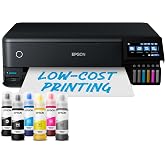
  • Epson EcoTank ET-2750 A4 Print/Scan/Copy Wi-Fi Printer, Black

Epson EcoTank ET-2750 A4 Print/Scan/Copy Wi-Fi Printer, Black

4.4 out of 5 stars (1,118)

Your transaction is secure
We work hard to protect your security and privacy. Our payment security system encrypts your information during transmission. We don’t share your credit card details with third-party sellers and we don’t sell your information to others. Learn more

Return Policy

Tap on the category links below for the associated return window and exceptions (if any) for returns.

Currently unavailable.
We don't know when or if this item will be back in stock.

About this item

  • Save 90 percent on the cost of ink*: Equivalent of 88 cartridges worth of ink included
  • Ultra-low-cost printing: Print up to 14,000 pages in black and 5,200 pages in colour
  • Next generation ink filling system: Enjoy hassle and mess-free refills with the enhanced ink bottles
  • Wi-Fi and apps: Print from mobile devices
  • 3-in-1 with LCD screen: Print, copy and scan including double-sided printing
Get 90 days FREE of Amazon Music Unlimited
with the purchase of any eligible product. Shop now

Product information

Warranty & Support

Amazon.com.au Return Policy:You may return for a full refund for the price you paid within 30 days of delivery any new computer purchased from Amazon that is "dead on arrival", arrives in damaged condition or is still in unopened boxes. Amazon may test or inspect returns. If Amazon finds a customer has misrepresented the condition of a return, Amazon may impose a fee equal to up to 15 percent of the merchandise sales price. Any returned computer that is damaged through customer misuse, missing parts, or in unsellable condition due to customer tampering may result in the customer being charged a restocking fee based on the condition of the computer. This policy does not restrict or alter any non-excludable statutory consumer protections or rights you may have, including under the Australian Consumer Law. To view full returns terms including return instructions, merchandise-specific requirements and exclusions see our Returns Policy Page. New, used and refurbished products purchased from Marketplace vendors are subject to the returns policy of the individual vendor.
Brief content visible, double tap to read full content.
Full content visible, double tap to read brief content.

Top Brand

Epson

Image

90% positive ratings from 200+ customers

Image

200+ recent orders from this brand

Product description

Epson’s EcoTank ET-2750 A4 economical printer can save 90 Percent on ink costs on average offering the ability to print up to 14,000 pages in black and 5,200 pages in colour. Epson’s EcoTank printer has an ultra-high-capacity ink tank system that completely removes the need for cartridges. In fact, it comes with the equivalent of 88 cartridges worth of ink on average. The ET-2750 provides ultra-low-cost printing solutions, reliable and easy to use.

Package Contents
  • Epson’s ET-2750
  • Power cable
  • Setup guide
  • Software (CD)
Warranty document

Customer reviews

4.4 out of 5 stars
1,118 global ratings

Top reviews from Australia

There are 0 reviews from Australia

Top reviews from other countries

    Translated by Amazon
    See original
  • 5 out of 5 stars
    Epson ET-2750 experience
    Reviewed in the United Kingdom on 5 December 2020
    Brief content visible, double tap to read full content.
    Full content visible, double tap to read brief content.

    I purchased the ET-2750 following research into home printers, with ink tanks rather than cartridges, for a budget around £200 to £250. I have had my fair share of "cartridge is nearly empty" warnings popping up plus I have had cartridge printers for 40 years so I must move with the times. I replaced a 20+ year old Canon MX850 which had begun to throw up one or two errors requiring Canon Service Centre intervention which sounded as expensive as a new printer. So I whittled my search down to Canon or Epson. Most reviews leaned towards the Epson because they were the first to introduce tank technology for home use. They are more expensive but the extra appeared worth the gamble. In addition the Black Friday deal forced my hand. Out of the box it's a very light, compact, machine which looks nice on my desk. Connection was simple using the existing power and USB leads used on the MX850. Topping the tanks with the supplied inks was easy, clean and very satisfying. My hardware is Windows XP and a 20+ year old desktop (homebuilt) computer. Loading the software was simple but as always you have to be patient while components are found and software is, as always, updated from the manufacturers web. Within 30 minutes I was printing out superb 7" x 5" photographs on Marrutt Satin/Oyster paper (I can fully recommend this paper). Some printer owners appear to have issues printing on non Epson paper but I did not. I printed out 12 photographs, some bordered and some borderless with superb results. Another 15 minutes spent setting up my iPhone 6S with Epson iPrint to allow me to print directly, via wireless, from the phone. Again with excellent results. Next came scanning. I suggest you read the manual and set up your file/folder to receive the scanned documents. Again scanning was simple and easy once the target folder was set up. Some reviews targeted noise as a CON but I have no issues with this. Internal parts are moving paper and printer heads so some sound is expected. It's very early days but so far I am very happy with my selection.

    Sending feedback...
    Thanks, we'll investigate in the next few days.
  • 4 out of 5 stars
    TRES CONTENTE DE CE PRODUIT
    Reviewed in France on 2 June 2020
    Brief content visible, double tap to read full content.
    Full content visible, double tap to read brief content.

    impression couleur correct recto verso économie de papier prix des cartouches et quantité de feuilles imprimées le top

    Sending feedback...
    Thanks, we'll investigate in the next few days.
    Translated from French by Amazon
    See original
  • 1 out of 5 stars
    Surtout ne pas acheter
    Reviewed in France on 7 January 2020
    Brief content visible, double tap to read full content.
    Full content visible, double tap to read brief content.

    Difficile à utiliser toujours un truc qui coince même les cartouches bonnes ne sont pas acceptées et durent rien du tout

    Sending feedback...
    Thanks, we'll investigate in the next few days.
    Translated from French by Amazon
    See original
  • 5 out of 5 stars
    Nice printer with good cheap ink filling system.
    Reviewed in the United Kingdom on 19 July 2019
    Brief content visible, double tap to read full content.
    Full content visible, double tap to read brief content.

    The printer arrived on time the next day after ordering it.

    It was well packages and is a nice compact design.

    It did take me some time to set up as initially it did not want to connect with my router, however once I did the connecting via the printer and not on the pc screen via the installation software, all went well.

    I notice people have complained that it does not Airprint from a mobile phone. This is not true as I use an Iphone 7 plus and it connected instantly and prints from the phone perfectly well.

    Very easy system for the ink filling and have just purchased a set of new inks for £12.99 so should be very cheap to run.

    I notice someone complained about only being able to use Epson Glossy photo paper. This also is not correct in my experience. I use standard inkjet glossy paper and the photos come out perfectly clear with no smudging.

    Thus far I would highly recommend this printer but would warn that it can take a little while to set up.

    The only negative was that the installation disc did not work on my PC (windows 10). I had to go to the Epson website to downlaod the driver software etc but this was hardly a chore.

    Sending feedback...
    Thanks, we'll investigate in the next few days.
  • 4 out of 5 stars
    Nice little printer but with a hard to read minute display
    Reviewed in the United Kingdom on 5 February 2020
    Brief content visible, double tap to read full content.
    Full content visible, double tap to read brief content.

    We got this at a very good price, must have been one of those 'flash' deals you stumble upon from time to time.

    For what we use it for (mainly b&w text printing, occasional colour printing, no photos) it has been very good so far. But the display is so small it's hard to read the icons. Operation is a bit counter intuitive, e.g to copy something you place the paper to be copied on the scanner, then, instead of just hitting the relatively large 'OK' button on the touch pad you are instructed, on the minuscule display, to hit a differnt button. On the display you can hardly make out which button that is! Penny pinching stupidity at its best - why not just include a slightly larger display. If you eyesight isn't great this display will be a problem.

    We had one paper jam but couldn't see how to clear it (unaware that there's a flip-down panel on the reat that gives you access to the paper path). Epson tech help didn't mention this when phoned so had to take it to an Epson repair centre where it was cleared.

    Had to have a lengthy head cleaning session to get the coloured inks to flow after having the unit for a year or so, but this was down to our low usage of colour. Black has never clogged. Print quality seems good, don't know about photos though. The double side printing is great.

    Best features are the large ink tanks. That ink (given our lowish usage) is going to last us for ever! And full bottles of refill ink are pretty cheap as well. If you're printing a lot you should get one of these ecotank machines. Also we got a free 3 year extended warranty, even though this isn't mentioned on the Amazon advert. You just go onto the Epson website and look for 'extended warranties' you will be directed to a page (might be a pdf download) that lists all the produts that can have the free extended warranty and follow the instructions.

    All in all quite pleased with it.

    Sending feedback...
    Thanks, we'll investigate in the next few days.