<?xml version="1.0" encoding="UTF-8"?>
<feed xmlns="http://www.w3.org/2005/Atom" xmlns:thoughtbot="https://thoughtbot.com/feeds/" xmlns:feedpress="https://feed.press/xmlns" xmlns:media="http://search.yahoo.com/mrss/" xmlns:podcast="https://podcastindex.org/namespace/1.0">
  <feedpress:locale>en</feedpress:locale>
  <link rel="hub" href="https://feedpress.superfeedr.com/"/>
  <title>Giant Robots Smashing Into Other Giant Robots</title>
  <subtitle>Written by thoughtbot, your expert partner for design and development.
</subtitle>
  <id>https://robots.thoughtbot.com/</id>
  <link href="https://thoughtbot.com/blog"/>
  <link href="https://feed.thoughtbot.com/" rel="self"/>
  <updated>2026-06-22T00:00:00+00:00</updated>
  <author>
    <name>thoughtbot</name>
  </author>
  <entry>
    <title>AI's "overnight" solution for our flaky tests took two weeks to adopt</title>
    <link rel="alternate" href="https://feed.thoughtbot.com/link/24077/17364998/what-it-took-to-use-this-overnight-ai-solution"/>
    <author>
      <name>Fritz Meissner</name>
    </author>
    <id>https://thoughtbot.com/blog/what-it-took-to-use-this-overnight-ai-solution</id>
    <published>2026-06-22T00:00:00+00:00</published>
    <updated>2026-06-19T12:59:16Z</updated>
    <content type="html"><![CDATA[<p>Recently I stopped a group of flaky tests from running in CI. 60% of CI runs were failing because of this group, which was unsustainable. Three weeks later I was able to restore that group to CI, with 0% failures on main<sup id="fnref1"><a href="https://thoughtbot.com/blog#fn1">1</a></sup> resulting. Our “non-flaky” tests now give more false positives than the (previously) flaky group.</p>

<p>This is not really a post about tests though, it’s really about AI’s contribution (a lot) and what it took to make that contribution usable (also a lot).</p>
<h2 id="the-hardest-problem">
  
    The hardest problem
  
</h2>

<p>Developers on this project had been quarantining tests with a <code>:flaky</code> label for several years. The strategy was to quarantine a small group which could be expected to fail randomly but could also be re-run easily and separately from the full suite. Apart from the flakiness, the test suite is comprehensive and gives us high confidence that if we merge something after tests pass, it works.</p>

<p>Over the years, several developers had tried for a week at a time to reduce flakiness, all resulting in failure. In our defense, the flaky tests centred around interactive pages using Stimulus or Hotwire, and online discussion of this topic is a combination of ideas we tried already, plus someone saying: “I tried a lot, it doesn’t work, I think there’s a bug”.</p>

<p>The most promising angle was adopting Playwright, which did improve some things but also left us with some tests that failed permanently and needed to be skipped. There’s a dissatisfying way in which this is better than tests that only fail some of the time.</p>

<p>The problem started to look more and more like a trap set for enthusiastic developers. As a manager I always had to urge caution: “sure, you can see some approaches that could help, but bear in mind the last five times anyone tried they found very promising angles that didn’t change the stats in github at all”. Developers whom I trust were seriously recommending deleting the entire group.</p>
<h2 id="opus-quotsolved-itquot-overnight">
  
    Opus “solved it” overnight
  
</h2>

<p>One night, Opus 4.6 running in Claude Code solved “the problem” by running the flaky test group hundreds of times and analyzing failures. There was some prompting to help Claude avoid premature conclusions and be aware that the problems could not be reproduced without repetition, plus a markdown file where it would record progress. Otherwise, no special magic.</p>

<p>I could see Claude’s progress over time because it needed to run the flaky group in larger and larger batches. At first, five times was sufficient because the errors it found occurred 20% of the time. As those were fixed, I had to tell it to use batches of ten, fifty, and then one hundred. Finally, it reached a point where zero errors were found.</p>

<p>A “nice” thing about needing such large batches is that I could leave Claude alone for hours at a time while my normal evening continued. Flaky specs may be a problem uniquely suited to coding agents in that way. There’s not even much token use: it just kicks off a long run and surfaces for an internal conversation, then kicks off the next batch.</p>
<h2 id="two-weeks-to-make-the-results-useful">
  
    Two weeks to make the results useful
  
</h2>

<p>This isn’t a post about test failure strategy, so I’ll spare you details of what was flaky and what fixes applied. Instead I’ll try to communicate some of the meta concerns I had with the resulting code changes.</p>

<p>Given a test that looked something like this:</p>
<div class="highlight"><pre class="highlight plaintext"><code>1 create objects
2 visit page
3 click A
4 click B
5 expect expression 1 to be true
6 click C
7 expect expression 2 to be true
</code></pre></div>
<p>Unchecked, Claude would have turned it into something like this:</p>
<div class="highlight"><pre class="highlight plaintext"><code>1  create objects in a slightly different way that makes no difference
2  visit page
3  explicit sleep
4  unnecessary scoping to a specific section of the page
5    click A
6  end of unnecessary scoping
7  click B, with 3 second wait passed as option arg
8  a clever improvement that should have been on line 3
9  expect expression 1 to be true
10 click C
11 an improvement that worked in other tests but was irrelevant here
12 expect expression 2 to be true
</code></pre></div>
<p>Ultimately the changes added up to a good improvement, usually because of one crucial addition per test (in our fictional example, line 8) that was on the wrong line and hidden in a mountain of garbage (lines 3, 4, 6, 7, 11).</p>

<p>It took two weeks to:</p>

<ul>
<li>separate coincidence from real results</li>
<li>remove the things that didn’t make a difference</li>
<li>apply good practice to the important differences</li>
<li>unify slight variations on the same changes</li>
<li>generalise to other parts of the test suite</li>
<li>make sensible commits</li>
</ul>

<p>Some of this work was just a matter of applying good practice (e.g. any explicit sleep call is immediately suspect), and other times it was sending Claude back to hundreds of test runs to prove that something it had added made no difference.</p>
<h2 id="conclusion-processing-my-reactions">
  
    Conclusion: processing my reactions
  
</h2>

<p>I see in myself three reactions.</p>
<h3 id="1-hooray-i39m-still-useful-as-a-programmer">
  
    1. Hooray, I’m still useful as a programmer!
  
</h3>

<p>I think it would have been impossible without lots of experience working with Rails and rspec to move from what Claude was suggesting initially towards something sustainable<sup id="fnref2"><a href="https://thoughtbot.com/blog#fn2">2</a></sup>. The exact amount of experience necessary is uncertain, but I’m on more than ten years. It took a lot to move beyond the optimism and false positives, and it would have taken more if I didn’t already have a reasonable gut instinct about these things.</p>
<h3 id="2-boy-ai-is-awful-why-bother-with-it-if-it-takes-so-long-to-use-the-results">
  
    2. Boy, AI is awful! Why bother with it if it takes so long to use the results?
  
</h3>

<p>I would absolutely use (and recommend) Claude for analysing flaky tests again. I think it would be a mistake not to do so. Accurately running long processes with tiny changes in between multi-hour waits is not a strength for humans.</p>

<p>In addition, Claude did reason through code running in parallel processes in a way that no human had managed for years. That particular part of our code is complex, but has not had active work for years, meaning that no human has good context. Claude probably caught up in 10 minutes.</p>

<p>An interesting aside here is that I find Claude to do much better work when it has tests to help it reason about application code. The tests were flaky, but they were still a good record of what the code was supposed to do.</p>
<h3 id="3-why-keep-going-for-two-weeks-after-ai-clearly-fixed-the-problem-i-care-about-in-one-evening">
  
    3. Why keep going for two weeks after AI clearly fixed the problem I care about in one evening?
  
</h3>

<p>I could have taken the win, ignored the cruft, and gained two weeks. If I had, I would have lost those two weeks and more later on. Humans and AI agents would cargo cult the new (anti) patterns, falsely claiming victory over any future flakiness, and making it harder to identify the real problems.</p>

<p>As with all programming, eventually “tidy first, then do the work” ends up being faster than “just do the work”. There’s no escaping the tidying if I want good results, the question is whether I do it at a predictable time and pace or when there’s an emergency (like no-one being able to deploy any code because CI keeps failing).</p>

<p>That includes tidying up after AI.</p>

<aside class="related-articles"><h2>If you enjoyed this post, you might also like:</h2>
<ul>
<li><a href="https://thoughtbot.com/blog/how-to-use-chatgpt-to-find-custom-software-consultants">How to Use ChatGPT to Find Custom Software Consultants</a></li>
<li><a href="https://thoughtbot.com/blog/your-flaky-tests-might-be-time-dependent">Your flaky tests might be time dependent</a></li>
<li><a href="https://thoughtbot.com/blog/debugging-why-your-specs-have-slowed-down">Debugging Why Your Specs Have Slowed Down</a></li>
</ul></aside>

<div class="footnotes">
<hr>
<ol>

<li id="fn1">
<p>commits on main are a proxy for “code that should pass tests”, as opposed to work-in-progress commits, which also go through CI and fail tests for real reasons. <a href="https://thoughtbot.com/blog#fnref1">↩</a></p>
</li>

<li id="fn2">
<p>this was Opus 4.6, but nothing I’ve seen of later versions of Opus gives me confidence that humans are less necessary here. <a href="https://thoughtbot.com/blog#fnref2">↩</a></p>
</li>

</ol>
</div>
<img src="https://feed.thoughtbot.com/link/24077/17364998.gif" height="1" width="1"/>]]></content>
    <summary>We lived with flaky tests for years until Claude found a solution overnight. It only took two weeks to make the solution useful.</summary>
    <thoughtbot:auto_social_share>true</thoughtbot:auto_social_share>
  </entry>
  <entry>
    <title>The Playwright debugging tool Rails devs aren't using</title>
    <link rel="alternate" href="https://feed.thoughtbot.com/link/24077/17363637/the-playwright-debugging-tool-rails-devs-aren-t-using"/>
    <author>
      <name>Justin Toniazzo</name>
    </author>
    <id>https://thoughtbot.com/blog/the-playwright-debugging-tool-rails-devs-aren-t-using</id>
    <published>2026-06-19T00:00:00+00:00</published>
    <updated>2026-06-18T19:33:53Z</updated>
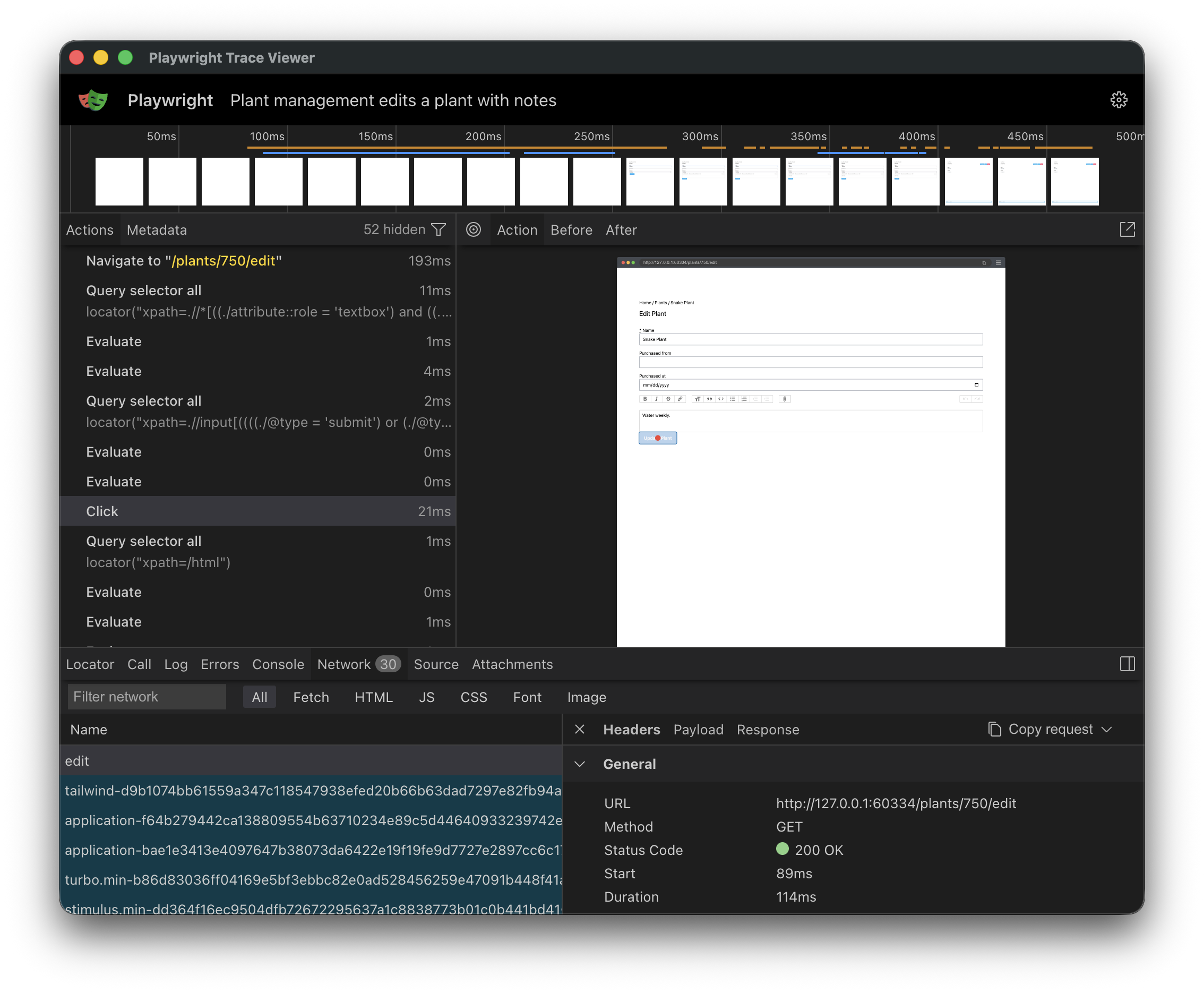
    <content type="html"><![CDATA[<p>Playwright ships with a <a href="https://en.wikipedia.org/wiki/Flight_recorder">black-box recorder</a> that records every detail of every test, giving you a treasure trove of information for debugging flaky tests. Most Rails apps I’ve worked on don’t use it.</p>

<p>It’s called the <a href="https://playwright.dev/docs/trace-viewer">Trace Viewer</a>, and if you’re running Capybara with Playwright via <a href="https://playwright-ruby-client.vercel.app/"><code>playwright-ruby-client</code></a>, turning it on takes a single block in <code>rails_helper.rb</code>.</p>
<h2 id="what39s-in-a-playwright-trace">
  
    What’s in a Playwright trace?
  
</h2>

<p>When Playwright records a trace, you get back a <code>.zip</code> you can replay in the Trace Viewer. The viewer is essentially a DVR for your test run. For every action Playwright took, every <code>click</code>, <code>fill_in</code>, and navigation, you get:</p>

<ul>
<li>A <strong>before-and-after screenshot</strong>, so you can see what the page looked like at each moment</li>
<li>The <strong>DOM at that point in time</strong>, fully inspectable like in your devtools</li>
<li>The <strong>network requests</strong> in flight, with status codes, body, and timing</li>
<li>The <strong>JavaScript console</strong> output</li>
<li>A <strong>timeline</strong> of everything that happened</li>
</ul>

<p><img src="https://images.thoughtbot.com/h90wgy5l1gaujkor9ntod93qbpwu_Screenshot%202026-05-15%20at%2011.18.43%E2%80%AFAM.png" alt="plawright trace viewer"></p>

<p>Compare that to what you usually get when a test fails on CI: A screenshot, and maybe a stack trace pointing at <code>expected to find "Saved"</code>. With a trace, you can scrub through the test like a video, and pinpoint exactly where things went wrong.</p>
<h2 id="enable-playwright-traces-in-your-rails-app">
  
    Enable Playwright traces in your Rails app
  
</h2>

<p>Drop this into your <code>rails_helper.rb</code>. It assumes you’re using <a href="https://playwright-ruby-client.vercel.app/docs/article/guides/rails_integration"><code>playwright-ruby-client</code></a>.</p>

<p>You may need to change <code>type: :system</code> to <code>type: :feature</code> if that’s how you set up your browser-based tests.</p>
<div class="highlight"><pre class="highlight ruby"><code><span class="no">RSpec</span><span class="p">.</span><span class="nf">configure</span> <span class="k">do</span> <span class="o">|</span><span class="n">config</span><span class="o">|</span>
  <span class="n">config</span><span class="p">.</span><span class="nf">before</span><span class="p">(</span><span class="ss">:each</span><span class="p">,</span> <span class="ss">type: :system</span><span class="p">)</span> <span class="k">do</span> <span class="o">|</span><span class="n">example</span><span class="o">|</span>
    <span class="n">driver</span> <span class="o">=</span> <span class="no">Capybara</span><span class="p">.</span><span class="nf">current_session</span><span class="p">.</span><span class="nf">driver</span>
    <span class="k">next</span> <span class="k">unless</span> <span class="n">driver</span><span class="p">.</span><span class="nf">respond_to?</span><span class="p">(</span><span class="ss">:start_tracing</span><span class="p">)</span>

    <span class="n">driver</span><span class="p">.</span><span class="nf">start_tracing</span><span class="p">(</span>
      <span class="ss">screenshots: </span><span class="kp">true</span><span class="p">,</span>
      <span class="ss">snapshots: </span><span class="kp">true</span><span class="p">,</span>
      <span class="ss">sources: </span><span class="kp">true</span><span class="p">,</span>
      <span class="ss">title: </span><span class="n">example</span><span class="p">.</span><span class="nf">full_description</span>
    <span class="p">)</span>
    <span class="n">example</span><span class="p">.</span><span class="nf">metadata</span><span class="p">[</span><span class="ss">:playwright_tracing</span><span class="p">]</span> <span class="o">=</span> <span class="kp">true</span>
  <span class="k">end</span>

  <span class="n">config</span><span class="p">.</span><span class="nf">after</span><span class="p">(</span><span class="ss">:each</span><span class="p">,</span> <span class="ss">type: :system</span><span class="p">)</span> <span class="k">do</span> <span class="o">|</span><span class="n">example</span><span class="o">|</span>
    <span class="k">next</span> <span class="k">unless</span> <span class="n">example</span><span class="p">.</span><span class="nf">metadata</span><span class="p">[</span><span class="ss">:playwright_tracing</span><span class="p">]</span>

    <span class="n">path</span> <span class="o">=</span> <span class="n">trace_path</span><span class="p">(</span><span class="n">example</span><span class="p">)</span>
    <span class="no">Capybara</span><span class="p">.</span><span class="nf">current_session</span><span class="p">.</span><span class="nf">driver</span><span class="p">.</span><span class="nf">stop_tracing</span><span class="p">(</span><span class="n">path</span><span class="p">:)</span>
    <span class="k">if</span> <span class="n">example</span><span class="p">.</span><span class="nf">exception</span>
      <span class="n">output</span> <span class="o">=</span> <span class="no">RSpec</span><span class="p">.</span><span class="nf">configuration</span><span class="p">.</span><span class="nf">output_stream</span>
      <span class="n">output</span><span class="p">.</span><span class="nf">puts</span><span class="p">(</span><span class="s2">"Playwright trace: </span><span class="si">#{</span><span class="n">path</span><span class="si">}</span><span class="s2">"</span><span class="p">)</span>
    <span class="k">end</span>
  <span class="k">rescue</span> <span class="no">Playwright</span><span class="o">::</span><span class="no">Error</span> <span class="o">=&gt;</span> <span class="n">e</span>
    <span class="k">raise</span> <span class="k">unless</span> <span class="n">e</span><span class="p">.</span><span class="nf">message</span><span class="p">.</span><span class="nf">start_with?</span><span class="p">(</span><span class="s2">"Must start tracing before stopping"</span><span class="p">)</span>
  <span class="k">end</span>

  <span class="k">def</span> <span class="nf">trace_path</span><span class="p">(</span><span class="n">example</span><span class="p">)</span>
    <span class="k">if</span> <span class="n">example</span><span class="p">.</span><span class="nf">exception</span>
      <span class="no">Rails</span><span class="p">.</span><span class="nf">root</span><span class="p">.</span><span class="nf">join</span><span class="p">(</span>
        <span class="s2">"tmp"</span><span class="p">,</span>
        <span class="s2">"playwright-traces"</span><span class="p">,</span>
        <span class="p">[</span>
          <span class="n">example</span><span class="p">.</span><span class="nf">full_description</span><span class="p">.</span><span class="nf">parameterize</span><span class="p">[</span><span class="mi">0</span><span class="p">,</span> <span class="mi">150</span><span class="p">],</span>
          <span class="s2">"-</span><span class="si">#{</span><span class="no">Time</span><span class="p">.</span><span class="nf">current</span><span class="p">.</span><span class="nf">to_i</span><span class="si">}</span><span class="s2">"</span><span class="p">,</span>
          <span class="s2">".zip"</span>
        <span class="p">].</span><span class="nf">join</span>
      <span class="p">)</span>
    <span class="k">else</span>
      <span class="no">File</span><span class="o">::</span><span class="no">NULL</span>
    <span class="k">end</span>
  <span class="k">end</span>
<span class="k">end</span>
</code></pre></div>
<p>This starts a trace before every feature spec and only saves it if the test failed. When that happens, you’ll see a line like this printed:</p>
<div class="highlight"><pre class="highlight plaintext"><code>Playwright trace: /Users/jutonz/code/thoughtbot/testing/tmp/playwright-traces/it-works-1775576941.zip
</code></pre></div>
<p>A few things in the snippet might catch your eye (the <code>before(:each)</code> instead of <code>around</code>, the <code>rescue</code>, the conditional path). They’re like that for a reason. Copy as-is, or expand below for the rationale.</p>

<details>
<summary>Why the snippet looks the way it does</summary>

<ul>
<li>
<strong><code>before(:each)</code> over <code>around</code>.</strong> Capybara only swaps from RackTest to Playwright after it sees the spec’s <code>:js</code> (or <code>js: true</code>) metadata. That swap happens after the <code>around</code> block, so a hook running there would still see the RackTest driver and <code>respond_to?(:start_tracing)</code> would always be <code>false</code>.</li>
<li>
<strong><code>rescue Playwright::Error</code>.</strong> If <code>start_tracing</code> failed for any reason, e.g. if a test modifies some low level driver config, <code>stop_tracing</code> will throw a “Must start tracing before stopping” error. Catching it won’t fail an otherwise passing test because of a tracing issue.</li>
<li>
<strong>Conditional <code>trace_path</code> / <code>File::NULL</code>.</strong> Playwright requires you to write a trace somewhere once you’ve started one. Since we don’t care about traces for passing tests, we discard them by writing them to the <code>/dev/null</code> <a href="https://en.wikipedia.org/wiki/Null_device">null device</a>.</li>
</ul>

</details>
<h2 id="download-traces-from-ci-for-debugging">
  
    Download traces from CI for debugging
  
</h2>

<p>You’ll want to keep failed traces around for inspection. In GitHub Actions, add an upload step that runs even when the suite fails:</p>
<div class="highlight"><pre class="highlight yaml"><code><span class="pi">-</span> <span class="na">name</span><span class="pi">:</span> <span class="s">Upload Playwright traces</span>
  <span class="na">if</span><span class="pi">:</span> <span class="s">failure()</span>
  <span class="na">uses</span><span class="pi">:</span> <span class="s">actions/upload-artifact@v4</span>
  <span class="na">with</span><span class="pi">:</span>
    <span class="na">name</span><span class="pi">:</span> <span class="s">playwright-traces</span>
    <span class="na">path</span><span class="pi">:</span> <span class="s">tmp/playwright-traces</span>
</code></pre></div>
<p>Now you can download traces after a failed test.</p>
<h2 id="open-a-trace">
  
    Open a trace
  
</h2>

<p>Once you’ve downloaded a trace zip, open it with:</p>
<div class="highlight"><pre class="highlight shell"><code>npx playwright show-trace path/to/trace.zip
</code></pre></div>
<p>That spins up the Trace Viewer in a local browser. The <a href="https://playwright.dev/docs/trace-viewer">Playwright docs</a> cover the UI in detail.</p>
<h2 id="gotchas">
  
    Gotchas
  
</h2>

<p>A couple of things worth knowing once traces are on.</p>

<p><strong>Traces only show Playwright actions, not Capybara or RSpec.</strong></p>

<p>A <code>click_on("Save")</code> call will appear as <code>Click</code> in the trace, since that’s the underlying Playwright action that’s performed. Usually it’s easy enough to map the Playwright action to the Capybara version, but it won’t be exactly the same.</p>

<p>The trace recorder is also capable of capturing <a href="https://playwright-ruby-client.vercel.app/docs/article/guides/rspec_integration">Playwright-based assertions</a>, but if you’re using Capybara, these won’t show up. Capybara does assertions itself, rather than delegating to the driver. This is because Selenium and other drivers don’t support built-in assertions.</p>

<p><strong>There’s a small I/O cost.</strong></p>

<p>Recording is mostly disk-bound. In my experience the cost is negligible, but if your CI is I/O-constrained, you might notice it as new flakiness. If that happens, you can store traces in a tmpfs or ramdisk by passing <code>tracesDir</code> to the driver:</p>
<div class="highlight"><pre class="highlight ruby"><code><span class="no">Capybara</span><span class="o">::</span><span class="no">Playwright</span><span class="o">::</span><span class="no">Driver</span><span class="p">.</span><span class="nf">new</span><span class="p">(</span>
  <span class="n">app</span><span class="p">,</span>
  <span class="c1"># ... existing options ...</span>
  <span class="ss">tracesDir: </span><span class="no">ENV</span><span class="p">[</span><span class="s2">"CI"</span><span class="p">].</span><span class="nf">present?</span> <span class="p">?</span> <span class="s2">"/mnt/ramdisk/playwright-traces"</span> <span class="p">:</span> <span class="kp">nil</span><span class="p">,</span>
<span class="p">)</span>
</code></pre></div>
<p>CircleCI exposes <a href="https://circleci.com/docs/guides/execution-managed/using-docker/#ram-disks"><code>/mnt/ramdisk</code></a> by default. On other providers you can <a href="https://docs.oracle.com/cd/E18752_01/html/817-5093/fscreate-99040.html">create a tmpfs directory manually</a>.</p>
<h2 id="debug-don39t-guess">
  
    Debug, don’t guess
  
</h2>

<p>Before traces, my approach to flaky CI was guess, re-run, and hope. Now I open the artifact, scrub through the test, and see the actual problem. The difference is night and day, and the setup is one block of code.</p>

<p>If you’re running Playwright through Capybara, you’ve already got everything you need. Turn it on.</p>

<aside class="related-articles"><h2>If you enjoyed this post, you might also like:</h2>
<ul>
<li><a href="https://thoughtbot.com/blog/your-flaky-tests-might-be-time-dependent">Your flaky tests might be time dependent</a></li>
<li><a href="https://thoughtbot.com/blog/debugging-why-your-specs-have-slowed-down">Debugging Why Your Specs Have Slowed Down</a></li>
<li><a href="https://thoughtbot.com/blog/automating-barcode-scanner-tests-with-capybara">Automating barcode scanner tests with Capybara</a></li>
</ul></aside>
<img src="https://feed.thoughtbot.com/link/24077/17363637.gif" height="1" width="1"/>]]></content>
    <summary> Playwright records every test in cinematic detail. Most Rails devs aren't watching.</summary>
    <thoughtbot:auto_social_share>true</thoughtbot:auto_social_share>
  </entry>
  <entry>
    <title>Giant Robots Podcast Ep 614:  AI Code Audits</title>
    <link rel="alternate" href="https://feed.thoughtbot.com/link/24077/17363283/giant-robots-podcast-ep-614-ai-code-audits"/>
    <author>
      <name>Chad Pytel and Sami Birnbaum</name>
    </author>
    <id>https://thoughtbot.com/blog/giant-robots-podcast-ep-614-ai-code-audits</id>
    <published>2026-06-18T00:00:00+00:00</published>
    <updated>2026-06-18T14:23:48Z</updated>
    <content type="html"><![CDATA[Our hosts Chad and Sami team up this week to discuss AI code bases and whether they can be built to be developer friendly and with best practices in mind.<img src="https://feed.thoughtbot.com/link/24077/17363283.gif" height="1" width="1"/>]]></content>
    <summary>Our hosts Chad and Sami team up this week to discuss AI code bases and whether they can be built to be developer friendly and with best practices in mind.</summary>
    <thoughtbot:auto_social_share>false</thoughtbot:auto_social_share>
  </entry>
  <entry>
    <title>Meet thoughtbot at Brighton Ruby 2026</title>
    <link rel="alternate" href="https://feed.thoughtbot.com/link/24077/17362977/meet-thoughtbot-at-brighton-ruby-2026"/>
    <author>
      <name>Rémy Hannequin</name>
    </author>
    <id>https://thoughtbot.com/blog/meet-thoughtbot-at-brighton-ruby-2026</id>
    <published>2026-06-18T00:00:00+00:00</published>
    <updated>2026-06-17T14:59:42Z</updated>
    <content type="html"><![CDATA[<p>Brighton Ruby 2026 will take place in a few days and the thoughtbot team will be
there to meet you all in real life, learn from all the great talks, and enjoy a
day by the English coast.</p>

<p>We love Brighton Ruby and enjoyed it for many years. It is a single-day,
single-track conference packed with great energy and great people.</p>

<p>This year we will have 5 thoughtbotters attending:</p>

<p><img src="https://images.thoughtbot.com/8sth2cjnqsrcqzqwi024demlwabm_Ali_Slater.png" alt="Aji Slater's portrait"></p>

<p>Aji will be at Brighton Ruby for the first time! They are always happy to talk
about ruby game development, recent conversations on
<a href="https://bikeshed.thoughtbot.com">The Bike Shed</a>, tracking reading lists on
<a href="https://app.thestorygraph.com/profile/doodlingdev">Storygraph</a>, or (let’s see
what else… <em>::rummages through bag of hobbies::</em>) linguistic anthropology.
Come say hello!</p>

<p><img src="https://images.thoughtbot.com/lwltzeyrmhro7xrbz2l9bbzqxp7v_Chad_Pytel.png" alt="Chad Pytel's portrait"></p>

<p>Chad is thoughtbot’s founder and CEO, host of the
<em>Giant Robots Smashing Into Other Giant Robots</em>‘s
<a href="https://podcast.thoughtbot.com/">podcast</a> and eternal player of D&amp;D.</p>

<p><img src="https://images.thoughtbot.com/pkyl5eoqpbz36lrquink7xqjusk9_Mina_Slater.png" alt="Mina Slater's portrait"></p>

<p>Mina is based in Edinburgh, Scotland, and this will be her first time at
Brighton Ruby. She’s interested in infrastructure as code and closing the gap
between operations responsibilities and application development, is an avid
marathon runner, always looking to strike up a conversation about the works of
Brandon Sanderson or show off pictures of her dogs, Dottie and Henson.</p>

<p><img src="https://images.thoughtbot.com/yvj3ky5sd803aoy3704pp4fut63z_rob.png" alt="Rob Whittaker's portrait"></p>

<p>Rob is our EMEA Development Director, based in Holmes Chapel, Cheshire and most
likely you have seen him already in Brighton Ruby or other conferences.</p>

<p>He has a not-so-quiet obsession with best practices and striving for
improvement. He likes to hunt down delicious beers and coffee in his spare time.
Despite the recent ups and downs, he’s an avid Stoke City fan, which is only a
testament to his determination!</p>

<p><img src="https://images.thoughtbot.com/rlx4eih0fe93p9fd3sna6io6why1_Sarah%20Lima%202026%20(1).png" alt="Sarah Lima's portrait"></p>

<p>Sarah is a developer and team lead, based in Porto, Portugal, and originally
from Brazil. She enjoys working with Ruby especially, but also on any technology
that enables projects to move forward. She loves playings sports like volleyball
and has a great movies and TV series culture.</p>

<p><img src="https://images.thoughtbot.com/038aqq7cxmnqu1fwguk5jlj8lq5h_Remy_Hannequin.png" alt="Rémy Hannequin's portrait"></p>

<p>And finally, we will also have a speaker at the conference this year: myself,
Rémy Hannequin. I am happy to share that I will be giving a talk on time
management and surprises with Ruby.</p>

<p>I am based in Paris, France, and I have a serious passion for astronomy. I
created multiple open source projects to combine Ruby and astronomy, with the
main one being <a href="https://github.com/rhannequin/astronoby">Astronoby</a>, a Ruby gem to allows to compute celestial events and
positions with extreme precision.</p>

<p>If you’re attending, come say hello! We’re always up for talking about Ruby,
Rails, that new gem we’re excited about, the eternal Vim vs VS Code debate or we
can just share a drink and talk about something else! Keep an eye on
<a href="https://thoughtbot.social/@thoughtbot">thoughtbot on Mastodon</a> and
<a href="https://ruby.social/@purinkle">Rob’s personal account</a> to see where we’ll be
hanging out.</p>

<p>We can’t wait to share the experience with you.</p>

<aside class="related-articles"><h2>If you enjoyed this post, you might also like:</h2>
<ul>
<li><a href="https://thoughtbot.com/blog/2-years-of-hackfests">2 Years Of Hackfests</a></li>
<li><a href="https://thoughtbot.com/blog/thoughtbot-at-rubyconf-2023">thoughtbot at RubyConf 2023</a></li>
<li><a href="https://thoughtbot.com/blog/railsconf2012">Meet thoughtbot at Railsconf 2012</a></li>
</ul></aside>
<img src="https://feed.thoughtbot.com/link/24077/17362977.gif" height="1" width="1"/>]]></content>
    <summary>Brighton Ruby 2026 will take place in two weeks, thoughtbot will be attending and speaking, let's meet!</summary>
    <thoughtbot:auto_social_share>true</thoughtbot:auto_social_share>
  </entry>
  <entry>
    <title>The mistake I didn't realise I was making when designing workshops</title>
    <link rel="alternate" href="https://feed.thoughtbot.com/link/24077/17362369/the-mistake-i-didn-t-realise-i-was-making-when-designing-workshops"/>
    <author>
      <name>Bethan Ashley</name>
    </author>
    <id>https://thoughtbot.com/blog/the-mistake-i-didn-t-realise-i-was-making-when-designing-workshops</id>
    <published>2026-06-17T00:00:00+00:00</published>
    <updated>2026-06-16T09:44:06Z</updated>
    <content type="html"><![CDATA[<h2 id="the-checklist-i-expected">
  
    The checklist I expected
  
</h2>

<p>Last week I attended a workshop on neuroinclusivity in learning design.</p>

<p>I expected to come away with a checklist.</p>

<ul>
<li>Use larger fonts</li>
<li>Send slides in advance</li>
<li>Offer cameras off</li>
<li>Use a dyslexia-friendly typeface</li>
</ul>

<p>Instead, the biggest takeaway was that there is <strong>no checklist</strong>.</p>

<p>Hold on - I know you want something tangible, it’s coming - stay with me.</p>
<h2 id="the-assumption-i-hadn39t-questioned">
  
    The assumption I hadn’t questioned
  
</h2>

<p>The facilitator challenged a belief I hadn’t questioned before: we often talk about neurodiversity as if it describes a group of people.</p>

<p>The workshop argued that neurodiversity is the natural variation in how humans think, focus, process information and communicate.</p>

<p>That reframing changes the problem entirely.</p>
<h2 id="why-this-matters-for-design">
  
    Why this matters for design
  
</h2>

<p>When we think in categories, we tend to design for ourselves and then add accommodations afterwards. We build the workshop, the meeting, the presentation or the product, based on our own preferences and then ask, “now how do we make this accessible?”</p>

<p>When we think in variation, we start by accepting that people will experience the same thing differently.</p>

<p>The workshop wasn’t really about fonts or slide templates. It was about design choices.</p>

<blockquote>
<p>How much information do you put on a slide?</p>

<p>Do people know why they’re learning something?</p>

<p>Can they contribute in different ways?</p>

<p>Have you considered sensory load, attention span, or processing time?</p>
</blockquote>
<h2 id="a-familiar-product-challenge">
  
    A familiar product challenge
  
</h2>

<p>As a product person, the parallel felt familiar: even if you start with the customer, there’s still a risk of designing for how something is <em>assumed</em> to be experienced, rather than how it actually is - a gap that only closes with context and testing.</p>

<p>Whether you’re designing software, a workshop, a conference talk or a team meeting, the principle feels surprisingly similar:</p>

<p>Start with the expectation that people will experience the same thing differently. <em>Design from there.</em></p>

<aside class="related-articles"><h2>If you enjoyed this post, you might also like:</h2>
<ul>
<li><a href="https://thoughtbot.com/blog/priority-determines-product">Priority Determines Product</a></li>
<li><a href="https://thoughtbot.com/blog/chicken-accessories-for-chickens">Chicken Accessories For Chickens</a></li>
<li><a href="https://thoughtbot.com/blog/tips-for-joining-an-existing-project">Tips for Joining an Existing Project 💡</a></li>
</ul></aside>
<img src="https://feed.thoughtbot.com/link/24077/17362369.gif" height="1" width="1"/>]]></content>
    <summary>The hidden reason good products, meetings and workshops still fail: they depend on a single way of seeing, thinking and processing.</summary>
    <thoughtbot:auto_social_share>true</thoughtbot:auto_social_share>
  </entry>
  <entry>
    <title>The Bike Shed Ep 502:  Apps That Make Our Work Go</title>
    <link rel="alternate" href="https://feed.thoughtbot.com/link/24077/17362032/the-bike-shed-ep-502-apps-that-make-our-work-go"/>
    <author>
      <name>Joël Quenneville and Sally Hall</name>
    </author>
    <id>https://thoughtbot.com/blog/the-bike-shed-ep-502-apps-that-make-our-work-go</id>
    <published>2026-06-16T00:00:00+00:00</published>
    <updated>2026-06-16T14:20:27Z</updated>
    <content type="html"><![CDATA[Aji and Sally are back together again, this time to discuss the different apps they use to make their workflows and To Do lists easier and quicker to achieve.<img src="https://feed.thoughtbot.com/link/24077/17362032.gif" height="1" width="1"/>]]></content>
    <summary>Aji and Sally are back together again, this time to discuss the different apps they use to make their workflows and To Do lists easier and quicker to achieve.</summary>
    <thoughtbot:auto_social_share>false</thoughtbot:auto_social_share>
  </entry>
  <entry>
    <title>AI crawlers are inflating your view counts</title>
    <link rel="alternate" href="https://feed.thoughtbot.com/link/24077/17361774/ai-crawlers-are-inflating-your-view-counts"/>
    <author>
      <name>Trésor Bireke</name>
    </author>
    <id>https://thoughtbot.com/blog/ai-crawlers-are-inflating-your-view-counts</id>
    <published>2026-06-16T00:00:00+00:00</published>
    <updated>2026-06-15T22:50:50Z</updated>
    <content type="html"><![CDATA[<p>Your most-viewed page might be one no human has ever opened. That is what <strong>AI crawlers</strong> have done to view tracking in 2026.</p>

<p>I ran into this problem on a production app that needed engagement tracking. The first version tracked everything server-side, the way Rails apps have done analytics for years. It broke within a day.</p>
<h2 id="the-problem-crawlers-inflate-every-count">
  
    The problem: crawlers inflate every count
  
</h2>

<p>We used <a href="https://github.com/ankane/ahoy">Ahoy</a> for tracking. Each controller action called <code>ahoy.track</code> while rendering the page, and every event rolled up into a denormalized counter column with <code>counter_culture</code>.</p>

<p>The issue is that server-side tracking fires on every request, including bots. AI crawlers like Meta-ExternalAgent, Bytespider, and Baiduspider were making roughly 100,000 requests per day. They were not attacking the site, just reading to feed training pipelines.</p>

<p>Ahoy has bot detection built in. It uses the <code>device_detector</code> gem to check user agents and skips known bots. That list catches Googlebot and older crawlers, but it misses the new wave of AI crawlers. As a result, every one of those requests created an <code>Ahoy::Event</code> row and incremented the corresponding counters.</p>

<p>Our view counts were not measuring human interest. They were measuring how hungry the scrapers were that week.</p>
<h2 id="fix-one-require-javascript">
  
    Fix one: require JavaScript
  
</h2>

<p>Chasing user agent strings is a losing game. New crawlers appear faster than blocklists update. But there is one thing AI crawlers reliably do not do, and that is execute JavaScript.</p>

<p>So we moved view tracking out of the controllers. Pages declare what is trackable as a data attribute, and a small Stimulus controller fires a beacon after the page loads.</p>
<div class="highlight"><pre class="highlight javascript"><code><span class="nf">connect</span><span class="p">()</span> <span class="p">{</span>
  <span class="k">if </span><span class="p">(</span><span class="k">this</span><span class="p">.</span><span class="nx">element</span><span class="p">.</span><span class="nx">dataset</span><span class="p">.</span><span class="nx">viewTrackerFired</span> <span class="o">===</span> <span class="dl">"</span><span class="s2">true</span><span class="dl">"</span><span class="p">)</span> <span class="k">return</span>
  <span class="k">this</span><span class="p">.</span><span class="nx">element</span><span class="p">.</span><span class="nx">dataset</span><span class="p">.</span><span class="nx">viewTrackerFired</span> <span class="o">=</span> <span class="dl">"</span><span class="s2">true</span><span class="dl">"</span>

  <span class="kd">const</span> <span class="nx">fire</span> <span class="o">=</span> <span class="p">()</span> <span class="o">=&gt;</span> <span class="k">this</span><span class="p">.</span><span class="nf">fire</span><span class="p">()</span>
  <span class="k">if </span><span class="p">(</span><span class="dl">"</span><span class="s2">requestIdleCallback</span><span class="dl">"</span> <span class="k">in</span> <span class="nb">window</span><span class="p">)</span> <span class="p">{</span>
    <span class="nf">requestIdleCallback</span><span class="p">(</span><span class="nx">fire</span><span class="p">,</span> <span class="p">{</span> <span class="na">timeout</span><span class="p">:</span> <span class="mi">2000</span> <span class="p">})</span>
  <span class="p">}</span> <span class="k">else</span> <span class="p">{</span>
    <span class="nf">setTimeout</span><span class="p">(</span><span class="nx">fire</span><span class="p">,</span> <span class="mi">500</span><span class="p">)</span>
  <span class="p">}</span>
<span class="p">}</span>
</code></pre></div>
<p>A few details mattered here:</p>

<ul>
<li>
<code>requestIdleCallback</code> defers the beacon until the browser is idle, so tracking never competes with rendering. The 2-second timeout guarantees it still fires on busy pages.</li>
<li>
<code>keepalive: true</code> on the fetch lets the request survive the user navigating away immediately.</li>
<li>The fired flag guards against Turbo reconnecting the controller and double-counting.</li>
</ul>

<p>Crawlers fetch the HTML and move on. Real browsers run the beacon and get counted. View counts dropped sharply the day this deployed. That was the fix landing, not a regression.</p>
<h2 id="fix-two-the-bots-found-the-beacon">
  
    Fix two: the bots found the beacon
  
</h2>

<p>Three days later, the tracking endpoint <code>/track/events</code> was the most-crawled path on the site. Crawlers do not execute JavaScript, but they do parse it. The endpoint URL sits in the markup as a data attribute, so the scrapers extracted it and started requesting it directly.</p>

<p>None of those requests created events, but they still burned through the full Rails stack for nothing. The fix was two cheap layers.</p>

<p>First, robots.txt for the well-behaved bots:</p>
<div class="highlight"><pre class="highlight plaintext"><code>Disallow: /track/
</code></pre></div>
<p>Second, a guard in the controller for everyone else:</p>
<div class="highlight"><pre class="highlight ruby"><code><span class="k">class</span> <span class="nc">TrackingEventsController</span> <span class="o">&lt;</span> <span class="no">ApplicationController</span>
  <span class="n">before_action</span> <span class="ss">:reject_bots</span>

  <span class="kp">private</span>

  <span class="k">def</span> <span class="nf">reject_bots</span>
    <span class="n">head</span> <span class="ss">:no_content</span> <span class="k">if</span> <span class="no">DeviceDetector</span><span class="p">.</span><span class="nf">new</span><span class="p">(</span><span class="n">request</span><span class="p">.</span><span class="nf">user_agent</span><span class="p">).</span><span class="nf">bot?</span>
  <span class="k">end</span>
<span class="k">end</span>
</code></pre></div>
<p>Any request with a bot user agent gets a 204 before the action runs. No parsing, no resource lookups, no database work. The well-behaved crawlers respect robots.txt and never arrive, and the rest get the cheapest possible response.</p>
<h2 id="the-takeaway">
  
    The takeaway
  
</h2>

<p>Server-side analytics was built for a web that no longer exists. In 2026, a meaningful share of your traffic comes from AI crawlers, so counting views on the server measures scraper appetite, not audience.</p>

<p>The defense is not one clever trick. It is stacked cheap layers: robots.txt for the bots that ask permission, a user agent check that returns early for the ones that announce themselves, and a JavaScript beacon for the bots that do neither.</p>

<p>Check your own numbers. If your view counts have never had a suspicious cliff in them, the bot tax is probably still baked in.</p>

<aside class="related-articles"><h2>If you enjoyed this post, you might also like:</h2>
<ul>
<li><a href="https://thoughtbot.com/blog/how-to-use-chatgpt-to-find-custom-software-consultants">How to Use ChatGPT to Find Custom Software Consultants</a></li>
<li><a href="https://thoughtbot.com/blog/how-upgrading-ruby-broke-javascript">How Upgrading Ruby Broke JavaScript</a></li>
<li><a href="https://thoughtbot.com/blog/ai-for-business-adoption-challenges-people">AI for Business: Adoption challenges - people</a></li>
</ul></aside>
<img src="https://feed.thoughtbot.com/link/24077/17361774.gif" height="1" width="1"/>]]></content>
    <summary>AI crawlers now make up most of your site's traffic, and server-side analytics counts every one of them. Your view counts measure scrapers, not readers. Here is how to fix it.</summary>
    <thoughtbot:auto_social_share>true</thoughtbot:auto_social_share>
  </entry>
</feed>