Close
0%
0%

UV Paper Printer

X/Y Plotter for high wattage UV LEDs to expose Cyanotype and other printing methods.

Public Chat
Similar projects worth following
I did my grad art piece at art school (Emily Carr in Vancouver) on making large UV printed Van Dyke prints of 3D generated art. These were done by using the output from a Lightjet film printer, where I printed a positive image. Then I enlarged this onto 24x30 inch ortho film. I could then contact print those on large sheets of VanDyke treated watercolor paper. After school I worked for a couple of years at Cymbolic Sciences (now apart of Canon) on large format film printers, like the Lightjet. Most of the printers used lasers that were focused onto the film via a spinning mirror, and one of those was a high power IR laser to print onto printing plates. I kept thinking back to my VanDyke prints, how I could make "big" prints. I would ask the engineers about UV lasers, or UV LEDs, but those were very rare and expensive at the time (the blue LED had been out for a year). Anyhow, the rise of cheap DIY CNCs and the availability of cheap UVs got me thinking that I should try to build

Basic Setup:

Arduino Mega w ESP 8266 

CNC Shield

Arduino Nano on Print head

4 x LDO6AJSA LED Driver boards link

4 x 3W 380nm UV LED link

1 x Heatsink link

I. System Architecture Diagram

The system operates across three distinct tiers, separating the user interface, the motion control, and the real-time hardware execution.

======================================================================
                  TIER 1: THE NETWORK HUB (ESP32)
======================================================================
  [ Web Browser ]  --> HTTP POST (JSON) -->  [ ESP32 Web Server ]
  - User draws UI                            - Broadcasts standalone AP
  - Sends gridData                           - Hosts index.html & app.js
                                             - Converts JSON to Hex
                                                      |
                                                      | Serial2 (115200 Baud)
                                                      | TX/RX Protocol
                                                      v
======================================================================
               TIER 2: THE MAIN BRAIN (Mega 2560 + CNC Shield)
======================================================================
  [ Arduino Mega 2560 ] <----> [ Hardware Peripherals ]
  - Parses Hex image data      - X, Y, Z Stepper Motors
  - Calculates Mesh Bed        - SSD1306 OLED Screen
    Leveling (MBL)             - SD Card (Config & Mesh Storage)
  - Orchestrates X/Y motion    - User Input Buttons
                                                      |
                                                      | Serial1 (115200 Baud)
                                                      | TX/RX Protocol
                                                      v
======================================================================
               TIER 3: THE PRINTHEAD MCU (Nano Custom PCB)
======================================================================
  [ Arduino Nano ] <---------> [ Printhead Hardware ]
  - Real-time peripheral device - D10, D11, D12, D13: 4x UV LEDs
  - Never blocks UART          - D3, D7: CR Touch (Servo & Signal)
  - Microsecond timers         - A0-A5: TMP36 Temp Sensors
                               - D8: NeoPixel Status Indicator
======================================================================

I. System Architecture

The system operates across three distinct tiers, separating the user interface, the motion control, and the real-time hardware execution.

TIER 1: THE NETWORK HUB (ESP32)

  • Input: Receives HTTP POST (JSON) from the User's Web Browser.
  • Core Functions: * Broadcasts a standalone Wi-Fi Access Point.
    • Hosts the index.html and app.js frontend files.
    • Converts the JSON pixel arrays into Hexadecimal strings.
  • Output: Sends data down to Tier 2 via Hardware Serial2 (115200 Baud).

TIER 2: THE MAIN BRAIN (Arduino Mega 2560)

  • Hardware Attached: CNC Shield V3 (X, Y, Z Steppers), SSD1306 OLED Screen, SPI SD Card Module, and physical UI buttons.
  • Core Functions: * Parses the Hex image data from the ESP32.
    • Calculates the Mesh Bed Leveling (MBL) interpolation.
    • Orchestrates the X/Y physical motion path.
  • Output: Sends real-time hardware triggers down to Tier 3 via Hardware Serial1 (115200 Baud).

TIER 3: THE PRINTHEAD MCU (Arduino Nano Custom PCB)

  • Hardware Attached: 4x UV LEDs (D10-D13), CR Touch (D3 Servo, D7 Signal), 6x TMP36 Temp Sensors (A0-A5), and a NeoPixel Status LED (D8).
  • Core Functions: * Operates as a real-time peripheral device (never blocks the UART line).
    • Executes microsecond-precise UV exposure timers.
    • Manages the CR Touch deployment and background thermal polling.

II. Protocol: Website to ESP32 (The Payload)

The frontend uses a simple, modern REST approach to send the user's design to the ESP32.

1. The HTTP POST Request When the user clicks "Print," the JavaScript fetch API fires a JSON payload to the "/print" ESP32's endpoint.

  • Format: JSON
  • Structure:
    • width (int): The width of the image in pixels.
    • height (int): The height of the image in pixels.
    • pixels (array of ints): A flat, 1D array representing the pixel intensities. Each pixel is an integer from 0 (off) to 15 (max intensity).

2. ESP32 to Mega Translation The ESP32 intercepts this JSON, strips out the network overhead, and compresses the pixel array into a single, continuous hexadecimal string to save RAM on the Mega. It sends this over hardware UART.

  • Format: P:[width],[height]:[HexData]\n
  • Example: P:8,8:000F0000FF00FF00...
  • Mechanics: 0 stays 0, 15 becomes F. The Mega reads this string, unpacks the hex characters back into integers, and loads...
Read more »

  • New PCBs on the way

    john14 hours ago 0 comments

    New PCBs ordered

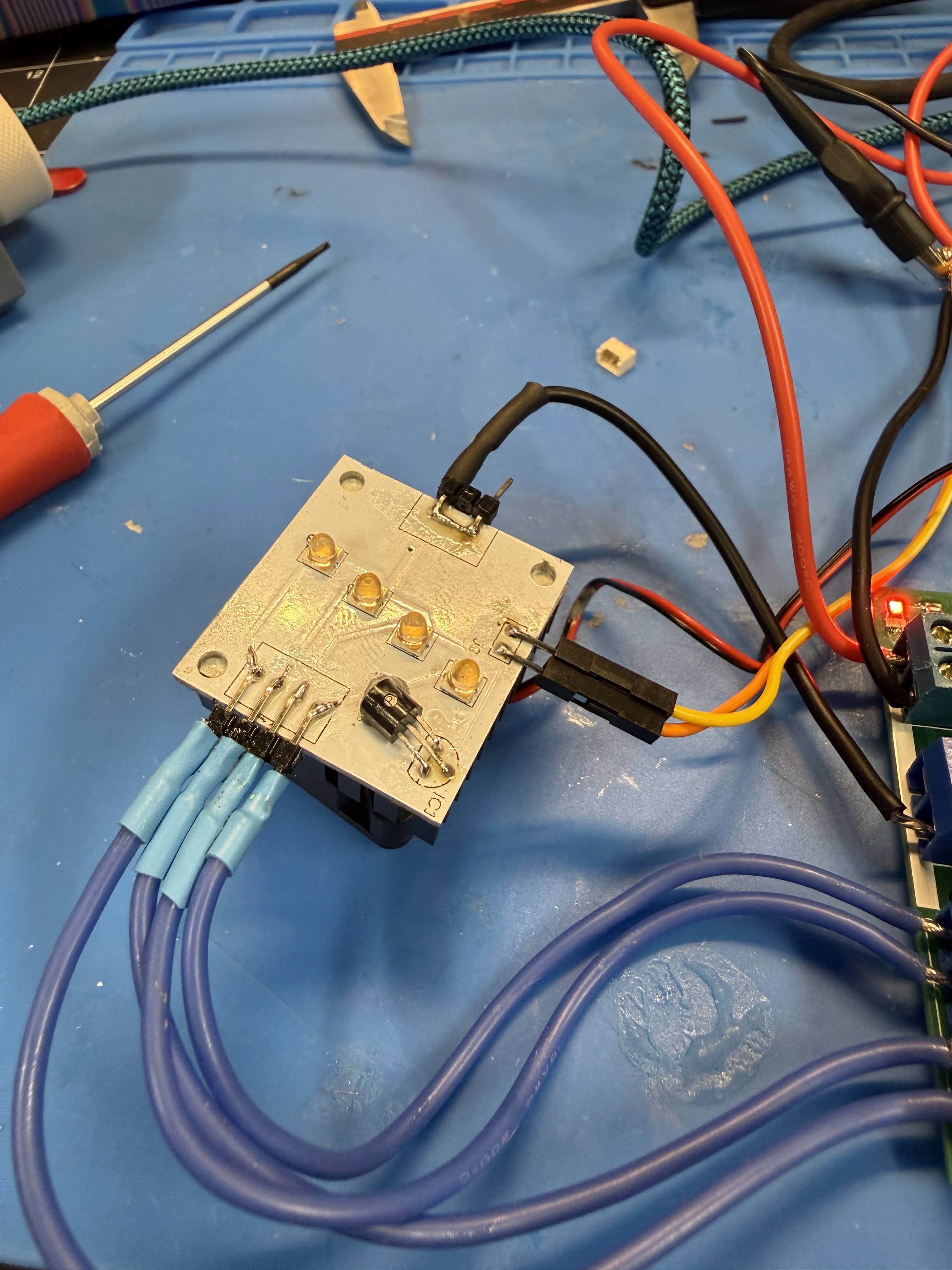
    Well issues with the aluminum PCBs finally got me to realize these could not be used at OpenSauce. The problem is that the through hole mistake means the solder really doesn't have much to adhere to, I ordered some Lead Free solder and paste to see if I could make it harder, but as I picked up the boards to examine them if they fit onto a 3D printed tray, all the leads popped off. This might work with some epoxy, but only for testing. So, ordered new ones from JLPCB last night and did a quick rev of the Nano board as well. 

    Cost for the PCBs:

    5 of the Aluminum LED  :  $5

    5 of the Nano : $2

    Shipping: $45

    If i had anything I could do to the Mega one I'd through in some fixes, but I honestly don't have much there to do. I was noodling with putting a bigger display on it, maybe touchscreen, but that probably would work fine with the existing board, and I'd have to cable it to a case anyhow. 

  • OPENSAUCE!

    john2 days ago 0 comments

    UPDATE! I will be showing the machine at OpenSauce 2026!

    The new LEDs are soldered, lots of learnings, haven't made a mistake that forces me to redo any PCB I ordered. (maybe the LED board but Knock on wood). But updates to boards in next Rev.

    Mega:

    I don't like the power connector. Either I have to buy new power clips or I need to specify the right ones on the PCB, but I can't have jumper wires onto bare SIP headers anymore if this will be reliable for showing. Probably the former.

    Nano Board:

    • Everything works so far! Snag, I thought I'd be smart and use my own design for the limit switches to prevent the motors from moving too far, and thus only need 2 pins. But then I thought about it, its just more work and a lot of effort to find out eventually why all those extra components are on those boards (debouncing). I also am using these micro molex format plugs, but the board is big enough with the Nano on it that I could just use standard clips. And I have a bag of them. But until then, I ordered the 2 pin micro and they're coming this week, and I just need to run a separate  VCC line to the switches. 
    • The CR Bed Leveler needs a timing signal, but when I made the PCB I just put it as another of my limit switches. So it prefers 5 pins and I gave it 2. Sigh, this will be a messy hack, maybe a bodge wire on the back of the PCB. I got tunnel vision doing all of the limit switches in Fusion and I should have stopped and thought. 

    LED PCB

    Big learnings here

    • No through holes on an aluminum PCB! Why did I do that, looking back at the emails from JLPCB they clearly were very politely saying I had no idea what I was doing. The entire PCB is conductive, so through holes will short! Anyhow, this might need a reorder for reliability, but I want to work with them a bit more to see if I need to change anything else.
    Image

  • More Updates

    john06/11/2026 at 16:07 0 comments

    So, I'm trying to show this at Open Sauce (on a waitlist). I've done a bunch of improvements since my first update, and I just discovered this log. 

    So Updates:

    LED Brightness

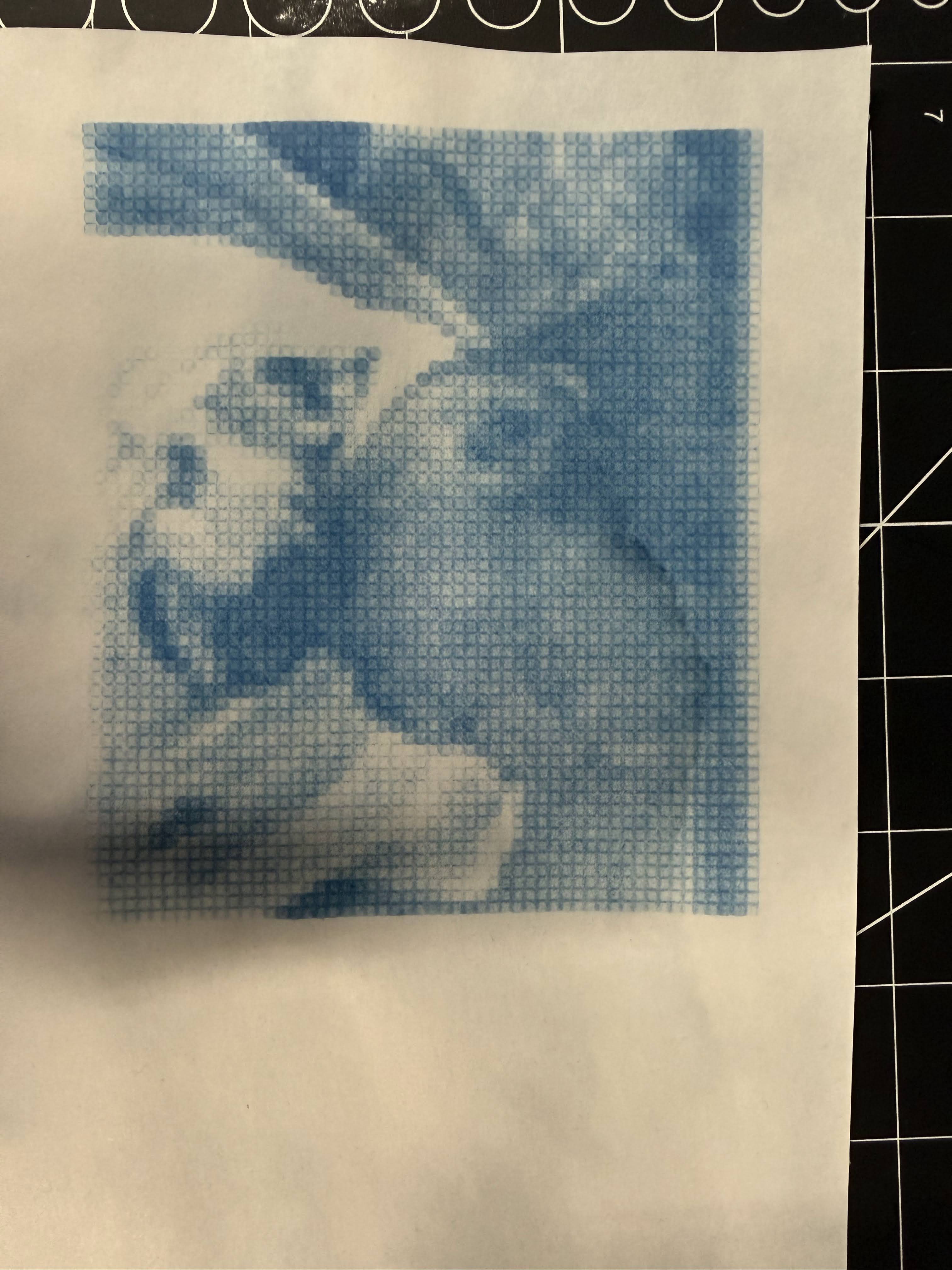
    Four LEDs now printing 1/4 of the exposure. One of the big issues has been the difference between each LED and its driver board. Using the boards I have been, I can control the output amps based on a tiny potentiometer. Even after adjusting, there's enough discrepancy to see visible bands. So I changed it up. Instead of printing each row once then advancing 4 rows, I advance 1 row and print over each pixel 4 times. This averages each LED out. The results show a distinct improvement but also show the limitations on my 3D printed mask. 

    Solution? I'm waiting on a metal SMD solder mask from JLPCB. This should be perfect accuracy. 

    Z Accuracy

    One of the hackiest things I've done is I control my Z axis with two 3D printed parts. A male part attached to the LED, and a female end on the gantry the distance fixed with some M3 screws.  The process has been, loosen the screws, put something thickish beneath the print head, then tighten the screws. This needs to change. I've decided to go with using a Creality bed leveling sensor to map the print area, then have a Z axis motor move the print head so its "perfectly" accurate. This will be incorporated into my next print head, I'll share results. 

    Pictures

    Image

  • Updating Printhead LEDs

    john06/11/2026 at 15:45 0 comments

    Upgrading the printhead. 

    I've been thinking about how to best improve the printing speed. This is where having AI as a sounding board is helpful, and its how I use it. The purpose of this project, and any of my projects, is to give me a task and allow me to learn by doing and its not the end product, entirely. 

    In my past projects one of the difficulties is that I had no one to ask questions of. Its very difficult in an esoteric project to find someone else who's tickled by the particular niche I'm interested in and here I've found asking an AI to be helpful even if its just allowing me to come up with the answer by forming the quesiton.

    I digress, right now the printer's DMax (darkest print) takes around 3 seconds of UV exposure. This makes printing .... very slow. But I knew that, its cyanotype (later Van Dykes), and you know that going in, but if I want to scale this to larger prints and smaller pixel sizes, the 3 seconds means days for large prints. So I went over my problem with Gemini and learned a few things.

    FIrst, I was putting the LEDs 15mm from the surface because I thought that would cut on any fringing. I guess that's a common misconception, AI said to move it 5mm away. Then I was noodling about the width of the printhead. Right now its 100mm, enough for 4 UV LEDs mounted on star heatsinks. What if I made my own heatsink? Quick look at JLPCB showed Aluminum PCBs are about as cheap as normal PCBs. Ok, now I just need to buy loose LEDs. 

    Looking at Amazon I couldn't find the LEDs I've been using by themselves. So I looked at DigiKey, whoa... I found 380nm LEDs with a 30 degree AOV for like $5 each. Right now I've been using 120 degree AOV LEDs. I've tested some lenses to focus those down, but I don't think its reasonable to get the accuracy I need from 3D Printed parts and cheap optics. I figured in the end, loses due to cheap lenses (<$100 ea) and other things it probably would even out. But 30mm? I just need to move the LEDs closer. 

    So I turn to Gemini, I gave it the specs on both the LEDs I've been using and the new one and asked, with the new one and moving it to 5mm away, given the old needed 3 secs, what is the rough new exposure? 

    0.3ms ... milliseconds.  

    The LEDs came in a couple of days ago and I replaced a star LED with the new one, and blasted a new sheet with it. I kept the LED roughly 5mm away from it, and used 4.4V, (down from 5V) so the LED drew .7A, so ~ 70% of full power. At 1/2 second, it looked like it bleached the cyanotype away. So, now I wait for the aluminum PCBs, at the worst, I can use the old printhead and just replace those LEDs with the new one, and print a new 5mm distance. 

View all 4 project logs

Enjoy this project?

Share

Discussions

Similar Projects

Does this project spark your interest?

Become a member to follow this project and never miss any updates

Image