
forumToolbox Pro for bbPress
GD bbPress Toolbox
Enhance, expand and optimize bbPress powered forums
Expand bbPress powered forums with attachments upload, BBCodes support, signatures, widgets, quotes, toolbar menu, activity tracking, enhanced widgets, extra views...


Latest Plugin Release
Plugin First Released
14 years, 28 days agoBasic Requirements
WordPress Multisite
Individual network websitesUltimate bbPress Plugin
GD bbPress Toolbox Pro is a feature-packed plugin for expanding bbPress-powered forums with many new forum-specific features.

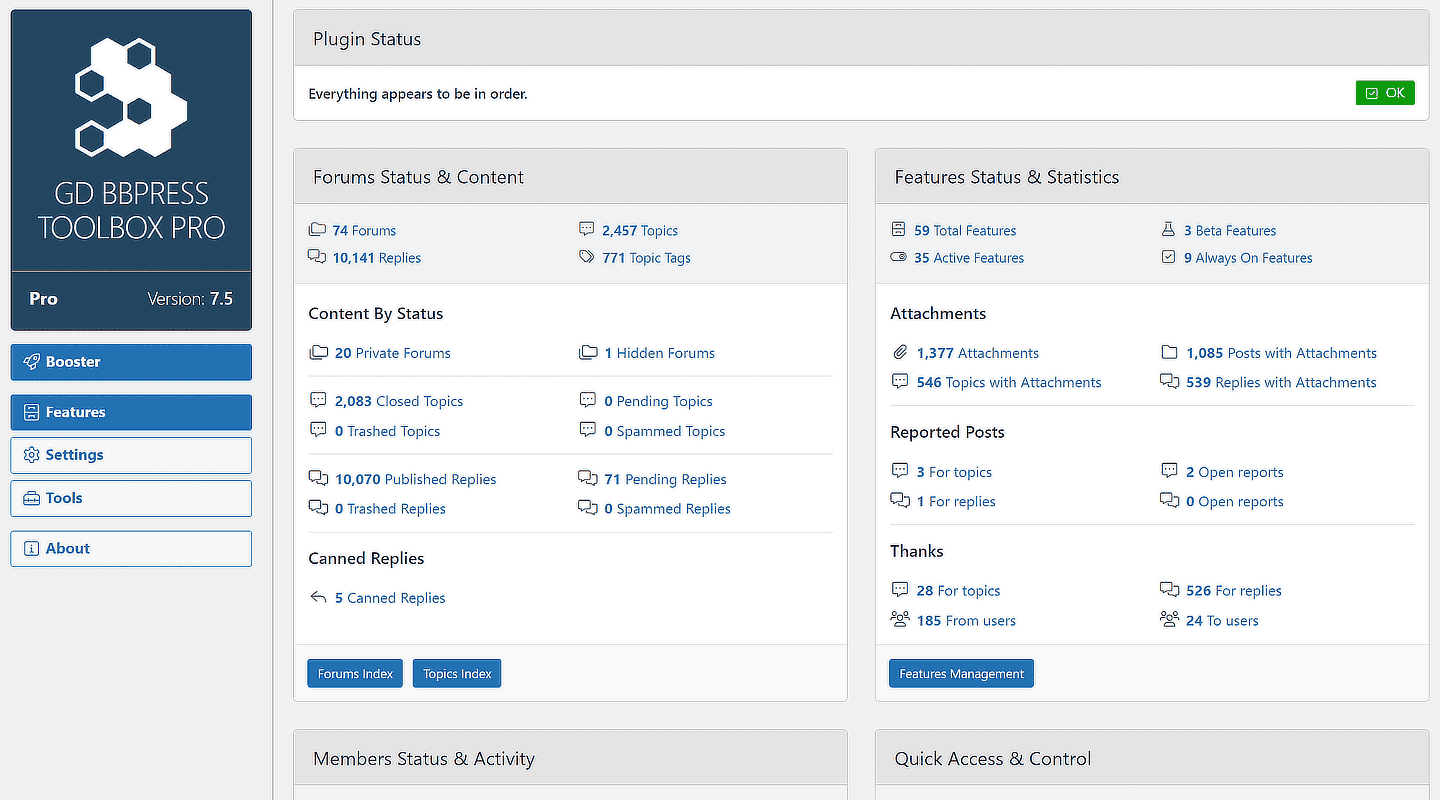
Plugin Dashboard
A very useful starting point to get some basic information about the forum, review the content, report posts and users, and give and receive thanks.

About Page
Get information about major plugin versions, full versions changelog, information about the plugin, and other Dev4Press plugins for WordPress.

Setup Wizard
Quickly configure the most important plugin options to get started using the plugin. The wizard includes several panels for setting up modules and more.

Features Architecture
The core of the plugin is Features. Most plugin features can be enabled or disabled, or controlled from the Features admin page.

WordPress Dashboard
The plugin adds two widgets to the WordPress main dashboard. One widget lists the latest topics and replies; the other shows online users’ stats.

Extra Widgets
The plugin adds several new widgets for showing topic views, filtered topics and replies, statistics, online users overview, current users, and more.
The Features
The core of GD bbPress Toolbox Pro are Features that aim for more straightforward setup and control. In the latest version of the plugin, 63 features are included via the Features panel. Each feature can be disabled (7 are always enabled and can’t be disabled), so you can use only what you need. Each feature has its own settings panel, which can have many options to control the feature better.
Here is the list of all the Features plugins currently have. In plugin version 7.6, the Features panel contains 63 features.
- Icons
- Tweaks
- Admin Tweaks
- Topic Actions
- Reply Actions
- User Settings
- Custom Topic Views
- Shortcodes
- Content Editor
- Navmenu Items
- Footer Actions Bar
- Forum Actions Bar
- Booster (BETA)
- Attachments
- Extra MIME Types
- Notifications
- Email Sender
- Email Overrides
- Visitors Redirect
- Online Tracking
- Mark As Read (BETA)
- Signatures
- Say Thanks
- Report
- Canned Replies
- Toolbar
- Private Topics
- Private Replies
- Lock Forums
- Lock Topics
- Auto Close Topics
- Close Topics Control
- 40+ BBCodes & Toolbar
- Markdown
- Topics Settings
- Replies Settings
- SEO
- SEO Tweaks
- Rich Snippets
- Clickable Control
- Forum Index
- User Stats
- Quotes
- Protect Revisions
- User Profiles
- Users Tracking
- Disable RSS Feeds
- Forum Public
- Mute Forums
- Mute Users
- Privacy
- Not Found
- Admin Access
- Admin Columns
- Admin Widgets
- Post Anonymously
- Journal Topic
- URL Rewriter
- Content Objects
- Schedule Topic
- BuddyPress Tweaks
- BuddyPress Signature
- BuddyPress Notifications
Attachments
The plugin features a powerful module for handling attachments for topics and replies. All attachments are uploaded to the WordPress Media Library.

Enhanced Upload
Upload attachments with enhanced upload fields using previews, validation of files, and an easy way to set file caption or insert the file into the content.

Configurable files display
Control how the files are displayed, including thumbnail view for images, with configurable thumbnail size, and use of icons for different file types.

Attachments Settings
Include a wide range of options: limit allowed file types (and add new file types), file size, and the number of files, with options for individual forums.

Allowed MIME Types
The plugin allows you to select the MIME type (file type) allowed for upload. And, if you need custom file types, the plugin allows you to add your types.

Individual Forum Settings
To get finer control for individual forums, the plugin has a metabox for each forum, where you can override some of the attachment settings.

Change upload directory
The plugin adds two panels on the admin side: a list of uploaded attachments (with various filters and controls) and a list of upload errors.

Bulk Downloads
If you have more than one file attached to the topic or reply, bulk download is a method to download all files at once.

Admin attachments List
The plugin offers an admin side panel with a list of all attached files with additional information and controls.

Admin side management
For each topic and reply on the admin side, you have an easy-to-use metabox. You can attach more files from there too.
Activity Tracking
GD bbPress Toolbox Pro can track users’ online status and topic activity and help them find new content on their return visits.

Track user activity
The plugin can track each user’s last activity time and set cookies to help track the current visiting session.

Online users tracking
The plugin can track how many users and visitors are online. This can be used in various places.

Topics visit tracking
On the return visit, it can calculate new topics, new replies in read topics, and unread topics for each user.
BBCodes and Toolbar
The plugin implements 40+ BBCodes (as shortcodes) with a simple BBCodes Toolbar for the topic/reply editor.

40+ BBCodes
The plugin includes 40+ BBCodes ranging from simple tags for bold, italic, alignment, colors, to more complex BBCodes for images, videos, and more.

Code Highlight
If you post source code to your forum topics and replies, using syntax highlight to display your code properly is very useful.

Hide & Spoiler
Hide textual content inside the topic or reply, and show it when predefine terms are fulfilled. Or hide content that will be displayed on mouse hover.

Media BBCodes
BBCodes will display images and videos (Youtube and Vimeo). It also supports the FitVid script to auto-resize videos for responsive layouts.

BBCodes Toolbar
A simple toolbar for adding BBCodes to the content or wrapping selected content into the BBCode. Support different-sized icons and more.

Preview BBCodes
In the admin panel, you can see all available BBCodes and a list of possible methods for formatting and using each BBCode.
All Dev4Press premium plugins share these features
Settings Import and Export
Tools to export all plugin settings into a file with JSON serialization. You can import settings from that file. This way, you can keep your settings safe or transfer settings between websites.
Dev4Press Library
Dev4Press Shared Library contains code and libraries for implementing a unified admin interface, reusable code to speed up plugin development, handling plugin settings, and more.
Regular Updates
Regular updates to fix reported bugs, fix any security issues, and enhance and improve every aspect of plugins. And using our Updater plugin, you can update directly from WordPress.
Complete Localization
WordPress's standard PO/MO translation system makes it easy to translate into any language. Dev4Press includes a GlotPress instance to handle translations for all the plugins.
Excellent Support
One of our primary goals is to provide the best support possible. This includes an active support forum and an ever-expanding knowledge base so you can get all the information you need.
Secure and Clean Code
Made with best coding practices, tested for potential security problems. We are constantly working on maintaining full WordPress compatibility and the highest level of security.
forumToolbox Blog & Support Resources
Get the latest news and blog posts, access the plugin documentation and support forums.


Discover more WordPress plugins


