Bookmrk
Bookmrk is a lightweight, open-source bookmark manager built with React, TypeScript, Vite and Tailwind CSS. It is designed as a modern local-first bookmark manager with quick-save keyboard shortcuts, multi-board organization, a canvas-style 4-column board layout, Chrome import fallback, flexible backgrounds and a bunch of themes.
This README is intended to be a comprehensive reference for users and contributors: installation, usage, architecture, data model, storage & migration, development and contribution guidelines, troubleshooting, and FAQs.
Table of Contents
- Overview
- Features
- Quick Start (User)
- Keyboard Shortcuts
- Usage & Workflows
- Storage, Import & Export
- Data Model
- Theming & Backgrounds
- Architecture & Code Structure
- Development Setup
- Build & Run Commands
- Testing, Linting & Formatting
- Contribution Guide
- Troubleshooting & FAQ
- Privacy & Data Considerations
- License & Contact
Overview
Bookmrk helps you capture and organize web pages into Boards and Pages. It focuses on fast keyboard-driven capture (Quick Save), portable storage, and a clean UI with modal-based input and toasts instead of intrusive browser prompts.
Key design goals:
- Fast capture with minimal friction (Quick Save keyboard binding)
- Organize bookmarks into Boards and Pages (like folders + boards)
- Organize boards in a canvas-style 4-column layout, including empty columns as valid drop targets
- Local-first persistence with optional Chrome bookmarks import
- Configurable background (image URL, upload)
- Accessible, centralized modals rendered via portals for consistent UX
Features
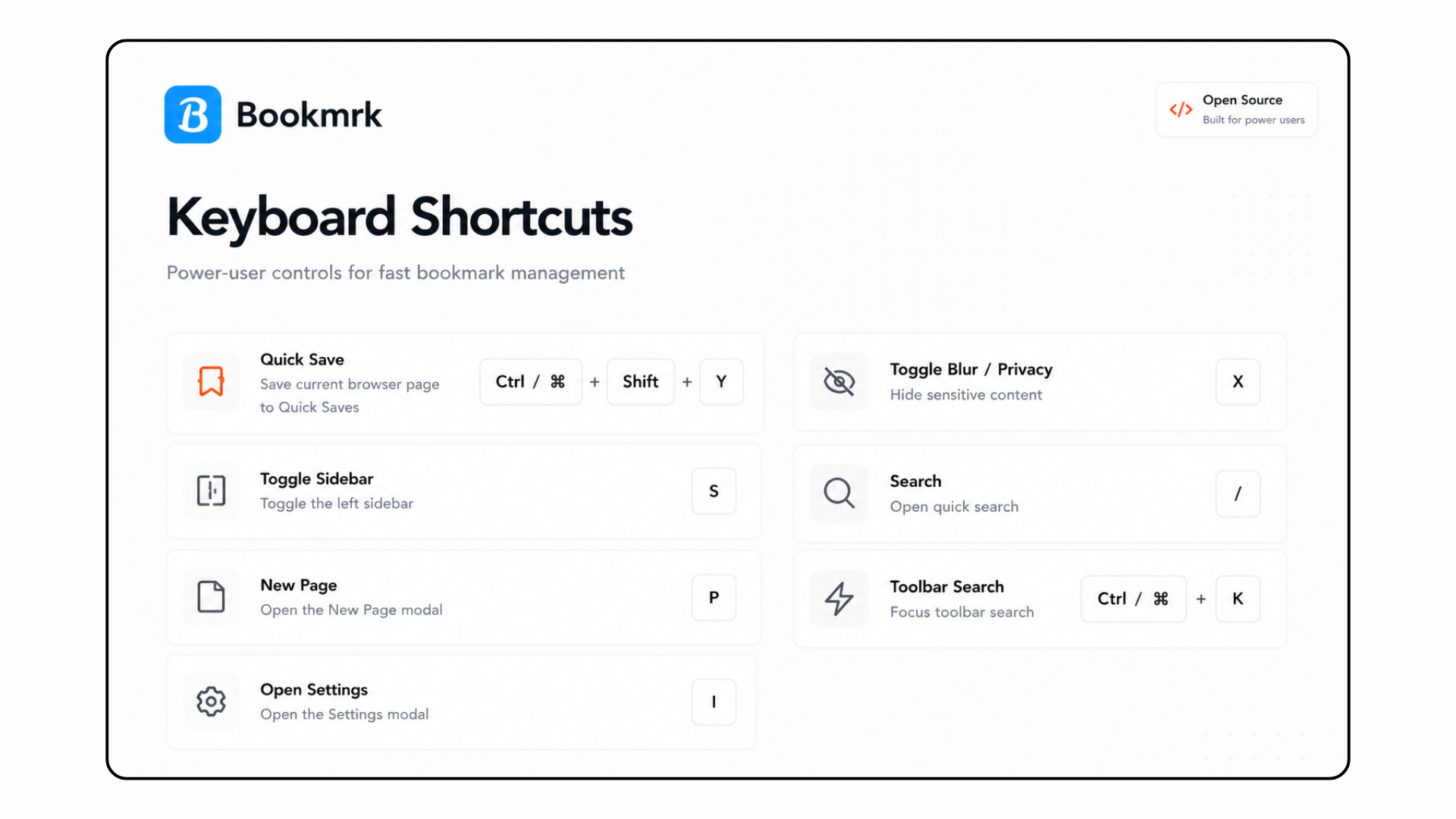
- Quick Save: press Ctrl/Cmd + Shift + Y on any page to save it to a
Quick Savesboard (auto-created if missing). - Boards & Pages: multiple boards per page, multiple pages; boards can be dragged into any of the four canvas columns, including empty columns. When dragging a board over another board in a different column, the board will be inserted at that position (before or after the target board based on cursor proximity).
- Centered modals and accessible inputs: all modals are portaled to the app root and theme-aware.
- Background options: set an external image URL or upload an image (stored as data URL) as homepage background.
- Toast notifications: replace alerts/prompts with in-app toasts (auto-dismissable).
- Board actions: edit name, delete (with confirmation), summon (opens bookmarks without a result toast), add bookmark.
- Bookmark cards: click the card itself to open the URL, with settings and delete actions available from the card menu.
- Page actions: rename and delete (with safe-guards preventing deleting the last page).
- Settings: configurable behavior and appearance options including:
- Behavior: Open links in new tab, show/hide bookmark descriptions
- Appearance: Compact mode for condensed card display, plus a font picker with multiple UI fonts
- Support: Help form with optional contact information (powered by NTFY.sh)
- Chrome integration: optional import of Chrome bookmarks when running as an extension; a flag prevents repeated imports.
- Export/Import JSON: export user data with settings metadata (background stripped by default for safe portability), import JSON to restore data.
Quick Start (User)
Install via GitHub Releases
Prerequisites:
- Chromium-based browser (Chrome, Brave, Edge, Arc, etc.)
- Developer Mode enabled in Extensions
Installation Steps
- Download the latest extension ZIP from the GitHub Releases page.
Repo → Releases → Download latest boomrk-extension-v1.0.0.zip
- Extract the ZIP file.
After extraction, the folder should contain:
manifest.json
index.html
assets/
icons/
background.js
content_toast.js
favicon.svg
icons.svg
- Open your browser extensions page:
chrome://extensions
-
Enable Developer Mode (top-right corner).
-
Click Load unpacked.
-
Select the extracted
boomrk-extensionfolder. -
Bookmrk is now installed 🎉
First-Time Usage
- Open the Bookmrk extension/app.
- Create Pages and Boards using the
+controls. - Open any website in a browser tab.
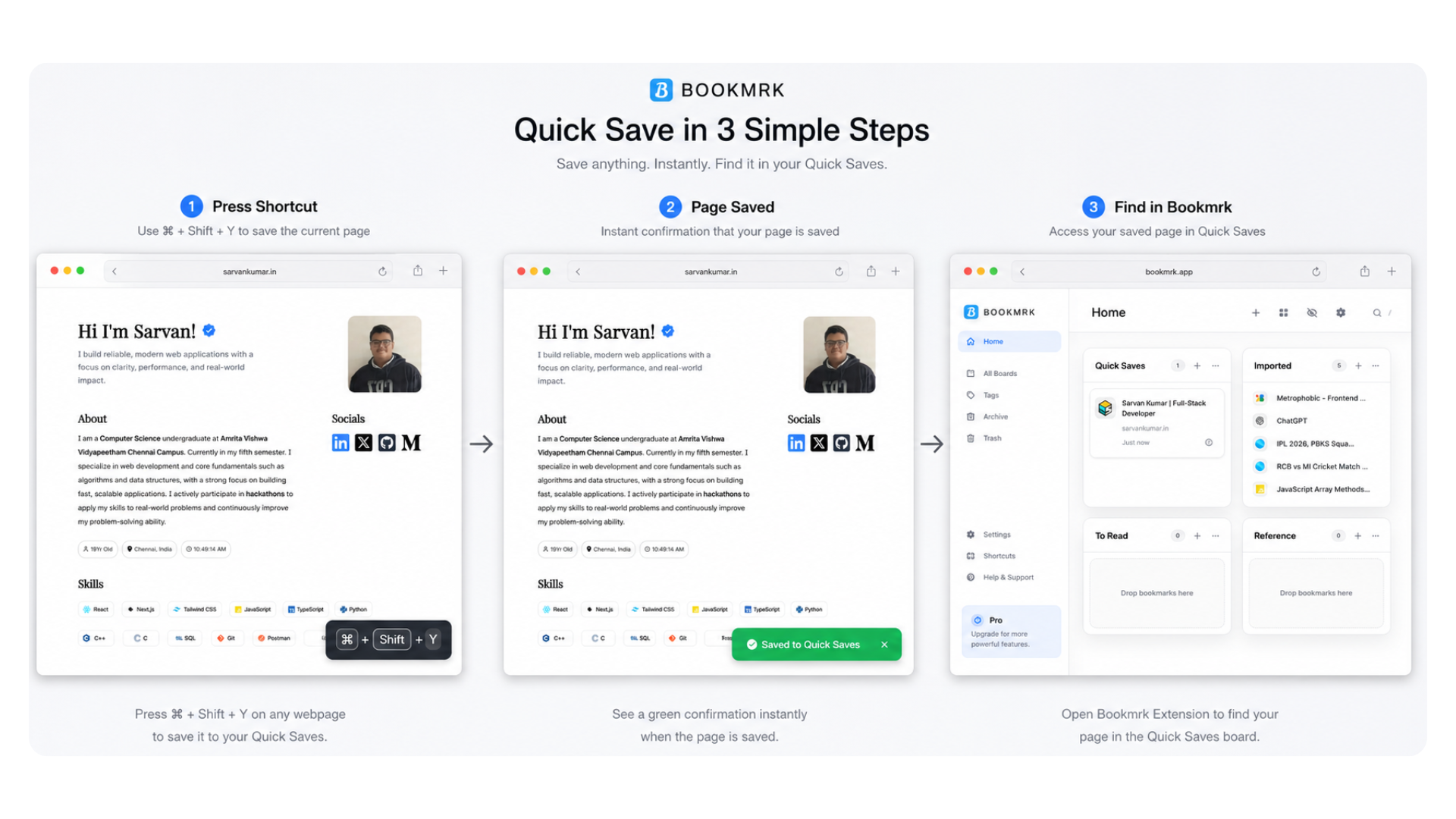
- Press:
Ctrl/Cmd + Shift + Y
- Bookmrk will instantly save the page into the Quick Saves board.
- Use the Board settings menu
(⋯)to rename, delete, organize, or summon bookmarks.
Quick Save Flow
Keyboard Shortcuts
Notes:
- Shortcuts are disabled while typing in inputs, textareas, or contenteditable elements.
- Some actions (like Search) are blocked when Drag Mode is active to prevent accidental triggers.
Note: Browser-level keyboard handling may vary across platforms and OS; when running as an extension, Chrome-specific platform behavior applies.
Usage & Workflows
- Quick Save workflow: quick-capture many pages during browsing sessions — the Quick Saves board collects these. Periodically move or curate entries into other boards.
- Summoning bookmarks: use the Summon action on a board to open all bookmarks. Use cautiously — popup blockers or tab explosions may occur.
- Board organization workflow: drag boards across the canvas to regroup them by column. Empty columns are valid drop targets, so you can build a layout by eye. To insert a board between two existing boards in another column, drag the board and drop it over the target board at the position where you want it inserted.
Settings
Access settings via the settings icon in the toolbar. Settings are auto-saved as you adjust them.
Behavior Settings:
- Open links in new tab: When enabled, clicking bookmarks opens them in a new browser tab instead of the current tab (default: off).
- Show bookmark descriptions: When enabled, displays saved descriptions below bookmark titles (default: on). Disabled automatically when compact mode is active.
Appearance Settings:
- Compact mode: Reduces spacing and card size to show more bookmarks per board. Hides descriptions and shrinks icons and text. Automatically disables “Show bookmark descriptions” (default: off).
- Font family: Switch the UI font across the app from the General settings tab. Available fonts include Plus Jakarta Sans (default), Satoshi, Google Sans, Electrolize, Space Grotesk, Comic Sans, DM Mono, and JetBrains Mono.
Support:
- Help contact form powered by NTFY.sh. Submit your email and message to reach the development team.
Storage, Import & Export
Persistence is provided by src/storage/local.ts. Bookmrk uses the browser extension APIs (when available) and falls back to localStorage otherwise.
- Chrome import: When run in an extension context, Bookmrk can import your Chrome bookmarks into an
Imported Bookmarksboard and sets achromeBookmarksImportedflag to prevent repeated imports. - Export JSON: Exports the application data model as JSON with settings metadata. By design, exported JSON excludes the background image/data to keep exports small and portable. The export includes a
_settingsMetadatasection documenting current settings (behavior and appearance) with human-readable labels and descriptions. You can manually include background data if desired for full fidelity. - Import JSON: Restore or migrate data by importing a JSON file generated by Bookmrk (or the compatible data structure). The import flow validates basic fields and merges or replaces data depending on import mode.
Migration notes
-
If you have an older Bookmrk export (or another import source), map the fields to the current BookmrkDatashape. Pay attention tochromeBookmarksImported(boolean) andbackground(objectnull).
Data Model
Core TypeScript types are defined in src/shared/types.ts. The important shapes:
Bookmark- { id, url, title, notes?, createdAt }Board- { id, name, order, columnIndex?, bookmarks: Bookmark[] }Page- { id, name, boards: Board[] }-
Settings- { openLinksInNewTab?: boolean, showBookmarkDescriptions?: boolean, compactMode?: boolean, themeMode?: ‘discord’‘simple’ ‘neobrutalist’ ‘neumorphism’, fontFamily?: ‘plus-jakarta-sans’ ‘satoshi’ ‘google-sans’ ‘electrolize’ ‘dm-mono’ ‘jetbrains-mono’ ‘comic-sans’ ‘space-grotesk’ } -
BookmrkData- { pages: Page[], settings: Settings, meta: { createdAt }, chromeBookmarksImported?: boolean, background?: Backgroundnull }
Background types:
- { type: ‘image’, url: ‘https://…’ }
- { type: ‘image’, url: ‘data:image/png;base64,…’ }
Theming & Backgrounds
- The app supports light/dark surfaces and respects the user’s
prefers-color-schemeby default. Modal surfaces use#000000in dark mode and#FFFFFFin light mode to ensure contrast and consistent visuals. - Backgrounds applied via the Background modal are persisted in the store and affect the home page only. You can set an external image URL or upload an image (stored as data URL). Uploaded images are stored as data URLs — note that large images can inflate storage. Consider compressing images before upload.
- Modal backgrounds automatically apply glassmorphism (blur + transparency) when an image background is active, creating a modern frosted-glass appearance. When using system defaults (light/dark mode), modals use solid backgrounds for clarity.
Themes
Bookmrk provides three built-in visual themes (selectable from the Palette menu in the toolbar or via the Appearance settings):
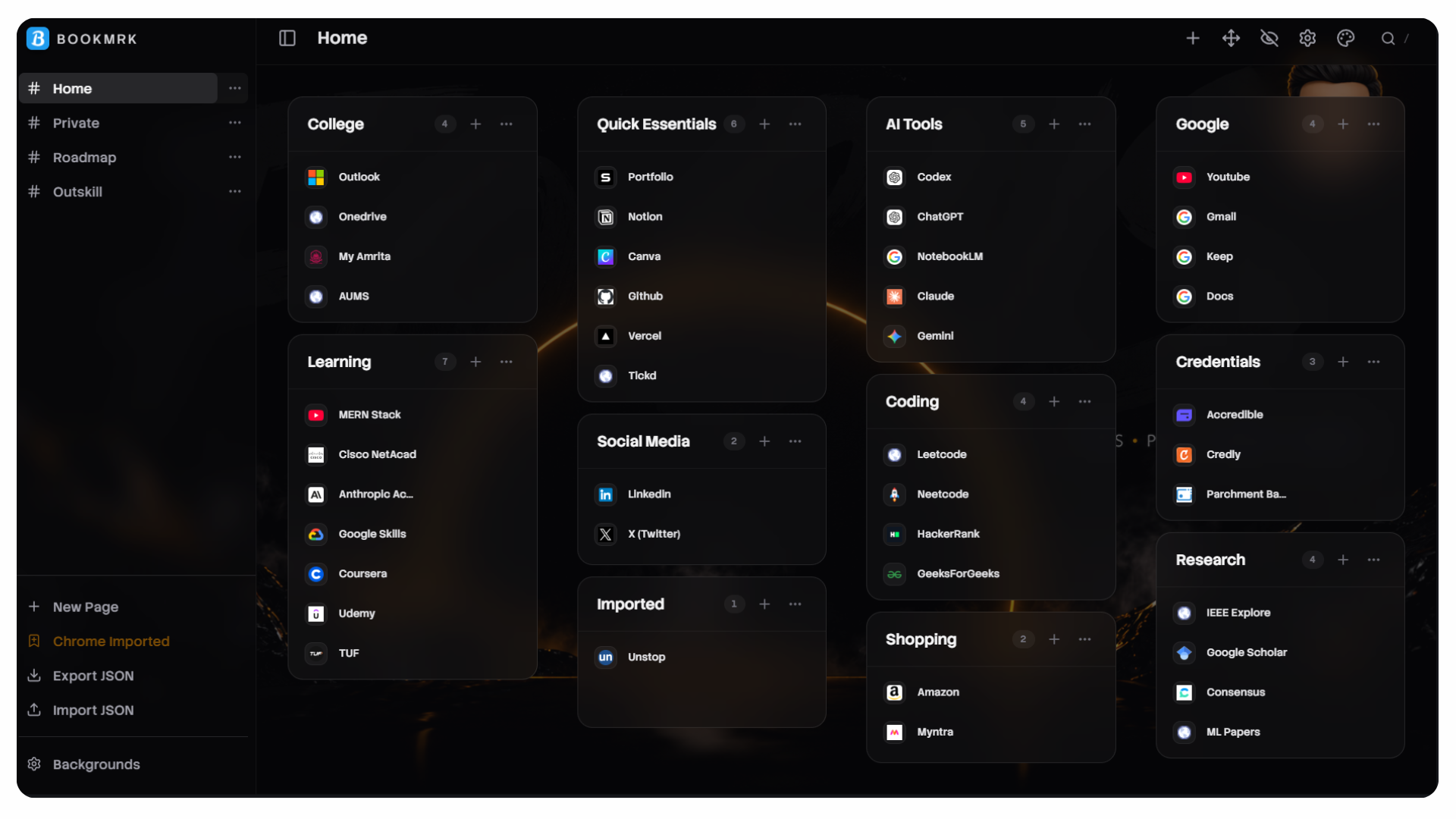
**Discord** (default): a dense, compact shell inspired by the Discord UI.
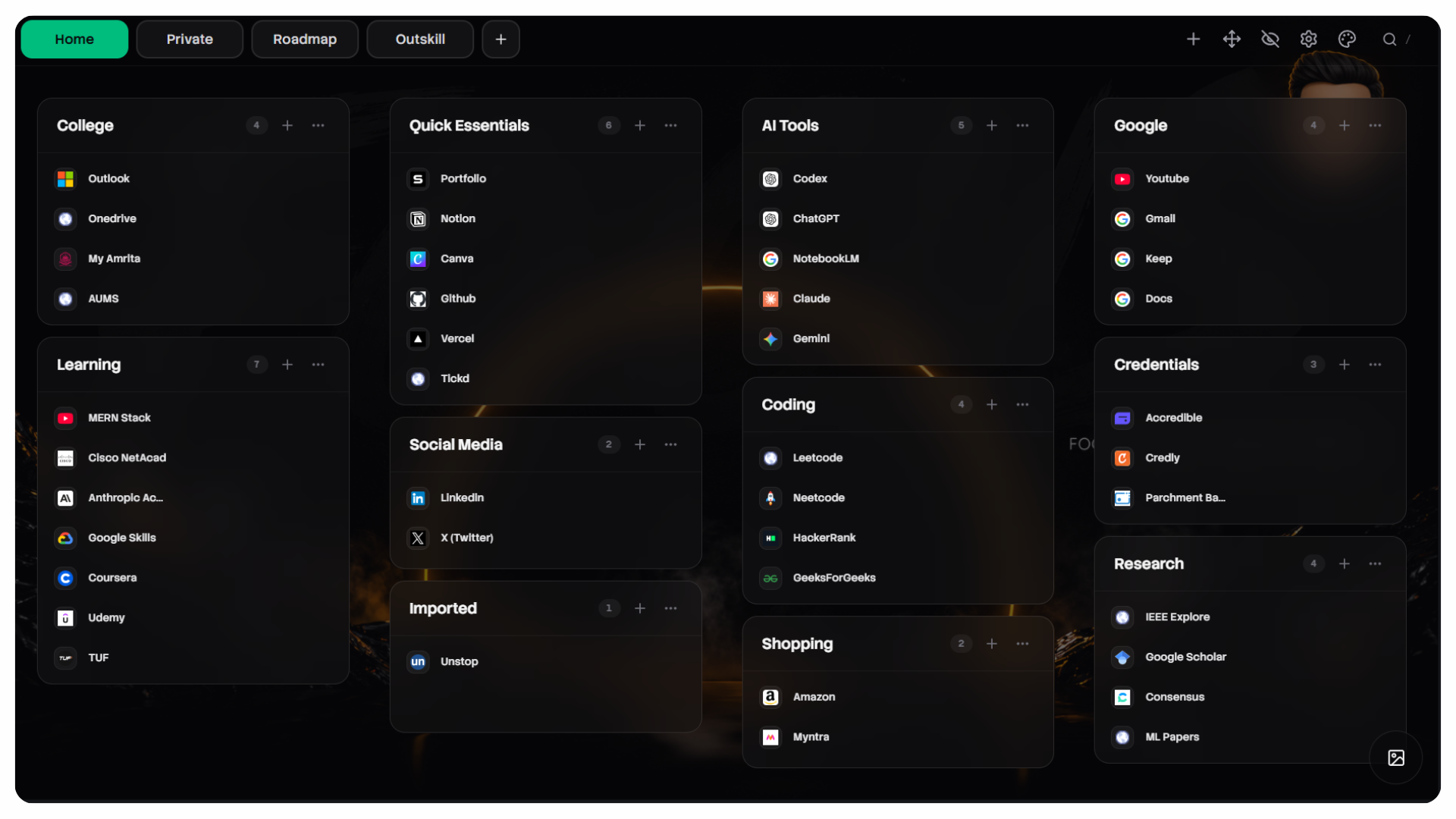
**Simple**: a cleaner top-tab layout with reduced chrome and clearer spacing.
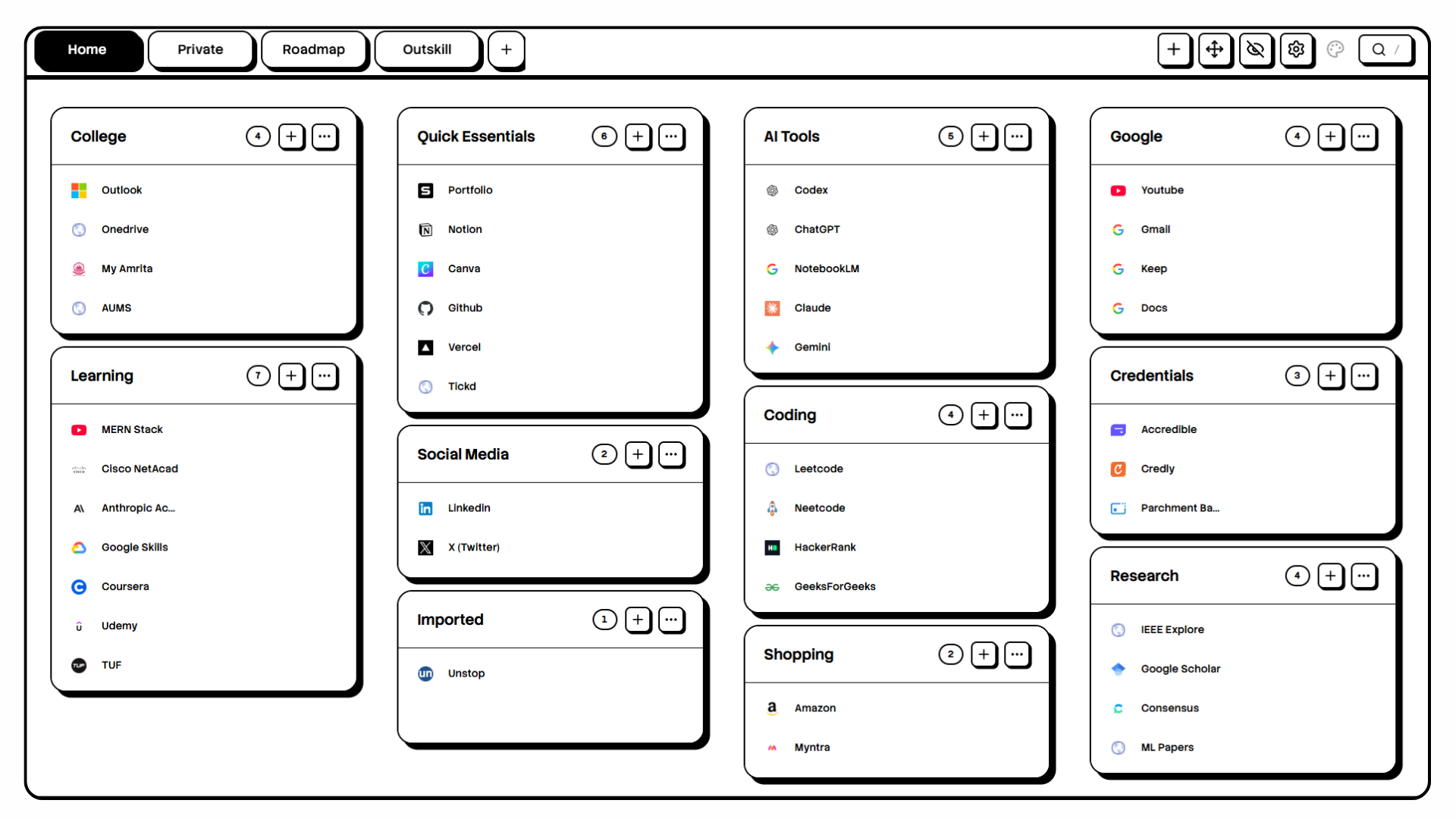
**NeoBrutalist**: high-contrast white-and-black styling with stronger borders and blocky shadows.
These theme choices are persisted in the stored settings as themeMode with allowed values discord, simple, or neobrutalist (see src/shared/types.ts).
Architecture & Code Structure
Top-level structure (important files/directories):
src/App.tsx— Application root, global modal mounting and theme fallback.src/store/useStore.ts— Zustand store: pages, boards, bookmarks, background, settings, modals, and toasts. Provides actions for settings management (updateSettings, openSettingsModal, closeSettingsModal).src/storage/local.ts— Persistence adapter (chrome.storage.local when available, otherwise localStorage). Handles export/import operations with settings metadata in exports.src/shared/types.ts— Central TypeScript types including Settings and getModalBackgroundStyle utility.src/components/— UI components and modal implementations:Settings/SettingsModal.tsx— settings manager with tabs for General (behavior/appearance/font picker), Account, and Support sections. Auto-saves changes with toggle switches.Background/BackgroundModal.tsx— background manager (URL/upload).Shared/InputModal.tsx— reusable input modal.Bookmark/QuickSaveModal.tsx— Quick Save keyboard handler and UX.Board/BoardColumn.tsx— board UI and BoardSettingsModal.Page/PageView.tsx— canvas-style 4-column board lanes, DnD context, and add-board placement.
src/store/— global state & helpers.
DnD is implemented with @dnd-kit/core and @dnd-kit/sortable. Portals use createPortal from react-dom to ensure modals render at the document root and center properly.
Development Setup
Prerequisites: Node.js 18+ and npm.
- Install dependencies:
npm install
- Start development server (hot reload):
npm run dev
- Build for production:
npm run build
- Preview production build locally:
npm run preview
Scripts
npm run dev— start Vite dev servernpm run build— production buildnpm run preview— preview production build locally
Testing, Linting & Formatting
- Add tests and linters as needed — repository currently focuses on core functionality. Consider adding
vitestfor unit tests,eslintfor linting, andprettierfor formatting.
Contribution Guide
We welcome contributions. High-level workflow:
- Fork the repo and create a topic branch for your change.
- Run the app locally and ensure functionality passes.
- Open a pull request describing the change, tests, and any migration steps.
Example Screenshots & Annotated Flows
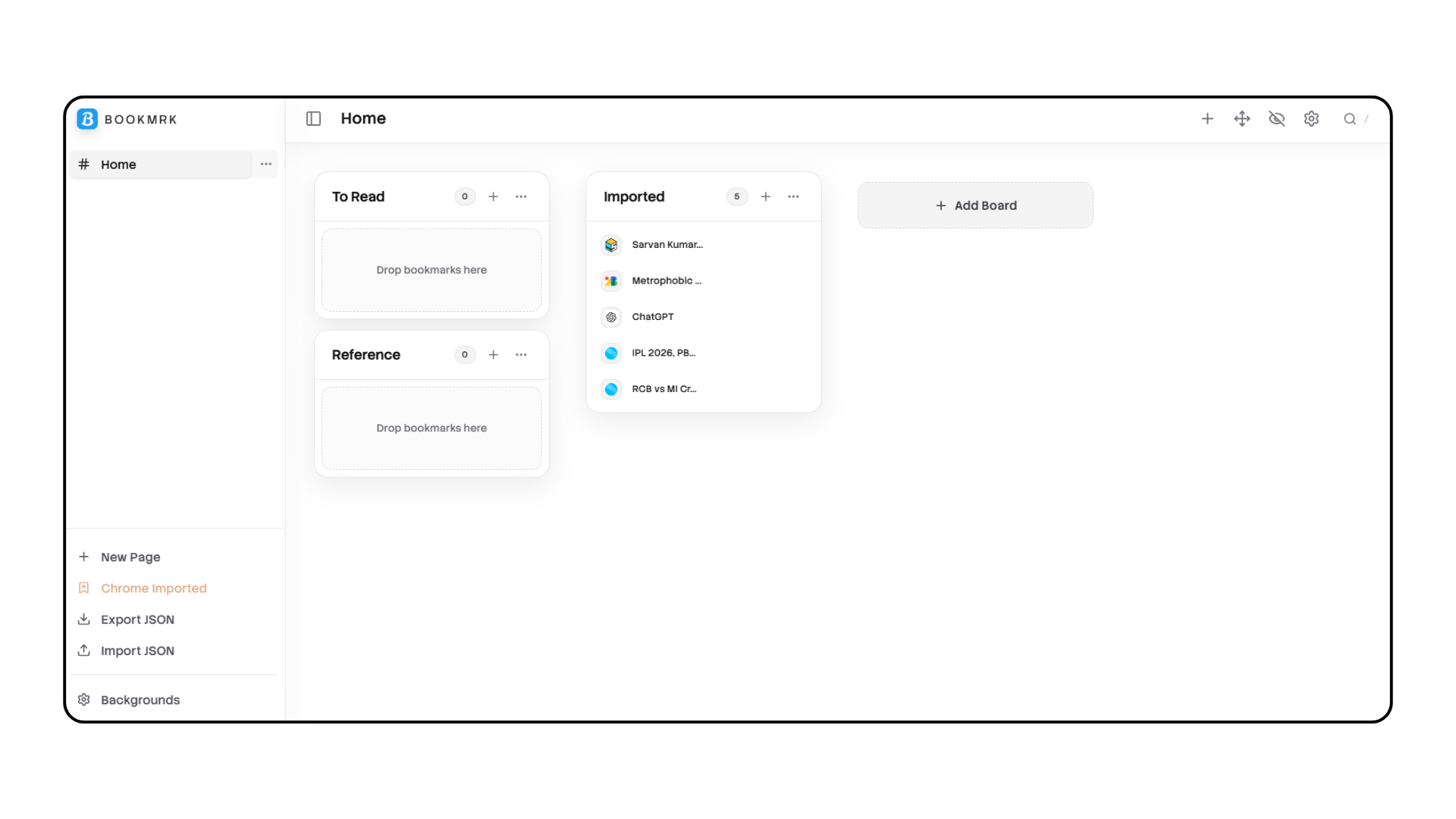
Home page showing 4-column grid
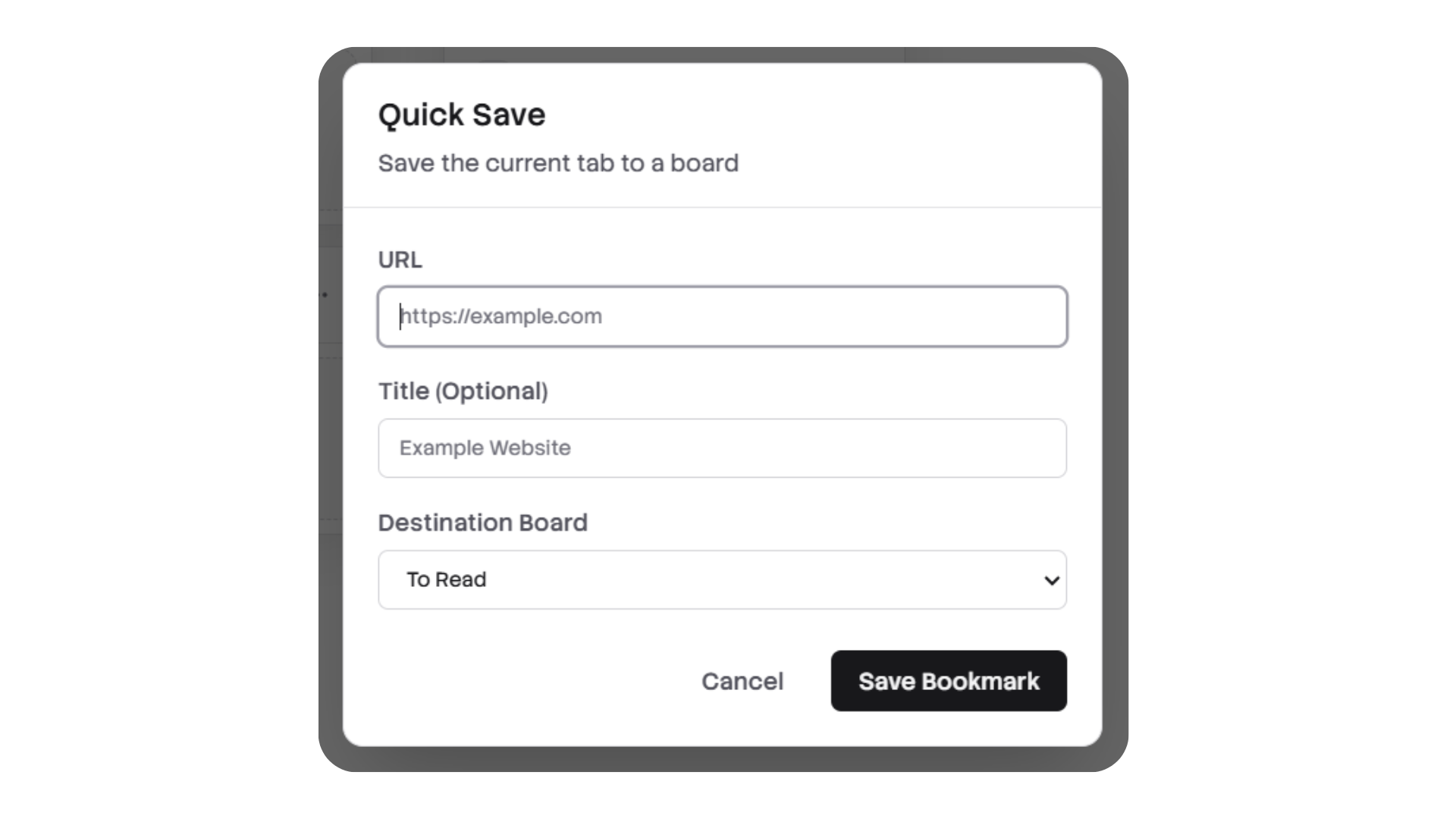
Quick Save modal open
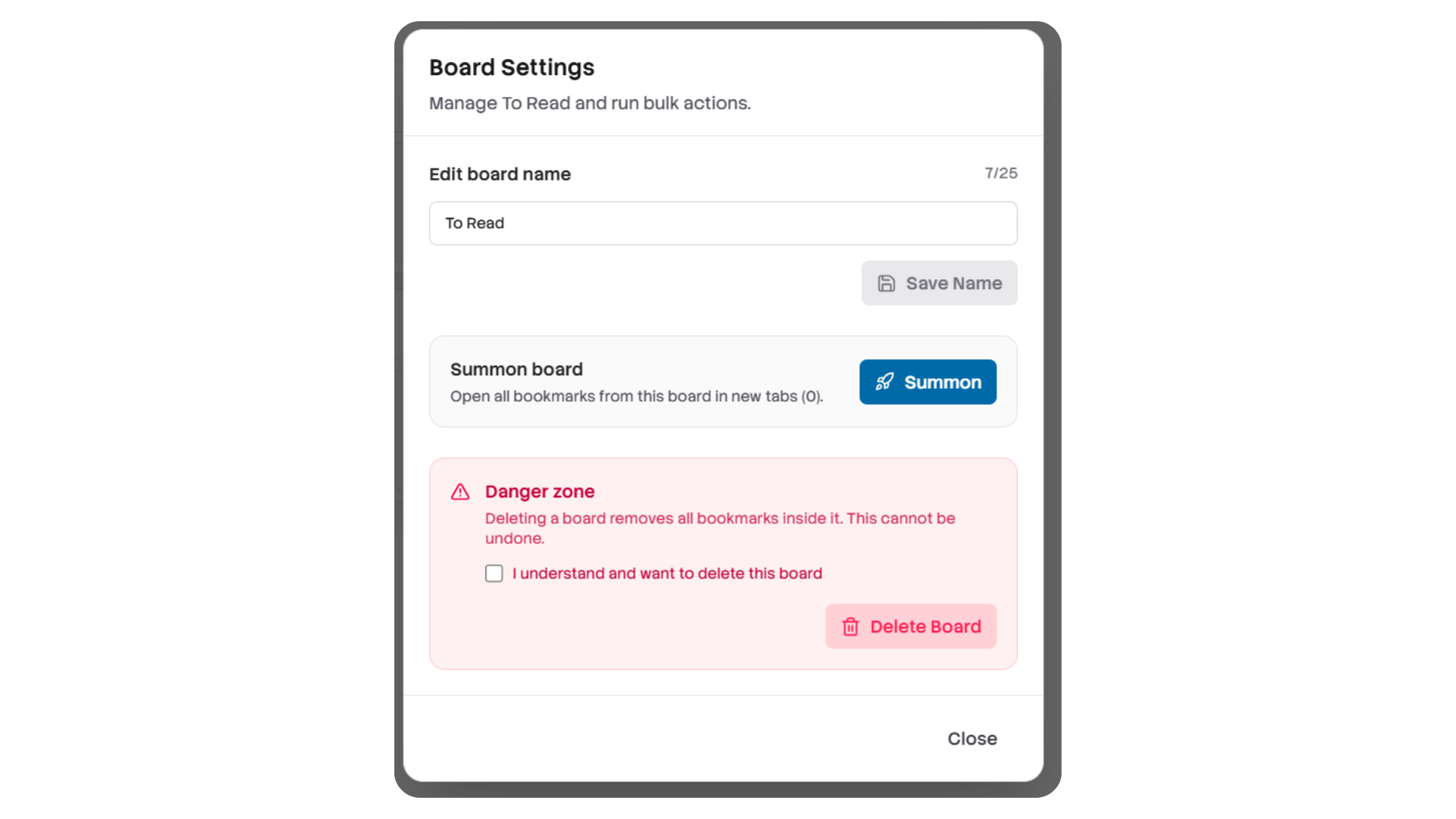
Board Settings modal open
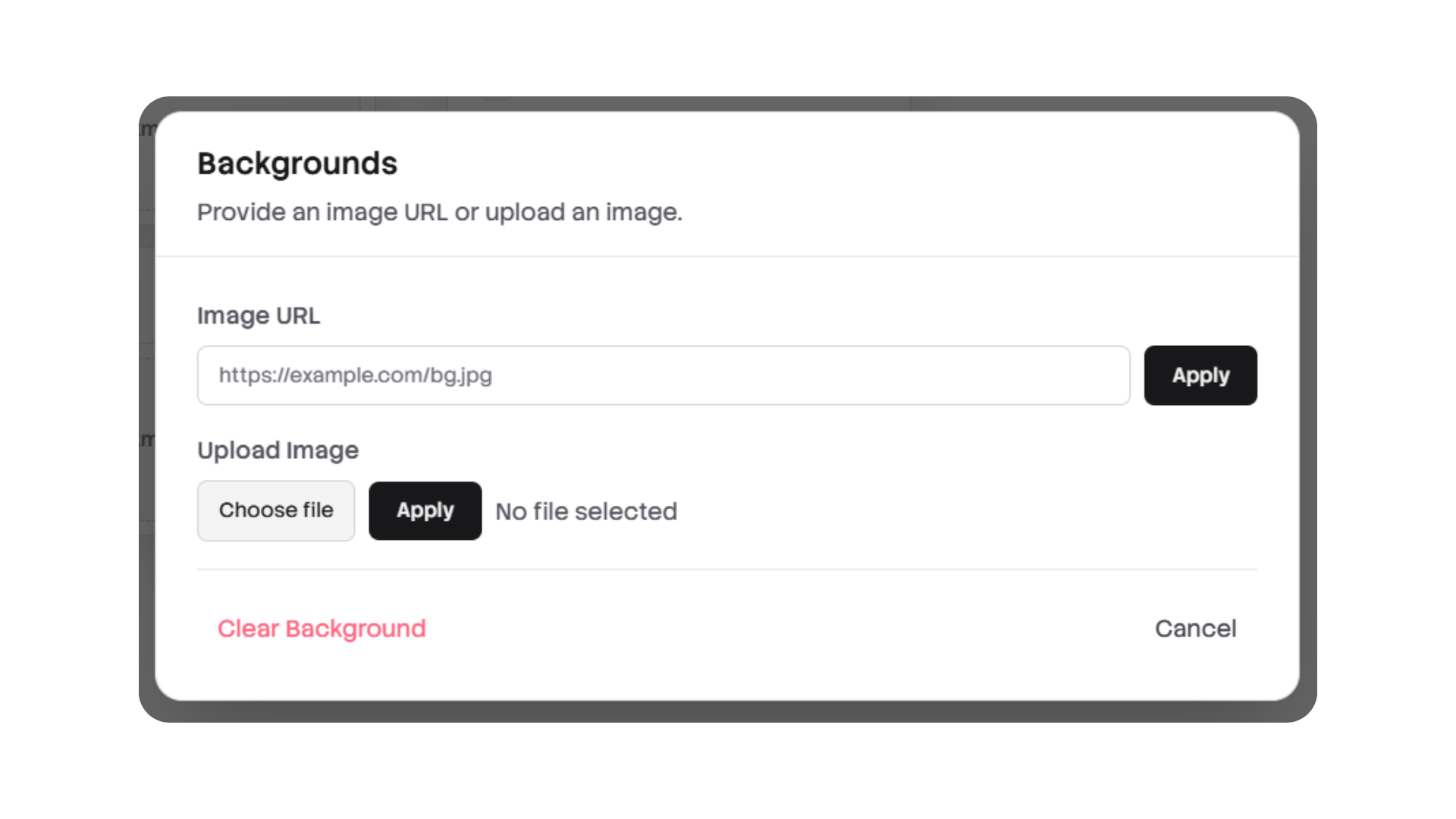
Background modal showing URL/upload options
Migration Script Example
When the persisted data shape changes between releases, a small migration script can help convert older exports to the current BookmrkData shape. Add and run this script locally to transform an exported JSON file.
Example script: scripts/migrate_v1_to_v2.ts — usage:
# install ts-node if you don't have it
npm install -D ts-node typescript

# run migration
npx ts-node scripts/migrate_v1_to_v2.ts old-export.json migrated.json
This example script performs conservative transforms:
- ensures
chromeBookmarksImportedexists (defaults tofalse) - normalizes
backgroundto explicit{ type, value } | null - ensures
createdAttimestamps exist on top-level meta
See scripts/migrate_v1_to_v2.ts for the implementation.
Contributor Checklist & PR Template
I’ve added a Pull Request template at .github/PULL_REQUEST_TEMPLATE.md with a contributor checklist to make reviews faster. The checklist includes items for tests, docs, migrations, and changelog notes.
When opening a PR, please include:
- A summary of the change and its rationale.
- Before/after screenshots if UI is affected (place under
docs/screenshots/). - Any migration steps or data shape changes and a link to the migration script if applicable.
- Update to
README.mdor docs when features or developer flows change.
Troubleshooting & FAQ
Q: Quick Save isn’t working in my browser.
A: Ensure the page has focus and the app/extension is active. Browser-level keybindings can conflict; try the toolbar Quick Save button as a fallback.
Q: I imported Chrome bookmarks and the button is disabled.
A: That’s by design, Bookmrk sets chromeBookmarksImported to avoid duplicate imports. If you need to re-import, you have two safe options:
- Delete the
Imported Bookmarksboard from the UI; Bookmrk will automatically clear the import lock and re-enable theImport Chromebutton. - Or (advanced) clear the
chromeBookmarksImportedflag manually in storage (not recommended unless you know what you’re doing).
Q: My exported JSON is missing my background image.
A: Bookmrk intentionally omits background data from exported JSON to keep exports small. If you need the background included, open the storage code in src/storage/local.ts and adjust the export function.
Q: Summon opened too many tabs.
A: Summon opens all bookmarks in a board. Use with caution with large boards.
Q: Where did the open-link icon go on bookmark cards?
A: The bookmark card itself now opens the URL when clicked, so the separate open-link button was removed.
Privacy & Data Considerations
- Bookmrk stores data locally (browser storage or extension storage). Uploaded images are persisted as data URLs and may contain sensitive metadata. Avoid uploading very large images.
- Chrome bookmark import reads local browser bookmarks when the extension has permission — the import is performed locally and not transmitted off-device by default.
License & Contact
This project is open source under MIT License.
For questions, issues, or contributions, open an issue or pull request in the repository.
