The Ultimate
Image to 3D Generator
Stop limiting yourself to a single tool. Access and compare the world's leading AI engines in one platform to turn any image into high-quality 3D models instantly.
“Without a doubt the best AI for 3D out there.”
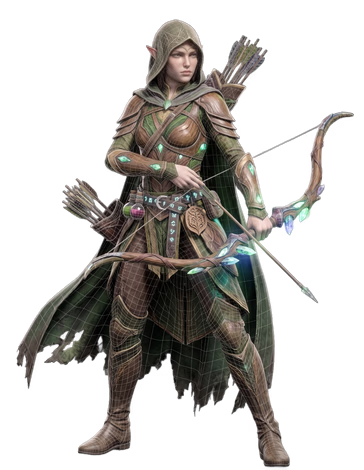
Everything you need to create 3D
Three powerful generation modes, one unified workflow. From concept to production-ready asset.

Describe it. Get a 3D model.
Type what you imagine in natural language — our multi-model AI interprets your prompt and generates detailed 3D geometry with PBR textures in under 30 seconds. No modeling skills required.

Upload any image. Get a 3D model back.
Upload concept art, photos, or sketches and receive a fully textured 3D model. Multi-view reconstruction ensures high fidelity capture of every detail.

Apply stunning textures with AI.
Generate PBR textures for any existing mesh. Control style, material properties, and detail level with simple prompts. Full albedo, normal, roughness, and metallic map output.
Three steps. Zero friction.
Go from idea to game-ready asset faster than any traditional workflow.
Describe or Upload
Type a text prompt or drag in a JPG, PNG, or WEBP reference image. Pick an AI engine, set style and detail level, and choose your target output format before generating.
AI Generates
Trify3D reconstructs geometry, UV-unwraps the mesh, and applies PBR texture maps — albedo, normal, roughness, and metallic. Most previews are ready in under a minute with live progress.
Export & Ship
Download production-ready GLB, FBX, OBJ, USDZ, or STL files. Drop them straight into Unity, Unreal, Blender, Three.js, or a 3D printing slicer — no manual cleanup needed.
Made with Trify3D
Real assets generated by our users — from game props to architectural visualizations.


Start free. Scale when ready.
No hidden fees. Generous free tier. Cancel anytime.
Starter
1,000 credits/month, all export formats
- 1,000 generation credits / month
- All generation modes + AI Texturing
- GLB, FBX, OBJ, USDZ export
- Speed and quality modes
- PBR texture maps
Pro
3,500 credits/month + priority queue
- 3,500 generation credits / month
- All generation modes + AI Texturing
- FBX, OBJ, GLB, USDZ, STL export
- High mesh quality + PBR maps
- Priority generation queue
- Priority technical support
Max
18,000 credits/month + dedicated support
- 18,000 generation credits / month
- All generation modes + AI Texturing
- All export formats + STL
- Ultra mesh quality + HD PBR maps
- Priority generation queue
- Dedicated technical support
You retain full ownership of every 3D model you generate — use, sell, and distribute them commercially without restriction. Always ensure you hold the rights to any source image you upload. See our Terms for details.
Need more credits?
Buy credits anytime. No subscription required.
Small
1,000 credits (one-time purchase)
Medium
3,500 credits (one-time purchase)
Large
18,000 credits (one-time purchase)
Image to 3D questions, answered
Quick answers on generation time, export formats, commercial use, and the AI engines behind Trify3D.
What is an AI image to 3D model generator?
An AI image to 3D model generator turns a flat photo, sketch, or concept art into a real 3D mesh you can rotate, edit, and export. Trify3D reconstructs geometry and applies PBR textures from a single image in under a minute — no 3D modeling experience required.
How long does it take to generate a 3D model from an image?
Most generations are ready in under a minute. Speed depends on the AI model you pick: Tripo3D P1 is fastest at around 30 seconds, while Meshy V6 and Rodin V2.5 prioritize fidelity and take closer to 90 seconds.
Is Trify3D free to use?
Yes. New accounts start with 50 free credits — no credit card required. Paid plans unlock more monthly credits, priority generation, and all export formats, with one-time credit packs available if you need a top-up without a subscription.
What 3D file formats can I export?
Trify3D exports production-ready formats including GLB, FBX, OBJ, USDZ, and STL. Use GLB for web and AR, FBX for Unity and Unreal, OBJ for Blender and Maya, USDZ for Apple AR, and STL for 3D printing.
Can I use the generated 3D models commercially?
Yes. You retain full ownership of every model you generate and can use, sell, and distribute them commercially without restriction. Always make sure you hold the rights to any source image you upload.
Which AI models power Trify3D?
Trify3D is a multi-model platform that routes your prompt across leading 3D AI engines — Tripo3D, Meshy, and Rodin (Hyper3D) — so you can compare speed, fidelity, and price in one workflow instead of juggling separate accounts.
Do I need to install any software?
No. Trify3D runs entirely in your browser. Upload an image, pick an AI model, generate, and export — nothing to download or install.
What images work best for image to 3D?
For best results use a clear, well-lit photo of a single object on a plain background. Photos, concept art, sketches, and AI-generated images all work. Avoid cluttered backgrounds, heavy shadows, or multiple overlapping objects.
Ready to create in 3D?
Join thousands of creators generating production-ready 3D assets with AI. Start with 50 free credits.
