
Online Appointments Calendar and
Booking System for WordPress website
BookIt is the complete appointments plugin, booking system, and event calendar

WordPress appointment
plugin for booking
automation
Use it as the foundation of your website’s appointment booking system. No need to manage bookings manually anymore. Save time and money with this WordPress plugin and book appointments easily.

Service Booking
An awesome booking plugin for WordPress that lets you simply receive bookings for services, enable customers to place orders, and make reservations on a 24/7 basis.

Easy Appointments and Events Scheduling
Allow clients to find the perfect meeting time and let them book their appointments. Other options include rescheduling and canceling appointments with ease.
Simply schedule appointments
without time mixing or double booking
Place and set a custom dedicated calendar for a specific category, service, or person.
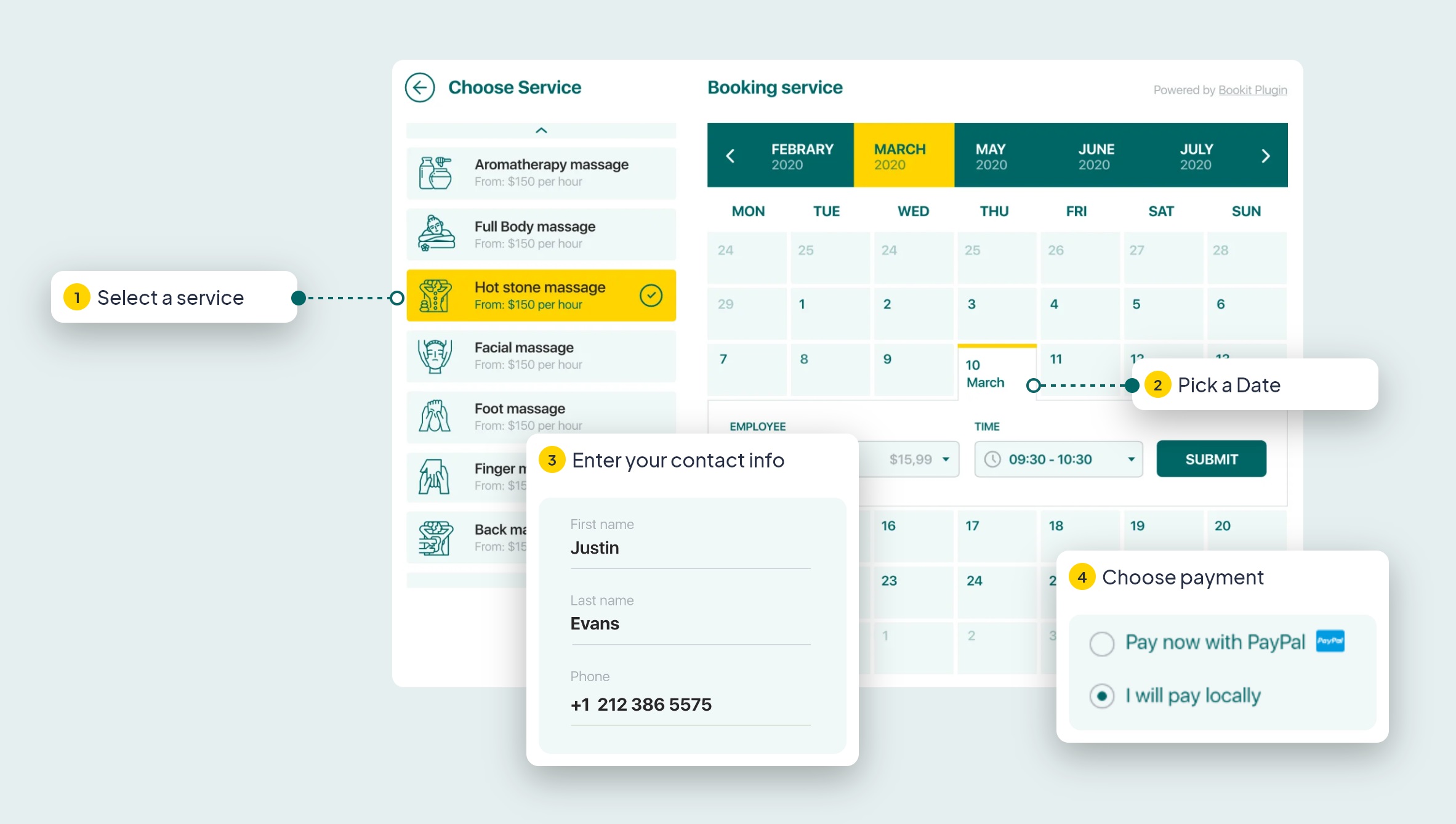
Transform your calendar view on this delightful sequential form. Reserve the service and define the fitting time one by one.

BookIt Pro
Supercharge your appointments & Bookings.

Google Calendar Sync
Merge BookIt and Google Calendar with just one click

Payments & WooCommerce
Monetize Bookit calendar with Paypal, Stripe, & WooCommerce.
The Best Fit for Every Business
BookIt’s free version is an excellent addition to any business WordPress site. Reservations and easy appointments are suitable for a wide range of services.
Medical Clinics
Law Consultancy
Spa & Beauty Services
Estate Agents
Education Entities
Entertainment Services
Flexible Customization
Enjoy flexible customization options with drag-and-drop custom fields. BookIt allows you to take control of the calendar appearance, from brand colors to email setup — you’ll have everything you need to make your calendar look perfect.

Pick a calendar theme, set custom booking type, and select a color theme

Set up the currency symbol appearance
Import demo content and upload or download appointments data

Set up email templates for different actions taken on the website
Creating appointments right in the admin panel
Booking by phone or via email? We found a way to easily add those bookings into your online system.
1
Click on the Create appointment and enter the primary information such as service, staff, date, and time, and specify the status.
2
Then select a customer if previously registered, or create a new profile.
3
Provide payment details with a payment gateway, price, discount, and promo code.
And that’s not all!
Customization
- An impressive feature list and a wealth of customization options to help you set up your system in the way that you want
- Change color scheme
- Choose the booking type (registered or guest)
Communication
- Email templates – set up the messages for different activities (stages of the booking process)
- Inform clients about their upcoming appointments with customizable notification emails when an appointment is made, confirmed, or changed
Accessibility
- Shortcode generator – create a calendar for any category and service you provide
- Place a calendar on any page of the website
- Import and export appointments
Online payments
- Change payment methods
- Enable online payments with premium add-ons, select from several options PayPal, Stripe, or WooCommerce
Testimonials
24/7 Customer Support
Providing you with high-quality service is our priority. We care about our customers and are available 24/7 for help. Connect with our support team, or use our online documentation and video tutorials.