
 Lessons: 18Length: 2.3 hours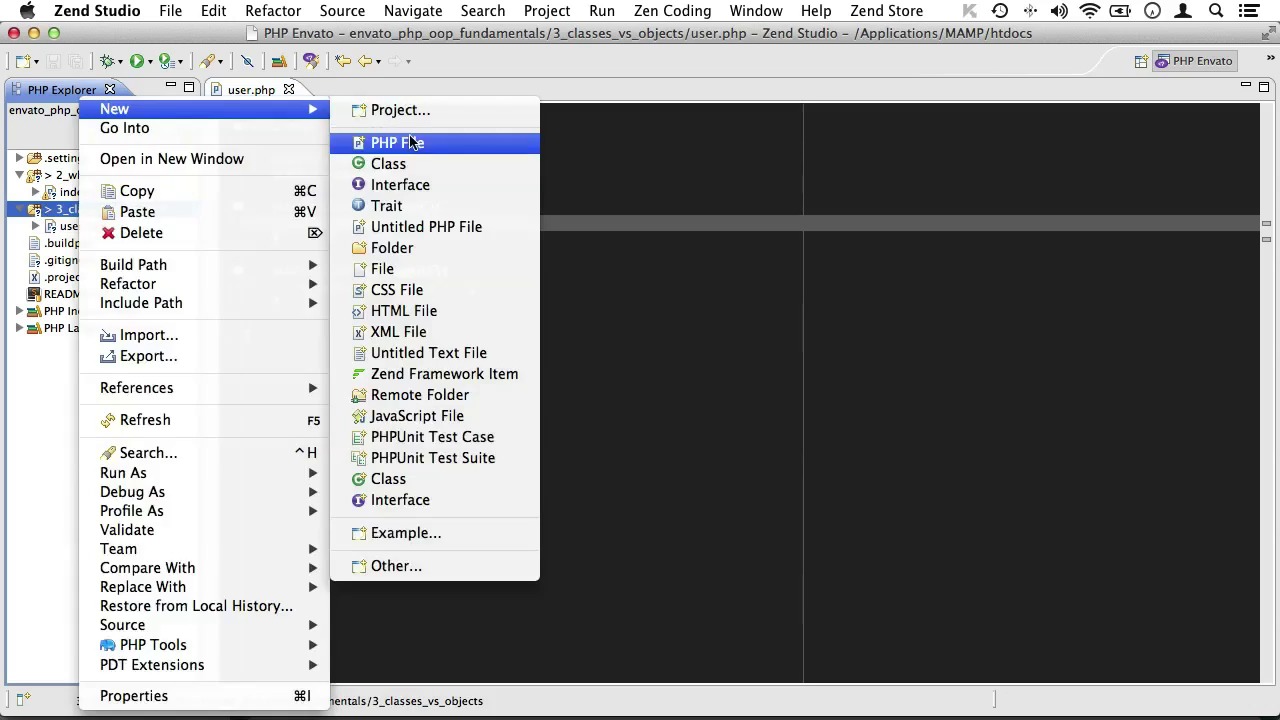
- Overview
- Transcript
2.2 Classes vs Objects
As we talk about object oriented programming, we seem to continuously bump into classes. Why, if classes are so important, isn’t this technique called ‘Class Oriented Programming’? What exactly are classes and what are objects?
1.Welcome
1.1Welcome01:07
2.The Absolute Basics of OOP
2.1What Is OOP?04:40
2.2Classes vs Objects05:42
2.3Class Constants and Internal Reference04:19
2.4Public vs Private Scope06:05
2.5Copying vs Cloning Objects02:07
3.Digging a Little Deeper Into OOP
3.1The Single Responsibility Principle15:18
3.2Magic Methods11:16
3.3Autoloading Through SPL03:37
3.4Working With Namespaces05:14
3.5Autoloading With PSR-008:27
4.OOP inheritance
4.1Class Inheritance And Protected Scope09:22
4.2Overriding Parent Methods02:40
5.OOP Abstractions
5.1Abstract Classes05:59
5.2Interfaces14:53
5.3Static Properties And Methods06:49
5.4Traits14:44
5.5Dependency Injection17:40
2.2 Classes vs Objects
Hello, and welcome back to PHP OOP Fundamentals. In the previous lesson, we had a look at the difference between procedural programming and OOP. Now, this lesson will be about classes. As we talk about object oriented programming, we seem to continuously bump into classes. So why, if classes are so important, isn't this technique called class oriented programming. What exactly are classes? And what are objects? Let's dive into that with an example. I'll just create a new folder here, and we'll just call it classes versus objects. Now, a class is a blueprint that you can use to crate an object from, much like a blueprint for a house. The blueprint would state the house has a door, and a roof and walls, and so on. And you can use such a blueprint to build as many houses as you like. The houses themselves would be the objects. Since not all web applications are about houses, let's try a more common example. Let's set ourselves up with a blueprint for a user. We'll just create a new PHP file called user. And inside, we'll just create a class called user as well. Let's clean that out. Now, let's give our blueprint user a few properties to work with. Now, these can be just about anything like the users hair color or the size of his shoes. However, our application is much more likely to need, let's say, an email address. So let's type an email here. And of course, every user needs a password as well. Now outside of a class, these would be called variables. Inside of a class, these are called properties. Now, you'll notice that I'm using the keyword public with my properties here. Which simply means that this property can be set and read from outside of the class. Well, don't worry. We'll cover that in a later video. Now, we're not setting any values for these properties here. Remember, this is a blueprint for a user, and not an actual user. So now that we have some properties, let's create some functions that every user should be able to perform. That will be a log in function, and let's just have that return something like logging in. And maybe this should have another g. And then, we'll just copy that once, and create a log out function as well. And of course, that should return the logging out. Once again, I'm using the public keyword with my functions here. Now this, outside of the class would be called a function. Inside of a class, it's called a method. Also you'll notice that I'm returning the values instead of echoing them here. And that's because another part of the application should determine what to do with this data. If I were to echo something to the screen here, then logging in a user would have an unwanted side effect. So instead, we'll just make it return that. So now that we have our blueprint ready, let's start creating some users. I'll just create an index of php files. And at the top, I'll just require our users file here. User.php, and since we now have a blueprint, we can use it to create as many users as we like. We could have a user called Joost, Kevin, Nick, Jeffery, et cetera. Okay. Now, let's create our first user. We'll call him Joost, so i'll just create a variable distortive usering. That's create an actual user from my user blueprint class, we do this, Joost = new User, live so. And now, we have created a new actual user from this blueprint class, here. And that user has an email address, a password. He can log in and he can log out. Now, let's just see if that's actually true. We'll just dump this to the screen, so I'll type in Joost here. And then, we'll fire up our browser. And as you can see, Joost is an object of the user type. And he has an email address and a password like so. Now, let's set the value for Joost's email address. And we'll just get rid of this. Well, outside of a class, you will do something like @mail ='joost@tutsplus.com. But this is just a standalone variable, it's not attached to the Joost user. So this one, let's just get rid of this. We will need to reference the joost object and then use the object operator. That's just a dash then a greater than sign, it looks a bit like an arrow. And basically, you're telling PHP, okay. I want you to take the Joost object and access something within that object. And now we can do Joost email = joosttutsplus.com. Let's just clean this up and dump that to the screen. And see where that gets us. So we'll add dump joost again, like so. Fire up our browser again, and there you have it. Our email is set to joost@tutsplus.com. While we're at it, let's just set Joost's password as well. That will be password, and I'll just replace it with random gibberish. So have a look again, and there you have it. There's our password. Okay. Time to clean up our mess and create another user. Let's call him, Nick. Nick will need an email address and a password as well cuz he will be nick@tutsplus.com. And his password will be different as well. Now, let's see if we can get Nick to login. So I will go to Nick, login like so, and fire up our browser again. And there you have it. Nick has logged in. So let's recap for just a minute. A class is a blueprint. An object is an actual instance created from their blueprint. Now if I want to alter all users in my application, all I have to do is change my user class. And when I change that blueprint, it will be good for all users. In the next video, we'll have a closer look at properties. I'll see you there.


