
Crawlkit
Crawlkit is a powerful API that extracts data and screenshots from any website with ease.
Visit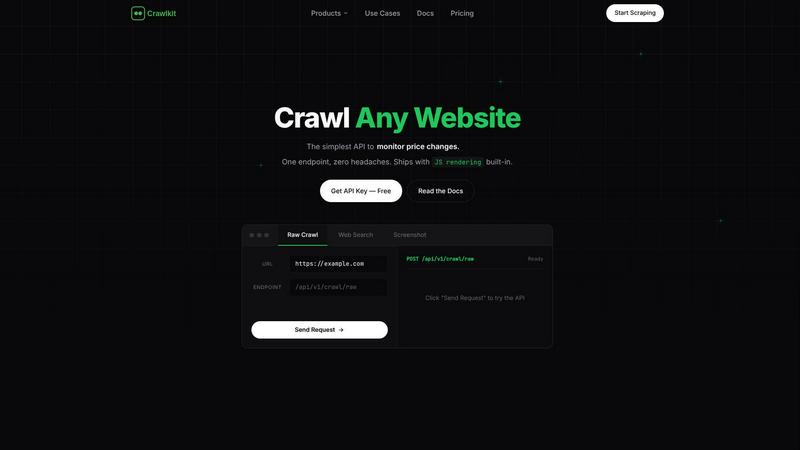
About Crawlkit
## About Crawlkit
Crawlkit is a developer-first web data extraction platform that provides reliable, scalable access to web data without the need to build or maintain complex scraping infrastructure. It is designed for developers, data engineers, and business teams who need to programmatically collect information from websites but want to avoid the constant challenges of modern web scraping. These challenges include managing rotating proxies, running headless browsers, bypassing sophisticated anti-bot protections, handling rate limits, and dealing with frequent code breakages. Crawlkit abstracts all this complexity behind a simple, consistent API. You send a request with a target URL, and Crawlkit automatically handles proxy rotation, JavaScript rendering, automatic retries, and blocking evasion. The platform supports extracting multiple data types, including raw HTML content, structured search results, full-page visual snapshots, and professional data from platforms like LinkedIn. With an industry-leading success rate and a global edge network ensuring fast average response times, Crawlkit allows teams to focus entirely on utilizing the data rather than the arduous and unreliable process of collecting it.
## Features of Crawlkit
### Universal Crawling API
A single, consistent REST API endpoint to extract data from any URL, regardless of the site's complexity. It comes with built-in JavaScript rendering to handle modern single-page applications (SPAs) and dynamic content seamlessly. This eliminates the need for multiple tools or custom scripts for different websites, providing a unified interface for all crawling needs.
### Built-in Anti-Block & Proxy Rotation
Crawlkit automatically manages a robust proxy network and advanced techniques to bypass anti-bot protections, CAPTCHAs, and rate limits. This infrastructure is maintained by Crawlkit, ensuring high success rates and reliability so developers don't have to source, rotate, or manage proxies themselves.
### Multiple Data Output Formats
Extract more than just raw HTML. The platform allows you to fetch complete page content, capture full-page screenshots as PNG or PDF files, execute programmatic web searches with structured JSON results, and access data from specific professional networks, all through the same platform.
### Developer-First SDKs & Tools
Built with developers in mind, Crawlkit offers simple, well-documented SDKs for popular languages like Node.js, Python, and Go, alongside direct cURL access. Features like detailed response timing, status codes, and content length are provided, making integration and debugging straightforward within existing data pipelines.
## Use Cases of Crawlkit
### Competitive Price Monitoring
Automatically track price changes, product availability, and promotional offers from competitor e-commerce websites. Crawlkit can be scheduled to crawl target URLs at regular intervals, detecting changes and alerting your team in real-time to inform dynamic pricing and inventory strategies.
### Market Research & Lead Generation
Extract structured data from business directories, review sites, and professional networks like LinkedIn to build targeted lead lists, conduct market analysis, and gather intelligence on industry trends without manual data entry.
### Content Aggregation & Monitoring
Build data pipelines that aggregate news articles, blog posts, forum discussions, or real estate listings from across the web. Monitor specific websites for content updates, new publications, or changes in sentiment for media analysis or content curation.
### Visual Regression & Screenshot Testing
Use the screenshot capture API to take full-page, pixel-perfect PNG or PDF snapshots of websites. This is ideal for developers and QA teams to monitor visual changes on production sites, track UI updates on competitor platforms, or archive webpage states for compliance.
## Frequently Asked Questions
### What makes Crawlkit different from building my own scraper?
Building and maintaining a reliable scraper in-house requires significant ongoing effort: managing proxy pools, updating headless browsers, writing code to evade anti-bot systems, and handling parse breakages. Crawlkit provides this as a managed service with a 98%+ success rate, allowing your team to save time and focus on data analysis instead of infrastructure upkeep.
### Does Crawlkit handle JavaScript-rendered pages?
Yes, absolutely. JavaScript rendering is built-in and automatic. When you send a request, Crawlkit uses headless browsers to fully load and execute JavaScript, ensuring you get the complete, rendered HTML content just as a user would see it in a web browser, without any extra configuration.
### What is a "credit" in Crawlkit's pricing?
A credit is the unit of consumption for the Crawlkit API. Different operations consume different amounts of credits based on complexity (e.g., a simple HTML crawl vs. a full-page PDF screenshot). Pricing scales down per credit as you purchase larger bundles, and unused credits do not expire, providing flexibility.
### Is there a free tier to try Crawlkit?
Yes, Crawlkit offers a free starting tier that includes an API key and a limited number of credits at no cost. This allows developers to test the API, integrate it into their projects, and evaluate its reliability and performance before committing to a paid plan.
Crawlkit is a developer-first web data extraction platform that provides reliable, scalable access to web data without the need to build or maintain complex scraping infrastructure. It is designed for developers, data engineers, and business teams who need to programmatically collect information from websites but want to avoid the constant challenges of modern web scraping. These challenges include managing rotating proxies, running headless browsers, bypassing sophisticated anti-bot protections, handling rate limits, and dealing with frequent code breakages. Crawlkit abstracts all this complexity behind a simple, consistent API. You send a request with a target URL, and Crawlkit automatically handles proxy rotation, JavaScript rendering, automatic retries, and blocking evasion. The platform supports extracting multiple data types, including raw HTML content, structured search results, full-page visual snapshots, and professional data from platforms like LinkedIn. With an industry-leading success rate and a global edge network ensuring fast average response times, Crawlkit allows teams to focus entirely on utilizing the data rather than the arduous and unreliable process of collecting it.
## Features of Crawlkit
### Universal Crawling API
A single, consistent REST API endpoint to extract data from any URL, regardless of the site's complexity. It comes with built-in JavaScript rendering to handle modern single-page applications (SPAs) and dynamic content seamlessly. This eliminates the need for multiple tools or custom scripts for different websites, providing a unified interface for all crawling needs.
### Built-in Anti-Block & Proxy Rotation
Crawlkit automatically manages a robust proxy network and advanced techniques to bypass anti-bot protections, CAPTCHAs, and rate limits. This infrastructure is maintained by Crawlkit, ensuring high success rates and reliability so developers don't have to source, rotate, or manage proxies themselves.
### Multiple Data Output Formats
Extract more than just raw HTML. The platform allows you to fetch complete page content, capture full-page screenshots as PNG or PDF files, execute programmatic web searches with structured JSON results, and access data from specific professional networks, all through the same platform.
### Developer-First SDKs & Tools
Built with developers in mind, Crawlkit offers simple, well-documented SDKs for popular languages like Node.js, Python, and Go, alongside direct cURL access. Features like detailed response timing, status codes, and content length are provided, making integration and debugging straightforward within existing data pipelines.
## Use Cases of Crawlkit
### Competitive Price Monitoring
Automatically track price changes, product availability, and promotional offers from competitor e-commerce websites. Crawlkit can be scheduled to crawl target URLs at regular intervals, detecting changes and alerting your team in real-time to inform dynamic pricing and inventory strategies.
### Market Research & Lead Generation
Extract structured data from business directories, review sites, and professional networks like LinkedIn to build targeted lead lists, conduct market analysis, and gather intelligence on industry trends without manual data entry.
### Content Aggregation & Monitoring
Build data pipelines that aggregate news articles, blog posts, forum discussions, or real estate listings from across the web. Monitor specific websites for content updates, new publications, or changes in sentiment for media analysis or content curation.
### Visual Regression & Screenshot Testing
Use the screenshot capture API to take full-page, pixel-perfect PNG or PDF snapshots of websites. This is ideal for developers and QA teams to monitor visual changes on production sites, track UI updates on competitor platforms, or archive webpage states for compliance.
## Frequently Asked Questions
### What makes Crawlkit different from building my own scraper?
Building and maintaining a reliable scraper in-house requires significant ongoing effort: managing proxy pools, updating headless browsers, writing code to evade anti-bot systems, and handling parse breakages. Crawlkit provides this as a managed service with a 98%+ success rate, allowing your team to save time and focus on data analysis instead of infrastructure upkeep.
### Does Crawlkit handle JavaScript-rendered pages?
Yes, absolutely. JavaScript rendering is built-in and automatic. When you send a request, Crawlkit uses headless browsers to fully load and execute JavaScript, ensuring you get the complete, rendered HTML content just as a user would see it in a web browser, without any extra configuration.
### What is a "credit" in Crawlkit's pricing?
A credit is the unit of consumption for the Crawlkit API. Different operations consume different amounts of credits based on complexity (e.g., a simple HTML crawl vs. a full-page PDF screenshot). Pricing scales down per credit as you purchase larger bundles, and unused credits do not expire, providing flexibility.
### Is there a free tier to try Crawlkit?
Yes, Crawlkit offers a free starting tier that includes an API key and a limited number of credits at no cost. This allows developers to test the API, integrate it into their projects, and evaluate its reliability and performance before committing to a paid plan.
You may also like:
AiRanking
Discover and rank the best AI tools with data-driven insights and community reviews.

Skippership
Skippership uses AI to find and fix where users get stuck on your site.
