-
Escape Awkward!!!!!!!!!

AwkwardEscape
Inspiration
AwkwardEscape was inspired by a familiar social problem: needing a believable way to exit an awkward situation without escalating it. In many moments—long conversations, uncomfortable encounters, or overwhelming social settings—saying “I need to leave” can feel abrupt or socially costly especially for introverted person.
We wanted a solution that felt calm, private, and socially acceptable. Instead of something gimmicky or obviously fake, our goal was to create an exit that felt real—one that blends naturally into everyday behavior. That’s why we grounded the experience in a familiar iOS call interface, minimizing suspicion and cognitive load during stressful moments.
What It Does
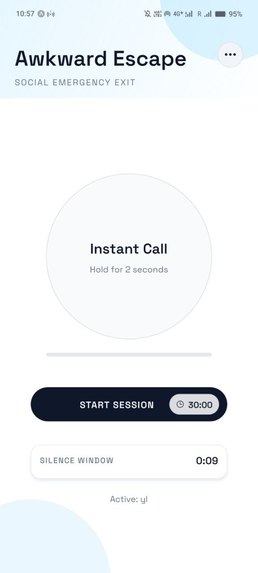
AwkwardEscape simulates realistic exit scenarios through two primary modes:
Instant Call Mode
A press-and-hold action (2 seconds) immediately triggers a believable incoming call.
Call-After-Silence Mode
The user starts a session where the app listens for silence. If no silence is detected for a fixed window, the app initiates the call automatically.
How We Built It
We built AwkwardEscape using Expo and Expo Router to enable fast iteration while maintaining native-feeling navigation and animations.
State & Preferences
Managed using Zustand with AsyncStorage, allowing persona selection, mode settings, and session parameters to persist across app launches.
Audio & Silence Detection
Implemented using expo-av, leveraging microphone metering to detect low-amplitude audio over time. Silence detection is session-based and intentionally conservative to avoid false triggers.
Dialogue System
Scripts are generated from offline templates for reliability, with optional LLM support when available. This ensures the app remains fully functional even without network access.
Challenges We Ran Into
As we arer both new to hackthon, and not both of us have strong coding background, we spent quite a lot of time to configure the project, set up the environment as well as trying out different api and library.
Another major challenge was finding a suitable AI voice cover that feels believable.
We quickly discovered that many standard text-to-speech APIs sound too robotic, especially in emotional or conversational contexts. Even when the script is good, a synthetic voice can break immersion instantly.
Accomplishments That We’re Proud Of
- Building a reliable call-after-silence session mode that works under real-world conditions
- Designing a UX that remains simple and usable under social pressure
- Ensuring the app works fully offline with believable fallback scripts
What We Learned
Through this project, we learned:
- How strongly user trust depends on visual and interaction fidelity
- How to design an interface that stays calm and simple even when the underlying logic is complex
Most importantly, we learned that small UX details matter the most when users are stressed.
What’s Next for AwkwardEscape
Looking ahead, we plan to:
Enhance personalization through habit-based calibration
We want to improve the silence and voice-trigger accuracy by learning from the user’s real environment over time. By optionally recording and analyzing typical background sound levels (e.g., cafés, classrooms, public transport), the app can automatically set a more suitable and personalized detection threshold, reducing false triggers and improving reliability.
Upgrade the AI voice cover for higher realism
We also plan to enhance the AI voice experience so it feels more human and natural. This includes exploring better voice models, improving pacing and emotional tone, and reducing “robotic” artifacts—so the simulated call feels more believable in real social situations.
Built With
- expo.io
- google-cloud-tts
- groq
- react-native
- supabase
- typescript


Log in or sign up for Devpost to join the conversation.