-
-
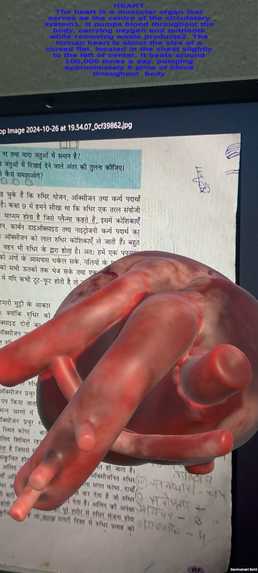
Heart Model Hovering above the textbook having the heart diagram.

Inspiration
The inspiration for this project came from the need to enhance biology education for students in an engaging and interactive way. Biology concepts can be challenging to visualize, especially when it comes to understanding the structure and function of organs. We envisioned using Augmented Reality (AR) to bring these concepts to life, making learning more immersive and accessible. By creating 3D models of organs that students can view directly from their textbooks, we aim to make the learning experience exciting and memorable.
What We Learned
Throughout this project, we learned a lot about the power and versatility of AR technology in education. Key takeaways include: ->The importance of user experience, especially in educational tools, to ensure accessibility and ease of use. ->How AR can provide a new perspective on traditionally challenging subjects, enhancing retention and comprehension for students. ->Technical skills, including 3D modeling, audio integration, and the complexities of AR target tracking with mobile devices.
Building the Project 🛠️
Our project was developed in several key steps:
1.3D Modeling: Using software to create realistic models of organs like the heart, lungs, and kidneys. We made sure each model was detailed enough to provide an educational experience. 2.Target Image Detection: Each organ model is linked to specific images in a biology textbook. When the camera detects these images, the corresponding 3D model appears. 3.AR Implementation: We used an AR development platform to bring the models to life, ensuring smooth transitions and accurate overlays. 4.Audio & Text Overlays: We integrated audio explanations for each organ and a short text description to reinforce learning. This combination of visual, auditory, and textual information supports multiple learning styles.
Challenges Faced
Building this AR education tool came with its share of challenges:
1.Ensuring Accuracy: Making sure that each model accurately represented the real-life organ, which required several iterations and feedback from biology experts. 2.Offline Functionality: To support accessibility, we had to ensure that the app could run smoothly in offline mode, which required adjustments in data handling and storage. 3.Performance Optimization: AR applications can be resource-intensive, so we had to optimize model sizes and rendering to maintain smooth performance across a variety of devices. 4.User Testing and Feedback: Gathering feedback to improve usability was essential but also required us to be flexible with the project design and incorporate quick changes.
In the end, this project gave us an excellent opportunity to blend creativity with technology, solving real-world educational challenges with innovative solutions.


Log in or sign up for Devpost to join the conversation.