-
-
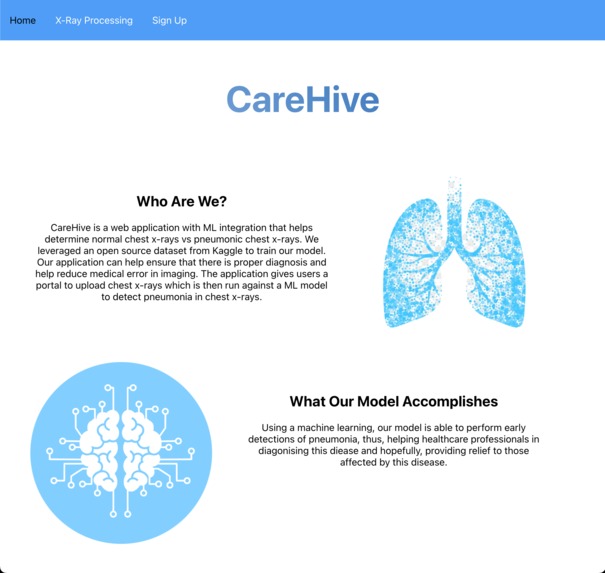
Homepage
-
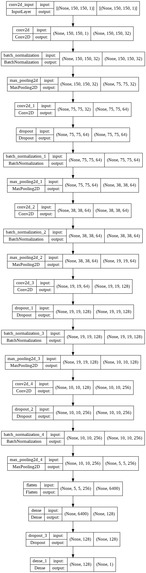
Model Detection


Inspiration
Diseases are prominent in today's world, especially respiratory illnesses and they cause many deaths. For example, SARS spread in 2003 with a death rate of 20% and MERS was introduced in 2012, with a fatality rate of 38%. In 2020, there was the COVID global pandemic which caused major disturbances throughout the world and affected numerous people. This illnesses eventually leads to pneumonia, which is a dangerous infection that when misdiagnosed can be fatal to both young children as well as adults. This inspired us to create CareHive, a web platform that uses ML to predict pneumonic chest x-ray images, thereby helping to reduce medical error and misdiagnosis.
What it does
CareHive is a web application with ML integration that helps determine normal chest x-rays vs pneumonic chest x-rays. We leveraged an open source dataset from Kaggle to train our model. Our application can help ensure that there is proper diagnosis and help reduce medical error in imaging. The application gives users a portal to upload chest x-rays which is then run against a ML model to detect pneumonia in chest x-rays. In addition to this, they can create an account to store their data as well as contact doctors, after the data results have arrived.
How we built it
- Figma: UI Design
- React Js: For frontend
- Python/Flask: For backend
- ML: analyzing image data
Challenges we ran into
- Some of our team members were still learning React, so they needed some help along the way
- Located in different time zones within the US
- Coming up with a feasible idea that adheres to the theme
Accomplishments that we're proud of
- Implementing ML model which could accurately analyze the images
- Creating an aesthetically beautiful website that is easy to use
- Completing the project within the give time frame
What we learned
- Collaboration with other developers
- Efficient time management
- How to implement Flask
- Updating user interface elements
What's next for CareHive
- Adding more features
- Building a mobile app
- Improving UI
Built With
- figma
- flask
- machine-learning
- python
- react.js


Log in or sign up for Devpost to join the conversation.