-
-
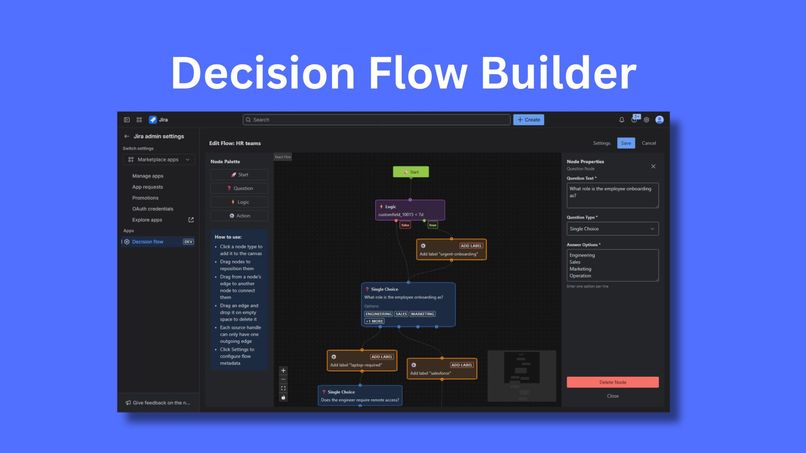
Intro
-
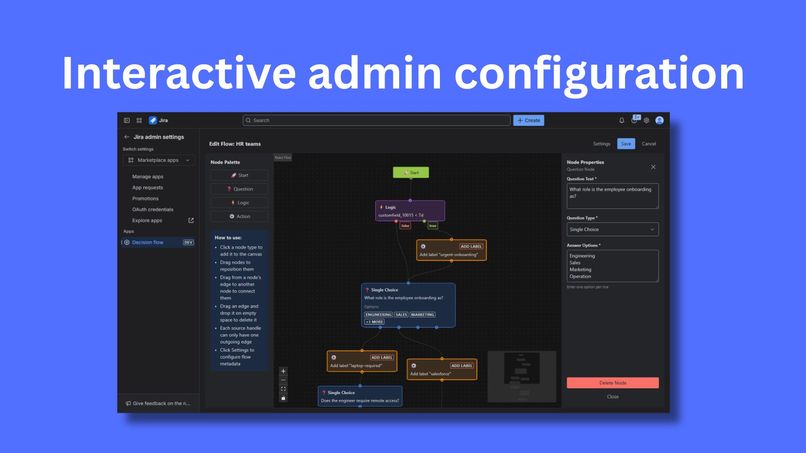
Admin page
-
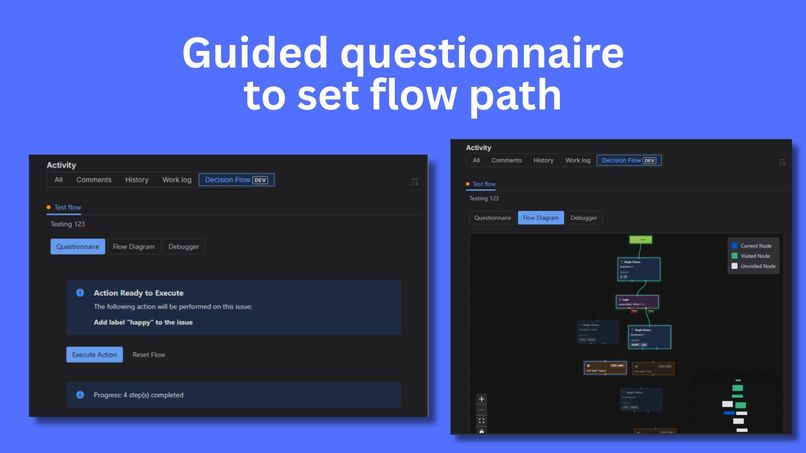
Issue view


Decision Flow Builder
Inspiration
Every Jira admin knows the pain: users constantly asking "What should I do with this issue?" or "Which field should I update?" The answer often depends on a complex web of conditions—project type, issue status, custom field values, and business rules that live only in someone's head or buried in a wiki page.
We've all seen the workarounds: massive wiki pages with decision trees, Slack channels filled with "quick questions," and automation rules that become unmaintainable spaghetti. What if we could turn those implicit decision trees into explicit, visual workflows that guide users through the right questions and automatically execute the right actions?
That's where Decision Flow Builder was born—from the simple idea that conditional logic shouldn't require code, and guidance shouldn't require hunting through documentation.
What It Does
Decision Flow Builder transforms Jira into an intelligent assistant that guides users through complex decisions and automates the resulting actions.
For Admins
Admins use a visual flow builder to create decision trees without writing a single line of code.
- Question Nodes: Ask users single-choice, multiple-choice, date, or numeric questions
- Logic Nodes: Branch based on existing Jira field values (status, priority, custom fields)
- Action Nodes: Automatically set fields, add labels, or post comments
Each flow can be bound to multiple projects, making it reusable across teams.
For Users
When users open a Jira issue, they see an interactive questionnaire in the issue panel. The app guides them through relevant questions, automatically evaluates conditions based on the issue's data, and executes Jira actions when they reach the end of the flow.
Users also get:
- Flow Diagram View: A visual map showing where they are in the decision tree
- Debugger View: An audit trail of every action taken and why
Real-World Example (Support team)
Imagine a support team that needs to triage incoming tickets:
- Question: "Is this a bug or feature request?"
- Logic: Check if priority is "Critical"
- If critical bug → Action: Add "urgent" label, post comment to on-call engineer
- If feature request → Action: Move to backlog, add "enhancement" label
All of this happens automatically as the user answers one simple question.
Real-World Example (Finance team)
Imagine a finance team processing expense reports:
- Question: "What is the expense category?" (Travel, Equipment, Training, Other)
- Question: "What is the expense amount?" (Number input)
- Logic: Check if amount > $1,000
- Logic: Check if requester's department is "Sales"
- If Travel + Amount > $1,000 → Action: Add "requires-vp-approval" label, assign to VP, post comment requesting receipt documentation
- If Equipment + Sales Department → Action: Add "sales-equipment" label, assign to Sales Operations, set priority to High
- If Amount < $1,000 → Action: Add "auto-approved" label, post comment "Approved - standard expense", transition to "Approved" status
This automates the expense approval routing logic that typically lives in someone's head or scattered across email threads.
How We Built It
Mostly through Kiro IDE. Using forge create to bootstrap the app -- this come with AGENT.md. And coupled with Forge MCP Server. We have all the needed tools ready for AI programming.
The initial requirement and scoping is done through vibe-coding and generate a couple of Markdown file to persist the state. We then use the generated file to create .kiro docs for a spec-driven development. This help with a slow, steady and consistent way of building the app.
Technology Stack
- Platform: Atlassian Forge
- Backend: Node.js with Forge resolvers
- Frontend:
- Admin Page: Visual flow builder using React Flow
- Issue Panel: User-facing questionnaire interface
- UI Components: Atlassian's Atlaskit
- Storage: Forge Storage API (key-value store)
- Dependency: Jira REST API
Challenges We Ran Into
1. React Flow Learning Curve
Although the AI Agent help managed to help with the overall code structure, we still find ourself to go back to the code level to perform minor tweaking to match our desire UI looks and output.
2. Flow Traversal Logic
Determining the "next node" in a decision tree is trickier than it sounds. Question nodes can have multiple outgoing edges (one per answer option), logic nodes have true/false branches, and we needed to handle cycles and dead ends gracefully.
It wasn't as straight forward with vibe fixing, that we decided to create additional sub-task in the tasks.md to fix, correct, and add additional guardrail to the traversal logic.
3. Dynamic Form Rendering
Similar to the Flow Traversal Logic, form rendering wasn't intuitive off the get go when it automatically skip through the node that doesn't requires user input. For that, we need to do a few rounds of iteration by testing as a users to ensure the User experience is spot on.
In the end, this has deviated from our original requirement, but is fine since it is better.
4. Automated Tests
Although the specs come with writing test, Kiro didn't build this well. Mainly due to the lack of existing framework and example on how to build test in the Forge platform.
With the AGENT.md and MCP, the AI agent is still good enough not to hallucinate the test. Instead provide a checklist in markdown to manually test the app. Which I think is good enough for now.
5. Updating Requirement and Design
Once we started building and there are some discrepancy with the requirement, it is quite challenging to go back and updating those 2 files without affecting the integrity of the whole specs. It takes time to review and make sure everything is correct.
Nevertheless, we decided to just work through the requirement by updating the tasks and work from there instead. And surprisingly, it able to get the output we need.
Accomplishments That We're Proud Of
1. Getting the Agent to do most of the development
In this era of development, it is interesting to be able to command the AI agent this well. I am impressed with the quality of the agent output. *the commit is clean and minimal
2. Developing a solution that can be applied immediately to my work
As an engineering manager myself, I often find the inconsistency of set a non-required field and label accross Jira issues. With this Decision Flow Builder, it helps not just for the consistency of the action, but also empowering business team to standardize the process and managing real-world work on the Jira ticket as well.
3. Elegant Flow Traversal
The algorithm that walks through decision trees, evaluates conditions, and executes actions is clean, maintainable, and handles edge cases gracefully. It's the heart of the app. Coupled with the clean look from the React Flow, the app looks amazing to me.
What We Learned
I never had success with Spec Driven approach with AI. This is the first for me. I learn some of important strategy to apply for vibe and spec-driven development concurrently.
We also need a good understanding of Forge development in order to make the best used of Atlassian feature. The AI agent sometime may still require us to provide direction and leads in order to effectively vibe-code the application.
What's Next for Decision Flow
There are still plenty of things can be added, nevertheless, is good enough for now. Improvement shall be based on future feedback, such as:
- Advanced Question Types
- More Action Types - Capability for standardization
- Flow Templates - Pre-built flows for common scenarios
- Flow Analytics - Dashboard showing flow completion, path, etc
Built With
- atlassian-forge
- javascript
- kiro
- node.js


Log in or sign up for Devpost to join the conversation.