
DockWidgets
Transform Your Empty Dock Space into Something Useful
Add transparent, functional widgets to the unused space beside your macOS dock. DockWidgets brings essential information and controls right to your desktop without cluttering your workspace.

✨ Features
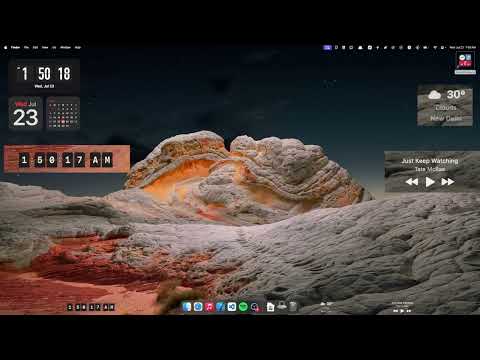
🕒 FlipClock Widget
- Beautiful retro flip clock with satisfying animations
- 12 or 24-hour format support
- Optional seconds display
- Smooth flip animations between digits
🌤️ Weather Widget
- Current temperature display at a glance
- Weather condition icons
- Multiple location support
- Customizable update frequency
- Real-time weather updates for any location
🎵 Music Controls Widget
- Control music playback without switching apps
- Works seamlessly with Apple Music and Spotify
- Play, pause, and skip tracks
- Current track and artist details display
🎨 Design Philosophy
- Transparent Design: Widgets blend seamlessly with your desktop
- Lightweight: Minimal resource usage to keep your Mac running smoothly
- Customizable: Adjustable opacity for your desired appearance
- Non-Intrusive: Widgets stay within dock height to avoid blocking app content
📋 System Requirements
- macOS 14.6 or later
- Compatible with both Intel and Apple Silicon Macs
📥 Installation

Installation Steps:
- Download the latest release from the link above
- Unzip the downloaded file
- Move the DockWidgets app to your Applications folder
- Right-click the app and select "Open" (required for first launch)
- If prompted by Gatekeeper, choose "Open Anyway" in System Preferences > Privacy & Security
Note: Since DockWidgets doesn't have Apple notarization yet, you may need to bypass Gatekeeper on first launch.
🎥 Demo Video
⚙️ Configuration
Setting Up Weather Location
- Right-click on any DockWidgets widget
- Select "Preferences"
- Enter your desired location in the weather settings
Customizing Appearance
- Adjust widget opacity through the preferences panel
- Choose between 12/24-hour clock formats
- Toggle seconds display on/off
❓ FAQ
Q: Will the widgets block my apps? A: No, widgets are designed to stay within the dock's height and won't block any app content.
Q: Does this slow down my Mac? A: DockWidgets is optimized for minimal resource usage and shouldn't impact your Mac's performance.
Q: Can I move the widgets around? A: Currently, widgets are positioned automatically in the empty dock space. Custom positioning may be added in future updates.
Q: What music apps are supported? A: DockWidgets currently supports Apple Music and Spotify, with plans to add more music services.


Log in or sign up for Devpost to join the conversation.