-
-
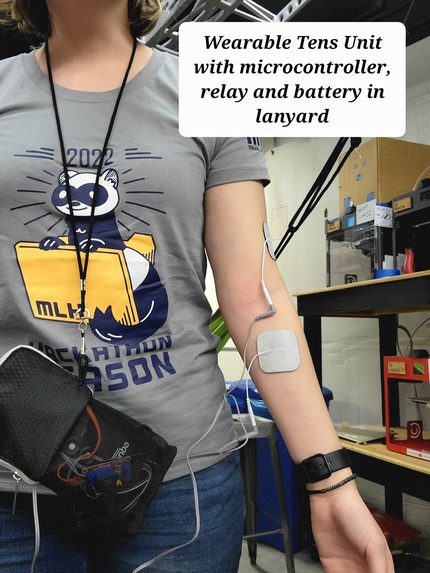
Wearable Tens Unit and Microcontroller Housing
-
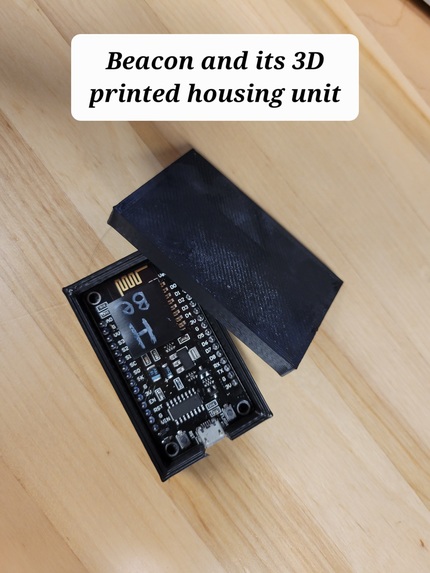
Beacon housing unit
-
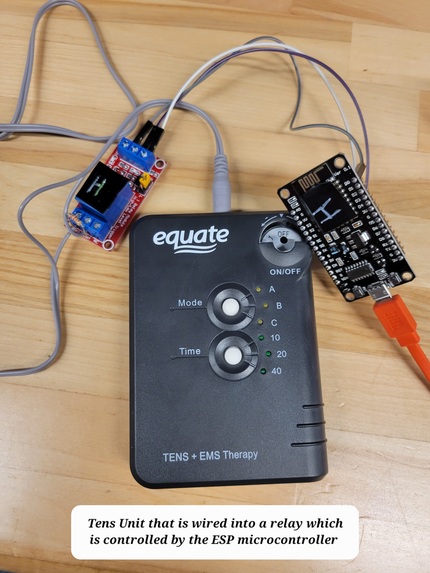
Tens unit wiring
-
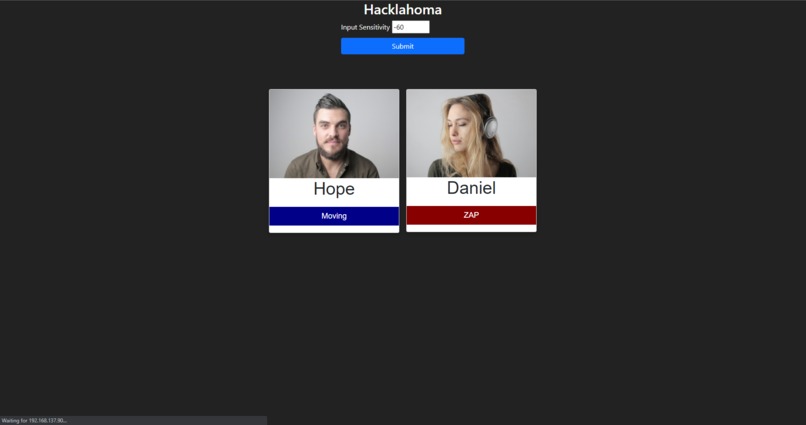
The page showing the current users and their status
-
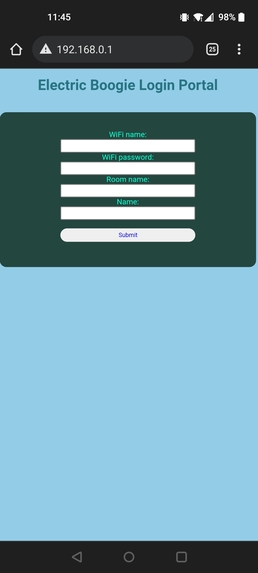
The setup page, for telling it the WiFi name and password and stuff


Presenting Project In-Person
Inspiration
What inspired us to make this product was the realization of just how dangerous it is to sit for an extended period of time. Sitting for prolonged periods of time can cause increased stress of the back, neck, arms, and legs and can add a tremendous amount of pressure to the back muscles and spinal discs. Being programmers and gamers ourselves we know firsthand how easy it is to become inactive, especially while grinding to finish a project or playing fun new games. Because of this, we wanted to design a motivating way for friends to help each other be active again!
What it does
The Electric Boogie is a wearable device unit that connects wirelessly to a "beacon" placed at the user's common sitting space (e.g. desk, table, couch, etc.). The user then sticks the provided patches to their arm, plugging the other ends into the device's TENS unit. This unit is prewired to a microcontroller which communicates with the beacon, and which is able to roughly measure the distance to the beacon. If the user spends too much time next to the beacon, the device will send a continuous electric pulse, which will motivate the user to move away from it in order to stop the electric pulses.
The best part is that each user can have up to 15 other accountability partners that have the same system! The units coordinate via a cloud server, such that, if ANYONE in this group spends too long sitting, EVERYONE will get zapped! This helps provide outside motivation for the user to be active because they will have several people contacting them reminding them that they need to move in order to avoid the zap themselves! It's a very fun social component of the system, which unites you and your friends against inactivity!
How we built it
For this project, there were multiple specific functions which the project had to perform, so the simplest way to explain it is to step through each of these functions, and discuss the components which made them successful.
First, the unit has to identify when the user has gotten up and moved around. After a brief experiment with some GPS chips we had planned to use (more on that in the next section), we ended up accomplishing this with just two different ESP8266 boards. The first one is part of the main unit, and the second one, which we call the "beacon", simply passively sits at the user's desk (or other sitting space), and broadcasts a WiFi network. The main unit is then able to tell how close it is to the desk, simply by checking the strength of the WiFi network! When the signal strength drops below a pre-set (but still user-configurable) threshold, it knows that it's left the area!
Second, once the unit detects that the user has spent too long next to the beacon, it needs to deliver the electric shock which is central to our application. In order to accomplish this, we have a power relay which is controlled by our microcontroller, which governs the connection between the shock pads on the users' arms, and the TENS unit which delivers the shock. The TENS unit is left on constantly, such that any time the microcontroller closes the connection, a shock is delivered. When the microcontroller opens the connection, the pads are still connected to the TENS unit (the connection isn't fully broken), but the circuit shifts to have a high-Ohm resistor in series with it. We did this so that the user wouldn't feel anything, but the TENS unit doesn't think it's unplugged, as this would cause it to turn off.
Third, the unit needs to communicate to the other units. It does this by connecting to a WiFi network (which the user is able to configure), and then connecting to a Socket.IO server we host on AWS. This server collects data from each unit, and broadcasts that data back to every other unit, such that every unit is synced up, and is aware of the status of every other person in their group - when they're connected or disconnected, as well as whether they've been in one place for too long (in which case everyone will get shocked).
Fourth and finally, the unit needs to be able to communicate to the user about the status of their group. This is accomplished via a web interface, hosted on the unit itself on a tiny web server (made using the ESP8266's Web Server library), which can be accessed on the user's phone, tablet, or laptop. This web interface allows users to see who's in their group, and see when each person triggers the zapping function. Additionally, the unit also acts as a web server (and also broadcasts its own WiFi network) when it's not been configured for a "real" network, or if it's unable to connect to it. When this is the case, the user can connect to the unit's network and access and interface which allows them to set the WiFi credentials (as well as set their name, and the room they're connecting to)!
Challenges we ran into
Our original plan was to use a GPS chip to track the user's location, to see when they left their desk. However, after several hours of coding and troubleshooting we learned that the GPS would only work if the provided antenna was outside, pointed at the sky in just the right way. This GPS became useless to us, because we wanted our product to be able to function indoors! Unfortunately, we didn't have any other hardware to use, except for the ESP8266 WiFi chips we were using to communicate between accountability partners. That was when we got the idea to use a second ESP chip in the way we described above.
Accomplishments that we're proud of
We are VERY proud of our solution for the GPS's not working. For a while, it looked like we'd have to come up with an entirely new idea, despite having already spent several hours working on this one. However, when we came up with the idea to measure distance using WiFi strength, everything fell into place!
Additionally, the ESP that the user wears serves as a WebSocket client, AND an HTTP server, AND a WiFi scanner! This was no trivial task, as it meant having the weakest and most limited part of our setup (the ESP8266) essentially act as the frontend for one part of the project, while simultaneously acting as the backend for another part of the project, and the wireless sensor for another. We really pushed the processing capabilities of the board to the max, and we're proud that we were able to get so much out of it!
Finally, we're proud that we were able to make such a complete package. In the past, we've sometimes made projects which lacked core functionality, or which put a ton of hardcoded values in the code, due to the time constraints of a Hackathon. However, for this project, we were able to include almost everything we needed, even including a setup feature which allows users to input their WiFi network to connect to, rather than hardcoding a specific SSID and password! And we were even able to take it one step further, where the chip can actually store that and load it on startup, rather than making the user input it every time!
What we learned
We learned a TON about the limits of the microcontroller hardware. As stated above, we were running multiple features of our board simultaneously, specifically with its WiFi capabilities. We had to explore every inch of that library to get our project to work, from its scanning interface, to how to connect to a websocket through it, while running a webserver.
We also learned a hard lesson about the limits of GPS hardware. We had expected for location tracking to take a few minutes once we got going, but instead, a large amount of the time on our project was devoted to getting that functionality working.
What's next for Electric Boogie
The Electric Boogie team is excited to try and continue this project outside of the Hackathon. We want to present our idea to the OU Start Up programs and pursue making this into a product anyone can buy!


Log in or sign up for Devpost to join the conversation.