-
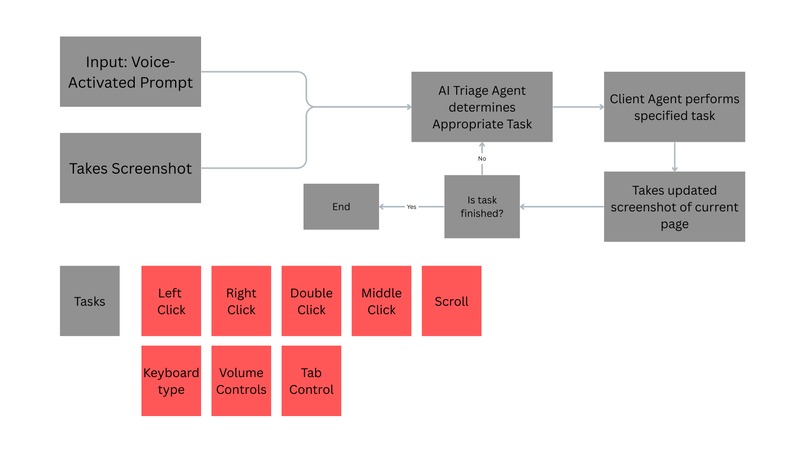
Technical Flowchart

I broke my arm recently in a basketball accident. What I thought would be a minor inconvenience turned into a wake-up call about digital accessibility. Suddenly, I couldn't:
- Take notes in class
- Complete coding assignments
- Submit homework online
- Message friends I tried using voice dictation tools—they helped with typing and simple commands, such as asking what the weather is like, but that was it. I still needed my other hand to navigate, click buttons, switch tabs, and scroll through pages. Simple tasks became impossible. I fell behind in school. My grades started slipping. The frustration was overwhelming. I started researching and discovered that millions of people with severe physical disabilities, those without arms, with paralysis, ALS, cerebral palsy, and arthritis, face these barriers every single day. Existing solutions, such as Siri, can set timers, and screen readers can announce content, but neither can actually utilize the internet. Tools like LipSurf require learning specific command syntax and manually directing every single action. And that's what inspired me to build this.
What It Does Ferdinand is an AI-powered voice agent that gives users complete desktop control through natural conversation. Instead of memorizing rigid commands or directing every micro-action, users simply speak their intent:
"Open Spotify and play my most recently liked song." "Find noise-cancelling headphones under $100 and add the best-reviewed ones to my cart." "Scroll to the bottom of my liked songs."
Ferdinand understands the context, breaks down the task into steps, identifies targets on screen, and executes the entire workflow autonomously, no setup, no training, zero learning curve.
How We Built It
Ferdinand uses a multi-agent architecture with three main components working in harmony: Voice Client - Captures speech and manages the command queue Server & Orchestrator - Flask server that coordinates the AI agents and execution loop Vision Agent - Claude Sonnet 4 analyzes screenshots and finds UI elements with pixel-perfect precision Execution Engine - PyAutoGUI performs mouse/keyboard automation How it works User speaks → Speech-to-text → Flask server receives request → GPT-4o analyzes screenshot & plans next action → Claude Sonnet 4 finds precise coordinates → PyAutoGUI executes command → Screenshot captured → Loop continues until task is complete
Challenges we ran into
- Coordinate Accuracy Problem Early versions struggled with element detection - clicking 50+ pixels off target.
- Multi-Step Task Management Commands like "open Spotify and play my liked songs" require 5+ atomic actions.
- Voice Recognition Accuracy Background noise, accents, and similar-sounding commands caused errors.


Log in or sign up for Devpost to join the conversation.