-
-
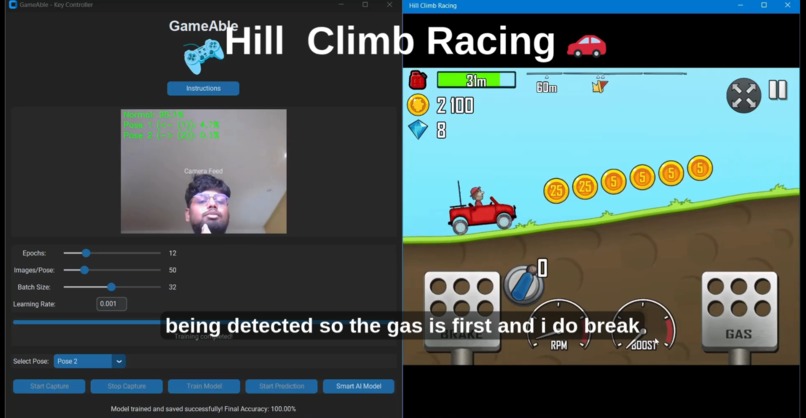
Hill Climb Racing Gameplay :)
-
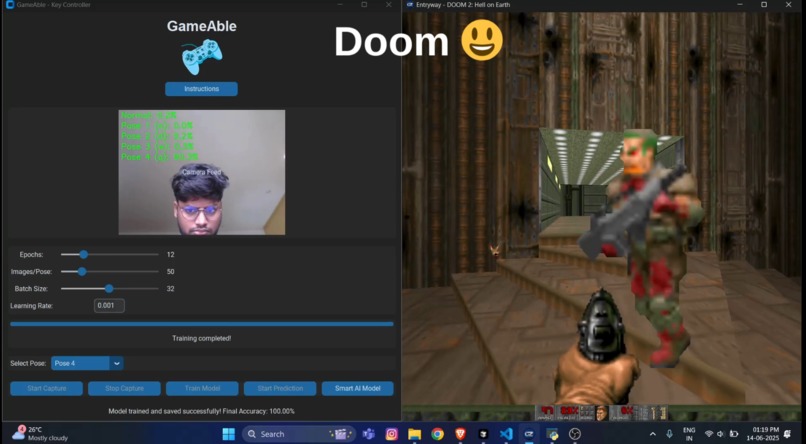
Doom Gameplay :)
-
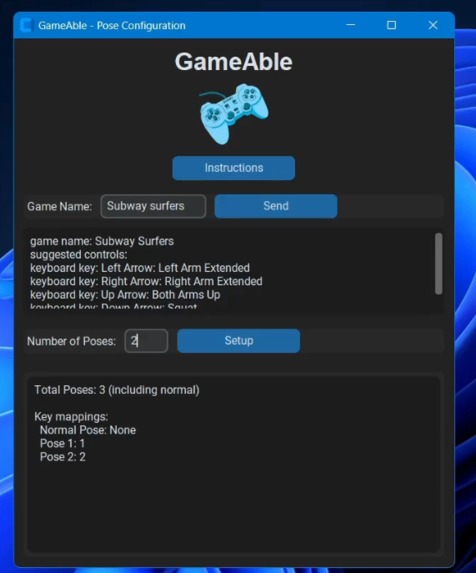
Pose Mapping Page
-
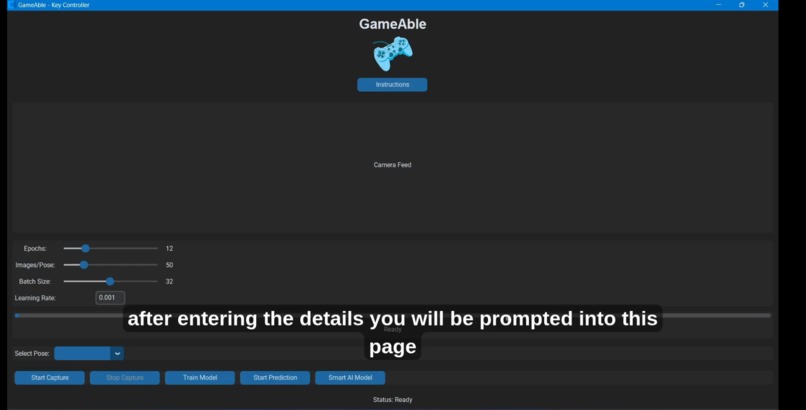
Capturing of Pose images
-
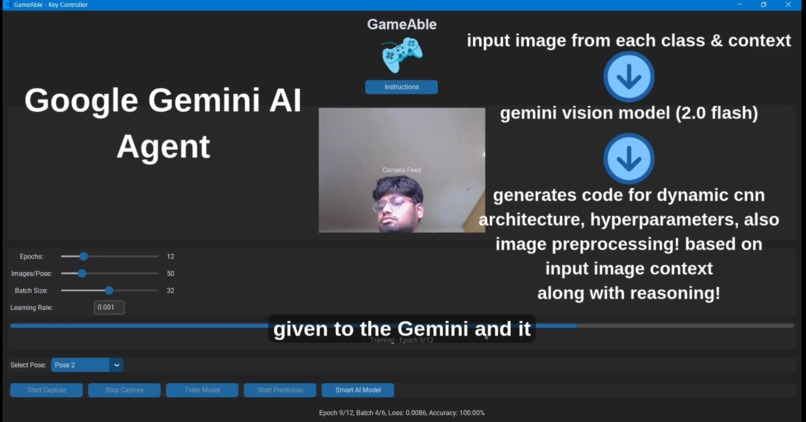
Gemini for Pose Prediction model
-
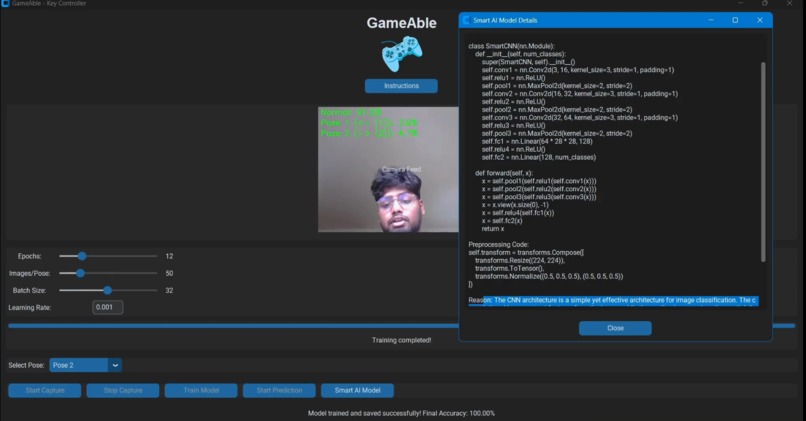
Explaination for generated model


GameAble AI - PC Gaming for People with Disability and Beyond! 🎮
- Hey! this project is done by Vishnu S and Shruthi V 😊
Overview
GameAble is a desktop application that enables you to play any PC game using ANY of your body (User Custom Poses) poses, detected in real time via your webcam! The app is designed for universal accessibility and can be used by anyone, but is especially valuable for:
- People with disabilities who cannot use their fingers or hands, including:
- Paralysis of hands or fingers
- Amputees
- Neurological disorders affecting fine motor control (e.g., ALS, muscular dystrophy, cerebral palsy, spinal cord injuries)
- Arthritis or severe joint pain
- Any other condition where motion-based game control is easier than using a keyboard or mouse
GameAble allows you to map any pose to any keyboard key, making it possible to play your favorite games with just your body movements.
Highlight: Gemini AI Agent!
A unique feature of GameAble is its integration with the Gemini AI Agent (Google Gemini API). This agent can:
- Dynamically generate a custom CNN (Convolutional Neural Network) model class for pose classification, tailored to your own captured images!!!
- Write preprocessing code and recommend hyperparameters for optimal training.
- Provide a detailed explanation for why the generated model and preprocessing steps are suitable for your specific input images.
This means you can get a model that is truly adapted to your own environment, camera, and poses no coding required.
How It Works
1. Pose & Key Setup
- Enter the number of poses you want to use.
- Assign a keyboard key to each pose (e.g., arrow keys (mapped to 1,2,3,4), WASD, etc.).
- Use the built-in chatbot to get pose suggestions based on your game name.
2. Image Capture
- Open the camera and record your custom poses for each class.
- The app saves these images for training.
3. Model Training
- Adjust metrics like epochs, batch size, and learning rate.
- Train the default CNN model, or use the Smart AI Model feature to let Gemini generate a custom model, preprocessing pipeline, and hyperparameters based on your images.
4. Real-Time Prediction
- Start prediction mode.
- The app recognizes your pose in real time and presses/holds the mapped key in your game, allowing you to play hands-free.
5. Gemini Custom Model Agent
- When you use the Smart AI Model feature, Gemini analyzes your sample images and requirements, then writes:
- A custom CNN model class
- Preprocessing steps
- Recommended hyperparameters
- An explanation for the choices made
- All of this is dynamically integrated into the app for training and prediction.
Use Cases
- Play any desktop game (offline or online; internet is only required for dynamic model generation via Gemini).
- Enable accessible gaming for users with limited or no finger/hand mobility.
- Experiment with AI-generated models and preprocessing for pose recognition.
Real-World Demo
I have personally used GameAble to play:
- Hill Climb Racing (car game)
- Doom (shooting game)
See the demo video here: https://youtu.be/SIZ6B2lRwAg
Source code and more details: https://github.com/ZENODIUM/GameAble-AI
Notes
- GameAble works for all desktop games.
- Internet is only required for the Smart AI Model (Gemini) feature; all other features work fully offline.
- Your Gemini API key must be inserted in
key_controller.pyto use the Smart AI Model feature.
Future Scope (Shipable Product or MVP :P)
GameAble is designed to be a flexible and extensible platform. Here are some exciting directions for future development:
1. Reusable Models
- Model Export/Import: Save trained models and reuse them across different games or share with other users.
- Model Library: Build a library of pre-trained models for popular games and pose sets.
2. More Accurate Calibration
- Personalized Calibration: Guided calibration routines to adapt to each user’s body proportions, camera angle, and environment.
- Automatic Pose Normalization: Use AI to automatically adjust for user height, arm length, and distance from the camera.
- Continuous Learning: Allow the model to improve over time as more data is collected during gameplay.
3. Multiplayer Mode
- Multi-User Support: Recognize and differentiate between multiple players in the same camera frame.
- Split-Screen or Turn-Based Play: Enable two or more users to play together or compete using their own pose sets.
4. Advanced AI Features
- Gesture Sequences: Recognize not just static poses, but dynamic gesture sequences for more complex controls.
- Adaptive Thresholds: Automatically adjust confidence thresholds for pose recognition based on user performance.
- Hybrid Models: Combine pose estimation (e.g., MediaPipe, OpenPose) with CNN classification for higher accuracy.
5. Accessibility Enhancements
- Voice Feedback: Provide real-time audio cues for detected poses and game actions.
- Customizable UI: Allow users to adjust font sizes, colors, and layouts for better accessibility.
- Integration with Assistive Devices: Support for eye-tracking, head-tracking, or other alternative input devices.
6. Game Integration
- Direct Game API Integration: Beyond keyboard emulation, integrate directly with game APIs for smoother control.
- Game-Specific Presets: Offer downloadable control/pose presets for popular games.
7. Cloud and Community
- Cloud Training: Offload model training to the cloud for faster results on low-end hardware.
- Community Sharing: Share pose sets, models, and configurations with the GameAble community.
8. Security and Privacy
- Data Privacy: Options for local-only data storage and privacy controls.
- Secure Model Sharing: Ensure safe sharing of models and configurations.
GameAble is just the beginning—these future enhancements can make it even more powerful, accurate, and accessible for everyone!




Log in or sign up for Devpost to join the conversation.