-
-
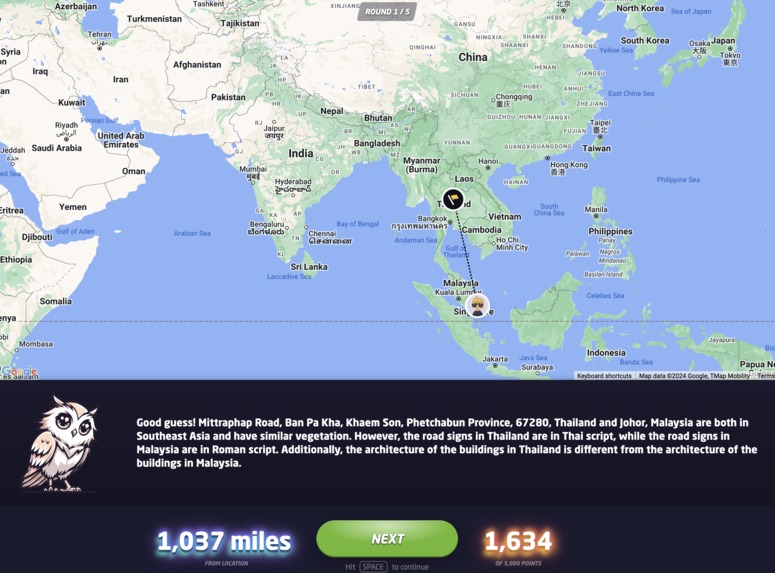
Tippy Giving A Tip
-
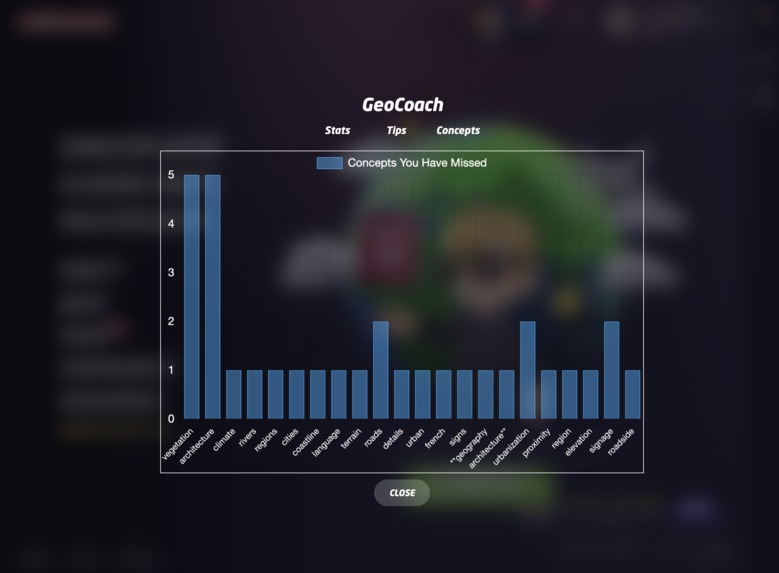
Feedback by categories of guess information
-
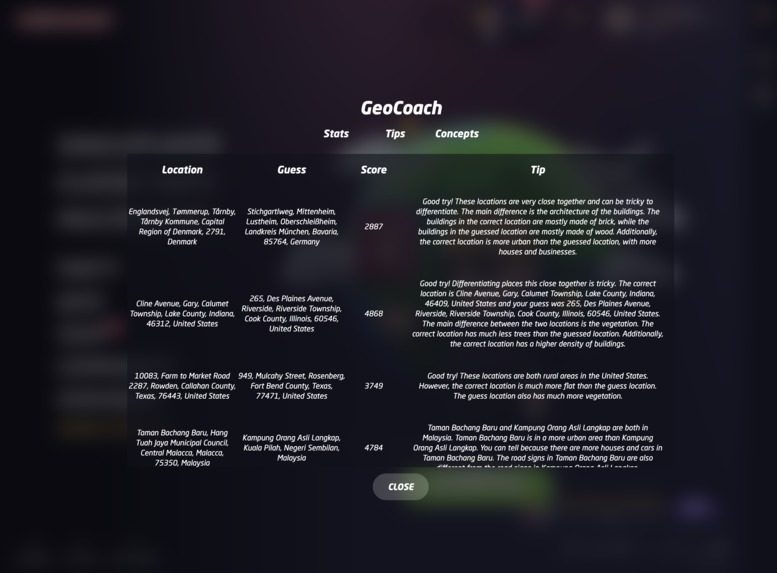
Previous Tips
-
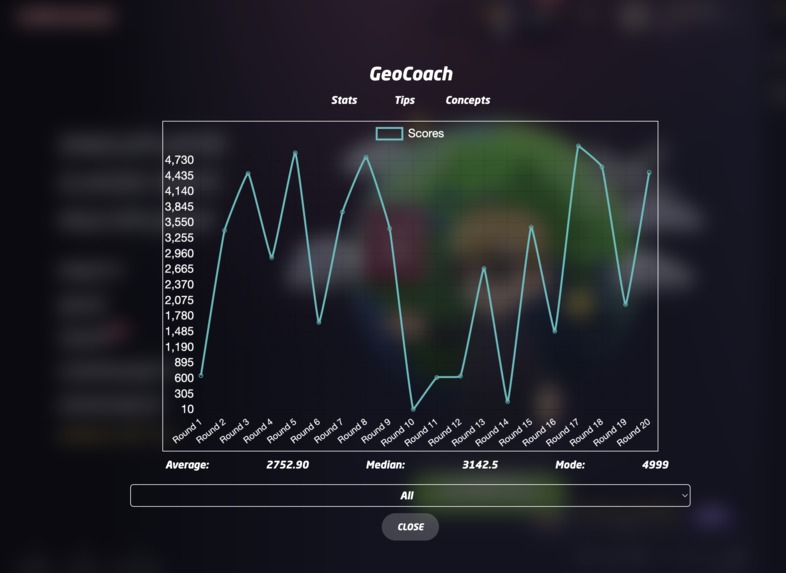
Previous Rounds' Scores
-
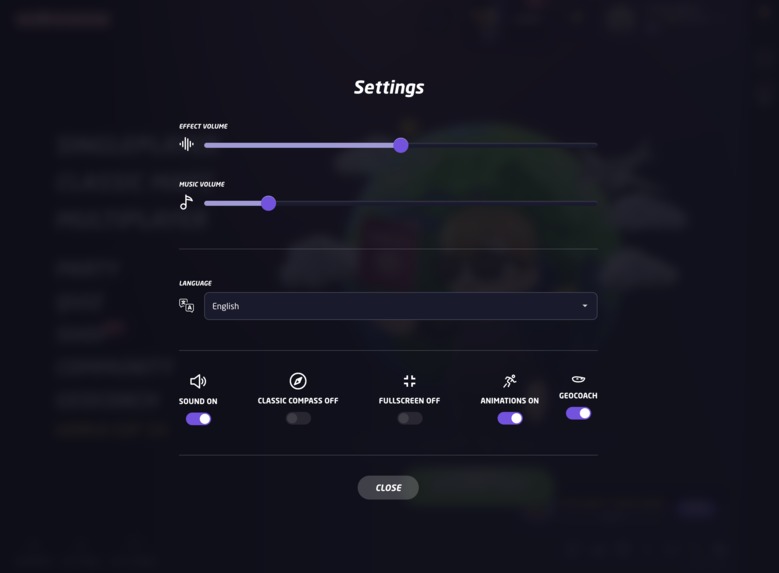
Modified Settings Page to Enable/Disable GeoCoach
-

Our modified home screen with the GeoCoach Option!


Inspiration
Recently, our friends have found a new addiction in Geoguessr. We aren't quite as good as some of them though, but we really want to get better so that we can bet them! To help us improve, we built an AI coach to help us improve!
What it does
GeoCoach is a chrome extension that will expand the functionality of the Geoguessr website seamlessly. Simply start any Geoguessr game and make a guess. Once you've submitted your guess for a round, Tippy, our mascot, will appear and give helpful feedback on your guess. It will provide all kinds of useful information on how to better distinguish between the place you guessed and the correct location. For example, it may note the target location has confierous trees whilst the guess does not or that the guess is significantly less urban or populated than the goal location. It also tracks your stats so you can measure your progress as a player! This information can be seen in chart form or statistical form. It also keeps all the old tips it has given so users can refer back to their previous tips! We also used Gemini to make topological analysis. We are able to analyze what elements of guessing are hardest for a player.
How we built it
Our project is a chrome extension that injects scripts into Geoguessr to add tons of new functionality. We started by following Google's chrome extension format and building a simple extension that could inject a script to a website. We then used javascript to build out all of our new UIs by querying the UI and even spying on web requests to dynamically update with the Geoguessr page. We soon realized we would need some sort of backend service to call Gemini for the AI coaching since we shouldn't include the API key in the extension. Plus this allowed us to add a database to track statistics and old hints! We built this backend service in Golang because of the bindings for Gemini.
Challenges we ran into
We ran into a number of challenges, and many of them seemed to be related to attempting to reverse engineer Geouessr in 36 hours. One major issue was getting everything to load consistently and look correct in the UI. The way we originally hooked into Geoguessr's UI events was ineffective. Sometimes our code would pick up the error but a lot of the time UI wasn't syncing properly. Sometimes our UI would load super slowly and sometimes it wouldn't load at all. We fixed this by creating more custom UI event tracking for each one of our UI features. We also struggled a bit with prompt engineering. Our original prompts gave us inconsistent results and was frankly not good. We worked on the prompt to slim down responses and only give the information that would help us improve.
Accomplishments that we're proud of
We are most proud of how seamless our integration with Geoguessr is. By simply installing an extension in Chrome or Firefox, you unlock a ton of new functionality. Within Geoguessr, you can utilize our app without ever noticing its not part of Geoguessr itself. Our goal was to integrate as smoothly as possible and we we believe that this is was achieved because the UI such as the buttons and dialog are very similar to the original pages' buttons and dialogs.
What we learned
We learned that working with Geo is hard! We also learned that embarking on a reverse engineering heavy project during a hackathon is insane. It took so much of our time just getting our app integrated into the Geoguessr UI. We learned many tricks for reverse engineering on the web such as replacing the fetch method so you can intercept data and use it for triggering events.
What's next for GeoCoach
GeoCoach has some room for improvement. We would love to work on building more features to learn how to guess better such as a dedicated practice mode! We can always do more prompt engineering for more accurate and more informative results.
Google Challenge: Technical Video Demo
Built With
- browser-extension
- gemini
- go
- javascript


Log in or sign up for Devpost to join the conversation.