-
-
The Grandkid logo
-
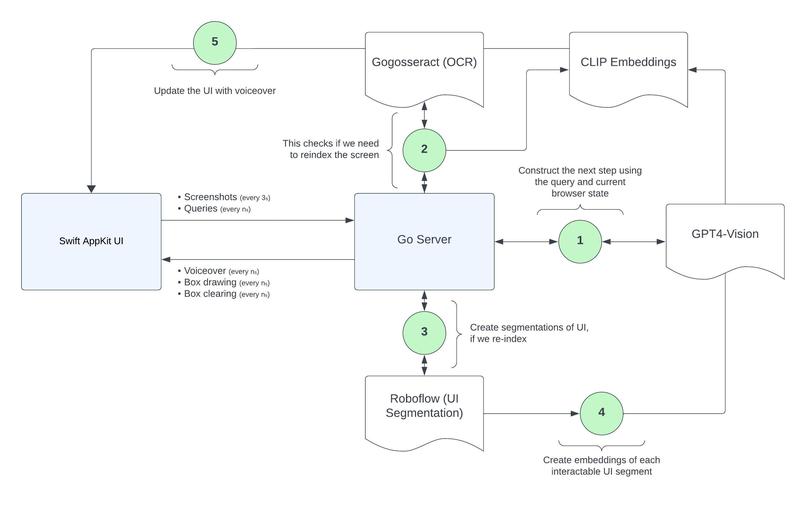
A diagram of the architecture we used (and what a typical query loop looks like)
-
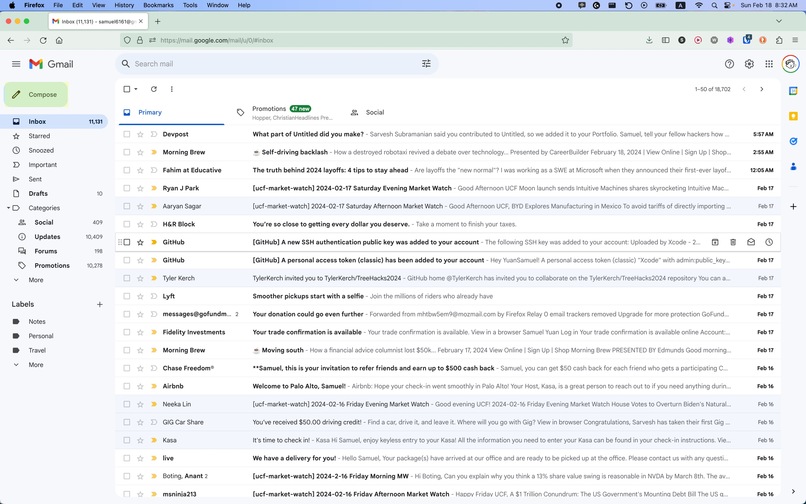
An example of the "compose" button getting highlighted.


Inspiration
As computer science kids, being home for the holidays doesn't mean being free from work: it means we become 24/7 tech support! As we brainstormed for TreeHacks, we thought a lot about accessibility and how much we take for granted; we all shared experiences of helping our grandparents navigate the challenges of modern technology. With recent incredible jumps in computer vision, low-latency computing, and generative AI, we figured there must be a way to make modern technology work for our golden-age friends and family, instead of against them. We noticed current accessibility services (like Apple's Screen Reader) are useful utilities for those with severe visual impairments, but for the vast majority of elderly folks, confusion over navigation, functionality, and communication through software is much, much more common. We decided to create "Grandkid", a powerful tool that doesn't just help the elderly troubleshoot tumultuous technology, but helps teach them fundamentals in computer literacy.
What it does
At its core, Grandkid is about answering questions. Users can speak queries aloud while pressing a button, and we generate answers to help guide them through software processes. For example, Sarvesh's grandpa runs a prayer group and is always printing, or rather, trying to print PDFs, excerpts from books, and Google Docs. He sometimes gets confused by the different options on the screen and has trouble when errors we think are trivial arise. With Grandkid, he could simply ask, while on the Google Docs page, "How do I print this?". Using a combination of computer vision and generative AI, we would break the process down into simple, single-action steps and walk through it with him. Additionally, we can highlight relevant components, which will help him form strong associations with common workflows, improving his e-literacy not only on Google Docs but the web/computer in general.
How we built it
There are four sections to our architecture.
1) We use a Swift AppKit frontend which handles speech input and speech rendering and makes necessary socket pack sends to interact with our backend
2) We built a Go web socket server that takes images and queries from the frontend and constructs embeddings on relevant interactable components in parallel
3) Our machine-learning layer involves several models
- CLIP is utilized both for checking image differences to decide when to dispatch API requests and for allowing us to take subsections of images and help decide which interactable portion we direct the user towards
- OpenAI's GPT-4 Vision Preview model is used for taking a multimodal context of an image and query string to broadly understand which step in the process a user is currently at, and what actions are feasible
- Gogosseract, a Go port of the Tesseract OCR model to aid with text recognition of individual interactable components
- Roboflow's UI Detection Model, a supervised computer vision model that bounds different interactable UI components to support positional highlighting
4) A lightweight JS server with ngrok to reduce token sizes for GPT by switching away from base64 image encodings to storing images on disk (shop local!)
Challenges we ran into
This was an incredibly technically complex challenge, as we had to grapple with a lot of moving parts. There are multiple languages and frameworks at play, there are multiple models that need to produce coherent results, and there was a good deal of systems-level concurrency that we needed to get latency as low as possible, which of course introduced a multitude of race conditions. In 36 hours, trying to get goroutines to play nice with constant packet sends over a web socket from Swift code that also had to be dynamic enough to deal with erratic user scrolling and navigation, along with lowering the time it took to run several models, was a tall order.
Accomplishments that we're proud of
1) Fixing most (?) of the race conditions related to multithreading and channel communication in the Go code and finally got Grandkid to guide us through each step of a workflow smoothly and quickly 2) Getting the web socket code working with different models publishing messages and sending our first packets between terminals. Also getting those performance benefits by using realtime polling instead of a standard HTTP server 3) Making the logo into a gif that would play whenever we recorded audio (c'mon, it's cute)
What we learned
While we learned umpteen different things grinding the past day and a half, the main lesson we learned was that this technology is truly visible on the horizon. Amazing leaps in accessibility are possible with the generalizability of AI. If we, goofy college students who occasionally took coding breaks to play goldfish basketball (don't ask - rules are self-explanatory), could build this strong of a product with a wide scope of use cases, then in a few years, after dedicated efforts from talented coders in industry and academia, we will see services that beneficially transform the way even the least tech-literate people live.
What's next for Grandkid
Call it the sunk-cost fallacy, but after spending so many hours working on an idea we're truly passionate about, we're not ready to call it quits just because the hackathon's over. There are a lot of cool features that we could add, such as doing click automation to make workflows even easier (something we thought of from the very start), letting users control the level of given information or quiz themselves, and even the ability to fine-tune a personal instance of Grandkid (imagine Grandpa/Grandma's face when they see that!).


Log in or sign up for Devpost to join the conversation.