-
-
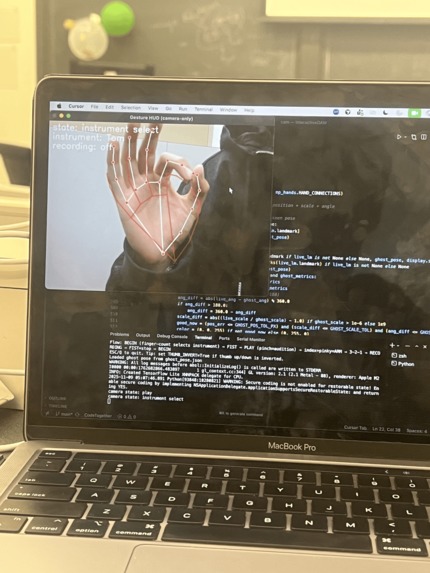
getting the camera hand to work properly + HUD
-
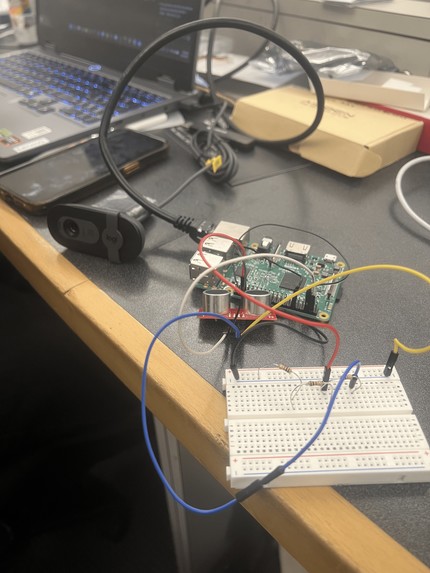
fully built circuit


Inspiration
We came in knowing we wanted to do a hardware project, and when looking at the available hardware, we found an ultrasonic distance sensor and the first thing that came to mind was a theremin. A musical instrument designed to change pitch and play notes via hand gestures. So then we discussed and came to an idea of making digital audio workstations (DAWs) more interactive by making it possible to choose instruments, record, and play them all with just your hands, one tapping beats the other controlling pitch something not that far from the theremin inspiration.
What it does
Interactive DAW lets you make music with two hands using only a webcam, laptop and our distance sensor pi setup. The camera hand selects instruments with different hand gestures, triggers quantized hits with a pinch, and a fist changes modes between [“Instrument Select”, “Play Mode”] and a special gesture in play mode allows for recording and playback to the DAW directly. The pitch hand controls note pitch by distance; hold it at a certain distance, then pinch with the camera hand to produce the corresponding frequency and hold for note length.
How we built it
Software:
Laptop_Node: OpenCV + MediaPipe Hands with a small state machine - instrument select → play → recording. Gestures: finger count to choose instrument, pinch to trigger/hold, fist to state transition. A simple HUD provides user feedback. Events are timestamped and sent to the DAW via a MIDI adapter. We used Reaper as our base DAW, and used loopMIDI a software to create MIDI ports in combination with Reaper’s “Actions” feature to send MIDI notes to the port or actions and have Reaper be able to respond with recording, play back, instrument select, etc.
Pi_Node: We just used pigpiod to listen for the sensor measurements and convert them into actual numbers. There were some other complications, we made sure to try to filter implausible values and reduce noise as much as we can and make sure we correctly define hits from the hand. As for sending the distance measurements from the pi_node to the laptop_node we used routeOSC which we were able to do since we had an ethernet connection from the pi to the laptop and just set up an OSC port for one to listen to and the other to send to.
Hardware: An ultrasonic sensor runs on a Raspberry Pi with a voltage divider on ECHO to 3.3 V and common ground. Readings are smoothed and mapped to pitch, and this module plugs into the software path without messing with the camera. There's also the Brio webcam connected to the laptop for the time being, it would have been nice to have webcam on the pi_node but figuring out how to send that much data in the time that we add + only an 8gb sd card for the pi made it hard for us to figure that out.
Challenges we ran into
1. Raspberry Pi setup ate time A couple of flaky card readers plus a stubborn micro SD made flashing and booting Pi OS painful. We had to go out and buy our own SD card reader. Swapping readers/cards a couple of times, and starting fresh fixed it for us, but it cost us a lot of time. Additionally figuring out a way to get into the pi while headless and without an easy way to ssh in made it difficult. We ended up being lucky enough to find an ethernet cord and after flashing the pi with Pi OS we were able to get in pretty easily.
2. Ultrasonic noise and power problem Our second biggest hardware problem was probably figuring out how to fix the power problems between our Raspberry Pi and our ultrasonic sensor. Basically one of the pins outputs 5V but Pi gpio pins take in 3.3v. So we had to look around at the bottom of the misc. Hardware to find any amount of resistors that would give us a ⅔ ratio to split the voltage. We ended up being incredibly lucky and found 3 1k ohm resistors that we used to divide the ECHO pin voltage down to 3.3V from 5V for the pi. Additionally we also had some noise issues in the beginning with the sensor but we were able to figure it out.
3. Camera hand gesture state machine There was a lot of tuning and messing around with the opencv hand rig model to get different gestures to correspond to different states with our FSM. We ended up writing out our state machine as one defined gesture (a fist) allowing for transition between modes, and then in each mode there were some gestures that would be different actions like one finger down represented a trumpet, etc.
4. Audio felt laggy Initial playback/recording felt sluggish. We removed a couple delays that were affecting this and it was slightly better but there's still a little bit of delay that seems inevitable.
5. Integration We knew from the start this would be the most challenging portion of this hackathon for us, with trying to find a way to get everything to connect nicely without too much lag or anything breaking. We tackled this by creating a pretty indepth map / plan on how everything was going to connect between the ultrasonic sensor, camera, the main controller, and the daw. We found ways to send information (OSC, loopMIDI), moved components around that would be able to send data faster (camera to laptop instead of on pi) to optimize, and we thoroughly discussed the gesture state machine. We did get pretty lucky sometimes with some integrations or data transfer systems working almost perfectly on the first try, but figuring it all out and actually implementing it took a lol of work.
Accomplishments that we're proud of
We’re proud that: we were able to incorporate hardware knowledge we previously learned in an actionable way, we were able to adapt to many challenges we faced both in hardware and software, we got to work with computer vision and have it work well for us, and last but not least that we were able to create not only a challenging project for us but one that remained incredibly fun to work on together incorporating music and technology!
What we learned
We learned a lot about how ports work whether it be for the OSC or loopMIDI port system we had for transferring data, more than we probably need to know about how Reaper DAW works, and about how to actually implement a custom voltage divider in a real system and not just learn it from a lecture or ideal lab. We got to work with libraries we hadn’t necessarily got to before, like the Open CV for hand stuff and got to slowly implement stuff one connection at a time to make sure nothing would just collapse on us.
What's next for Interactive DAW
There's definitely a lot that could be added to this. More instrument states being the first. We only had time to implement 4 states and only give some basic, but the most helpful, control to the user. However, more control can be given to the user, like mute/clear/undo, volume control, reverb/slow. We could definitely look into some cleanup in code, hardware, and gui and make some quality of life improvements for the system. Ideally being able to set this system up separate from a laptop and integrate with any DAW pretty easily is a huge goal. There's also plenty more potential to make this more than just hand controlled, being able to make music with dances or body movements is definitely a future possibility for this system.
Built With
- loop-midi
- mediapipe-hands
- opencv
- python
- raspberry-pi
- reaper
- ultrasonic-sensor


Log in or sign up for Devpost to join the conversation.