-
-
Leetcards Logo
-
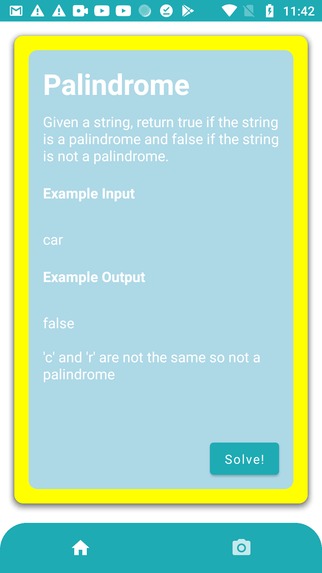
Sample Problem
-
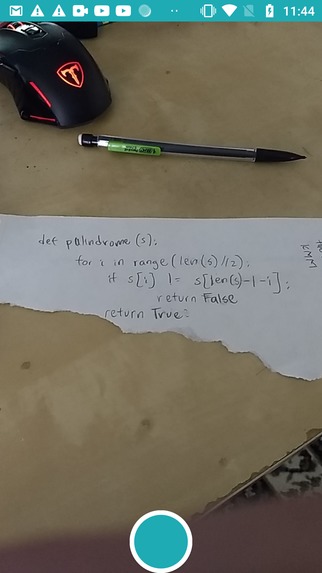
Camera Screen
-
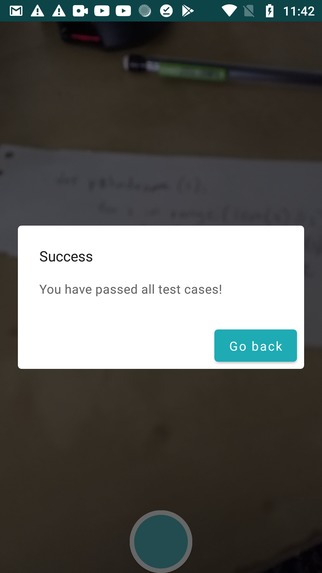
Success Dialog
-
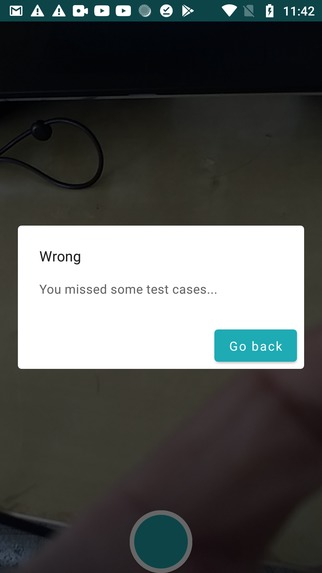
Failure Dialog


Inspiration
As part of the “traditional method” of preparing for technical interviews, many people grind Leetcode, AlgoExpert, and/or Hackerrank. While these methods cannot be disregarded for their importance in helping many people get their first jobs, one thing that has always bothered us is that we are always typing on a keyboard to solve solutions. Not all technical interviews will have us in front of a computer but instead on a whiteboard, writing out the solutions. In addition, all of these technical preparations are not very mobile solutions since again, we must always be bound to typing away on a keyboard. That is why we wanted to offer a mobile app that would serve as a “on the go” solution to preparing for technical interviews, especially for on-site, whiteboard solutions.
What it does
Essentially, we can think of this application as a mobile Leetcode or Algoexpert or what have you. But instead of typing on a computer, we run the application on a mobile device (at the moment, Android); specifically, we take a picture of written code and send the image to a backend to be interpreted and be put to the test against our test cases. If the code passes all the test cases, then the user receives a Success message and vice versa for not passing all test cases.
In trying to achieve a collaborative community among our users, the application also encourages people to come up with their own problems to be used by other people on the app.
How we built it
The frontend of the app was built in Kotlin using Android Studio. Rather than building the app traditionally through XML layouts and Java, we opted for newer, less tested technologies such as the Jetpack Compose toolkit in the Canary build of Android Studio to gain experience and insight into the future of Android app development and the Kotlin language.
To build the backend of the app, the Flask framework was used to create an API that is hosted on a Heroku server, and we leveraged the Pytesseract and Google Cloud optical character recognition (OCR) libraries to help us extract text from the images that we took.
Challenges we ran into
We had previously made Android apps before through the previously mentioned traditional methods, but for this hackathon, we gave ourselves the challenge of making the app with tools and languages that we had no prior experience using. Since technologies like Jetpack Compose were relatively new and updated often, we also found that there was little to no documentation and example code that was up to date and could be used as a reference when we needed help with more complex features like the camera and dialog box.
Our biggest challenge was with finding the right tools for optical character recognition (OCR), a crucial aspect of our application. We experimented with Pytesseract, EasyOCR, and Google Cloud Vision to extract the text data from our images. Pytesseract provided decent results, but required a separate .exe file to work, and was cumbersome to deploy on a larger scale. We decided that Google Cloud Vision is the most promising option due to it's accuracy not only in extracting the text but in determining bounding boxes. Especially in python code, accurate bounding boxes are necessary for specifying indentations.
Accomplishments that we're proud of
For all of us, this is the first time where we took the leap to use Jetpack Compose, which is currently in beta. As such, there are not many resources to help us along our way, but we are happy that we were able to pull through and take advantage of the benefits of programming UI declaratively. We saw benefits such as cutting down on the size of our codebase as well as increasing productivity among our frontend engineers. In addition, this was also the first time that we used OCR in an application, and having used it, we are excited to use it more in future applications.
What we learned
In the process of making this app, we learned about the future direction of Android app development, and the benefits to utilizing newer tools such as Jetpack Compose, despite the temporary downside of limited assistance online. We also learned about the benefits and drawbacks to different OCR tools, and will try to make the right choice from the start based on this experience if we ever want to incorporate OCR into another project. Finally, our individual team members had the opportunity to experience roles they typically aren’t accustomed to, such as someone who typically does back end working on the front end for this particular project.
What's next for Leetcards
During the upcoming summer, we intend to convert this into a project that we could eventually deploy into the real world and potentially help thousands of young aspiring problem solvers, critical thinkers, engineers, and programmers like ourselves. Some features we plan to add in the future are user accounts and profiles with visual graphics so they can save and track their progress along with the progress of other users. We also hope to provide a chatbot to assist newer users in operating the app and learning concepts to help solve more complex problems. In the long term, we envision a future where thousands of users across the world of all ages, races, and education levels are able to become part of a community where everyone can learn and gain skills in computer science as it becomes an increasingly relevant and essential part of our economy and world.
Built With
- android-studio
- google-cloud
- heroku
- jetpack-compose
- kotlin
- pytesseract
- python


Log in or sign up for Devpost to join the conversation.