-
-

MavFind
-
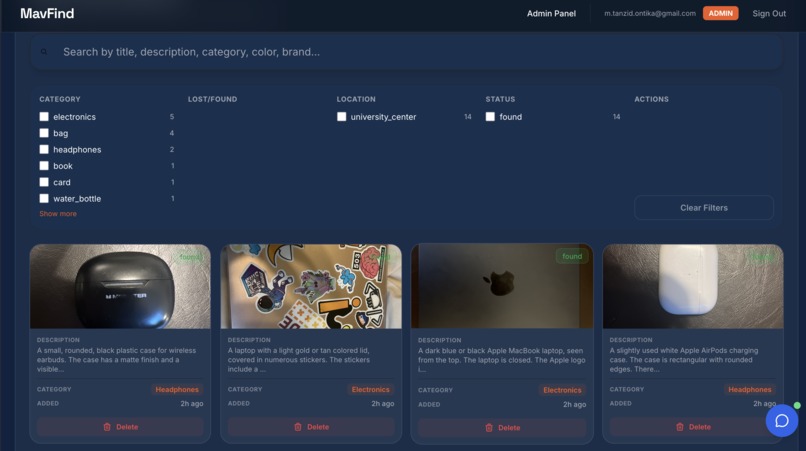
Admin Viewing Lost Items
-
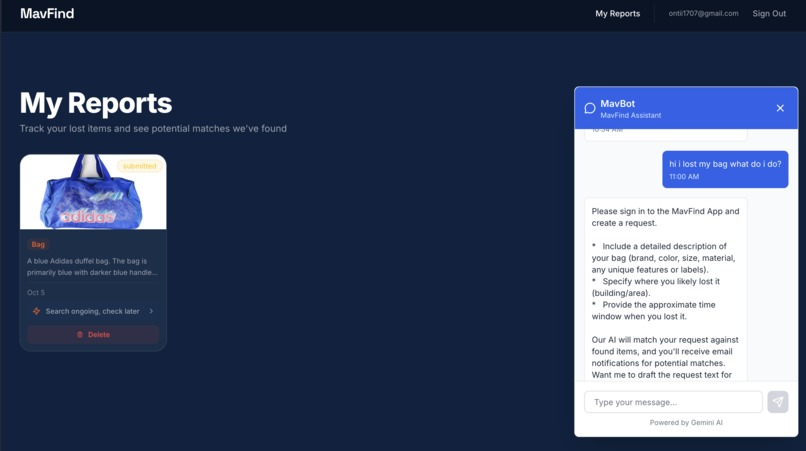
Brief Overview of ChatBot Answering User Query
-
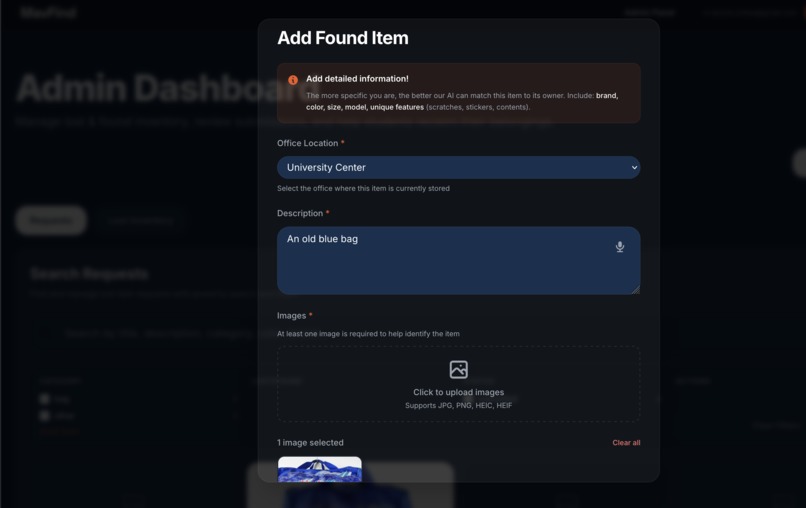
Staff Adding Lost Item to Inventory
-
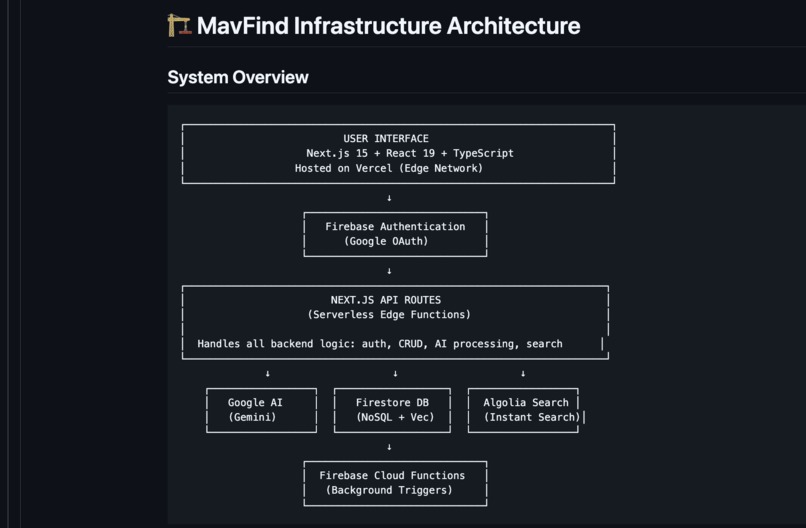
Project Infrastructure


MavFind
Lost and Found. Reimagined.
Inspiration
Every day, thousands of items are lost on college campuses. A forgotten laptop in the library. AirPods left in a classroom. A wallet that slipped out during lunch. Students waste hours searching. Admins struggle with overflowing lost and found boxes. Items rarely find their way home.
To save the day, here comes your friendly neighbourhood app - MavFind.
What It Does
MavFind is an intelligent lost and found platform that uses AI to reunite people with their belongings.
Students can report lost items by speaking naturally, typing a description, or uploading a photo. The system extracts details, categorizes items, and searches thousands of found items to surface matches. Notifications are sent instantly when matches are found.
Campus staff can upload photos of found items, which the AI automatically identifies and matches against pending lost item reports, eliminating manual sorting.
Main Features
- Instant AI Matching: Semantic search and vector similarity find potential matches instantly.
- Voice Input: Speak naturally to report lost items; AI handles transcription and extraction.
- Photo Recognition: Upload a photo of a found item, and AI detects attributes like brand, color, condition, and unique marks.
- Notifications: Automated emails alert students the moment a match is detected.
- Search & Filtering: Fast, typo-tolerant search across all items with advanced filters.
- Status Tracking: Track reports from pending to resolved.
- ChatBot: Gemini API powered AI Chatbot.
How It Works
MavFind makes finding lost items effortless, using AI to automate every step.
1. Report Naturally
- Students describe what they lost—speak, type, or upload a photo.
- Example:
> “I left my black Patagonia backpack in the Engineering building, second floor, around 3 PM yesterday.” - ElevenLabs Scribe converts speech to text with high accuracy.
2. AI Extracts Everything
- Google Gemini 2.0 Flash reads text and images to extract structured data:
- Category: Electronics, bags, keys, clothing, and 34 more
- Attributes: Brand, color, model, size, material, condition
- Location Context: Building, room, landmark, GPS coordinates
- Distinguishing Features: Stickers, scratches, engravings, unique marks
- Time Information: When and where the item was last seen
- Category: Electronics, bags, keys, clothing, and 34 more
3. Instant Matching
Every description becomes a 768-dimensional vector embedding. When a new item is reported:lost or found, our Firebase backend runs vector similarity search across the entire database using cosine distance algorithms. The system automatically finds potential matches and ranks them by confidence. No waiting. No manual searching.
4. Smart Search
Can't wait for a match? Search the inventory yourself. Algolia's instant search lets you find items in milliseconds with typo tolerance, intelligent filtering, and natural language queries.
"blue hydroflask stickers" finds exactly what you're looking for.
5. You Get Notified
The moment someone reports an item matching yours, you get an email. Click through. Verify it's yours. Arrange pickup. Done.
6. Campus Staff Workflow
- Upload found items via photo or text.
- AI identifies item attributes and automatically matches them to pending lost reports.
- Matches appear in a staff dashboard for review, approval, or follow-up.
How We Built It
We built MavFind using a modern stack of cutting-edge technologies:
- Frontend: Next.js, React, Tailwind CSS, Framer Motion, TypeScript
- AI & ML: Google Gemini 2.0 Flash, ElevenLabs Scribe, text-embedding-004, NLP, computer vision
- Database & Backend: Firebase Firestore, Firebase Storage, Firebase Functions, Firebase Authentication
- Search & Matching: Firestore Vector Search, Algolia, real-time indexing
- Cloud Infrastructure: Google Cloud Platform, Vercel, serverless architecture
- Data & Validation: Zod runtime validation, TypeScript type safety
Intelligent Matching Pipeline
User Reports Lost Item
↓
Speech/Text Input → ElevenLabs Scribe → Transcription
↓
Text + Images → Gemini 2.0 Flash → Structured Extraction
↓
Generic Description → text-embedding-004 → 768D Vector
↓
Save to Firestore → onDocumentCreated Trigger → Cloud Function
↓
Vector Search (KNN + Cosine Distance) → Find Similar Items
↓
Calculate Confidence Scores → Filter by Threshold
↓
Save Matches to Subcollection → Index in Algolia
↓
Send Email Notification → User Gets Alert
Challenges We Ran Into
One of our biggest challenges was building a real-time AI matchmaking system that could accurately connect lost and found items. Initially, we tried using Gemini 2.0 directly, but the model’s context limits made it impossible to handle thousands of unique item descriptions. So we built our own custom fine-tuned matching pipeline using Gemini text embeddings (text-embedding-004). Each description was converted into a 768-dimensional vector, and we used cosine similarity to find potential matches within milliseconds. It took hours of debugging and experimentation, but we finally achieved a scalable system capable of sub–10 ms matching — one of our proudest technical wins.
We also struggled with authentication. We first built a full SSO-based system for staff, students, and guests, but realized it made the process too slow and confusing for users who were already stressed about lost items. We switched to Google Sign-In instead — allowing students to log in with their campus email, guests to join instantly, and admins to retain secure access through role-based permissions.
Finally, we focused heavily on mobile responsiveness. Many staff members use their phones while managing found items on campus, so we redesigned the interface to be fully optimized for small screens while keeping it fast and intuitive.
These challenges pushed us to learn and integrate Firestore Vector Search, Algolia, Gemini 2.0, and ElevenLabs Scribe, and taught us how to balance technical performance with user empathy.
Accomplishments That We're Proud Of
First of all building a standalone complex project in less than 24 HOURS!!
- Successfully implemented AI-driven lost and found matching
- Real-time notifications and instant search with typo tolerance
- Seamless integration of frontend, backend, and AI pipelines
- Multimodal AI handling both text and images
What We Learned
- Effective combination of AI and cloud technologies for real-time applications
- Managing and processing large datasets efficiently
- Team collaboration under tight timelines
- Importance of user-centered design in building practical solutions
What's Next for MavFind
- Develop native iOS and Android apps
- Add QR code and campus map integration for item tracking
- Multi-language support
- SMS notifications for users without email
- Expand to airports, hotels, corporate offices, and other high-traffic areas
- Enhance AI models for even better matching accuracy


Log in or sign up for Devpost to join the conversation.