-
-
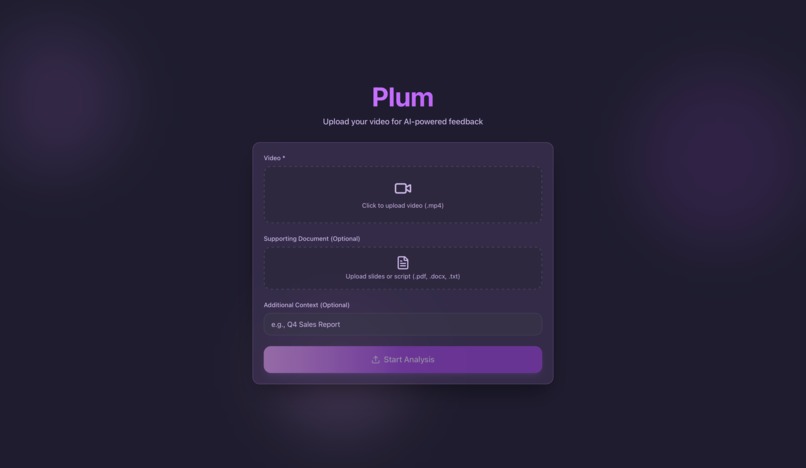
Landing Page
-
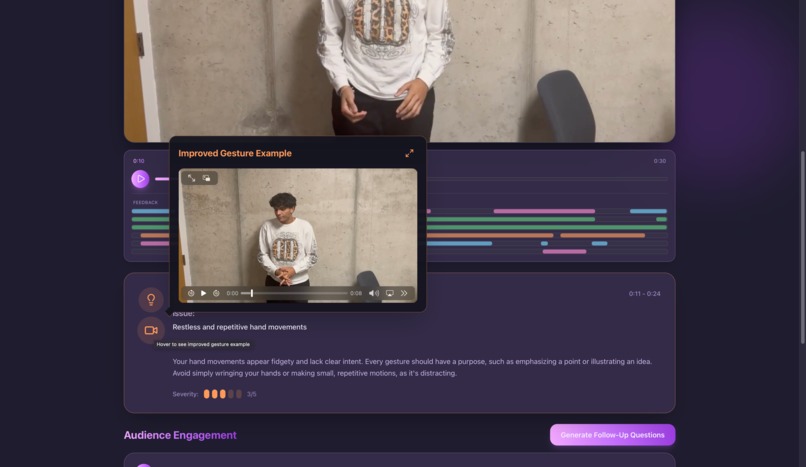
Video Playing and VEO Generated Gesture Reccomendation
-
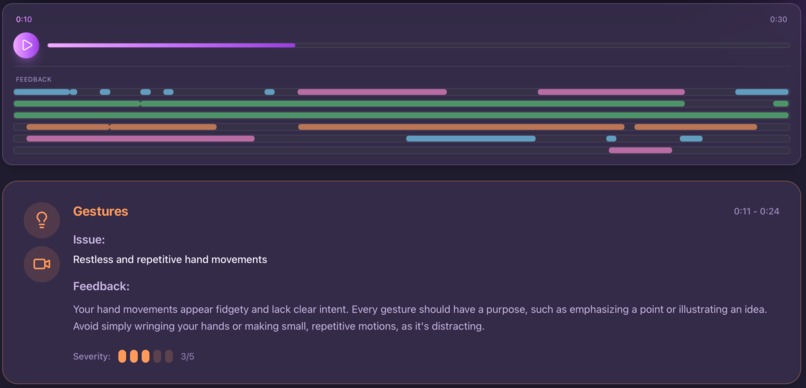
Gesture Textual Feedback and Rubric
-
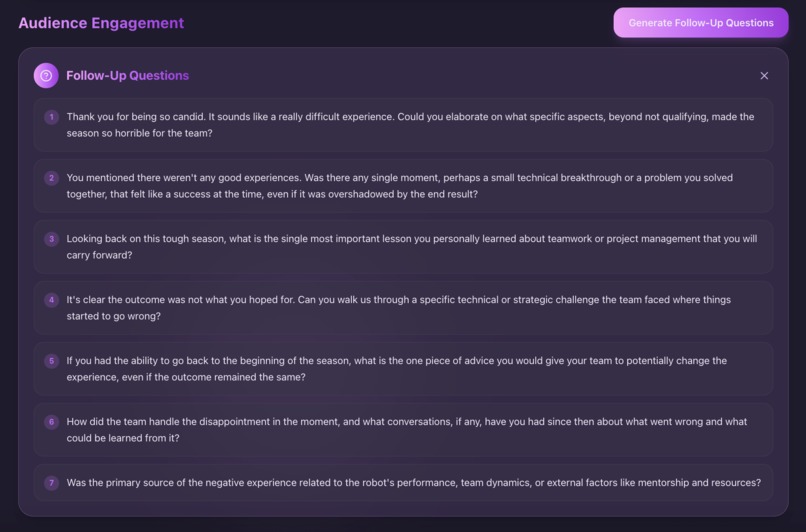
Potential Audience Questions Generated


Plum - AI-Powered Public Speaking Coaching Platform
Inspiration
Public speaking anxiety affects many people who lack access to coaching. Plum uses AI to provide accessible, instant feedback for students, professionals, and anyone looking to improve presentation skills.
What it does
Plum analyzes video presentations (up to 3 minutes) across four areas:
- Speech Clarity — speaking pace, filler words, pauses, and transcripts
- Body Language & Gestures — posture, gestures, eye contact, expressions. Veo 3.1 generates personalized demonstration videos for gesture improvements.
- Vocal Inflection — pitch variation, volume, and emphasis
- Content Structure — flow and accuracy verification against uploaded documents
The platform provides a score out of 100 with timestamped markers, actionable tips, and an interactive timeline. For gesture feedback, users receive Veo 3.1-generated demonstration videos. Helps prepare users for real world presentations by giving relevant follow-up questions.
How we built it
- Backend: FastAPI with Google Gemini 2.5 Pro for analysis and Google Veo 3.1 for gesture demonstration videos. Multi-agent system (Speech, Gesture, Inflection, Content agents). The Gesture Agent triggers Veo 3.1 to generate contextual demonstration videos. FFmpeg for video processing; PyPDF2 and python-docx for documents. Async job queue handles analysis and video generation.
- Frontend: React 19, Vite, TailwindCSS, Framer Motion. Custom video player with timeline markers, real-time feedback, and embedded Veo 3.1-generated demonstration videos.
Key Technical Challenges Solved
- Video File Upload & Processing - Handled large video file uploads (up to 500MB) with progress tracking
- AI Integration - Integrated Google Gemini API for multimodal video analysis
- Real-time Feedback Synchronization - Synchronized video playback with dynamic feedback updates
- Asynchronous Job Processing - Implemented background job processing with status polling
- Document Verification - Built content verification system that compares video content against source documents
- Interactive Timeline - Created custom video player with clickable markers and smooth animations
Challenges we ran into
Video Processing Complexity - Handling video file uploads, processing, and serving required careful implementation of file streaming and CORS configuration. We had to optimize for large file sizes while maintaining fast upload times.
AI Model Integration - Integrating Google Gemini 2.5 Pro for video analysis presented challenges
Multi-Agent Coordination - Running four specialized AI agents in parallel required careful orchestration
Real-time Video Synchronization - Creating an interactive video player that synchronizes feedback with playback
Content Verification Logic - Building a system that accurately verifies video content against source documents was complex
Veo 3.1 Integration - Finding realiable and working code examples that could work in the context of our project
Accomplishments that we're proud of
Comprehensive AI Analysis System - Built a sophisticated multi-agent AI system that provides detailed, actionable feedback on four critical aspects of presentations, going far beyond simple speech-to-text. Using veo 3.1 in. novel, purposeful and impactful way rather than just for entertainment was something really eye opening and gave us insights into what is actually possible with tools such as these.
Interactive User Experience - Created an intuitive, beautiful interface with:
- Real-time feedback synchronization
- Interactive video timeline with color-coded markers
- Smooth animations and transitions
- Category filtering for focused analysis
Content Verification Feature - Implemented a unique content verification system that compares video presentations against source documents, flagging fact discrepancies and missing information - a feature we haven't seen in other presentation coaching tools.
Accessibility & Usability - Created an application that's easy to use, requiring no technical knowledge - users can simply upload a video and get instant, valuable feedback.
What we learned
Multimodal AI Integration - Learned how to effectively use Google Gemini's multimodal capabilities to analyze both video and audio content simultaneously, extracting meaningful insights from visual and auditory cues.
Multi-Agent AI Systems - Gained experience in designing and coordinating multiple specialized AI agents to work together, each focusing on a specific aspect of analysis while maintaining consistency in output format.
Video Processing Best Practices - Learned about video file handling, streaming, metadata extraction, and optimization for web applications.
Real-time UI Synchronization - Developed techniques for synchronizing UI updates with media playback, handling edge cases like manual selections, seeking, and automatic updates.
Asynchronous Job Processing - Implemented a robust job queue system with status polling, error handling, and user feedback - essential for long-running AI operations.
AI Prompt Engineering - Learned to craft effective prompts for AI models to ensure consistent, structured output in JSON format with proper error handling.
What's next for Plum
Advanced Analytics Dashboard - Add historical tracking of presentation improvements over time, allowing users to see their progress and identify patterns.
Custom Scoring Rubrics - Allow users to customize scoring criteria based on their specific needs (e.g., academic presentations, business pitches, TED talks).
Collaborative Features - Enable users to share presentation analyses with peers, mentors, or coaches for collaborative feedback.
Real-time Presentation Coaching - Develop a live coaching mode that provides real-time feedback during presentations using webcam and microphone input.
Integration with Presentation Tools - Integrate with popular presentation tools like PowerPoint, Google Slides, or Prezi to provide context-aware feedback.


Log in or sign up for Devpost to join the conversation.