-
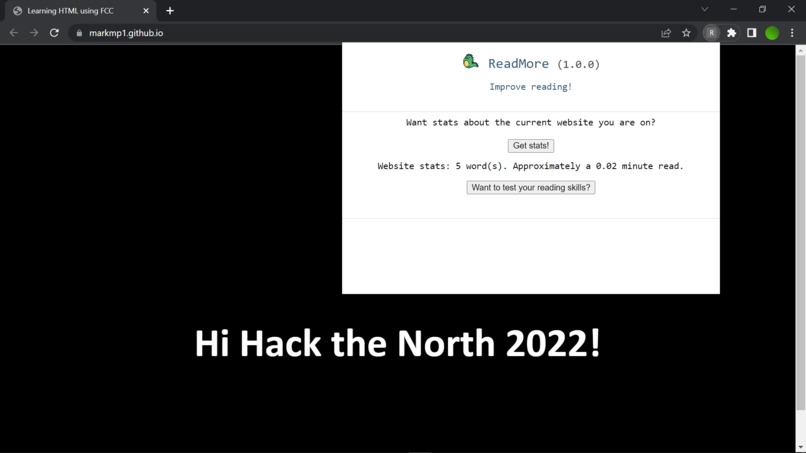
An example use of our chrome extension.
-
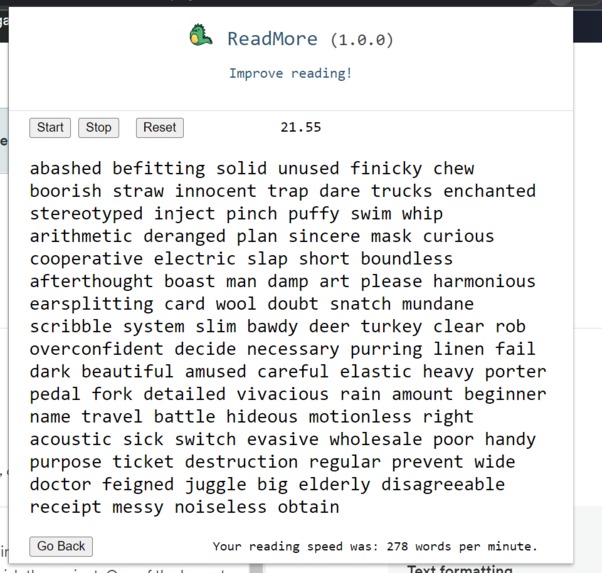
Another use of our chrome extension, to find your reading WPM.


Inspiration
Almost everyone has felt the effects of procrastination at least one time in their life. Procrastination pushes projects and assignments back, leaving little to no time to finish the project. One of the largest parts of an assignment is the research, which requires tons of reading in order to connect and create a meaningful product. The process of reading takes time, dependent on the individual's reading speed. Reading speed is something that can be cut down with practice, and where we gained inspiration for this project. We wanted to help improve the monotonous process of reading through pages and blurbs of text, and thus this chrome extension was made!
What it does
Our app has two main features. The first feature helps provide the user with more information, to enhance their reading experience. It does this by providing the user with information about how many words are being displayed on the webpage at a current time, and also how many minutes it would approximately take (for the average) human to read through it, to provide a sense of scale. The second feature is designed to help the user improve their reading speed. They are given a list of 100 words, and are instructed to time themselves to discover their own reading speed. The user can then use this statistic to track their progress, and also as an incentive to improve.
How we built it
We used a chrome extension to create this app. It utilizes HTML, CSS, JS. HTML and CSS are used to display the content to the user, while JS was used to provide functionality to the elements presented in the HTML and CSS. We began by building a basic HTML template to test things on, before implementing both features and applying them to our full HTML and CSS presentation.
Challenges we ran into
Many members of our group were completely brand new to web-development and subsequently, chrome extensions. Within a span of 2 days, many of us learned how to code a working HTML, CSS, and JS application from scratch. Thus, a lot of our time was spent learning the ropes on what it means to create a meaningful chrome extension from the ground up!
One thing we had particular trouble with was with JS. Already being unfamiliar with the language, we had trouble understanding the concept of promises and asynchronous code inside JS, where it is often needed in chrome extensions. As a result, our communications between functions were often incorrect, leaving many variables with crucial information undefined.
Accomplishments that we're proud of
We're proud that we finished what we wanted in time! All of us are novices to hackathons, and are glad we managed to finish our project to a level we were happy with. Additionally, many of us learned HTML, CSS, and JS within a span of 2 days, well enough to make an entire chrome extension, which we found quite surprising ourselves!
What we learned
We learned how to combine HTML, CSS, and JS to make a chrome extension! We also learned a lot about asynchronous programming, which allowed us for easier communication from function to function. Finally, we also learned and practiced the use of proper planning, creating templates and ideas well before implementing them in our code editors, allowing us to continually build upon our project, rather than constantly restarting and redeveloping.
What's next for ReadMore
Expand on our reading speed practice, providing more methods and more engaging ways to practice reading quickly! (e.g instead of reading words quickly for practice, you have the option to read sentences quickly instead) Another way we could improve the user experience for practicing reading quickly could be providing insights and history for user performance, allowing the user to look back in time to see previous graphs and statistics about their reading speeds, providing further motivation!


Log in or sign up for Devpost to join the conversation.