-
-
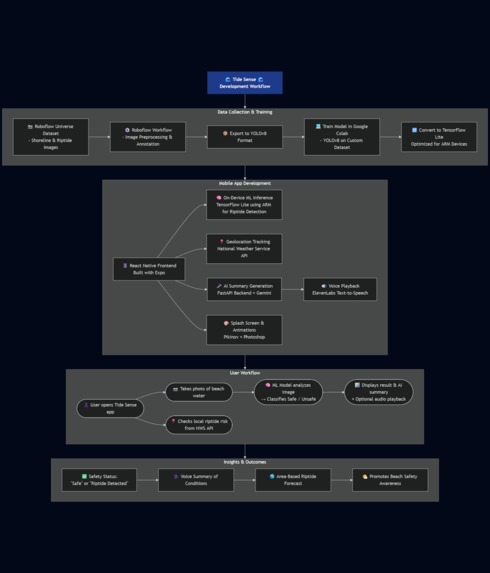
Tide Sense Development Workflow
-
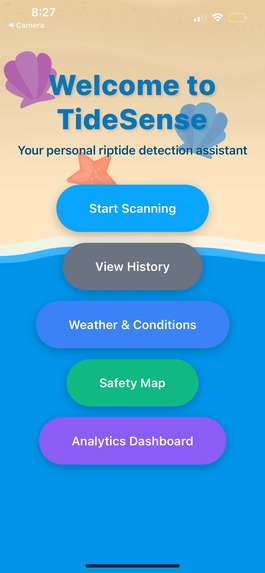
Home Screen
-
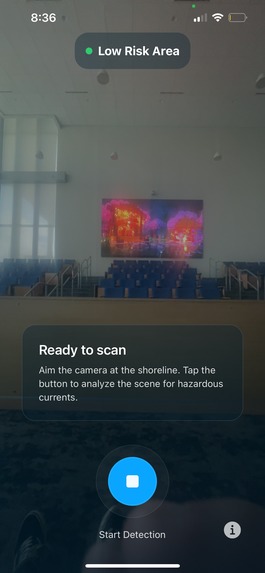
Camera Screen
-
Analysis Screen
-
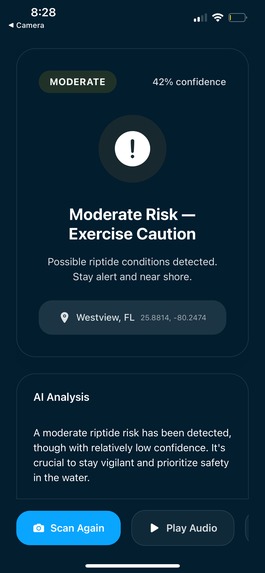
Risk Level with AI Analysis Screen
-
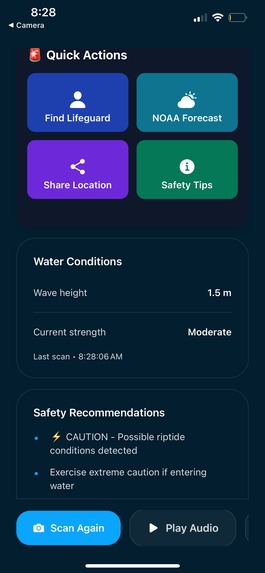
Extra Features Screen
-
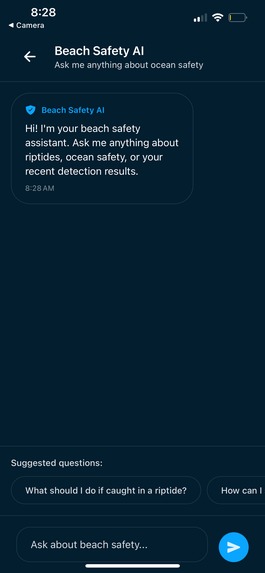
Beach Safety AI ChatBot
-
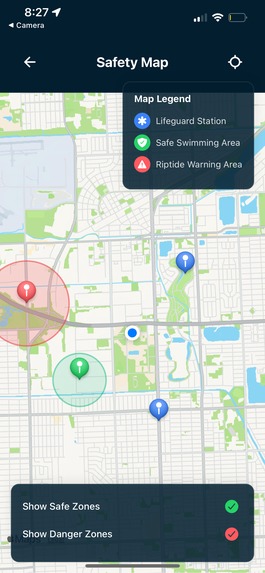
Safety Zones Screen
-
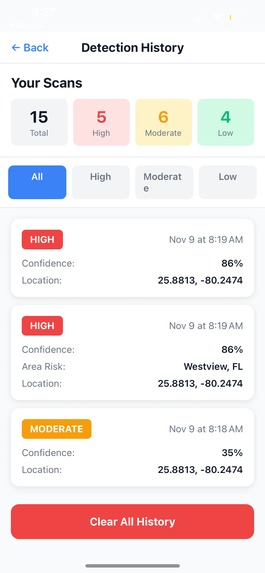
Detection History Screen
-
Logo


Discord: chrisxxc
✨ Tide Sense Inspiration
Every beachgoer’s nightmare: a calm morning by the ocean turns deadly when a hidden riptide pulls someone beneath the surface.
Each year, these invisible currents claim around a hundred lives in the United States alone and trigger more than 80% of all lifeguard rescues. Yet, most of these tragedies are preventable with just a moment’s awareness.
We asked ourselves: in a world where everyone carries a camera and a phone, why can’t technology help spot danger before it strikes? Why should a family’s day at the beach depend on what they can’t see beneath the waves?
Traditional beach safety signs and forecasts are important, but they can’t detect the unique and ever-changing conditions of a single shoreline. They’re static, while the ocean is anything but.
That’s when we came up with Tide Sense, an idea to give beachgoers a simple, yet life-saving tool. By using a quick photo and the power of computer vision, we can help people recognize riptides in real time, making every swim a little safer and every shoreline a little smarter.
💡What it does
TideSense is an AI-powered mobile safety companion that transforms your smartphone into a riptide detection tool. Simply point your camera at the ocean, and our app instantly analyzes the water conditions to detect dangerous riptide currents.
🛠️ Core Features:
- 🎯 Real-Time Riptide Detection - Advanced computer vision analyzes wave patterns, foam channels, and water discoloration to identify riptides with confidence scores
- 🗺️ Safety Map - Interactive map showing lifeguard stations, danger zones, and safe swimming areas with real-time GPS tracking
- 🌊 Live Weather & Ocean Conditions - Integration with NOAA APIs for current temperature, wind speed, wave height, water temperature, UV index, and 5-day forecasts
- 🤖 AI Safety Assistant - Powered by Google Gemini 2.5 Flash, providing personalized safety advice, answering beach safety questions, and generating audio summaries with ElevenLabs TTS
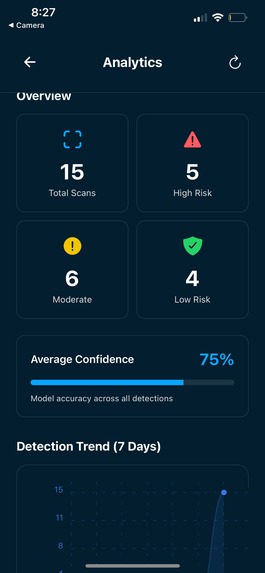
- 📊 Analytics Dashboard - Track your beach visits with trend charts, risk distribution analysis, and safety insights
- 📜 Detection History - SQLite database storing all scans with timestamps, locations, and confidence scores
- 🚨 Emergency Actions Panel - Quick access to emergency services (911, Coast Guard, Lifeguard hotline) with one-tap calling
- 📱 Share Alerts - Instantly notify friends and family of dangerous conditions
The app provides three risk levels (HIGH, MODERATE, LOW) with visual indicators, recommendations, and location-specific hazard warnings. Every feature is designed with one goal: keep people safe at the beach.
📊 How we built it
 ┌───────────────────────────────────────────────────────────────────┐
 │        Frontend (React Native + Expo, TypeScript)                 │
 │  ┌──────────┐  ┌────────────┐  ┌───────────────┐  ┌────────────┐  │
 │  │React Nav │  │Expo SDK    │  │TensorFlow Lite│  │SQLite DB   │  │
 │  │UI/UX     │  │Camera API  │  │On-Device Model│  │Scan History│  │
 │  └──────────┘  └────────────┘  └───────────────┘  └────────────┘  │
 │        ├─ History & Analytics Screens                             │
 │        ├─ Weather & Safety Map Screens                            │
 │        ├─ Emergency Panel & Alerts                                │
 │        └─ AI Chatbot Overlay                                      │
 └───────────────────────────────────────────────────────────────────┘
                                │
                                ▼
 ┌──────────────────────────────────────────────────────────────────┐
 │                Backend API (FastAPI, Python)                     │
 │  ┌──────────┐  ┌────────────┐  ┌─────────────┐  ┌─────────────┐  │
 │  │Endpoints │  │Pydantic    │  │SQLite Bridge│  │NWS API      │  │
 │  │Image/AI  │  │Validation  │  │Data Access  │  │Weather Feed │  │
 │  └──────────┘  └────────────┘  └─────────────┘  └─────────────┘  │
 │       ├─ Handles Riptide Detections & Summaries                  │
 │       ├─ Syncs Local History with Analytics Data                 │
 │       └─ Connects to External APIs for Forecasting               │
 └──────────────────────────────────────────────────────────────────┘
                                │
                                ▼
 ┌──────────────────────────────────────────────────────────────┐
 │                 AI & Service Integrations                    │
 │  ┌──────────────┐  ┌──────────────────┐  ┌────────────────┐  │
 │  │Gemini API    │  │ElevenLabs API    │  │National Weather│  │
 │  │- Risk Summary│  │- Voice Playback  │  │- Rip Current   │  │
 │  │- Chat Q&A    │  │                  │  │  & Forecasts   │  │
 │  └──────────────┘  └──────────────────┘  └────────────────┘  │
 │       ├─ AI Summaries of Detection Results                   │
 │       ├─ Conversational Assistant                            │
 │       └─ Real-Time Conditions Data                           │
 └──────────────────────────────────────────────────────────────┘
❓ Challenges we ran into
Model Consistency & Accuracy The biggest challenge was making the riptide detection reliable and realistic. Initial tests showed wild fluctuations between HIGH and LOW risk on identical images. We solved this by:
*Implementing top-K averaging (taking the average of top 5 confidence scores instead of just the max) *reating a weighted confidence system (70% average + 30% max) to balance stability and responsiveness
React Hooks Violations We encountered a persistent "Rendered more hooks than during the previous render" error when viewing detection history. The issue was hooks being declared after conditional returns. Fixed by:
Moving ALL hooks (useState, useEffect, useRef, useMemo) to the top of the component Placing the loading guard AFTER all hook declarations Adding null checks in useMemo and callback functions
Gemini API Compatibility Integrating Google's Gemini AI was frustrating due to rapidly changing model names and availability. We tried multiple models (gemini-pro, gemini-1.5-flash-latest, gemini-2.0-flash-exp) before discovering gemini-2.5-flash was the stable option. Created a model discovery script to list all available models.
Network Configuration Getting the mobile app to communicate with the local backend server required careful network setup. Android emulators use 10.0.2.2, iOS simulators need the local network IP, and real devices need proper routing. Implemented platform-specific API URLs with fallbacks.
TensorFlow Lite Model Integration Loading and running the TFLite model on the server had compatibility issues with different interpreter packages. Created fallback logic to try tensorflow.lite first, then tflite_runtime, ensuring the server works in different environments.
🏆 Accomplishments that we're proud of
🧠 Intelligent AI Integration Successfully integrated three AI services (Gemini for conversation, ElevenLabs for voice, TensorFlow for vision) into one cohesive experience. The AI chatbot doesn't just answer questions—it provides contextual safety advice based on your specific detection.
📚 What we learned
Computer Vision is Hard (but Solvable) We learned that raw ML model outputs are noisy and unreliable. Real-world deployment requires post-processing techniques like temporal smoothing, weighted averaging, and dynamic thresholding. Understanding your model's behavior is just as important as training it. And when you train it, it makes it easier for us to get what we desired.
What's next for TideSense?
📡 Community Safety Network
Enable users to share real-time hazard reports with others nearby Build a crowdsourced safety database of beach conditions Create heatmaps showing aggregated risk levels across regions Add social features: beach check-ins, safety badges, group notifications
🗺️ Advanced Mapping Features
Partner with beach authorities to get official lifeguard schedules and station data Add AR overlays showing safe swimming zones directly on camera view Integrate tide predictions and current flow visualizations Show historical incident data on safety maps
Built With
- api
- elevenlabs
- exposdk
- fastapi
- gemini
- google-colab
- numpy
- python
- react-native
- roboflow
- sqlite
- tensorflowlite
- typescript
- uvicorn
- yolov8n




Log in or sign up for Devpost to join the conversation.