-

You can add the bot to your server by clicking the link at the bottom of the page!
-
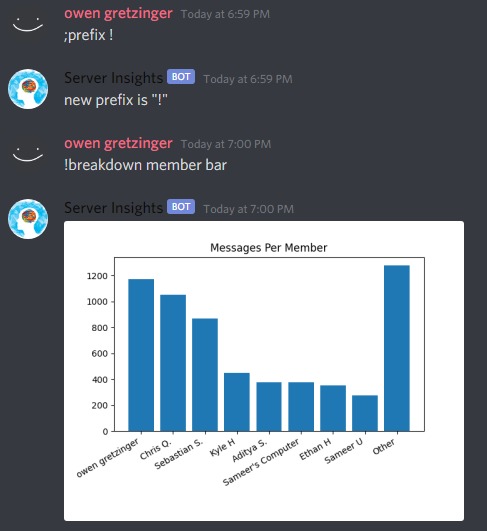
Command that shows how many messages each server member has sent, displayed with a bar graph.
-

Command that shows how many messages a specific server member has sent.
-

Command that shows how many messages each server member has sent, displayed as text.
-
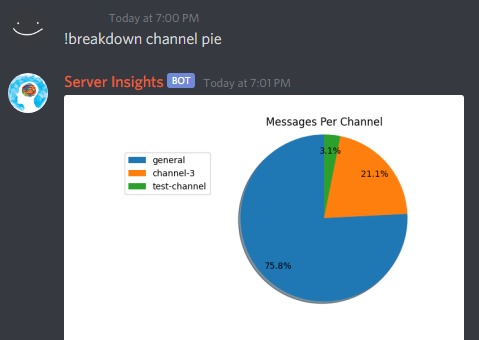
Command that shows how many messages have been sent in each channel.
-

Command that shows how many times each member has said a specific word or phrase.
-

An extra feature we added...


Inspiration
Ever since Covid hit and quarantine began, everything shifted towards being online. This year, IRHS clubs have also transitioned into being fully virtual. Most clubs have a discord server as their main platform, and we want to help IRHS clubs fight (as well as other communities & friend groups) through the inconvenience that Covid has brought to them and enhance the experience that these communities can provide.
What it does
In order to help discord communities grow, our bot helps to fetches data on discord servers, and presents the data through clear graphs. This way, the owners of the server can have a greater understanding of the server's interactivity, and more. For example, the main features of the bot include being able to see how many messages each person in the server has sent, how many messages have been sent in each channel, and how many times each member has said a specific word or phrase. Each of these can be displayed to users as a bar graph, pie graph, or text.
How we built it
We used python with the discord.py module to create the bot. We also used PyCharm's "Code With Me" feature to collaborate and create the discord bot together in real time.
Challenges we ran into
One challenge we ran into initially was finding a solution to collaborate on python files in real time. We initially tried Visual Studio Code, but mainly due to unfamiliarity with the platform we decided to switch to PyCharm, which had many difficulties of it's own. Another challenge was creating visuals to display the information our bot collects, because we used a python module called MatPlotLib, which we were unfamiliar with at first. It was very time consuming to make the bar graph labels and pie graph legend look right, but we persevered and were able to figure it out.
Accomplishments that we're proud of
We are proud of all of the different features the bot contains. In just a day, we managed to make a discord bot that will actually be useful. For example, two members of our team lead clubs at the ridge (Owen is an exec in Polygon, the IRHS Videogame Development club, and Lee runs IRHS coders). The bot we created will help us run our discord servers, which we are very proud of.
What we learned
We learned how to collaborate in real-time as a team on a python file together. We also learned how to budget our time in order to meet the deadlines while keeping up the quality of our project, and how to use the MatPlotLib module to create different graphs out of datastructures.
What's next for server insights
Hosting the discord bot on a virtual machine in order to have it online 24/7, writing more efficient code for pre-existing functions, as well as creating more advanced features such as more detailed graphs, and performing analysis on more areas of a server.




Log in or sign up for Devpost to join the conversation.