-
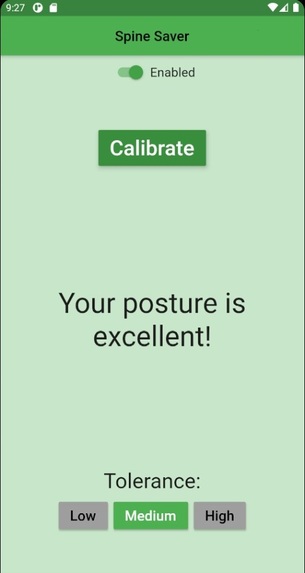
The app when the user is in the proper posture.
-
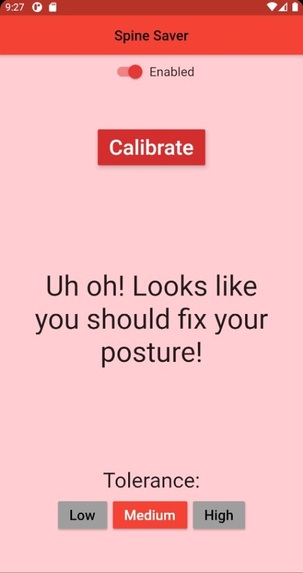
The app when the user is in the improper posture.


Inspiration
Working from home during the pandemic is hard, but it does have some advantages! With the absence of social constructs, everyone is able to work in the way they see fit - whether that be waking up at noon, working in your pyjamas, or sitting with the worst posture known to man. (We know you are guilty of this too). Unfortunately, this third option, albeit comfortable, can have serious impacts on your health - sure, embodying a sloth might be comfortable, but your back will not be thanking you after a few weeks of this. How can you resist the temptation to lean, slouch, and lounge? Well, the Spine Saver is here to help!
What it does
The physical Spine Saver device is easily attached to one’s shirt at the beginning of a work session. It contains a gyroscope that, after calibrating to your personal pristine posture, continuously takes measurements to tell if you are still sitting properly. The device connects to the Spine Saver app, which helpfully tells you whether your posture is perfect or poor.
To start off, select the tolerance you want the device to have - a high tolerance is more of a challenge (but better for spine saving)! Then, sit with your best posture (yes, your actual best, not just "good enough") and hit the Calibrate button. Once the calibration is finished, the screen will display whether or not your current posture is within the given level of tolerance - a nice, happy green if it is, or a shameful red if it isn't. Keep your phone nearby as you work, and if you ever see the screen turn to red... well, you should probably adjust how you're sitting (or, you know, your spine will not be saved). Don't worry if you have to bend down to pet your cat, pick up your pencil, or anything else - there is a toggle button where you can temporarily disable the readings to avoid being wrongfully shamed. (Don't cheat though - you're only cheating yourself)!
How we built it
We started off by testing out our basic code using a breadboard to wire our components. Once we had the bluetooth module functioning and the gyroscope returning smooth and readable data, we then worked to integrate the two. When the full system code was finished, we then disconnected everything from the breadboard and started designing a mounting solution. We ended up mounting all the components including the 9V battery, Arduino, bluetooth module, and belt clip to an old Tim Hortons gift card. It fit all the components perfectly and was a compact mounting solution.
Reading values from the MPU6050 gyroscope and accelerometer was relatively easy, what was more difficult was calculating the angle. We used example code from https://maker.pro/arduino/tutorial/how-to-interface-arduino-and-the-mpu-6050-sensor in order to make our first angle reading function and then added a filtering and calibration system so that a zero point could be set from any position. Next we learned how to send and receive data from the HC-06 bluetooth module to an Android phone using a premade app found on the app store. Once all the systems were working with the hardware and the code was functioning, we attempted to run the SpineSaver app with the hardware which is where we ran into problems.
The app was made using Google's Flutter framework. The baseline for the Bluetooth integration was the example code from this helpful article.
Challenges and accomplishments
The largest challenge for this project was getting the arduino and app to communicate. After some research, we found two possible solutions for this. We decided to go with the simpler solution to reduce the amount of time spent doing research. Our team was very hopeful with this solution - we had incredible success with every individual piece of the puzzle. Unfortunately, we could not test the full system until every part was complete, so we did not notice a fatal issue with the bluetooth solution we chose until it was much too late to learn and switch to the other.
Despite the final product not being complete, we are still very proud of what we accomplished this weekend. The Flutter app was functional and we got it running on a physical phone, and the accuracy of the Arduino device exceeded all of our expectations. Overall, we all learned a lot and had a lot of fun!
What's next for Spine Saver
With our new confidence and skill set, the future of Spine Saver is bright. After getting Bluetooth communications funcional, some possibilities to bring it from just a Spine Saver to a Spine Mega-Superhero include:
- Adding more gyroscopes to the back, shoulders, and neck to measure the positioning more accurately and over more of your body
- Adding more customization features to the app such as a timer to track how long you’ve maintained proper posture
- Adding sounds, vibrations, or notification features to the app so that you don’t have to rely only on noticing the colour change
- Gamifying the experience! Perhaps future iterations could give you rewards for holding the posture for a certain amount of time
- Integrating social media tools to be able to share accomplishments and challenges


Log in or sign up for Devpost to join the conversation.