-
-
-
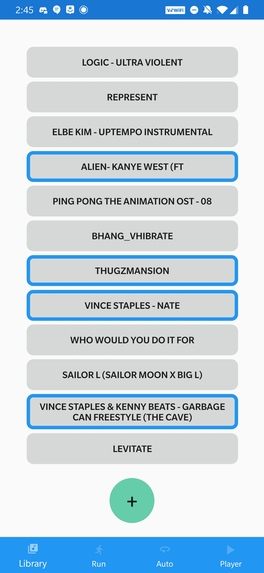
Library Screen -- Once songs are added to your library, their API analysis is already saved locally.
-
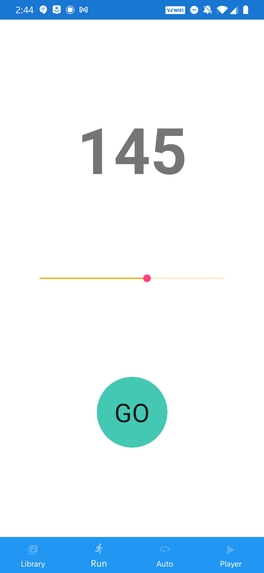
Constant Tempo -- Challenge yourself to keep up with a set pace.
-
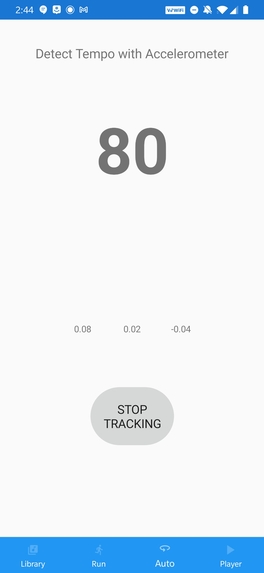
Auto Tempo -- Let the music adapt to your personal rhythm.


Inspiration
Many people run while listening to music as it elevates the experience and sharpens their focus. However, oftentimes the music is not in sync with the runner’s rhythm, which could be distracting and affect their performance.
To resolve that problem, we decided to build a mobile app that alters a song’s speed in beats per minute to match the runner’s rhythm while preserving audio quality and pitch.
What it does
Once you start up the app, you will have the option of adding any song into the running queue. When you have added all your songs, you can go to the tempo screen where you have two options for the music speed: fixed tempo or dynamic tempo.
If you choose fixed tempo, you can manually set the tempo for your run speed. Once you hit the go button, your entire playlist will play at the target BPM.
If you choose dynamic tempo, once you start to run, the current song’s speed will change dynamically to your running speed. This is all done in real time without distorting the pitch of the song. So the song will never sound like its sung by the chipmunks. The essence and quality of the music will remain the same, sounding amazing at any pace, from a steady jog to a fast sprint.
How we stand out
There are existing apps, such as Weav Run, that have functionality similar to SprintSync; However Weav Run offers a limited selection of songs, locks some of its features behind a paid subscription, and is ultimately not available on Android. In comparison, we are cross-platform, open source, and free for everyone. On top of that, our design allows for users to import any song of their choosing, so the possibilities are endless.
How we built it
Our app is developed in Xamarin, which is a cross platform UI framework for building android/iOS/windows apps. We had originally considered using Flutter but switched gears to Xamarin when we realized Flutter libraries lacked the audio speed-up/slow-down functionality that we needed.
In order to obtain the natural BPM of a song, we used a music processing web service called sonic API. In its tempo analysis, Sonic API outputs a series of clicks which we manually parsed to classify different sections of a song based on tempo. Using this information, we store time stamps of each section change and apply the necessary speed shifts for each section of a song. Because we can’t always expect to have stellar wifi connectivity during our runs, we issue the API request for each song only once -- whenever it is added to the app’s library. Information about each song’s BPM range is stored locally, so the app has everything it needs to recalculate tempo adjustments without being tethered to a wifi connection.
Challenges we ran into
Lack of SonicAPI documentation
Finding libraries that supported the audio controls we wanted
What we learned
C#, XAML, Xamarin, HTTP GET/POST
What's next for SprintSync
To enhance user accessibility and convenience, we plan to integrate SprintSync with popular music apps like Spotify and fitness apps like Strava. This will allow users to track their runs easily while saving them the trouble of downloading music.


Log in or sign up for Devpost to join the conversation.