-
-
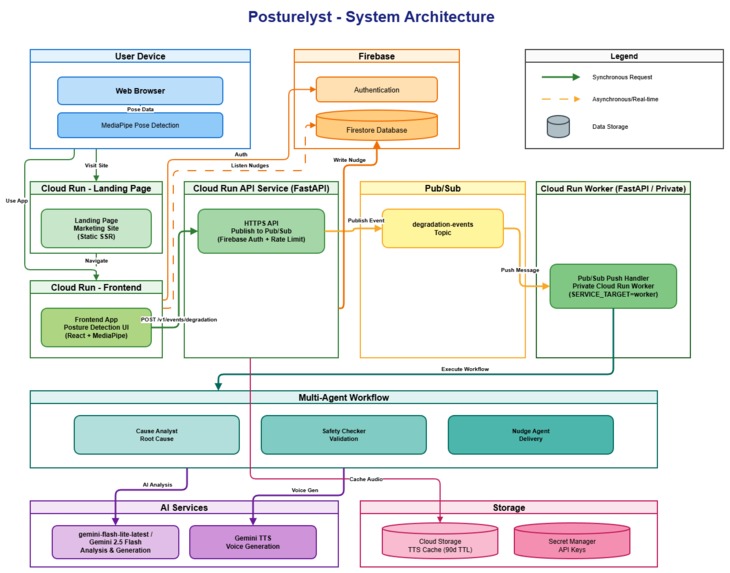
SystemArchitecture
-
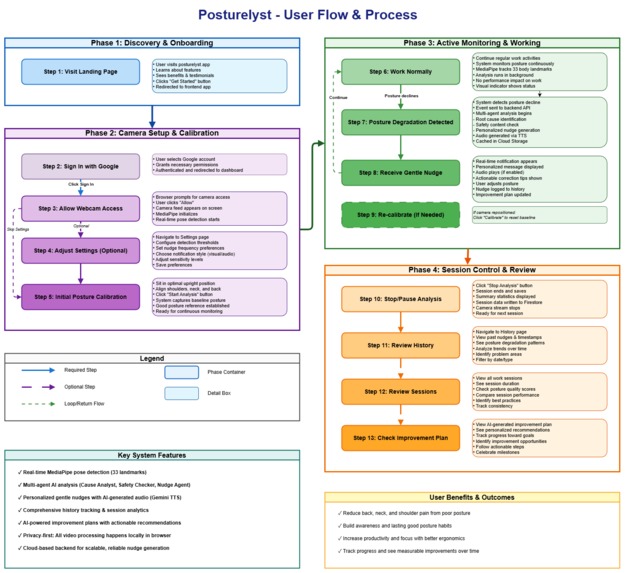
UserFlow
-
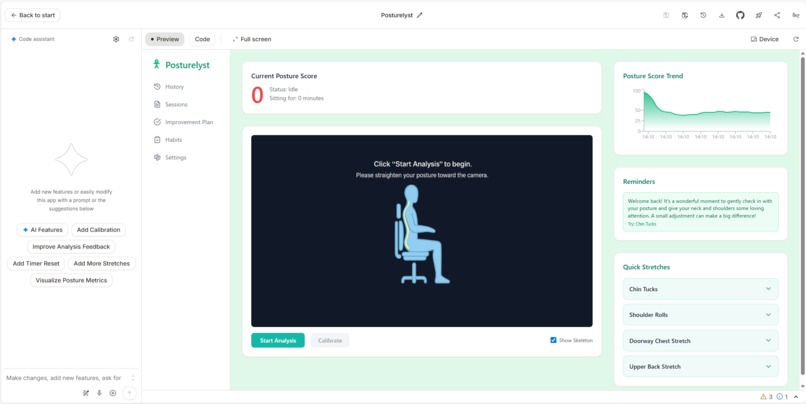
The foundation of the frontend was built using Google AI Studio’s Build feature.
-
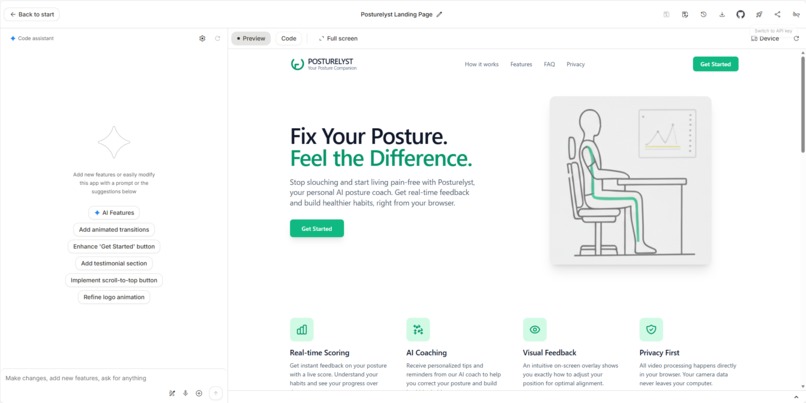
The landing page was created using Google AI Studio’s Build feature and deployed with a single click.
-
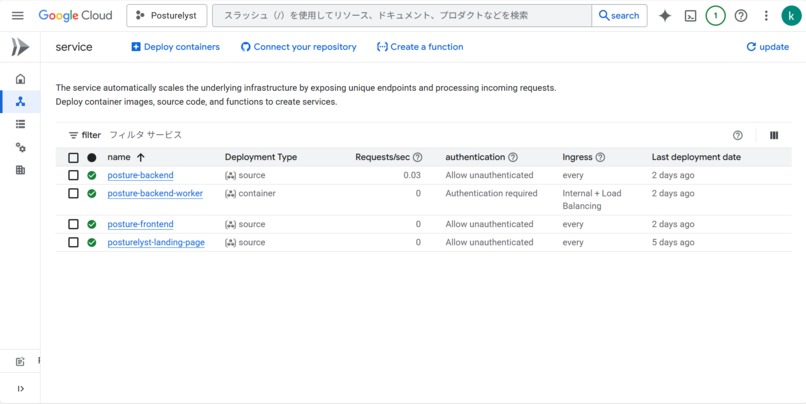
Every part of Posturelyst runs on Cloud Run — built for modularity, speed, and effortless scaling.
-
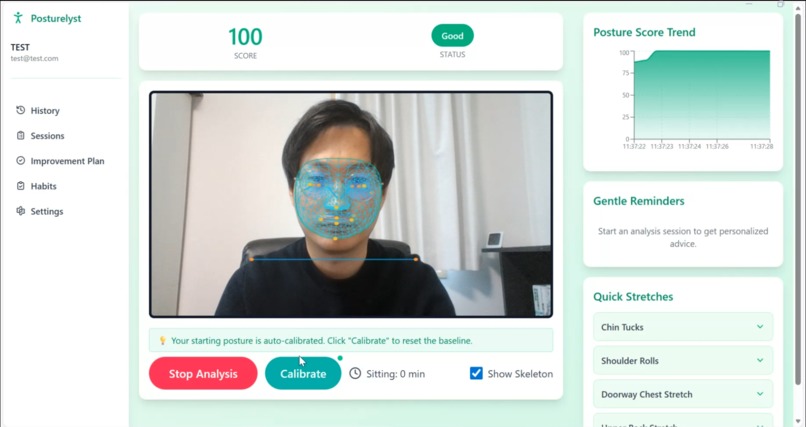
Posture Analysis Screen (Good Status)
-
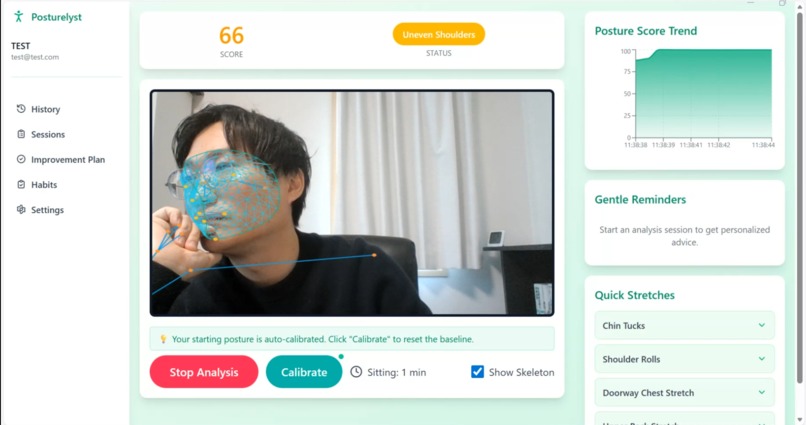
Posture Analysis Screen (Bad Status)
-
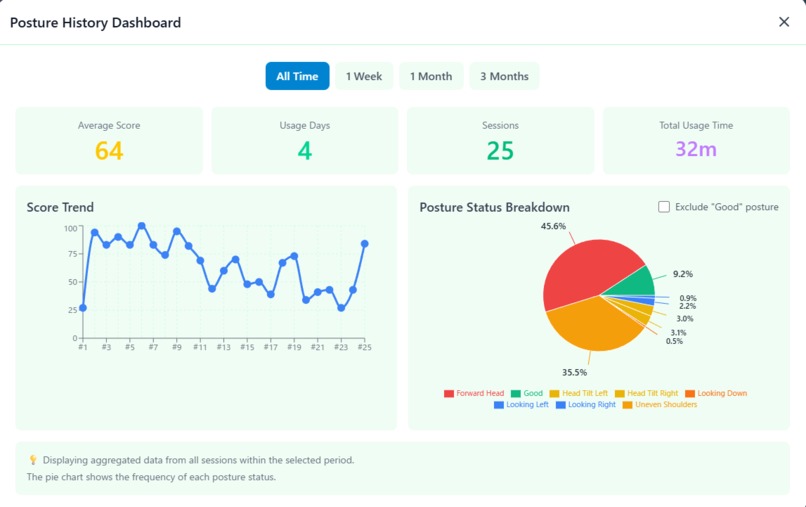
Posture History Dashboard
-
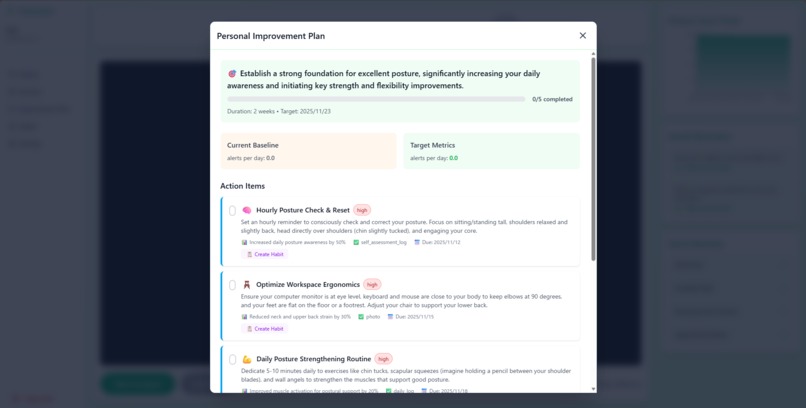
Personal Improvement Plan
-
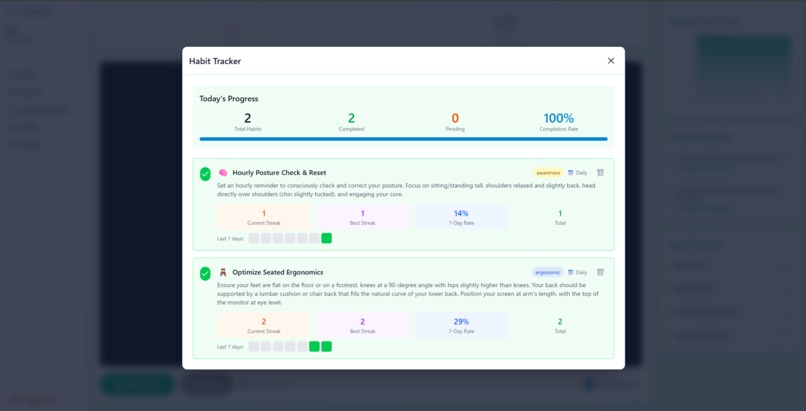
Habit Tracker


Inspiration
I spend eight hours a day at my desk. My neck stiffens and my shoulders grow heavy. My posture is pretty bad, and I can feel it lowering my productivity. About 80% of remote workers report posture-related pain. Wearables you must buy and charge, and nagging reminder apps, still don’t address why posture slips.
Gemini and Google AI Studio are truly disruptive and help me create more than ever. The downside is that I sit even longer when I get absorbed.
So I built the app I wanted most: Posturelyst, using Google AI Studio and the Gemini CLI. No expensive equipment is required all you need is a webcam.It keeps video local with on-device analysis and uses a Cloud Run × Gemini multi-agent pipeline. It supports me end to end: detect, analyze, provide personalized improvement suggestions, and reinforce habits. It also gives gentle, well-timed notifications. I built Posturelyst for myself and for many fellow engineers who, like me, struggle with posture problems.
What it does
Posturelyst is an AI-agent posture health coach that runs entirely in your browser. It analyzes your webcam feed in real time and scores your posture. Using neck angle, shoulder tilt, and head orientation, we detect posture degradations—FORWARD_HEAD, UNEVEN_SHOULDERS, LOOKING_DOWN, HEAD_TILT_LEFT, HEAD_TILT_RIGHT, LOOKING_LEFT, and LOOKING_RIGHT—and compute an overall posture SCORE. When your posture deteriorates and the score stays below a threshold for a set period, multiple AI agents intervene automatically.
・Cause Analyst Agent: e.g., “Your head is leaning forward. Please tuck your chin in and straighten your posture.”
・Safety Checker Agent: Verifies the guidance is appropriate and safe.
・Nudge Agent: Delivers short, actionable guidance via voice and text.
To help you review and improve:
・Habit Formation Support: AI proposes a personalized improvement plan.
・Analytics Dashboard: Visualizes past scores and the detected root causes of posture degradation.
How we built it
Posturelyst runs everything on Cloud Run—the landing page, frontend, and backend—using the best tool for each job and moving from prototype to production in stages. The flow is a simple three-step stack: Landing Page → Frontend App → Backend API

1) Landing Page: End-to-end with Google AI Studio Build (No-code experience)
We provided requirements and reference images, and asked AI Studio Build to generate the site. Coding to deployment finished in a few hours—we didn’t write a single line of code. The standout was the Annotate App feature: we could point at the screen, tell the AI what to change, and see it apply instantly, like giving live directions to an engineer sitting next to you.
・“Emphasize the hero section” → applied in seconds
・“Change the button color to a green palette” → real-time preview
・“Add icons to the features section” → appropriate icons auto-selected
After minor tweaks (requested directly in the UI), we one-clicked deploy from AI Studio to Cloud Run.Docker setup, build pipeline, and Cloud Run config were auto-optimized, letting us reach production in the shortest possible time.
2) Frontend: Staged move from AI Studio Build → Gemini CLI
We first generated multiple prototypes with AI Studio Build. Ideas turned into UI in minutes, and AI Studio felt like a designer working alongside us. We picked the closest mock, pushed it to GitHub, and then handed development off to Gemini CLI to add production needs:
・Firebase Auth (Google Sign-In) integration
・Firestore for real-time alerts
・Environment variable management (Firebase Config / Backend API URL)
・Backend client code generation (REST client / JWT handling)
(If Google AI Studio could handle all of this natively, it would be an incredible breakthrough!)
Because the Gemini CLI automatically orchestrates the gcloud and Firebase CLIs, our cloud configuration was seamlessly automated. We tried deploying the frontend to Cloud Run with the deploy command after adding the Gemini CLI extension, but it failed with errors. To ensure both speed and reproducibility, we instead had the Gemini CLI invoke gcloud commands directly to perform the deployment.

3) Backend: Built from scratch with Gemini CLI (multi-agent AI in one day)
Gemini CLI acted like an on-call engineer: it scaffolded the FastAPI project, generated the Pub/Sub push handler, wired Firebase Auth verification, and even emitted the Cloud Build / Dockerfile / Secret Manager wiring for both Cloud Run services (public API + private worker). On top of that foundation we used Google ADK to stand up three focused agents (Cause / Safety / Nudge), each with its own prompt and validation schema. The result is the full “API service publishes events, worker service consumes them” topology—something that usually takes a week of boilerplate—condensed into a single day of guided conversation.
Challenges we ran into
On the delivery side, we evaluated both Firebase Hosting and Cloud Run. For static assets, Hosting wins on cost-efficiency. That said, when we need strict header control or future SSR, Cloud Run’s flexibility is hard to beat. We ultimately deployed to both. Going forward, we plan to switch or rebalance based on traffic and feature requirements—keeping “the right to scale” in line with real-world needs (cheap in the short term, more extensible in the long term).
For data design, we made a deliberate trade-off. Pushing high-frequency time-series (like posture scores) directly into Firestore is neither latency- nor cost-friendly. So we flipped the model to “raw data stays on the device, the cloud stores only metadata.” The core stream lives in IndexedDB, while Firestore keeps just the decision-useful summaries—session ID, p95, average score, number of degradations, and so on—preserving both privacy and clear visualization.
Initially, our Cloud Run backend hosted both the public API called by the frontend and the endpoint that receives Pub/Sub pushes on the same service. That created a dilemma: if web crawlers hit the push endpoint, Cloud Run would keep spinning up and drive up costs; but if we set --no-allow-unauthenticated, the user-facing API also required IAM auth, which broke the frontend that only has a Firebase token.We fixed this by creating a worker-only Cloud Run service and moving the Pub/Sub push there. The API service remains publicly accessible with Firebase ID tokens, while the worker is locked down with --no-allow-unauthenticated and internal-only ingress, and only the Pub/Sub service account is granted roles/run.invoker. This prevents crawler-induced unnecessary activations while preserving the user experience.
The unexpected bottleneck was loading the hero section image on the landing page (LP). Google AI Studio Build couldn’t load it, so as a workaround we stored the image in Cloud Storage and made it publicly accessible. We worked around it by hosting the hero image in Cloud Storage as a public asset and pointing AI Studio to that URL, which reliably loads even when the builder can’t fetch local files.
None of these issues are flashy, but they’re the product’s backbone. By prioritizing smooth experience, cost efficiency, and privacy, we made the calls that matter.
Accomplishments that we're proud of
My six proudest accomplishments are:
1)Privacy-first architecture All analysis runs entirely in the browser. Only numeric posture metadata (e.g., angles, scores) is sent to the cloud—no video is ever transmitted. This naturally aligns with real-world privacy requirements.
2)“Only when needed” AI execution We trigger Cloud Run Workers and Gemini only on degradation events (event-driven). With TTS caching, we achieve fast responses while keeping costs low.
3)Orchestrated multi-agent workflow Three single-responsibility agents—Cause / Safety / Nudge—coordinate via Pub/Sub. Each can be improved or swapped independently, and the design supports future parallelization and accuracy upgrades.
4)Maximum leverage of the Google Cloud ecosystem By combining Cloud Run, Pub/Sub, Firestore, Cloud Storage, and Secret Manager, we deliver a platform that auto-scales, follows least-privilege IAM, and stays secure and lightweight to operate.
5)Google AI Studio × Gemini CLI in practice We used AI Studio Build to rapidly create the landing page (LP) and prototypes, then Gemini CLI to handle auth, environment variables, CI/CD, and production deployment end-to-end. This project demonstrates that even non-engineers can, through AI-assisted workflows, build feature-rich apps on the Google Cloud ecosystem in a short time.
6)I actually used it myself and felt a real improvement in my posture Since I started using this myself, I’ve become more mindful of my posture, noticed real improvements, and my productivity has gone up. Posturelyst has the potential to solve every engineer’s struggle with posture.
What we learned
Architecturally we split Cloud Run into a public API service that accepts Firebase Auth tokens and a private worker service that only accepts Pub/Sub OIDC pushes, letting us keep the user-facing API open while hard-locking the background pipeline.
By combining Google AI Studio and Gemini CLI, we learned we can move from 0→1 prototypes to 1→production quickly, repeatably, and at a production-ready standard.
AI Studio excels at creating and deploying prototypes and lightweight features. For production needs such as authentication, environment variables, CI/CD, and security/header controls, it doesn’t cover everything on its own; Gemini CLI fills those gaps and accelerates the hardening to production.
With this two-step approach, anyone can build a feature-rich app in a short time at an operational, production quality. That’s the key lesson we took away.
What's next for Posturelyst
First, we’ll strengthen the AI. We’ll add predictive interventions that anticipate posture degradation a few minutes ahead and gently notify you before it happens. We’ll also expand voice customization so you can choose a coach tone—calm, energetic, or professional—and introduce a character-based UI to make your “personal coach” feel more tangible.
Next, we’ll boost consistency with gamification—streaks, weekly challenges, and achievement badges—to help you build lasting posture habits in a fun way.
Finally, we’ll approach monetization without compromising the experience. We’ll test lightweight ads and explore a subscription that includes voice customization, personalized plans, and detailed history, with fair pricing aligned to the value provided.
🚀 Posturelyst: Because your posture deserves an AI that cares.
Built with Cloud Run. Powered by Gemini. Protected by privacy.
Built With
- cloudrun
- cloudstorage
- cloudtext-to-speechapi
- fastapi
- firebaseauth
- firestore
- gemini
- gemini2.5-flash-preview-tts
- geminicli
- googleadk
- googleaistudio
- mediapipepose
- pubsub
- python
- react
- tailwindcss
- typescript


Log in or sign up for Devpost to join the conversation.