-
-

The TestRouter Logo
-
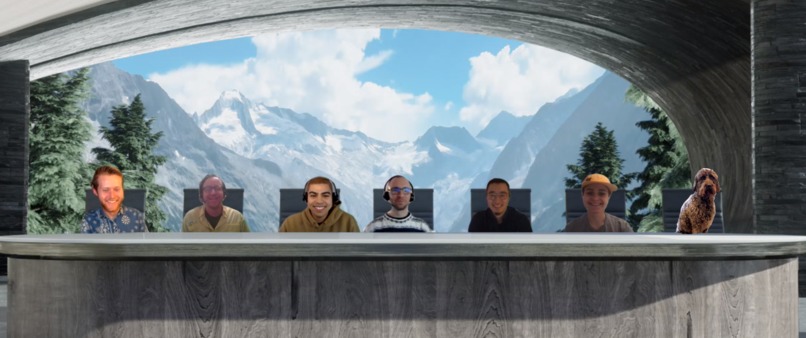
Team TestRouter (L to R): Christopher Eber, Craig McCabe, Chris Messerich, Jeffery Scarmazzi, Yankuan "Kuan" Zhang, Liz Todd, and Wednesday
-
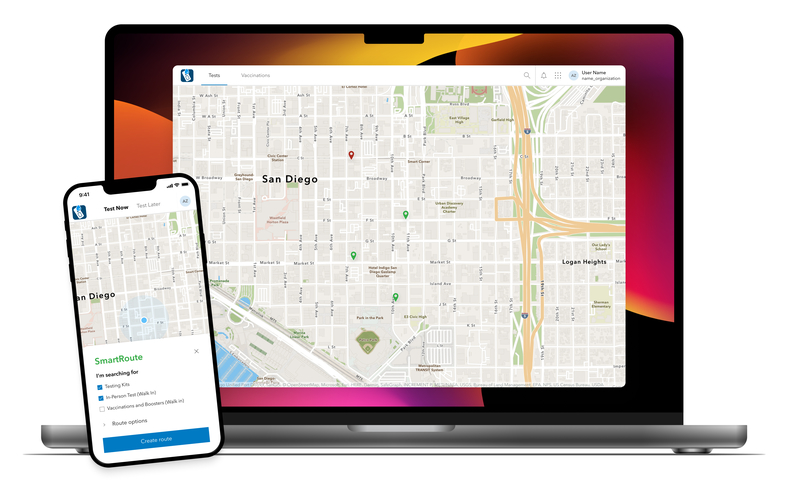
A mockup of TestRouter on both mobile and desktop
-
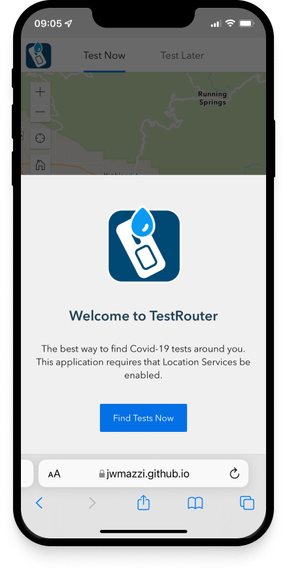
The TestRouter splash page on mobile
-
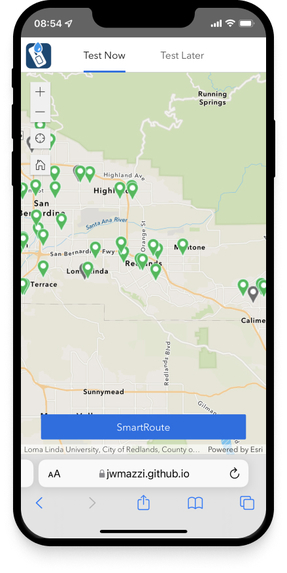
The TestRouter default map view on mobile
-
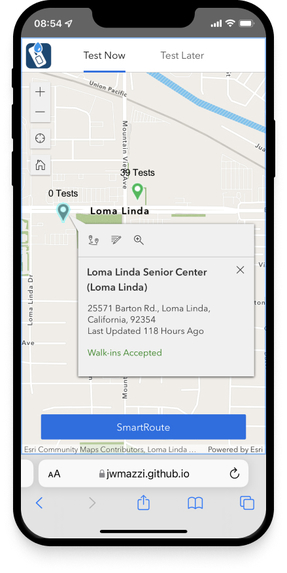
The TestRouter provider pop-up view on mobile
-
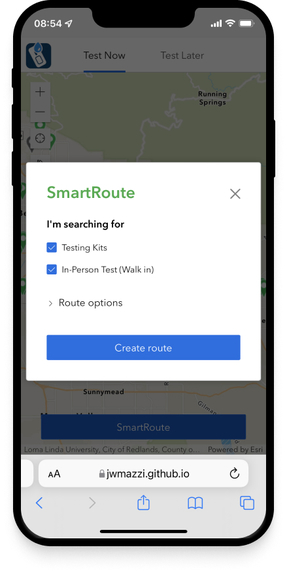
The TestRouter SmartRoute modal selection on mobile
-
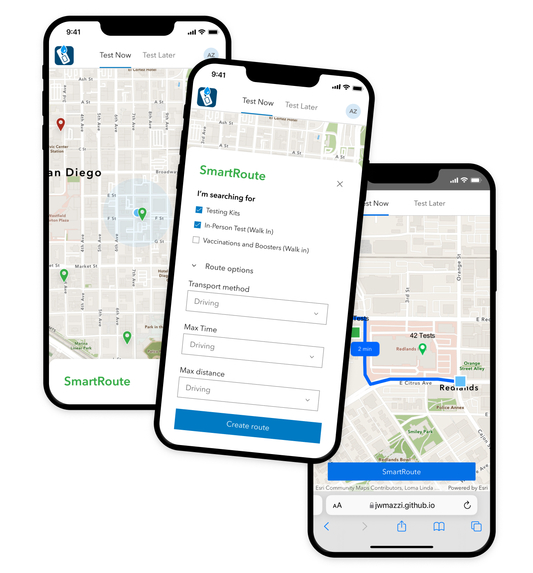
A series of mockups showing various TestRouter designs
-
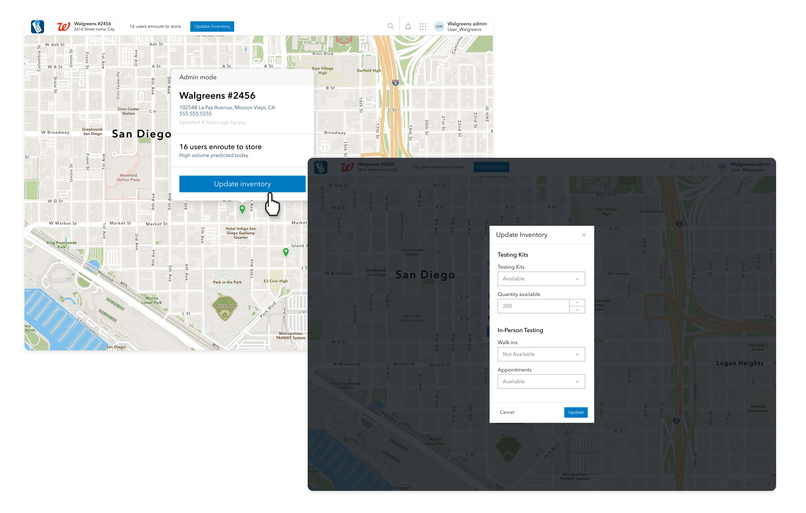
A mockup of Provider View on desktop (in product roadmap)
-
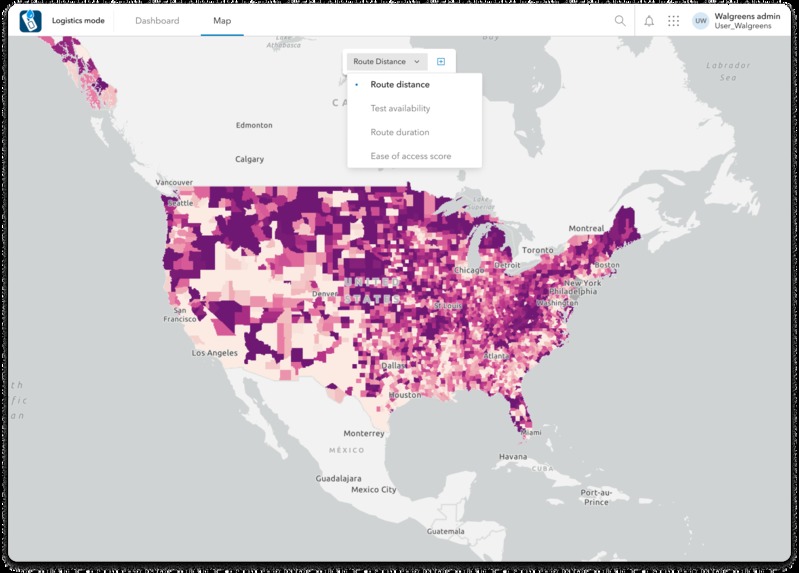
A mockup of Utility Mode Map View on desktop (in product roadmap)
-
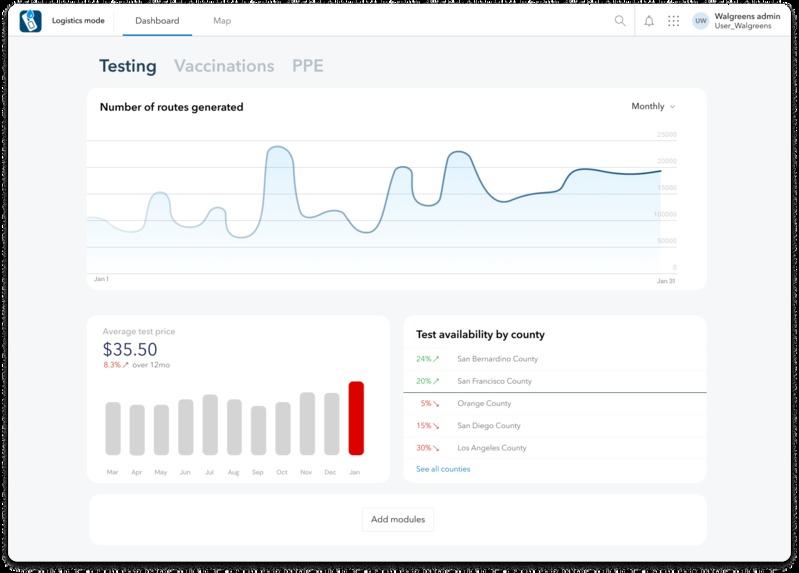
A mockup of Utility Mode Dashboard View on desktop (in product roadmap)


Important Information
In addition to our final video, and this Project Details page, we made a project pitch StoryMaps Express story for TestRouter. Though Devpost allows Markdown formatting, we wanted to provide the judges and viewers with a more visually cohesive and engaging experience than the Devpost Project Details page offers. We encourage the judges to use our story Hack the Map 5: TestRouter to view, interact with, and judge our project.
Here is our TestRouter Presentation Video
Here is our GitHub Repository
Inspiration
Recently, Kuan, a member of our team needed to get a COVID-19 test. What started as a regular Tuesday turned into a harrowing, time consuming and frustrating quest, that almost ended in failure. Unable to find accurate information around the current in-stock inventory of COVID-19 take-home tests and same-day testing at various pharmacies in his area, he spent hours driving from location to location, only to find they were out of stock upon arrival.
Unfortunately, the experience Kuan had is not an isolated one. Multiple members of our team, as well as people we know, have run into the same problem. With COVID-19 surging to an all-time high, transparent and easy access to testing is more important than ever. Experiences like Kuan's are the norm, and shouldn't be.
"I searched pharmacies' online stores for the testing kits: They were all sold out everywhere. I looked for appointments, and there was nothing available very soon. In the end I had to put on my mask, grab my car keys, punch in "pharmacies nearby" in Google Maps, and hit the road. Going to different places was risky, but I needed to find tests. I searched for hours and I didn't end up finding any. One of the pharmacists told me they would restock at 7 a.m. in two days. I went back at 7 a.m. two days later only to realize they still hadn't restocked." - Yankuan "Kuan" Zhang
We decided to use the Hackathon as an opportunity to apply our combined skills to make sure that community members don't have the same experience moving forward.
We knew we needed to understand the root causes of experiences like Kuan's. After some research, we narrowed it down to one main cause that we could address: Authoritative websites that show testing locations do not usually include availability or stock. This means that community members often drive, contact, or research a number of locations, which is time consuming and stressful, with no guarantee of success.
Functionality
TestRouter is a mobile-friendly web-based application that empowers community members to more easily find and travel to participating locations with COVID-19 tests in their area.
Community members can filter locations by type of test needed, their travel method, and the maximum desired travel time. TestRouter returns sites that meet the selected criteria as well as displays availability and inventory statuses. There is also the option to generate a route to the location of their choosing.
Currently, the data being used for testing-kit locations is simulated and does not represent the real-world conditions. In the future we plan to implement an alternate interface for testing-kit providers to use to report their real-time testing-kit inventory either manually or via API. This process will increase community engagement as well as transparency.
How we built it
The Data Story
After determining the scope of the app and its functionality, next up was finding (or creating) the core datasets that power it. State and county agencies are largely responsible for the management of COVID-19 testing and vaccination sites, so we started by researching the different ways governments at all levels were reporting information. Given the time frame, we knew it wasn't feasible to go global, so we landed on the country level–specifically San Bernardino County, CA– for our app and data scope.
Working at the county level mimics how COVID-19-related resources are managed – and how TestRouter might be deployed spatially throughout the country. Using San Bernardino also added value and interest to the sample dataset – at least for those members of our distributed Hack-the-Map team whose homes are Redlands-adjacent.
The San Bernardino SBCOVID-19 testing portal was our primary data resource for testing sites. From this site, you can locate COVID-19 testing sites managed by: the County, the State, or Other. In each category, you can find the name, address, operating hours, and other useful information – which eventually defined our testing site layer schema.
Step 1: We scraped all the available metadata for each testing location, put them in a table, and then used Geocode Table (with the ArcGIS World Geocoding Service) to put the first test site points on the map (2 of 53 sites needed manual intervention).
Step 2: The “Other sites” category on the San Bernardino website included three major chain Drug Stores/Pharmacies (CVS, Rite Aid, and Walgreens) that offered testing, but they were missing location information. We used the Business and Facilities Search function (using Data Axle) of the Business Analysis workflows in ArcGIS Pro as a secondary resource to add 117 new site locations to our testing sites database. Unfortunately, after this step, the street address data was still incomplete, so we Reverse Geocoded the points (again, using the ArcGIS World Geocoding Service) to create complete addresses and join those to our testing site locations.
The testing sites points schema is shown in the tables below. Italicized field names use coded domains, with future Survey123 integration and community-based feedback in mind.
The below attributes came from scraping and enriching the San Bernardino COVID-19 testing site locations.
| Field Name | Description |
|---|---|
| Site Name | Arrowhead Regional Medical Center (ARMC) (Colton) |
| Site Owner | San Bernardino County |
| Site Address | 400 N. Pepper Ave., Colton, California, 92324 |
| Site Hours | Monday 8 a.m. – 1 p.m., Tuesday a.m. – 1 p.m., Friday 11 a.m. – 3 p.m. |
| Site Environment | Drive-Thru. |
| Site Notes | ARMC testing is a drive-through testing site and is open to the general public by appointment only. Tests are at no charge to the patients. |
| Appointment URL | https://www.arrowheadregional.org/covid-19-updates/ |
| Walk-ins Accepted | No |
| Testing Site Type | In-person Testing |
| Free Home Test Kits | No |
We added (or simulated) the below attributes to support app functionality. In the future, the data in many of these attributes will be generated through the Provider View of TestRouter, which allows participating locations to directly input their inventory either via form or through an inventory API. Provider View is currently in our product roadmap.
| Field Name | Description |
|---|---|
| PCR Tests in Stock | 15 |
| Rapid Tests in Stock | 0 |
| Testing Site Wait Time | 10-20 min |
| Last Updated By | Craig |
| Last Updated Date | 1/18/2022 8:59:59 AM |
| Route Requests | 3 |
| Testing Site ID | 9 |
Pre-Calculating Testing Site Service Areas
A key piece of functionality in the TestFinder app is routing from the user's home or mobile location to a COVID-19 testing site, or provider location with available supply. To lighten the potential load on a hosted Network Analyst routing service, we pre-calculated service areas for each testing site location at set travel time intervals – this gives an estimate within 5 minutes of the walking or driving travel time (sans traffic) to that site.
We used the Network Analyst extension in ArcGIS Pro, specifically the built-in Driving Time and Walking Time solvers to create overlapping standard-precision Service Area rings at 5-minute intervals from 0-60 minutes starting from each testing facility in both travel modes. The first Origin component of the Name attribute in the output service area polygons (formatted as “SiteID - 0 - 5” for a 0-5 minute walk or drive time polygon) was split out to a separate SiteID field so that it could be easily linked to the SiteID of the testing site locations. These polygons were published as hosted feature services in our organization’s account to be used by the app. Now when a test site location is selected, the pre-determined “Home” location is spatially intersected with the stack of thousands of service area polygon features, and the polygon it exists on that has matching SiteID values returns the pre-computed approximate travel time.
The Developer Story
Our team has two talented developers: Jeffrey, a GIS developer and Kuan, a front-end developer. When we kicked off the Hackathon, the first question we asked was what languages and technologies we were comfortable with given our deadline. After reviewing the initial list of requirements, and our desired functionality, it was clear that a cross-platform native mobile application would be ideal. However, that didn't feel like a reasonable goal given the time parameters of the hackathon. The Runtime SDK and .NET were considered, but ultimately we decided that taking advantage of both Jeffery and Kuan's knowledge of JavaScript would let us prototype faster.
We then discussed what frameworks could help us build a mobile-friendly web-based application quickly. Given both developers are comfortable with React, building from scratch with something like NextJS was an option. However, we wanted to move quickly and ultimately provide tooling that could be reused by other teams or projects in the future. Taking that into consideration, we decided to build custom Widgets within Experience Builder. Not only does Experience Builder use React, Redux, and the JS API 4.X, we could also mix configuration into our solution, e.g., our “splash screen” was created without any code. Experience Builder provides an attractive UI library (Jimu-UI) based on ReactStrap, which gave us confidence that the final product would have a good look and feel, while lightening the workload of our lead designer, Christopher Eber. Another advantage of Experience Builder was the ability to deploy the bundled application to GitHub Pages in order to deliver the prototype to our end users. In the end, we found that the mobile performance of Experience Builder was not ideal, but the overall framework was very useful for prototyping quickly.
Both of the developers used GitHub along with pair programming sessions to move the product forward and release the final version.
Try it Yourself
You can visit TestRouter via GitHub Pages. If you don't live in Redlands, we suggest using the demonstration version of the application, where a predefined location is used to illustrate the routing capabilities.
What's Next for TestRouter
One of the challenges of doing a Hackathon is narrowing down the scope and scale of your project to maintain feasibility. We're proud of what we built during the Hackathon, and couldn't help but dream up a big future for TestRouter!
Provider View
Currently, the data being used for testing-kit locations is simulated and does not represent the real-world conditions In the future we plan to implement an alternate interface called Provider View for testing-kit providers to use to report their real-time testing-kit inventory either manually or via API. This process will increase community engagement as well as transparency.
Provider View will also incorporate information that helps frontline workers at provider locations prepare for users by including information about the volume of user traffic en route to their location.
Logistics Mode
We plan to implement a series for providers that incorporates important information regarding their locations. The map view will provide maps that show statistics like average route distance, test availability, and an easy of access score.
A dashboard view will include insights into things like average cost, number of routes generated, and test availability.
In the future, we hope to geoenrich Logistics View with demographic information in order to gain insights around which communities and regions have access to testing. This would allow for smart placement of pop-up testing locations in order to address testing inequity.
Personal Protective Equipment and Vaccinations
We plan to eventually scale to include information around vaccine availability and personal protective equipment stock.
Expanded SmartRouting
Eventually, we plan to add the ability to be rerouted to the nearest location with available tests if the inventory of your initial destination becomes too low.
The Big Takeaways
Challenges
We began the Hackathon with a strong challenge to ourselves: Build a fully functional app that helps community members. And, as a team of hardworking, competitive perfectionists, we were willing to push to the limits of our skillsets and creativity to do it. However, we rapidly realized that in order to balance our day jobs and hackathon responsibilities we were going to have to be a bit more modest with our goals.
"A secondary challenge with this project was how wide it could reach. While we focused simply on test-finding for the MVP, this could be expanded to literally any product that is supply-constrained. We also have considered dedicated finders for Vaccination Appointments, PPE (Inc. Masks), Medical Supplies, and sundries such as Paper Towels, Toilet Paper, and more." – Christopher Eber
Our team mantra quickly became "Perfect is the enemy of good". Our biggest challenge was knowing when to stop finetuning and when to scale back designs. Strong design, time-management, communication, regular check-ins, clearly set expectations ,and accountability helped us find the balance we needed.
"Figuring out to accurately communicate all of this amazing information and hard work into a condensed 5 minute video. I wish I had a lot more time and energy, but 'perfect is the enemy of good'" – Chris Messerich
Accomplishments
We're proud of what we produced for Hack the Map 5. TestRouter is a product of our teamwork and collaboration. Everyone on this team pulled their weight, pitched in with jobs that weren't always fun, and worked exceptionally hard. It wasn't easy and we learned a lot along the way. Most importantly, we had fun and grew new friendships!
Here are a few highlights from our team:
"During 5 days of active development, I was able to learn how to develop custom widgets in ArcGIS Experience Builder. With 45 commits to the code repository for 15 pull requests which closed 8 issues, I implemented, refactored, and polished parts of the app workflows/UI according to the design spec." – Yankuan "Kuan" Zhang
"Kuan and Jeffery are incredible developers and really built TestRouter into a reality. Christopher E. went above and beyond with his design, concept mocks, and roadmap ideas. Craig was a true data wrangler and quickly created the feature services we needed to accelerate our development. Chris M. was a jack-of-all-trades. Chris M.'s work is all over TestRouter–from the data to the storytelling to our final presentation–he did high quality work wherever and whenever it was needed! – Liz Todd
Lessons Learned
We learned a lot during the Hackathon. Not only did we build a cool app, there was a lot of knowledge transfer during the build and design process. From Chris E. teaching Liz Figma tricks, to Kuan showing Jeffrey some front-end developer tricks to Craig and Chris M. working together to pull data, everyone was generous with their knowledge.
"Having a strong design is invaluable for keeping a team organized when there isn’t much time. We obviously had to deviate from the ideal solution in several places, but since we started with such a great design, it really helped the developers know what the next best solution might look like." – Jeffrey Scarmazzi
"One of the biggest lessons for me wasn’t related to data processing or analysis – but coming to terms with leaving so many great ideas from the team on the Hack the Map cutting-room-floor. Analysis of travel patterns, modes, and wait times in different parts of the county will add additional value to TestRouter 2.0." – Craig McCabe
Built With
- adobe-stock
- animation-tools-in-arcgis-pro
- arcgis-api-for-javascript
- arcgis-platform
- arcgis-pro
- arcgis-world-geocoding-service-(geocode-table-&-reverse-geocode)
- business-analyst-extension-(business-and-facilities-search-via-data-axle)
- calcite-icons
- experience-builder-for-developers-v1.6
- figma-calcite-ui-component-library
- figma-calcite-ui-icons-library
- jimu-ui-by-esri
- network-analyst-extension-(generate-driving-time-&-generate-walking-time)
- one-note
- python-api-via-jupyter-notebook-in-arcgis-online
- react
- reactstrap
- routing-api
- storymaps-express
- typescript




Log in or sign up for Devpost to join the conversation.