-
-
Immersive Reader
-
Main page


Overview
WordLens is our education and learning improvement hack! WordLens leverages Azure’s speech to text and immersive reading API’s to focus user attention and enhance text reading and comprehension for all users regardless of age and ability. WordLens takes in speech input from the user’s surroundings and runs immersive analysis providing grammar classification, picture dictionary, key phrase compilation, and visual/audio output. We wanted to tackle an issue that many children and adults in our society face but lacks solution awareness. WordLens offer a unique streamlined approach providing an end to end experience to improve education quality.
Inspiration
Literacy and personalized education profiles are essential for unlocking knowledge and propelling our society forward. We must recognize the challenges faced by people with dyslexia, ADHD, or visual impairment. In our evolving diverse society, we must recognize the needs of emerging readers, as well as non-native speakers, for the purpose of empowering all with hopes of achieving fair opportunity. We wanted to create an interface that combines intelligent Azure API’s and an easy to understand UI, inspired by the 8 to 80 litmus test, to provide those vulnerable groups in our society with a means towards higher quality learning.
What it does
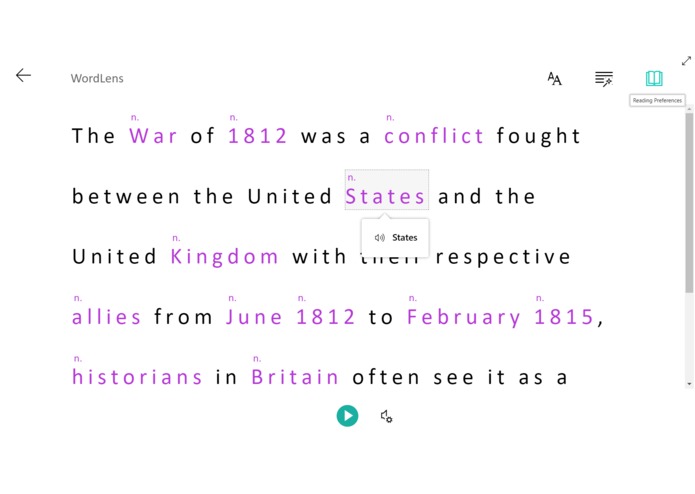
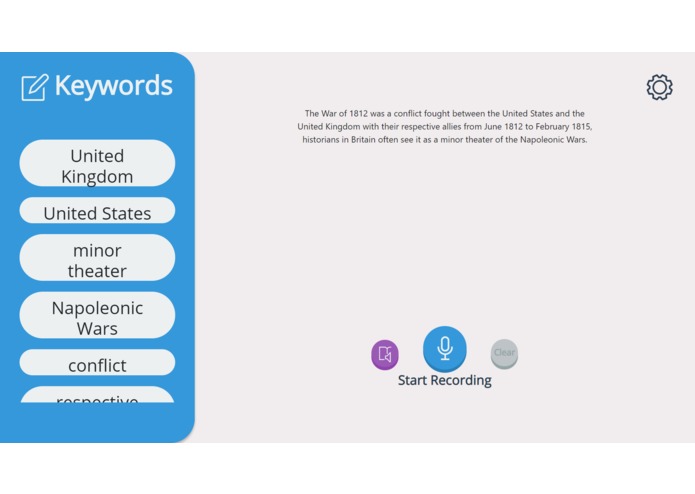
Taking an example of a student in a classroom, the student would press record and WordLens takes in speech input from the teacher, seamlessly presents it inside the UI then runs it through intelligent Azure cognitive service API’s. WordLens extracts key phrases, this improves the retention rate of relevant information. A visual interface is then constructed for the purpose of focusing the student’s attention. This interface offers graphical output from the integrated picture dictionary allowing the user to visually reinforce learning. The student can then toggle syllable parsing breaking down words into their syllables, this combined with the previous outputs gives a full depth understanding of meaning, spelling, and pronunciation. The student also has the option to adjust the text size, spacing, and themes, targeted towards assisting learner’s suffering from visual impairment. The interface also offers grammar classification, highlighting nouns, verbs, adjectives, and adverbs with easy to understand color coding. If the student/user is not a native speaker of the input language, WordLens also allows for translation into different languages for easier understanding.
How we built it
That lovely UI sure looks like it might be built using complex frameworks, right? We kept the front end simple and intuitive, using a combination of Vanilla, HTML, CSS, and JS. The back end on the other hand is a Python flask web server. The speech to text element was implemented using Azure’s cognitive service speech recognition API. The key phrase extraction was done using many cognitive services text analytic library functions. The visual interface and all other accessibility features were implemented using Azure’s brand-new immersive reading API.
Challenges we ran into
Max, Alari and Murtadha came into TOHacks as an incomplete team seeking friendship and front-end help. We could not have asked for a better teammate than Jerry! The API’s we used on the other hand was not as friendly as Jerry, the lack of documentation and different language implementation made immersive reader difficult to implement in Python, but we managed to get it done :D We found a lot of difficulty combining our front and back end, but we were ready for it. It was also tough to narrow down our features to what can be accomplished in 24 hours + no sleep + caffeine, but by the end we were pretty proud of what we were able to put together.
Accomplishments that we're proud of
We all stepped outside of our comfort zone and tackled a problem while continuously thinking about the user and positive social impact we are creating. We ended up with a functioning prototype with a clear message for improving learning quality for groups facing hurdles in the pursuit of unlocking knowledge. We used 3 different Azure API’s, each with a learning curve and functional difficulties, to reach our end goal. We also collaborated effectively in brainstorming sessions to determine implementations we all agreed on. Immersive reader is a brand-new API and we were happy to create something unique using it.
What we learned
We learned how to harness the power of Microsoft Azure’s cognitive science libraries and transforming our effort into a product that serves a social good! We learned about the learning challenges faced by individuals with a learning disability or non-native speakers, and how we must pay more attention to those challenges in order to eventually approach equal opportunity. We worked with vanilla js for the first time while working on the front end.
What's next for WordLens
We want to expand WordLens to accepting all kinds of learning material, such as textbooks and lecture slides. WordLens will generate interactive learning questions as the student/user inputs course material into the interface, this will improve retention rate as suggested by Dale’s cone of learning, where a 50% or more retention boost is expected when the person learning does so interactively. WordLens will keep track of retention rate and associate highest retention with interactive learning modules with the highest number of correct answers whether that be matching, multiple choice or image association.


Log in or sign up for Devpost to join the conversation.