HomePod of the future may only answer Siri queries if you look at it

Jump to First Reply
Posted:
in Future Apple Hardware edited May 5

HomePod owners may not necessarily have to even call out the word "Siri" in future, with Apple researching ways to use gaze detection for a device to know it's wanted.
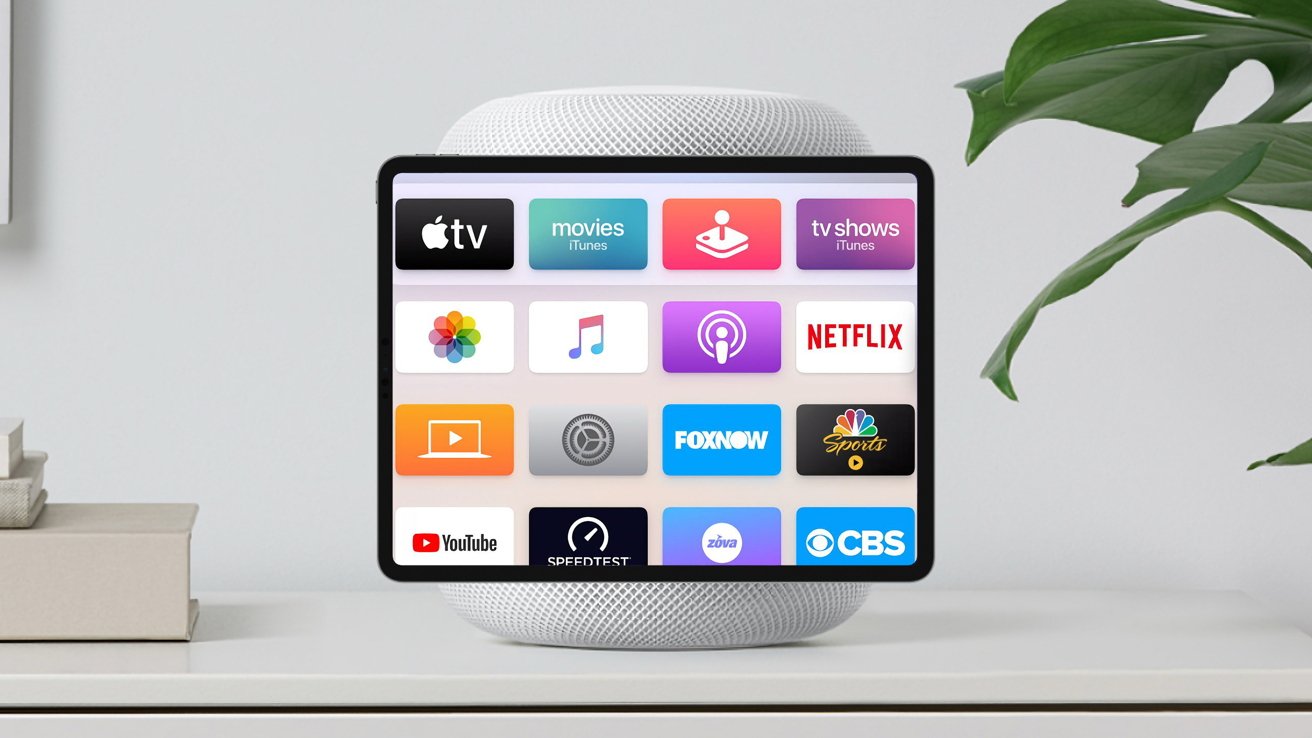
An iPad superimposed on a HomePod to represent a hybrid home display device
The patent's drawings show a HomePod with cameras, which might now become the expected Apple HomeHub


If you have multiple Apple devices, then you know that it's difficult to get Siri to respond on the one you want. When you are in a room that contains an iPhone, an iPad, and a HomePod mini, Apple has all sorts of systems to assess which device you want, but they routinely fail.

Furthermore, not everyone feels comfortable with the "Siri" prompt, even if it is better than the original "Hey Siri" one. You can still say either version, and so can your TV set -- it's common for something said on a show to be close enough to "Siri" that it prompts a query you didn't ask for.

Then there is also the possibility of users needing to interact with devices without using their voice at all. There can of course be situations where a command needs to be issued from a distance, or where it could be socially awkward to talk to the device.

In a newly granted patent called "Device control using gaze information," Apple suggests it may be possible to command Siri visually. Specifically, it proposes that devices could detect a user's gaze to determine if that user wants that device to respond.

It would need HomePods, or other devices, that had cameras and other sensors capable of determining the location of a user and the path of their gaze, to work out what they are looking at. This information could be used to automatically set the looked-at device to go into an instruction-accepting mode where it actively listens, in the expectation that instructions will be told to it.

That would be similar to the way that an iPhone's "always on" screen will actually switch off until you look at it. So there is already a device that can detect when it is being looked at.

Apple could extend that to interpret a gaze as being the equivalent of a verbal trigger. Users could still call out "Siri" if they weren't looking at the device, but it would give them an extra option.

Using the gaze as a barometer for whether the user wants to tell the digital assistant a command is also useful in other ways. For example, gaze detected looking at the device could confirm that the user actively intends the device to follow commands.
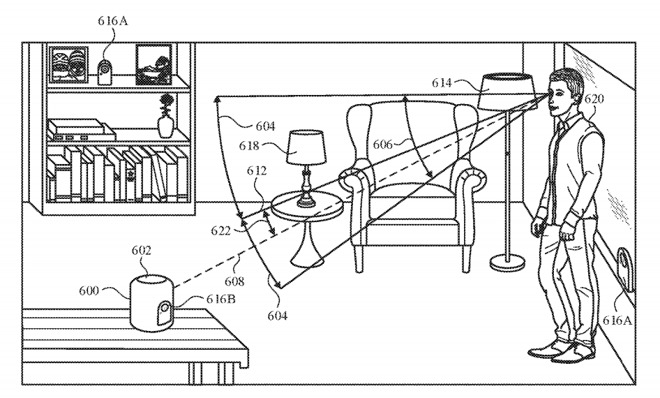
A digital assistant for a HomePod could potentially only interpret a command if the user is looking at it, the patent suggests.


In practical terms, this could mean the difference between the device interpreting a sentence fragment such as "play Elvis" as a command or as part of a conversation that it should otherwise ignore.

The patent filing mentions that simply looking at the device won't necessarily register as an intention for it to listen for instruction, as a set of "activation criteria" needs to be met. This could merely consist of a continuous gaze for a period of time, like a second, to eliminate minor glances or false positives from a person turning their head.

The angle of the user's head is also important. For example, if the device is located on a bedside cabinet and the user is laid in bed asleep, the device could potentially count the user facing the device as a gaze depending on how they lie, but could discount it as such for realizing the user's head is on its side instead of vertical.

It would be a judgement, taking into account whether the user's eyes were open, as well as what the angle was. That would avoid unintended glances triggering Siri, but as useful as that would be, there is then a concomitant problem.

That's how if the device won't always respond to a gaze, the user has to know whether it has or not. It can't be that the user speaks a long command only to have Siri eventually say, "You talkin' to me?"

So in response to an intentional gaze, a device could provide a number of indicators to the user that the assistant has been activated by a glance, such as a noise or a light pattern from built-in LEDs or a display.

Given the ability to register a user's gaze, it would also be feasible for the system to detect if the user is looking at an object they want to interact with, rather than the device holding the virtual assistant.

For example, a user could be looking at one of multiple lamps in the room, and the device could use the context of the user's gaze to work out which lamp the user wants turned on from a command.

The patent also describes situations where the user might begin a command before turning to the device to complete it. Or alternatively, that they might look at the device and turn away before finishing the command.

In either case, the device would need to have determined that it is the one being addressed. But if the gaze isn't detected right away, Apple suggests that the device could ask the user what they want, and thereby get their attention.
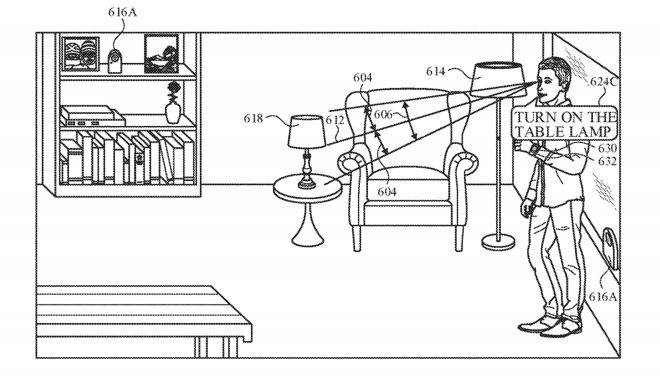
Nearby devices could detect the user's gaze of other controllable objects in a room.


This is not the first time that Apple has applied for parents concerning being able to remotely operate a device has cropped up in earlier patent filings a few times. For example, a 2015 patent for a "Learning-based estimation of hand and finger pose" suggested the use of an optical 3D mapping system for hand gestures, which may well have led to the Apple Vision Pro.

The new patent, though, is also not the first time Apple been granted one on precisely this same patent. A version of it was originally filed in 2019, and was then granted in 2020.

Apple applies for many hundreds of patents every year, and it's not uncommon for it to re-apply even after one is granted. It can be, for instance, that there is a minor but significant update in the new version.

In this case, the fact that Apple originally applied for the patent in 2019 means that there has been time to see at least parts of it becoming shipping products. Face ID had already launched in the 2017 iPhone X, but exceptional gaze detection has been a key element in the Apple Vision Pro.

It's still true, however, that even the existence of repeated patents on the same technology is not proof that this specific idea will ever launch. But the patent's drawings consistently show a HomePod, and we are now closer to having a similar HomeHub device that might well have cameras.

Originally filed on August 28, 2019, the patent lists its inventors as Sean B. Kelly, Felipe Bacim De Araujo E Silva, and Karlin Y. Bark.


Read on AppleInsider

Comments

  • Reply 1 of 17
    One of the differentiating features of the HomePod is its ability to hear you very well, making it easy to give commands when not facing it, raising your voice or even needing to be in the same room; so I doubt the gaze detection feature would be a requirement to use “hey Siri”, but I agree that it could be useful in making requests without first having to speak the activation command. A bit like how “raise to speak” on the Apple Watch functions. 
    Such a feature would be useful for hands free AppleTV use or easier use of Siri on iPhones (which already happen to include gaze detection features.)
    edited December 2020
    Beatswatto_cobramike1hcrefugee
     4Likes 0Dislikes 0Informatives
  • Reply 2 of 17
    Whilst I give Apple far more credit, when it comes to privacy, than other manufacturers, the thought of having additional cameras in the home (my HomePod currently sits on the bedside table) gives me serious pause for thought.

    I would hope to see this rely fully on faceID-type tech, rather than a full-vision (AI-based) camera system, else I believe I would be too worried to have one in more personal areas.
    edited December 2020
    williamlondonhcrefugee
     0Likes 0Dislikes 2Informatives
  • Reply 3 of 17
    Afganblues afganblues Posts: 12unconfirmed, member
    Absolutely useless for people with low vision, or who are blind, or the HomePod is out of the line of sight,. There is one simple solution that I do not understand why Apple doesn’t implement. Hey HomePod or hey Siri pod or whatever the hell else you want to use as an alert phrase. We could even have custom FrasesWhy couldn’t the person program HomePod to respond to, let’s say something ridiculous like rumplestillskin.  Remember the reports of how angry Steve Jobs was over mobile me?, I’m sure he would be livid over this HomePod, iPhone, watch Siri differentiation issue. What really sucks that if I’m in a room with my  HomePod, phone and watch that I do not know where Siri will come from, especially when it’s a personal request and the HomePod responds with I can’t do that. Steve Jobs is probably rolling over in his grave
    edited December 2020
    williamlondon
     0Likes 0Dislikes 1Informative
  • Reply 4 of 17
    Beatsbeats Posts: 3,073member
    Seems dumb. Isn't the point that you DON'T have to look at it?

    One of the differentiating features of the HomePod is its ability to hear you very well, making it easy to give commands when not facing it, raising your voice or even needing to be in the same room; so I doubt the gaze detection feature would be a requirement to use “hey Siri”, but I agree that it could be useful in making requests without first having to speak the activation command. A bit like how “raise to speak” on the Apple Watch functions. 
    Such a feature would be useful for hands free AppleTV use or easier use of Siri on iPhones (which already happen to include gaze detection features.)

    Great idea and hope this is the case.

    Absolutely useless for people with low vision, or who are blind, or the HomePod is out of the line of sight,. There is one simple solution that I do not understand why Apple doesn’t implement. Hey HomePod or hey Siri pod or whatever the hell else you want to use as an alert phrase. We could even have custom phrases. Why couldn’t the person program HomePod to respond to, let’s say something ridiculous like rumplestillskin.  Remember the reports of how angry Steve Jobs was over mobile me?, I’m sure he would be livid over this HomePod, iPhone, watch Siri differentiation issue. What really sucks that if I’m in a room with my  HomePod, phone and watch that I do not know where Siri will come from, especially when it’s a personal request and the HomePod responds with I can’t do that. Steve Jobs is probably rolling over in his grave

    I like that all devices are activated by ONE phrase. The problem is having the wrong device activate. @EsquireCats may be onto something.
    williamlondonhcrefugee
     0Likes 0Dislikes 2Informatives
  • Reply 5 of 17
    Absolutely useless for people with low vision, or who are blind, or the HomePod is out of the line of sight,. There is one simple solution that I do not understand why Apple doesn’t implement. Hey HomePod or hey Siri pod or whatever the hell else you want to use as an alert phrase. We could even have custom FrasesWhy couldn’t the person program HomePod to respond to, let’s say something ridiculous like rumplestillskin.  Remember the reports of how angry Steve Jobs was over mobile me?, I’m sure he would be livid over this HomePod, iPhone, watch Siri differentiation issue. What really sucks that if I’m in a room with my  HomePod, phone and watch that I do not know where Siri will come from, especially when it’s a personal request and the HomePod responds with I can’t do that. Steve Jobs is probably rolling over in his grave
    I'm not sure what differentiation issues you are referring to.  We have 8 x HomePods around the house, we both have iPhones & iPads that are on us or laying around, and 3-4 MacBooks on with the lids open, and both wear Apple Watches.  A HomePod ALWAYS answers, as they should, unless we have another device awake & actively using it.. Maybe you have a home WiFi or Bluetooth issue with interference, etc.?  The devices must be able to connect and announce to each other, who's handling the request.  There could also be Apple ID account issues, which is what ties all the devices together.  Probably an Apple ID/registration issue, or communications issue.
    watto_cobrawilliamlondon
     2Likes 0Dislikes 0Informatives
  • Reply 6 of 17
    I won't begin to say that HomePods are perfect. They're not - and I think the biggest problem (that we encounter) is that they seem to work better with a slight pause after "Hey Siri." My wife forgets that and it frustrates me because I know it's not going to work. But then again, about 50% of the time it does work for her. (As opposed to over 90% of the time if you add that ever-so-slight pause after "Siri.")

    Point being: if a visual clue improved upon that for her, I can't imagine it being a bad thing.

    Image
    edited December 2020
    watto_cobrawilliamlondonhcrefugee
     2Likes 0Dislikes 1Informative
  • Reply 7 of 17
    MacPromacpro Posts: 19,892member
    Here's looking at you Siri.
    watto_cobrawilliamlondonhcrefugeeavon b7
     3Likes 0Dislikes 1Informative
  • Reply 8 of 17
    mike1mike1 Posts: 3,584member
    I’m sure he would be livid over this HomePod, iPhone, watch Siri differentiation issue. What really sucks that if I’m in a room with my  HomePod, phone and watch that I do not know where Siri will come from, especially when it’s a personal request and the HomePod responds with I can’t do that. Steve Jobs is probably rolling over in his grave
    With my wife and I each having iPhones, iPads and my Watch, as well as a house full of HomePods, I found the most reliable solution was to disable Hey Siri on all the devices except the HomePods. For my needs, there is no benefit to having the phones or Watch respond to Hey Siri. If I am not at home, the phone is within arm's reach and the Watch is on my wrist, so I can easily push the buttons to engage Siri when needed.

     0Likes 0Dislikes 0Informatives
  • Reply 9 of 17
    nicholfd said:
    Absolutely useless for people with low vision, or who are blind, or the HomePod is out of the line of sight,. There is one simple solution that I do not understand why Apple doesn’t implement. Hey HomePod or hey Siri pod or whatever the hell else you want to use as an alert phrase. We could even have custom FrasesWhy couldn’t the person program HomePod to respond to, let’s say something ridiculous like rumplestillskin.  Remember the reports of how angry Steve Jobs was over mobile me?, I’m sure he would be livid over this HomePod, iPhone, watch Siri differentiation issue. What really sucks that if I’m in a room with my  HomePod, phone and watch that I do not know where Siri will come from, especially when it’s a personal request and the HomePod responds with I can’t do that. Steve Jobs is probably rolling over in his grave
    I'm not sure what differentiation issues you are referring to.  We have 8 x HomePods around the house, we both have iPhones & iPads that are on us or laying around, and 3-4 MacBooks on with the lids open, and both wear Apple Watches.  A HomePod ALWAYS answers, as they should, unless we have another device awake & actively using it.. Maybe you have a home WiFi or Bluetooth issue with interference, etc.?  The devices must be able to connect and announce to each other, who's handling the request.  There could also be Apple ID account issues, which is what ties all the devices together.  Probably an Apple ID/registration issue, or communications issue.
    Yes, the HomePod always answers. But so does every other device. Whenever I give Siri a command, 3 or 4 different devices answer the command. It seems like all of the devices should be able to discern which device is closest to me or whether I’m actively using a device. If I’m actively using the iPad, all of the other devices still respond to the command instead of only the device I’m actively using.
    williamlondon
     0Likes 0Dislikes 1Informative
  • Reply 10 of 17
    mike1 said:
    I’m sure he would be livid over this HomePod, iPhone, watch Siri differentiation issue. What really sucks that if I’m in a room with my  HomePod, phone and watch that I do not know where Siri will come from, especially when it’s a personal request and the HomePod responds with I can’t do that. Steve Jobs is probably rolling over in his grave
    With my wife and I each having iPhones, iPads and my Watch, as well as a house full of HomePods, I found the most reliable solution was to disable Hey Siri on all the devices except the HomePods. For my needs, there is no benefit to having the phones or Watch respond to Hey Siri. If I am not at home, the phone is within arm's reach and the Watch is on my wrist, so I can easily push the buttons to engage Siri when needed.

    Maybe I’ll try that idea, but I still wish that Apple could figure out a way for the different devices to somehow communicate with each other and delegate the task to just one device that is closest to the command issuer. I’m guessing that ability will be forthcoming with the advancement of AI.
     0Likes 0Dislikes 0Informatives
  • Reply 11 of 17
    nicholfdnicholfd Posts: 843member
    mike1 said:
    I’m sure he would be livid over this HomePod, iPhone, watch Siri differentiation issue. What really sucks that if I’m in a room with my  HomePod, phone and watch that I do not know where Siri will come from, especially when it’s a personal request and the HomePod responds with I can’t do that. Steve Jobs is probably rolling over in his grave
    With my wife and I each having iPhones, iPads and my Watch, as well as a house full of HomePods, I found the most reliable solution was to disable Hey Siri on all the devices except the HomePods. For my needs, there is no benefit to having the phones or Watch respond to Hey Siri. If I am not at home, the phone is within arm's reach and the Watch is on my wrist, so I can easily push the buttons to engage Siri when needed.

    Maybe I’ll try that idea, but I still wish that Apple could figure out a way for the different devices to somehow communicate with each other and delegate the task to just one device that is closest to the command issuer. I’m guessing that ability will be forthcoming with the advancement of AI.
    This is a home infrastructure issue (WiFi).

    We have 13 home pods.  My wife & I each have an iPhone, Apple Watch & iPad.  Always only one device answers.  Unless the iPhone or iPad are unlocked and in use, a home pod answers.  If you are actively using an iPhone or iPad, they will take priority and only one will answer.  This works by all the devices talking on the same reliable WiFi network. Multiple devices hear the "Hey Siri!, and they decide which will answer & inform the others to not answer.

    You need to troubleshoot your home infrastructure.  This is a problem that Apple solved from the beginning.
    williamlondonhcrefugee
     1Like 0Dislikes 1Informative
  • Reply 12 of 17
    nicholfd said:
    mike1 said:
    I’m sure he would be livid over this HomePod, iPhone, watch Siri differentiation issue. What really sucks that if I’m in a room with my  HomePod, phone and watch that I do not know where Siri will come from, especially when it’s a personal request and the HomePod responds with I can’t do that. Steve Jobs is probably rolling over in his grave
    With my wife and I each having iPhones, iPads and my Watch, as well as a house full of HomePods, I found the most reliable solution was to disable Hey Siri on all the devices except the HomePods. For my needs, there is no benefit to having the phones or Watch respond to Hey Siri. If I am not at home, the phone is within arm's reach and the Watch is on my wrist, so I can easily push the buttons to engage Siri when needed.

    Maybe I’ll try that idea, but I still wish that Apple could figure out a way for the different devices to somehow communicate with each other and delegate the task to just one device that is closest to the command issuer. I’m guessing that ability will be forthcoming with the advancement of AI.
    This is a home infrastructure issue (WiFi).

    We have 13 home pods.  My wife & I each have an iPhone, Apple Watch & iPad.  Always only one device answers.  Unless the iPhone or iPad are unlocked and in use, a home pod answers.  If you are actively using an iPhone or iPad, they will take priority and only one will answer.  This works by all the devices talking on the same reliable WiFi network. Multiple devices hear the "Hey Siri!, and they decide which will answer & inform the others to not answer.

    You need to troubleshoot your home infrastructure.  This is a problem that Apple solved from the beginning.
    I would have no idea how to do that. All of my devices use the same WiFi network. But apparently I’m not the only one this is happening to.
    williamlondon
     0Likes 0Dislikes 1Informative
  • Reply 13 of 17
    mike1mike1 Posts: 3,584member
    If you have multiple Apple devices, then you know that it's difficult to get Siri to respond on the one you want. When you are in a room that contains an iPhone, an iPad, and a HomePod mini, Apple has all sorts of systems to assess which device you want, but they routinely fail.

    I have multiple HomePods throughout the house and rarely have had the wrong HomePod respond. The same solution exists now as it did 5-1/2 years ago. If you have HomePods throughout your house, simply disable the ability to listen for "Siri" on those devices so you need to engage Siri manually. Personally, I never use Siri on my phone when I am home and if I do want to engage it while I am out, I can't imagine doing so any other way except manually. My phone and/or watch would always be within arms reach.

    The only time the non-intended HomePod responds is when it is already active, such as playing music. For example. I have noticed that if the HomePod in my office is playing music and I step out of my office and I ask something in a different room, the active HomePod in my office will respond as long as it can hear me.
    coolfactor
     1Like 0Dislikes 0Informatives
  • Reply 14 of 17
    coolfactorcoolfactor Posts: 2,475member
    I was wondering why the comments are dated "5 years ago", and then I saw the article is, too. Recycling old articles to get "fresh" content... interesting strategy?

    I think Star Trek had it right... a lapel pin that activates Siri, powered by the larger infrastructure surrounding you, and the pin only activates it. I'd prefer that over always checking my pockets for my keys and phone.
    williamlondon
     1Like 0Dislikes 0Informatives
  • Reply 15 of 17
    coolfactorcoolfactor Posts: 2,475member

    mike1 said:
    If you have multiple Apple devices, then you know that it's difficult to get Siri to respond on the one you want. When you are in a room that contains an iPhone, an iPad, and a HomePod mini, Apple has all sorts of systems to assess which device you want, but they routinely fail.

    I have multiple HomePods throughout the house and rarely have had the wrong HomePod respond. The same solution exists now as it did 5-1/2 years ago. If you have HomePods throughout your house, simply disable the ability to listen for "Siri" on those devices so you need to engage Siri manually. Personally, I never use Siri on my phone when I am home and if I do want to engage it while I am out, I can't imagine doing so any other way except manually. My phone and/or watch would always be within arms reach.

    The only time the non-intended HomePod responds is when it is already active, such as playing music. For example. I have noticed that if the HomePod in my office is playing music and I step out of my office and I ask something in a different room, the active HomePod in my office will respond as long as it can hear me.
    Interesting. I thought they had proximity sorted out already?

     0Likes 0Dislikes 0Informatives
  • Reply 16 of 17
    avon b7avon b7 Posts: 8,609member
    In the run up to 2030 we will be hearing a lot more about network sensing. Just about everyone is working on it - Apple included - and it will be a major part of the 6G roll out.

    As part of a wider range of sensing capabilities (including active sensing via other methods) it would be easy to determine who is talking to a device.

    Network sensing, combined with AI, will even be able to 'sense' if someone in bed is breathing or not (assuming the proposed use cases come to fruition). 
     0Likes 0Dislikes 0Informatives
  • Reply 17 of 17
    Xedxed Posts: 3,609member
    As an aside, I would really love to get some HomePods but they haven't been updated in so long that I feel that they could drop support for the entire line or update them any day now. As of today it's been 1203 days since the HomePod was updated and 2030 days since the HomePod mini was updated. That's October 2020 for the mini. We were all still in COVID-19 lockdown when the HomePod mini was last updated.
     0Likes 0Dislikes 0Informatives
Sign In or Register to comment.