Image

3D Printing A Telescope Is Rewarding, Even If Not Always Cheaper

What can one expect from 3D printing an 8″ Newtonian telescope? [Molly Wakeling] shares her thoughts after doing exactly that. The performance was on par with any solid 8″ telescope, but in the end it wasn’t really any cheaper than purchasing a manufactured unit. Does that mean it wasn’t worth it? Not at all!

Image[Molly] makes the excellent observation that the process of printing and building one’s own telescope is highly educational and rewarding. Also, the end result is modular, user-serviceable, and customizable in a way that many commercial offerings can only dream of. It’s a great conversation starter with other enthusiasts, as well!

[Molly] printed the 203 Leavitt design (3d models available on Printables) which is an 8″ Newtonian telescope. This telescope design uses a concave parabolic mirror (a significant part of the expense) at the back of the tube to gather and focus light, and a small flat mirror near the front of the tube reflects this light to an eyepiece on the side. The wood stand makes things convenient, and we like the elastic tie-down used as a simple way to put tension on the mounts.

Do you find yourself intrigued but would prefer to start a little smaller and cheaper? Good news, because the same designer of the 203 Leavitt has a very similar design we happen to have featured before: the 114 Hadley. It features easily obtainable, lower-cost optics which perform well and can be easily ordered online, making it a great DIY starter telescope.
Image

Stack N’ Rack Your Hardware With The HomeRacker Project

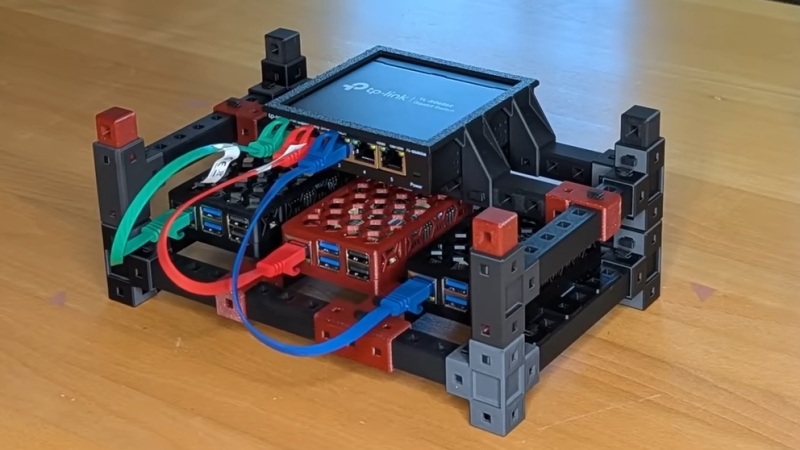
Things are cooler when rack-mounted, and [KellerLab] aims to make that all far more accessible with the HomeRacker, a modular and 3D-printable rack building system designed to let you rack-mount to your heart’s content. While it can handle big things, it seems especially applicable to tasks like mounting one’s home network equipment and Raspberry Pi machines.

Image
A rack is a great place for those Raspberry Pi servers and home networking equipment, but it can also handle bigger jobs.

The basic system (or core) consists of three different parts: supports, connectors, and lock pins. The supports are the main structural bars, the connectors mostly go at the corners, and the lock pins ensure everything stays put. The nominal sizing is a 15 mm x 15 mm profile for the supports, with lengths being a multiple of 15 mm.

All is designed with 3D printing in mind, and requires no tools to assemble or disassemble. There are design elements we really appreciate, like how parts are printed at an angle, which improves strength while eliminating the need for supports. The lock pins (and the slots into which they go) are designed so that they are effective and will neither rattle nor fall out.

But the core system is just the foundation. There’s plenty of modularity and expansions to handle whatever one may need, from Gridfinity shelves and drawers to various faceplates and other modules. There are some example applications available from [KellerLab]’s HomeRacker models page, like CD shelf, under-desk drawer, or filament rack.

[KellerLab] welcomes any collaboration, so check out the GitHub repository for CAD references and design files.

One last point to make about the value of printing objects like this at an angle: not only can the resulting layer lines provide better strength and reduce or eliminate the need for supports, but printing at an angle can help hide layer lines.

Continue reading “Stack N’ Rack Your Hardware With The HomeRacker Project”

Image

Building A DIY Ryzen-Based PC!

This project gives a whole new meaning to DIY PC. We don’t know how capable you were as a teenager, but could you have designed your own Ryzen-based mini PC?

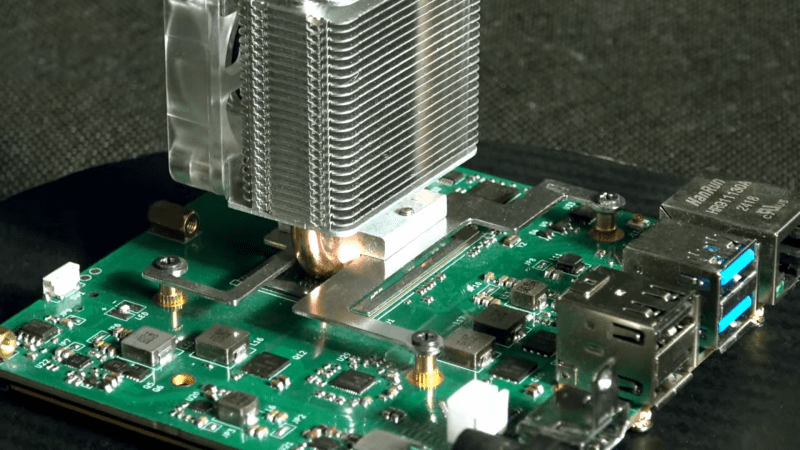
Whilst making repairs to laptop internals, [Dominik Baroński] was busy taking notes. Modern super-integrated laptop PCs have reached the point where all the functions of a complete PC are embedded in a single chip. But it’s a big, complicated chip with very specific feeding and care needs. Once you’ve figured out what it needs, it ‘merely’ remains to supply it power, hook up some DDR4 RAM, PCIe storage, and some USB ports, and you’re away. It sounds easy when you say it like that, but do not underestimate how difficult it is to create such a board—or even to populate it by hand—yet that’s precisely what [Dominik] has achieved.

Continue reading “Building A DIY Ryzen-Based PC!”

Image

Tiny UPS Keeps WiFi Online

For any mission-critical computer system, it’s a good idea to think about how the system will handle power outages. At the very least it’s a good idea to give the computer enough time to gracefully shut down if the power outage will last for an indefinite time. But for extremely critical infrastructure, like our home Wi-Fi, we might consider a more long-term battery backup that can let us get through the longest of power outages.

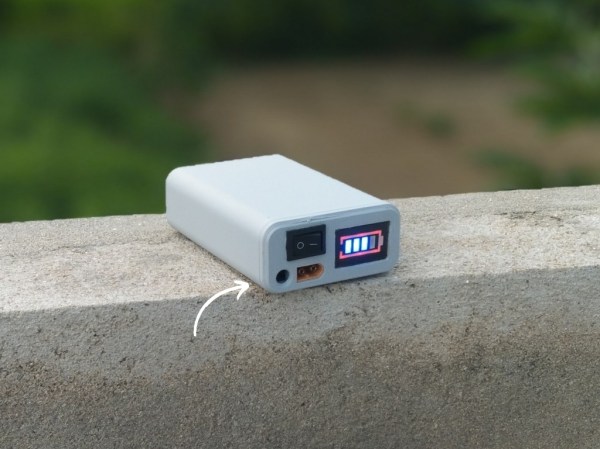
Part of why this project from [Next Builder] works so well is that most off-the-shelf routers don’t actually use that much energy. Keeping that and a modem online when the power is out only requires a few lithium batteries. To that end, three lithium ion cells are arranged in series to provide the router with between 9 and 12 volts, complete with a battery management system (BMS) to ensure they aren’t over- or under-charged and that they are balanced. The router plugs directly into a barrel jack, eliminating any switching losses from having to use an inverter during battery operation.

While [Next Builder] is a student who lives in an area with frequent interruptions to the electricity supply, this does a good job of keeping him online. If you’re planning for worse or longer outages, a design like this is easily adapted for more batteries provided the correct BMS is used to keep the cells safely charged and regulated. You can also adapt much larger UPS systems to power more of your home’s electrical system, provided you can find enough batteries.

Image

Play Capacitor Cupid With The Matchmaker

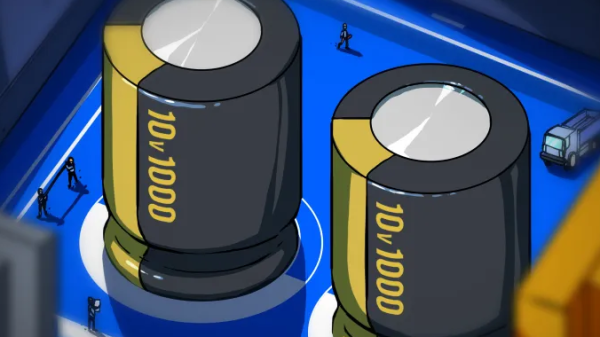
Occasionally a design requires capacitors that are much closer to being identical in value to one another than the usual tolerance ranges afford. Precision matching of components from parts on hand might sound like a needle-in-a-haystack problem, but not with [Stephen Woodward]’s Capacitor Matchmaker design.

Image
The larger the output voltage, the greater the mismatch between capacitors A and B.

The Matchmaker is a small circuit intended to be attached to a DVM, with the output voltage indicating whether two capacitors (A and B) are precisely matched in value. If they are not equal, the voltage output indicates the degree of the mismatch as well as which is the larger of the two.

The core of the design is complementary excitation of the two capacitors (the CD4013B dual flip-flop achieves this) which results in a measurable signal if the two capacitors are different; nominally 50 mV per % of mismatch. Output polarity indicates which of the capacitors is the larger one. In the case of the two capacitors being equal, the charges cancel out.

Can’t precision-matched capacitors be purchased? Absolutely, but doing so is not always an option. As [Stephen] points out, selection of such components is limited and they come at an added cost. If one’s design requires extra-tight tolerances, requires capacitor values or types not easily available as precision pairs, or one’s budget simply doesn’t allow for the added cost, then the DIY approach makes a lot more sense.

If you’re going to go down this road, [Stephen] shares an extra time-saving tip: use insulated gloves to handle the capacitors being tested. Heating up a capacitor before testing it — even just from one’s fingers — can have a measurable effect.

[Stephen]’s got a knack for insightful electronic applications. Check out his PWMPot, a simple DIY circuit that can be an awfully good stand-in for a digital potentiometer.

Image

LeRobot Brings Autonomy To Hobby Robots

Robotic arms have a lot in common with CNC machines in that they are usually driven by a fixed script of specific positions to move to, and actions to perform. Autonomous behavior isn’t the norm, especially not for hobby-level robotics. That’s changing rapidly with LeRobot, an open-source machine learning framework from the Hugging Face community.

Image
The SO-101 arm is an economical way to get started.

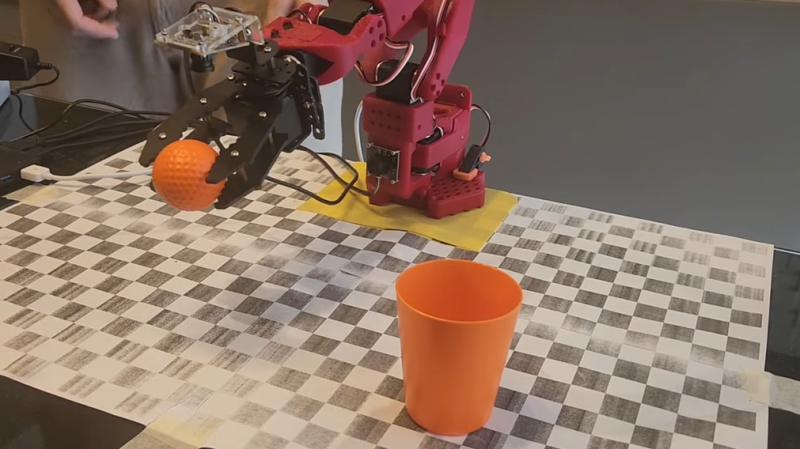
If a quick browse of the project page still leaves you with questions, you’re not alone. Thankfully, [Ilia] has a fantastic video that explains and demonstrates the fundamentals wonderfully. In it, he shows how LeRobot allows one to train an economical 3D-printed robotic arm by example, teaching it to perform a task autonomously. In this case, the task is picking up a ball and putting it into a cup.

[Ilia] first builds a dataset by manually operating the arm to pick up a ball and place it in a cup. Then, with a dataset consisting of only about fifty such examples, he creates a machine learning model capable of driving the arm to autonomously pick up a ball and place it in a cup, regardless of where the ball and cup actually are. It even gracefully handles things like color changes and [Ilia] moving the cup and ball around mid-task. You can skip directly to 34:16 to see this autonomous behavior in action, but we do recommend watching the whole video for a highly accessible yet deeply technical overview.

Continue reading “LeRobot Brings Autonomy To Hobby Robots”

Image

RepRapMicron Promises Micro-fabrication For Desktops With New Prototype

3D printing has transformed how hobbyists fabricate things, but what additional doors would open if we could go even smaller? The µRepRap (RepRapMicron) project aims to bring fabrication at the micron and sub-micron scale to hobbyists the same way RepRap strove to make 3D printing accessible. New developments by [Vik Olliver] show a promising way forward, and also highlight the many challenges of going so small.

Image
New Maus prototype is modular, setting the stage for repeatable and reliable 3D printing at the micro scale.

How exactly would a 3D printer do micro-fabrication? Not by squirting plastic from a nozzle, but by using a vanishingly tiny needle-like effector (which can be made at any workbench via electrochemical erosion) to pick up a miniscule amount of resin one dab a time, curing it with UV after depositing it like a brush deposits a dot of ink.

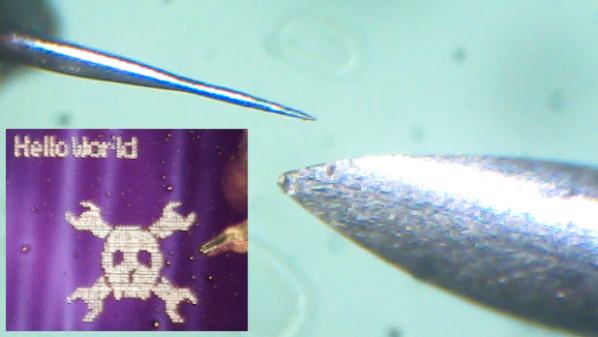
By doing so repeatedly and in a structured way, one can 3D print at a micro scale one “pixel” (or voxel, more accurately) at a time. You can see how small they’re talking in the image in the header above. It shows a RepRapMicron tip (left) next to a 24 gauge hypodermic needle (right) which is just over half a millimeter in diameter.

Moving precisely and accurately at such a small scale also requires something new, and that is where flexures come in. Where other 3D printers use stepper motors and rails and belts, RepRapMicron leverages work done by the OpenFlexure project to achieve high-precision mechanical positioning without the need for fancy materials or mechanisms. We’ve actually seen this part in action, when [Vik Olliver] amazed us by scribing a 2D micron-scale Jolly Wrencher 1.5 mm x 1.5 mm in size, also visible in the header image above.

Using a tiny needle to deposit dabs of UV resin provides the platform with a way to 3D print, but there are still plenty of unique problems to be solved. How does one observe such a small process, or the finished print? How does one handle such a tiny object, or free it from the build platform without damaging it? The RepRapMicron project has solutions lined up for each of these and more, so there’s a lot of discovery waiting to be done. Got ideas of your own? The project welcomes collaboration. If you’d like to watch the latest developments as they happen, keep an eye on the Github repository and the blog.