Image

Playing Factorio On A Floppy Disk Cluster

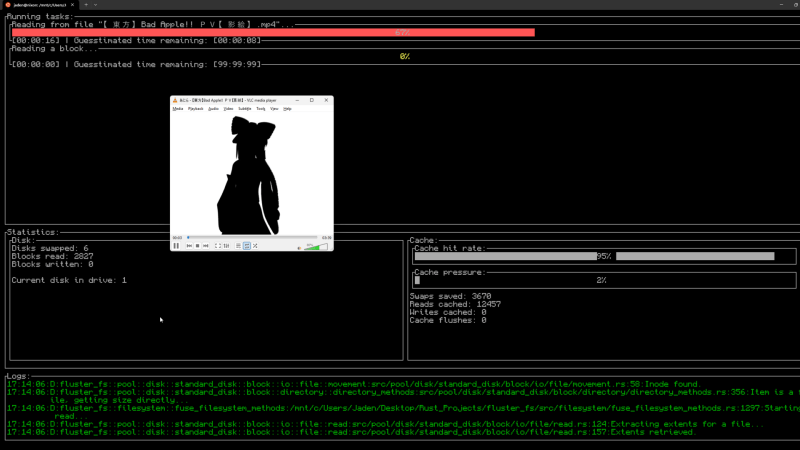
While a revolutionary storage system for their time, floppy disks are not terribly useful these days. Though high failure rates and slow speeds are an issue, for this project, the key issue is capacity. That’s because [DocJade’s] goal is playing the video game Factorio off floppy disks. 

Storing several gigabytes of data on floppy disks is a rather daunting challenge. But instead of using a RAID array, only a single reader and a custom file system is deployed in this setup. A single disk is dedicated to storing pool information allowing for caching of file locations, reducing disk swaps. The file system can also store single files across multiple disks for storage of larger files. Everything mounts in fuse and is loosely POSIX compliment, but lacks some features like permissions and links.

With the data stored across thousands of disks, the user is prompted to insert a new disk when needed. This ends up being the limiting factor in read and write speeds, rather than the famously slow speeds of floppies. In fact, it takes about a week to load all of Factorio in this manner, even after optimizations to reduce disk swaps. Factorio is also one of the few games that could be installed in this manner, as it loads most of the game into memory at launch. Many other games that dynamically load textures and world maps would simply crash when a chunk is not immediately available.

Not a Factorio fan? No worries, you could always install modern Linux on a floppy!

Continue reading “Playing Factorio On A Floppy Disk Cluster”
Image

Print Pixel Art To A Floppy Disk

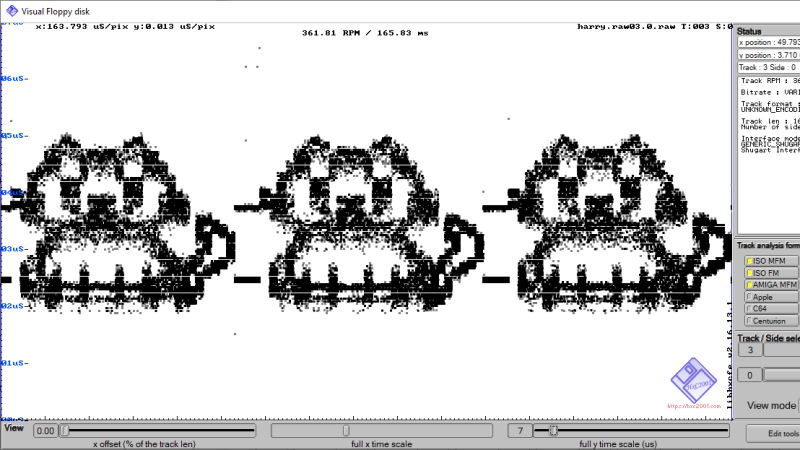
Here at Hackaday we love floppy disks. While they are by no means a practical or useful means of storing data in the age of solid state storage, there is something special about the little floppy disc of magnetic film inside that iconic plastic case. That’s why we were so excited to see the tool [dbalsom] developed for printing pixel art in a floppy’s track timing diagrams!

Floppy timing diagrams are usually used to analyze the quality of an individual disk. It represents flux transitions within a single floppy tack as a 2D graph. But it’s also perfectly possible to “paint” images on a floppy this way. Granted, you can’t see these images without printing out a timing diagram, but if you’re painting images onto a floppy, that’s probably the point.

This is where pbm2track comes in handy! It takes bitmap images and encodes them onto floppy emulators, or actual floppies. The results are quite excellent, with near-perfect recreation in floppy graphical views. The results on real floppies are also recognizable as the original image. The concept is similar to a previous tool [dbalsom] created, PNG2disk

If you, too, love the nearly forgotten physical likeness of the save button, make sure to check out this modern Linux on a floppy hack next!

Thanks [gloriouscow] for the tip!

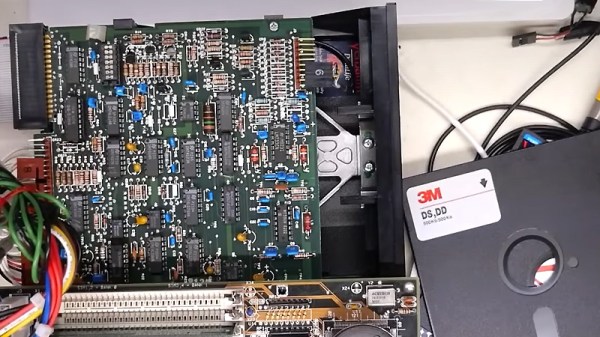
Overhead photo of a Tandon TM100-1 Floppy Drive and a 5,25" Floppy

How To Revive A Tandon Floppy Drive

In this episode of [Adrian’s Digital Basement], we dive into the world of retro computing with a focus on diagnosing and repairing an old full-height 5.25-inch floppy drive from an IBM 5150 system. Although mechanically sound, the drive had trouble reading disks, and Adrian quickly set out to fix the issue. Using a Greaseweazle—a versatile open-source tool for floppy disk diagnostics—he tests the drive’s components and explores whether the fault lies with the read/write head or electronic systems.

The repair process provides fascinating insights into the Tandon TM100-1 floppy drive, a key player in vintage computing. Adrian explains how the drive was designed as a single-sided unit, yet hints at potential double-sided capability due to its circuit board, raising possibilities for future tweaks. Throughout the video, Adrian shares handy tips on ensuring proper mechanical maintenance, such as keeping lubrication in check and ensuring correct spring tension. His attention to detail, especially on termination resistors, provided vital knowledge for anyone looking to understand or restore these old drives.

For fans of retro tech, this episode is a must-watch! Adrian makes complex repairs accessible, sharing both technical know-how and nostalgic appreciation. For those interested in similar hacks, past projects like the Greaseweazle tool itself or other Amiga system repairs are worth exploring. To see Adrian in action and catch all the repair details, check out the full video.

Continue reading “How To Revive A Tandon Floppy Drive”

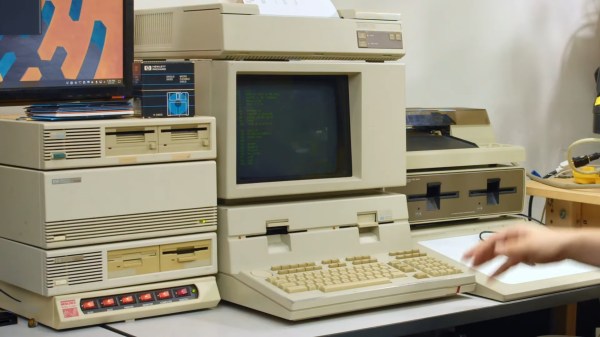
A beige computer with a CRT monitor. A black LCD sits atop a stack of 3 devices next to it and a set of power control switches (the orange light up kind). There appear to be 8 floppy drives available.

Flux Is Your Friend For Archiving Old Floppy Disks

Nothing screams retrocomputing quite like floppy drives. If you want to preserve some of your favorite computing memories like that paper you wrote about the joys of the Information Superhighway, [Shelby] from Tech Tangents has a detailed dive into how to preserve the bits off those old floppies.

Back in the day, the best way to get data off an old drive was to fire up an old computer. Now, with new devices specifically designed for harvesting data off of old floppies like the KryoFlux and the Greaseweazle, you can get the full flux map of the disk. With this, you can build binary image files and actually pull files and duplicate disks from vintage systems.

Some systems, like PCs, Macs, and Commodores are well-understood and are simple to preserve, while others take quite a bit of work to figure out. [Shelby] walks us through some of the more common disk formats as well as some real oddballs like Microsoft Adventure which features inconsistent formatting as a form of early DRM (boo).

Want to do your own preservation? We’ve covered a couple different methods in the past.

Continue reading “Flux Is Your Friend For Archiving Old Floppy Disks”

Image

[CuriousMarc] Repairs A Floppy

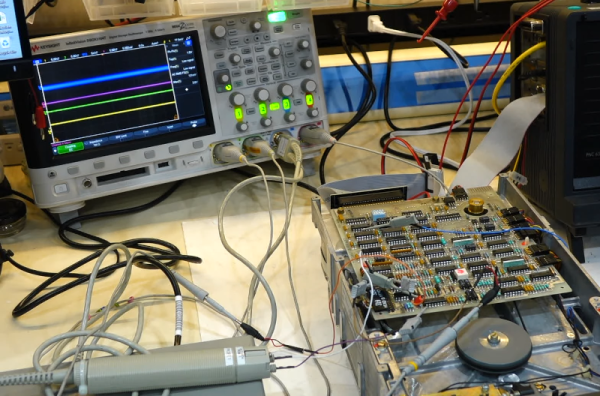
[CuriousMarc] has a pile of 8-inch drives, all marked bad. You can’t just pop over to the computer store and buy a new one these days, so it was off to the repair bench. Although the target drive would do a quick seek,  once it was in use, it just kind of shut down. So [Marc] started sending low-level commands to the device to see if he could isolate the fault. You can watch the whole adventure in the video below.

Using a breakout board, he was able to monitor and exercise all the pins going into the floppy. A quick study of the schematics, and connection to the scope were all [Marc] needed to build some theories of what was happening.

One of the theories was that the head amplifier was disabled, but it turned out to be fine. After several other dead ends, he finally found a broken spring and came up with a creative repair for it. But there was still no clear reason why the drive wouldn’t work. By process of elimination, he started to suspect an array of diodes used for switching, but again, it was another dead end.

Luckily, he had one working drive, so he could compare things between them. He found a strange voltage difference. Turns out the old advice of checking power first might have paid off here. One of the voltage regulator ICs was dead. In all fairness, there are two 12V power supplies and he had checked one of them but had missed the second supply.  This supply is only used for head bias which switches the diodes he had suspected earlier. There had also been a loose pin that might have been a contributor.

With a new power supply IC, the drive worked but needed an alignment. You may never need to repair an 8-inch floppy drive, but the logic in chasing down a problem like this will serve you well on any diagnostic task.

If you think the big drives won’t work with a modern PC, they will. On the other hand, if you need to read some badly enough, you could just use an oscilloscope.

Continue reading “[CuriousMarc] Repairs A Floppy”

Hackaday Links Column Banner

Hackaday Links: March 19, 2023

We get results! Well, sort of. You may recall that in this space last week we discussed Ford’s plans to exclude AM reception on the infotainment systems of certain of their cars starting in 2024. We decried the decision, not for the loss of the sweet, sweet content that AM stations tend to carry — although we always enjoyed “Traffic on the 8s” back in our dismal days of daily commuting — but rather as a safety concern, because AM radio can reach almost the entire US population with emergency information using just 75 stations. To our way of thinking, this makes AM radio critical infrastructure, and eliminating it from motor vehicles is likely to have unintended consequences. Now it seems like there’s some agreement with that position, as former administrators of FEMA (Federal Emergency Management Administration; and no, not FEDRA) have gotten together to warn about the dangers of deleting AM from cars. Manufacturers seem to be leaning into the excuse that EVs emit a lot of radio frequency interference, rendering static-sensitive AM receivers less useful than other, more profitable less susceptible modes, like digital satellite radio. That seems like a red herring to us, but then again, the most advanced infotainment option in any car we’ve ever owned is a CD player, so it’s hard for us to judge.

Continue reading “Hackaday Links: March 19, 2023”

Image

Floppy-8 Is A Tiny PC In A Floppy Drive

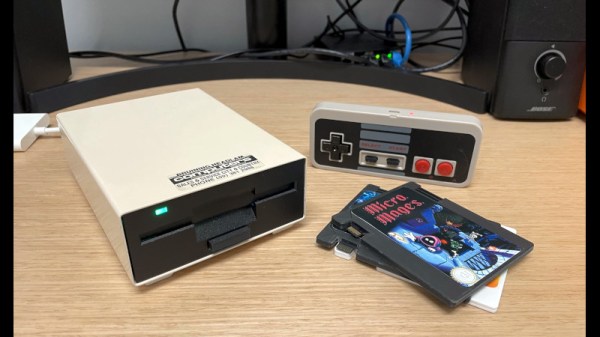
At first sight, Floppy-8 is simply a LattePanda based PC built into the shell of a external vintage floppy drive. Indeed, it’s a very nicely executed LattePanda PC in a floppy, and we’re impressed by it. What turns it from a nifty case mod into something a bit special though, is the way creator [Abraham Haskins] has used floppy-like cartridges in the original floppy slot, as a means of loading software.

The cartridges started out as PCBs in the shape of a floppy with an SD socket on their bottom, and progressed to USB drives on 3D printed cartridges and finally and simplest of all, the same 3D printed cartridges with micro SD cards embedded in their leading edges. All this was necessary to get them thin enough to fit into the existing disk slot — if dimensions weren’t a concern, you could enclose various USB devices into printed cartridges. A script on the computer looks for new card insertion, and runs the appropriate autostart.sh script on the SD card if it finds one. If you don’t need the “disks” to fit into an existing slot, you could print them larger and embed

Beyond the cartridges, the PC itself is assembled on a 3D printed frame inside the case. It’s controlled via Bluetooth, with a pair of knock-off NES controllers for games and an Amazon Fire remote for media. We particularly like the idea of weighting the controllers with ball bearings to give them a little heft.

The LattePanda gives the Raspberry Pi a run for its money in these applications. We particularly liked this portable Macintosh.