Image

A Steam Machine Clone For An Indeterminate But Possibly Low Cost

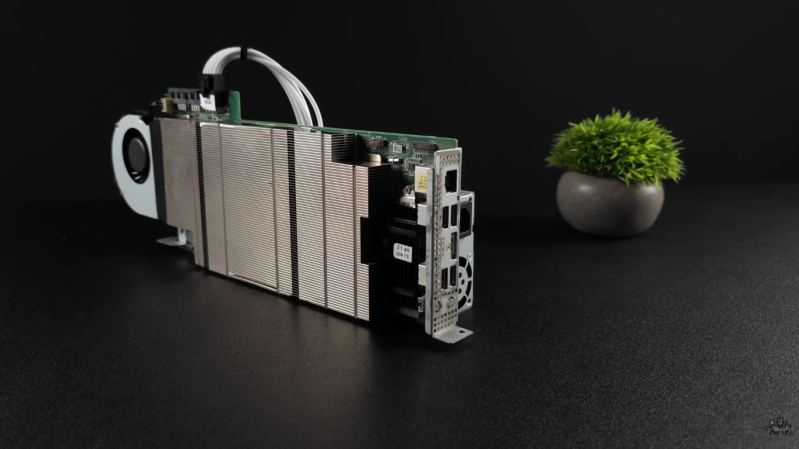
For various reasons, crypto mining has fallen to the wayside in recent years. Partially because it was never useful other than as a speculative investment and partially because other speculative investments have been more popular lately, there are all kinds of old mining hardware available at bargain prices. One of those is the Asrock AMD BC250, which is essentially a cut down Playstation 5 but which has almost everything built into it that a gaming PC would need to run Steam, and [ETA PRIME] shows us how to get this system set up.

The first steps are to provide the computer with power, an SSD, and a fan for cooling. It’s meant to be in a server rack so this part at least is pretty straightforward. After getting it powered up there are a few changes to make in the BIOS, mostly related to memory management. [ETA PRIME] is uzing Bazzite as an operating system which helps to get games up and running easily. It plays modern games and even AAA titles at respectable resolutions and framerates almost out-of-the-box, which perhaps shouldn’t be surprising since this APU has a six-core Zen 2 processor with a fairly powerful RDNA2 graphics card, all on one board.

It’s worth noting that this build is a few weeks old now, and the video has gotten popular enough that the BC250 cards that [ETA PRIME] was able to find for $100 are reported to be much more expensive now. Still, though, even at double or triple the price this might still be an attractive price point for a self-contained, fun, small computer that lets you game relatively easily and resembles the Steam Machine in concept. There are plenty of other builds based on old mining hardware as well, so don’t limit yourself to this one popular piece of hardware. This old mining rig, for example, made an excellent media server.

Continue reading “A Steam Machine Clone For An Indeterminate But Possibly Low Cost”
Image

Debugging The AMD GPU

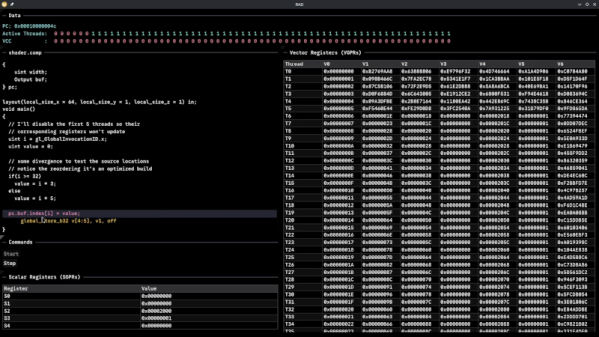
Although Robert F. Kennedy gets the credit for popularizing it, George Bernard Shaw said: “Some men see things as they are and say, ‘Why?’ I dream of things that never were and say, ‘Why not?'” Well, [Hadz] didn’t wonder why there weren’t many GPU debuggers. Instead, [Hadz] decided to create one.

It wasn’t the first; he found some blog posts by [Marcell Kiss] that helped, and that led to a series of experiments you’ll enjoy reading about. Plus, don’t miss the video below that shows off a live demo.

It seems that if you don’t have an AMD GPU, this may not be directly useful. But it is still a fascinating peek under the covers of a modern graphics card. Ever wonder how to interact with a video card without using something like Vulkan? This post will tell you how.

Writing a debugger is usually a tricky business anyway. Working with the strange GPU architecture makes it even stranger. Traps let you gain control, but implementing features like breakpoints and single-stepping isn’t simple.

We’ve used things like CUDA and OpenCL, but we haven’t been this far down in the weeds. At least, not yet. CUDA, of course, is specific to NVIDIA cards, isn’t it?

Continue reading “Debugging The AMD GPU”

Hackaday Links Column Banner

Hackaday Links: November 16, 2025

We make no claims to be an expert on anything, but we do know that rule number one of working with big, expensive, mission-critical equipment is: Don’t break the big, expensive, mission-critical equipment. Unfortunately, though, that’s just what happened to the Deep Space Network’s 70-meter dish antenna at Goldstone, California. NASA announced the outage this week, but the accident that damaged the dish occurred much earlier, in mid-September. DSS-14, as the antenna is known, is a vital part of the Deep Space Network, which uses huge antennas at three sites (Goldstone, Madrid, and Canberra) to stay in touch with satellites and probes from the Moon to the edge of the solar system. The three sites are located roughly 120 degrees apart on the globe, which gives the network full coverage of the sky regardless of the local time.

Continue reading “Hackaday Links: November 16, 2025”

Hackaday Links Column Banner

Hackaday Links: September 28, 2025

In today’s “News from the Dystopia” segment, we have a story about fighting retail theft with drones. It centers on Flock Safety, a company that provides surveillance technologies, including UAVs, license plate readers, and gunshot location systems, to law enforcement agencies. Their flagship Aerodome product is a rooftop-mounted dock for a UAV that gets dispatched to a call for service and acts as an eye-in-the-sky until units can arrive on scene. Neat idea and all, and while we can see the utility of such a system in a first responder situation, the company is starting to market a similar system to retailers and other private sector industries as a way to contain costs. The retail use case, which the story stresses has not been deployed yet, would be to launch a drone upon a store’s Asset Protection team noticing someone shoplifting. Flock would then remotely pilot the drone, following the alleged thief back to their lair or hideout and coordinating with law enforcement, who then sweep in to make an arrest.

Continue reading “Hackaday Links: September 28, 2025”

Image

The Shady School

We can understand why shaderacademy.com chose that name over “the shady school,” but whatever they call it, if you are looking to brush up on graphics programming with GPUs, it might be just what you are looking for.

The website offers challenges that task you to draw various 2D and 3D graphics using code in your browser. Of course, this presupposes you have WebGPU enabled in your browser which means no Firefox or Safari. It looks like you can do some exercises without WebGPU, but the cool ones will need you to use a Chrome-style browser.

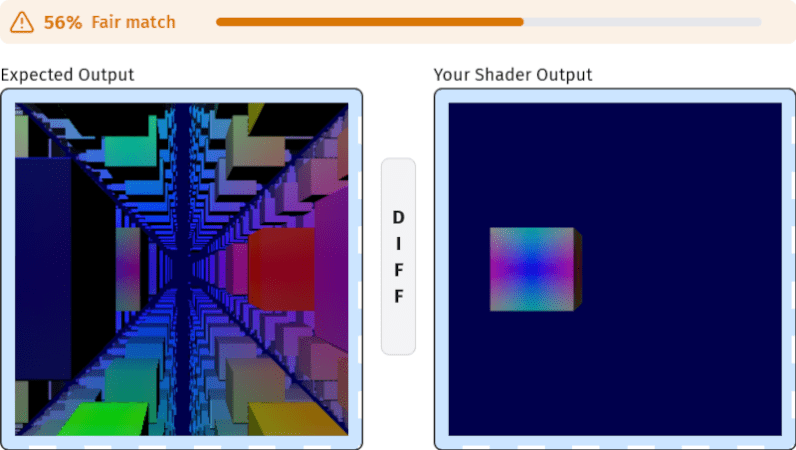
You can search by level of difficulty, so maybe start with “Intro” and try doing “the fragment shader.” You’ll notice they already provide some code for you along with a bit of explanation. It also shows you a picture of what you should draw and what you really drew. You get a percentage based on the matching. There’s also a visual diff that can show you what’s different about your picture from the reference picture.

We admit that one is pretty simple. Consider moving on to “Easy” with options like “two images blend,” for example. There are problems at every level of difficulty. Although there is a part for compute shaders, none seem to be available yet. Too bad, because that’s what we find most interesting. If you prefer a different approach, there are other tutorials out there.

Screenshot of audio noise graph

Whispers From The Void, Transcribed With AI

‘Hearing voices’ doesn’t have to be worrisome, for instance when software-defined radio (SDR) happens to be your hobby. It can take quite some of your time and attention to pull voices from the ether and decode them. Therefore, [theckid] came up with a nifty solution: RadioTranscriptor. It’s a homebrew Python script that captures SDR audio and transcribes it using OpenAI’s Whisper model, running on your GPU if available. It’s lean and geeky, and helps you hear ‘the voice in the noise’ without actively listening to it yourself.

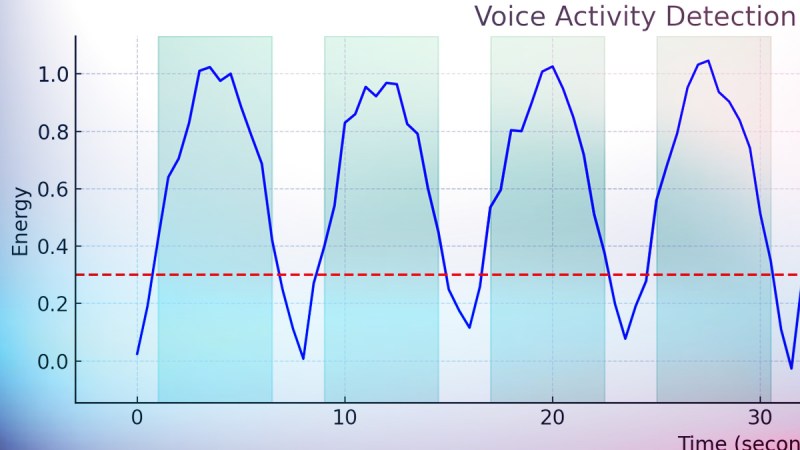
This tool goes beyond the basic listening and recording. RadioTranscriptor combines SDR, voice activity detection (VAD), and deep learning. It resamples 48kHz audio to 16kHz in real time. It keeps a rolling buffer, and only transcribes actual voice detected from the air. It continuously writes to a daily log, so you can comb through yesterday’s signal hauntings while new findings are being logged. It offers GPU support with CUDA, with fallback to CPU.

It sure has its quirks, too: ghost logs, duplicate words – but it’s dead useful and hackable to your liking. Want to change the model, tweak the threshold, add speaker detection: the code is here to fork and extend. And why not go the extra mile, and turn it into art?

ATTiny85 as fan controller

An ATTiny GPU Fan Controller That Sticks

When your GPU fan goes rogue with an unholy screech, you either shell out for a new one or you go full hacker mode. Well, [ashafq] did the latter. The result is a delightfully nerdy fan controller powered by an ATTiny85 and governed by a DS18B20 temperature sensor. We all know a silent workstation is golden, and there’s no fun in throwing money at an off-the-shelf solution. [ashafq]’s custom build transforms a whiny Radeon RX 550 into a cool, quiet operator. Best of all: it’s built from bits likely already in your junk drawer.

To challenge himself a bit, [ashafq] rolled his own temperature-triggered PWM logic using 1-wire protocol on an ATtiny85, all without libraries or bloated firmware. The fan’s speed only ramps up when the GPU gets toasty, just like it should. It’s efficient and clever, and that makes it a fine hack. The entire system runs off a scavenged 12V fan. He could have used a 3D printer, but decided to stick onto the card with double-sided tape. McGyver would approve.

The results don’t lie: idle temps at 40 °C, load peaking at 60 °C. Quieter than stock, smarter than stock, and way cheaper too. The double-sided tape may not last, but that leaves room for improvement. In case you want to start on it yourself, read the full write-up and feel inspired to build your own. Hackaday.io is ready for the documentation of your take on it.

Modifying fans is a tradition around here. Does it always take a processor? Nope.