
Enjoy a faster browsing experience
Namebench is a free networking software program that helps users find the fastest Domain Name System (DNS) for an enhanced browsing experience. Developed under Google’s ‘20 percent’ program, Namebench for Windows is open-source and runs a benchmark using browsing history and other datasets. The software has a command-line as well as a graphical user interface and doesn’t modify your computer’s settings in any way. Since Namebench is cross-platform, users can easily download the tool on their Mac devices.
How does Namebench work?
Namebench is an open-source program that runs a benchmark test to assess the fastest DNS servers available for your computer’s use. The program is completely free to use and available on multiple devices, including Windows. The free tool uses your computer’s standard datasets, tcpdump output, geographical locations, and internet browsing history to provide a list of DNS server recommendations. You can use the information to select the server that provides you with the fastest browsing experience.
What is a DNS Server?
A Domain Name System (DNS) is the internet’s phonebook. While humans interact with the internet, using understandable URLs, browsers interact with other machines using IP addresses. A DNS server is a go-between the two and converts URLs to IP addresses. When you wish to load a web page, the translation must occur to turn the user-friendly address to one that the machine understands.
Unfortunately, the DNS server given to you by your internet service provider may not always be the fastest one available. Therefore, you need applications like Namebench to replace your DNS server with one that translates faster and loads web pages at the maximum possible speed. Public DNS servers as compared to assigned DNS servers are faster because they use available cache to complete raised requests.
Additionally, open-source DNS servers also offer numerous security features otherwise missing from servers provided by most ISPs. You can even switch to public servers to solve censorship problems existing in many countries. When Namebench runs a scan of the available DNS servers, it lets you know which ones are fast and which ones are highly secure. It also recommends the one you should use to get access to content faster.
Developed by Google
Thomas Stromberg developed Namebench as part of Google’s ‘20 percent’ program, which allows employees to work on their own projects. Not only is the software cross-platform, but it is also released as an open-source program with an Apache 2.0 license. So anyone who wishes to see the complete source code file of the program can do so without any difficulty.
Benchmark performance test
When launched, Namebench performs a fair number of connection tests and benchmarks your internet’s performance. After the test is complete, it responds with a list of available servers. Namebench highlights the ones that are faster than your current DNS and recommends the one that you should use. The entire process takes about 10-15 minutes, so you may have to wait a bit before the results show up.
How do you use Google Namebench?
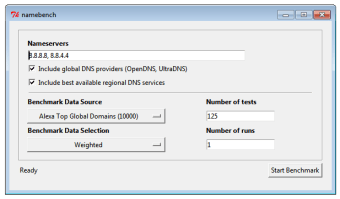
Once the Namebench download is complete, you need to follow the instructions that appear on the screen to complete the installation process. When you start the application, click on the ‘Start Benchmark’ option and wait for the software to start. The entire process could take time and will mostly depend on your internet connection.
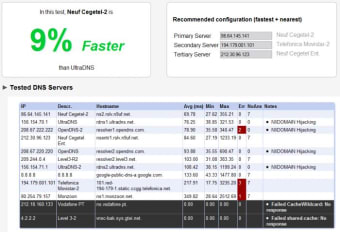
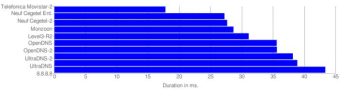
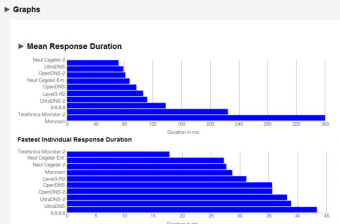
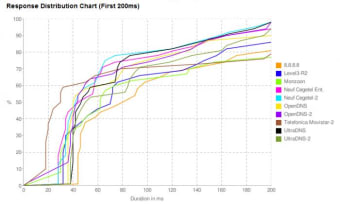
After the benchmarking is complete, you will come across an exhaustive results page. This page shows the performance results of each DNS server in both graphic and tabular format. You can take a look at your available options via graphs and charts, and skip the ones you don’t like. Namembench also uses the data to suggest the top three DNS servers to select, so you don’t have to worry about decoding the best one available.
Is Namebench safe?
Yes, Namebench is quite safe and shows no malicious activity. Moreover, the source code is available for anyone who wishes to inspect the software.
How long does Namebench take to run?
While the time taken for benchmarking depends on your internet connection, results usually appear in-between 5 to 10 minutes.
Are there any alternatives?
Namebench is quite simple to use, even for beginners. However, if you’d like to check out alternatives, you should explore DNS Benchmark, DNS Jumper, and QuickSetDNS.
Should I download Namebench?
If you’re tired of your slow internet experience, you should download Namebench. It’s easy to use, free software that helps you find the fastest and most secure DNS server. It uses your browsing history, location, and other datasets to find and recommend the best available servers that are usually faster and more secure than your assigned DNS.
















.png)