

تفصیل
"PHP version” is very simple and lightweight plugin that will help you for showing up the current PHP version in WordPress dashboard.
If you satisfied with this plugin, please rate it. Your rate will encourage to do better in the future.
اسکرین شاٹس

banner-772×250.png 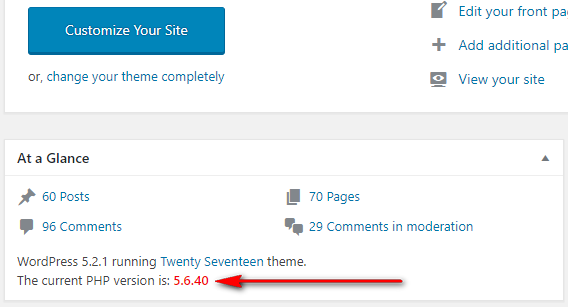
icon-256×256.png


انسٹالیشن
How to install the PHP Version Plugin?
- Dashboard -> Plugins -> Add New.
- Write "PHP Version” in the search box and hit enter.
- Find out the PHP Version plugin from suggested all and click on Install Now .
- Now click on Activate.
- Go to your WordPress dashboard page and see the current PHP version is showing.
جائزے

شراکت دار اور ڈیویلپرز
“PHP Version” اوپن سورس سافٹ ویئر ہے۔ مندرجہ ذیل لوگوں نے اس پلگ ان میں حصہ لیا:
شراکت دار
“PHP Version” کا اپنی زبان میں ترجمہ کریں۔
ڈویلپمینٹ میں دلچسپی ہے؟
کوڈ براؤز کریں، ایس این وی ریپوزیٹری کو چیک کریں یا ڈویلپمینٹ لاگ کو سبسکرائب کریں بذریعہ آر ایس ایس۔
چینج لاگ
1.0.7 – 10 Dec, 2025
Compatible with Latest WordPress Version
Main File’s version updated
1.0.6 – 24 May, 2025
Compatible with Latest WordPress Version
Main File’s version updated
1.0.5 – 18 December, 2024
Compatible with Latest WordPress Version
1.0.4 – 16 September, 2024
Compatible with Latest WordPress Version
1.0.3 – 12 June, 2024
Compatible with Latest WordPress Version
1.0.2 – 18 October, 2023
Compatible with Latest WordPress Version
1.0.1 – 16 July, 2021
Compatible with latest WordPress Version
1.0.0 – 16 June, 2019
Initial Release
